parking brake OPEL AMPERA E 2019 Manual user
[x] Cancel search | Manufacturer: OPEL, Model Year: 2019, Model line: AMPERA E, Model: OPEL AMPERA E 2019Pages: 271, PDF Size: 6.7 MB
Page 198 of 271
196Driving and operatingThere is also an available mobile appwith several charging functions.
Smartphone remote function 3 27.Automatic power supply cut-off
When the vehicle no longer needs to
use power from the charging station,
the charging process will be stopped.
Use the electronic key to unlock the
DC vehicle plug.
Energy can still be consumed from
the charging station when the
vehicle’s displays and indicators
show that the high voltage battery is
fully charged. This is to ensure the
high voltage battery is in optimal
temperature operating range to
maximise vehicle range.
Programmable charging 3 196.
End charging
1. Wait until the charging process has been fully stopped, the
vehicle plug is unlocked and the
charging status indicator is solid
green or off.
2. Unplug the DC vehicle plug from the DC charge port on the vehicle
and close the dust cover.
3. Close the charge port door by pressing firmly in the centre to
latch properly.
4. Manually disengage the electric parking brake before driving the
vehicle.
5. To start another DC charge, remove the DC vehicle plug and
reconnect.
Programmable charging
Programmable charge modes To view the current charge mode
status on the Info Display, touch Energy and then Charging.
The charge start and charge
complete time estimations are also
displayed on the screen. These
estimations are most accurate when
the vehicle is plugged in and in
moderate temperature conditions.
Also, to get an accurate time
estimate, the vehicle uses an internal clock for programmable charging, notthe clock in the instrument panel.Charge mode selection
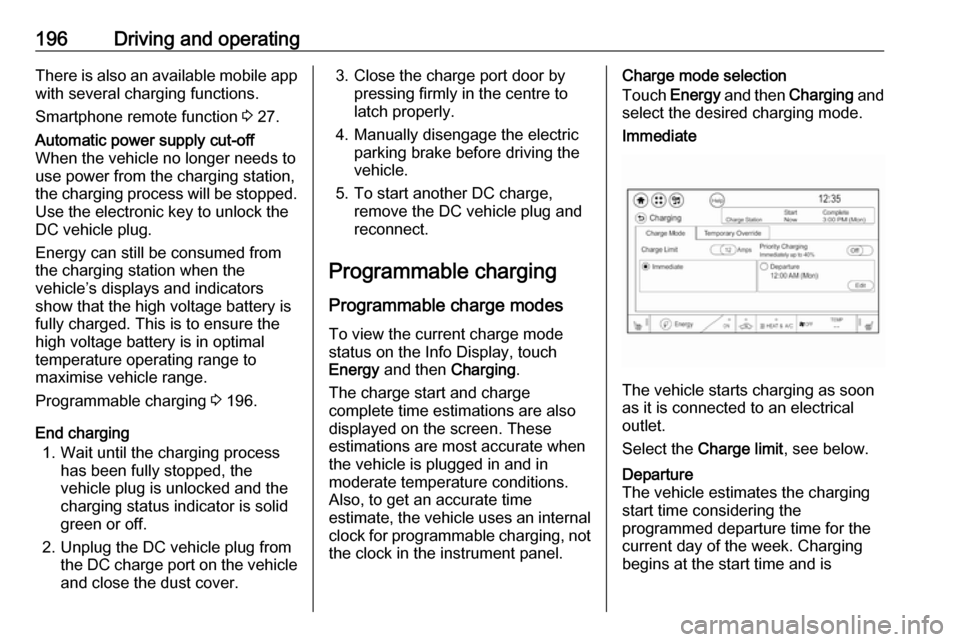
Touch Energy and then Charging and
select the desired charging mode.Immediate
The vehicle starts charging as soon
as it is connected to an electrical outlet.
Select the Charge limit , see below.
Departure
The vehicle estimates the charging start time considering the
programmed departure time for the
current day of the week. Charging
begins at the start time and is
Page 212 of 271
210Vehicle careLifting the vehicle9Warning
Lifting the vehicle improperly can
cause serious injuries and
damage to the vehicle.
The vehicle should be lifted only by well-trained staff at an
authorised workshop.
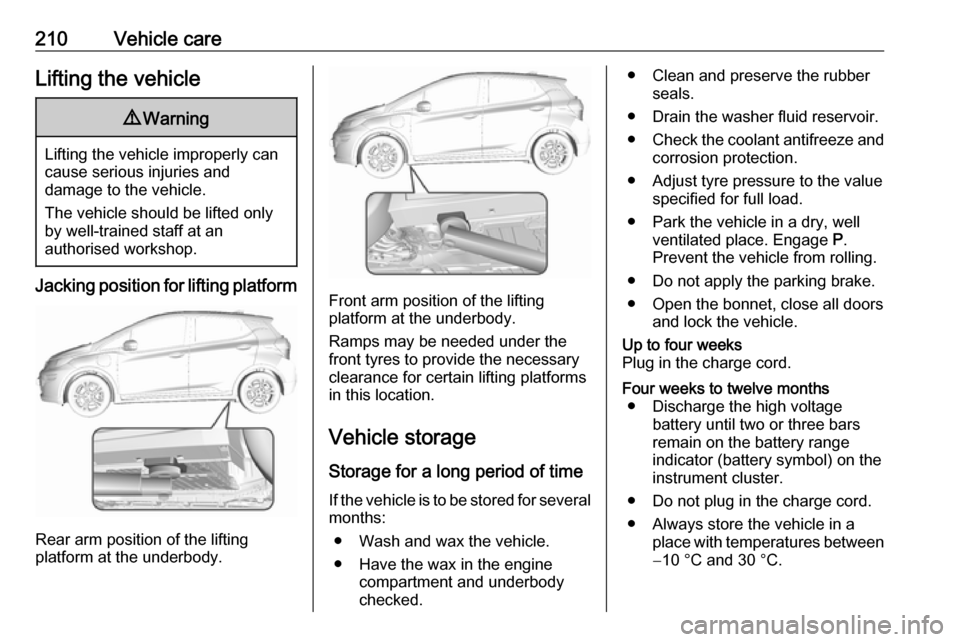
Jacking position for lifting platform
Rear arm position of the lifting
platform at the underbody.
Front arm position of the lifting
platform at the underbody.
Ramps may be needed under the
front tyres to provide the necessary
clearance for certain lifting platforms
in this location.
Vehicle storage Storage for a long period of timeIf the vehicle is to be stored for several months:
● Wash and wax the vehicle.
● Have the wax in the engine compartment and underbody
checked.
● Clean and preserve the rubber seals.
● Drain the washer fluid reservoir.
● Check the coolant antifreeze and
corrosion protection.
● Adjust tyre pressure to the value specified for full load.
● Park the vehicle in a dry, well ventilated place. Engage P.
Prevent the vehicle from rolling.
● Do not apply the parking brake.
● Open the bonnet, close all doors and lock the vehicle.Up to four weeks
Plug in the charge cord.Four weeks to twelve months ● Discharge the high voltage battery until two or three bars
remain on the battery range
indicator (battery symbol) on the
instrument cluster.
● Do not plug in the charge cord.
● Always store the vehicle in a place with temperatures between−10 °C and 30 °C.
Page 238 of 271

236Vehicle careTyre chains
Tyre chains are only permitted on the
front wheels.
9 Warning
Damage may lead to tyre blowout.
Tyre chains used on a vehicle without
the proper amount of clearance can
cause damage to the brakes,
suspension, or other vehicle parts.
The area damaged by the tyre chains could cause loss of control and a
crash. Use another type of traction
device only if its manufacturer
recommends it for the vehicle's tyre
size combination and road conditions.
Follow that manufacturer's
instructions. To avoid vehicle
damage, drive slowly and readjust or
remove the traction device if it
contacts the vehicle. Do not spin the
wheels. If traction devices are used,
install them on the front tyres.
On tyres of size 205/55 R16 and 215/50 R17 only use special snow
chains which are permitted for Opel
Ampera-e and tyres of these sizes. For further information contact a
workshop.
Tyre repair kit Minor damage to the tyre tread can be
repaired with the tyre repair kit.
Do not remove foreign bodies from
the tyres.
Tyre damage exceeding 4 mm or that is at the tyre's sidewall cannot be
repaired with the tyre repair kit.9 Warning
Do not drive faster than 80 km/h.
Do not use for a lengthy period.
Steering and handling may be
affected.
If you have a flat tyre:
Apply the parking brake and engage
a forward gear or the reverse gear.
The tyre repair kit is in the tool box
under the floor cover in the load
compartment.
1. Open the floor cover.
Page 242 of 271
240Vehicle careJump startingDo not use quick charger.
If the 12 V vehicle battery is empty, the vehicle can be started using jump
leads and the vehicle battery of
another vehicle. Jump starting only
works when the high voltage battery
is charged.9 Danger
The high voltage battery cannot be
jump started either with another
vehicle or battery charger.
Personal injury, death, or damage
to the vehicle could result.
9 Warning
Be extremely careful when using
jump leads. Any deviation from the following instructions can lead to
injuries or damage caused by
vehicle battery explosion or
damage to the electrical systems
of both vehicles.
9 Warning
Avoid contact of the battery with
eyes, skin, fabrics and painted
surfaces. The fluid contains
sulphuric acid which can cause
injuries and damage in the event
of direct contact.
9 Warning
Never jump start another vehicle
by using the terminals located in
the engine compartment.
This could cause a fuse to
overload in the vehicle.
● Never expose the 12 V vehicle battery to naked flames or
sparks.
● A discharged 12 V vehicle battery
can already freeze at a
temperature of 0 °C. Defrost the
frozen 12 V vehicle battery
before connecting jump leads.
● Wear eye protection and protective clothing when
handling a 12 V vehicle battery.
● Use a booster vehicle battery with the same voltage (12 V). Its
capacity (Ah) must not be much
less than that of the discharged
12 V vehicle battery.
● Use jump leads with insulated terminals and a cross section of
at least 16 mm 2
.
● Do not disconnect the discharged
12 V vehicle battery from the
vehicle.
● Switch off all unnecessary electrical consumers.
● Do not lean over the 12 V vehicle
battery during jump starting.
● Do not allow the terminals of one
lead to touch those of the other
lead.
● The vehicles must not come into contact with each other during
the jump starting process.
● Apply the parking brake, shift selector lever into P.
● Open the positive terminal protection cap of both batteries.
Page 244 of 271

242Vehicle careTowingTowing the vehicleCaution
Incorrect towing of a disabled
vehicle may cause damage to the
vehicle. The disabled vehicle
should only be towed on a flatbed
car carrier.
Ensure the vehicle is only towed
by well trained technicians.
Wrap a cloth around the tip of a slot
screwdriver to prevent paint damage. Insert the screwdriver in the slot at the
short edge of the cap. Release the
cap by carefully moving the
screwdriver sidewards.
The towing eye is stowed with the vehicle tools 3 230.
Screw in the towing eye anticlockwise
as far as it will go until it stops in a
horizontal position.
Attach a tow rope – or better still a tow
rod – to the towing eye.
The towing eye must only be used for
towing and not for recovering the
vehicle.
Switch on the vehicle to release
steering wheel lock and to permit
operation of brake lights, horn and
windscreen wiper.Caution
Deactivate the driver assistance
systems like active emergency
braking 3 168, otherwise the
vehicle may automatically brake during towing.
Shift the selector lever of the electric
drive unit into N.
Release the electric parking brake.
Caution
Drive slowly. Do not drive jerkily.
Excessive tractive force can
damage the vehicle.
When the vehicle is not running, considerably more force is needed to
brake and steer.
Page 265 of 271

263Initiating a phone call..............136
Ring tone ................................. 136
Call history .................................. 136
Car wash mode .......................... 153
Central locking system ................20
Centre console storage ...............58
Changing tyre and wheel size ...235
Charge cord ................................ 205
Charge limit selection .................196
Charge mode selection ..............196
Charge rate selection .................196
Charging ..................................... 192
Charging override .......................196
Charging status .......................... 203
Charging system .......................... 78
Child locks ................................... 26
Child restraint installation locations ................................... 53
Child restraints.............................. 51
Child restraint systems ................51
Climate control ............................. 13
Clock............................................. 69
Control elements Infotainment system ................107
Steering wheel ........................ 107
Control elements overview .........107
Control indicators.......................... 77
Control of the vehicle .................148
Controls ........................................ 65
Convex shape .............................. 32Coolant ....................................... 213
Coolant and antifreeze ...............247
Cooling system ........................... 213
Cruise control ...................... 81, 163
Cupholders .................................. 57
Curtain airbag system .................. 49
D
DAB ............................................ 123
Danger, Warnings and Cautions ...2
Daytime running lights ...............101
Declaration of conformity ............254
Delayed locking ............................ 25
Digital audio broadcasting ..........123
Directional tyres .......................... 230
Displaying pictures .....................129
Display settings ..................129, 130
Door open .................................... 82
Doors ............................................ 29
Drive modes ............................... 153
Driver assistance systems ..........163
Driver Information Centre .............82
Driving economically................... 147
Driving efficiency gauge ...............74
Driving hints ........................ 147, 148
E Electric adjustment ......................32
Electrical requirements ...............208
Electrical system......................... 222
Electrical system overload .........222Electric drive unit ..................14, 153
Electric parking brake ...........79, 158
Electric parking brake fault ...........79
Electric rate schedule .................196
Electric vehicle operation modes 153
Electronic climate control system 141
Electronic key system ...................19
Electronic Stability Control.......... 162
Electronic Stability Control and Traction Control system ............80
Electronic Stability Control off....... 80
Emergencies............................... 148
Emergency call ........................... 135
End-of-life vehicle recovery .......211
Engine compartment fuse box ...224
Engine data ............................... 251
Entry lighting .............................. 104
Event data recorders ..................258
Exit lighting ................................ 104
Exterior care .............................. 243
Exterior light ................................. 81
Exterior lighting ......................10, 98
Exterior mirrors ............................. 32
F
File formats Audio files................................ 125
Movie files ............................... 125
Picture files.............................. 125
First aid kit ................................... 61
Page 267 of 271

265Mobile phones and CB radioequipment .............................. 139
Movie files................................... 125
Mute............................................ 109
N New vehicle running-in ..............148
Number plate light .....................221
O
Object detection systems ...........173
Odometer ..................................... 74
One-pedal driving .......................153
OnStar .......................................... 93
Operation ............................ 136, 153
External devices ......................125
Menu ....................................... 112
Phone ...................................... 136
Radio ....................................... 119
Outside temperature ....................68
P Pairing ........................................ 133
Panoramic view system ..............183
Parking ................................ 15, 151
Parking assist ............................ 173
Parking brake ............................ 158
Parking lights ............................. 102
Pedestrian detection .....................81
Pedestrian safety alert ............11, 66
Performance .............................. 251Performing work ........................211
Phone Bluetooth ................................. 133
Bluetooth connection ..............133
Call history .............................. 136
Emergency calls ......................135
Entering a number ..................136
Functions during a call ............136
General information ................133
Incoming call ........................... 136
Phone book ............................. 136
Phone main menu ...................136
Selecting the ring tone ............136
Speed dial number ..................136
Phone book ................................ 136
Phone projection ........................131
Picture files ................................. 125
Playing audio .............................. 127
Playing movies ........................... 130
Post-crash label .......................... 151
Power button .............................. 148
Power indicator gauge ..................76
Power outlets ............................... 69
Power windows ............................ 34
Programmable charging .............196
Programmed charging override ..203
Propulsion system data ..............251R
Radio Activating................................. 119
Configuring DAB .....................123
Configuring RDS .....................122
DAB announcements ..............123
Digital audio broadcasting
(DAB) ...................................... 123
Favourite lists .......................... 120
Intellitext .................................. 123
Radio data system (RDS) .......122
Regional .................................. 122
Regionalisation ....................... 122
Selecting the waveband ..........119
Station search ......................... 120
Station tuning .......................... 120
Usage ...................................... 119
Radio data system .....................122
Radio Frequency Identification (RFID) ..................................... 261
Radio remote control ...................17
RDS ............................................ 122
REACH ....................................... 255
Reading lights ............................ 104
Rear cross traffic alert ................186
Rear floor storage cover ..............60
Rear fog light ...............81, 102, 220
Rear seats .................................... 42
Rear view camera ...................... 184
Rear window wiper and washer ..68