rapid OPEL AMPERA E 2019 User Guide
[x] Cancel search | Manufacturer: OPEL, Model Year: 2019, Model line: AMPERA E, Model: OPEL AMPERA E 2019Pages: 271, PDF Size: 6.7 MB
Page 182 of 271

180Driving and operatingCaution
Performance of the system can bereduced when sensors are
covered, e.g. by ice or snow.
Performance of the parking assist
system can be reduced due to
heavy loading.
Special conditions apply if there
are taller vehicles in the vicinity
(e.g. off-road vehicles, mini vans,
vans). Object identification and correct distance indication in the
upper part of these vehicles
cannot be guaranteed.
Objects with a very small reflection
cross-section, e.g. objects of
narrow size or soft materials, may
not be detected by the system.
Parking assist systems do not
detect objects outside the
detection range.
Note
It is possible that the sensor detects a non-existing object caused by
echo disturbance from external
acoustic noise or mechanical
misalignments (sporadic false
warnings may occur).
Make sure that the front number
plate is properly mounted, vertically
and horizontally centred and the
sensors are firmly in place. The
performance of the parking assist
could be reduced if the number plate is bent or a number plate holder is
used.
Advanced parking assist system
may not respond to changes in the
available parking space after
initiating a parking manoeuvre. The
system may recognize an entry, a
gateway, a courtyard or even a
crossing as a parking slot. After
selecting reverse gear the system
will start a parking manoeuvre. Take care regarding the availability of the
suggested parking slot.
Low curbs and surface irregularities,
e.g. on construction zones, are not
detected by the system. The driver
accepts responsibility.Note
Each new vehicle requires a
calibration. For optimal parking
guidance, a driving distance of at
least 10 km, including a number of
bends, is required.
Side blind zone assistant
The side blind zone assistant detects and reports objects on either side of
the vehicle, within a specified "blind
zone". The system displays a visual
alert in each exterior mirror, when
detecting objects that may not be
visible in the interior and exterior
mirrors.
The radar distance sensors are
located in the rear bumper.9 Warning
Side blind zone assistant does not
replace driver vision.
The system does not detect:
● vehicles outside the side blind zones which may be rapidly
approaching
● pedestrians, cyclists or animals
Page 183 of 271
Driving and operating181Before changing a lane, always
check all mirrors, look over the
shoulder and use the turn lights.
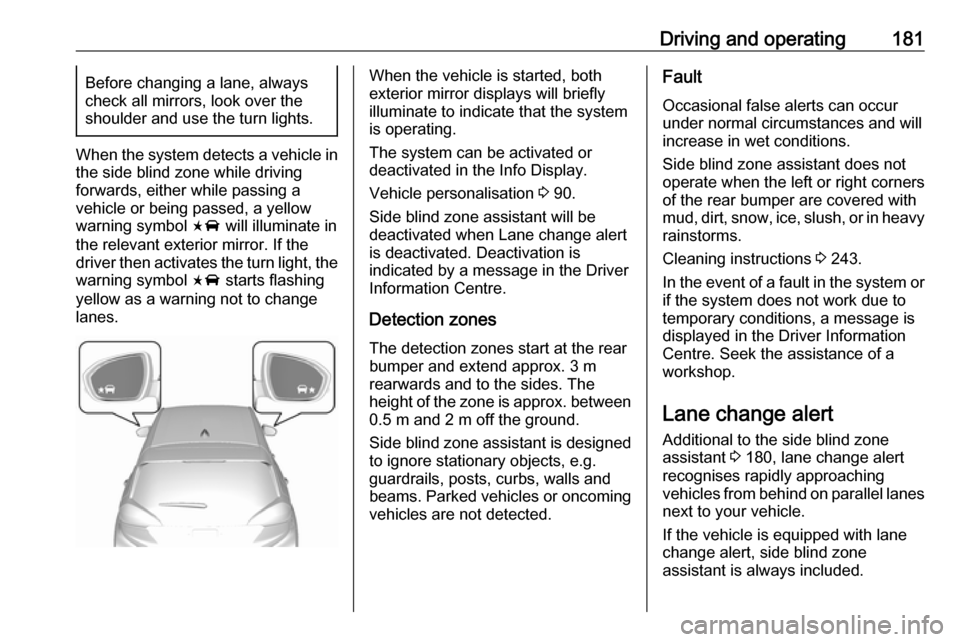
When the system detects a vehicle in
the side blind zone while driving
forwards, either while passing a
vehicle or being passed, a yellow
warning symbol F will illuminate in
the relevant exterior mirror. If the
driver then activates the turn light, the warning symbol F starts flashing
yellow as a warning not to change
lanes.
When the vehicle is started, both
exterior mirror displays will briefly illuminate to indicate that the system
is operating.
The system can be activated or
deactivated in the Info Display.
Vehicle personalisation 3 90.
Side blind zone assistant will be
deactivated when Lane change alert
is deactivated. Deactivation is
indicated by a message in the Driver Information Centre.
Detection zones
The detection zones start at the rear bumper and extend approx. 3 m
rearwards and to the sides. The
height of the zone is approx. between 0.5 m and 2 m off the ground.
Side blind zone assistant is designed
to ignore stationary objects, e.g.
guardrails, posts, curbs, walls and
beams. Parked vehicles or oncoming
vehicles are not detected.Fault
Occasional false alerts can occur
under normal circumstances and will
increase in wet conditions.
Side blind zone assistant does not
operate when the left or right corners
of the rear bumper are covered with
mud, dirt, snow, ice, slush, or in heavy rainstorms.
Cleaning instructions 3 243.
In the event of a fault in the system or
if the system does not work due to
temporary conditions, a message is
displayed in the Driver Information
Centre. Seek the assistance of a
workshop.
Lane change alert
Additional to the side blind zone
assistant 3 180, lane change alert
recognises rapidly approaching
vehicles from behind on parallel lanes
next to your vehicle.
If the vehicle is equipped with lane change alert, side blind zone
assistant is always included.
Page 184 of 271

182Driving and operatingThe system alerts visually in each
exterior mirror when detecting rapidly
approaching vehicles from behind.
The radar distance sensors are
located in the rear bumper.9 Warning
Lane change alert does not
replace driver vision.
Before changing a lane, always
check all mirrors, look over the
shoulder and use the turn light.
When the system detects an
approaching vehicle from behind
which drives considerably faster, the
yellow warning symbol F will
illuminate in the relevant exterior mirror. If the driver then activates the
turn light, the warning symbol F
starts flashing yellow as a warning not to change lanes.
When the vehicle is started, both
exterior mirror displays will briefly
come on to indicate that the system is
operating.
Detection zones
The system sensors cover a zone of
approx. 3.5 m parallel on both vehicle
sides and approx. 3 m rearwards on
side blind zone assistant (A) and
approx. 70 m rearwards on lane
change alert (B) on parallel lanes.
The zones start at each exterior
mirror. The height of the zone is
approx. between 0.5 m and 2 m off the ground.
Deactivation Activation or deactivation of the lane
change alert can be set in the vehicle
personalisation menu in the Info
Display.