tyre OPEL AMPERA E 2019 User Guide
[x] Cancel search | Manufacturer: OPEL, Model Year: 2019, Model line: AMPERA E, Model: OPEL AMPERA E 2019Pages: 271, PDF Size: 6.7 MB
Page 98 of 271

96Instruments and controls● Send navigation destination tothe vehicle for use with
navigation application via phone
projection.
● Locate vehicle on a map.
● Manage Wi-Fi settings.
To operate these functions, download the app from App Store ®
or
Google Play™ Store.
Remote control
If desired, use any phone to call an
advisor, who can remotely operate
specific vehicle functions. Find the
respective OnStar phone number on
our country-specific website.
The following functions are available: ● Lock or unlock vehicle.
● Provide information on the vehicle location.
● Honk horn or flash lights.
Stolen vehicle assistance
If the vehicle is stolen, report the theft to the authorities and request OnStar
stolen vehicle assistance. Use anyphone to call an advisor. Find the
respective OnStar phone number on
our country-specific website.
OnStar can provide support in
locating and recovering the vehicle.Theft alert
When the anti-theft alarm system is
triggered, a notification is sent to
OnStar. You are then informed about
this event by text message or email.Restart prevention
By sending remote signals, OnStar can prevent the vehicle from
restarting once it has been turned off.
On-demand diagnostics
At any time e.g. if the vehicle displays a vehicle message, press Z to
contact an advisor and ask to complete a real-time diagnostic check
to directly determine the issue.
Depending on the results, the advisor
will provide further support.
Diagnostic report
The vehicle automatically transmits
diagnostic data to OnStar which
sends a monthly email report to you
and your preferred workshop.
Note
The workshop notification function
can be disabled in your account.
The report contains the status of key
operating systems of the vehicle like
propulsion system, airbags, ABS, and
other major systems. It also provides
information on possible maintenance
items and tyre pressure (only with tyre
pressure monitoring system).
To look at the information in greater
detail, select the link within the email
and log in to your account.
OnStar settings
OnStar PIN
To have full access to all OnStar
services, a four-digit PIN is required. The PIN has to be personalised when first talking to an advisor.
To change the PIN, press Z to call an
advisor.
Page 149 of 271

Driving and operating147Driving and
operatingDriving hints ............................... 147
Driving economically ...............147
Control of the vehicle ...............148
Emergencies ........................... 148
Starting and operating ...............148
New vehicle running-in ............148
Power button ........................... 148
Retained power off ..................150
Starting and stopping the vehicle .................................... 150
Parking .................................... 151
Electric vehicle operation
modes ........................................ 153
Operation ................................. 153
Drive modes ............................ 153
Electric drive unit .......................153
Operation ................................. 153
Brakes ........................................ 157
Antilock brake system .............157
Parking brake .......................... 158
Regenerative braking ..............160Ride control systems .................161
Traction Control system ..........161
Electronic Stability Control ......162
Driver assistance systems .........163
Cruise control .......................... 163
Speed limiter ........................... 164
Forward collision alert .............166
Following distance indication ...168
Active emergency braking .......168
Front pedestrian protection .....171
Parking assist .......................... 173
Side blind zone assistant .........180
Lane change alert ....................181
Panoramic view system ...........183
Rear view camera ...................184
Rear cross traffic alert .............186
Traffic sign assistant ................187
Lane keep assist .....................190
Charging .................................... 192
Programmable charging ..........196
Programmed charging override .................................. 203
Charging status .......................203
Charge cord ............................. 205
Electrical requirements ............208Driving hints
Driving economically
The following advice is intended to
help maximise energy efficiency and
range.
In colder temperatures, while these
efficiency tips will help, the electric
vehicle's driving range may be lower
due to higher energy usage.
The weight of additional cargo in the
vehicle affects efficiency and range.
Avoid carrying more than is needed.
Avoid unnecessary use of electrical
accessories. Power used for
functions other than propelling the
vehicle will reduce electric vehicle
range.
Always keep the tyres properly
inflated and the vehicle properly
aligned.
Driving style
Avoid unnecessary rapid
accelerations and decelerations.
Use cruise control when appropriate.
Page 157 of 271

Driving and operating155At low vehicle speeds, R can be used
to rock the vehicle back and forth to
get out of snow, ice, or sand without
damaging the electric drive unit.
N : In this position, the propulsion
system does not transfer torque to the wheels. To restart the propulsion
system when the vehicle is already
moving, use D only.
The vehicle is not designed to stay in
N for extended periods of time. It will
automatically shift into P.
To shift into and out of N:
● To shift into N, move the selector
lever forward until N is illuminated
in red.
● If the vehicle is in P, press the
release button while pressing the selector lever forward until N is
illuminated in red.
To shift out of N, bring the vehicle
to a complete stop and shift into the desired gear.D : This position is for normal driving.
If more power is needed for passing,
and the vehicle speed is:
● less than 56 km/h, push the accelerator pedal about halfway
down.
● about 56 km/h or more, push the accelerator pedal all the way
down.Caution
If the vehicle seems to accelerate
slowly or not respond when you try to go faster, do not continue your
journey. The electric drive unit
could be damaged. Consult a
workshop as soon as possible.
Note
In slippery conditions, operate the
vehicle in D for enhanced riding and
handling performance.
To shift into and out of D:
1. Bring the vehicle to a complete stop.
2. To shift into D, move the selector
lever back. If the vehicle is in P,
press the release button while
pressing the selector lever back.
D is illuminated in red.
To shift out of D, shift to the
desired gear.
When stopping on a steep hill, use the brakes to hold the vehicle in place.
When shifting into P on a hill, use the
brakes to hold the vehicle. Then shift
into P.
L : This position reduces vehicle
speed without using the brakes. Use
L on very steep hills, in deep snow, in
mud or in stop-and-go traffic.Caution
Spinning the tyres or holding the
vehicle in one place on a hill using only the accelerator pedal may
damage the electric drive unit. If you are stuck, do not spin the
tyres. When stopping on a hill, use
the brakes to hold the vehicle in
place.
Page 163 of 271

Driving and operating161Ride control systems
Traction Control system The Traction Control system (TC) is a
component of the Electronic Stability
Control (ESC).
TC improves driving stability when
necessary, regardless of the type of
road surface or tyre grip, by
preventing the drive wheels from
spinning.
As soon as the drive wheels starts to
spin, electric drive unit output is
reduced and the wheel spinning the
most is braked individually. This
considerably improves the driving
stability of the vehicle on slippery road
surfaces.
TC is operational as soon as the
control indicator b extinguishes.
When TC operates b flashes.
9
Warning
Do not let this special safety
feature tempt you into taking risks
when driving.
Adapt speed to the road
conditions.
Control indicator b 3 80.
Deactivation
TC can be switched off when spinning of drive wheels is required: press b
briefly.
Control indicator k illuminates.
When TC is deactivated, ESC
remains active but with a higher
control threshold.
TC is reactivated by pressing b
again.
TC is also reactivated the next time
the vehicle is switched on.
Caution
Do not repeatedly brake or accelerate heavily if TC is off. The vehicle's driveline could be
damaged.
Fault
If there is a fault in the system the
control indicator b illuminates
continuously and a message appears in the Driver Information Centre. Thesystem is not operational.
Page 164 of 271
162Driving and operatingHave the cause of the fault remedied
by a workshop.
Electronic Stability Control
Electronic Stability Control (ESC)
improves driving stability when
necessary, regardless of the type of
road surface or tyre grip.
As soon as the vehicle starts to
swerve (understeer / oversteer),
electric drive unit output is reduced and the wheels are braked
individually. This considerably
improves the driving stability of the
vehicle on slippery road surfaces.
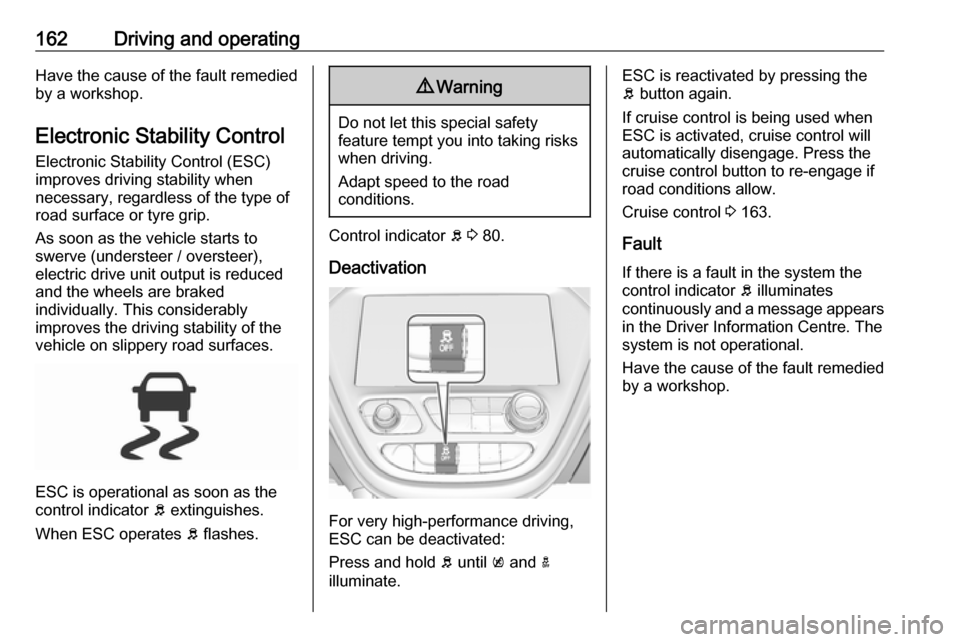
ESC is operational as soon as the
control indicator b extinguishes.
When ESC operates b flashes.
9 Warning
Do not let this special safety
feature tempt you into taking risks
when driving.
Adapt speed to the road
conditions.
Control indicator b 3 80.
Deactivation
For very high-performance driving,
ESC can be deactivated:
Press and hold b until k and a
illuminate.
ESC is reactivated by pressing the
b button again.
If cruise control is being used when
ESC is activated, cruise control will
automatically disengage. Press the
cruise control button to re-engage if road conditions allow.
Cruise control 3 163.
Fault
If there is a fault in the system the
control indicator b illuminates
continuously and a message appears
in the Driver Information Centre. The
system is not operational.
Have the cause of the fault remedied by a workshop.
Page 193 of 271
Driving and operating191Activation
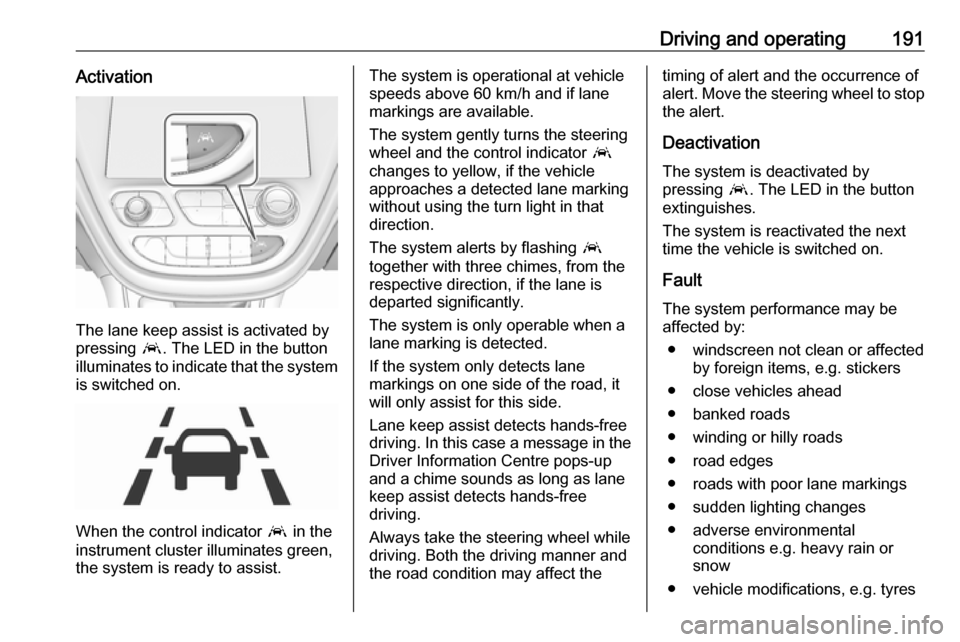
The lane keep assist is activated by
pressing a. The LED in the button
illuminates to indicate that the system
is switched on.
When the control indicator a in the
instrument cluster illuminates green,
the system is ready to assist.
The system is operational at vehicle
speeds above 60 km/h and if lane
markings are available.
The system gently turns the steering
wheel and the control indicator a
changes to yellow, if the vehicle
approaches a detected lane marking
without using the turn light in that
direction.
The system alerts by flashing a
together with three chimes, from the respective direction, if the lane is
departed significantly.
The system is only operable when a
lane marking is detected.
If the system only detects lane
markings on one side of the road, it
will only assist for this side.
Lane keep assist detects hands-free
driving. In this case a message in the
Driver Information Centre pops-up
and a chime sounds as long as lane
keep assist detects hands-free
driving.
Always take the steering wheel while
driving. Both the driving manner and
the road condition may affect thetiming of alert and the occurrence of
alert. Move the steering wheel to stop
the alert.
Deactivation The system is deactivated by
pressing a. The LED in the button
extinguishes.
The system is reactivated the next
time the vehicle is switched on.
Fault The system performance may beaffected by:
● windscreen not clean or affected by foreign items, e.g. stickers
● close vehicles ahead
● banked roads
● winding or hilly roads
● road edges
● roads with poor lane markings
● sudden lighting changes
● adverse environmental conditions e.g. heavy rain or
snow
● vehicle modifications, e.g. tyres
Page 211 of 271

Vehicle care209Vehicle careGeneral Information...................209
Accessories and vehicle modifications .......................... 209
Lifting the vehicle .....................210
Vehicle storage ........................210
End-of-life vehicle recovery .....211
Vehicle checks ........................... 211
Performing work ......................211
Bonnet ..................................... 212
Cooling system ........................213
Washer fluid ............................ 215
Brakes ..................................... 215
Brake fluid ............................... 215
Vehicle battery ......................... 216
Wiper blade replacement ........218
Headlight aiming ......................218
Bulb replacement .......................219
Halogen bulbs ......................... 219
Xenon headlights .....................219
Front turn lights .......................219
Tail lights ................................. 220
Side turn lights ......................... 220
Number plate light ...................221Electrical system ........................222
High voltage devices and wiring ...................................... 222
Electrical system overload .......222
Fuses ....................................... 222
Engine compartment fuse box . 224
Instrument panel fuse box .......227
Vehicle tools .............................. 230
Tools ........................................ 230
Wheels and tyres .......................230
Tyres ....................................... 230
Winter tyres ............................. 231
Tyre designations ....................231
Tyre pressure .......................... 231
Tyre pressure monitoring system .................................... 232
Tread depth ............................. 234
Changing tyre and wheel size . 235
Wheel covers ........................... 235
Tyre chains .............................. 236
Tyre repair kit .......................... 236
Jump starting ............................. 240
Towing ....................................... 242
Towing the vehicle ...................242
Towing another vehicle ...........243
Appearance care .......................243
Exterior care ............................ 243
Interior care ............................. 245General Information
Accessories and vehiclemodifications
We recommend the use of genuine
parts and accessories and factory
approved parts specific for your
vehicle type. We cannot assess or
guarantee reliability of other products - even if they have a regulatory or
otherwise granted approval.
Any modification, conversion or other
changes made to standard vehicle
specifications (including, without
limitation, software modifications,
modifications of the electronic control units) may invalidate the warranty
offered by Opel. Furthermore, such
changes may affect driver assistance
systems and energy consumption.
They may also invalidate the vehicle
operating permit.Caution
When transporting the vehicle on
a train or on a recovery vehicle, the
mud flaps might be damaged.
Page 212 of 271
210Vehicle careLifting the vehicle9Warning
Lifting the vehicle improperly can
cause serious injuries and
damage to the vehicle.
The vehicle should be lifted only by well-trained staff at an
authorised workshop.
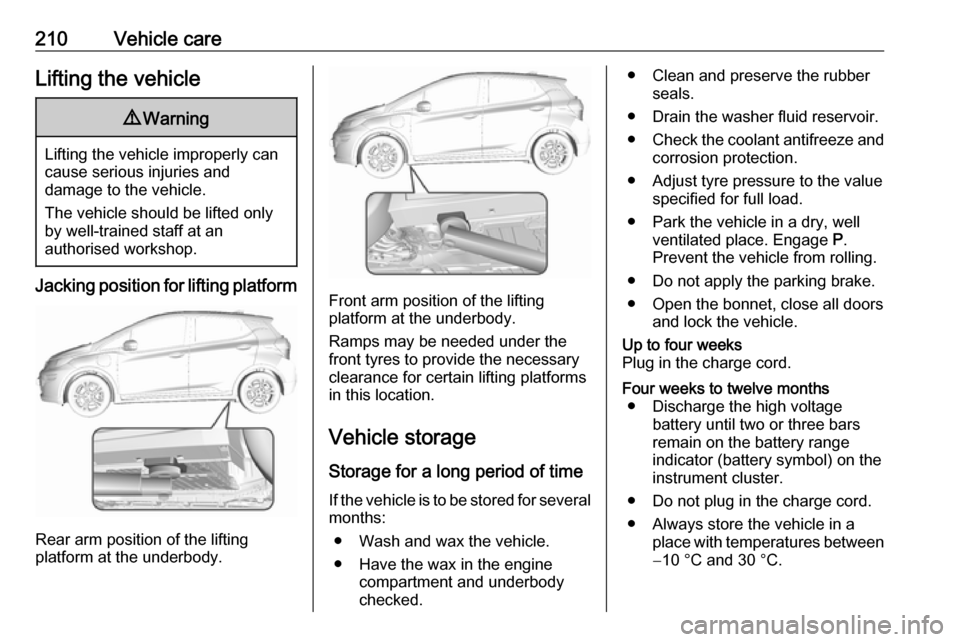
Jacking position for lifting platform
Rear arm position of the lifting
platform at the underbody.
Front arm position of the lifting
platform at the underbody.
Ramps may be needed under the
front tyres to provide the necessary
clearance for certain lifting platforms
in this location.
Vehicle storage Storage for a long period of timeIf the vehicle is to be stored for several months:
● Wash and wax the vehicle.
● Have the wax in the engine compartment and underbody
checked.
● Clean and preserve the rubber seals.
● Drain the washer fluid reservoir.
● Check the coolant antifreeze and
corrosion protection.
● Adjust tyre pressure to the value specified for full load.
● Park the vehicle in a dry, well ventilated place. Engage P.
Prevent the vehicle from rolling.
● Do not apply the parking brake.
● Open the bonnet, close all doors and lock the vehicle.Up to four weeks
Plug in the charge cord.Four weeks to twelve months ● Discharge the high voltage battery until two or three bars
remain on the battery range
indicator (battery symbol) on the
instrument cluster.
● Do not plug in the charge cord.
● Always store the vehicle in a place with temperatures between−10 °C and 30 °C.
Page 213 of 271
Vehicle care211● Vehicle storage at extremetemperatures may cause
damage to the high voltage
battery.
● Remove the black negative (−) cable from the 12 V vehicle
battery and attach a trickle
charger to the vehicle battery
terminals or keep the 12 V
vehicle battery cables connected and trickle charge from the
positive (+) and negative (−)
terminals in the engine
compartment.Caution
The vehicle is equipped with an
AGM 12 V vehicle battery, which
can be damaged by using the
incorrect type of trickle charger.
An AGM compatible charger must be used with the appropriate
setting selected.
Follow the trickle charger
manufacturer instructions.
After the 12 V vehicle battery cable is reconnected, it is possible that the
vehicle may not operate. If this
happens, the high voltage battery
may need to be charged.
Putting back into operation
When the vehicle is to be put back into operation:
● Connect the clamp to the negative terminal of the 12 V
vehicle battery. Activate the
electronics of the power
windows.
● Check tyre pressure.
● Fill up the washer fluid reservoir.
● Check the coolant level.
● Fit the number plate if necessary.
End-of-life vehicle recovery
Information on end-of-life vehicle
recovery centres and the recycling of
end-of-life vehicles is available on our website, where legally required. Only
entrust this work to an authorised
recycling centre.Vehicle checks
Performing work9 Danger
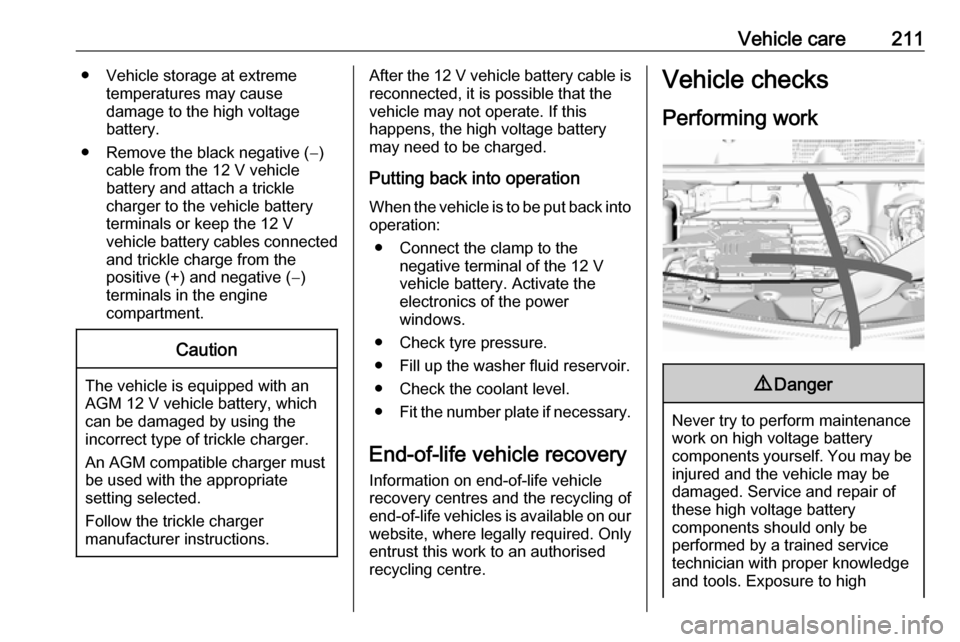
Never try to perform maintenance
work on high voltage battery
components yourself. You may be
injured and the vehicle may be
damaged. Service and repair of
these high voltage battery
components should only be
performed by a trained service
technician with proper knowledge
and tools. Exposure to high
Page 232 of 271
230Vehicle careVehicle tools
Tools
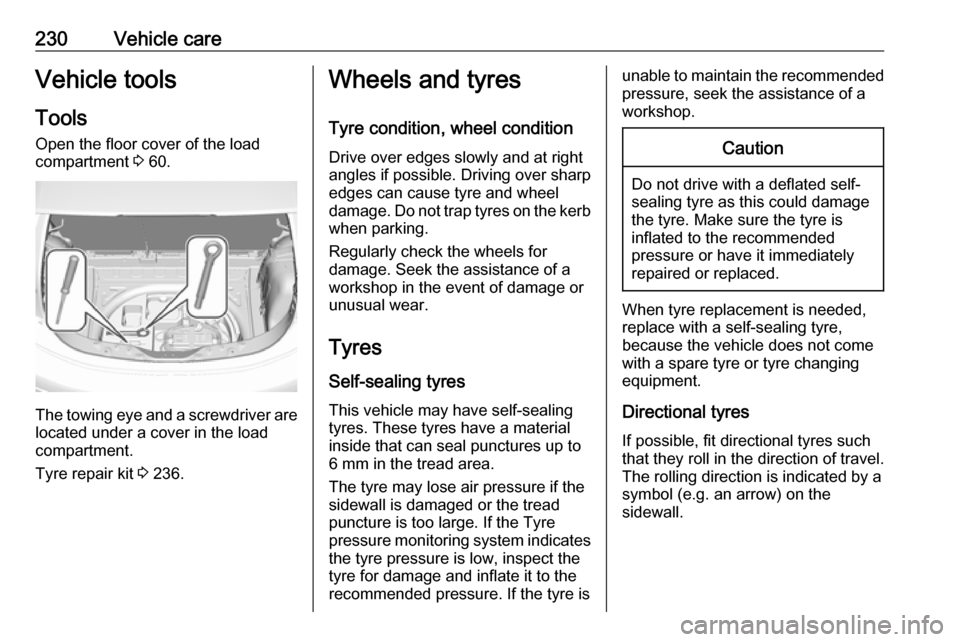
Open the floor cover of the load
compartment 3 60.
The towing eye and a screwdriver are
located under a cover in the load
compartment.
Tyre repair kit 3 236.
Wheels and tyres
Tyre condition, wheel condition Drive over edges slowly and at right
angles if possible. Driving over sharp
edges can cause tyre and wheel
damage. Do not trap tyres on the kerb when parking.
Regularly check the wheels for
damage. Seek the assistance of a
workshop in the event of damage or
unusual wear.
Tyres
Self-sealing tyres This vehicle may have self-sealing
tyres. These tyres have a material
inside that can seal punctures up to
6 mm in the tread area.
The tyre may lose air pressure if the
sidewall is damaged or the tread
puncture is too large. If the Tyre
pressure monitoring system indicates the tyre pressure is low, inspect the
tyre for damage and inflate it to the
recommended pressure. If the tyre isunable to maintain the recommended
pressure, seek the assistance of a
workshop.Caution
Do not drive with a deflated self-
sealing tyre as this could damage
the tyre. Make sure the tyre is
inflated to the recommended
pressure or have it immediately
repaired or replaced.
When tyre replacement is needed,
replace with a self-sealing tyre,
because the vehicle does not come
with a spare tyre or tyre changing
equipment.
Directional tyres
If possible, fit directional tyres such
that they roll in the direction of travel.
The rolling direction is indicated by a
symbol (e.g. an arrow) on the
sidewall.