wipers OPEL ANTARA 2009 Owners Manual
[x] Cancel search | Manufacturer: OPEL, Model Year: 2009, Model line: ANTARA, Model: OPEL ANTARA 2009Pages: 234, PDF Size: 3.01 MB
Page 11 of 234

In brief11
Page
1 Side air vents ................................... 104
2 Door window defroster vents ......... 104
3 Headlamp flash and main beam .... 14
turn signal lamps .............................. 14
Peripheral lighting............................. 98
cruise control 3............................... 140
4 Infotainment system
remote control buttons ................... 101
Trip computer 3.......................... 81, 88
5 Horn ................................................... 15
6 Instruments ........................................ 70
7 Windscreen and tailgate
wipers and washers .................... 15, 16
headlamp washers 3........................ 16
8 Central information display for time,
date, outside temperature,
Infotainment system,
check control 3................................. 91
Trip computer 3.......................... 81, 88 Page
9 Centre air vents ............................... 104
10 Hazard warning ................................ 14
Park pilot 3..................................... 142
Descent Control System (DCS) ....... 138
Electronic Stability Control (ESC) ... 136
Front passenger’s
seat belt reminder 3......................... 46
Fold in exterior mirrors 3................. 30
Control indicator for
anti-theft alarm system 3................ 29
11 Infotainment system ....................... 101
12 Front passenger’s airbag ................. 52
13 Glove compartment.................. 64, 105
14 Fuse box .......................................... 182
15 Climate control................................ 103
16 Ignition switch ................................... 13 Page
17 Accelerator pedal ........................... 127
18 Driver’s airbag .................................. 52
19 Brake pedal............................. 127, 146
20 Clutch pedal 3........................ 127, 128
21 Steering wheel adjustment .............. 13
22 Bonnet release ................................ 171
23 Coin storage...................................... 67
24 Card holder ....................................... 67
25 Parking lamps ................................... 94
dipped beam .............................. 14, 95
automatic dipped beam
activation 3...................................... 95
headlamp range adjustment 3....... 97
front fog lamps ................................. 96
fog tail lamp ..................................... 96
instrument illumination .................... 98
Page 15 of 234

In brief15
Activate horn j:
Press either side of the
steering wheel
The horn will sound regardless of ignition
switch position.
6 Airbag systems - see page 52,
remote control on steering wheel -
see page 101.
Windscreen wipers:
Move lever upwards
Press lever down from position J:
Single swipe.
6 Windscreen wipers - see page 92,
adjustable wiper interval - see page 92,
further information - see pages 198, 202,
205.
Automatic wiping with rain
sensor 3:
Move lever to automatic wiping
with rain sensor position $
The rain sensor detects the amount of
water on the windscreen and automatically
regulates the windscreen wipers.
6Windscreen wipers - see page 92,
further information - see pages 198, 202,
205.
J =Off
$ =Timed interval wipe
% =Slow
& =Fast
Page 16 of 234

In brief16
Operating windscreen and
headlamp washer systems 3:
Pull lever towards steering wheel
6 Windscreen and he adlamp washer
systems - see page 93,
further information - see pages 199, 202,
205.
Tailgate wiper and washer
systems:
6 Tailgate wiper and washer systems -
see page 93,
further information - see pages 198, 199,
202, 205.
Heated rear window,
heated exterior mirrors 3:
6 Air conditioning - see page 109,
heated rear window, heated exterior
mirrors - see page 105.
Wipers on = Push lever forward
Wipers off = Pull lever back towards steering
wheel
Wash = Press and hold buttonPress Ü =On
Press Ü again = Off
Page 70 of 234

70 Instruments, controls
Instruments, controls
Control indicators ............................... 70
Instrument display .............................. 75
Information display ............................ 76
Display of current tyre pressure3.... 91
Check control 3.................................. 91
Warning buzzers................................. 92
Windscreen wipers .............................. 92
Control indicators
The control indicators described here are
not present in all vehicles. The description
applies to all instrument versions.
The colours of the control indicators mean:
uABS (Anti-lock Brake System)
see page 148.
gTrailer indicator 3
Illuminates in green when a trailer is
connected to the vehicle. Extinguishes
when the trailer is disconnected.
4Brake system
Illuminates in red when ignition is switched
on. Extinguishes after engine is started.
Illuminates when engine is running if
hand brake is applied and/or fluid level for
brake hydraulics is too low.
Further information - see page 145.
z
Red Danger, important reminder,
z Yellow Warning, information, fault,
z Green Confirmation of activation,
z Blue Confirmation of activation.
9 Warning
If it illuminates when the hand brake is
not applied: stop vehicle; interrupt your
journey immediately. Consult a
workshop.
Page 92 of 234

Instruments, controls92
Warning buzzers
While driving:
z when operating th e turn signals.
z if driver’s or passenger’s seat belt 3 is
not engaged when the seat is occupied
and vehicle speed exceeds approx.
22 km/h (14 mph).
When the vehicle is parked and driver’s
door is opened:
z with exterior lamps switched on.
z when the key is in the ignition switch.
6 Seat belt warning chimes -
see pages 46, 72,
driving hints - see page 127,
save fuel, protect the environment -
see page 129.
Windscreen wipers
To activate, move lever upwards.
Press lever down from position J:
single swipe.
Further information - see pages 198, 202,
205. Adjustable wiper interval
To set the wiping interval to a value
between 1 and 10 seconds:
Switch on ignition.
Push lever down from position
J.
Wait the desired interval.
Set the lever to adjustable timed interval
wiper position $.
The interval remains stored until the next
change or the ignition is switched off.
Switching the ignition on and moving the
lever to $ sets the interval to 3.5 seconds.
In this mode, wiping frequency is also
affected by vehicle speed. As vehicle speed
increases, wiping will become more
frequent.
J
=Off
$ =Timed interval wipe
% =Slow
& =Fast
Page 93 of 234

Instruments, controls93
Automatic wiping with rain sensor3
To activate, move lever upwards to
automatic wiping with rain sensor
position $.
The rain sensor detects the amount of
water on the windscreen and automatically
regulates the windscreen wipers.
The wipers operate for one cycle to check
the system when the ignition switch is
turned to ACC.
To turn wipers off, move lever to position J.
Keep the rain sensor area clean by
activating the windsc reen washer system.
Further information - see pages 198, 202,
205. Windscreen and headlamp washer
systems
3
To activate, pull lever towards steering
wheel. Washer fluid is sprayed onto the
windscreen. If the lever is held longer, the
wipers operate for two cycles after the lever
has been released and once more after a
3 second delay 3.
The headlamp washer system 3 can only
be operated when the headlamps are on.
Washer fluid is sprayed onto the
headlamps. The headlamp washer system
can only be operated again after a short
delay. If washer fluid level is low then this
delay is increased.
On vehicles fitted with rain sensor 3, keep
the sensor area clean by activating the
windscreen washer system.
Further information - see pages 199, 202,
205. Tailgate wiper and washer systems
Activate wipers and washer as follows:
Washer fluid is sprayed on to tailgate
window when the button on the end of the
lever is pressed. When the button is
released, the washer will stop, but the
wipers will continue to swipe for approx.
3cycles.
Further information - see pages 198, 199,
202, 205.
Wipers on = Push lever forwards
Wipers off = Pull lever back towards
steering wheel
Wash = Press and hold button
Page 94 of 234

Lighting94
Lighting
Exterior lamps
Turn light switch:
In positions 8 and 9, the tail lamps,
license plate lamps and instrument panel
lamps are also on. Daytime running lamps
3
Come on automatically when engine is
started.
They will turn off wh en the parking lamps
or dipped beam are on, or when the engine
is stopped.
Follow the regulations of the country in
which you are driving when using daytime
running lamps and front fog lamps.
Driving abroad - see page 100.
Lamps on reminder
If the driver’s door is opened when the light
switch is in position 8 or 9 and the
ignition is off, a warning chime will sound.
If the lamps are then switched off and back
on again, the warning chime will not sound.
Wiper activated lighting 3
With light switch in AUTO position,
if windscreen wipers are operated for
8 cycles or more, the exterior lamps
illuminate automatically.
Approach lighting 3
Depending upon outside light conditions,
when you press q on the remote control,
the hazard warning lamps flash twice and
the exterior lamps illuminate for approx.
20 seconds.
Main beam, headlamp flash ............. 95
Automatic dipped beam activation
3 95
Turn signal lamps ............................... 95
Front fog lamps >............................. 96
Fog tail lamp r.................................. 96
Reversing lamps.................................. 96
Centre high-mounted stop lamp ....... 96
Hazard warning lamps ...................... 97
Headlamp range adjustment q........ 97
Peripheral lighting .............................. 98
Instrument illumination, information display illumination .......................... 98
Interior courtesy lamps....................... 98
Battery discharge protection ............. 100
Headlamps when driving abroad ..... 100 7
=Off
8 = Parking lamps
9 = Dipped beam or main
beam
AUTO = Automatic dipped beam
activation 3
Page 122 of 234

Driving and operation122
Always exercise caution when in slippery
conditions (caused by sand, gravel, water,
snow or ice on the road), in order to
maintain vehicle control.
Use the accelerator to control the vehicle -
keep brake pedal use to a minimum.
zDo not slip the clutch.
z Do not spin the wheels.
z Do not make exaggerated or jerky
steering movements.
Driving a vehicle in snow and ice should be
undertaken with extreme caution:
z Select a gear suitable for the conditions.
z Start the vehicle moving with minimal
engine revs, low gear and combined
clutch and accelerator control.
z Change to a higher gear as quickly as
possible, to keep the engine revs low.
z With automatic transmission 3, select
drive range D and press button n, to
activate the Winter program. Off-road driving
During off-road drivin
g, you will encounter
a variety of driving conditions and
circumstances too numerous to list here.
Always use good judgement and common
sense. If you feel uncomfortable about
tackling a given situation, do not attempt
it.
Avoid protruding objects (such as rocks or
tree stumps) that may damage the
underbody and tyres of your vehicle.
Test the brakes after operating in mud, to
clear excess mud from the braking
surfaces.
Gripping the steering wheel
Terrain conditions can cause rapid and
unexpected movement in the steering,
especially rough terrain. Preparation
The duration, distance and conditions of
the off-road activity determine the extent
of the preparation th
at is required. The
following are given as guidelines.
Know the area where you will be driving,
either by inspection or from terrain maps.
Decide your route in advance and ensure
that it is a vehicular right of way
1).
Make a thorough check of the vehicle.
Check the following:
z Oil, water, fuel, brake and clutch fluid
levels,
z Drive belts,
z Windscreen wipers and washer system,
z Lamps.
Maintenance - see pages 126, 206.
9 Warning
Be ready to deal with these movements
by having a firm grip on the outer rim of
the steering wheel with the thumbs
outside the spokes, to guard against
injury from kickback.
1)Observe national regulations.
Page 171 of 234

Self-help, vehicle care171
Self-help, vehicle care
Diesel fuel system, bleeding
Never let the fuel tank run dry. If control
indicator Y illuminates, refuel as soon as
possible.
It is possible to restart the engine if the tank
has been run dry. A delayed start can be
expected. Switch on the ignition three times
for approx. 15 seconds. Then try to start
the engine for no more than 40 seconds. If
the engine will not start, wait at least
10 seconds before trying again. If the
engine will still not start, consult a
workshop.
Bonnet
To open the bonnet, pull release lever /
located on the left-hand side below the
instrument panel.
The bonnet will then be unlocked and will
partially open. Return release lever to its
original position.
Do not pull release lever while the vehicle is
moving.
Diesel fuel system, bleeding .............. 171
Bonnet ................................................. 171
Starting ................................................ 172
Starting the engine with jump leads
3 172
Towing ................................................. 174
Jack and vehicle tools ........................ 176
Warning triangle ¨ 3 ,
First aid kit +3................................ 177
Temporary spare wheel ..................... 177
Wheel changing .................................. 178
Electrical system ................................. 181
Fuses and the most important circuits they protect ...................................... 182
Bulb replacement ............................... 185
Opel genuine parts and accessories . 191
A note on safety ................................. 191
Checking and topping up fluids ........ 191
Windscreen wipers .............................. 198
Windscreen washer system ................ 199
Battery ................................................. 200
Protection of electr onic components 201
Vehicle storage ................................... 201
Vehicle care......................................... 201
9 Warning
Disregard of the instructions may lead to
injuries or endanger life. Vehicle
passengers must be informed
accordingly.
Page 174 of 234
Self-help, vehicle care174
zDo not connect leads to negative
terminal of discharged battery.
z The last connection point should be as
far away from the discharged battery as
possible.
z Route leads so they cannot catch on
rotating parts in engine compartment.
z Start the engine of the vehicle providing
the jump start.
z After 5 minutes, start the other engine.
Start attempts shou ld be made at
intervals of 1 minute and should not last
longer than 15 seconds.
z After starting, allow both engines to idle
for approx. 3 minutes with leads
connected.
z In order to avoid excess voltage in the
electrical system, before removing a
lead, switch on an electrical consumer
(e.g. lamps, heated rear window) in the
vehicle receiving the jump start.
z Operate discharged vehicle for approx.
20 minutes to allow for recharging.
z Reverse above sequence exactly when
removing leads.
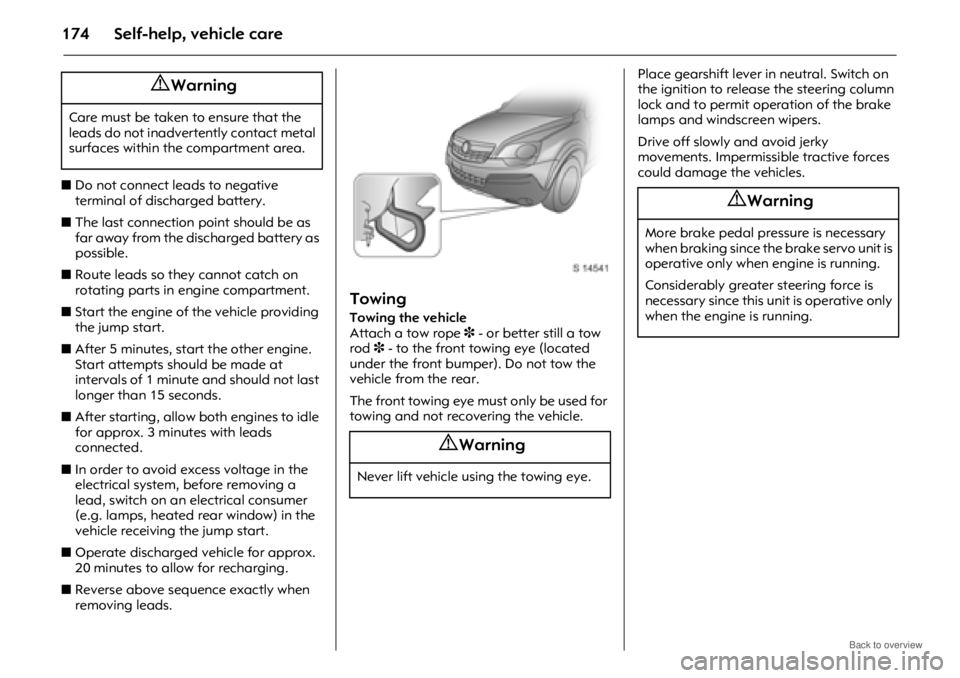
Towing
Towing the vehicle
Attach a tow rope 3 - or better still a tow
rod 3 - to the front towing eye (located
under the front bumper). Do not tow the
vehicle from the rear.
The front towing eye must only be used for
towing and not recovering the vehicle. Place gearshift lever in neutral. Switch on
the ignition to release the steering column
lock and to permit operation of the brake
lamps and windscreen wipers.
Drive off slowly and avoid jerky
movements. Impermissible tractive forces
could damage
the vehicles.
9 Warning
Care must be taken to ensure that the
leads do not inadvertently contact metal
surfaces within the compartment area.
9 Warning
Never lift vehicle using the towing eye.
9 Warning
More brake pedal pressure is necessary
when braking since the brake servo unit is
operative only when engine is running.
Considerably greater steering force is
necessary since this unit is operative only
when the engine is running.