turn signal OPEL ASTRA J 2014 Manual user
[x] Cancel search | Manufacturer: OPEL, Model Year: 2014, Model line: ASTRA J, Model: OPEL ASTRA J 2014Pages: 331, PDF Size: 10.13 MB
Page 147 of 331

Lighting145
Dynamic automatic headlight
levelling 3 145.
Headlights when driving
abroad
The asymmetrical headlight beam
extends visibility at the edge of the
road at the passenger side.
However, when driving in countries
where traffic drives on the opposite
side of the road, adjust the headlights
to prevent dazzling of oncoming
traffic.
Vehicles with halogen headlight
system The headlights do not have to be
adjusted.Vehicles with Xenon headlight
system
1. Key in ignition switch.
2. Pull turn signal lever and hold (headlight flash).
3. Switch on ignition.
4. After approx. 5 seconds the control indicator f starts flashing
and an acoustic signal sounds.
Control indicator f 3 120.
Every time the ignition is switched on,
f flashes as a reminder for approx. 4
seconds.
For deactivation operate the same
procedure as described above. f will
not flash when function is
deactivated.
Daytime running lights
Daytime running lights increase
visibility of the vehicle during daylight.
They are switched on automatically
when ignition is on.
If the vehicle is equipped with
automatic light control function, the
system switches between daytime running light and low/high beam
automatically depending on the
lighting conditions and information
given by the rain sensor system.
Automatic light control 3 143.
Adaptive forward lighting
The Adaptive forward lighting
functions are only available with Bi-
Xenon headlights. Light range, light
distribution and intensity of light are
variably triggered depending on the
light conditions, weather and road
type.
Page 148 of 331
146Lighting
With the light switch in position
AUTO all lighting functions are
available.
The following functions are available
also with light switch in position 9:
■ Dynamic curve lighting
■ Cornering light
■ Reversing function
■ Dynamic automatic headlight levelling
Playstreet lighting
Activated automatically at low speed
up to approx. 30 km/h. The light beam is turned at an angle of 8° to the
roadside.
Town lighting
Activated automatically at a speed
range between approx. 40 and
55 km/h and when street lights are
detected by the light sensor. The light
range is reduced by an extended light
distribution.Country lighting
Activated automatically at a speed
range between approx. 55 and
115 km/h. The beam of light and the
brightness is different between the left and the right side.
Motorway lighting
Activated automatically at a speed
above approx. 115 km/h and minimal
steering movements. It switches on
after a delay or directly when the
vehicle is powerfully accelerated. The
light beam is longer and brighter.
Adverse weather lighting
Activated automatically up to a speed
of approx. 70 km/h, when the rain
sensor recognizes condensation or
the wiper operates continuously. The
range, distribution and light intensity
is regulated variably depending on visibility.Dynamic curve lighting
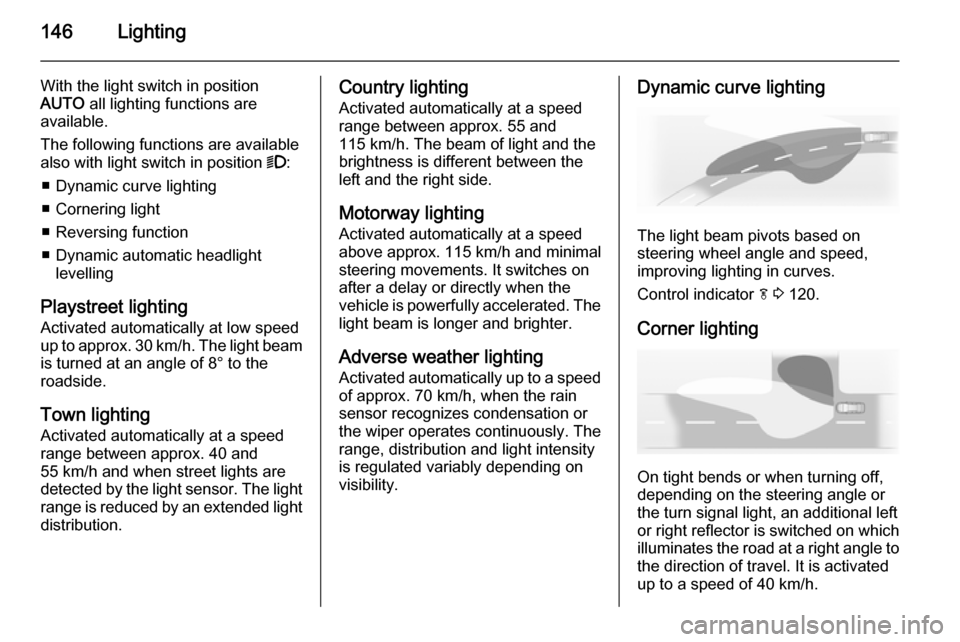
The light beam pivots based on
steering wheel angle and speed,
improving lighting in curves.
Control indicator f 3 120.
Corner lighting
On tight bends or when turning off,
depending on the steering angle or
the turn signal light, an additional left
or right reflector is switched on which illuminates the road at a right angle to
the direction of travel. It is activated
up to a speed of 40 km/h.
Page 151 of 331
Lighting149
Fault in adaptive forward lightingsystem
When the system detects a failure in
the Adaptive forward lighting system,
the system moves to a preset position to avoid dazzling of oncoming traffic.
If this is not possible the affected
headlight will be automatically
switched off. In any case one
headlight will stay on. A warning is
displayed in the Driver Information
Centre.
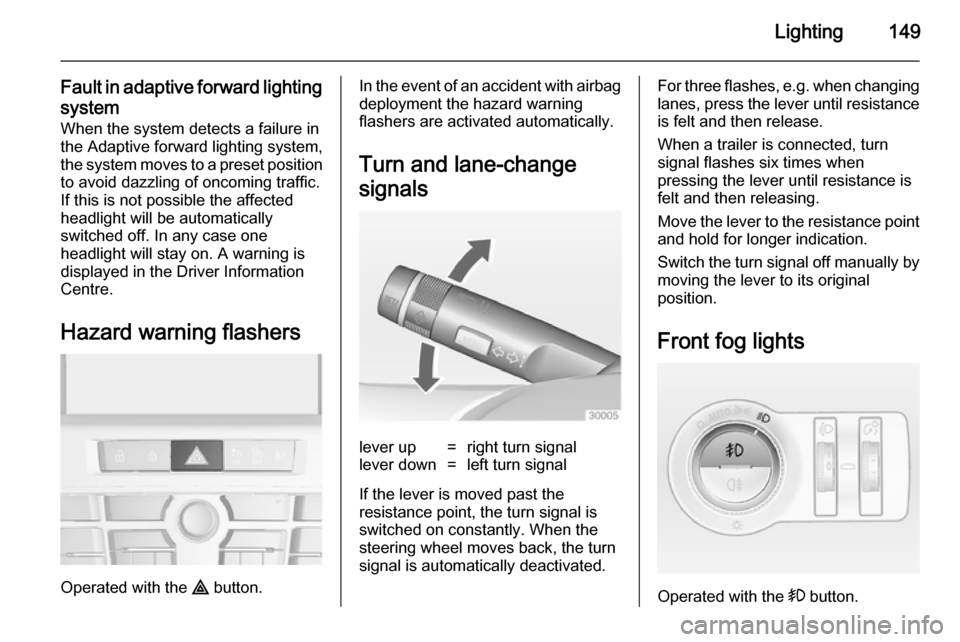
Hazard warning flashers
Operated with the ¨ button.
In the event of an accident with airbag
deployment the hazard warning
flashers are activated automatically.
Turn and lane-change
signalslever up=right turn signallever down=left turn signal
If the lever is moved past the
resistance point, the turn signal is
switched on constantly. When the
steering wheel moves back, the turn
signal is automatically deactivated.
For three flashes, e.g. when changing lanes, press the lever until resistance
is felt and then release.
When a trailer is connected, turn
signal flashes six times when
pressing the lever until resistance is
felt and then releasing.
Move the lever to the resistance point
and hold for longer indication.
Switch the turn signal off manually by moving the lever to its original
position.
Front fog lights
Operated with the > button.
Page 152 of 331

150Lighting
Light switch in position AUTO:
switching on front fog lights will switch headlights on automatically.
Rear fog lights
Operated with the r button.
Light switch in position AUTO:
switching on rear fog light will switch
headlights on automatically.
Light switch in position 8: rear fog
light can only be switched on with
front fog lights.
The vehicle rear fog light is
deactivated when towing.
Parking lights
When the vehicle is parked, the
parking lights on one side can be
activated:
1. Switch off ignition.
2. Move turn signal lever all the way up (right parking lights) or down
(left parking lights).
Confirmed by a signal and the
corresponding turn signal control
indicator.
Reversing lights
The reversing light comes on when
the ignition is on and reverse gear is
selected.
Misted light covers The inside of the light housing may
mist up briefly in poor, wet and cold weather conditions, in heavy rain or
after washing. The mist disappears
quickly by itself; to help switch on the
headlights.
Page 155 of 331
Lighting153
The lighting switches off immediately
when the ignition key is turned to
position 1 3 165.
Activation or deactivation of this
function can be changed in the menu Settings in the Info-Display. Vehicle
personalisation 3 134.
The settings can be saved for the key being used 3 25.
The following lights will additionally
switch on when the driver's door is
opened:
■ all switches
■ Driver Information Centre
■ door pocket lights
■ console lights
Exit lighting
The following lights switch on if the
key is removed from the ignition
switch:
■ Interior lights
■ Instrument panel light (only when it
is dark)■ Door and console lights
■ Puddle lights
They will switch off automatically after
a delay and will be activated again if
the driver's door is opened.
Headlights, tail lights, reversing lights
and number plate lights illuminate the
surrounding area for an adjustable
time after leaving the vehicle.
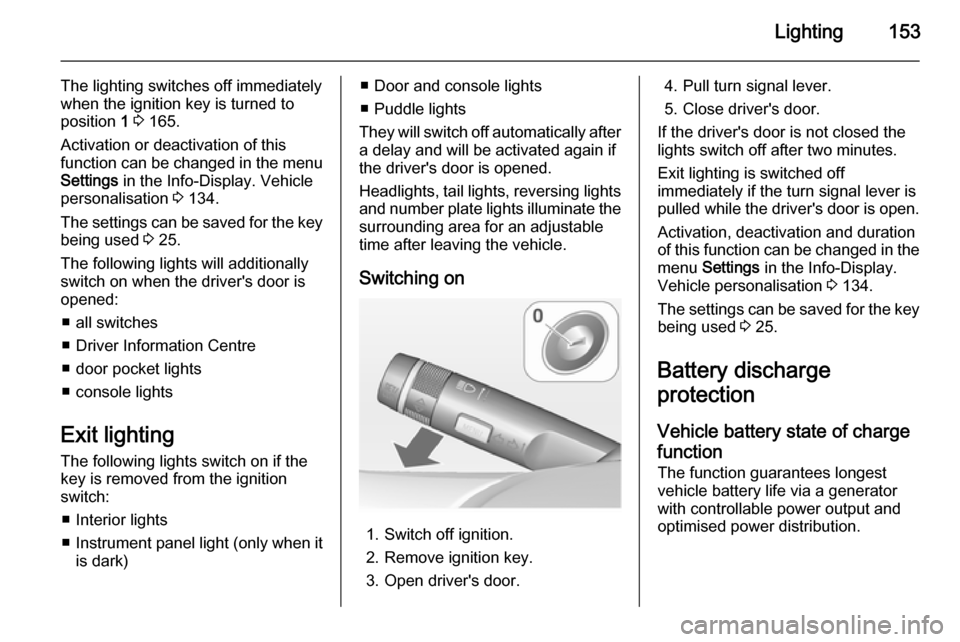
Switching on
1. Switch off ignition.
2. Remove ignition key.
3. Open driver's door.
4. Pull turn signal lever.
5. Close driver's door.
If the driver's door is not closed the
lights switch off after two minutes.
Exit lighting is switched off
immediately if the turn signal lever is pulled while the driver's door is open.
Activation, deactivation and duration
of this function can be changed in the menu Settings in the Info-Display.
Vehicle personalisation 3 134.
The settings can be saved for the key being used 3 25.
Battery discharge
protection
Vehicle battery state of charge
function
The function guarantees longest
vehicle battery life via a generator with controllable power output and
optimised power distribution.
Page 198 of 331

196Driving and operatingThe complete attention of the
driver is always required while
driving. The driver must always be ready to take action and apply the
brakes.
System limitations
The system is designed to warn only for vehicles, but may react also to
other metallic objects.
In the following cases, forward
collision alert may not detect a vehicle
ahead or sensor performance is
limited:
■ on winding roads,
■ when weather limits visibility, e.g. fog, rain, or snow,
■ when the sensor is blocked by snow, ice, slush, mud, dirt, or
windscreen damage.
Following distance
indication The following distance indication
displays the distance to a preceding
moving vehicle. The system uses,
depending on the vehicle equipment,
either the radar behind the radiator
grille or the front camera in the
windscreen to detect the distance of
a vehicle directly ahead in your path.
It is active at speeds above 40 km/h.
When a preceding vehicle is detected
ahead, the distance is indicated in
seconds, displayed on a page in the
Driver Information Centre 3 121.
Press the MENU button on the turn
signal lever to select Vehicle
Information Menu X and turn the
adjuster wheel to choose following distance indication page.The minimum indicated distance is
0.5 s.
If there is no vehicle ahead or the vehicle ahead is out of range, two
dashes will be displayed: -.- s.
Active Emergency Braking
Active emergency braking can help to reduce the damage from crashes with vehicles and obstacles directly
ahead, when a collision can no longer be avoided either by manual braking
or by steering. Before the active
emergency braking applies, the driver
is warned by the forward collision
alert 3 193.
The feature uses various inputs (e.g.
radar sensor, brake pressure, vehicle speed) to calculate the probability ofa frontal collision.
Active emergency braking operates automatically above walking speed,
provided that Auto collision
preparation setting is not deactivated
in the vehicle personalisation menu
3 134.
Page 207 of 331

Driving and operating205vans). Object identification in the
upper part of these vehicles
cannot be guaranteed.
Objects with a very small reflection
cross section, like objects of
narrow size or soft materials, may
not be detected by the system.
Parking assist will not detect
objects out of the detection range.
Note
The parking assist system
automatically detects factory-fitted
towing equipment. It is deactivated
when the connector is plugged in.
It is possible that the sensor detects
a non-existing object (echo
disturbance) caused by external
acoustical or mechanic
disturbances.
Advanced parking assist system
may not respond to changes in the
parking space after initiating a
parallel parking manoeuvre.
Side blind spot alert
The Side blind spot alert system
detects and reports objects on either
side of the vehicle, within a specified
"blind spot" zone. The system alerts visually in each exterior mirror, when
detecting objects that may not be
visible in the interior and exterior
mirrors.
The system's sensors are located in
the bumper on the left and right side
of the vehicle.9 Warning
Side blind spot alert does not
replace driver vision.
The system does not detect: ■ Vehicles outside the side blind zones which may be rapidly
approaching.
■ Pedestrians, cyclists or animals.
Before changing a lane, always
check all mirrors, look over the
shoulder and use the turn signal.
When the system detects a vehicle in the side blind zone while driving
forward, either while passing a
vehicle or being passed, an amber warning symbol B will illuminate in
the relevant exterior mirror. If the
driver then activates the turn signal,
the warning symbol B starts flashing
amber as a warning not to change
lanes.
Side blind spot alert is active from
speeds of 10 km/h up to 140 km/h.
Driving faster than 140 km/h
deactivates the system, indicated by
low lighting warning symbols B in
both exterior mirrors. Reducing the
Page 212 of 331

210Driving and operating
Traffic signs are displayed on the
page Traffic sign detection on the
Driver Information Centre, chosen via the adjuster wheel on the turn signal
lever 3 121.
When another function on the Driver
Information Centre menu was
selected and then Traffic sign
detection page is chosen again, the
last recognised traffic sign will be displayed.
After the traffic sign page is cleared
by the system, the following symbol is
indicated:The content of the traffic sign page is also cleared during driving by pushing
the SET/CLR button on the turn signal
lever for a longer time.
Pop-up function
Speed limits and no passing signs are
displayed as pop-ups on each page
of the Driver Information Centre.
The pop-up function can be
deactivated on the traffic sign page by
pressing the SET/CLR button on the
turn signal lever.
Page 213 of 331

Driving and operating211
Once setting page is displayed, selectOff to deactivate pop-up function.
Reactivated by selecting On. When
switching on the ignition, pop-up function is deactivated.
Pop-up indication is displayed for approx. 8 seconds in the Driver
Information Centre.
Fault The traffic sign assistant system may
not operate correctly when:
■ the area of the windscreen, where the front camera is located, is notclean
■ traffic signs are completely or partially covered or difficult to
discern
■ there are adverse environmental conditions, e.g. heavy rain, snow,direct sunlight or shadows. In this
case No Traffic Sign Detection due
to Weather is indicated on the
display■ traffic signs are incorrectly mounted
or damaged
■ traffic signs do not comply with the Vienna Convention on traffic signs
(Wiener Übereinkommen über
Straßenverkehrszeichen)Caution
The system is intended to help the driver within a defined speed
range to discern certain traffic
signs. Do not ignore traffic signs
which are not displayed by the
system.
The system does not discern any other than the conventional traffic
signs that might give or end a
speed limit.
Do not let this special feature
tempt you into taking risks when
driving.
Always adapt speed to the road
conditions.
The driver assistance systems do not relieve the driver from full
responsibility for vehicle
operation.
Lane departure warning
The lane departure warning systemobserves the lane markings between
which the vehicle is driving via a front camera. The system detects lane
changes and warns the driver in the
event of an unintended lane change
via visual and acoustic signals.
Criteria for the detection of an
unintended lane change are:
■ no operation of turn signals
■ no brake pedal operation
■ no active accelerator operation or speeding-up
■ no active steering
If the driver is active, no warning will
be issued.
Page 241 of 331

Vehicle care239
3. Turn the bulb socket anti-clockwise and remove it from the
reflector.
4. Disengage the bulb socket from the plug connector by pressing
the retaining lug.
5. Remove and replace the bulb socket with bulb and attach the
plug connector.
6. Insert the bulb socket into the reflector by turning clockwise and
engage.
7. Mount the light assembly by tightening both screws.
8. Assemble and engage the cover.Front turn signal lights
5-door hatchback, 4-doornotchback, Sports tourer
1. Release both caps with a screwdriver at the marked area.
2. Unscrew both screws and remove
light assembly from the bumper.