lock OPEL ASTRA J 2014 Manual user
[x] Cancel search | Manufacturer: OPEL, Model Year: 2014, Model line: ASTRA J, Model: OPEL ASTRA J 2014Pages: 331, PDF Size: 10.13 MB
Page 141 of 331

Instruments and controls139
vehicle in the event of imminent
collision danger. The following is
selectable: the system will take
over brake control, warn by chimes
only or is deactivated.
Side blind zone alert : Changes the
settings for the side blind spot alert
system.
■ Exterior ambient lighting
Duration upon exit of vehicle :
Activates or deactivates and
changes the duration of exit
lighting.
Exterior lighting by unlocking :
Activates or deactivates the
welcome lighting.
■ Power door locks
Auto door lock : Activates or
deactivates the automatic door
unlocking function after switching off ignition. Activates or deactivates the automatic door locking function after driving off.
Prevent doorlock while door open :
Activates or deactivates the automatic door locking function
while a door is open.■ Lock / Unlock / Start by remote
Remote unlock feedback : Activates
or deactivates the hazard warning
flasher feedback whilst unlocking.
Remote door unlock : Changes the
configuration to unlock only the
driver's door or the whole vehicle
whilst unlocking.
Auto relock doors : Activates or
deactivates the automatic relock
function after unlocking without
opening the vehicle.
■ Restore factory settings
Restore factory settings : Resets all
settings to the default settings.
Display settings
Selectable display settings:
■ Day mode : Optimisation for
daylight conditions.
■ Night mode : Optimisation for
darkness.
■ Automatic mode : The display
changes mode when the vehicle lights are switched on/off.■ Rear view camera : Changes the
settings for the rear view camera.
■ Picture frame : See description for
Infotainment system in the
Infotainment system manual.
Settings in the Colour-Info- Display CD 600/Navi 650/Navi 950
Press the CONFIG button on the
Infotainment system faceplate to
enter the Configuration menu.
Turn the multifunction knob to scroll
upwards or downwards in the list.
Press the multifunction knob
(Navi 950 / Navi 650: press the outer
ring) to select a menu item.
Page 143 of 331

Instruments and controls141
on the ignition or uses the last
chosen setting.
Auto Demist : Activate or deactivate
auto demist.
Auto Rear Demist : Activates
automatically the rear heated
window.
■ Comfort and Convenience
Chime Volume : Change the volume
of warning chimes.
Personalisation by Driver :
Activates or deactivates the
personalisation function.
Auto Reverse Gear Wiper : Activate
or deactivate automatically
switching on of the rear window
wiper when reverse gear is
engaged.
■ Collision Detection Systems
Park Assist : Activate or deactivate
the ultrasonic sensors.
Automatic Collision Preparation :
Activates or deactivates the
automatic brake functionality of the
vehicle in the event of imminent
collision danger. The following is
selectable: the system will takeover brake control, warn by chimes
only or is deactivated completely.
Side Blind Zone Alert : Activates or
deactivates the side blind spot alert system.
■ Lighting
Vehicle Locator Lights : Activate or
deactivate the entry lighting.
Exit Lighting : Activate or deactivate
and change the duration of exit lighting.
■ Power Door Locks
Open Door Anti Lock Out : Activate
or deactivate the automatic door locking function while a door is
open.
Auto Door Lock : Activates or
deactivates the automatic door
unlocking function after switching off ignition. Activates or deactivates the automatic door locking function
after driving-off.
Delay Door Lock : Activate or
deactivate the delayed door locking
function.■ Remote Lock/Unlock/Start
Remote Lock Feedback : Activate
or deactivate the hazard warning
light feedback whilst locking.
Remote Unlock Feedback : Activate
or deactivate the hazard warning
flasher feedback whilst unlocking.
Remote Door Unlock : Change the
configuration to unlock only the
driver's door or the whole vehicle
whilst unlocking.
Relock Remotely Unlocked Doors :
Activates or deactivates the
automatic relock function after
unlocking without opening the
vehicle.
■ Return to Factory Settings? : Reset
all settings to the default settings.
Page 154 of 331

152Lighting
Rear courtesy lights
Illuminates in conjunction with the
front courtesy light depending on
rocker switch position.
Press s or t to switch on manually.
Reading lights
Operated with s and t buttons in
front and rear courtesy lights.
Sunvisor lights
Illuminates when the cover is opened.
Lighting features
Centre console lighting Spotlight incorporated in the interior
lighting comes on when headlights
are switched on.
Entry lighting
Welcome lighting
The following lights are switched on
for a short time by unlocking the
vehicle with the radio remote control:
■ headlights,
■ tail lights,
■ reversing lights,
■ number plate lights,
■ instrument panel light,
■ interior lights,
■ door and console lights,
■ puddle lights.
Some functions work only in the dark
and facilitates locating the vehicle.
Page 167 of 331
Driving and operating165Starting and operating
New vehicle running-in Do not brake unnecessarily hard for
the first few journeys.
During the first drive, smoke may
occur because of wax and oil
evaporating off the exhaust system.
Park the vehicle in the open for a
while after the first drive and avoid
inhaling the fumes.
During the running-in period fuel and
engine oil consumption may be
higher and the cleaning process of the diesel particle filter may take
place more often. Autostop may be inhibited to allow for charging the
battery.
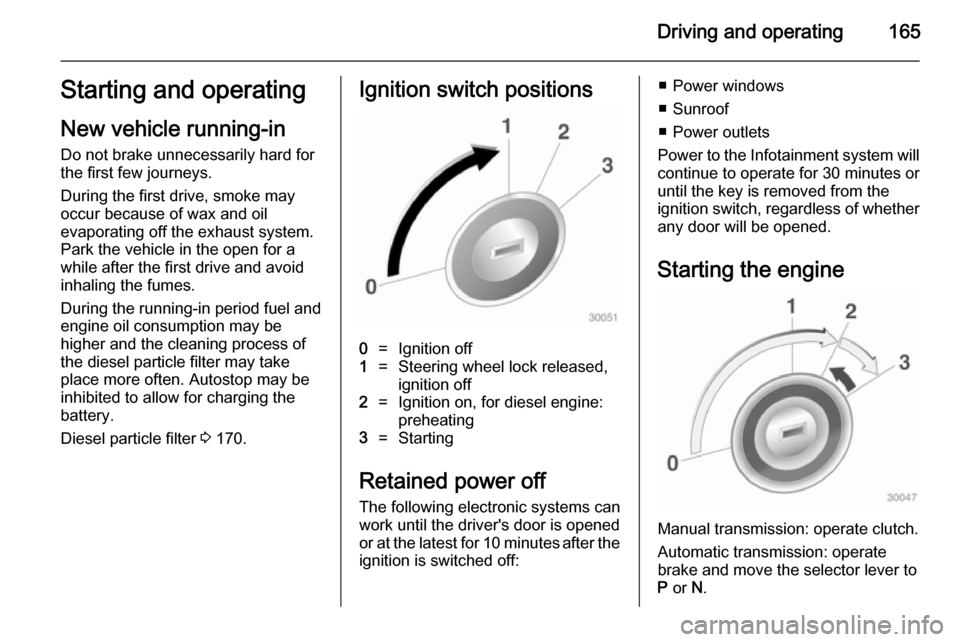
Diesel particle filter 3 170.Ignition switch positions0=Ignition off1=Steering wheel lock released,
ignition off2=Ignition on, for diesel engine:
preheating3=Starting
Retained power off
The following electronic systems can
work until the driver's door is opened
or at the latest for 10 minutes after the
ignition is switched off:
■ Power windows
■ Sunroof
■ Power outlets
Power to the Infotainment system will continue to operate for 30 minutes oruntil the key is removed from the
ignition switch, regardless of whether
any door will be opened.
Starting the engine
Manual transmission: operate clutch.
Automatic transmission: operate
brake and move the selector lever to
P or N.
Page 171 of 331

Driving and operating169
■ the driver's seat belt is unfastenedand the driver's door is opened
■ the engine temperature is too low
■ the charging level of the vehicle battery is below a defined level
■ the brake vacuum is not sufficient
■ the vehicle is driven at least at walking speed
■ the climate control system requests
an engine start
■ the air conditioning is manually switched on
If the bonnet is not fully closed, a warning message is displayed in the
Driver Information Centre.
If an electric accessory, e.g. a
portable CD player, is connected to
the power outlet, a brief power drop during restart might be noticeable.
Parking ■ Do not park the vehicle on an easily
ignitable surface. The high
temperature of the exhaust system
could ignite the surface.■ Always apply parking brake. Apply manual parking brake without
pressing release button. Apply as
firmly as possible on downhill or uphill slopes. Depress the foot
brake at the same time to reduce
operating force.
Apply electric parking brake by pulling switch m for approx.
one second.
■ Switch off the engine and ignition. Turn the steering wheel until the
steering wheel lock engages.
■ If the vehicle is on a level surface or
uphill slope, engage first gear or set the selector lever to P before
switching off the ignition. On an
uphill slope, turn the front wheels
away from the kerb.
If the vehicle is on a downhill slope, engage reverse gear or set theselector lever to P before switching
off the ignition. Turn the front
wheels towards the kerb.
■ Lock the vehicle and activate the anti-theft alarm system.Note
In the event of an accident with
airbag deployment, the engine is
turned off automatically if the vehicle
comes to a standstill within a certain time.
Page 174 of 331

172Driving and operatingSelector leverP=park position, wheels are
locked, engage only when the
vehicle is stationary and the
parking brake is appliedR=reverse gear, engage only
when the vehicle is stationaryN=neutralD=automatic mode with all gears
The selector lever is locked in P and
can only be moved when the ignition
is on and the brake pedal is applied.
Without brake pedal applied, the
control indicator j illuminates.
If the selector lever is not in P when
the ignition is switched off, the control
indicators j and P flash.
To engage P or R, press the release
button.
The engine can only be started with
the lever in position P or N. When
position N is selected, press the brake
pedal or apply the parking brake
before starting.
Do not accelerate while engaging a
gear. Never depress the accelerator
pedal and brake pedal at the same
time.
When a gear is engaged, the vehicle
slowly begins to creep when the
brake is released.
Engine braking To utilise the engine braking effect,select a lower gear in good time when
driving downhill, see manual mode.
Rocking the vehicle
Rocking the vehicle is only
permissible if the vehicle is stuck in
sand, mud or snow. Move the selector
lever between D and R in a repeat
pattern. Do not race the engine and
avoid sudden acceleration.
Parking
Apply the parking brake and engage
P .
The ignition key can only be removed
when the selector lever is in position
P .
Page 176 of 331

174Driving and operating
Only the highest gear is available.
Depending on the fault, 2nd gear may also be available in manual mode.
Shift only when vehicle is at a
standstill.
Have the cause of the fault remedied
by a workshop.
Interruption of power
supply
In the event of an interruption of
power supply, the selector lever
cannot be moved out of the P
position. The ignition key cannot be
removed from the ignition switch.
If the vehicle battery is discharged,
start the vehicle using jump leads
3 276.
If the vehicle battery is not the cause
of the fault, release the selector lever.
1. Apply the parking brake.
2. Release the selector lever trim from the centre console at the
front, fold it upwards and rotate it
to the left.
3. Insert a screwdriver into the opening as far as it will go and
move the selector lever out of P or
N . If P or N is engaged again, the
selector lever will be locked in
position again. Have the cause of
the power supply interruption
remedied by a workshop.
4. Mount the selector lever trim onto
the centre console and refit.
Page 177 of 331
Driving and operating175Manual transmission
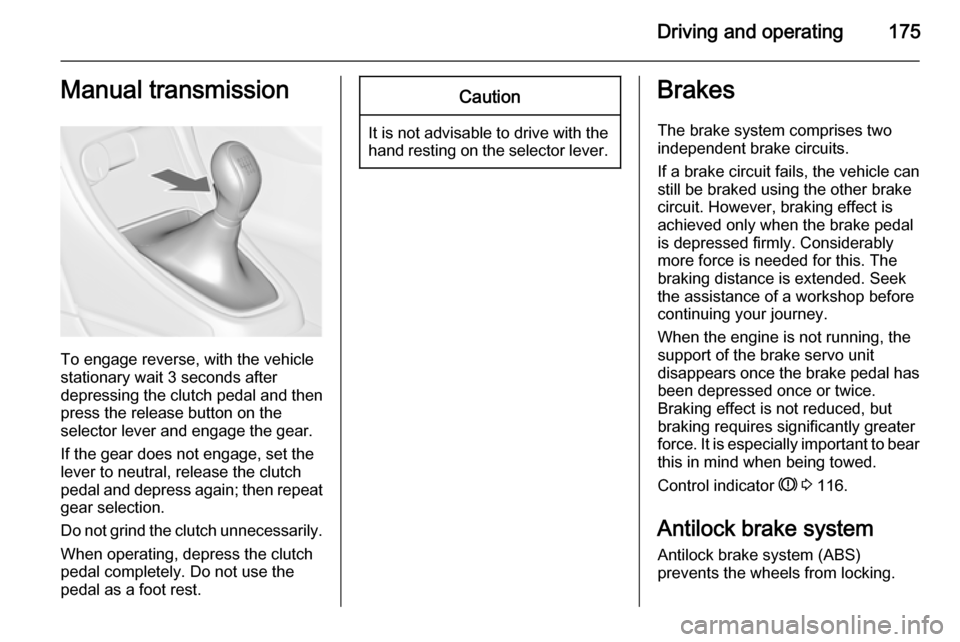
To engage reverse, with the vehicle
stationary wait 3 seconds after
depressing the clutch pedal and then
press the release button on the
selector lever and engage the gear.
If the gear does not engage, set the
lever to neutral, release the clutch
pedal and depress again; then repeat
gear selection.
Do not grind the clutch unnecessarily. When operating, depress the clutchpedal completely. Do not use the
pedal as a foot rest.
Caution
It is not advisable to drive with the hand resting on the selector lever.
Brakes
The brake system comprises two independent brake circuits.
If a brake circuit fails, the vehicle can
still be braked using the other brake
circuit. However, braking effect is
achieved only when the brake pedal
is depressed firmly. Considerably
more force is needed for this. The
braking distance is extended. Seek the assistance of a workshop before
continuing your journey.
When the engine is not running, the
support of the brake servo unit
disappears once the brake pedal has been depressed once or twice.
Braking effect is not reduced, but
braking requires significantly greater
force. It is especially important to bear
this in mind when being towed.
Control indicator R 3 116.
Antilock brake system
Antilock brake system (ABS)
prevents the wheels from locking.
Page 178 of 331

176Driving and operating
ABS starts to regulate brake pressureas soon as a wheel shows a tendency to lock. The vehicle remains
steerable, even during hard braking.
ABS control is made apparent
through a pulse in the brake pedal
and the noise of the regulation
process.
For optimum braking, keep the brake
pedal fully depressed throughout the
braking process, despite the fact that
the pedal is pulsating. Do not reduce
the pressure on the pedal.
After starting off the system performs
a self-test which may be audible.
Control indicator u 3 117.
Adaptive brake light
During full braking, all three brake
lights flash for the duration of ABS
control.Fault9 Warning
If there is a fault in the ABS, the
wheels may be liable to lock due
to braking that is heavier than
normal. The advantages of ABS are no longer available. During
hard braking, the vehicle can no longer be steered and may
swerve.
Have the cause of the fault remedied
by a workshop.
Parking brake
Manual parking brake
Always apply parking brake firmly
without operating the release button,
and apply as firmly as possible on a
downhill or uphill slope.
To release the parking brake, pull the lever up slightly, press the release
button and fully lower the lever.
To reduce the operating forces of the
parking brake, depress the foot brake
at the same time.
Control indicator R 3 116.
Page 183 of 331
Driving and operating181Interactive driving system
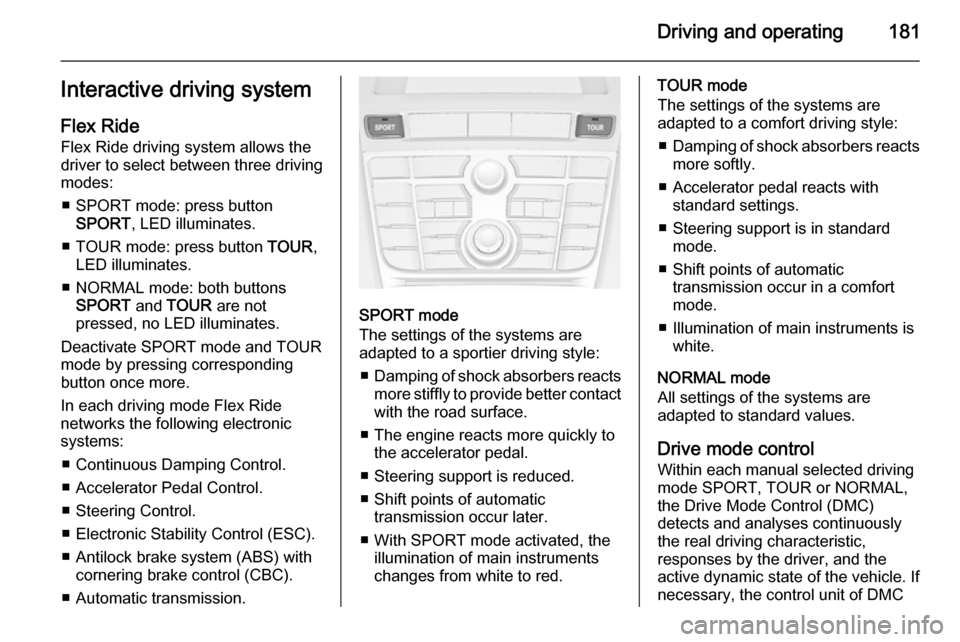
Flex Ride Flex Ride driving system allows the
driver to select between three driving
modes:
■ SPORT mode: press button SPORT , LED illuminates.
■ TOUR mode: press button TOUR,
LED illuminates.
■ NORMAL mode: both buttons SPORT and TOUR are not
pressed, no LED illuminates.
Deactivate SPORT mode and TOUR
mode by pressing corresponding
button once more.
In each driving mode Flex Ride
networks the following electronic systems:
■ Continuous Damping Control.
■ Accelerator Pedal Control.
■ Steering Control.
■ Electronic Stability Control (ESC).
■ Antilock brake system (ABS) with cornering brake control (CBC).
■ Automatic transmission.
SPORT mode
The settings of the systems are
adapted to a sportier driving style:
■ Damping of shock absorbers reacts
more stiffly to provide better contact
with the road surface.
■ The engine reacts more quickly to the accelerator pedal.
■ Steering support is reduced.
■ Shift points of automatic transmission occur later.
■ With SPORT mode activated, the illumination of main instruments
changes from white to red.
TOUR mode
The settings of the systems are
adapted to a comfort driving style:
■ Damping of shock absorbers reacts
more softly.
■ Accelerator pedal reacts with standard settings.
■ Steering support is in standard mode.
■ Shift points of automatic transmission occur in a comfort
mode.
■ Illumination of main instruments is white.
NORMAL mode
All settings of the systems are
adapted to standard values.
Drive mode control
Within each manual selected driving
mode SPORT, TOUR or NORMAL,
the Drive Mode Control (DMC)
detects and analyses continuously
the real driving characteristic,
responses by the driver, and the
active dynamic state of the vehicle. If
necessary, the control unit of DMC