automatic transmission OPEL ASTRA J 2017 Manual user
[x] Cancel search | Manufacturer: OPEL, Model Year: 2017, Model line: ASTRA J, Model: OPEL ASTRA J 2017Pages: 295, PDF Size: 8.23 MB
Page 144 of 295
142Driving and operatingAutomatic Starter Control
This function controls the engine
starting procedure. The driver does
not need to hold the key in position 3.
Once applied, the system will go on
starting automatically until the engine
is running. Because of the checking
procedure, the engine starts running
after a short delay.
Possible reasons for a non-starting
engine:
● Clutch pedal not operated (manual transmission).
● Brake pedal not operated or selector lever not in P or N
(automatic transmission).
● Timeout occurred.
Turbo engine warm-up
Upon start-up, engine available
torque may be limited for a short time, especially when the engine
temperature is cold. The limitation is
to allow the lubrication system to fully
protect the engine.Overrun cut-off
The fuel supply is automatically cut off
during overrun, i.e. when the vehicle
is driven with a gear engaged but
accelerator pedal is released.
Depending on driving conditions, the
overrun cut-off may be deactivated.
Stop-start system The stop-start system helps to save
fuel and to reduce the exhaust
emissions. When conditions allow, it
switches off the engine as soon as the
vehicle is at a low speed or at a
standstill, e.g. at a traffic light or in a
traffic jam. It starts the engine
automatically as soon as the clutch is depressed. A battery sensor ensures
that an Autostop is only performed if
the vehicle battery is sufficiently
charged for a restart.
Activation
The stop-start system is available as
soon as the engine is started, the
vehicle starts-off and the conditions
as stated below in this section are
fulfilled.Deactivation
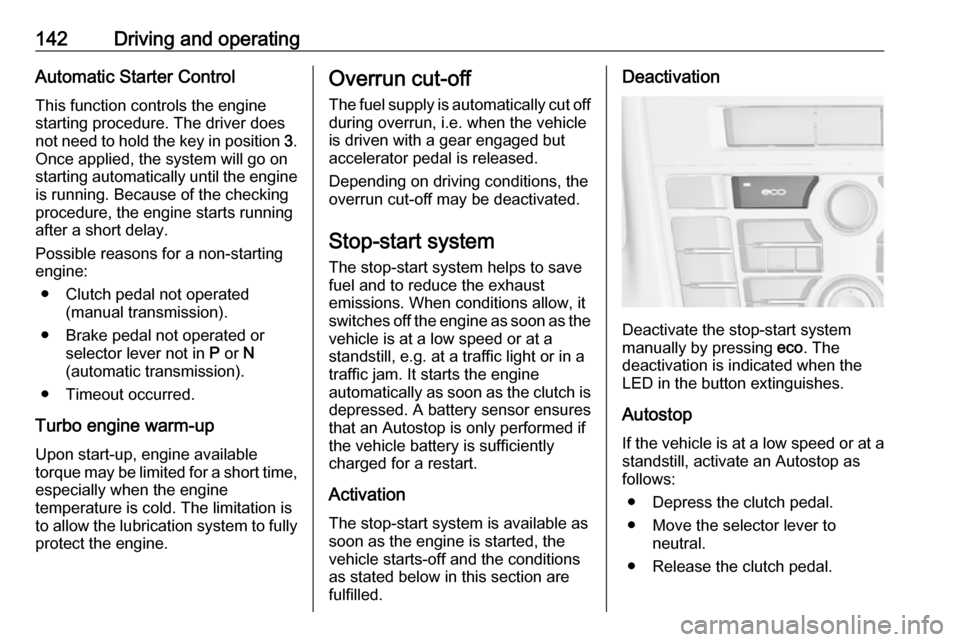
Deactivate the stop-start system
manually by pressing eco. The
deactivation is indicated when the
LED in the button extinguishes.
Autostop If the vehicle is at a low speed or at a
standstill, activate an Autostop as
follows:
● Depress the clutch pedal.
● Move the selector lever to neutral.
● Release the clutch pedal.
Page 147 of 295

Driving and operating145key. Turn the front wheels
towards the kerb.
● Close the windows and the sunroof.
● Remove the ignition key from the ignition switch. Turn the
steering wheel until the
steering wheel lock is felt to
engage.
For vehicles with automatic
transmission, the key can only
be removed when the selector
lever is in position P.
● Lock the vehicle.
● Activate the anti-theft alarm system.
● The engine cooling fans may run
after the engine has been
switched off 3 202.
Caution
After running at high engine
speeds or with high engine loads,
operate the engine briefly at a low load or run in neutral for
approx. 30 seconds before
switching off, in order to protect
the turbocharger.
Note
In the event of an accident with
airbag deployment, the engine is
turned off automatically if the vehicle
comes to a standstill within a certain time.
Engine exhaust9 Danger
Engine exhaust gases contain
poisonous carbon monoxide,
which is colourless and odourless and could be fatal if inhaled.
If exhaust gases enter the interior
of the vehicle, open the windows.
Have the cause of the fault
rectified by a workshop.
Avoid driving with an open load
compartment, otherwise exhaust
gases could enter the vehicle.
Diesel particle filter
The diesel particle filter system filters
harmful soot particles out of the
exhaust gases. The system includes
a self-cleaning function that runs
automatically during driving without
any notification. The filter is cleaned
by periodically burning off the soot
particles at high temperature. This
process takes place automatically
under set driving conditions and may
take up to 25 minutes. Typically it
Page 149 of 295

Driving and operating147can be continued for a short period,
keeping vehicle speed and engine
speed low.Automatic transmission
The automatic transmission permits
automatic gearshifting (automatic
mode) or manual gearshifting
(manual mode).
Manual shifting is possible in manual
mode by tapping the selector lever
3 149.
Transmission display
The mode or selected gear is shown
in the transmission display.
In automatic mode, the driving
programme is indicated by D in the
Driver Information Centre.
R indicates reverse gear.
N indicates neutral position.
P indicates park position.
Midlevel display: in manual mode the
number of the selected gear is
indicated.
Uplevel display: in manual mode, M
and the number of the selected gear
is indicated.
Page 151 of 295

Driving and operating149ParkingApply the parking brake and engage
P .
The ignition key can only be removed
when the selector lever is in position
P .
Manual mode
Move selector lever out of position D
towards the left to select manual
mode M.
Tap selector lever
forwards <:shift to a higher gearbackwards ]:shift to a lower gearThe selected gear is indicated in the
instrument cluster.
If a higher gear is selected when
vehicle speed is too low, or a lower
gear when vehicle speed is too high,
the shift is not executed. This can
cause a message in the Driver
Information Centre.
In manual mode, no automatic
shifting to a higher gear takes place
at high engine revolutions.
Electronic driving programmes
● Following a cold start, the operating temperature
programme increases engine
speed to quickly bring the
catalytic converter to the required
temperature.
● The automatic neutral shift function automatically shifts to
idling when the vehicle is stopped with a forward gear engaged andthe brake pedal is pressed.● When SPORT mode is engaged,
the vehicle shifts at higher engine
speeds (unless cruise control is
on). SPORT mode 3 156.
● Special programmes automatically adapt the shifting
points when driving up inclines or
down hills.
● When starting off in snowy or icy conditions or on other slippery
surfaces, the electronic
transmission control selects a
higher gear automatically.
Kickdown
If the accelerator pedal is pressed down completely in automatic mode, the transmission shifts to a lower gear
depending on engine speed.
Fault
In the event of a fault, control indicator g illuminates. Additionally, a code
number or a vehicle message is
displayed in the Driver Information
Centre. Vehicle messages 3 99.
Page 152 of 295

150Driving and operatingThe transmission no longer shifts
automatically. Continued travel is possible with manual shifting.
Only the highest gear is available.
Depending on the fault, 2nd gear may also be available in manual mode.
Shift only when vehicle is at a
standstill.
Have the cause of the fault remedied
by a workshop.
Interruption of power supply In the event of an interruption of
power supply, the selector lever
cannot be moved out of the P
position. The ignition key cannot be
removed from the ignition switch.
If the vehicle battery is discharged,
start the vehicle using jump leads
3 247.
If the vehicle battery is not the cause
of the fault, release the selector lever.
1. Apply the parking brake.
2. Release the selector lever trim from the centre console at the
front, fold it upwards and rotate it
to the left.
3. Insert a screwdriver into the opening as far as it will go and
move the selector lever out of P or
N . If P or N is engaged again, the
selector lever will be locked in
position again. Have the cause of
the power supply interruption
remedied by a workshop.
4. Mount the selector lever trim onto
the centre console and refit.
Page 155 of 295

Driving and operating153To reduce the operating forces ofthe parking brake, depress the
brake pedal at the same time.
Control indicator R 3 88.
Electric parking brake
Applying when vehicle is stationary
9 Warning
Pull switch m for approx.
one second, the electric parking
brake operates automatically with
adequate force. For maximum
force, e.g. parking with trailer or on
inclines, pull switch m twice.
The electric parking brake is
applied when control indicator m
illuminates 3 88.
The electric parking brake can always
be activated, even if the ignition is off.
Do not operate electric parking brake
system too often without engine
running, as this will discharge the
vehicle battery.
Before leaving the vehicle, check the electric parking brake status. Control
indicator m 3 88.
Releasing
Switch on ignition. Keep brake pedal
depressed and then push switch m.
Drive away function
Vehicles with manual transmission:
Depressing the clutch pedal and then
slightly releasing the clutch pedal and
slightly depressing the accelerator
pedal releases the electric parking
brake automatically. This is not
possible when the switch m is pulled
at the same time.
Vehicles with automatic transmission: Engaging D and then depressing the
accelerator pedal releases the
electric parking brake automatically. This is not possible when the switch
m is pulled at the same time.
Dynamic braking when vehicle is
moving
When the vehicle is moving and the
switch m is kept pulled, the electric
parking brake system will decelerate
the vehicle, but will not apply
statically.
As soon as the switch m is released,
dynamic braking will be stopped.
Fault
Failure mode of electric parking brake
is indicated by control indicator j and
by a code number or a vehicle
message which is displayed in the
Driver Information Centre. Vehicle
messages 3 99.
Page 159 of 295

Driving and operating157Deactivate SPORT mode and TOUR
mode by pressing the corresponding
button once more.
In each driving mode, Flex Ride
networks the following electronic
systems:
● Continuous Damping Control
● Accelerator Pedal Control
● Steering Control
● Electronic Stability Control (ESC)
● Antilock brake system (ABS) with
cornering brake control (CBC)
● Automatic transmissionSPORT mode
The settings of the systems are
adapted to a sportier driving style:
● Damping of shock absorbers reacts more stiffly to providebetter contact with the road
surface.
● The engine reacts more quickly to the accelerator pedal.
● Steering support is reduced.
● Shift points of automatic transmission occur later.
● With SPORT mode activated, the
illumination of main instruments changes from white to red.
TOUR mode
The settings of the systems are
adapted to a comfort driving style:
● Damping of shock absorbers reacts more softly.
● Accelerator pedal reacts with standard settings.
● Steering support is in standard mode.● Shift points of automatictransmission occur in a comfort
mode.
● Illumination of main instruments is white.
NORMAL mode
All settings of the systems are
adapted to standard values.
Drive mode control Within each manual selected driving
mode SPORT, TOUR or NORMAL,
the Drive Mode Control (DMC)
detects and analyses continuously the real driving characteristic,
responses by the driver, and the
active dynamic state of the vehicle. If
necessary, the control unit of DMC
automatically changes the settings
within the selected driving mode or,
when recognising greater variations,
the driving mode is changed for the
length of variation.
If, for example, NORMAL mode is
selected and DMC detects a sporty
driving behaviour, DMC changes
several settings of the Normal mode
Page 161 of 295

Driving and operating159NORMAL mode
In NORMAL mode, when neither
SPORT nor OPC is pressed, all
settings of the systems are adapted
to standard values.
SPORT mode
The settings of the systems are
adapted to a sportier driving style.
OPC mode
The drive dynamic characteristics are
adapted to high performance
settings.
In this mode, the illumination of main
instruments is switched to red.
Personalised settings in the OPC mode
The driver can select the functions of
the OPC mode when OPC is pressed.
These settings can be changed in the Settings menu in the Info-Display.
Vehicle personalisation 3 105.Driver assistance
systems9 Warning
Driver assistance systems are
developed to support the driver
and not to replace the driver's
attention.
The driver accepts full
responsibility when driving the
vehicle.
When using driver assistance
systems, always take care
regarding the current traffic
situation.
Cruise control
The Cruise control can store and
maintain speeds of approx. 30 to
200 km/h. Deviations from the stored
speeds may occur when driving uphill or downhill.
For safety reasons, the cruise control cannot be activated until the brake
pedal has been operated once.
Activating in first gear is not possible.
Do not use the cruise control if it is not advisable to maintain a constant
speed.
With automatic transmission, only
activate cruise control in automatic
mode.
Control indicator m 3 92.
Switching on
Press m; control indicator m in
instrument cluster illuminates white.
Activation
Accelerate to the desired speed and
turn thumb wheel to SET/-; the
current speed is stored and
Page 167 of 295
Driving and operating165
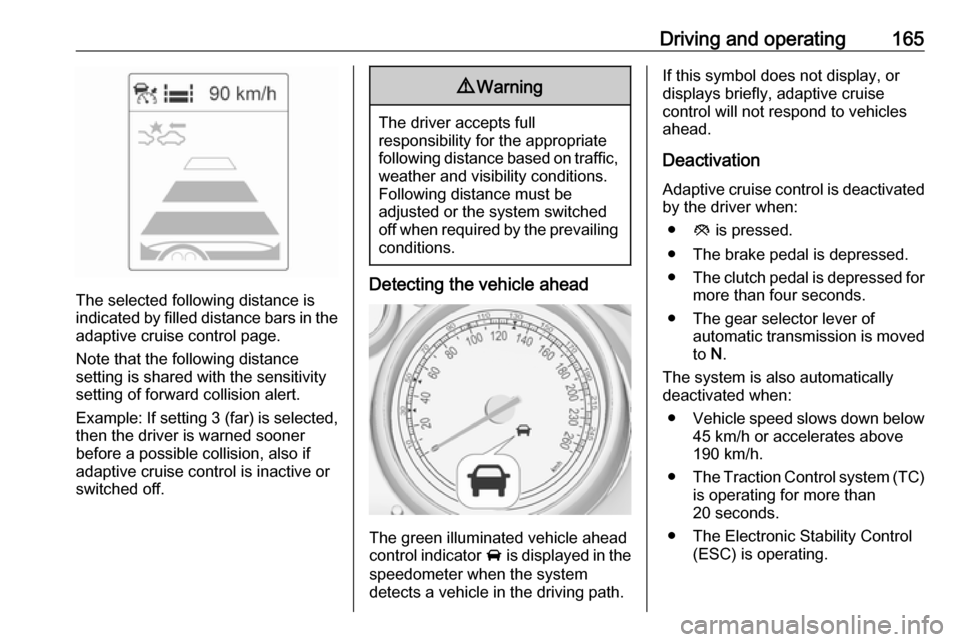
The selected following distance is
indicated by filled distance bars in the
adaptive cruise control page.
Note that the following distance
setting is shared with the sensitivity
setting of forward collision alert.
Example: If setting 3 (far) is selected,
then the driver is warned sooner
before a possible collision, also if
adaptive cruise control is inactive or
switched off.
9 Warning
The driver accepts full
responsibility for the appropriate
following distance based on traffic, weather and visibility conditions.
Following distance must be
adjusted or the system switched
off when required by the prevailing
conditions.
Detecting the vehicle ahead
The green illuminated vehicle ahead
control indicator A is displayed in the
speedometer when the system
detects a vehicle in the driving path.
If this symbol does not display, or
displays briefly, adaptive cruise
control will not respond to vehicles
ahead.
Deactivation Adaptive cruise control is deactivatedby the driver when:
● y is pressed.
● The brake pedal is depressed.
● The clutch pedal is depressed for
more than four seconds.
● The gear selector lever of automatic transmission is moved
to N.
The system is also automatically
deactivated when:
● Vehicle speed slows down below
45 km/h or accelerates above
190 km/h.
● The Traction Control system (TC)
is operating for more than
20 seconds.
● The Electronic Stability Control (ESC) is operating.
Page 235 of 295

Vehicle care233
A detected low tyre pressure
condition is indicated by illumination
of control indicator w 3 91.
If w illuminates, stop as soon as
possible and inflate the tyres as
recommended 3 271.
If w flashes for 60-90 seconds and
then illuminates continuously, there is
a fault in the system. Consult a
workshop.
After inflating, driving may be
required to update the tyre pressure
values in the Driver Information
Centre. During this time w may
illuminate.
If w illuminates at lower temperatures
and extinguishes after some driving,
this could be an indicator for
approaching a low tyre pressure
condition. Check tyre pressure.
Vehicle messages 3 99.
If the tyre pressure must be reduced
or increased, switch off ignition.
Only mount wheels with pressure
sensors, otherwise the tyre pressure
will not be displayed and w
illuminates continuously.
A spare wheel or temporary spare
wheel is not equipped with pressure
sensors. The tyre pressure
monitoring system is not operational
for these wheels. Control indicator w
illuminates. For the further three
wheels the system remains
operational.
The use of commercially available
liquid tyre repair kits can impair the
function of the system. Factory-
approved repair kits can be used.
Operating electronic devices or being close to facilities using similar wave
frequencies could disrupt the tyre
pressure monitoring system.Each time the tyres are replaced, tyre pressure monitoring system sensors
must be dismounted and serviced. For the screwed sensor: replace
valve core and sealing ring. For
clipped sensor: replace complete
valve stem.
Vehicle loading status Adjust tyre pressure to load condition
according to the tyre information label or tyre pressure chart 3 271, and
select the appropriate setting in the Tyre load menu in the Driver
Information Centre 3 93. This setting
is the reference for the tyre pressure
warnings.
The Tyre Load menu only appears if
the vehicle is in a standstill and the
parking brake is applied. On vehicles
with automatic transmission, the
selector lever must be in P.