Pan OPEL ASTRA J 2017 User Guide
[x] Cancel search | Manufacturer: OPEL, Model Year: 2017, Model line: ASTRA J, Model: OPEL ASTRA J 2017Pages: 295, PDF Size: 8.23 MB
Page 74 of 295

72Storage● Use the four hooks on thesidewalls of the load
compartment for hanging up
carrier bags. Maximum load:
5 kg per hook.
● Secure loose objects in the load compartment to prevent themfrom sliding.
● When transporting objects in the load compartment, the backrests
of the rear seats must not be angled forward.
● Do not allow the load to protrude above the upper edge of the
backrests.
● Do not place any objects on the load compartment cover or theinstrument panel, and do notcover the sensor on top of the
instrument panel.
● The load must not obstruct the operation of the pedals, parking
brake and selector lever, or
hinder the freedom of movement of the driver. Do not place any
unsecured objects in the interior.
● Do not drive with an open load compartment.9Warning
Always make sure that the load in
the vehicle is securely stowed.
Otherwise objects can be thrown
around inside the vehicle and
cause personal injury or damage
to the load or car.
● The payload is the difference between the permitted gross
vehicle weight (see identification
plate 3 257) and the EC kerb
weight.
To calculate the payload, enter
the data for your vehicle in the
weights table at the front of this
manual.
The EC kerb weight includes
weights for the driver (68 kg),
luggage (7 kg) and all fluids (fuel
tank 90% full).
Optional equipment and
accessories increase the kerb
weight.
● Driving with a roof load increases
the sensitivity of the vehicle to
cross-winds and has a
detrimental effect on vehicle
handling due to the vehicle's
higher centre of gravity.
Distribute the load evenly and secure it properly with retaining
straps. Adjust the tyre pressure
and vehicle speed according to
the load conditions. Check and
retighten the straps frequently.
Do not drive faster than
120 km/h.
The permissible roof load is
75 kg. The roof load is the
combined weight of the roof rack and the load.
Page 99 of 295

Instruments and controls97
●Economy Trend : Displays the
average consumption
development over a distance of
50 km. Filled segments display
the consumption in 5 km steps
and shows the effect of
topography or driving behaviour
on fuel consumption.
Performance Menu
Press MENU to select the
Performance Menu , or select C on
Uplevel-Combi-Display.
Turn the adjuster wheel to select a
submenu. Press SET/CLR to confirm.
Submenus are: ● Acceleration : Display of current
acceleration in all directions.
● Lap Timer : Display of lap times,
top speed, average speed and
average time. Follow the
instructions given in the
submenu.
● Coolant Temp. : Display of
coolant temperature.
● Battery Volt. : Display of vehicle
battery voltage.
Graphic-Info-Display, Colour-Info-Display
Depending on the vehicle
configuration the vehicle has a
Graphic-Info-Display or Colour-Info-
Display. The Info-Display is located in
the instrument panel above the
Infotainment system.
Graphic-Info-Display
Page 118 of 295
116LightingLightingExterior lighting.......................... 116
Light switch .............................. 116
Automatic light control .............117
High beam ............................... 118
High beam assist .....................118
Headlight flash ......................... 118
Headlight range adjustment ....119
Headlights when driving abroad .................................... 119
Daytime running lights .............120
Adaptive forward lighting .........120
Hazard warning flashers ..........123
Turn and lane-change signals . 123
Front fog lights ......................... 124
Rear fog lights ......................... 124
Parking lights ........................... 124
Reversing lights .......................125
Misted light covers ...................125
Interior lighting ........................... 125
Instrument panel illumination control ..................................... 125
Interior lights ............................ 125
Reading lights .......................... 126
Sunvisor lights ......................... 126Lighting features ........................127
Centre console lighting ............127
Entry lighting ............................ 127
Exit lighting .............................. 127
Battery discharge protection ....128Exterior lighting
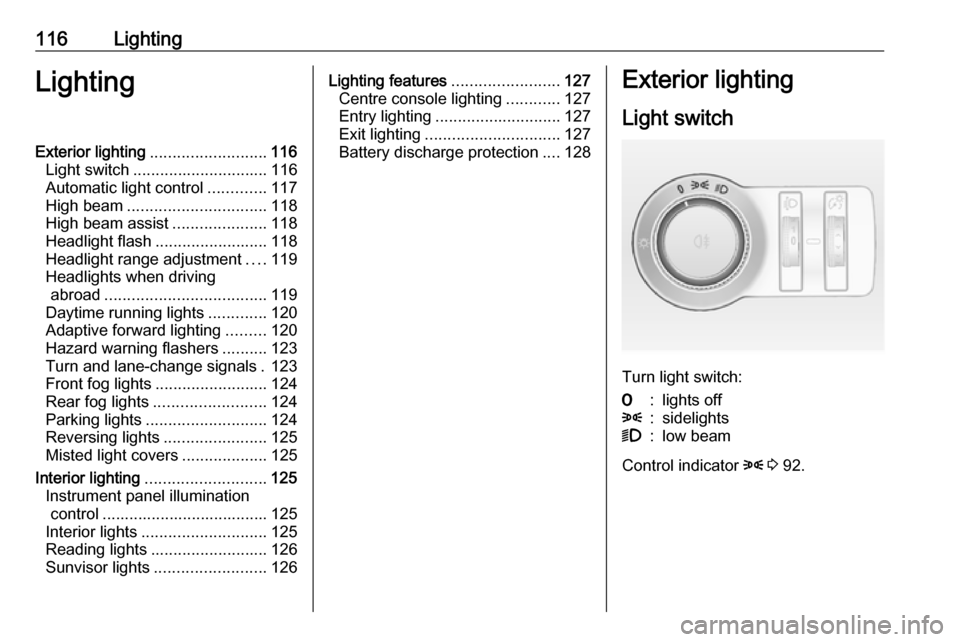
Light switch
Turn light switch:
7:lights off8:sidelights9:low beam
Control indicator 8 3 92.
Page 127 of 295

Lighting125Reversing lights
The reversing light comes on when
the ignition is on and reverse gear is
selected.
Misted light covers The inside of the light housing may
mist up briefly in poor, wet and cold weather conditions, in heavy rain or
after washing. The mist disappears
quickly by itself; to help switch on the
headlights.Interior lighting
Instrument panel
illumination control
Brightness of the following lights can
be adjusted when the exterior lights
are on:
● instrument panel illumination
● Info-Display
● illuminated switches and operation elements
Turn thumb wheel A and hold until
the desired brightness is obtained.
On vehicles with light sensor, the
brightness can only be adjusted when
the exterior lights are on and the light sensor detects night conditions.
Interior lights
During entry and exit of the vehicle,
the front and rear courtesy lights
automatically switch on and then off
after a delay.
Note
In the event of an accident with
airbag deployment the courtesy
lights are turned on automatically.
Front courtesy light
Page 128 of 295

126LightingOperate rocker switch:w:automatic switching on
and offpress u:onpress v:off
Courtesy light on version with
panorama roof
Left and right lamps are separately
switchable.
Operate rocker switches:
centre posi‐
tion:automatic switching
on and offpress I:onpress 0:offRear courtesy lights
Illuminates in conjunction with the
front courtesy light depending on
rocker switch position.
Press s or t to switch on manually.
Reading lights
Operated by pressing s and t in
front and rear courtesy lights.
Sunvisor lights Illuminates when the cover is opened.
Page 129 of 295

Lighting127Lighting features
Centre console lighting Spotlight incorporated in the interior
lighting comes on when headlights
are switched on.
Entry lighting
Welcome lighting The following lights are switched on
for a short time by unlocking the
vehicle with the radio remote control:
● headlights
● tail lights
● number plate lights
● instrument panel light
● interior lights
● door and console lights
● puddle lights
Some functions work only in the dark
and facilitates locating the vehicle.
The lighting switches off immediately
when the ignition key is turned to
position 1 3 141.Activation or deactivation of this
function can be changed in the
Settings menu in the Info-Display.
Vehicle personalisation 3 105.
The settings can be saved for the key
being used 3 24.
The following lights will additionally
switch on when the driver's door is
opened:
● illumination of some switches
● Driver Information Centre
● door pocket lights
● console lights
Exit lighting The following lights switch on if the
key is removed from the ignition
switch:
● interior lights
● instrument panel light (only when
it is dark)
● door lights
● puddle lights
They will switch off automatically after
a delay and will be activated again if
the driver's door is opened.Path lighting
Headlights, tail lights and number
plate lights illuminate the surrounding area for an adjustable time after
leaving the vehicle.
Activating
1. Switch off ignition.
2. Remove ignition key.
3. Open driver's door.
4. Pull turn signal lever.
5. Close driver's door.
If the driver's door is not closed the
lights switch off after two minutes.
Page 133 of 295

Climate control131If no cooling or drying is required,
switch off the cooling system for fuel
saving reasons. Activated cooling
may inhibit Autostops.
Stop-start system 3 142.
Air recirculation system 4
Press 4 to activate air recirculation
mode. The LED in the button
illuminates to indicate activation.
Press 4 again to deactivate air
recirculation mode.
9 Warning
The exchange of fresh air is
reduced in air recirculation mode.
In operation without cooling the air humidity increases, so the
windows may mist up from inside.
The quality of the passenger
compartment air deteriorates,
which may cause the vehicle
occupants to feel drowsy.
In warm and very humid ambient air conditions, the windscreen may mist
up from outside when cold air is
directed towards it. If windscreen
mists up from outside, activate
windscreen wiper and deactivate s.
Maximum cooling
Briefly open the windows so that hot
air can disperse quickly.
● Switch on cooling n.
● Air circulation system 4 on.
● Press air distribution switch M.
● Set temperature control to coldest level.
● Set fan speed to highest level.
● Open all vents.
Page 138 of 295

136Climate controlrestart will be requested by the
climate control system during an
Autostop. Exception: defrost system
is activated and outside temperature
above 0 °C.
The display will indicate ACON when
cooling is activated or ACOFF when
the cooling is deactivated.
Activation or deactivation of cooling
operation after engine start can be
changed in the Settings menu in the
Info-Display. Vehicle personalisation
3 105.
Stop-start system 3 142.
Air recirculation mode 4Press 4 to activate the air
recirculation mode. The LED in the
button illuminates to indicate
activation.
Press 4 again to deactivate
recirculation mode.9 Warning
The exchange of fresh air is
reduced in air recirculation mode.
In operation without cooling the air humidity increases, so the
windows may mist up from inside.
The quality of the passenger
compartment air deteriorates,
which may cause the vehicle
occupants to feel drowsy.
In warm and very humid ambient air conditions, the windscreen may mist
up from outside when cold air is
directed towards it. If windscreen
mists up from outside, activate
windscreen wiper and deactivate s.
Basic settings
Some settings can be changed in the Settings menu in the Info-Display.
Vehicle personalisation 3 105.
Auxiliary heater
Air heater Quickheat is an electric auxiliary air
heater which automatically warms up
the passenger compartment more
quickly.
Page 176 of 295

174Driving and operating9Warning
Active emergency braking is not
designed to apply strong
autonomous braking or to avoid automatically a collision. It is
designed to reduce the vehicle
speed before collision. It may not
react on stopped vehicles,
pedestrians or animals. After a
sudden lane change, the system
needs a certain time to detect the
next preceding vehicle.
The complete attention of the
driver is always required while
driving. The driver shall always be ready to take action and apply the brakes and steer to avoid
collisions. The system is designed
to work with all occupants wearing their seat belts.
System limitations
The active emergency braking has
limited or no function during rain,
snow or heavy dirt, as the radar
sensor can be covered by a water
film, dust, ice or snow. In case of
sensor blockage, clean the sensor
cover.
In some seldom cases the active
emergency braking system may
provide a short automatic braking in
situations that seem to be
unnecessary, for instance due to
traffic signs in a curve or due to
vehicles in another lane. This is
acceptable operation, the vehicle
does not need service. Firmly apply
the accelerator pedal to override the
automatic braking.
Settings
Settings can be changed in the Auto
collision preparation menu in the
vehicle personalisation, 3 105.
Fault
In the event of a system service
requirement, a message is displayed
in the Driver Information Centre.
If the system does not work as it
should do, vehicle messages are
displayed in the Driver Information
Centre.
Vehicle messages 3 99.
Page 191 of 295

Driving and operating189Caution
Use of fuel that does not comply toEN 590 or similar can lead to
engine powerloss, increased wear
or engine damage and may affect
your warranty.
Do not use marine diesel oils, heating
oils, Aquazole and similar diesel-
water emulsions. Diesel fuels must
not be diluted with fuels for petrol
engines.
Fuel for liquid gas operation Liquid gas is known as LPG
(Liquefied Petroleum Gas) or under its French name GPL (Gaz de Pétrole
Liquéfié). LPG is also known as
Autogas.
LPG consists mainly of propane and
butane. The octane rating is between 105 and 115, depending on the
butane proportion. LPG is stored
liquid at around 5 - 10 bar pressure.
The boiling point depends on the
pressure and mixing ratio. At ambient pressure, it is between -42 °C (pure
propane) and -0.5 °C (pure butane).Caution
The system works at an ambient
temperature of approx. -8 °C to
100 °C.
Full function of the LPG system can
only be guaranteed with liquid gas
which complies with the minimum
requirements of DIN EN 589.
Fuel selector
Pressing LPG switches between
petrol and liquid gas operation as
soon as the required parameters (coolant temperature, gas
temperature and minimum engine
speed) have been reached. The
requirements are usually fulfilled after
around 60 seconds (depending on
exterior temperature) and the first firm press on the accelerator. The LED
status shows the current operating
mode.1 off:petrol operation1 flashes:checking conditions
for fuel transition to
liquid gas operation.
Illuminates if
conditions are fulfilled.1 illumi‐
nates:liquid gas operation1 flashes 5
times and
extin‐
guishes:liquid gas tank is
empty or failure in
liquid gas system. A
message is displayed
in the Driver
Information Centre.
If the fuel tank is empty, the engine
will not start.