park assist OPEL ASTRA J 2018.5 Manual user
[x] Cancel search | Manufacturer: OPEL, Model Year: 2018.5, Model line: ASTRA J, Model: OPEL ASTRA J 2018.5Pages: 295, PDF Size: 8.4 MB
Page 110 of 295

108Instruments and controls●Comfort settings
Chime volume : Changes the
volume of warning chimes.
Personalization by driver :
Activates or deactivates the
personalisation function.
Rear auto wipe in reverse :
Activates or deactivates
automatic switching on of the
rear window wiper when reverse gear is engaged.
● Park assist / Collision detection
Park assist : Activates or
deactivates the ultrasonic
parking assist. Activation is
selectable with or without
attached trailer coupling.
Auto collision preparation :
Activates or deactivates the
automatic brake functionality of
the vehicle in the event of
imminent collision danger. The
following is selectable: the
system will take over brake
control, warn by chimes only or is
deactivated.Side blind zone alert : Changes
the settings for the side blind spot
alert system.
● Exterior ambient lighting
Duration upon exit of vehicle :
Activates or deactivates and
changes the duration of exit
lighting.
Exterior lighting by unlocking :
Activates or deactivates the
welcome lighting.
● Power door locks
Auto door lock : Activates or
deactivates the automatic door
unlocking function after switching off ignition. Activates or
deactivates the automatic door
locking function after driving-off.
Stop door lock if door open :
Activates or deactivates the
automatic door locking function
while a door is open.
Delayed door lock : Activates or
deactivates the delayed door
locking function.
● Remote locking, unlocking,
startingRemote unlock feedback :
Activates or deactivates the
hazard warning flasher feedback
whilst unlocking.
Remote door unlock : Changes
the configuration to unlock only
the driver's door or the whole
vehicle whilst unlocking.
Auto relock doors : Activates or
deactivates the automatic relock
function after unlocking without
opening the vehicle.
● Restore factory settings
Restore factory settings : Resets
all settings to the default settings.
Settings in the Colour-Info-
Display
Navi 950/Navi 650/CD 600Press CONFIG on the Infotainment
system faceplate to enter the
Configuration menu.
Turn the multifunction knob to scroll
upwards or downwards in the list.
Press the multifunction knob
(Navi 950 / Navi 650: press the outer
ring) to select a menu item.
Page 112 of 295

110Instruments and controlsAuto Rear Demist: Activates the
heated rear window
automatically.
● Comfort and Convenience
Chime Volume : Changes the
volume of warning chimes.
Personalisation by Driver :
Activates or deactivates the
personalisation function.
Auto Reverse Gear Wiper :
Activates or deactivates
automatic switching on of the
rear window wiper when reverse gear is engaged.
● Collision Detection Systems
Park Assist : Activates or
deactivates the ultrasonic
sensors. Activation is selectable
with or without attached trailer
coupling.
Automatic Collision Preparation :
Activates or deactivates the
automatic brake functionality of
the vehicle in the event of
imminent collision danger. The
following is selectable: the
system will take over brakecontrol, warn by chimes only or is
deactivated completely.
Side Blind Zone Alert : Activates
or deactivates the side blind spot
alert system.
● Lighting
Vehicle Locator Lights : Activates
or deactivates the entry lighting.
Exit Lighting : Activates or
deactivates and changes the
duration of exit lighting.
● Power Door Locks
Open Door Anti Lock Out :
Activates or deactivates the
automatic door locking function
while a door is open.
Auto Door Lock : Activates or
deactivates the automatic door unlocking function after switching off ignition. Activates or
deactivates the automatic door
locking function after driving-off.
Delay Door Lock : Activates or
deactivates the delayed door
locking function.● Remote Lock/Unlock/Start
Remote Lock Feedback :
Activates or deactivates the
hazard warning flasher feedback whilst locking.
Remote Unlock Feedback :
Activates or deactivates the
hazard warning flasher feedback
whilst unlocking.
Remote Door Unlock : Changes
the configuration to unlock only
the driver's door or the whole
vehicle whilst unlocking.
Relock Remotely Unlocked
Doors : Activates or deactivates
the automatic relock function
after unlocking without opening
the vehicle.
● Return to Factory Settings? :
Resets all settings to the default
settings.
Page 119 of 295

Lighting117LightingExterior lighting.......................... 117
Light switch .............................. 117
Automatic light control .............118
High beam ............................... 119
High beam assist .....................119
Headlight flash ......................... 119
Headlight range adjustment ....120
Headlights when driving abroad .................................... 120
Daytime running lights .............121
Adaptive forward lighting .........121
Hazard warning flashers ..........124
Turn lights ................................ 124
Front fog lights ......................... 125
Rear fog lights ......................... 125
Parking lights ........................... 125
Reversing lights .......................126
Misted light covers ...................126
Interior lighting ........................... 126
Instrument panel illumination control ..................................... 126
Interior lights ............................ 126
Reading lights .......................... 127
Sunvisor lights ......................... 127Lighting features ........................128
Centre console lighting ............128
Entry lighting ............................ 128
Exit lighting .............................. 128
Battery discharge protection ....129Exterior lighting
Light switch
Turn light switch:
7:lights off8:sidelights9:low beam
Control indicator 8 3 93.
Page 142 of 295

140Driving and operatingDriving and
operatingDriving hints ............................... 141
Control of the vehicle ...............141
Steering ................................... 141
Starting and operating ...............141
New vehicle running-in ............141
Ignition switch positions ...........142
Retained power off ..................142
Starting the engine ..................142
Overrun cut-off ........................ 143
Stop-start system ....................143
Parking .................................... 145
Engine exhaust .......................... 146
Exhaust filter ............................ 146
Catalytic converter ...................148
Automatic transmission ..............148
Transmission display ...............148
Selector lever .......................... 149
Manual mode ........................... 150
Electronic driving programmes 150
Fault ........................................ 151
Interruption of power supply ....151
Manual transmission ..................152Brakes........................................ 153
Antilock brake system .............153
Parking brake .......................... 154
Brake assist ............................. 155
Hill start assist ......................... 155
Ride control systems .................156
Traction Control system ..........156
Electronic Stability Control ......156
Interactive driving system ........158
Driver assistance systems .........160
Cruise control .......................... 160
Speed limiter ........................... 162
Adaptive cruise control ............163
Forward collision alert .............170
Following distance indication ...173
Active Emergency Braking ......174
Parking assist .......................... 176
Side blind spot alert .................183
Traffic sign assistant ................184
Lane departure warning ..........188
Fuel ............................................ 189
Fuel for petrol engines .............189
Fuel for diesel engines ............190
Fuel for liquid gas operation ....191
Refuelling ................................ 191
Trailer hitch ................................ 195
General information .................195
Driving characteristics and towing tips .............................. 195Trailer towing........................... 195
Towing equipment ...................196
Trailer stability assist ...............199
Page 143 of 295

Driving and operating141Driving hints
Control of the vehicle
Never coast with engine not
running (except during Autostop)
Many systems will not function in this
situation (e.g. brake servo unit, power steering). Driving in this manner is a
danger to yourself and others. All
systems function during an Autostop,
but there will be a controlled reduction
in power steering assist and vehicle
speed is reduced.
Stop-start system 3 143.
Idle boost
If charging of the vehicle battery is
required due to battery condition, the
power output of the generator must be increased. This will be achieved by an idle boost which may be audible.
A message is displayed in the Driver Information Centre.Pedals
To ensure the pedal travel is
uninhibited, there must be no mats in the area of the pedals.
Use only floor mats which fit properly and are fixed by the retainers on the
driver's side.
Steering If power steering assist is lost
because the engine stops or due to a
system malfunction, the vehicle can
be steered but may require increased
effort.
Control indicator c 3 90.Caution
Vehicles equipped with hydraulic
power steering:
If the steering wheel is turned until it reaches the end of its travel, and
is held in that position for more
than 15 seconds, damage may
occur to the power steering
system and there may be loss of
power steering assist.
Starting and operating
New vehicle running-in
Do not brake unnecessarily hard for
the first few journeys.
During the first drive, smoke may
occur because of wax and oil
evaporating off the exhaust system.
Park the vehicle in the open for a
while after the first drive and avoid
inhaling the fumes.
During the running-in period fuel and engine oil consumption may be
higher and the cleaning process of the exhaust filter may take place more
often. Autostop may be inhibited to
allow for charging the battery.
Exhaust filter 3 146.
Page 157 of 295

Driving and operating155brake automatically. This is not
possible when the switch m is pulled
at the same time.
Vehicles with automatic transmission:
Engaging D and then depressing the
accelerator pedal releases the
electric parking brake automatically.
This is not possible when the switch
m is pulled at the same time.
Dynamic braking when vehicle is
moving
When the vehicle is moving and the
switch m is kept pulled, the electric
parking brake system will decelerate the vehicle, but will not apply
statically.
As soon as the switch m is released,
dynamic braking will be stopped.
Fault
Failure mode of electric parking brake
is indicated by control indicator j and
by a code number or a vehicle
message which is displayed in the
Driver Information Centre. Vehicle
messages 3 100.Apply electric parking brake: pull and
hold the switch m for more than five
seconds . If control indicator m
illuminates, electric parking brake is
applied.
Release electric parking brake: push
and hold the switch m for more than
two seconds. If control indicator m
extinguishes, electric parking brake is
released.
Control indicator m flashes: electric
parking brake is not fully applied or released. When continuously
flashing, release electric parking
brake and retry applying.
Brake assist
If the brake pedal is depressed
quickly and forcefully, maximum
brake force is automatically applied
(full braking).
Maintain steady pressure on the
brake pedal for as long as full braking
is required. Maximum brake force is
automatically reduced when the
brake pedal is released.Hill start assist
The system helps prevent unintendedmovement when driving away on
inclines.
When releasing the brake pedal after
stopping on an incline, the brakes
remain on for a further two seconds.
The brakes release automatically as
soon as the vehicle begins to
accelerate.
The hill start assist is not active during
an Autostop.
Page 178 of 295
176Driving and operatingParking assist
Rear parking assist9 Warning
The driver bears full responsibility
for the parking manoeuvre.
Always check the surrounding
area while reversing and using the rear parking assist system.
The rear parking assist makes
parking easier by measuring the
distance between the vehicle and
rear obstacles. It informs and warns
the driver by giving acoustic signals.
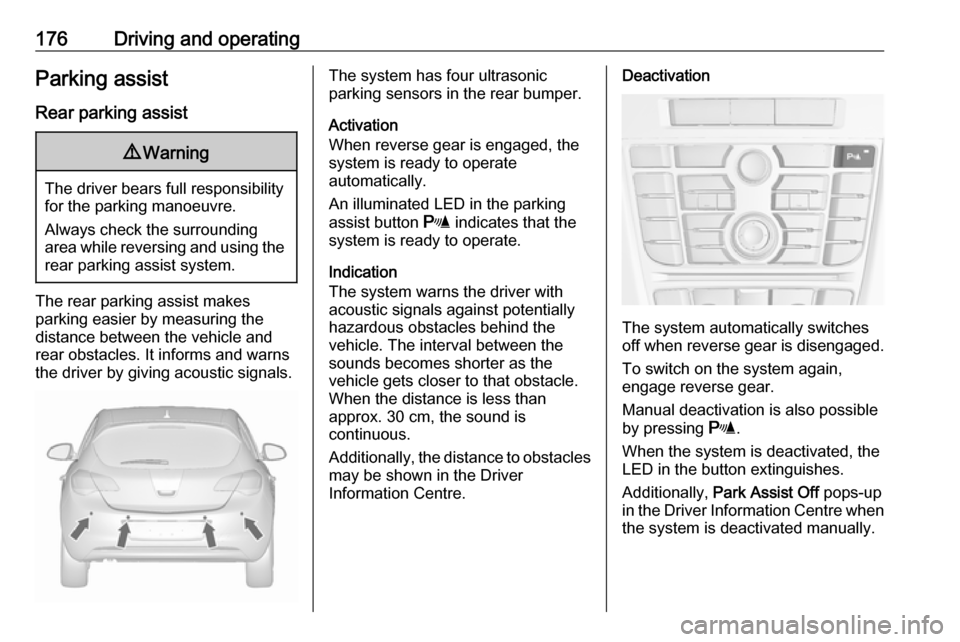
The system has four ultrasonic
parking sensors in the rear bumper.
Activation
When reverse gear is engaged, the
system is ready to operate
automatically.
An illuminated LED in the parking
assist button r indicates that the
system is ready to operate.
Indication
The system warns the driver with
acoustic signals against potentially
hazardous obstacles behind the
vehicle. The interval between the
sounds becomes shorter as the
vehicle gets closer to that obstacle.
When the distance is less than
approx. 30 cm, the sound is
continuous.
Additionally, the distance to obstacles may be shown in the Driver
Information Centre.Deactivation
The system automatically switches
off when reverse gear is disengaged.
To switch on the system again,
engage reverse gear.
Manual deactivation is also possible by pressing r.
When the system is deactivated, the
LED in the button extinguishes.
Additionally, Park Assist Off pops-up
in the Driver Information Centre when
the system is deactivated manually.
Page 179 of 295
Driving and operating177Fault
In the event of a fault in the system or
if the system does not work due to
temporary conditions, e.g. ice
covered sensors, control indicator
r illuminates or a message is
displayed in the Driver Information
Centre.
Vehicle messages 3 100.
Control indicator r 3 91.
Front-rear parking assist9 Warning
The driver bears full responsibility
for the parking manoeuvre.
Always check the surrounding
area when driving backwards or
forwards while using parking
assist system.
The front-rear parking assist
measures the distance between the
vehicle and obstacles in front and
behind the vehicle. The system gives acoustic signals and display
messages.
The system has four ultrasonic
parking sensors each in the rear and
front bumper.
It uses two different acoustic warning
signals for the front and rear
monitoring areas, each with a
different tone frequency. The signal
for front obstacles sounds via the
front speakers, for rear obstacles it
sounds from the rear speakers.
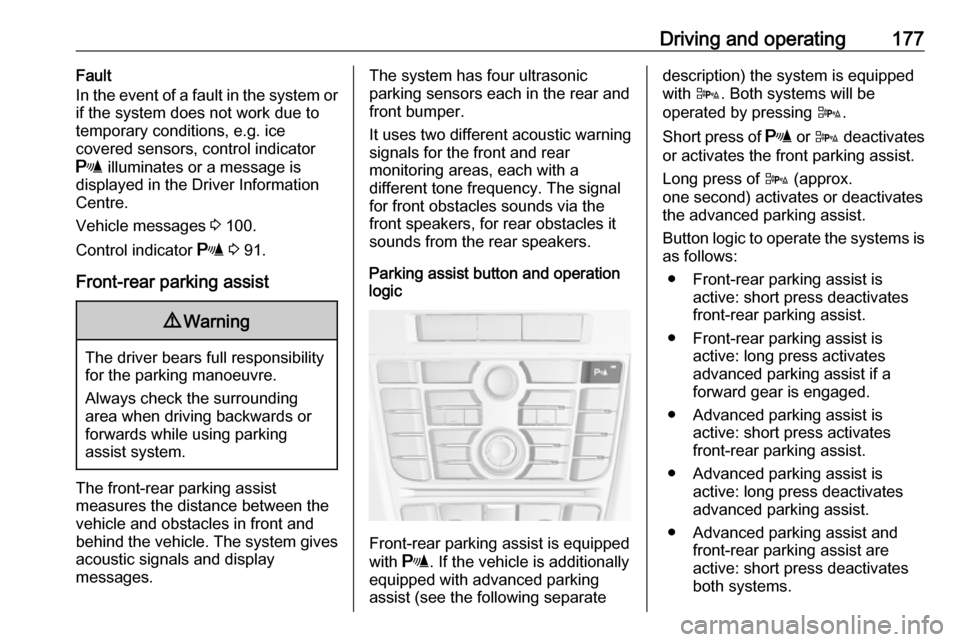
Parking assist button and operation
logic
Front-rear parking assist is equipped
with r. If the vehicle is additionally
equipped with advanced parking
assist (see the following separate
description) the system is equipped
with D. Both systems will be
operated by pressing D.
Short press of r or D deactivates
or activates the front parking assist.
Long press of D (approx.
one second) activates or deactivates
the advanced parking assist.
Button logic to operate the systems is as follows:
● Front-rear parking assist is active: short press deactivates
front-rear parking assist.
● Front-rear parking assist is active: long press activates
advanced parking assist if a
forward gear is engaged.
● Advanced parking assist is active: short press activates
front-rear parking assist.
● Advanced parking assist is active: long press deactivatesadvanced parking assist.
● Advanced parking assist and front-rear parking assist are
active: short press deactivates
both systems.
Page 180 of 295
178Driving and operatingActivation
When reverse gear is engaged, the
front and rear parking assist is ready
to operate.
The front parking assist is also
activated automatically at a speed up to 11 km/h.
An illuminated LED in the parking
assist button r or D indicates that
the system is ready to operate.
If the vehicle exceeds a speed of
11 km/h, the front parking assist is
deactivated. The front parking assist
is always reactivated when vehicle
speed drops below 11 km/h.
Indication
The system warns the driver with
acoustic signals against potentially
hazardous obstacles behind and in
front of the vehicle. Depending on
which side of the vehicle is closer to
an obstacle, you will hear acoustic warning signals on the respective
side of the vehicle. The interval
between the sounds becomes shorter as the vehicle gets closer to thatobstacle. When the distance is less
than approx. 30 cm, the sound is
continuous.
Additionally, the distance to obstacles
may be shown in the Driver
Information Centre 3 94.
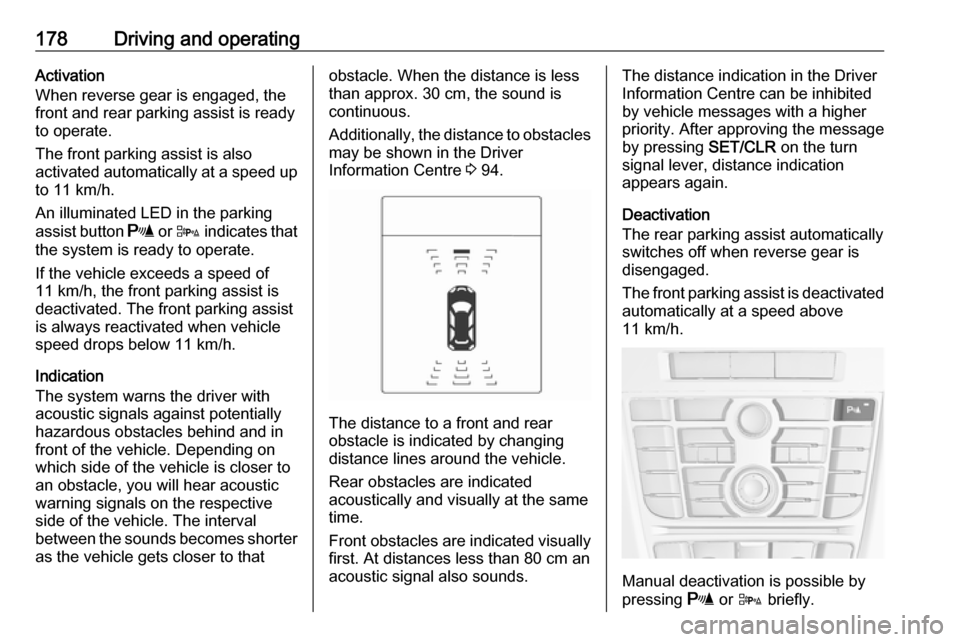
The distance to a front and rear
obstacle is indicated by changing
distance lines around the vehicle.
Rear obstacles are indicated
acoustically and visually at the same
time.
Front obstacles are indicated visually
first. At distances less than 80 cm an
acoustic signal also sounds.
The distance indication in the Driver
Information Centre can be inhibited
by vehicle messages with a higher
priority. After approving the message
by pressing SET/CLR on the turn
signal lever, distance indication
appears again.
Deactivation
The rear parking assist automatically
switches off when reverse gear is
disengaged.
The front parking assist is deactivated
automatically at a speed above
11 km/h.
Manual deactivation is possible by
pressing r or D briefly.
Page 181 of 295
Driving and operating179When the system is deactivated, the
LED in the button extinguishes.
Additionally, Park Assist Off pops-up
in the Driver Information Centre when
the system is deactivated manually.
After a manual deactivation, the front
parking assist is activated again if
r or D is pressed or if reverse
gear is engaged.
Fault
In the event of a fault in the system or if the system does not work due to
temporary conditions, e.g. ice
covered sensors, control indicator
r illuminates or a message is
displayed in the Driver Information
Centre.
Vehicle messages 3 100.
Control indicator r 3 91.Advanced parking assist9 Warning
The driver bears full responsibility
for accepting the parking slot
suggested by the system and the
parking manoeuvre.
Always check the surrounding
area in all directions when using
advanced parking assist.
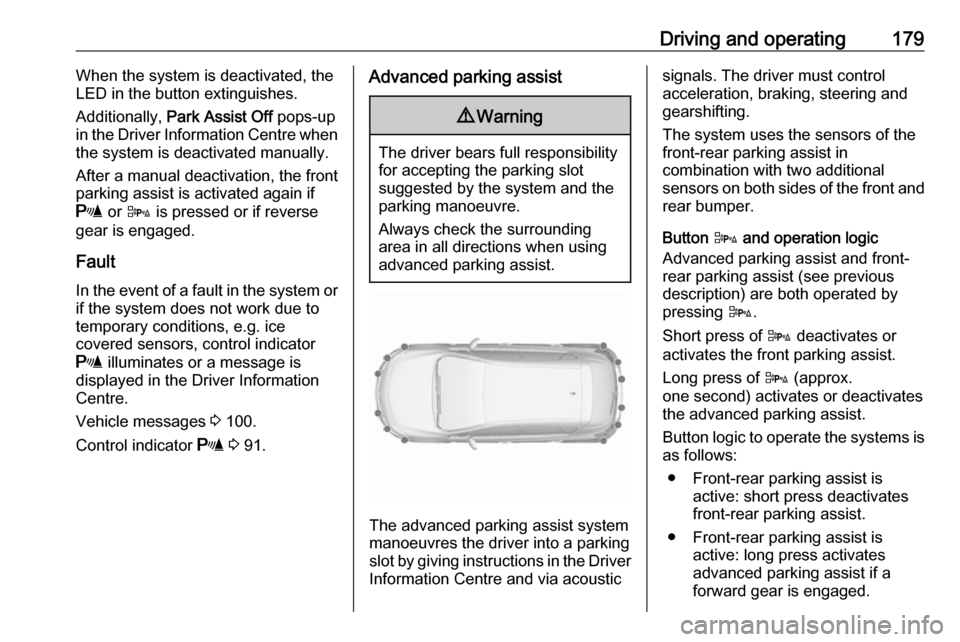
The advanced parking assist system manoeuvres the driver into a parkingslot by giving instructions in the Driver Information Centre and via acoustic
signals. The driver must control
acceleration, braking, steering and
gearshifting.
The system uses the sensors of the
front-rear parking assist in
combination with two additional
sensors on both sides of the front and rear bumper.
Button D and operation logic
Advanced parking assist and front-
rear parking assist (see previous
description) are both operated by
pressing D.
Short press of D deactivates or
activates the front parking assist.
Long press of D (approx.
one second) activates or deactivates the advanced parking assist.
Button logic to operate the systems is
as follows:
● Front-rear parking assist is active: short press deactivates
front-rear parking assist.
● Front-rear parking assist is active: long press activates
advanced parking assist if a
forward gear is engaged.