drive OPEL ASTRA J 2018 Owners Manual
[x] Cancel search | Manufacturer: OPEL, Model Year: 2018, Model line: ASTRA J, Model: OPEL ASTRA J 2018Pages: 295, PDF Size: 8.41 MB
Page 186 of 295

184Driving and operatingRoad signs
Beginning and end of:
● motorways
● A-roads
● play streetsAdd-on signs ● additional hints to traffic signs
● restriction of trailer towing
● tractor constraints
● wet warning
● ice warning
● direction arrows
Speed limit signs are displayed in the
Driver Information Centre until the
next speed limit sign or end of speed
limit is detected or up to a defined sign timeout.
Indication of multiple signs on the
display is possible.
An exclamation mark in a frame
indicates that there is an add-on sign detected which cannot be recognised
by the system.
The system is active up to a speed of 200 km/h depending on the lighting
conditions. At night the system is
active up to a speed of 160 km/h.
As soon as vehicle speed becomes
slower than 55 km/h the display will
be reset and the content of the traffic
sign page will be cleared. The next
recognized speed indication will be
displayed.
Display indication
Traffic signs are displayed on the Traffic sign detection page in the
Driver Information Centre.
Page 187 of 295

Driving and operating185
Select Settings X by pressing
MENU and select Traffic sign
detection via the adjuster wheel on
the turn signal lever 3 93.
When another page on the Driver
Information Centre menu was
selected and then Traffic sign
detection page is chosen again, the
last recognised traffic sign will be
displayed.
Alert function
Once activated, speed limit and no
passing signs are displayed as pop-
up alerts in the Driver Information
Centre.
The alert function can be activated or
deactivated in the Settings menu of
the traffic sign assistant page by
pressing SET/CLR on the turn signal
lever.
Page 188 of 295

186Driving and operatingWhen the Settings page is displayed,select Off to deactivate alert function.
Reactivate by selecting On.
When switching on the ignition, alert function is deactivated.
Pop-up indication is displayed for approx. eight seconds in the Driver
Information Centre.
System reset The content of the traffic sign memory
can be cleared in the Settings menu
of the traffic sign assistant page by
pressing and holding SET/CLR on the
turn signal lever. Upon successful
reset, a chime will sound and the
following symbol is indicated until the next traffic sign is detected.
In some cases, traffic sign assistant is
reset automatically by the system.
Fault
The traffic sign assistant system may
not operate correctly when:
● The area of the windscreen, where the front camera is
located, is not clean.
● Traffic signs are completely or partially covered or difficult to
discern.
● There are adverse environmental
conditions, e.g. heavy rain, snow,direct sunlight or shadows. In this
case No Traffic Sign Detection
due to Weather is indicated in the
Driver Information Centre.
● Traffic signs are incorrectly mounted or damaged.
● Traffic signs do not comply with the Vienna Convention on traffic
signs (Wiener Übereinkommen
über Straßenverkehrszeichen).Caution
The system is intended to help the driver within a defined speed
range to discern certain traffic
signs. Do not ignore traffic signs
which are not displayed by the
system.
The system does not discern any other than the conventional traffic
signs that might give or end a
speed limit.
Do not let this special feature
tempt you into taking risks when
driving.
Always adapt speed to the road
conditions.
Page 189 of 295

Driving and operating187The driver assistance systems donot relieve the driver from full
responsibility for vehicle
operation.
Lane departure warning
The lane departure warning system
observes the lane markings between
which the vehicle is driving via a front camera. The system detects lane
changes and warns the driver in the
event of an unintended lane change
via visual and acoustic signals.
Criteria for the detection of an
unintended lane change are:
● No operation of turn signals.
● No brake pedal operation.
● No active accelerator operation or speeding-up.
● No active steering.
If the driver is active, no warning will
be issued.
Activation
The lane departure warning system is activated by pressing ). The
illuminated LED in the button
indicates that the system is switched
on. When control indicator ) in the
instrument cluster illuminates green, the system is ready to operate.
The system is only operable at
vehicle speeds above 56 km/h and if lane markings are available.
When the system recognises an
unintended lane change, the control
indicator ) changes to yellow and
flashes. Simultaneously a chime
sound is activated.
Deactivation
The system is deactivated by
pressing ), the LED in the button
extinguishes.
At speeds below 56 km/h the system
is inoperable.
Fault The lane departure warning system
may not operate properly when:
● The windscreen is not clean.
● There are adverse environmental
conditions like heavy rain, snow,
direct sunlight or shadows.
Page 196 of 295

194Driving and operatingThe figures are provided only for the
purpose of comparison between different vehicle variants and mustnot be taken as a guarantee for the
actual fuel consumption of a
particular vehicle. Additional
equipment may result in slightly
higher results than the stated
consumption and CO 2 figures.
Furthermore, fuel consumption is dependent on personal driving style
as well as road and traffic conditions.Trailer hitch
General information
Only use towing equipment that has
been approved for your vehicle.
Entrust retrofitting of towing
equipment to a workshop. It may be
necessary to make changes that
affect the cooling system, heat
shields or other equipment.
The bulb outage detection function for trailer brake light cannot detect a
partial bulb outage, e.g. in case of 4 x
5 Watt bulbs, the function only detects
lamp outage when only a single
5 Watt lamp remains or none remain.
Fitting of towing equipment could
cover the opening of the towing eye.
If this is the case use the coupling ball
bar for towing. Always keep the
coupling ball bar in the vehicle.Driving characteristics and
towing tips
Before attaching a trailer, lubricate
the coupling ball. However, do not do
so if a stabiliser, which acts on the coupling ball, is being used to reduce snaking movements.
For trailers with low driving stability
and caravan trailers with a permitted
gross vehicle weight of more than
1300 kg the use of a stabiliser is
strongly recommended when driving
above 80 km/h.
If the trailer starts snaking, drive more
slowly, do not attempt to correct the
steering and brake sharply if
necessary.
When driving downhill, drive in the
same gear as if driving uphill and
drive at a similar speed.
Adjust tyre pressure to the value
specified for full load 3 271.
Page 202 of 295
200Vehicle careGeneral Information
Accessories and vehicle modifications
We recommend the use of genuine
parts and accessories and factory
approved parts specific for your
vehicle type. We cannot assess or guarantee reliability of other products
- even if they have a regulatory or
otherwise granted approval.
Any modification, conversion or other changes made to standard vehicle
specifications (including, without
limitation, software modifications,
modifications of the electronic control units) may invalidate the warranty
offered by Opel. Furthermore, such
changes may affect driver assistance
systems, may impact fuel
consumption, CO 2 emissions and
other emissions of the vehicle and
cause the vehicle to no longer
conform to the operating permit,
impacting the validity of your vehicle
registration.Caution
When transporting the vehicle on
a train or on a recovery vehicle, the
mud flaps might be damaged.
Vehicle storage
Storage for a long period of time
If the vehicle is to be stored for several months:
● Wash and wax the vehicle.
● Have the wax in the engine compartment and underbody
checked.
● Clean and preserve the rubber seals.
● Fill up fuel tank completely.
● Change the engine oil.
● Drain the washer fluid reservoir.
● Check the coolant antifreeze and
corrosion protection.
● Adjust tyre pressure to the value specified for full load.
● Park the vehicle in a dry, wellventilated place. Engage first or
reverse gear or set selector lever
to P. Prevent the vehicle from
rolling.
● Do not apply the parking brake.
● Open the bonnet, close all doors and lock the vehicle.
● Disconnect the clamp from the negative terminal of the vehicle
battery. Beware that all systems
are not functional, e.g. anti-theft
alarm system.
Putting back into operation
When the vehicle is to be put back into
operation:
● Connect the clamp to the negative terminal of the vehicle
battery. Activate the electronics
of the power windows.
● Check tyre pressure.
● Fill up the washer fluid reservoir.
● Check the engine oil level.
● Check the coolant level.
● Fit the number plate if necessary.
Page 211 of 295
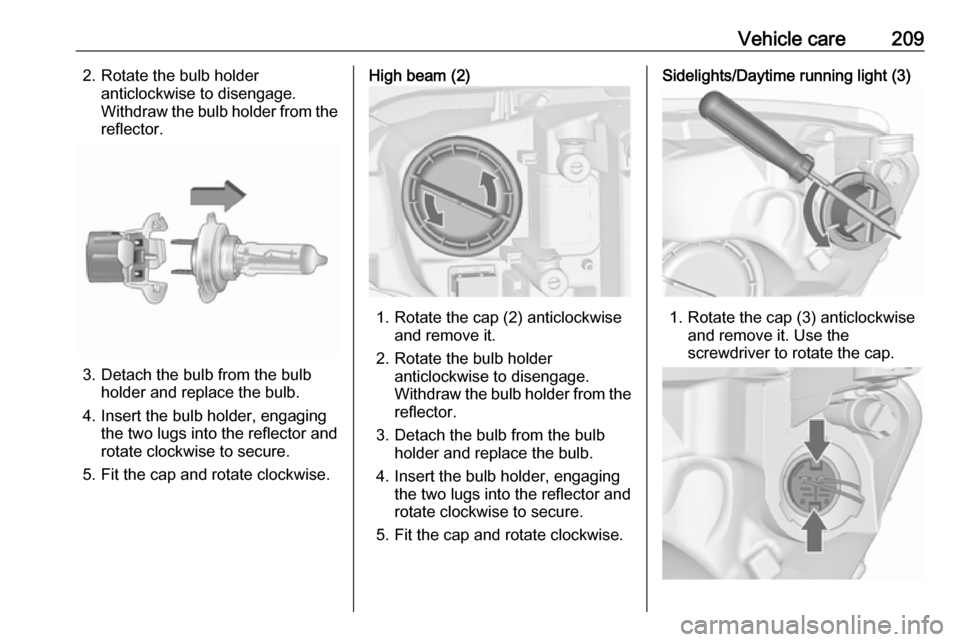
Vehicle care2092. Rotate the bulb holderanticlockwise to disengage.
Withdraw the bulb holder from the reflector.
3. Detach the bulb from the bulb holder and replace the bulb.
4. Insert the bulb holder, engaging the two lugs into the reflector androtate clockwise to secure.
5. Fit the cap and rotate clockwise.
High beam (2)
1. Rotate the cap (2) anticlockwise and remove it.
2. Rotate the bulb holder anticlockwise to disengage.
Withdraw the bulb holder from the
reflector.
3. Detach the bulb from the bulb holder and replace the bulb.
4. Insert the bulb holder, engaging the two lugs into the reflector and
rotate clockwise to secure.
5. Fit the cap and rotate clockwise.
Sidelights/Daytime running light (3)
1. Rotate the cap (3) anticlockwise and remove it. Use the
screwdriver to rotate the cap.
Page 214 of 295
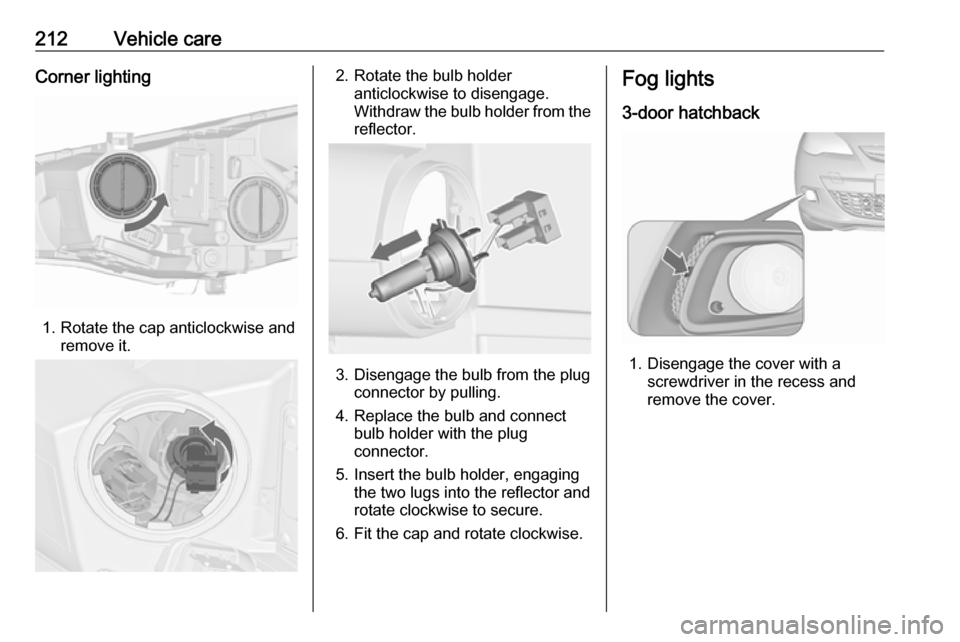
212Vehicle careCorner lighting
1. Rotate the cap anticlockwise andremove it.
2. Rotate the bulb holderanticlockwise to disengage.
Withdraw the bulb holder from the
reflector.
3. Disengage the bulb from the plug connector by pulling.
4. Replace the bulb and connect bulb holder with the plug
connector.
5. Insert the bulb holder, engaging the two lugs into the reflector and
rotate clockwise to secure.
6. Fit the cap and rotate clockwise.
Fog lights
3-door hatchback
1. Disengage the cover with a screwdriver in the recess and
remove the cover.
Page 215 of 295
Vehicle care213
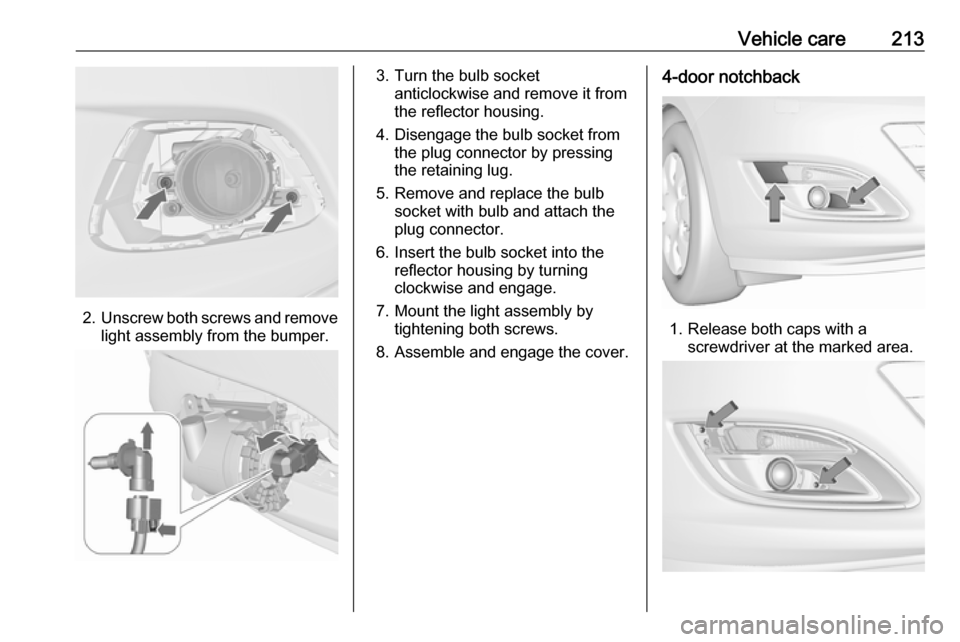
2.Unscrew both screws and remove
light assembly from the bumper.
3. Turn the bulb socket anticlockwise and remove it from
the reflector housing.
4. Disengage the bulb socket from the plug connector by pressing
the retaining lug.
5. Remove and replace the bulb socket with bulb and attach the
plug connector.
6. Insert the bulb socket into the reflector housing by turning
clockwise and engage.
7. Mount the light assembly by tightening both screws.
8. Assemble and engage the cover.4-door notchback
1. Release both caps with a screwdriver at the marked area.
Page 217 of 295

Vehicle care2152. Rotate bulb socket anticlockwiseto disengage and withdraw from
the reflector housing.
3. Remove the bulb from the socket by turning anticlockwise.
4. Replace and insert new bulb into socket by turning clockwise.
5. Insert the bulb socket into the reflector housing and turn
clockwise.
6. Fit the cap and rotate clockwise.
4-door notchback
1. Release both caps with a screwdriver at the marked area.
2. Unscrew both screws and remove
light assembly from the bumper.
3. Disengage the bulb socket from the reflector housing by pressing
both retaining lugs.