brake OPEL ASTRA J 2019 Manual user
[x] Cancel search | Manufacturer: OPEL, Model Year: 2019, Model line: ASTRA J, Model: OPEL ASTRA J 2019Pages: 205, PDF Size: 6.25 MB
Page 127 of 205

Driving and operating125Caution
It is not advisable to drive with thehand resting on the selector lever.
Upshift indication 3 70.
Brakes
The brake system comprises two independent brake circuits.
If a brake circuit fails, the vehicle can
still be braked using the other brake
circuit. However, braking effect is
achieved only when the brake pedal
is depressed firmly. Considerably
more force is needed for this. The
braking distance is extended. Seek
the assistance of a workshop before
continuing your journey.
When the engine is not running, the
support of the brake servo unit
disappears once the brake pedal has
been depressed once or twice.
Braking effect is not reduced, but
braking requires significantly greater
force. It is especially important to bear this in mind when being towed.
Control indicator R 3 69.
Antilock brake system
Antilock brake system (ABS)
prevents the wheels from locking.ABS starts to regulate brake pressure as soon as a wheel shows a tendency to lock. The vehicle remains
steerable, even during hard braking.
ABS control is made apparent
through a pulse in the brake pedal
and the noise of the regulation
process.
For optimum braking, keep the brake
pedal fully depressed throughout the
braking process, despite the fact that
the pedal is pulsating. Do not reduce
the pressure on the pedal.
After starting off the system performs
a self-test which may be audible.
Control indicator u 3 70.
Adaptive brake light
During full braking, all three brake
lights flash for the duration of ABS
control.
Page 128 of 205
126Driving and operatingFault9Warning
If there is a fault in the ABS, the
wheels may be liable to lock due
to braking that is heavier than
normal. The advantages of ABS are no longer available. During
hard braking, the vehicle can no longer be steered and may
swerve.
Have the cause of the fault remedied
by a workshop.
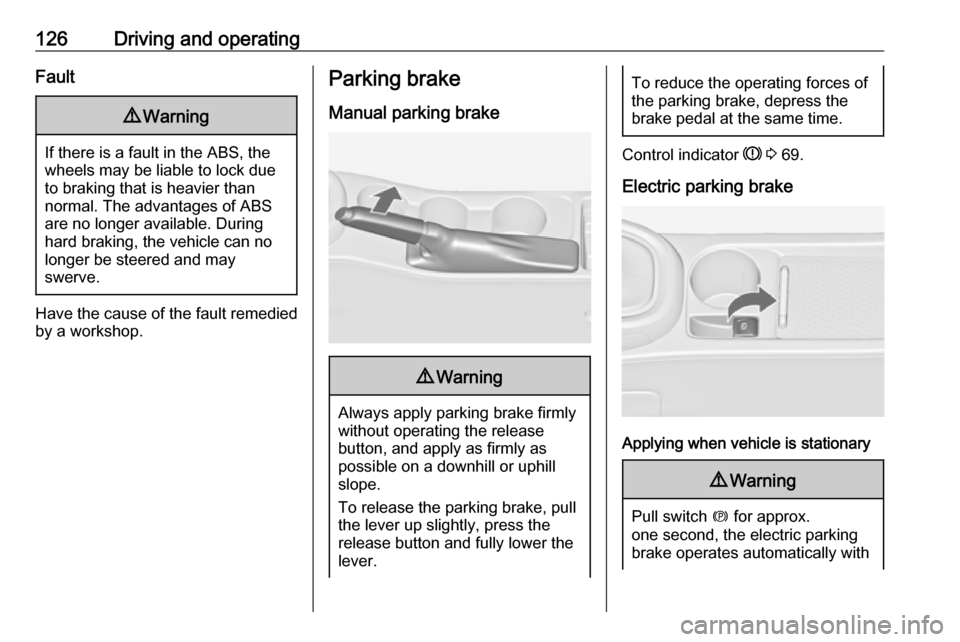
Parking brake
Manual parking brake9 Warning
Always apply parking brake firmly
without operating the release
button, and apply as firmly as
possible on a downhill or uphill
slope.
To release the parking brake, pull
the lever up slightly, press the
release button and fully lower the
lever.
To reduce the operating forces of
the parking brake, depress the
brake pedal at the same time.
Control indicator R 3 69.
Electric parking brake
Applying when vehicle is stationary
9 Warning
Pull switch m for approx.
one second, the electric parking
brake operates automatically with
Page 129 of 205

Driving and operating127adequate force. For maximum
force, e.g. parking with trailer or on
inclines, pull switch m twice.
The electric parking brake is
applied when control indicator m
illuminates 3 69.
The electric parking brake can always
be activated, even if the ignition is off.
Do not operate electric parking brake
system too often without engine
running, as this will discharge the
vehicle battery.
Before leaving the vehicle, check the
electric parking brake status. Control
indicator m 3 69.
Releasing
Switch on ignition. Keep brake pedal
depressed and then push switch m.
Drive away function Vehicles with manual transmission:
Depressing the clutch pedal and then slightly releasing the clutch pedal and
slightly depressing the accelerator
pedal releases the electric parking
brake automatically. This is not
possible when the switch m is pulled
at the same time.
Vehicles with automatic transmission: Engaging D and then depressing the
accelerator pedal releases the
electric parking brake automatically.
This is not possible when the switch
m is pulled at the same time.
Dynamic braking when vehicle is
moving
When the vehicle is moving and the
switch m is kept pulled, the electric
parking brake system will decelerate
the vehicle, but will not apply
statically.
As soon as the switch m is released,
dynamic braking will be stopped.
Fault
Failure mode of electric parking brake
is indicated by control indicator j and
by a code number or a vehicle message which is displayed in the
Driver Information Centre. Vehicle
messages 3 79.Apply electric parking brake: pull and
hold the switch m for more than five
seconds . If control indicator m
illuminates, electric parking brake is
applied.
Release electric parking brake: push
and hold the switch m for more than
two seconds. If control indicator m
extinguishes, electric parking brake is
released.
Control indicator m flashes: electric
parking brake is not fully applied or
released. When continuously
flashing, release electric parking
brake and retry applying.
Brake assist If the brake pedal is depressed
quickly and forcefully, maximum
brake force is automatically applied
(full braking).
Maintain steady pressure on the
brake pedal for as long as full braking is required. Maximum brake force is
automatically reduced when the
brake pedal is released.
Page 130 of 205
128Driving and operatingHill start assistThe system helps prevent unintendedmovement when driving away on
inclines.
When releasing the brake pedal after
stopping on an incline, the brakes
remain on for a further two seconds.
The brakes release automatically as
soon as the vehicle begins to
accelerate.Ride control systems
Traction Control systemThe Traction Control system (TC) is a
component of the Electronic Stability
Control (ESC) 3 129.
TC improves driving stability when necessary, regardless of the type of
road surface or tyre grip, by
preventing the drive wheels from
spinning.
As soon as the drive wheels starts to spin, engine output is reduced and
the wheel spinning the most is braked
individually. This considerably
improves the driving stability of the
vehicle on slippery road surfaces.
TC is operational after each engine
start as soon as control indicator b
extinguishes.
When TC operates b flashes.9 Warning
Do not let this special safety
feature tempt you into taking risks
when driving.
Adapt speed to the road
conditions.
Control indicator b 3 71.
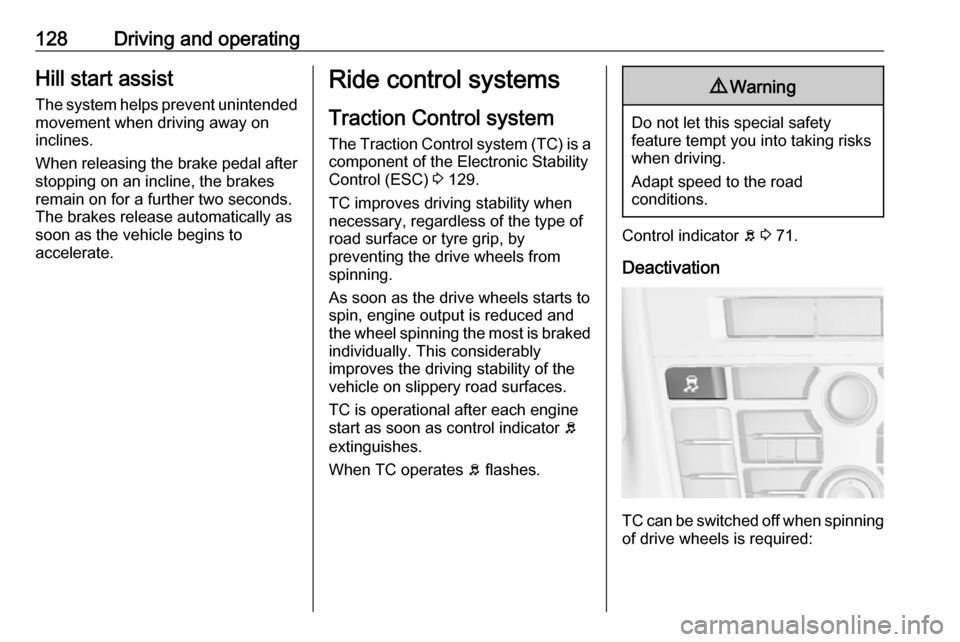
Deactivation
TC can be switched off when spinning of drive wheels is required:
Page 131 of 205
Driving and operating129press b briefly to deactivate TC, k
illuminates. Deactivation is displayed
as status message in the Driver
Information Centre.
TC is reactivated by pressing b
again.
TC is also reactivated the next time
the ignition is switched on.
Electronic Stability Control
Electronic Stability Control (ESC)
improves driving stability when
necessary, regardless of the type of
road surface or tyre grip. It also
prevents the drive wheels from
spinning. ESC operates in
combination with the Traction Control
system (TC) 3 128.
As soon as the vehicle starts to
swerve (understeer/oversteer),
engine output is reduced and the wheels are braked individually. This
considerably improves the driving
stability of the vehicle on slippery road
surfaces.
ESC is operational after each engine
start as soon as the control indicator
b extinguishes.When ESC operates b flashes.9 Warning
Do not let this special safety
feature tempt you into taking risks
when driving.
Adapt speed to the road
conditions.
Control indicator b 3 71.
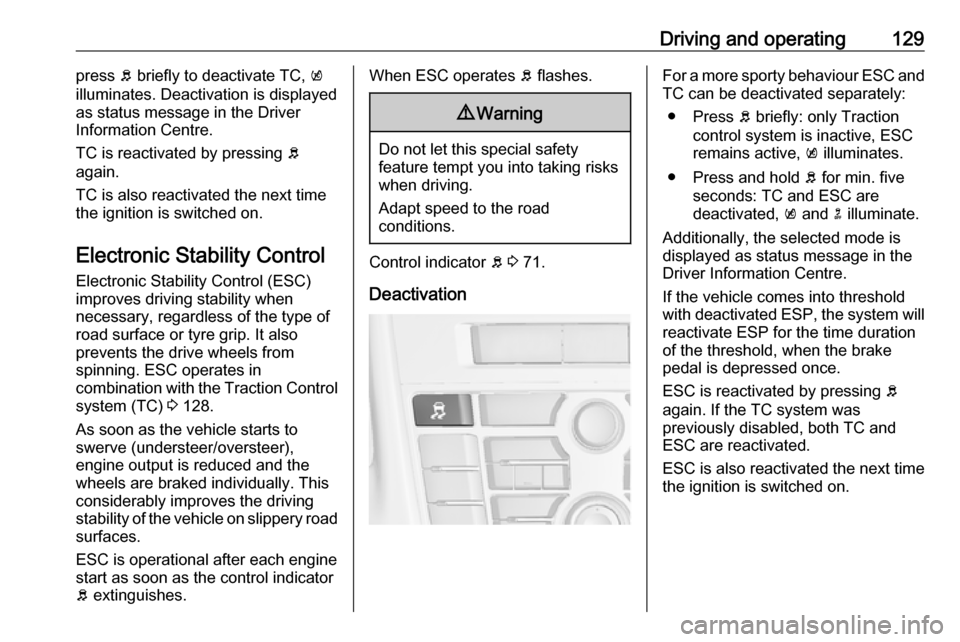
Deactivation
For a more sporty behaviour ESC and
TC can be deactivated separately:
● Press b briefly: only Traction
control system is inactive, ESC
remains active, k illuminates.
● Press and hold b for min. five
seconds: TC and ESC are
deactivated, k and n illuminate.
Additionally, the selected mode is
displayed as status message in the
Driver Information Centre.
If the vehicle comes into threshold
with deactivated ESP, the system will reactivate ESP for the time duration
of the threshold, when the brake
pedal is depressed once.
ESC is reactivated by pressing b
again. If the TC system was
previously disabled, both TC and
ESC are reactivated.
ESC is also reactivated the next time
the ignition is switched on.
Page 132 of 205
130Driving and operatingDriver assistance
systems9 Warning
Driver assistance systems are
developed to support the driver
and not to replace the driver's
attention.
The driver accepts full
responsibility when driving the
vehicle.
When using driver assistance
systems, always take care
regarding the current traffic
situation.
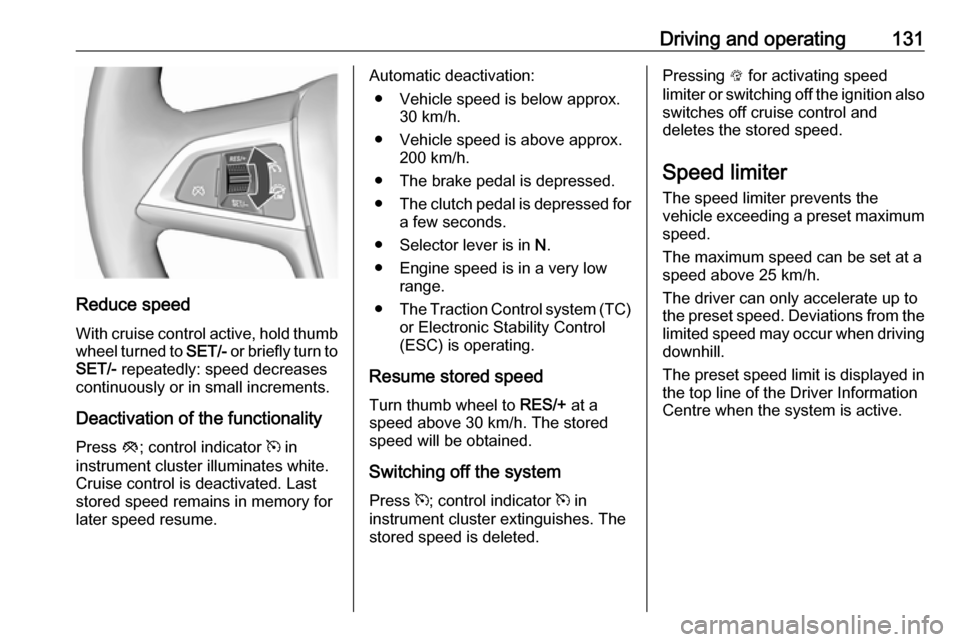
Cruise control
The Cruise control can store and
maintain speeds of approx. 30 to
200 km/h. Deviations from the stored
speeds may occur when driving uphill or downhill.
For safety reasons, the cruise control cannot be activated until the brake
pedal has been operated once.
Activating in first gear is not possible.
Do not use the cruise control if it is not advisable to maintain a constant
speed.
With automatic transmission, only
activate cruise control in automatic
mode.
Control indicator m 3 73.
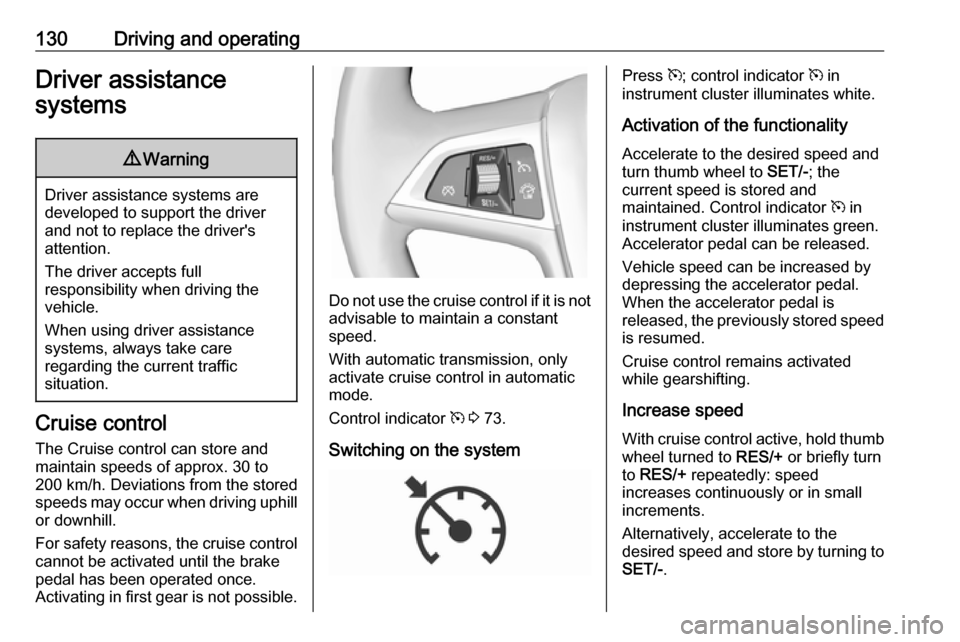
Switching on the system
Press m; control indicator m in
instrument cluster illuminates white.
Activation of the functionality Accelerate to the desired speed and
turn thumb wheel to SET/-; the
current speed is stored and
maintained. Control indicator m in
instrument cluster illuminates green.
Accelerator pedal can be released.
Vehicle speed can be increased by
depressing the accelerator pedal.
When the accelerator pedal is
released, the previously stored speed
is resumed.
Cruise control remains activated
while gearshifting.
Increase speed
With cruise control active, hold thumb
wheel turned to RES/+ or briefly turn
to RES/+ repeatedly: speed
increases continuously or in small
increments.
Alternatively, accelerate to the
desired speed and store by turning to SET/- .
Page 133 of 205
Driving and operating131
Reduce speedWith cruise control active, hold thumb
wheel turned to SET/- or briefly turn to
SET/- repeatedly: speed decreases
continuously or in small increments.
Deactivation of the functionality
Press y; control indicator m in
instrument cluster illuminates white.
Cruise control is deactivated. Last
stored speed remains in memory for
later speed resume.
Automatic deactivation:
● Vehicle speed is below approx. 30 km/h.
● Vehicle speed is above approx. 200 km/h.
● The brake pedal is depressed.
● The clutch pedal is depressed for
a few seconds.
● Selector lever is in N.
● Engine speed is in a very low range.
● The Traction Control system (TC)
or Electronic Stability Control
(ESC) is operating.
Resume stored speed
Turn thumb wheel to RES/+ at a
speed above 30 km/h. The stored
speed will be obtained.
Switching off the system
Press m; control indicator m in
instrument cluster extinguishes. The stored speed is deleted.Pressing L for activating speed
limiter or switching off the ignition also switches off cruise control and
deletes the stored speed.
Speed limiter
The speed limiter prevents the
vehicle exceeding a preset maximum
speed.
The maximum speed can be set at a
speed above 25 km/h.
The driver can only accelerate up to
the preset speed. Deviations from the limited speed may occur when driving
downhill.
The preset speed limit is displayed in
the top line of the Driver Information
Centre when the system is active.
Page 140 of 205

138Vehicle careVehicle careGeneral Information...................138
Accessories and vehicle modifications .......................... 138
Vehicle storage ........................139
End-of-life vehicle recovery .....139
Vehicle checks ........................... 140
Performing work ......................140
Bonnet ..................................... 140
Engine oil ................................. 141
Engine coolant ......................... 142
Power steering fluid .................142
Washer fluid ............................ 143
Brakes ..................................... 143
Brake fluid ............................... 143
Vehicle battery ......................... 144
Wiper blade replacement ........145
Bulb replacement .......................145
Halogen headlights ..................146
Adaptive forward lighting .........148
Front fog lights ......................... 149
Front turn lights .......................150
Tail lights ................................. 151
Side turn lights ......................... 152
Number plate light ...................153Interior lights ............................ 153
Instrument panel illumination ...153
Electrical system ........................154
Fuses ....................................... 154
Engine compartment fuse box . 155
Instrument panel fuse box .......157
Load compartment fuse box ....158
Vehicle tools .............................. 159
Tools ........................................ 159
Wheels and tyres .......................159
Winter tyres ............................. 159
Tyre designations ....................160
Tyre pressure .......................... 160
Tyre pressure monitoring system .................................... 161
Tread depth ............................. 164
Changing tyre and wheel size . 165
Wheel covers ........................... 165
Tyre chains .............................. 165
Wheel changing .......................166
Spare wheel ............................ 167
Jump starting ............................. 170
Towing ....................................... 172
Towing the vehicle ...................172
Towing another vehicle ...........173
Appearance care .......................174
Exterior care ............................ 174
Interior care ............................. 176General Information
Accessories and vehicle modifications
We recommend the use of genuine
parts and accessories and factory approved parts specific for your
vehicle type. We cannot assess or guarantee reliability of other products - even if they have a regulatory or
otherwise granted approval.
Any modification, conversion or other
changes made to standard vehicle specifications (including, without
limitation, software modifications,
modifications of the electronic control units) may invalidate the warranty
offered by Opel. Furthermore, such
changes may affect driver assistance
systems, may impact fuel
consumption, CO 2 emissions and
other emissions of the vehicle and
cause the vehicle to no longer
conform to the operating permit,
impacting the validity of your vehicle
registration.
Page 141 of 205

Vehicle care139Caution
When transporting the vehicle on
a train or on a recovery vehicle, the
mud flaps might be damaged.
Vehicle storage
Storage for a long period of time
If the vehicle is to be stored for several months:
● Wash and wax the vehicle.
● Have the wax in the engine compartment and underbody
checked.
● Clean and preserve the rubber seals.
● Fill up fuel tank completely.
● Change the engine oil.
● Drain the washer fluid reservoir.
● Check the coolant antifreeze and
corrosion protection.
● Adjust tyre pressure to the value specified for full load.
● Park the vehicle in a dry, wellventilated place. Engage first or
reverse gear or set selector lever
to P. Prevent the vehicle from
rolling.
● Do not apply the parking brake.
● Open the bonnet, close all doors and lock the vehicle.
● Disconnect the clamp from the negative terminal of the vehicle
battery. Beware that all systems
are not functional.
Putting back into operation When the vehicle is to be put back into
operation:
● Connect the clamp to the negative terminal of the vehicle
battery. Activate the electronics
of the power windows.
● Check tyre pressure.
● Fill up the washer fluid reservoir.
● Check the engine oil level.
● Check the coolant level.
● Fit the number plate if necessary.End-of-life vehicle recovery
Information on end-of-life vehicle
recovery centres and the recycling of
end-of-life vehicles is available on our website, where legally required. Only
entrust this work to an authorised recycling centre.
Gas vehicles must be recycled by a
service centre authorised for gas
vehicles.
Page 145 of 205

Vehicle care143Power steering fluid level normally
does not have to be checked. If an
unusual noise sounds during steering or the power steering reacts
unusually, seek the assistance of a
workshop.
Washer fluid
Fill with clean water mixed with a
suitable quantity of approved
windscreen washer fluid which
contains antifreeze.
Caution
Only washer fluid with a sufficient
antifreeze concentration provides
protection at low temperatures or
after a sudden drop in
temperature.
Use of washer fluid containing
isopropanol can damage exterior
lamps.
Washer fluid 3 178.
Brakes In the event of minimum thickness ofthe brake lining, a squealing noise
sounds during braking.
Continued driving is possible but
have the brake lining replaced as
soon as possible.
Once new brake linings are installed,
do not brake unnecessarily hard for
the first few journeys.
Brake fluid9 Warning
Brake fluid is poisonous and
corrosive. Avoid contact with eyes, skin, fabrics and painted surfaces.
The brake fluid level must be betweenthe MIN and MAX marks.
If fluid level is below MIN seek the
assistance of a workshop.
Brake and clutch fluid 3 178.