manual transmission OPEL ASTRA K 2017.5 Manual user
[x] Cancel search | Manufacturer: OPEL, Model Year: 2017.5, Model line: ASTRA K, Model: OPEL ASTRA K 2017.5Pages: 311, PDF Size: 9.21 MB
Page 175 of 311

Driving and operating173When clutch slip is detected for aspecific time, the engine power will be
reduced. A warning is displayed in the
Driver Information Centre. Release
the clutch.Caution
It is not advisable to drive with the hand resting on the selector lever.
Gear shift indication 3 112.
Stop-start system 3 163.
Manual transmission
automated
The automated manual transmission permits manual gearshifting (manual
mode) or automatic gearshifting
(automatic mode), both with
automatic clutch control.
Manual shifting is possible by tapping the selector lever in manual mode.
Note
When unlocking or opening a
vehicle door, a sound may be
audible caused by the hydraulic
system.Transmission display
In automatic mode, the driving
programme is indicated by D in the
Driver Information Centre.
In manual mode, M and the number
of the selected gear is indicated.
R indicates reverse gear.
N indicates neutral.
Page 176 of 311
174Driving and operatingSelector lever
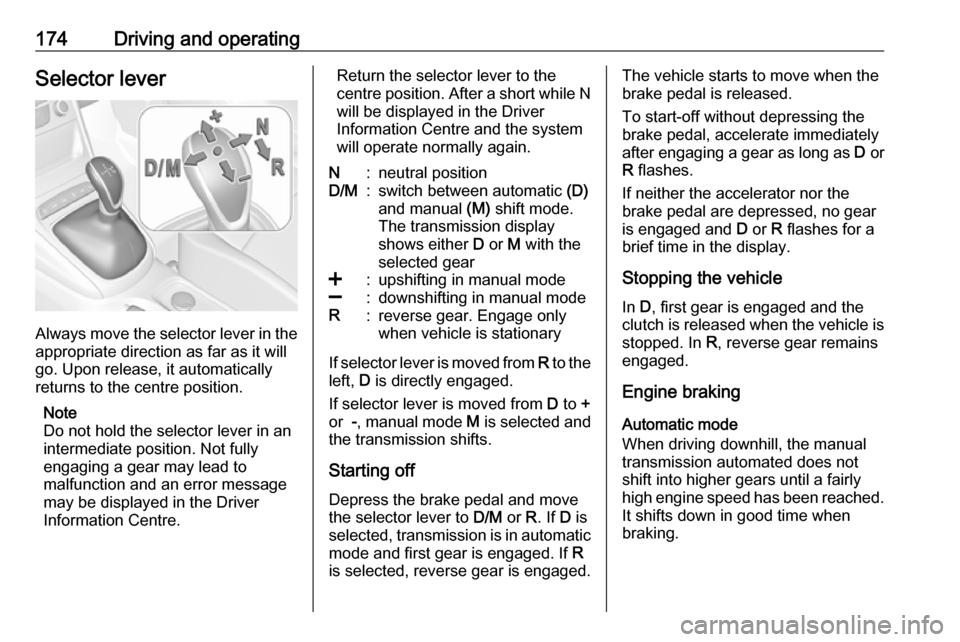
Always move the selector lever in the
appropriate direction as far as it will
go. Upon release, it automatically
returns to the centre position.
Note
Do not hold the selector lever in an
intermediate position. Not fully
engaging a gear may lead to
malfunction and an error message
may be displayed in the Driver
Information Centre.
Return the selector lever to the
centre position. After a short while N
will be displayed in the Driver
Information Centre and the system
will operate normally again.N:neutral positionD/M:switch between automatic (D)
and manual (M) shift mode.
The transmission display
shows either D or M with the
selected gear<:upshifting in manual mode]:downshifting in manual modeR:reverse gear. Engage only
when vehicle is stationary
If selector lever is moved from R to the
left, D is directly engaged.
If selector lever is moved from D to +
or -, manual mode M is selected and
the transmission shifts.
Starting off Depress the brake pedal and move
the selector lever to D/M or R. If D is
selected, transmission is in automatic
mode and first gear is engaged. If R
is selected, reverse gear is engaged.
The vehicle starts to move when the
brake pedal is released.
To start-off without depressing the
brake pedal, accelerate immediately
after engaging a gear as long as D or
R flashes.
If neither the accelerator nor the
brake pedal are depressed, no gear
is engaged and D or R flashes for a
brief time in the display.
Stopping the vehicle In D, first gear is engaged and the
clutch is released when the vehicle is
stopped. In R, reverse gear remains
engaged.
Engine braking
Automatic mode
When driving downhill, the manual
transmission automated does not shift into higher gears until a fairly
high engine speed has been reached. It shifts down in good time when
braking.
Page 177 of 311

Driving and operating175Manual mode
To utilise the engine braking effect, select a lower gear in good time when
driving downhill. Changing into
manual mode is only possible while the engine is running or during an
Autostop.
Rocking the vehicle Rocking the vehicle is only
permissible if the vehicle is stuck in
sand, mud or snow. Move the selector
lever between R and D in a repeat
pattern. Do not race the engine and
avoid sudden acceleration.
Parking
The most recently engaged gear (see
transmission display) remains
engaged when switching off ignition.
With N, no gear is engaged.
Therefore always apply the parking
brake when switching off ignition. If
parking brake is not applied, P flashes
in the transmission display and the
key cannot be removed from the
ignition switch. P stops flashing in the
transmission display as soon as the
parking brake is slightly applied.When the ignition is switched off, the
transmission no longer responds to
movement of the selector lever.
Emergency operation to avoid
freezing of the parking brake 3 166.
Manual mode If a higher gear is selected when the
engine speed is too low, or a lower
gear when the speed is too high, the
shift is not executed. This prevents
the engine from running at too low or
too high an engine speed. A warning
message is displayed in the Driver
Information Centre. Vehicle
messages 3 123.
If engine speed is too low, the transmission automatically shifts to a
lower gear.
When + or - is selected in automatic
mode, the transmission switches to
manual mode and shifts accordingly.
Gear shift indication
The symbol R or S with a number
beside is indicated when gearshifting
is recommended for fuel saving
reasons.Shift indication appears only in
manual mode.
Electronic driving programmes
● Following a cold start, the operating temperature
programme increases engine
speed to quickly bring the
catalytic converter to the required
temperature.
● The adaptive programme tailors gearshifting to the driving
conditions, e.g. greater load or
gradients.
Kickdown If the accelerator pedal is pressed
down completely in automatic mode, the transmission shifts to a lower gear
depending on engine speed.
Fault
To prevent damage to the manual transmission automated, the clutch is
engaged automatically at high clutch
temperatures.
Page 180 of 311

178Driving and operating3 111. The electric parking brake
operates automatically with
adequate force.
Before leaving the vehicle, check
the electric parking brake status.
Control indicator m 3 111.
The electric parking brake can always
be activated, even if the ignition is off.
Do not operate electric parking brake
system too often without engine
running as this will discharge the
vehicle battery.
Releasing
Switch on ignition. Keep foot brake
pedal depressed and then push
switch m.
Drive away function
Vehicles with manual transmission:
Depressing the clutch pedal and then
slightly releasing the clutch pedal and slightly depressing the accelerator
pedal releases the electric parking
brake automatically. This is not
possible when switch m is pulled at
the same time.
Vehicles with automatic transmission
or manual transmission automated:
Engaging D and then depressing the
accelerator pedal releases the
electric parking brake automatically.
This is not possible when switch m is
pulled at the same time.
Dynamic braking when vehicle is
moving
When the vehicle is moving and the
switch m is kept pulled, the electric
parking brake system will decelerate
the vehicle, but will not apply
statically.
As soon as the switch m is released,
dynamic braking will be stopped.
Automatic applying
If the vehicle is equipped with
automatic transmission and adaptive
cruise control is active, electric
parking brake is applied automatically when vehicle is stopped by the
system for more than two minutes.
Parking brake releases automatically
after moving off.Functionality check
When the vehicle is not moving, the
electric parking brake might be
applied automatically. This is done to
check the system.
Fault
Failure mode of electric parking brake
is indicated by a control indicator j
and by a vehicle message which is
displayed in the Driver Information
Centre. Vehicle messages 3 123.
Apply electric parking brake: pull and
hold the switch m for more than
five seconds. If control indicator m
illuminates, electric parking brake is
applied.
Release electric parking brake: push and hold the switch m for more than
two seconds. If control indicator m
extinguishes, electric parking brake is
released.
Control indicator m flashes: electric
parking brake is not fully applied or
released. When continuously
flashing, release electric parking
brake and retry applying.
Page 189 of 311
Driving and operating187Press C to switch on adaptive cruise
control. C appears in the Driver
Information Centre.
Activation by setting the speed
Adaptive cruise control can be
activated at speeds above 25 km/h on
vehicles with automatic transmission
or 30 km/h on vehicles with manual
transmission. The upper speed limit is 180 km/h.
Accelerate to the desired speed and
turn thumb wheel to SET/-, the
current speed is stored and
maintained.
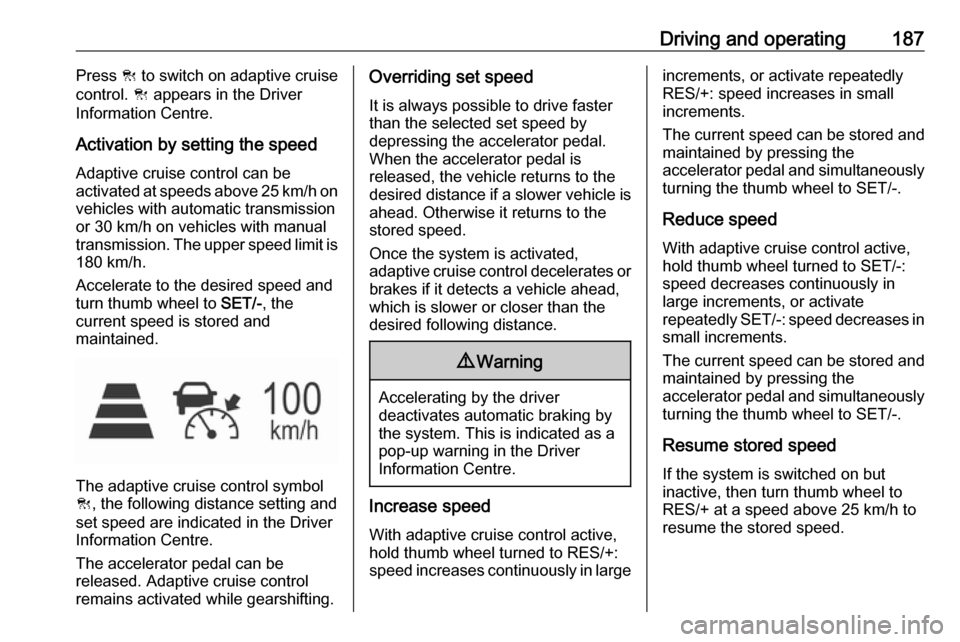
The adaptive cruise control symbol
C , the following distance setting and
set speed are indicated in the Driver
Information Centre.
The accelerator pedal can be
released. Adaptive cruise control
remains activated while gearshifting.
Overriding set speed
It is always possible to drive faster
than the selected set speed by
depressing the accelerator pedal. When the accelerator pedal is
released, the vehicle returns to the
desired distance if a slower vehicle is
ahead. Otherwise it returns to the
stored speed.
Once the system is activated,
adaptive cruise control decelerates or
brakes if it detects a vehicle ahead,
which is slower or closer than the
desired following distance.9 Warning
Accelerating by the driver
deactivates automatic braking by
the system. This is indicated as a
pop-up warning in the Driver
Information Centre.
Increase speed
With adaptive cruise control active,
hold thumb wheel turned to RES/+:
speed increases continuously in large
increments, or activate repeatedly
RES/+: speed increases in small
increments.
The current speed can be stored and maintained by pressing the
accelerator pedal and simultaneously turning the thumb wheel to SET/-.
Reduce speed With adaptive cruise control active,
hold thumb wheel turned to SET/-:
speed decreases continuously in
large increments, or activate
repeatedly SET/-: speed decreases in
small increments.
The current speed can be stored and maintained by pressing the
accelerator pedal and simultaneously turning the thumb wheel to SET/-.
Resume stored speed If the system is switched on but
inactive, then turn thumb wheel to
RES/+ at a speed above 25 km/h to
resume the stored speed.
Page 190 of 311

188Driving and operatingFull speed range adaptive cruise
control on vehicles with automatic
transmission
Full speed range adaptive cruise
control will maintain a following
headway behind a detected vehicle
and slow your vehicle to a stop behind
that vehicle.
In case of a brief stop of the vehicle
ahead the adaptive cruise control will drive off automatically without driver
action. If necessary, press RES/+ or the accelerator pedal to resume
adaptive cruise control.
If the stopped vehicle ahead was
stopped for a longer time and then
begins to move forward, the green
illuminated vehicle ahead control
indicator A will flash and a warning
chime will sound as a reminder to
check traffic before proceeding.
When the vehicle ahead drives away,
press RES+ or the accelerator pedal
to resume adaptive cruise control. If
stopped for more than five minutes or
if the driver door is opened and the
driver safety belt is unbuckled, the
electric parking brake is appliedautomatically to hold the vehicle.
Control indicator m will illuminate. To
release electric parking brake, press
the accelerator pedal. Electric parking
brake 3 1779 Warning
When full speed range adaptive
cruise control is deactivated or
cancelled, the vehicle will no
longer be held at a stop and can
start to move. Always be prepared to manually apply the brake to hold the vehicle stationary.
Do not leave the vehicle while it is being held at a stop by the full
speed range adaptive cruise
control. Always move selector
lever to park position P and switch
off the ignition before leaving the
vehicle.
Setting the following distance
When adaptive cruise control detects
a slower moving vehicle in the driving path, it will adjust the vehicle speed tomaintain the following distance
selected by the driver.
The following distance can be set to
near, medium or far.
Press E, the current setting is shown
in the Driver Information Centre.
Press E again to change the
following distance. The setting is also displayed in the Driver Information
Centre.
Page 250 of 311

248Vehicle careNo.Circuit18Diesel exhaust system19Diesel exhaust system20–21DC/AC Converter22ABS23Washer system for windscreen
and rear window24–25Diesel fuel heating26Transmission control module27Power tailgate module28–29Heated rear window30Mirror defrost31–32DC transformer/LED display/
Electrical heater/Climate
control/Glow plug controllerNo.Circuit33Anti theft warning34Horn35Power outlet load compartment36Right high beam (Halogen)/
Right low beam (LED)37Left high beam (Halogen)38LED headlight/Automatic head‐
light range adjustment39Front fog light40OnStar41Water in fuel sensor/Water
pump42Manual headlight range adjust‐
ment43Fuel pump44Rear view camera/Inside rear
view mirror/Trailer module45LED headlight left/Automatic
headlight range adjustment leftNo.Circuit46Instrument cluster47Steering column lock48Rear wiper49–50LED headlight right/Automatic
headlight range adjustment
right51Left low beam (LED)52Engine control module/Trans‐
mission control module53–54Windscreen wiper55Diesel exhaust system56–57–
After having changed defective fuses,
close the fuse box cover and press
until it engages.
If the fuse box cover is not closed
correctly, malfunction may occur.
Page 261 of 311

Vehicle care259positions. If it takes longer, the
matching process stops and must be restarted.
The tyre pressure sensor matching
process is:
1. Apply the parking brake.
2. Turn the ignition on.
3. On vehicles with automatic transmission: set the selector
lever to P.
On vehicles with manual
transmission: select neutral.
4. Midlevel display: Use MENU on the turn signal
lever to select the Vehicle
Information Menu ? in the
Driver Information Centre.
Uplevel display:
Press p on the steering wheel to
open main menu page.
Select the Info page with Q or P.
Confirm with 9.
5. Select the tyre pressure menu. Midlevel display:
Uplevel display:
6. Midlevel display: Press SET/CLR to begin the
sensor matching process. A
message requesting acceptance
of the process should be
displayed.
Press SET/CLR again to confirm
the selection. The horn sounds
twice to indicate that the receiver
is in relearn mode.
Uplevel display:
Press 9 to begin the sensor
matching process. The horn
sounds twice to indicate that the receiver is in relearn mode.
7. Start with the left side front wheel.
8. Place the relearn tool against the tyre sidewall, near the valve stem.Then press the button to activate
the tyre pressure sensor. A horn
chirp confirms that the sensor
identification code has been
matched to this wheel position.
9. Proceed to the right side front wheel, and repeat the procedure
in Step 8.
10. Proceed to the right side rear wheel, and repeat the procedure
in Step 8.
11. Proceed to the left side rear wheel, and repeat the procedure
in Step 8. The horn sounds twice
Page 274 of 311
272Vehicle care
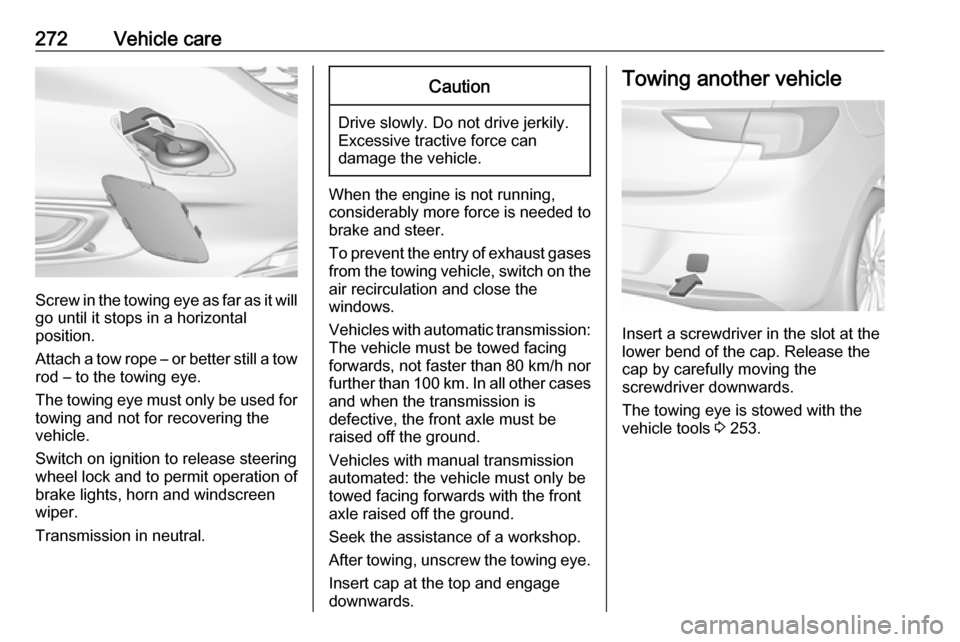
Screw in the towing eye as far as it will
go until it stops in a horizontal
position.
Attach a tow rope – or better still a tow
rod – to the towing eye.
The towing eye must only be used for towing and not for recovering the
vehicle.
Switch on ignition to release steering
wheel lock and to permit operation of
brake lights, horn and windscreen
wiper.
Transmission in neutral.
Caution
Drive slowly. Do not drive jerkily.
Excessive tractive force can
damage the vehicle.
When the engine is not running,
considerably more force is needed to
brake and steer.
To prevent the entry of exhaust gases from the towing vehicle, switch on the
air recirculation and close the
windows.
Vehicles with automatic transmission: The vehicle must be towed facing
forwards, not faster than 80 km/h nor further than 100 km. In all other cases
and when the transmission is
defective, the front axle must be
raised off the ground.
Vehicles with manual transmission
automated: the vehicle must only be
towed facing forwards with the front axle raised off the ground.
Seek the assistance of a workshop. After towing, unscrew the towing eye.
Insert cap at the top and engage
downwards.
Towing another vehicle
Insert a screwdriver in the slot at the
lower bend of the cap. Release the
cap by carefully moving the
screwdriver downwards.
The towing eye is stowed with the
vehicle tools 3 253.
Page 289 of 311
![OPEL ASTRA K 2017.5 Manual user Technical data287Performance
5-door HatchbackEngineB10XFLB14XEB14XFLB14XFT
B14XNT
CNG
B16SHT
Maximum speed [km/h]Manual transmission1951852052154)235Manual transmission automated200–––––Auto](/img/37/18781/w960_18781-288.png "OPEL ASTRA K 2017.5 Manual user Technical data287Performance
5-door HatchbackEngineB10XFLB14XEB14XFLB14XFT
B14XNT
CNG
B16SHT
Maximum speed [km/h]Manual transmission1951852052154)235Manual transmission automated200–––––Auto")
Technical data287Performance
5-door HatchbackEngineB10XFLB14XEB14XFLB14XFT
B14XNT
CNG
B16SHT
Maximum speed [km/h]Manual transmission1951852052154)235Manual transmission automated200–––––Automatic transmission–––210–2354) Value was not available at time of printing.EngineB16DTCB16DTEB16DTUB16DTHB16DTRMaximum speed [km/h]Manual transmission185195200205220Manual transmission automated–––––Automatic transmission–––200–