ABS OPEL ASTRA K 2017.5 Manual user
[x] Cancel search | Manufacturer: OPEL, Model Year: 2017.5, Model line: ASTRA K, Model: OPEL ASTRA K 2017.5Pages: 311, PDF Size: 9.21 MB
Page 92 of 311

90Instruments and controlsInstruments and
controlsControls ....................................... 91
Steering wheel adjustment ........91
Steering wheel controls .............91
Heated steering wheel ...............92
Horn ........................................... 92
Windscreen wiper/washer .........92
Rear window wiper/washer .......94
Outside temperature ..................95
Clock ......................................... 95
Power outlets ............................. 97
Power connector .......................98
Ashtrays .................................... 99
Warning lights, gauges and indi‐ cators ......................................... 101
Instrument cluster ....................101
Speedometer ........................... 104
Odometer ................................ 105
Trip odometer .......................... 105
Tachometer ............................. 106
Fuel gauge .............................. 106
Fuel selector ............................ 106
Engine coolant temperature gauge ..................................... 107
Service display ........................ 108Control indicators ....................109
Turn signal ............................... 109
Seat belt reminder ...................109
Airbag and belt tensioners .......110
Airbag deactivation ..................110
Charging system .....................111
Malfunction indicator light ........111
Brake and clutch system .........111
Electric parking brake ..............111
Electric parking brake fault ......111
Antilock brake system (ABS) ...112
Gear shifting ............................ 112
Following distance ...................112
Lane keep assist .....................112
Electronic Stability Control off . 112
Electronic Stability Control and Traction Control system .........112
Traction Control system off .....113
Preheating ............................... 113
Tyre pressure monitoring system .................................... 113
Engine oil pressure ..................113
Low fuel ................................... 113
Immobiliser .............................. 114
Exterior light ............................ 114
High beam ............................... 114
High beam assist .....................114
LED headlights ........................ 114
Fog light ................................... 114
Rear fog light ........................... 114Cruise control.......................... 114
Adaptive cruise control ............114
Vehicle detected ahead ...........115
Speed limiter ........................... 115
Traffic sign assistant ................115
Door open ................................ 115
Information displays ...................115
Driver Information Centre ........115
Info display .............................. 121
Vehicle messages ......................123
Warning chimes .......................124
Battery voltage ........................ 124
Vehicle personalisation ..............125
Telematics service .....................131
OnStar ..................................... 131
Page 106 of 311
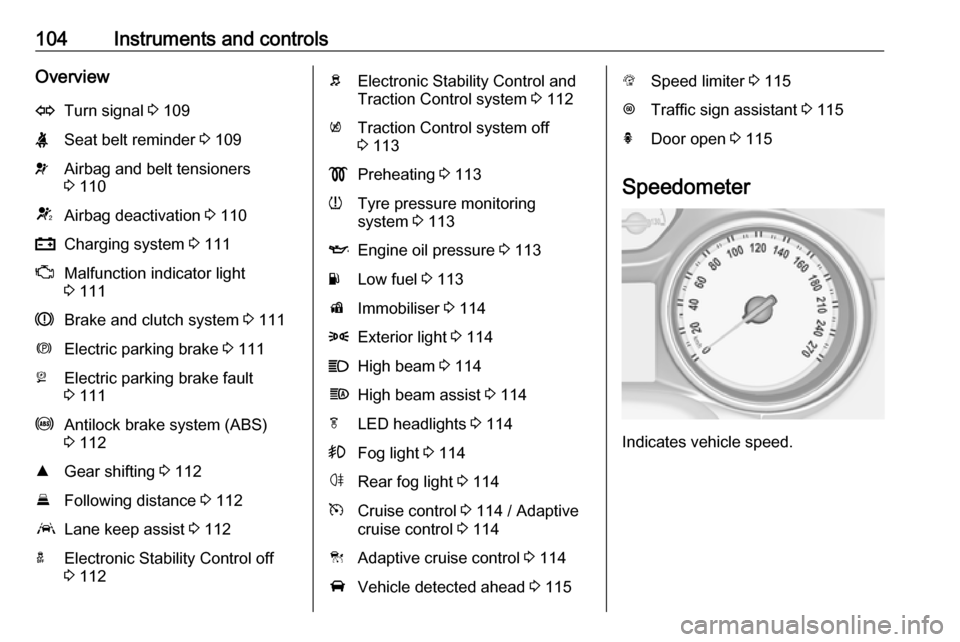
104Instruments and controlsOverviewOTurn signal 3 109XSeat belt reminder 3 109vAirbag and belt tensioners
3 110VAirbag deactivation 3 110pCharging system 3 111ZMalfunction indicator light
3 111RBrake and clutch system 3 111mElectric parking brake 3 111jElectric parking brake fault
3 111uAntilock brake system (ABS)
3 112RGear shifting 3 112EFollowing distance 3 112aLane keep assist 3 112aElectronic Stability Control off
3 112bElectronic Stability Control and
Traction Control system 3 112kTraction Control system off
3 113!Preheating 3 113wTyre pressure monitoring
system 3 113IEngine oil pressure 3 113YLow fuel 3 113dImmobiliser 3 1148Exterior light 3 114CHigh beam 3 114fHigh beam assist 3 114fLED headlights 3 114>Fog light 3 114øRear fog light 3 114mCruise control 3 114 / Adaptive
cruise control 3 114CAdaptive cruise control 3 114AVehicle detected ahead 3 115LSpeed limiter 3 115LTraffic sign assistant 3 115hDoor open 3 115
Speedometer
Indicates vehicle speed.
Page 114 of 311

112Instruments and controlsIlluminates
Electric parking brake is operating
with degraded performance 3 177.
Flashes
Electric parking brake is in service mode. Stop vehicle, apply and
release the electric parking brake to
reset.9 Warning
Have the cause of the fault
remedied immediately by a
workshop.
Antilock brake system
(ABS)
u illuminates yellow.
Illuminates for a few seconds after the ignition is switched on. The system is
ready for operation when the control
indicator extinguishes.
If the control indicator does not go out after a few seconds, or if it illuminates while driving, there is a fault in the
ABS. The brake system remains
operational but without ABS
regulation.
Antilock brake system 3 176.
Gear shifting R or S with the number of a higher or
lower gear is indicated, when up- or
downshifting is recommended for fuel
saving reasons.
Following distance
E indicates the following distance
setting of the alert timing sensitivity
for the forward collision alert using
filled distance bars.
Forward collision alert 3 193.
Lane keep assist
a illuminates green or yellow, or
flashes yellow.
Illuminates green
The system is switched on and ready
to operate.Illuminates yellow
The system approaches a detected
lane marking without using the turn
signal in that direction.
Flashes yellow The system recognizes that the lane
is departed significantly.
Lane keep assist 3 215
Electronic Stability Control off
n illuminates yellow.
The system is deactivated.
Electronic Stability Controland Traction Control system
b illuminates or flashes yellow.
Illuminates
A fault in the system is present.
Continued driving is possible. Driving
stability, however, may deterioratedepending on road surface
conditions.
Page 136 of 311

134Instruments and controlsDiagnostic report
The vehicle automatically transmits
diagnostic data to OnStar which
sends a monthly email report to you
and your preferred workshop.
Note
The workshop notification function
can be disabled in your account.
The report contains the status of key
operating systems of the vehicle like
engine, transmission, airbags, ABS,
and other major systems. It also
provides information on possible
maintenance items and tyre pressure (only with tyre pressure monitoring
system).
To look at the information in greater
detail, select the link within the email and log in to your account.
Destination download
A desired destination can be directly
downloaded to the navigation system.
Press Z to call an advisor and
describe the destination or point of
interest.The advisor can look up any address
or point of interest and directly send
the destination to the built-in
navigation system.
OnStar settings
OnStar PIN
To have full access to all OnStar
services, a four-digit PIN is required. The PIN has to be personalised when first talking to an advisor.
To change the PIN, press Z to call an
advisor.
Account data
An OnStar subscriber has an account
where all the data is stored. To
request a change of the account
information, press Z and talk to an
advisor or log in to your account.
If the OnStar service is used on
another vehicle, press Z and request
that the account be transferred to the
new vehicle.Note
In any case, if the vehicle is disposed of, sold or otherwise transferred,
immediately inform OnStar about
the changes and terminate the
OnStar service on this vehicle.
Vehicle location
The vehicle location is transmitted to OnStar when service is requested ortriggered. A message on the Info-
Display informs about this
transmission.
To activate or deactivate the
transmission of the vehicle location,
press and hold j until an audio
message is heard.
The deactivation is indicated by the
status light flashing red and green for a short period of time and each time
the vehicle is started.
Note
If the transmission of the vehicle
location is deactivated, some
services are no longer available.
Page 178 of 311

176Driving and operatingIn the event of a fault, a warning
message is displayed in the Driver
Information Centre. Vehicle
messages 3 123.
Continued driving is restricted or not
possible, depending on the fault.
Have the cause of the fault remedied
by a workshop.Brakes
The brake system comprises two
independent brake circuits.
If a brake circuit fails, the vehicle can
still be braked using the other brake
circuit. However, braking effect is
achieved only when the brake pedal
is depressed firmly. Considerably
more force is needed for this. The
braking distance is extended. Seek the assistance of a workshop before
continuing the journey.
When the engine is not running, the
support of the brake servo unit
disappears once the brake pedal has
been depressed once or twice.
Braking effect is not reduced, but
braking requires significantly greater
force. It is especially important to bear this in mind when being towed.
Control indicator R 3 111.
Antilock brake system
Antilock brake system (ABS)
prevents the wheels from locking.ABS starts to regulate brake pressure as soon as a wheel shows a tendency to lock. The vehicle remains
steerable, even during hard braking.
ABS control is made apparent
through a pulse in the brake pedal
and the noise of the regulation
process.
For optimum braking, keep the brake
pedal fully depressed throughout the
braking process, despite the fact that
the pedal is pulsating. Do not reduce
the pressure on the pedal.
After starting off, the system performs
a self-test which may be audible.
Control indicator u 3 112.
Adaptive brake light During full braking, all three brake
lights flash for the duration of ABS
control.
Page 179 of 311

Driving and operating177Fault9Warning
If there is a fault in the ABS, the
wheels may be liable to lock due
to braking that is heavier than
normal. The advantages of ABS are no longer available. During
hard braking, the vehicle can no longer be steered and may
swerve.
Have the cause of the fault remedied
by a workshop.
Parking brake
9 Warning
Before leaving the vehicle, check
parking brake status. Control
indicator R (manual parking
brake) or m (electrical parking
brake) must illuminate constantly.
Manual parking brake9 Warning
Always apply parking brake firmly
without operating the release
button, and apply as firmly as
possible on a downhill or uphill
slope.
To release the parking brake, pull
the lever up slightly, press the
release button and fully lower the
lever.
To reduce the operating forces of
the parking brake, depress the
foot brake at the same time.
Control indicator R 3 111.
Electric parking brake
Applying when vehicle is stationary
9 Warning
Pull switch m for a minimum of
one second until control indicator
m illuminates constantly and
electric parking brake is applied
Page 235 of 311
Vehicle care233Vehicle battery
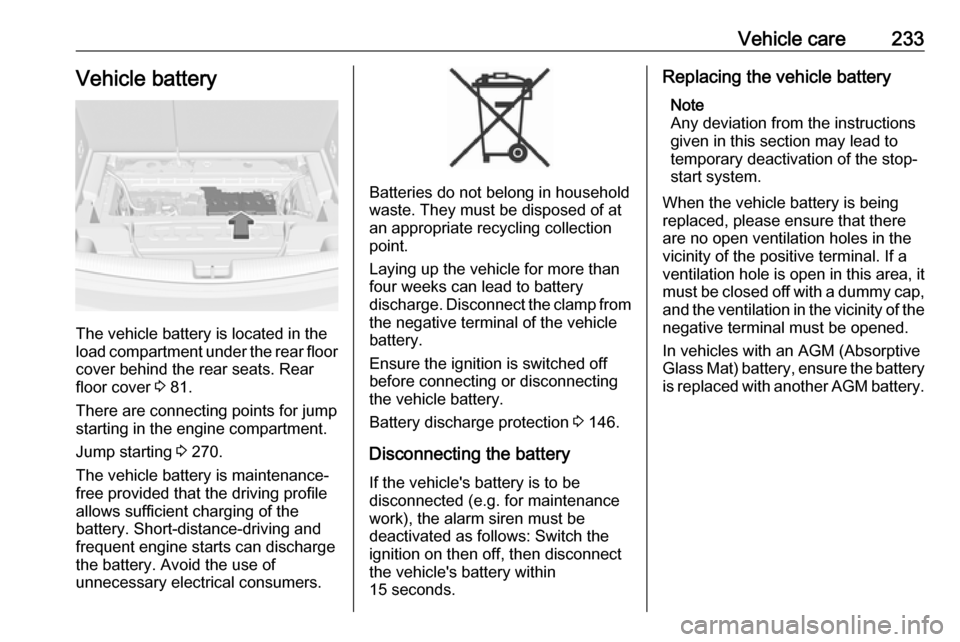
The vehicle battery is located in the
load compartment under the rear floor cover behind the rear seats. Rear
floor cover 3 81.
There are connecting points for jump starting in the engine compartment.
Jump starting 3 270.
The vehicle battery is maintenance-
free provided that the driving profile
allows sufficient charging of the
battery. Short-distance-driving and
frequent engine starts can discharge
the battery. Avoid the use of
unnecessary electrical consumers.
Batteries do not belong in household
waste. They must be disposed of at
an appropriate recycling collection
point.
Laying up the vehicle for more than
four weeks can lead to battery
discharge. Disconnect the clamp from
the negative terminal of the vehicle
battery.
Ensure the ignition is switched off
before connecting or disconnecting
the vehicle battery.
Battery discharge protection 3 146.
Disconnecting the battery
If the vehicle's battery is to be
disconnected (e.g. for maintenance
work), the alarm siren must be
deactivated as follows: Switch the ignition on then off, then disconnect
the vehicle's battery within
15 seconds.
Replacing the vehicle battery
Note
Any deviation from the instructions
given in this section may lead to
temporary deactivation of the stop-
start system.
When the vehicle battery is being
replaced, please ensure that there
are no open ventilation holes in the
vicinity of the positive terminal. If a
ventilation hole is open in this area, it
must be closed off with a dummy cap,
and the ventilation in the vicinity of the negative terminal must be opened.
In vehicles with an AGM (Absorptive
Glass Mat) battery, ensure the battery
is replaced with another AGM battery.
Page 250 of 311

248Vehicle careNo.Circuit18Diesel exhaust system19Diesel exhaust system20–21DC/AC Converter22ABS23Washer system for windscreen
and rear window24–25Diesel fuel heating26Transmission control module27Power tailgate module28–29Heated rear window30Mirror defrost31–32DC transformer/LED display/
Electrical heater/Climate
control/Glow plug controllerNo.Circuit33Anti theft warning34Horn35Power outlet load compartment36Right high beam (Halogen)/
Right low beam (LED)37Left high beam (Halogen)38LED headlight/Automatic head‐
light range adjustment39Front fog light40OnStar41Water in fuel sensor/Water
pump42Manual headlight range adjust‐
ment43Fuel pump44Rear view camera/Inside rear
view mirror/Trailer module45LED headlight left/Automatic
headlight range adjustment leftNo.Circuit46Instrument cluster47Steering column lock48Rear wiper49–50LED headlight right/Automatic
headlight range adjustment
right51Left low beam (LED)52Engine control module/Trans‐
mission control module53–54Windscreen wiper55Diesel exhaust system56–57–
After having changed defective fuses,
close the fuse box cover and press
until it engages.
If the fuse box cover is not closed
correctly, malfunction may occur.
Page 252 of 311

250Vehicle careNo.Circuit1–2Climate control system, fan3Power seat driver side4Cigarette lighter/Power outlet
front5–6Power window front7ABS8Heated steering wheel9Body control module10Power window rear11Sunroof12Body control module13Seat heating (only on vehicles
without alarm horn)14Exterior mirror15Body control module16Body control moduleNo.Circuit17Body control module18Body control module19Data link connector20Airbag system21Climate control system22Central locking system, tailgate23Electronic key system24Power seat memory function25Airbag system steering wheel26Ignition switch/Steering column
lock27Body control module28USB socket29–30Selector lever31Rear window wiper32Transmission control moduleNo.Circuit33Anti-theft alarm system/Power
sounder34Parking assist/Side blind spot
alert/Infotainment system/USB
socket35OnStar36Info display/Instrument cluster/ CD player37Infotainment system, radio
After having changed defective fuses,
close the fuse box cover and press
until it engages.
Vehicles with power connector: 1. Apply the cover on the right side.
Page 275 of 311
Vehicle care273
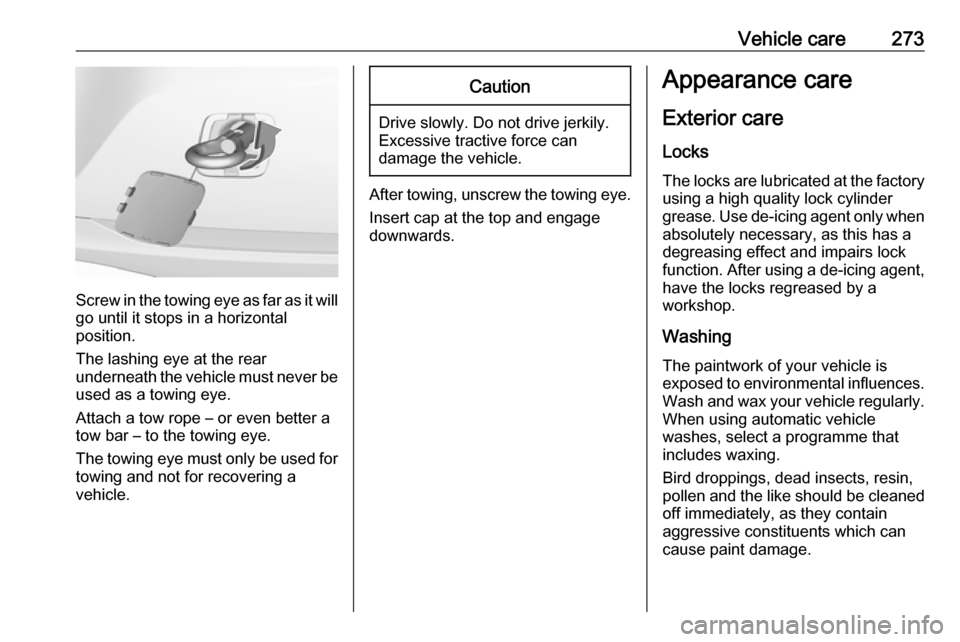
Screw in the towing eye as far as it will
go until it stops in a horizontal
position.
The lashing eye at the rear
underneath the vehicle must never be used as a towing eye.
Attach a tow rope – or even better a
tow bar – to the towing eye.
The towing eye must only be used for
towing and not for recovering a
vehicle.
Caution
Drive slowly. Do not drive jerkily.
Excessive tractive force can
damage the vehicle.
After towing, unscrew the towing eye.
Insert cap at the top and engage
downwards.
Appearance care
Exterior care Locks
The locks are lubricated at the factory using a high quality lock cylinder
grease. Use de-icing agent only when absolutely necessary, as this has a
degreasing effect and impairs lock function. After using a de-icing agent,
have the locks regreased by a
workshop.
WashingThe paintwork of your vehicle is
exposed to environmental influences.
Wash and wax your vehicle regularly.
When using automatic vehicle
washes, select a programme that
includes waxing.
Bird droppings, dead insects, resin,
pollen and the like should be cleaned
off immediately, as they contain
aggressive constituents which can
cause paint damage.