camera OPEL ASTRA K 2017.5 User Guide
[x] Cancel search | Manufacturer: OPEL, Model Year: 2017.5, Model line: ASTRA K, Model: OPEL ASTRA K 2017.5Pages: 311, PDF Size: 9.21 MB
Page 200 of 311

198Driving and operatingnot brake outside of its operatingspeed range and only responds to
detected vehicles.
Forward looking brake assist
In addition to the brake preparation
system and emergency automatic
braking, the forward looking brake
assist function makes the brake assist more sensitive. Therefore, pressing
the brake pedal less strongly results
in immediate hard braking. This
function helps the driver brake
quicker and harder before the
imminent collision.
If equipped only with front camera the
system operates up to a speed of 85
km/h.
9 Warning
Active emergency braking is not
designed to apply hard
autonomous braking or to
automatically avoid a collision. It is designed to reduce the vehicle
speed before a collision. It may not
react for pedestrians or animals.
After a sudden lane change, the
system needs a certain time to
detect the next preceding vehicle.
The complete attention of the
driver is always required while
driving. The driver shall always be ready to take action and apply the
brakes and steer to avoid
collisions. The system is designed to work with all occupants wearingtheir seat belts.
Intelligent Brake Assist
If the vehicle is equipped with radar
sensor Intelligent brake assist may
activate when the brake pedal is
applied quickly by providing a boost
to braking based on the speed of
approach and distance to a vehicle
ahead.
Minor brake pedal pulsations or pedal movement during this time is normal
and the brake pedal should continue to be applied as needed. Intelligent
brake assist will automatically
disengage only when the brake pedal is released.
9 Warning
Intelligent brake assist may
increase vehicle braking in
situations when it may not be
necessary. You could block the
flow of traffic. If this occurs, take
your foot off the brake pedal and
then apply the brakes as needed.
Deactivation
On vehicles with front camera active
emergency braking can be
deactivated by repeatedly pressing
the gap switch V to Off setting,
Page 201 of 311

Driving and operating1993 193. If deactivated a message is
displayed in the Driver Information
Centre.
On vehicles with radar sensor the
system can be disabled in the
personalisation menu in the Info-
display, 3 125.
System limitations
In some cases, the active emergency braking system may provide an
automatic braking in situations that
seem to be unnecessary, for instance in parking garages, due to traffic signs
in a curve or due to vehicles in
another lane. This is normal
operation, the vehicle does not need
service. Firmly apply the accelerator
pedal to override the automatic
braking.Emergency automatic braking may not:
● detect a vehicle ahead on winding or hilly roads.
● detect all vehicles, especially vehicles with a trailer, tractors,
muddy vehicles, etc.
● detect a vehicle when weather limits visibility, such as in fog,rain, or snow.
To avoid malfunction keep the areas
of the camera sensor in the
windscreen and the radar sensor in
the radiator grille always clean from
dirt, dust, ice and snow.
Complete attention is always required
while driving, and you should be
ready to take action and apply the
brakes and/or steer the vehicle to
avoid crashes.
Fault
In case the system requires a service, a message is displayed in the Driver
Information Centre.If the system does not work as it
should do, vehicle messages are
displayed in the Driver Information
Centre.
Vehicle messages 3 123.
Parking assist General information
When the trailer hitch is attached,
change the configuration settings in
the vehicle personalisation menu in
the Info-Display. Vehicle
personalisation 3 125.
When attaching a trailer or bike
carrier to the trailer hitch, the parking
assist is deactivated.
Rear parking assist9 Warning
It is the driver who bears full
responsibility for the parking
manoeuvre.
Always check the surrounding
area while reversing and using the rear parking assist system.
Page 210 of 311

208Driving and operatingNote
If the overtaking vehicle is at least
10 km/h faster than the vehicle being
overtaken, the warning symbol B in
the relevant exterior mirror may not
illuminate.
Side blind spot alert is active from
speeds of 10 km/h up to 140 km/h.
Driving faster than 140 km/h
deactivates the system, indicated by
low lighting warning symbols B in
both exterior mirrors. Reducing the speed again will extinguish the
warning symbols. If a vehicle is then
detected in the blind zone, the
warning symbols B will illuminate as
normal on the relevant side.
When the vehicle is started, both exterior mirror displays will briefly
illuminate to indicate that the system
is operating.
The system can be activated or
deactivated in the Info-Display.
Vehicle personalisation 3 125.
Deactivation is indicated by a
message in the Driver Information
Centre.
Detection zones
The detection zones start at the rear
bumper and extend approx.
three metres rearwards and to the
sides. The height of the zone is
approx. between half a metre and
two metres off the ground.
The system is deactivated if the
vehicle is towing a trailer or if a bike
carrier is attached.
Side blind spot alert is designed to
ignore stationary objects, e.g.
guardrails, posts, curbs, walls and
beams. Parked vehicles or oncoming
vehicles are not detected.Fault
Occasional missed alerts can occur
under normal circumstances and will
increase in wet conditions.
Side blind spot alert does not operate when the left or right corners of the
rear bumper are covered with mud,
dirt, snow, ice, slush, or in heavy
rainstorms. Cleaning instructions
3 273.
In the event of a fault in the system or if the system does not work due to
temporary conditions, the symbols in
the mirrors will be permanently
illuminated and a message is
displayed in the Driver Information
Centre. Seek the assistance of a
workshop.
Rear view camera
The rear view camera assists the
driver when reversing by displaying a view of the area behind the vehicle.
The view of the camera is displayed
in the Colour-Info-Display.
Page 211 of 311

Driving and operating2099Warning
The rear view camera does not
replace driver vision. Note that
objects that are outside the
camera's field of view and the
advanced parking assist sensors,
e.g. below the bumper or
underneath the vehicle, are not
displayed.
Do not reverse the vehicle by only looking at the Info-Display and
check the surrounding area
behind and around the vehicle
before reversing.
Activation
Rear view camera is automatically
activated when reverse gear is
engaged.
Functionality
On 5-door hatchback the camera is
mounted between the number plate
lights.
On Sports Tourer the camera is
mounted under the tailgate moulding.
The area displayed by the camera is
limited. The distance of the image that
appears on the display differs from
the actual distance.
Guiding lines
Dynamic guiding lines are horizontal
lines at one metre intervals projected onto the picture to define the distance to displayed objects.
Page 212 of 311

210Driving and operating
Trajectory lane of the vehicle is
shown in accordance with the
steering angle.
Warning symbols
Warning symbols are indicated as
triangles 9 on the picture, which show
obstacles detected by the rear
sensors of the advanced parking
assist.
Additionally, 9 appears on the top
line of the Info-Display with the
warning to check the vehicle
surrounding.
Deactivation
The camera is switched off when a
certain forward speed is exceeded or
if reverse gear is not engaged for
approx. 15 seconds.
Deactivation of guiding lines and
warning symbols
7'' Colour-Info-Display: Activation or
deactivation of the visual guiding lines and the warning symbols can be
changed via touch buttons in the
lower zone of the display.
8'' Colour-Info-Display: Activation or
deactivation of the visual guiding lines
and the warning symbols can be
changed in the Settings menu in the
Info-Display. Select the relevant
setting in Settings, I Rear Camera .
Info-Display 3 121.
Vehicle personalisation 3 125.
Fault
Fault messages are displayed with a
9 on the top line of the Info-Display.
The rear view camera may not
operate properly when:
● The surrounding is dark.
● The sun or the beam of headlights is shining directly into
the camera lens.
● Ice, snow, mud, or anything else covers the camera lens. Clean
the lens, rinse it with water, and
wipe it with a soft cloth.
● The vehicle is towing a trailer. ● The vehicle had a rear end accident.
● There are extreme temperature changes.
Page 213 of 311

Driving and operating211Traffic sign assistant
Functionality
Traffic sign assistant detects
designated traffic signs via a front
camera and displays them in the
Driver Information Centre.
If the vehicle is equipped with an
embedded navigation system, traffic signs from data maps may be
included additionally.
Traffic signs, which will be detected,
are:
Limit and no passing signs ● speed limit
● no passing
● end of speed limit
● end of no passingRoad signs
Beginning and end of:
● city regions (country-specific)● motorways
● A-roads
● play streetsAdd on signs ● additional hints to traffic signs
● restriction of trailer towing
● tractor constraints
● wet warning
● ice warning
● time constraints
● distance constraints
● direction arrows
Speed limit signs and no passing
signs are displayed in the Driver
Information Centre until the nextspeed limit sign or end of speed limit
is detected or up to a defined sign
timeout.
Indication of multiple signs on the
display is possible.
An exclamation mark in a frame
indicates that there is an additional
sign detected which cannot be clearly
identified by the system.
The system operates without loss of
performance up to a speed of
200 km/h depending on the lighting
conditions. At night the system is
active up to a speed of 160 km/h.
Page 216 of 311

214Driving and operatingAlternatively, SET/CLR or 9 can be
pressed for three seconds to clear the
content of the page.
Upon successful reset, a chime will
sound and the following “Default
Sign” is indicated until the next traffic
sign is detected or provided by map
data of the navigation system.
In some cases, traffic sign assistant is
cleared up automatically by the
system.
Clearing of traffic signs
There are different scenarios that
lead to clearing the currently
displayed traffic signs. After clearing,
the “Default Sign” or a sign from
navigation map data is displayed in
the Driver Information Centre.
Reasons for signs being cleared:
● A predefined distance was driven
or time has elapsed (differs for
each sign type)
● Vehicle drives through a turn
● If no navigation map data is available and speed drops below52 km/h (city entry detection)
● If navigation map data is available and a city entry/exit was
detected due to map data change
Traffic sign detection in
conjunction with navigation
system
If the vehicle is equipped with a
navigation system, the currently
displayed sign can either originate
from optical sign detection or from the
map data.
If the currently displayed sign
originates from map data and the map
information changes, a new sign will
be displayed. This may lead to
detection of a new sign although no
sign on the road may have been
passed.Fault
Traffic sign assistant may not operate
correctly if:
● The area of the windscreen, where the front camera is
located, is not clean or affected
by foreign items, e.g. stickers.
● Traffic signs are completely or partially covered or difficult to
discern.
● There are adverse environmental
conditions, e.g. heavy rain, snow,
direct sunlight or shadows.
● Traffic signs are incorrectly mounted or damaged.
● Traffic signs do not comply with the Vienna Convention on traffic
signs (Wiener Übereinkommen
über Straßenverkehrszeichen).Caution
The system is intended to help the driver within a defined speed
range to discern certain traffic
Page 217 of 311
Driving and operating215signs. Do not ignore traffic signs
which are not displayed by the
system.
The system does not discern any
other than the conventional traffic
signs that might give or end a
speed limit.
Do not let this special feature
tempt you into taking risks when
driving.
Always adapt speed to the road
conditions.
The driver assistance systems do not relieve the driver from full
responsibility for vehicle
operation.
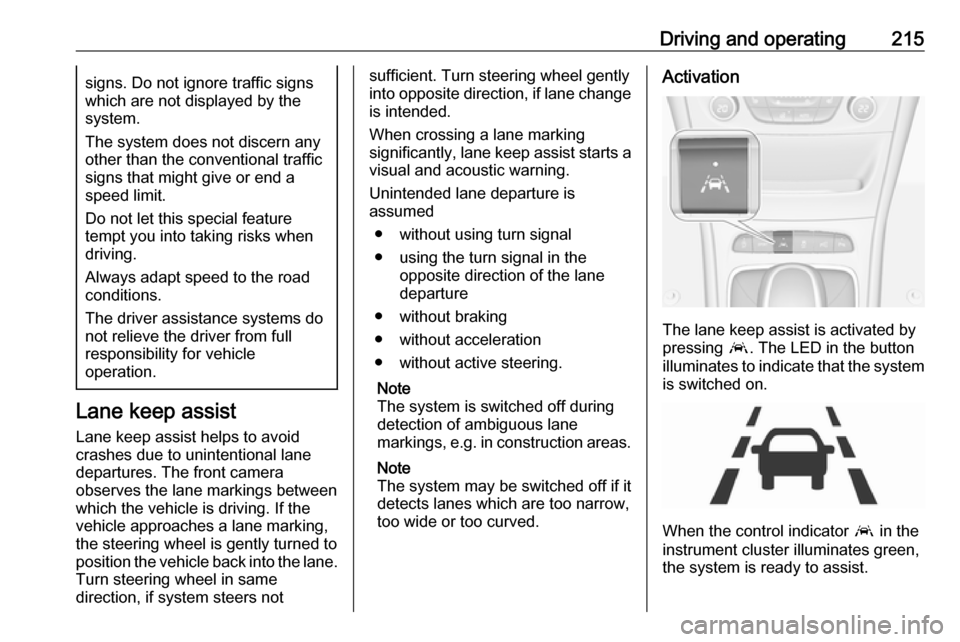
Lane keep assist
Lane keep assist helps to avoid
crashes due to unintentional lane
departures. The front camera
observes the lane markings between
which the vehicle is driving. If the
vehicle approaches a lane marking,
the steering wheel is gently turned to
position the vehicle back into the lane. Turn steering wheel in same
direction, if system steers not
sufficient. Turn steering wheel gently
into opposite direction, if lane change
is intended.
When crossing a lane marking
significantly, lane keep assist starts a
visual and acoustic warning.
Unintended lane departure is
assumed
● without using turn signal
● using the turn signal in the opposite direction of the lane
departure
● without braking
● without acceleration
● without active steering.
Note
The system is switched off during
detection of ambiguous lane
markings, e.g. in construction areas.
Note
The system may be switched off if it
detects lanes which are too narrow,
too wide or too curved.Activation
The lane keep assist is activated by
pressing a. The LED in the button
illuminates to indicate that the system
is switched on.
When the control indicator a in the
instrument cluster illuminates green,
the system is ready to assist.
Page 250 of 311

248Vehicle careNo.Circuit18Diesel exhaust system19Diesel exhaust system20–21DC/AC Converter22ABS23Washer system for windscreen
and rear window24–25Diesel fuel heating26Transmission control module27Power tailgate module28–29Heated rear window30Mirror defrost31–32DC transformer/LED display/
Electrical heater/Climate
control/Glow plug controllerNo.Circuit33Anti theft warning34Horn35Power outlet load compartment36Right high beam (Halogen)/
Right low beam (LED)37Left high beam (Halogen)38LED headlight/Automatic head‐
light range adjustment39Front fog light40OnStar41Water in fuel sensor/Water
pump42Manual headlight range adjust‐
ment43Fuel pump44Rear view camera/Inside rear
view mirror/Trailer module45LED headlight left/Automatic
headlight range adjustment leftNo.Circuit46Instrument cluster47Steering column lock48Rear wiper49–50LED headlight right/Automatic
headlight range adjustment
right51Left low beam (LED)52Engine control module/Trans‐
mission control module53–54Windscreen wiper55Diesel exhaust system56–57–
After having changed defective fuses,
close the fuse box cover and press
until it engages.
If the fuse box cover is not closed
correctly, malfunction may occur.
Page 309 of 311

307Power connector........................... 98
Power outlets ............................... 97
Power seat adjustment ................50
Power windows ............................ 41
Preheating ................................. 113
Puncture ..................................... 264
Q
Quickheat ................................... 155
R Radio Frequency Identification (RFID) ..................................... 303
Radio remote control ...................21
Reading lights ............................ 144
Rear floor storage cover ..............81
Rear fog light .....................114, 143
Rear seats .................................... 55
Rear storage ................................. 79
Rear view camera ...................... 208
Rear window wiper/washer .......... 94
Recommended fluids and lubricants ........................ 278, 282
Refuelling ................................... 218
Registered trademarks ...............301
Retained power off .....................160
Reversing lights .........................143
Ride control systems ..................179
Roof .............................................. 44
Roof load ...................................... 88
Roof rack ..................................... 87S
Safety belts ................................... 56
Safety net .................................... 84
Seat adjustment ............................. 7
Seat belt ........................................ 8
Seat belt reminder .....................109
Seat belts ..................................... 56
Seat heating Seat heating, front .....................54
Seat heating, rear .....................56
Seat position ................................ 47
Selector lever ..................... 169, 174
Service ............................... 156, 277
Service display .......................... 108
Service information ....................277
Side airbag system ......................62
Side blind spot alert ....................207
Sidelights .................................... 136
Side turn signal lights ................244
Software acknowledgement .......299
Software update ......................... 301
Spare wheel ............................... 267
Speed limiter....................... 115, 184
Speedometer ............................. 104
Sport mode ................................ 181
Starting and operating ................158
Starting off ................................... 17
Starting the engine ....................161
Steering ...................................... 158
Steering wheel adjustment ......9, 91Steering wheel controls ...............91
Stop-start system........................ 163
Storage ......................................... 71
Storage compartments .................71
Sunroof ........................................ 44
Sunvisor lights ........................... 145
Sun visors .................................... 43
Symbols ......................................... 4
T Tachometer ............................... 106
Tail lights ................................... 238
Three-point seat belt .................... 57
Tools .......................................... 253
Tow bar....................................... 221
Towing ................................ 221, 271
Towing another vehicle .............272
Towing equipment .....................223
Towing the vehicle .....................271
Traction Control system ............. 179
Traction Control system off......... 113
Traffic sign assistant ...........115, 211
Trailer coupling ........................... 221
Trailer stability assist .................226
Trailer towing ............................. 222
Transmission ............................... 16
Transmission display .........169, 173
Tread depth ............................... 260
Trip odometer ............................ 105
Turn and lane-change signals ...142