change time OPEL ASTRA K 2018.5 Infotainment system
[x] Cancel search | Manufacturer: OPEL, Model Year: 2018.5, Model line: ASTRA K, Model: OPEL ASTRA K 2018.5Pages: 183, PDF Size: 3.32 MB
Page 122 of 183

122Navigation
Depending on the former setting, the
screen button is labelled 3D Head
Up , 2D Head Up or 2D North Up . The
map view changes according to the
screen button.
Select the desired option.
Map colours
Depending on the external lighting
conditions, the colouring of the map
screen (light colours for the day and
dark colours for the night) can be
adapted.
Select L on the map screen to display
the Options menu. Select Navigation
Settings and then Map colours .
The default setting is Auto. When
Auto is activated, the screen adjusts
automatically.
Alternatively, activate Day (light) or
Night (dark) for an only light or only
dark screen.
Autozoom function
If the autozoom function is activated
(default setting), the zoom level
changes automatically when
approaching a turning manoeuvre
during active route guidance. This
way, you always get a good overview of the respective manoeuvre.
If the autozoom function is
deactivated, the selected zoom level
remains the same during the whole
route guidance process.
To deactivate the function, select L
on the map to display the Options
menu. Select Navigation Settings and
then touch the slider bar next to Auto
Zoom .
Touch the screen button again to
reactivate the function.POI (Points of Interest) icons on the
map
POIs are points of general interest,
e.g. gas stations or restaurants.
The display of POI categories shown
on the map may be personally
adapted.
Select L on the map to display the
Options menu. Select Navigation
Settings and then Show on map .
Activate the desired POI categories.
Traffic events on the map
Traffic events may be directly
indicated on the map.
To activate the function, select L on
the map to display the Options menu.
Select Traffic on Map . The screen
button changes to activation mode.
To deactivate the function, select
Traffic on Map again.
Time indication
The time indication during active
route guidance may be displayed in
two different modes: the remaining
time (until the destination will be
reached) or the arrival time (when the destination will be reached).
Page 123 of 183

Navigation123Select L on the map to display the
Options menu. Select Navigation
Settings and then Time to Destination
Format .
Activate the desired option in the submenu.
Note
During active route guidance, the
time indication can be changed by
simply tapping on the time indication
field on the screen.
Alert preferences
If desired, you may receive an
additional notification in specific traffic
zones.
Select L on the map to display the
Options menu. Select Navigation
Settings and then Alert Preferences .
If Safety camera is activated, you are
warned when approaching a
stationary speed camera.
Note
This function is only available if such an alert system corresponds to the
legal provisions applicable in the
country you are in.
Activate the desired option.Voice guidance
The route guidance process can be
supported by voice prompts given out
by the system.
Note
The navigation voice prompts
function is not supported for all
languages. If there are no voice
prompts available, the system
automatically plays a tone to
indicate a manoeuvre ahead.
Activation
The voice guidance function is
activated by default. To deactivate
the function, select L on the map to
display the Options menu and then
touch Voice Guidance . The screen
button changes.
Select the screen button again to
reactivate the function.
Voice guidance settings
To define which system outputs may assist during active route guidance,
select L on the map, Navigation
Settings and then Voice Guidance .If Normal voice guidance is activated,
a voice announces the next turning
manoeuvre to be taken.
If Beep only is activated, only beep
tones are given out for notification.
In the submenu of Prompts during
Phone Call , the possible voice
outputs during a phone call can be
set.
Activate the desired options.
Note
Voice guidance prompts are only
given out if Voice Guidance is
activated in the Options menu, see
above.
Information
Select L on the map to display the
Options menu. Select Navigation
Settings and then About.
The texts of the manufacturer's terms and conditions or privacy statement
can be accessed via the respective
menu items.
The navigation map version is
displayed.
Page 129 of 183

Navigation129Note
If you select Go, route guidance to
the destination first selected is
stopped and route guidance to the new destination is started.
The destinations are arranged in the
order in which they are entered while
the last destination added is the first
you are guided to. In order to check or
confirm while driving, the name of the
next destination is displayed above
the arrival time and distance.
The order of the destinations can be
changed 3 129.
Guidance
Route guidance is provided by the navigation system through visual
instructions and voice prompts (voice guidance).Visual instructions
Visual instructions are provided on
the display.
Note
When route guidance is active and
you are not within the navigation
application, turning manoeuvres are indicated by pop-up messages
displayed on top of the screen.
Voice guidance
Navigation voice prompts announce
which direction to follow, when
approaching an intersection at which
you need to turn.
To activate the voice prompts
function 3 119.
Touch the big turn arrow on the left side of the screen to replay the last voice guidance instruction.Starting and cancelling route
guidance
To start route guidance, select Go in
the Details menu after a destination
has been selected 3 124.
To cancel route guidance, select
Cancel on the left side of the screen
3 119.
Destinations list
The Destinations list contains all
destinations belonging to the route
currently active.
Touch j within the time and distance
field. The Destinations list is
displayed.
Page 135 of 183

Phone135interference is caused by the
mobile phone or if dangerous
situations can occur.
Bluetooth
The phone function is certified by theBluetooth Special Interest Group
(SIG).
You can find further information about the specification on the internet at
http://www.bluetooth.com.
Bluetooth connection
Bluetooth is a radio standard for the
wireless connection of e.g. mobile
phones, smartphones or other
devices.
The pairing and connecting of the
Bluetooth devices to the Infotainment
system are carried out via the
Bluetooth menu. Pairing is the PIN
code exchange between the
Bluetooth device and the
Infotainment system.
Bluetooth menu
Press ; and then select Settings.
Select Bluetooth to display the
Bluetooth menu.
Pairing a device
Important information ● Up to ten devices can be paired to the system.
● Only one paired device can be connected to the Infotainment
system at a time.
● Pairing only needs to be carried out once, unless the device is
deleted from the list of paired
devices. If the device has been
connected previously, the
Infotainment system establishes
the connection automatically.
● Bluetooth operation considerably
drains the device's battery.
Therefore, connect the device to
the USB port for charging.
Pairing a new device 1. Activate the Bluetooth function of the Bluetooth device. For further
information, see the operating
instructions of the Bluetooth
device.
2. Press ; and then select
Settings on the display.
Select Bluetooth and then Device
Management to display the
respective menu.
Page 148 of 183

148IntroductionIntroductionGeneral information...................148
Theft-deterrent feature ...............149
Control elements overview ........150
Usage ........................................ 152General information
The Infotainment system provides
you with state-of-the-art in-car
infotainment.
Using the FM, AM or DAB radio
functions, you can register a large
number of stations on different
favourites pages.
You can connect external data
storage devices to the Infotainment
system as further audio sources;
either via a cable or via Bluetooth ®
.
The digital sound processor provides
you with several preset equaliser
modes for sound optimisation.
In addition, the Infotainment system is equipped with a Phone portal that
allows comfortable and safe use of
your mobile phone in the vehicle.
Optionally, the Infotainment system
can be operated using the control
panel or the controls on the steering
wheel, or - if provided by your mobile
phone - via speech recognition.
Note
This manual describes all options
and features available for the
various Infotainment systems.Certain descriptions, including those
for display and menu functions, may
not apply to your vehicle due to
model variant, country
specifications, special equipment or
accessories.
Important information on
operation and traffic safety9 Warning
Drive safely at all times when
using the Infotainment system.
If in doubt, stop the vehicle before operating the Infotainment
system.
Radio reception
Radio reception may be disrupted by static, noise, distortion or loss of
reception due to:
● changes in distance from the transmitter
● multi-path reception due to reflection
● shadowing
Page 156 of 183

156Basic operationSelect Time and Date .
Set Time
Select Set Time to enter the
respective submenu.
Select Auto Set at the bottom of the
screen. Activate either On - RDS or
Off (Manual) .
If Off (Manual) is selected, adjust
hours and minutes.
Repeatedly select 12-24 HR at the
bottom of the screen to choose a time mode.
If the 12-hour mode is selected, a
third column for AM and PM selection
is displayed. Select the desired
option.
Set Date
Select Set Date to enter the
respective submenu.
Select Auto Set at the bottom of the
screen. Activate either On - RDS or
Off (Manual) .
If Off (Manual) is selected, adjust the
date settings.Language
Press MENU to open the respective
audio menu.
Select Settings , scroll through the list
and select Vehicle Settings .
Select Languages .
Scroll through the list and select the
desired language.
Restore Factory Settings
Press MENU to open the respective
audio menu.
Select Settings , scroll through the list
and select Vehicle Settings .
Select Restore Factory Settings to
enter the respective submenu.
Select the desired option and confirm the message.
Software Information The Software Information menu
contains specific information on the
software.
Press MENU to open the respective
audio menu.Select Settings , scroll through the list
and select Vehicle Settings .
Select Software Information .
Valet mode
If valet mode is activated, all vehicle
displays are locked and no changes
may be performed within the system.
Note
Vehicle-related messages remain
enabled.
Locking the system
Press MENU to open the respective
audio menu.
Select Settings , scroll through the list
and select Vehicle Settings .
Select Valet Mode . A keypad is
displayed.
Enter a four-digit code and select
Enter . The keypad is redisplayed.
To confirm the first input, reenter the
four-digit code and select Lock. The
system is locked.
Unlocking the system
Turn the Infotainment system on. A
keypad is displayed.
Page 168 of 183

168Phoneinterference is caused by the
mobile phone or if dangerous
situations can occur.
Bluetooth
The Phone portal is certified by the
Bluetooth Special Interest Group
(SIG).
You will find further information about the specification on the internet at
http://www.bluetooth.com.
Bluetooth connection
Bluetooth is a radio standard for the
wireless connection of e.g. mobile
phones or other devices.
To be able to set up a Bluetooth
connection to the Infotainment
system, the Bluetooth function of the
Bluetooth device must be activated.
For further information, please
consult the operating instructions for
the Bluetooth device.
Via the Phone portal, pairing (PIN
code exchange between Bluetooth
device and Infotainment system) and
connecting of the Bluetooth devices
with the Infotainment system are
carried out.
Pairing a device
Important information ● Up to five devices can be paired to the system.
● Only one paired device can be connected to the Infotainment
system at a time.
● Pairing only needs to be carried out once, unless the device is
deleted from the list of paired
devices. If the device has been connected previously, the
Infotainment system establishes
the connection automatically.
● Bluetooth operation considerably
drains the device's battery.
Therefore, connect the device to
the USB port for charging.
Pairing the first device 1. Press PHONE and then select
Pair .
A message is displayed on the
Infotainment system indicatingthe name and PIN code of the
Infotainment system.
2. Start Bluetooth searching on the Bluetooth device to be paired.
3. Confirm pairing: ● If SSP (secure simple pairing) is supported:
Compare the PIN code (if
demanded) and confirm the
messages on the
Infotainment system and the
Bluetooth device.
● If SSP (secure simple pairing) is not supported:
Enter the Infotainment PIN
code on the Bluetooth device and confirm your input.
4. The Infotainment system and the device are paired. The phonemenu is displayed.
5. If available on the Bluetooth device, phone book and calls lists
are downloaded to the
Infotainment system. If required,
confirm the respective message
on your smartphone.
Page 171 of 183
Phone171
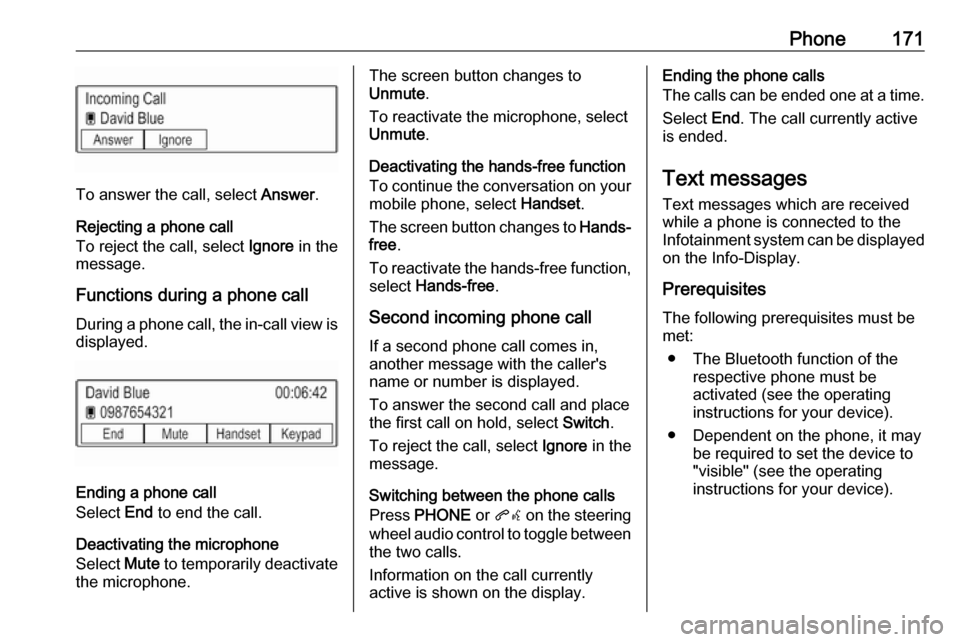
To answer the call, select Answer.
Rejecting a phone call
To reject the call, select Ignore in the
message.
Functions during a phone call During a phone call, the in-call view is displayed.
Ending a phone call
Select End to end the call.
Deactivating the microphone
Select Mute to temporarily deactivate
the microphone.
The screen button changes to
Unmute .
To reactivate the microphone, select
Unmute .
Deactivating the hands-free function
To continue the conversation on your mobile phone, select Handset.
The screen button changes to Hands-
free .
To reactivate the hands-free function,
select Hands-free .
Second incoming phone call If a second phone call comes in,
another message with the caller's
name or number is displayed.
To answer the second call and place
the first call on hold, select Switch.
To reject the call, select Ignore in the
message.
Switching between the phone calls
Press PHONE or qw on the steering
wheel audio control to toggle between the two calls.
Information on the call currently
active is shown on the display.Ending the phone calls
The calls can be ended one at a time.
Select End. The call currently active
is ended.
Text messages
Text messages which are received
while a phone is connected to the
Infotainment system can be displayed on the Info-Display.
Prerequisites The following prerequisites must be
met:
● The Bluetooth function of the respective phone must be
activated (see the operating
instructions for your device).
● Dependent on the phone, it may be required to set the device to
"visible" (see the operating
instructions for your device).