lights OPEL ASTRA K 2018 Manual user
[x] Cancel search | Manufacturer: OPEL, Model Year: 2018, Model line: ASTRA K, Model: OPEL ASTRA K 2018Pages: 313, PDF Size: 9.35 MB
Page 188 of 313

186Driving and operatingResume limit speed
Turn thumb wheel to RES/+. The
stored speed limit will be obtained
and is indicated without brackets in the Driver Information Centre.
Switching off
Press L, the speed limit indication
extinguishes in the Driver Information Centre. The stored speed is deleted.
By pressing m to activate cruise
control or adaptive cruise control,
speed limiter is also deactivated and
the stored speed is deleted.
By switching off the ignition, speed
limiter is also deactivated, but the
speed limit will be stored for next
speed limiter activation.
Adaptive cruise control
Adaptive cruise control is an
enhancement to conventional cruise
control with the additional feature of
maintaining a certain distance behind the vehicle ahead.Adaptive cruise control automatically
decelerates the vehicle when
approaching a slower moving vehicle. It then adjusts the vehicle speed to
follow the vehicle ahead at the
selected following distance. The
vehicle speed increases or decreases to follow the vehicle in front, but willnot exceed the set speed. It may
apply limited braking with activated
brake lights.
The adaptive cruise control can store
set speed over 30 km/h for manual
transmission. On vehicles with
automatic transmissions the system
can brake until a full stop and drive off from a stop.
Adaptive cruise control uses radar
and camera sensors to detect the
vehicles ahead. If no vehicle is
detected in the driving path, the
adaptive cruise control will behave
like a conventional cruise control.
Adaptive cruise control is mainly
advised to be used on long straight
roads like highways or country roads
with steady traffic. Do not use the
system if it is not advisable to
maintain a constant speed.
Control indicator A 3 115, m 3 114,
C 3 114.9 Warning
The complete driver attention is
always required while driving with adaptive cruise control. The driver stays fully in control of the vehicle
because the brake pedal, the
accelerator pedal and the cancel
switch have priority over any
adaptive cruise control operation.
Page 211 of 313
Driving and operating209Fault
Occasional missed alerts can occur
under normal circumstances and will
increase in wet conditions.
Side blind spot alert does not operate when the left or right corners of the
rear bumper are covered with mud,
dirt, snow, ice, slush, or in heavy
rainstorms. Cleaning instructions
3 273.
In the event of a fault in the system or if the system does not work due to
temporary conditions, the symbols in
the mirrors will be permanently
illuminated and a message is
displayed in the Driver Information
Centre. Seek the assistance of a
workshop.
Rear view camera The rear view camera assists the
driver when reversing by displaying a view of the area behind the vehicle.
The view of the camera is displayed
in the Colour-Info-Display.9 Warning
The rear view camera does not
replace driver vision. Note that
objects that are outside the
camera's field of view and the
advanced parking assist sensors,
e.g. below the bumper or
underneath the vehicle, are not
displayed.
Do not reverse the vehicle by only looking at the Info-Display and
check the surrounding area
behind and around the vehicle
before reversing.
Activation
Rear view camera is automatically
activated when reverse gear is
engaged.
Functionality
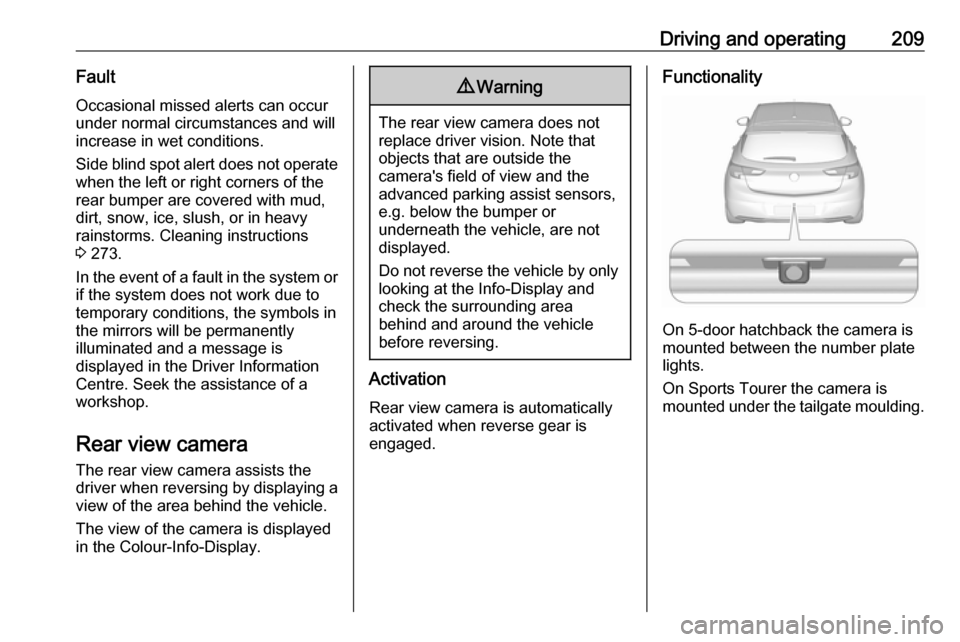
On 5-door hatchback the camera is
mounted between the number plate
lights.
On Sports Tourer the camera is
mounted under the tailgate moulding.
Page 213 of 313

Driving and operating211changed in the Settings menu in the
Info-Display. Select the relevant
setting in Settings, I Rear Camera .
Info-Display 3 121.
Vehicle personalisation 3 125.
Fault
Fault messages are displayed with a 9 on the top line of the Info-Display.
The rear view camera may not
operate properly when:
● The surrounding is dark.
● The sun or the beam of headlights is shining directly into
the camera lens.
● Ice, snow, mud, or anything else covers the camera lens. Clean
the lens, rinse it with water, and
wipe it with a soft cloth.
● The vehicle is towing a trailer.
● The vehicle had a rear end accident.
● There are extreme temperature changes.Traffic sign assistant
Functionality Traffic sign assistant detects
designated traffic signs via a front
camera and displays them in the
Driver Information Centre.
If the vehicle is equipped with an
embedded navigation system, traffic
signs from data maps may be
included additionally.
Traffic signs, which will be detected,
are:
Limit and no passing signs ● speed limit
● no passing
● end of speed limit
● end of no passingRoad signs
Beginning and end of:
● city regions (country-specific)● motorways
● A-roads
● play streetsAdd on signs ● additional hints to traffic signs
● restriction of trailer towing
● tractor constraints
● wet warning
● ice warning
● time constraints
● distance constraints
● direction arrows
Speed limit signs and no passing
signs are displayed in the Driver
Information Centre until the next
Page 229 of 313

Vehicle care227Vehicle careGeneral Information...................227
Accessories and vehicle modifications .......................... 227
Vehicle storage ........................228
End-of-life vehicle recovery .....228
Vehicle checks ........................... 229
Performing work ......................229
Bonnet ..................................... 229
Engine oil ................................. 230
Engine coolant ......................... 231
Washer fluid ............................ 232
Brakes ..................................... 232
Brake fluid ............................... 232
Vehicle battery ......................... 233
Diesel fuel system bleeding .....234
Wiper blade replacement ........234
Bulb replacement .......................235
Halogen headlights ..................235
Fog lights ................................. 237
Tail lights ................................. 238
Side turn signal lights ..............244
Number plate light ...................244
Interior lights ............................ 245
Instrument panel illumination ...245Electrical system ........................245
Fuses ....................................... 245
Engine compartment fuse box . 246
Instrument panel fuse box .......248
Load compartment fuse box ....250
Vehicle tools .............................. 252
Tools ........................................ 252
Wheels and tyres .......................254
Winter tyres ............................. 254
Tyre designations ....................254
Tyre pressure .......................... 254
Tyre pressure monitoring system .................................... 255
Tread depth ............................. 259
Changing tyre and wheel size . 260 Wheel covers ........................... 260
Tyre chains .............................. 260
Tyre repair kit .......................... 261
Wheel changing .......................264
Spare wheel ............................ 266
Jump starting ............................. 269
Towing ....................................... 271
Towing the vehicle ...................271
Towing another vehicle ...........272
Appearance care .......................273
Exterior care ............................ 273
Interior care ............................. 274General Information
Accessories and vehiclemodifications
We recommend the use of genuine
parts and accessories and factory
approved parts specific for your
vehicle type. We cannot assess or guarantee reliability of other products
- even if they have a regulatory or
otherwise granted approval.
Any modification, conversion or other
changes made to standard vehicle
specifications (including, without
limitation, software modifications,
modifications of the electronic control units) may invalidate the warranty
offered by Opel. Furthermore, such
changes may affect driver assistance
systems, may impact fuel
consumption, CO 2 emissions and
other emissions of the vehicle and
cause the vehicle to no longer
conform to the operating permit,
impacting the validity of your vehicle
registration.
Page 237 of 313

Vehicle care235Wiper blade on the rear window
Lift wiper arm. Disengage wiper bladeas shown in illustration and remove.
Attach the wiper blade slightly angled
to the wiper arm and push until it
engages.
Lower wiper arm carefully.
Bulb replacement
Switch off the ignition and switch off
the relevant switch or close the doors.
Only hold a new bulb at the base. Do not touch the bulb glass with bare
hands.
Use only the same bulb type for
replacement.
Replace headlight bulbs from within
the engine compartment.
Bulb check
After a bulb replacement switch on
the ignition, operate and check the
lights.
Halogen headlights Halogen headlights with separate
bulbs for low beam and high beam.
Low beam ( 1) outer bulb.
High beam ( 2) inner bulb.
Low beam (1)
Page 239 of 313
Vehicle care2372. Disengage spring clip fromretainer by moving it forward and
to the side. Swivel spring clip
downwards.
3. Withdraw the bulb holder from the
reflector housing.
4. Detach the bulb from the bulb holder and replace the bulb.
5. Insert the bulb holder and install spring clip.
Fit the cap and rotate clockwise.
Front turn signal light
In case of defective LEDs, have them replaced by a workshop.
Side light
In case of defective LEDs, have them
replaced by a workshop.
Daytime running light In case of defective LEDs, have them
replaced by a workshop.
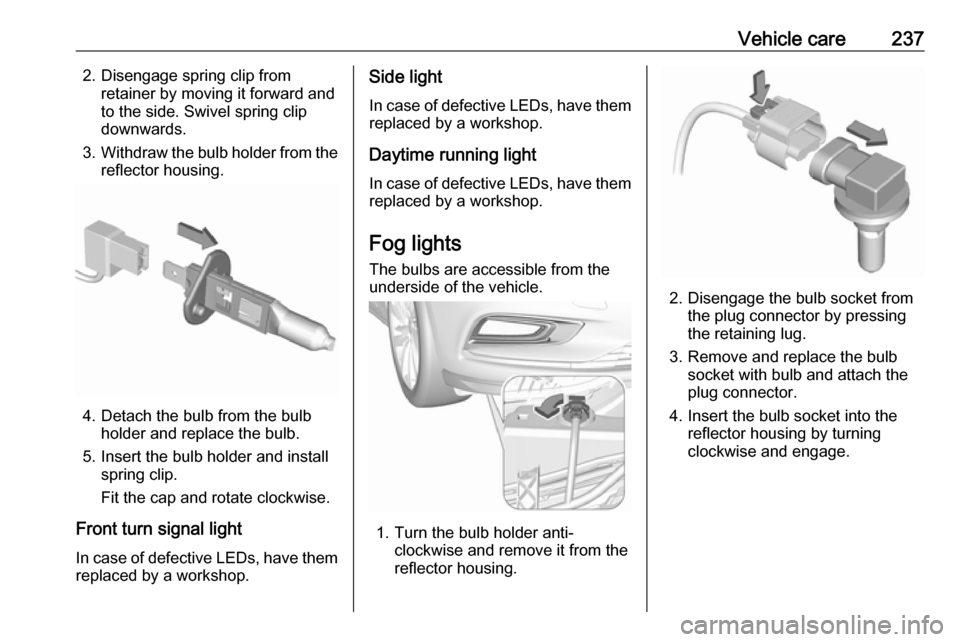
Fog lights
The bulbs are accessible from the
underside of the vehicle.
1. Turn the bulb holder anti- clockwise and remove it from the
reflector housing.
2. Disengage the bulb socket from the plug connector by pressing
the retaining lug.
3. Remove and replace the bulb socket with bulb and attach the
plug connector.
4. Insert the bulb socket into the reflector housing by turning
clockwise and engage.
Page 240 of 313
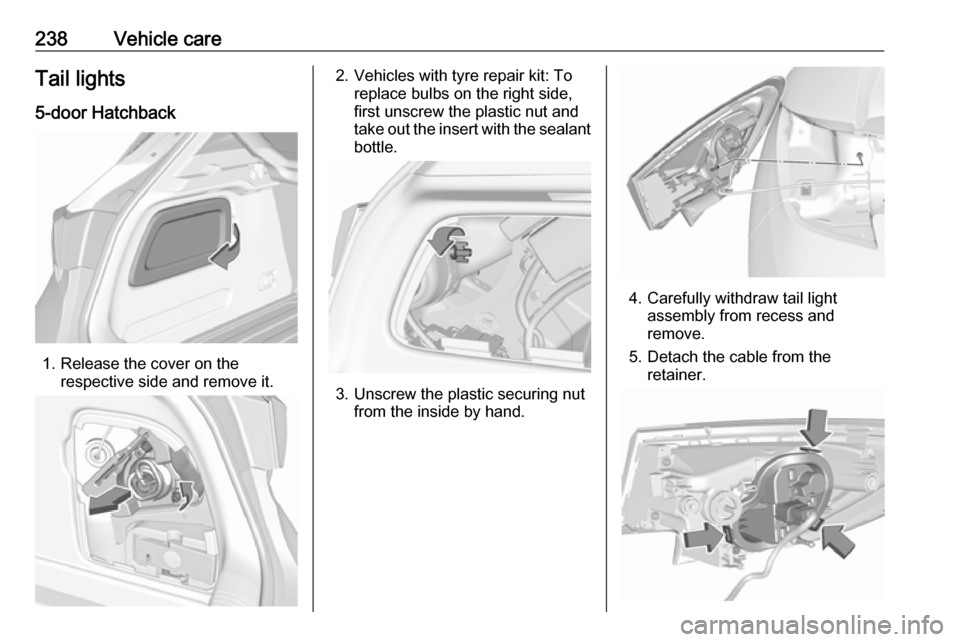
238Vehicle careTail lights5-door Hatchback
1. Release the cover on the respective side and remove it.
2. Vehicles with tyre repair kit: To replace bulbs on the right side,
first unscrew the plastic nut and
take out the insert with the sealant
bottle.
3. Unscrew the plastic securing nut from the inside by hand.
4. Carefully withdraw tail lightassembly from recess and
remove.
5. Detach the cable from the retainer.
Page 241 of 313
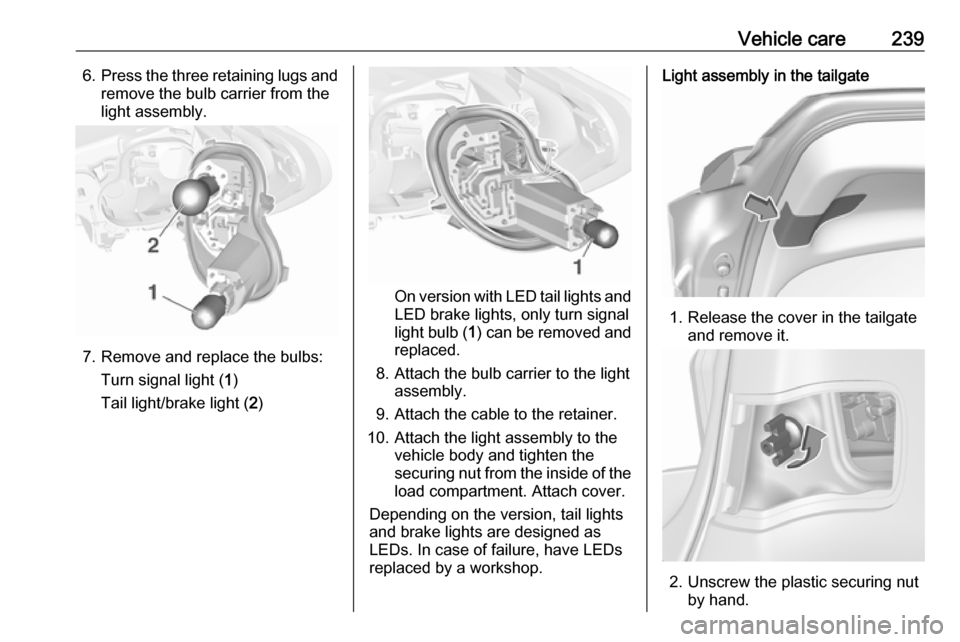
Vehicle care2396.Press the three retaining lugs and
remove the bulb carrier from the
light assembly.
7. Remove and replace the bulbs:
Turn signal light ( 1)
Tail light/brake light ( 2)
On version with LED tail lights and
LED brake lights, only turn signal
light bulb ( 1) can be removed and
replaced.
8. Attach the bulb carrier to the light assembly.
9. Attach the cable to the retainer.
10. Attach the light assembly to the vehicle body and tighten the
securing nut from the inside of the load compartment. Attach cover.
Depending on the version, tail lights
and brake lights are designed as
LEDs. In case of failure, have LEDs replaced by a workshop.
Light assembly in the tailgate
1. Release the cover in the tailgate and remove it.
2. Unscrew the plastic securing nutby hand.
Page 242 of 313
240Vehicle care
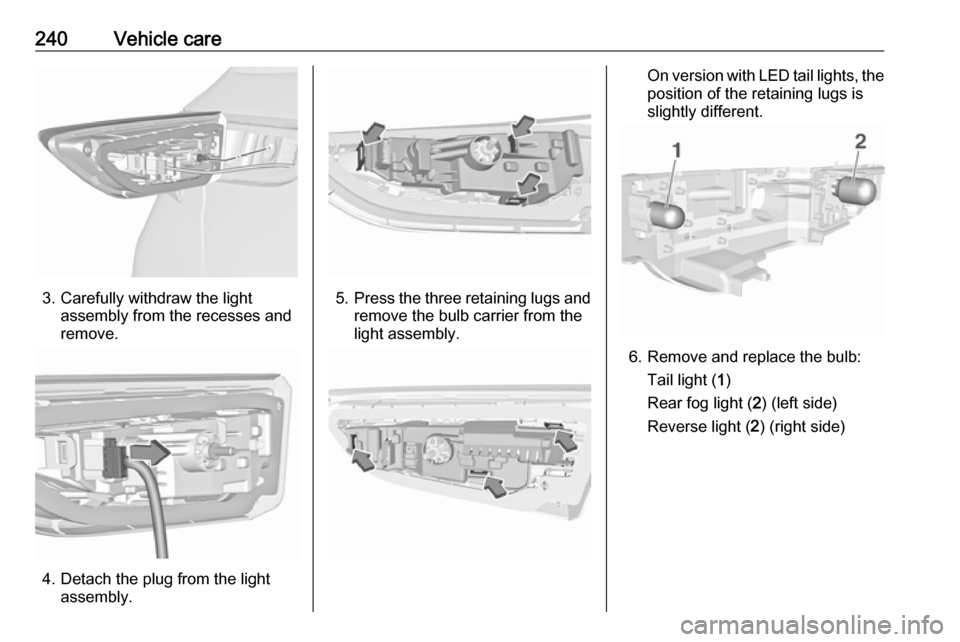
3. Carefully withdraw the lightassembly from the recesses and
remove.
4. Detach the plug from the light assembly.
5.Press the three retaining lugs and
remove the bulb carrier from the
light assembly.
On version with LED tail lights, the position of the retaining lugs is
slightly different.
6. Remove and replace the bulb:
Tail light ( 1)
Rear fog light ( 2) (left side)
Reverse light ( 2) (right side)
Page 243 of 313
Vehicle care241
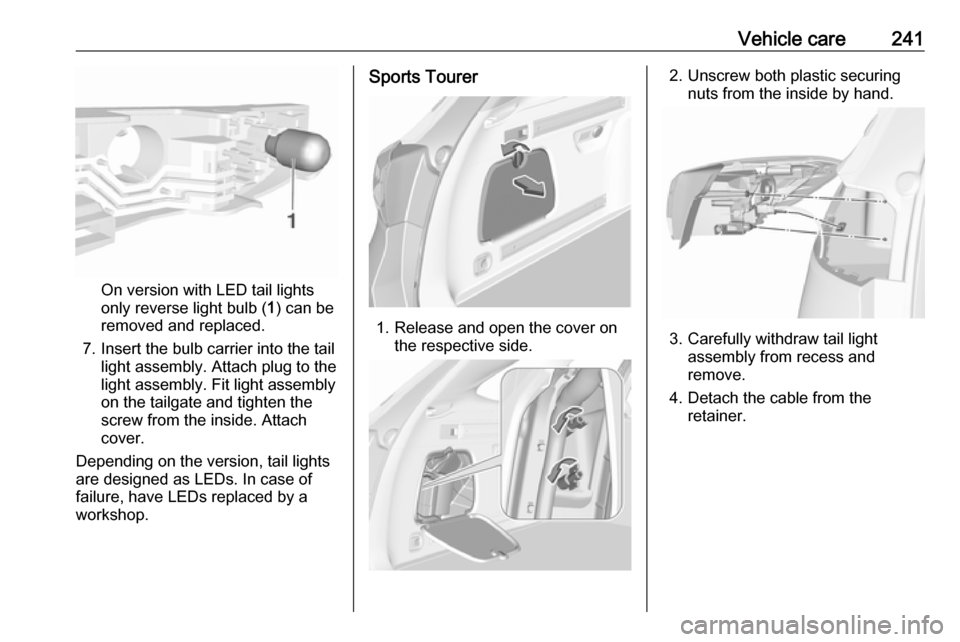
On version with LED tail lights
only reverse light bulb ( 1) can be
removed and replaced.
7. Insert the bulb carrier into the tail light assembly. Attach plug to the
light assembly. Fit light assembly
on the tailgate and tighten the
screw from the inside. Attach
cover.
Depending on the version, tail lights are designed as LEDs. In case of failure, have LEDs replaced by aworkshop.
Sports Tourer
1. Release and open the cover on the respective side.
2. Unscrew both plastic securingnuts from the inside by hand.
3. Carefully withdraw tail light assembly from recess and
remove.
4. Detach the cable from the retainer.