Esc OPEL ASTRA K 2018 User Guide
[x] Cancel search | Manufacturer: OPEL, Model Year: 2018, Model line: ASTRA K, Model: OPEL ASTRA K 2018Pages: 313, PDF Size: 9.35 MB
Page 136 of 313

134Instruments and controlsDiagnostic report
The vehicle automatically transmits
diagnostic data to OnStar which
sends a monthly email report to you
and your preferred workshop.
Note
The workshop notification function
can be disabled in your account.
The report contains the status of key
operating systems of the vehicle like
engine, transmission, airbags, ABS,
and other major systems. It also
provides information on possible
maintenance items and tyre pressure (only with tyre pressure monitoring
system).
To look at the information in greater
detail, select the link within the email and log in to your account.
Destination download
A desired destination can be directly
downloaded to the navigation system.
Press Z to call an advisor and
describe the destination or point of
interest.The advisor can look up any address
or point of interest and directly send
the destination to the built-in
navigation system.
OnStar settings
OnStar PIN
To have full access to all OnStar
services, a four-digit PIN is required. The PIN has to be personalised when first talking to an advisor.
To change the PIN, press Z to call an
advisor.
Account data
An OnStar subscriber has an account
where all the data is stored. To
request a change of the account
information, press Z and talk to an
advisor or log in to your account.
If the OnStar service is used on
another vehicle, press Z and request
that the account be transferred to the
new vehicle.Note
In any case, if the vehicle is disposed of, sold or otherwise transferred,
immediately inform OnStar about
the changes and terminate the
OnStar service on this vehicle.
Vehicle location
The vehicle location is transmitted to OnStar when service is requested ortriggered. A message on the Info-
Display informs about this
transmission.
To activate or deactivate the
transmission of the vehicle location,
press and hold j until an audio
message is heard.
The deactivation is indicated by the
status light flashing red and green for a short period of time and each time
the vehicle is started.
Note
If the transmission of the vehicle
location is deactivated, some
services are no longer available.
Page 140 of 313

138LightingTo adapt headlight range to the
vehicle load to prevent dazzling: turn
thumb wheel ? to required position.0:front seats occupied1:all seats occupied2:all seats occupied and load
compartment laden3:driver's seat occupied and load
compartment laden
Dynamic automatic headlight
levelling 3 138.
Headlights when driving
abroad
The asymmetrical headlight beam
extends visibility at the edge of the
road at the passenger side.
However, when driving in countries
where traffic drives on the opposite
side of the road, adjust the headlights to prevent dazzling of oncoming
traffic.
Vehicles with halogen headlight
system
The headlights do not have to be adjusted.
Vehicles with LED headlight
Headlights can be set for driving on
the opposite side of the road in the
vehicle personalisation menu via the
Info-Display.
Select the relevant setting in Settings,
I Vehicle .
Info-Display 3 121.
Vehicle personalisation 3 125.
Every time the ignition is switched on,
f flashes for approx. four seconds as
a reminder.
To deactivate, use the same
procedure as described above. f will
not flash when function is
deactivated.
Control indicator f 3 114.
Daytime running lights
Daytime running lights increases
visibility of the vehicle during daylight.
They are switched on automatically
during daytime when engine is
running.The system switches between
daytime running lights and headlights automatically, depending on the
lighting conditions. Automatic light
control 3 137.
LED headlights
LED headlight system contains a
variety of particular LEDs in each
headlight which enables the control of different lighting programs.
Light distribution and intensity of light
are variably triggered depending on
the lighting conditions, road type and
driving situation. The vehicle adapts
the headlights automatically to the
situation to enable optimal light
performance for the driver.
Some functions of the LED headlights
can be deactivated or activated in the vehicle personalisation menu. Select
the relevant setting in Settings, I
Vehicle in the Info-Display. Vehicle
personalisation 3 125.
High beam assist can not be
deactivated.
Page 155 of 313
Climate control153If V is pressed while the engine is
in an Autostop, the engine will restart
automatically.
If l is pressed with the fan switched
on while the engine is in an
Autostop, the engine will restart
automatically.
Stop-start system 3 163.
System on or off ON/OFF
Cooling, fan and automatic mode can
be switched off by pressing ON/OFF.
When the system is deactivated, the
LED in the button ON/OFF is off.
Activation by pressing ON/OFF, A/C
or AUTO . The LED in the button
illuminates to indicate activation.
Manual settingsClimate control system settings can
be changed by activating the buttons
and rotary knobs as described below.
Changing a setting will deactivate the
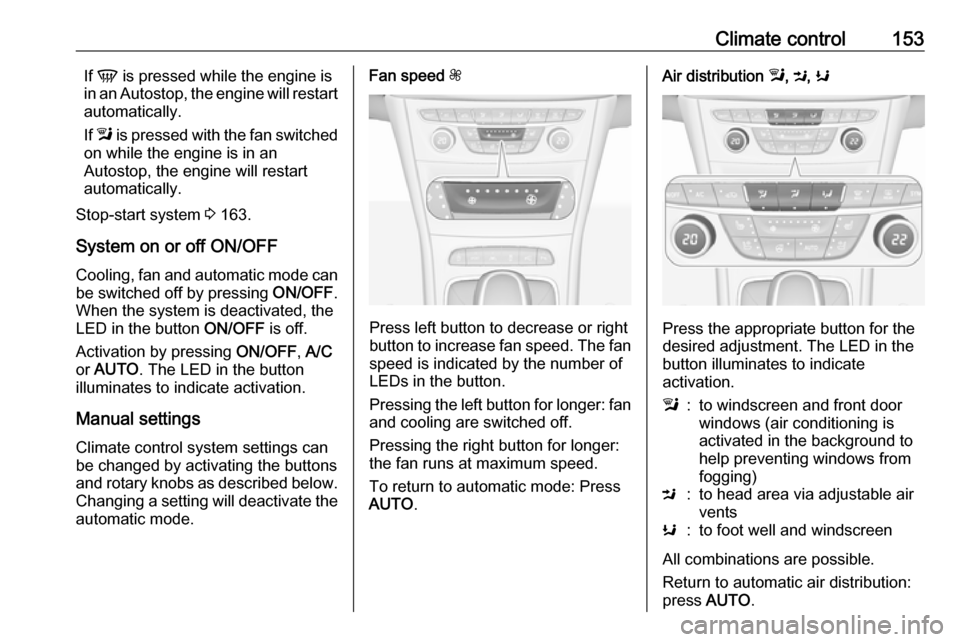
automatic mode.Fan speed Z
Press left button to decrease or right
button to increase fan speed. The fan speed is indicated by the number of
LEDs in the button.
Pressing the left button for longer: fan and cooling are switched off.
Pressing the right button for longer:
the fan runs at maximum speed.
To return to automatic mode: Press
AUTO .
Air distribution l, M , K
Press the appropriate button for the
desired adjustment. The LED in the
button illuminates to indicate
activation.
l:to windscreen and front door
windows (air conditioning is
activated in the background to
help preventing windows from
fogging)M:to head area via adjustable air ventsK:to foot well and windscreen
All combinations are possible.
Return to automatic air distribution:
press AUTO .
Page 181 of 313

Driving and operating179Functionality check
When the vehicle is not moving, the
electric parking brake might be
applied automatically. This is done to
check the system.
Fault
Failure mode of electric parking brake
is indicated by a control indicator j
and by a vehicle message which is
displayed in the Driver Information Centre. Vehicle messages 3 123.
Apply electric parking brake: pull and hold the switch m for more than
five seconds. If control indicator m
illuminates, electric parking brake is
applied.
Release electric parking brake: push and hold the switch m for more than
two seconds. If control indicator m
extinguishes, electric parking brake is
released.
Control indicator m flashes: electric
parking brake is not fully applied or
released. When continuously
flashing, release electric parking
brake and retry applying.Brake assist
If brake pedal is depressed quickly
and forcefully, maximum brake force
is automatically applied.
Operation of brake assist might
become apparent by a pulse in the
brake pedal and a greater resistance when depressing the brake pedal.
Maintain steady pressure on the
brake pedal as long as full braking is
required. Maximum brake force is
automatically reduced when brake
pedal is released.
Hill start assist The system helps prevent unintendedmovement when driving away on
inclines.
When releasing the brake pedal after
stopping on an incline, brakes remain
on for further two seconds. The
brakes release automatically as soon
as the vehicle begins to accelerate.Ride control systems
Traction Control systemThe Traction Control system (TC) is a
component of the Electronic Stability
Control (ESC).
TC improves driving stability when
necessary, regardless of the type of
road surface or tyre grip, by
preventing the drive wheels from
spinning.
As soon as the drive wheels starts to spin, engine output is reduced and
the wheel spinning the most is braked
individually. This considerably
improves the driving stability of the
vehicle on slippery road surfaces.
TC is operational after each engine
start as soon as the control indicator
b extinguishes.
When TC operates b flashes.
Page 182 of 313
180Driving and operating9Warning
Do not let this special safety
feature tempt you into taking risks
when driving.
Adapt speed to the road
conditions.
Control indicator b 3 112.
Deactivation
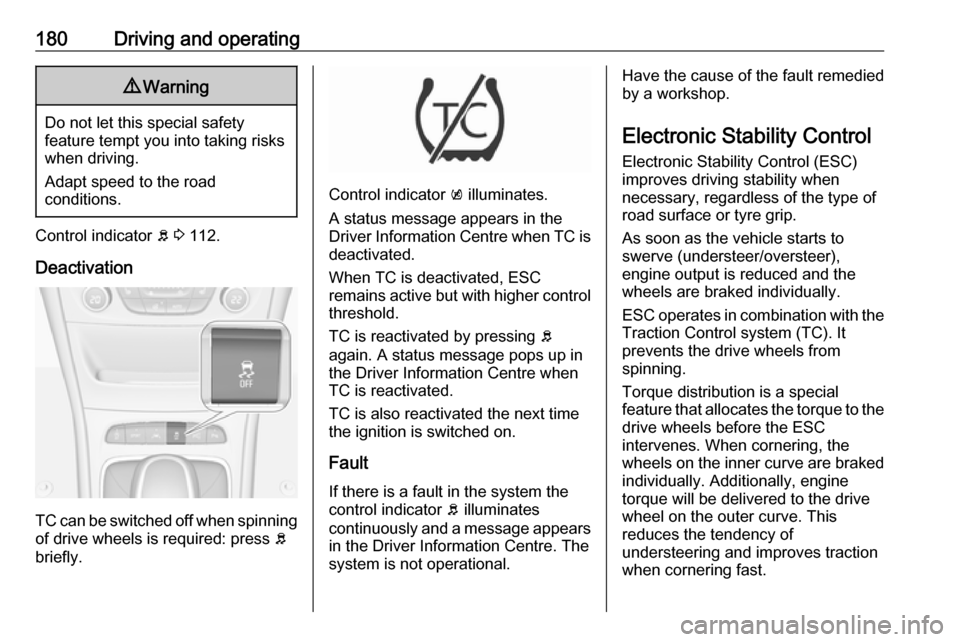
TC can be switched off when spinning of drive wheels is required: press b
briefly.
Control indicator k illuminates.
A status message appears in the
Driver Information Centre when TC is
deactivated.
When TC is deactivated, ESC
remains active but with higher control threshold.
TC is reactivated by pressing b
again. A status message pops up in the Driver Information Centre when
TC is reactivated.
TC is also reactivated the next time
the ignition is switched on.
Fault
If there is a fault in the system the
control indicator b illuminates
continuously and a message appears in the Driver Information Centre. The
system is not operational.
Have the cause of the fault remedied
by a workshop.
Electronic Stability Control
Electronic Stability Control (ESC)
improves driving stability when
necessary, regardless of the type of
road surface or tyre grip.
As soon as the vehicle starts to
swerve (understeer/oversteer),
engine output is reduced and the wheels are braked individually.
ESC operates in combination with the Traction Control system (TC). It
prevents the drive wheels from
spinning.
Torque distribution is a special
feature that allocates the torque to the drive wheels before the ESC
intervenes. When cornering, the
wheels on the inner curve are braked
individually. Additionally, engine
torque will be delivered to the drive wheel on the outer curve. This
reduces the tendency of
understeering and improves traction
when cornering fast.
Page 183 of 313
Driving and operating181
ESC is operational after each engine
start as soon as the control indicator
b extinguishes.
When ESC operates b flashes.
9 Warning
Do not let this special safety
feature tempt you into taking risks
when driving.
Adapt speed to the road
conditions.
Control indicator b 3 112.
Deactivation
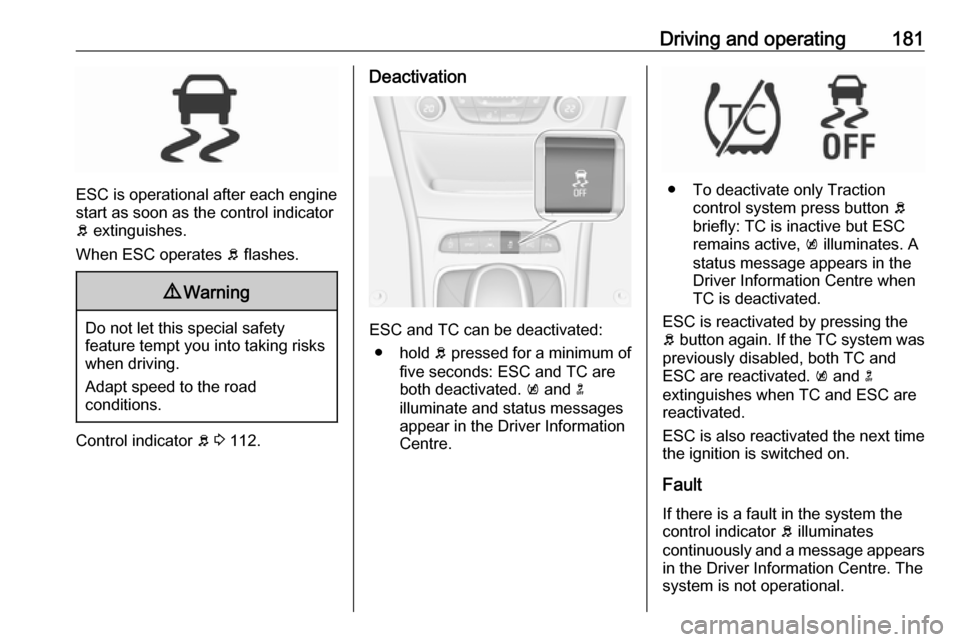
ESC and TC can be deactivated:
● hold b pressed for a minimum of
five seconds: ESC and TC are
both deactivated. k and n
illuminate and status messages appear in the Driver Information
Centre.
● To deactivate only Traction control system press button b
briefly: TC is inactive but ESC
remains active, k illuminates. A
status message appears in the
Driver Information Centre when
TC is deactivated.
ESC is reactivated by pressing the
b button again. If the TC system was
previously disabled, both TC and
ESC are reactivated. k and n
extinguishes when TC and ESC are
reactivated.
ESC is also reactivated the next time
the ignition is switched on.
Fault
If there is a fault in the system the
control indicator b illuminates
continuously and a message appears in the Driver Information Centre. The
system is not operational.
Page 208 of 313

206Driving and operating●The direction of driving during the
parking manoeuvre.
● The demand to shift into reverse or first gear.
● The demand to stop or to drive slowly.
● For some of the instructions a progress bar is shown in the
Driver Information Centre.
● The successful completion of the
parking manoeuvre indicated by
a pop-up symbol and a chime.
● The cancelling of a parking manoeuvre.
Display priorities
Advanced parking assist indication in the Driver Information Centre can be
inhibited by vehicle messages with a
higher priority. After approving the
message by pressing SET/CLR on
the turn signal lever or 9 on the
steering wheel, advanced parking assist instructions appear again and
the parking manoeuvre can be
continued.Deactivation
The system is deactivated by:
● a short press of (
● parking manoeuvre successfully ended
● driving faster than 30 km/h during
parking slot search
● driving faster than 8 km/h during parking guidance
● driver interference on steering wheel detected
● exceeding number of maximum gear changes: eight cycles when
parallel parking or five cycles
when perpendicular parking
● switching off the ignition
Deactivation by the driver or by the system during manoeuvring will beindicated by Parking Deactivated on
the display. Additionally, an acoustic
signal sounds.Fault
A message appears when:
● There is a fault in the system.
● The driver did not successfully complete the parking
manoeuvre.
● The system is not operational.
● Any of the deactivation reasons described above apply.
If an object is detected during parking instructions, Stop is indicated on the
display. Removing the object will
resume the parking manoeuvre. If the
object is not removed, the system will
be deactivated. A long press of ( will
activate the system and search for a
new parking slot.
Basic notes on parking assist
systems9 Warning
Under certain circumstances,
various reflective surfaces on
objects or clothing as well as
Page 220 of 313
218Driving and operatingSome fuel does not contain sufficient
quantities of additive to keep fuel injectors and intake valves clean.
To make up for this lack of
detergency, add Fuel System
Treatment PLUS to the fuel tank at
every engine oil change or every
15,000 km, whichever occurs first. It
is available at your workshop.
Fuels containing oxygenates such as
ethers and ethanol, as well as
reformulated fuel, are available in
some cities. If these fuels comply with the previously described
specification, then they are
acceptable to use. However, E85
(85% ethanol) and other fuels
containing more than 15% ethanol
must be used only in FlexFuel
vehicles.Caution
Do not use fuel containing
methanol. It can corrode metal
parts in the fuel system and also
damage plastic and rubber parts.
This damage would not be
covered by the vehicle warranty.
Some fuels, mainly high octane
racing fuels, can contain an octane
enhancing additive called
methylcyclopentadienyl manganese
tricarbonyl (MMT). Do not use fuels or fuel additives with MMT as they can
reduce spark plug life and affect
emission control system
performance. The malfunction
indicator light Z may turn on 3 111.
If this occurs, seek the assistance of
a workshop.
Fuel for diesel engines
Only use diesel fuel that complies
with EN 590 and which has a sulphur
concentration of max. 10 ppm.
Fuels with a biodiesel (compliant with
EN 14214) content of max. 7% by
volume may be used (e.g. named
B7).
If travelling in countries outside the
European Union occasional use of
Euro-Diesel fuel with a sulphur
concentration below 50 ppm is
possible.Caution
Frequent usage of diesel fuel containing more than 15 ppm
sulphur will cause severe engine
damage.
Caution
Use of fuel that does not comply to EN 590 or similar can lead to
engine powerloss, increased wear
or engine damage and may affect
your warranty.
Do not use marine diesel oils, heating
oils, Aquazole and similar diesel-
water emulsions. Diesel fuels must
not be diluted with fuels for petrol
engines.
Low temperature operation At temperatures below 0° C, some
diesel products with biodiesel blends may clog, freeze or gel, which mayaffect the fuel supply system. Starting
and engine operation may not work
Page 258 of 313

256Vehicle careAll wheels must be equipped with
pressure sensors and the tyres must
have the prescribed pressure.
Note
In countries where the tyre pressure monitoring system is legally
required, the use of wheels without
pressure sensors will invalidate the
vehicle operating permit.
The current tyre pressures can be
shown in the Driver Information
Centre.
Midlevel display:
Select the Tyre pressure page under
the Vehicle Information Menu ? in
the Driver Information Centre 3 115.
Uplevel display:
Select the Tyre pressure page under
the Info Menu in the Driver
Information Centre 3 115.
System status and pressure warnings
are displayed by a message
indicating the corresponding tyre in
the Driver Information Centre.
The system considers the tyre
temperature for the warnings.
Temperature dependency 3 254.
A detected low tyre pressure
condition is indicated by the control
indicator w 3 113.
If w illuminates, stop as soon as
possible and inflate the tyres as
recommended 3 293.
If w flashes for 60-90 seconds then
illuminates continuously, there is a
fault in the system. Consult a
workshop.
After inflating, some driving may be
required to update the tyre pressure
values in the Driver Information
Centre. During this time w may
illuminate.
If w illuminates at lower temperatures
and extinguishes after driving, this
could be an indicator for approaching
a low tyre pressure condition. Check
tyre pressure.
Vehicle messages 3 123.
Page 265 of 313

Vehicle care26313. The prescribed tyre pressureshould be obtained within ten
minutes.
Tyre pressure 3 293.
When the correct pressure is
obtained, switch off the
compressor.
If the prescribed tyre pressure is
not obtained within ten minutes,
remove the tyre repair kit. Move
the vehicle one tyre rotation.
Reattach the tyre repair kit and
continue the filling procedure for
ten minutes. If the prescribed tyre
pressure is still not obtained, the
tyre is too badly damaged. Seek
the assistance of a workshop.
Drain excess tyre pressure with
the button over the pressure indicator.
Do not run the compressor longer
than ten minutes.
14. Detach the tyre repair kit. Push catch on bracket to remove
sealant bottle from bracket. Screw the tyre inflation hose to the free
connection of the sealant bottle.
This prevents sealant from
escaping. Stow tyre repair kit in
load compartment.
15. Remove any excess sealant using a cloth.
16. Take the label indicating maximum permitted speed from
the sealant bottle and affix in the
driver's field of view.
17. Continue driving immediately so that sealant is evenly distributed
in the tyre. After driving approx.
10 km (but no more than ten
minutes), stop and check tyre
pressure. Screw compressor air
hose directly onto tyre valve and
compressor when doing this.
If tyre pressure is more than
1.3 bar , set it to the correct value.
Repeat the procedure until there
is no more loss of pressure.
If the tyre pressure has fallen
below 1.3 bar, the vehicle must
not be used. Seek the assistance
of a workshop.
18. Stow away tyre repair kit in load compartment.