belt OPEL ASTRA K 2019.5 Manual user
[x] Cancel search | Manufacturer: OPEL, Model Year: 2019.5, Model line: ASTRA K, Model: OPEL ASTRA K 2019.5Pages: 311, PDF Size: 9.52 MB
Page 86 of 311
84StorageAlternatively install both hooks in the
lower rail. Plug in the lower brackets
of the box from above into the lower
hooks.
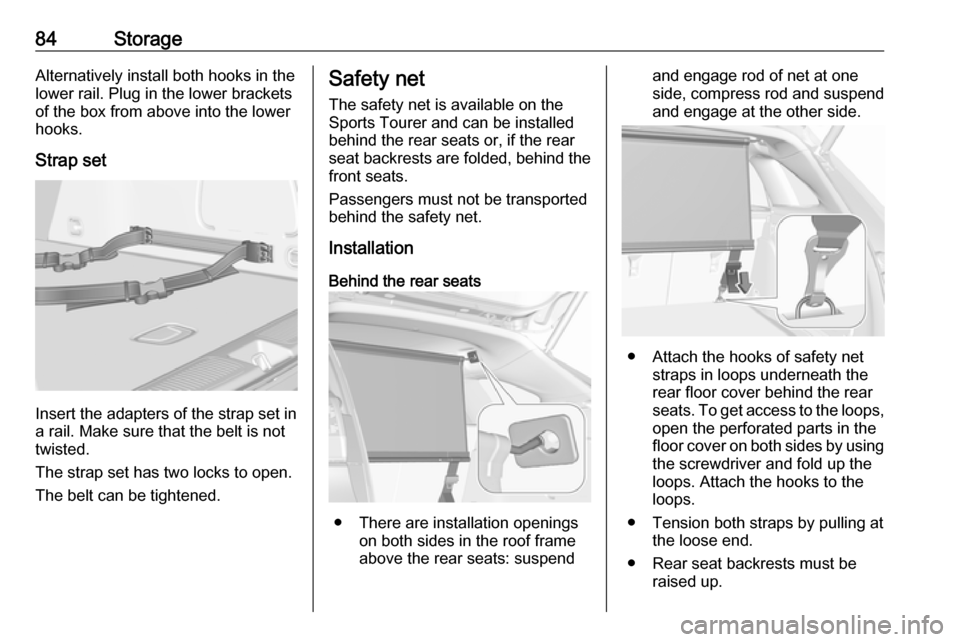
Strap set
Insert the adapters of the strap set in
a rail. Make sure that the belt is not
twisted.
The strap set has two locks to open. The belt can be tightened.
Safety net
The safety net is available on the
Sports Tourer and can be installed
behind the rear seats or, if the rear
seat backrests are folded, behind the
front seats.
Passengers must not be transported
behind the safety net.
Installation
Behind the rear seats
● There are installation openings on both sides in the roof frame
above the rear seats: suspend
and engage rod of net at one side, compress rod and suspendand engage at the other side.
● Attach the hooks of safety net straps in loops underneath the
rear floor cover behind the rear
seats. To get access to the loops, open the perforated parts in the
floor cover on both sides by using
the screwdriver and fold up the
loops. Attach the hooks to the
loops.
● Tension both straps by pulling at the loose end.
● Rear seat backrests must be raised up.
Page 92 of 311

90Instruments and controlsInstruments and
controlsControls ....................................... 91
Steering wheel adjustment ........91
Steering wheel controls .............91
Heated steering wheel ...............92
Horn ........................................... 92
Windscreen wiper and washer ..92
Rear window wiper and washer ...................................... 94
Outside temperature ..................95
Clock ......................................... 95
Power outlets ............................. 97
Ashtrays .................................... 98
Warning lights, gauges and indi‐ cators ........................................... 99
Instrument cluster ......................99
Speedometer ........................... 102
Odometer ................................ 103
Trip odometer .......................... 103
Tachometer ............................. 104
Fuel gauge .............................. 104
Fuel selector ............................ 104
Engine coolant temperature gauge ..................................... 105
Service display ........................ 106Control indicators ....................107
Turn lights ................................ 107
Seat belt reminder ...................107
Airbag and belt tensioners .......108
Airbag deactivation ..................108
Charging system .....................109
Malfunction indicator light ........109
Brake and clutch system .........109
Electric parking brake ..............109
Electric parking brake fault ......109
Antilock brake system (ABS) ...110
Gear shifting ............................ 110
Following distance ...................110
Lane keep assist .....................110
Electronic Stability Control off . 110
Electronic Stability Control and Traction Control system .........110
Traction Control system off .....111
Preheating ............................... 111
AdBlue ..................................... 111
Tyre pressure monitoring system .................................... 111
Engine oil pressure ..................111
Low fuel ................................... 112
Immobiliser .............................. 112
Exterior light ............................ 112
High beam ............................... 112
High beam assist .....................112
LED headlights ........................ 112
Front fog lights ......................... 112Rear fog light........................... 112
Cruise control .......................... 112
Adaptive cruise control ............113
Vehicle detected ahead ...........113
Speed limiter ........................... 113
Traffic sign assistant ................113
Door open ................................ 113
Displays ..................................... 114
Driver Information Centre ........114
Info Display .............................. 119
Vehicle messages ......................122
Warning chimes .......................122
Battery voltage ........................ 123
Vehicle personalisation ..............123
Telematics service .....................130
OnStar ..................................... 130
Page 104 of 311
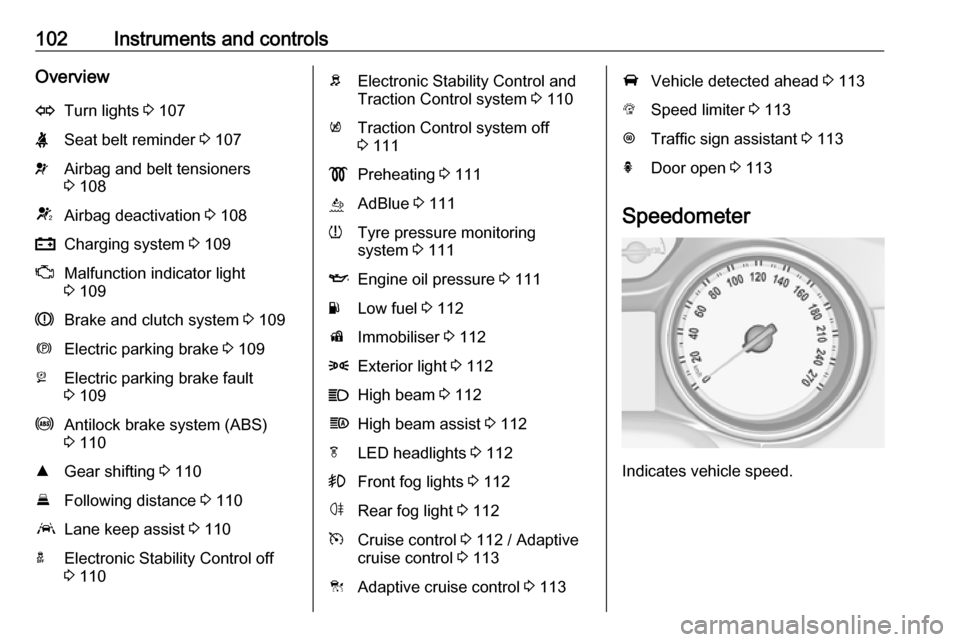
102Instruments and controlsOverviewOTurn lights 3 107XSeat belt reminder 3 107vAirbag and belt tensioners
3 108VAirbag deactivation 3 108pCharging system 3 109ZMalfunction indicator light
3 109RBrake and clutch system 3 109mElectric parking brake 3 109jElectric parking brake fault
3 109uAntilock brake system (ABS)
3 110RGear shifting 3 110EFollowing distance 3 110aLane keep assist 3 110aElectronic Stability Control off
3 110bElectronic Stability Control and
Traction Control system 3 110kTraction Control system off
3 111!Preheating 3 111ùAdBlue 3 111wTyre pressure monitoring
system 3 111IEngine oil pressure 3 111YLow fuel 3 112dImmobiliser 3 1128Exterior light 3 112CHigh beam 3 112fHigh beam assist 3 112fLED headlights 3 112>Front fog lights 3 112øRear fog light 3 112mCruise control 3 112 / Adaptive
cruise control 3 113CAdaptive cruise control 3 113AVehicle detected ahead 3 113LSpeed limiter 3 113LTraffic sign assistant 3 113hDoor open 3 113
Speedometer
Indicates vehicle speed.
Page 109 of 311

Instruments and controls107On Uplevel display select Info Menu
by pressing p on steering wheel.
Press P to select Remaining Oil
Life page.
Remaining oil life duration is indicated
in percentage.
Reset On Midlevel display press SET/CLR
on the indicator lever for several seconds to reset. The ignition must be
switched on but engine not running.
On Uplevel display press > on
steering wheel to open the subfolder. Select Reset and confirm by pressing
9 for several seconds. The ignition
must be switched on but engine not
running.
The system must be reset every time
the engine oil is changed to allow
proper functionality. Seek the
assistance of a workshop.
Next service A message appears in the Driver
Information Centre, when
maintenance of the vehicle is
required. Have maintenance workcarried out by a workshop within one week or 500 km, whichever occursfirst.
Service information 3 277.
Control indicators The control indicators described are
not present in all vehicles. The
description applies to all instrument
versions. Depending on the
equipment, the position of the control
indicators may vary. When the
ignition is switched on, most control
indicators will illuminate briefly as a functionality test.
The control indicator colours mean:red:danger, important reminderyellow:warning, information, faultgreen:confirmation of activationblue:confirmation of activationwhite:confirmation of activation
See all control indicators on different
instrument clusters 3 99.
Turn lights
O illuminates or flashes green.
Illuminates briefly
The parking lights are switched on.
Flashes
The turn lights or the hazard warning flashers are activated.
Rapid flashing: failure of the turn
lights or associated fuse, failure of the turn lights on the trailer.
Bulb replacement 3 235.
Fuses 3 245.
Turn lights 3 141.
Seat belt reminder Seat belt reminder on front seats
X for driver's seat illuminates or
flashes red in the instrument cluster.
Page 110 of 311
108Instruments and controlsk for front passenger seat illuminates
or flashes red in the roof console,
when seat is occupied.
Illuminates
After the ignition has been switched
on until the seat belt has been
fastened.
Flashes
After having started the engine for a
maximum of 100 seconds until the
seat belt has been fastened.
Seat belt status on rear seats
(vehicles with Midlevel display)
X illuminates or flashes white or grey
in the Driver Information Centre, after having started the engine.
Illuminates white
Seat belt is unfastened.
Illuminates grey
Seat belt has been fastened.
Flashes white or grey
Fastened seat belt has been
unfastened.
Fastening the seat belt 3 57.Seat belt status on rear seats
(vehicles with Uplevel display)
X illuminates green or grey or flashes
yellow in the Driver Information
Centre, after having started the
engine.
Illuminates grey
Seat belt is unfastened.
Illuminates green
Seat belt has been fastened.
Flashes yellow
Fastened seat belt has been
unfastened.
Fastening the seat belt 3 57.
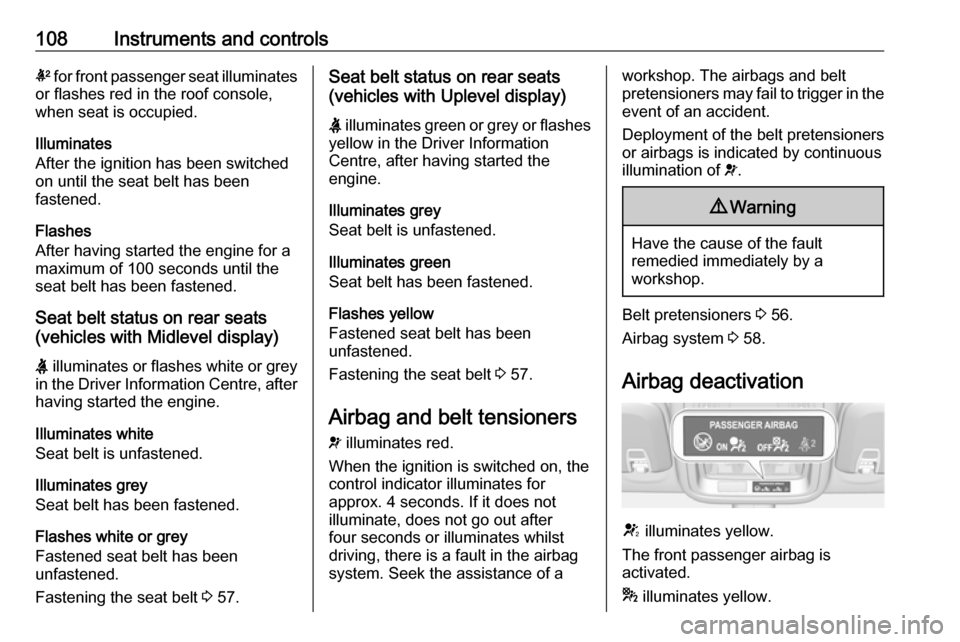
Airbag and belt tensioners v illuminates red.
When the ignition is switched on, the control indicator illuminates for
approx. 4 seconds. If it does not
illuminate, does not go out after
four seconds or illuminates whilst
driving, there is a fault in the airbag
system. Seek the assistance of aworkshop. The airbags and belt
pretensioners may fail to trigger in the
event of an accident.
Deployment of the belt pretensioners
or airbags is indicated by continuous
illumination of v.9 Warning
Have the cause of the fault
remedied immediately by a
workshop.
Belt pretensioners 3 56.
Airbag system 3 58.
Airbag deactivation
V illuminates yellow.
The front passenger airbag is
activated.
* illuminates yellow.
Page 124 of 311
122Instruments and controlsVehicle messagesMessages are indicated in the Driver
Information Centre, in some cases
together with a warning chime.
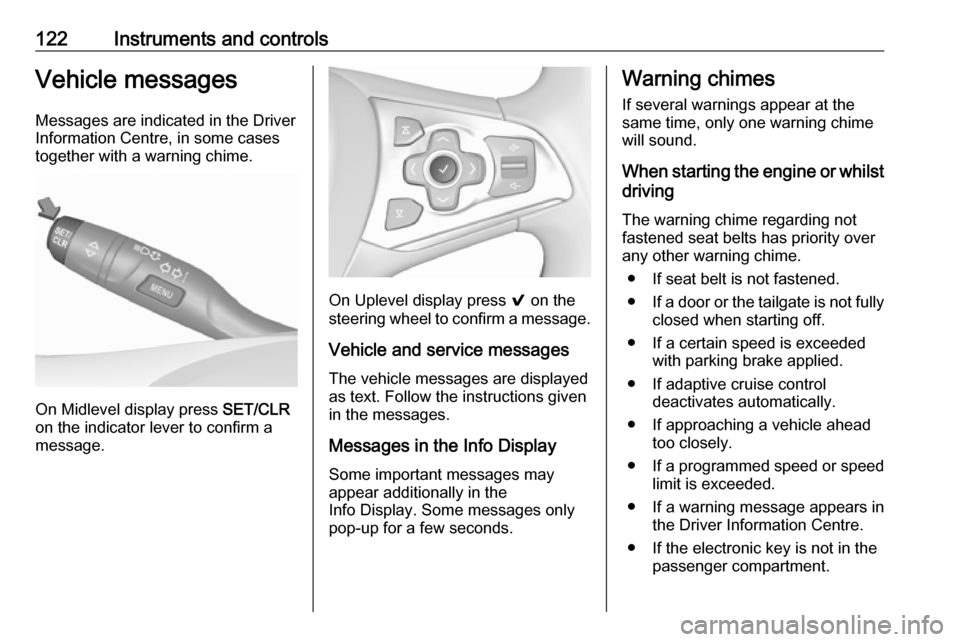
On Midlevel display press SET/CLR
on the indicator lever to confirm a
message.
On Uplevel display press 9 on the
steering wheel to confirm a message.
Vehicle and service messages
The vehicle messages are displayed
as text. Follow the instructions given
in the messages.
Messages in the Info Display
Some important messages may
appear additionally in the
Info Display. Some messages only
pop-up for a few seconds.
Warning chimes
If several warnings appear at the
same time, only one warning chime
will sound.
When starting the engine or whilst driving
The warning chime regarding not
fastened seat belts has priority over
any other warning chime.
● If seat belt is not fastened.
● If a door or the tailgate is not fully
closed when starting off.
● If a certain speed is exceeded with parking brake applied.
● If adaptive cruise control deactivates automatically.
● If approaching a vehicle ahead too closely.
● If a programmed speed or speed
limit is exceeded.
● If a warning message appears in the Driver Information Centre.
● If the electronic key is not in the passenger compartment.
Page 133 of 311

Instruments and controls131SOS button
Press [ to establish a priority
emergency connection to a specially
trained emergency advisor.
Status LED
Green: The system is ready with activated transmission of the vehicle
location.
Green flashing: The system is on a
call.
Red: A problem arose.
Off: The system is ready with
deactivated transmission of the
vehicle location or the system is in
standby mode.
Red / green flashing for a short period
of time: The transmission of the
vehicle location has been
deactivated.
OnStar services
General services
If you need any information e.g.
opening hours, points of interest and
destinations or if you need any
support e.g. in the case of a vehiclebreakdown, a flat tyre and empty fuel
tank, press Z to establish a
connection to an advisor.
Emergency services
In the case of an emergency situation,
press [ and talk to an advisor. The
advisor then contacts emergency or
assistance service providers and
directs them to your vehicle.
In the case of an accident with
activation of airbags or belt
tensioners, an automatic emergency
call is established. The advisor is
immediately connected to your
vehicle to see whether help is
needed.
Note
Establishing an emergency call may
not be possible in areas without
sufficient network availability or due
to hardware damage during an
accident.
Wi-Fi hotspot
The Wi-Fi hotspot of the vehicle
provides internet connectivity with a
maximum speed of 4G/LTE.Note
The Wi-Fi hotspot functionality is not available for all markets.
Note
Some mobile devices connect to Wi- Fi hotspots automatically and use
mobile data capacity in the
background, even if they are not in use. This includes automatic
updates, downloads, as well as
programme or app synchronisation
traffic. The data volume purchased
via OnStar might be consumed
rapidly. Turn off automatic
synchronisations in the settings of
your device.
Up to seven devices may be
connected.
To connect a mobile device with the
Wi-Fi hotspot:
1. Press j and then select Wi-Fi
settings on the Info Display. The
settings displayed include the Wi- Fi hotspot name (SSID),
password and connection type.
2. Start a Wi-Fi network search on your mobile device.
Page 158 of 311
156Climate controlMaintenanceAir intake
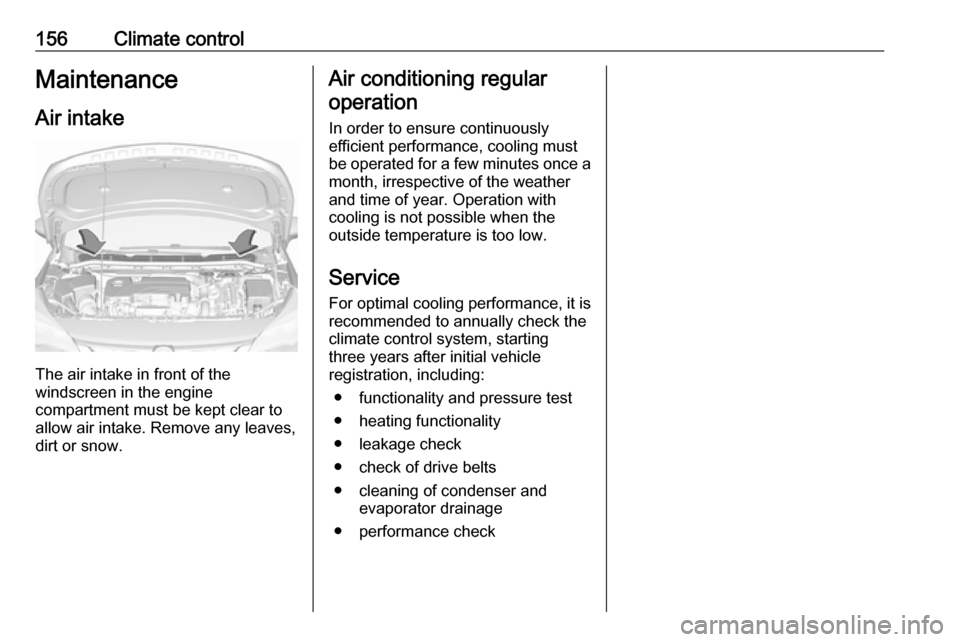
The air intake in front of the
windscreen in the engine
compartment must be kept clear to
allow air intake. Remove any leaves,
dirt or snow.
Air conditioning regular
operation
In order to ensure continuously
efficient performance, cooling must
be operated for a few minutes once a
month, irrespective of the weather
and time of year. Operation with
cooling is not possible when the
outside temperature is too low.
Service For optimal cooling performance, it is recommended to annually check the
climate control system, starting
three years after initial vehicle
registration, including:
● functionality and pressure test
● heating functionality
● leakage check
● check of drive belts
● cleaning of condenser and evaporator drainage
● performance check
Page 166 of 311
164Driving and operatingAn Autostop can be activated at a
speed lower than 5 km/h.
Activate a conventional Autostop as follows:
● Depress the clutch pedal.
● Set the lever in neutral.
● Release the clutch pedal.
Early Autostop
Only the engine B16DTU has early
Autostop in addition to conventional
Autostop.
An Autostop can be activated at a
speed lower than 14 km/h.
Early Autostop is inhibited if the
incline is greater than 5%.
Activate an early Autostop as follows: ● Depress the brake pedal sufficiently.
● Depress the clutch pedal.
The engine will be switched off while
the ignition stays on.
Early Autostop is inhibited when the
turn lights are on, trailer hitch is
connected, the steering wheel is
moved beyond a certain point or the
inclines is greater than 5%.Vehicles with automatic transmission
If the vehicle is at a standstill with
depressed brake pedal, Autostop is
activated automatically.
Indication
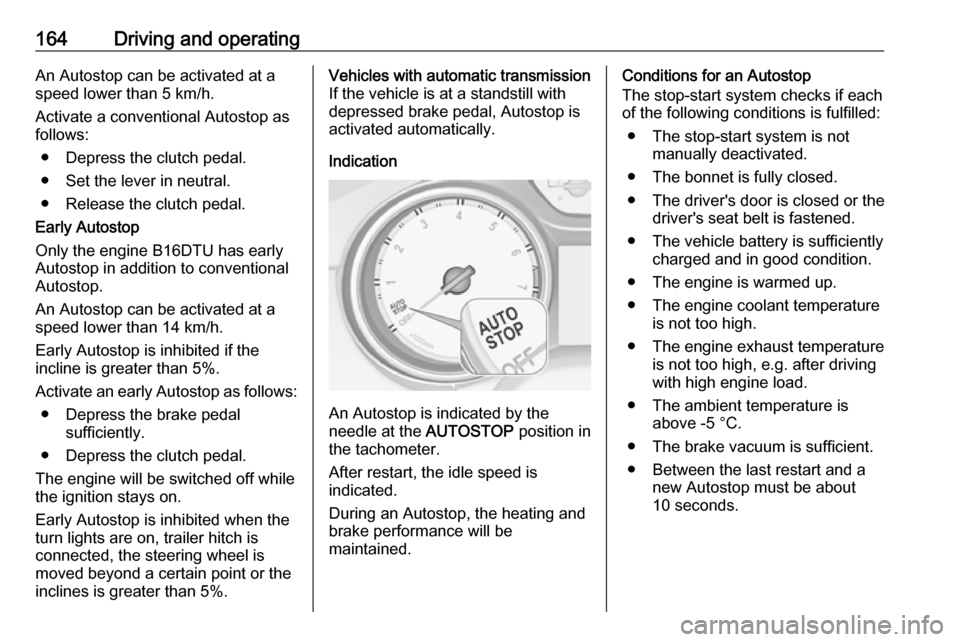
An Autostop is indicated by the
needle at the AUTOSTOP position in
the tachometer.
After restart, the idle speed is
indicated.
During an Autostop, the heating and
brake performance will be
maintained.
Conditions for an Autostop
The stop-start system checks if each
of the following conditions is fulfilled:
● The stop-start system is not manually deactivated.
● The bonnet is fully closed.
● The driver's door is closed or the driver's seat belt is fastened.
● The vehicle battery is sufficiently charged and in good condition.
● The engine is warmed up.
● The engine coolant temperature is not too high.
● The engine exhaust temperature is not too high, e.g. after driving
with high engine load.
● The ambient temperature is above -5 °C.
● The brake vacuum is sufficient.
● Between the last restart and a new Autostop must be about10 seconds.
Page 168 of 311

166Driving and operating● The driver's seat belt isunfastened and / or the driver'sdoor is opened.
● The engine temperature is too low.
● The charging level of the vehicle battery is below a defined level.
● The brake vacuum is not sufficient.
● The vehicle is driven at least at walking speed.
● The climate control system requests an engine start.
● The desired compartment temperature does not match the
actual temperature.
● The air conditioning is manually switched on.
If the bonnet is not fully closed, a warning message is displayed in the
Driver Information Centre.
If an electrical accessory, e.g. a
portable CD player, is connected to
the power outlet, a brief power drop
during the restart might be noticeable.Note
If a trailer or a bike carrier is
attached, early Autostop and late
restart is deactivated.
Parking9 Warning
● Do not park the vehicle on an
easily ignitable surface. The
high temperature of the
exhaust system could ignite the
surface.
● Always apply the parking brake. Activate the manual
parking brake without pressing the release button. Apply as
firmly as possible on a downhill slope or uphill slope. Depress
brake pedal at the same time to
reduce operating force.
For vehicles with electric
parking brake, pull switch m for
a minimum of 1 second until
control indicator m illuminates
constantly and electric parking
brake is applied 3 109.
● Switch off the engine.
● If the vehicle is on a level surface or uphill slope, engage
first gear or set the selector
lever to position P before
removing the ignition key or
switching off ignition on
vehicles with power button. On
an uphill slope, turn the front
wheels away from the kerb.
If the vehicle is on a downhill
slope, engage reverse gear or
set the selector lever to position
P before removing the ignition
key or switching off ignition on
vehicles with power button.
Turn the front wheels towards
the kerb.
● Close the windows and the sunroof.
● Remove the ignition key from the ignition switch or switch off
ignition on vehicles with power
button. Turn the steering wheel until the steering wheel lock is
felt to engage.