power OPEL ASTRA K 2019.5 Manual user
[x] Cancel search | Manufacturer: OPEL, Model Year: 2019.5, Model line: ASTRA K, Model: OPEL ASTRA K 2019.5Pages: 311, PDF Size: 9.52 MB
Page 9 of 311
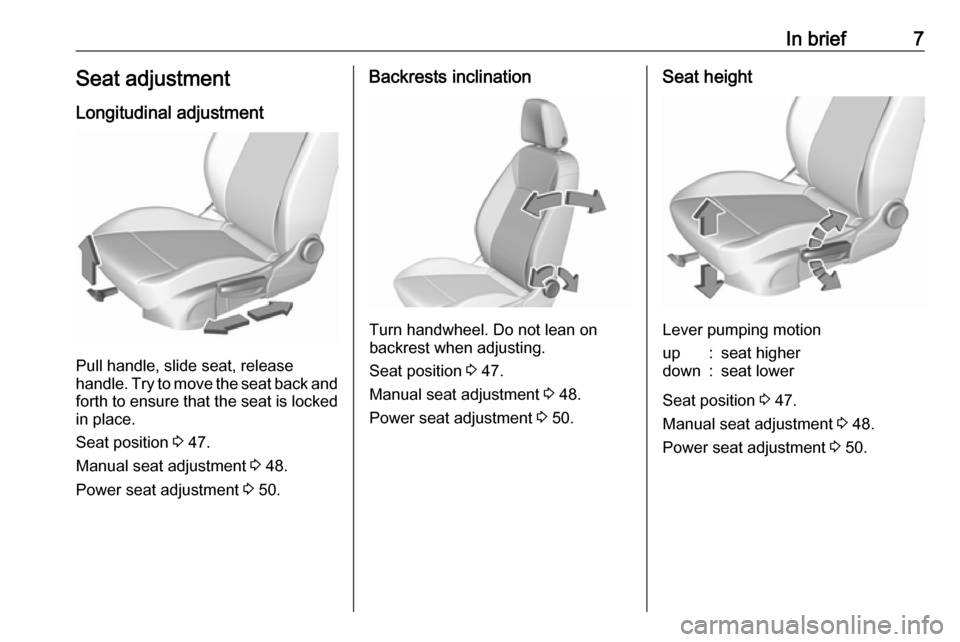
In brief7Seat adjustmentLongitudinal adjustment
Pull handle, slide seat, release
handle. Try to move the seat back and forth to ensure that the seat is locked
in place.
Seat position 3 47.
Manual seat adjustment 3 48.
Power seat adjustment 3 50.
Backrests inclination
Turn handwheel. Do not lean on
backrest when adjusting.
Seat position 3 47.
Manual seat adjustment 3 48.
Power seat adjustment 3 50.
Seat height
Lever pumping motion
up:seat higherdown:seat lower
Seat position 3 47.
Manual seat adjustment 3 48.
Power seat adjustment 3 50.
Page 10 of 311
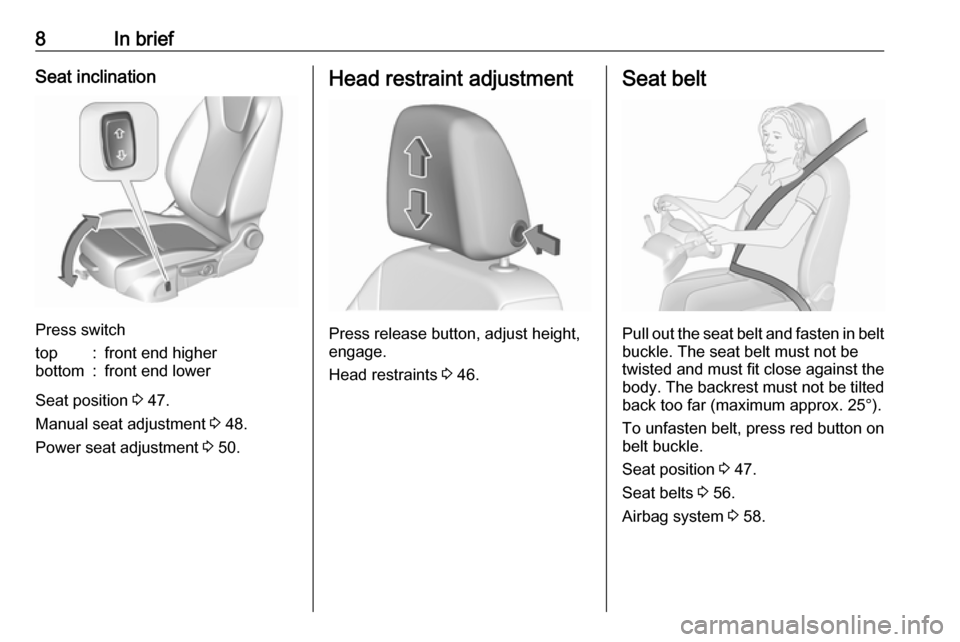
8In briefSeat inclination
Press switch
top:front end higherbottom:front end lower
Seat position 3 47.
Manual seat adjustment 3 48.
Power seat adjustment 3 50.
Head restraint adjustment
Press release button, adjust height,
engage.
Head restraints 3 46.
Seat belt
Pull out the seat belt and fasten in belt
buckle. The seat belt must not be
twisted and must fit close against the
body. The backrest must not be tilted back too far (maximum approx. 25°).
To unfasten belt, press red button on belt buckle.
Seat position 3 47.
Seat belts 3 56.
Airbag system 3 58.
Page 13 of 311

In brief111Power windows .....................41
2 Exterior mirrors .....................39
3 Central locking system ..........24
4 Side air vents ...................... 155
5 Cruise control .....................181
Speed limiter ....................... 183
Adaptive cruise control .......185
Forward collision alert .........192
6 Turn lights, headlight
flash, low / high beam,
high beam assist .................141
Exit lighting ......................... 145
Parking lights ...................... 142
Buttons for Driver
Information Centre ..............114
7 Instruments ........................ 102
Driver Information Centre .... 114
8 Buttons for Driver
Information Centre ..............114
9 Forward collision alert
indicator ............................. 192
10 Windscreen wiper and
washer, rear wiper and
washer ................................. 9211Centre air vents ................... 155
12 Info Display ......................... 119
13 Anti-theft alarm system
status LED ........................... 36
14 Hazard warning flashers ....141
15 Glovebox .............................. 71
16 CD player
17 Controls for Info Display
operation ............................. 119
18 Climate control system ........ 148
19 Fuse box ............................ 248
20 Traction Control system .....178
Electronic Stability Control . 179
Sport mode ........................ 181
Parking assist / Advanced
parking assist .....................199
Lane keep assist ................214
Eco button for stop-start
system ................................. 163
Fuel selector ....................... 104
21 Manual transmission ..........175
Automatic transmission ......172
22 Power outlet .......................... 97
23 Parking brake ......................17624Power button ....................... 159
25 Ignition switch .....................158
26 Steering wheel adjustment ..91
27 Horn ..................................... 92
28 Bonnet release lever ..........229
29 Storage compartment ...........72
30 Light switch ........................ 135
Headlight range
adjustment ......................... 138
Front / rear fog lights ..........142
Instrument illumination .......143
Page 20 of 311
18In brief● Diesel engines: wait until controlindicator ! for preheating
extinguishes.
● Turn key to position 3 and
release after engine has been started.
Starting the engine 3 161.
To turn the key back from position 2
to 1 or 0, first push the key all the way
in towards the steering column.
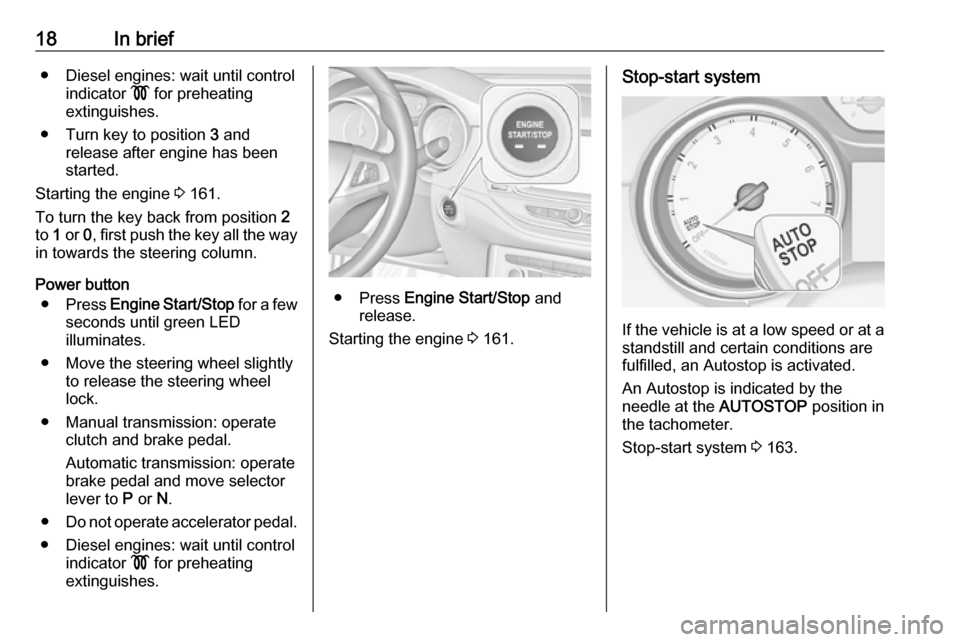
Power button ● Press Engine Start/Stop for a few
seconds until green LED
illuminates.
● Move the steering wheel slightly to release the steering wheel
lock.
● Manual transmission: operate clutch and brake pedal.
Automatic transmission: operate
brake pedal and move selector
lever to P or N.
● Do not operate accelerator pedal.
● Diesel engines: wait until control indicator ! for preheating
extinguishes.
● Press Engine Start/Stop and
release.
Starting the engine 3 161.
Stop-start system
If the vehicle is at a low speed or at a
standstill and certain conditions are
fulfilled, an Autostop is activated.
An Autostop is indicated by the
needle at the AUTOSTOP position in
the tachometer.
Stop-start system 3 163.
Page 21 of 311
In brief19Parking9Warning
● Do not park the vehicle on an
easily ignitable surface. The
high temperature of the
exhaust system could ignite the
surface.
● Always apply the parking brake. Activate the manual
parking brake without pressing the release button. Apply as
firmly as possible on a downhill slope or uphill slope. Depress
brake pedal at the same time to
reduce operating force.
For vehicles with electric
parking brake, pull switch m for
a minimum of 1 second until
control indicator m illuminates
constantly and electric parking
brake is applied 3 109.
● Switch off the engine. ● If the vehicle is on a level surface or uphill slope, engage
first gear or set the selector
lever to position P before
removing the ignition key or
switching off ignition on
vehicles with power button. On
an uphill slope, turn the front
wheels away from the kerb.
If the vehicle is on a downhill
slope, engage reverse gear or
set the selector lever to position
P before removing the ignition
key or switching off ignition on
vehicles with power button.
Turn the front wheels towards
the kerb.
● Close the windows and the sunroof.
● Remove the ignition key from the ignition switch or switch off
ignition on vehicles with power
button. Turn the steering wheel until the steering wheel lock is
felt to engage.
For vehicles with automatic
transmission, the key can only
be removed when the selector
lever is in position P.●
Lock the vehicle with e on the
radio remote control.
Activate the anti-theft alarm
system 3 36.
● The engine cooling fans may run
after the engine has been
switched off 3 229.Caution
After running at high engine
speeds or with high engine loads,
operate the engine briefly at a low load or run in neutral for
approx. 30 seconds before
switching off, in order to protect
the turbocharger.
Keys, locks 3 20.
Laying-up the vehicle for a long
period of time 3 228.
Page 22 of 311

20Keys, doors and windowsKeys, doors and
windowsKeys, locks ................................... 20
Keys .......................................... 20
Radio remote control .................21
Electronic key system ................22
Memorised settings ...................24
Central locking system ..............24
Automatic locking ......................29
Child locks ................................. 30
Doors ........................................... 30
Load compartment ....................30
Vehicle security ............................ 36
Anti-theft locking system ...........36
Anti-theft alarm system ..............36
Immobiliser ................................ 38
Exterior mirrors ............................ 39
Convex shape ........................... 39
Electric adjustment ....................39
Folding mirrors .......................... 39
Heated mirrors ........................... 40
Interior mirrors ............................. 40
Manual anti-dazzle ....................40
Automatic anti-dazzle ................41Windows...................................... 41
Windscreen ............................... 41
Manual windows ........................41
Power windows ......................... 41
Heated rear window ..................43
Sun visors .................................. 43
Roof ............................................. 44
Sunroof ...................................... 44Keys, locks
KeysCaution
Do not attach heavy or bulky itemsto the ignition key.
Replacement keys
The key number is specified on a
detachable tag.
The key number must be quoted
when ordering replacement keys as it
is a component of the immobiliser
system.
Locks 3 273.
Central locking 3 24.
Starting the engine 3 161.
Radio remote control 3 21.
Electronic key 3 22.
The code number of the adapter for
the locking wheel nuts is specified on
a card. It must be quoted when
ordering a replacement adapter.
Wheel changing 3 264.
Page 23 of 311
Keys, doors and windows21Key with foldaway key section
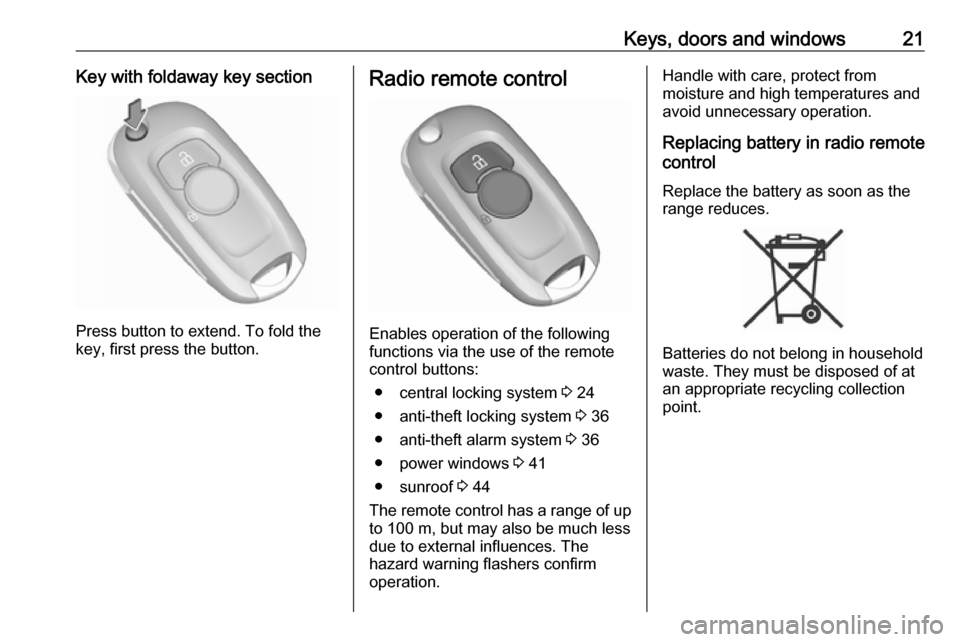
Press button to extend. To fold the
key, first press the button.
Radio remote control
Enables operation of the following
functions via the use of the remote control buttons:
● central locking system 3 24
● anti-theft locking system 3 36
● anti-theft alarm system 3 36
● power windows 3 41
● sunroof 3 44
The remote control has a range of up
to 100 m, but may also be much less
due to external influences. The
hazard warning flashers confirm
operation.
Handle with care, protect from
moisture and high temperatures and
avoid unnecessary operation.
Replacing battery in radio remote
control
Replace the battery as soon as the
range reduces.
Batteries do not belong in household
waste. They must be disposed of at
an appropriate recycling collection
point.
Page 24 of 311
22Keys, doors and windows
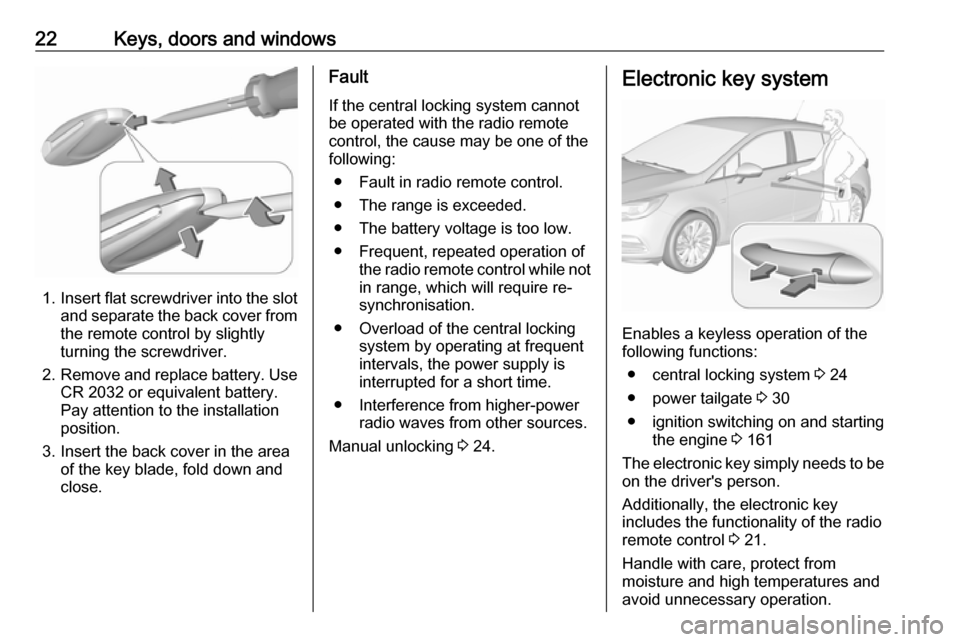
1.Insert flat screwdriver into the slot
and separate the back cover from the remote control by slightly
turning the screwdriver.
2. Remove and replace battery. Use
CR 2032 or equivalent battery.
Pay attention to the installation
position.
3. Insert the back cover in the area of the key blade, fold down and
close.
Fault
If the central locking system cannot
be operated with the radio remote
control, the cause may be one of the
following:
● Fault in radio remote control.
● The range is exceeded.
● The battery voltage is too low.
● Frequent, repeated operation of the radio remote control while notin range, which will require re-
synchronisation.
● Overload of the central locking system by operating at frequent
intervals, the power supply is
interrupted for a short time.
● Interference from higher-power radio waves from other sources.
Manual unlocking 3 24.Electronic key system
Enables a keyless operation of the
following functions:
● central locking system 3 24
● power tailgate 3 30
● ignition switching on and starting the engine 3 161
The electronic key simply needs to be on the driver's person.
Additionally, the electronic key
includes the functionality of the radio
remote control 3 21.
Handle with care, protect from
moisture and high temperatures and
avoid unnecessary operation.
Page 26 of 311
24Keys, doors and windows● Overload of the central lockingsystem by operating at frequent
intervals, the power supply is
interrupted for a short time.
● Interference from higher-power radio waves from other sources.
To rectify the cause of the fault,
change the position of the electronic
key.
Manual unlocking 3 24.
Memorised settings
Whenever the ignition is switched off,
some functions of the following
settings may be automatically
memorised by the remote control unit or the electronic key:
● automatic climate control
● lighting
● Infotainment system
● central locking system
● comfort settings
The saved settings are automatically
used the next time the ignition is
switched on with the memorised key
of the remote control unit 3 158 or
electronic key 3 22.A precondition is that Personalisation
by Driver is activated in the personal
settings of the Info Display. This must
be set for each remote control unit or
electronic key which is used. The
status change is available only after
locking and unlocking the vehicle.
The assigned memory position of the power seat is automatically recalled
when switching on ignition and Auto
Memory Recall is activated in the
Info Display for the memorised
remote control or electronic key.
Power seat 3 50.
Vehicle personalisation 3 123.
Central locking system
Unlocks and locks doors, load
compartment and fuel filler flap.
A pull on an interior door handle
unlocks the respective door. Pulling
the handle once more opens the door.
Note
In the event of an accident in which
airbags or belt pretensioners are
deployed, the vehicle is
automatically unlocked.Note
A short time after unlocking with the
remote control the doors are locked
automatically if no door has been
opened. A precondition is that the
setting is activated in the vehicle
personalisation 3 123.
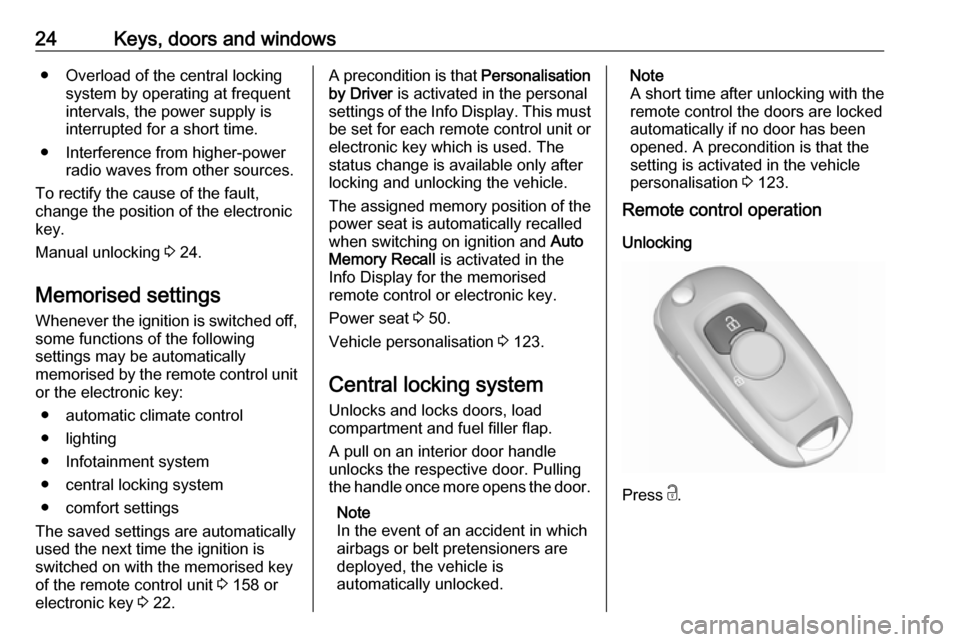
Remote control operation
Unlocking
Press c.
Page 29 of 311
Keys, doors and windows27Operation with buttons on the
electronic key
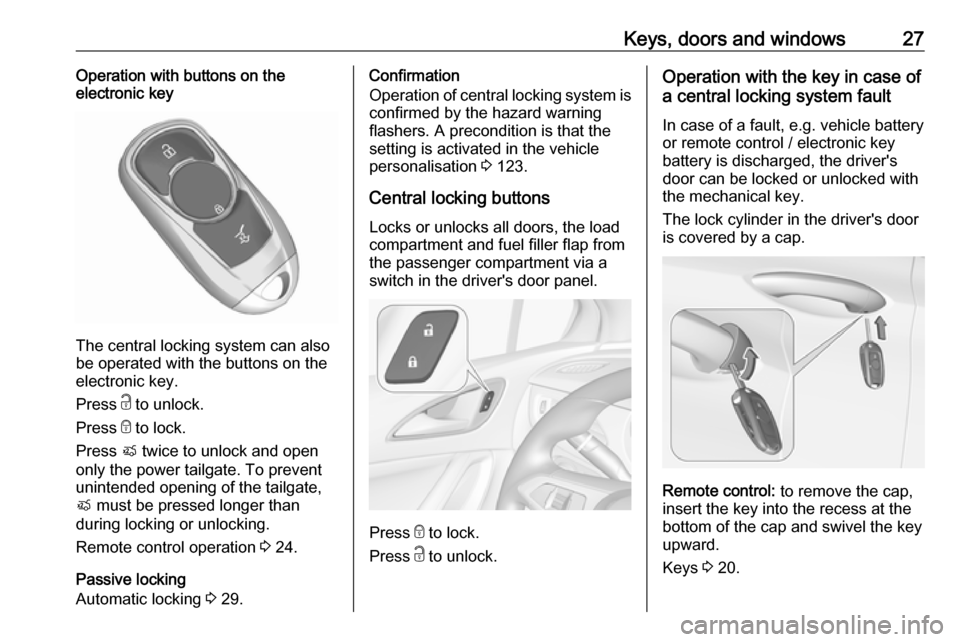
The central locking system can also
be operated with the buttons on the
electronic key.
Press c to unlock.
Press e to lock.
Press X twice to unlock and open
only the power tailgate. To prevent
unintended opening of the tailgate,
X must be pressed longer than
during locking or unlocking.
Remote control operation 3 24.
Passive locking
Automatic locking 3 29.
Confirmation
Operation of central locking system is
confirmed by the hazard warning
flashers. A precondition is that the
setting is activated in the vehicle
personalisation 3 123.
Central locking buttons Locks or unlocks all doors, the load
compartment and fuel filler flap from
the passenger compartment via a
switch in the driver's door panel.
Press e to lock.
Press c to unlock.
Operation with the key in case of
a central locking system fault
In case of a fault, e.g. vehicle battery
or remote control / electronic key
battery is discharged, the driver's
door can be locked or unlocked with
the mechanical key.
The lock cylinder in the driver's door
is covered by a cap.
Remote control: to remove the cap,
insert the key into the recess at the
bottom of the cap and swivel the key
upward.
Keys 3 20.