door lock OPEL ASTRA K 2019 Manual user
[x] Cancel search | Manufacturer: OPEL, Model Year: 2019, Model line: ASTRA K, Model: OPEL ASTRA K 2019Pages: 317, PDF Size: 9.56 MB
Page 77 of 317
Storage75
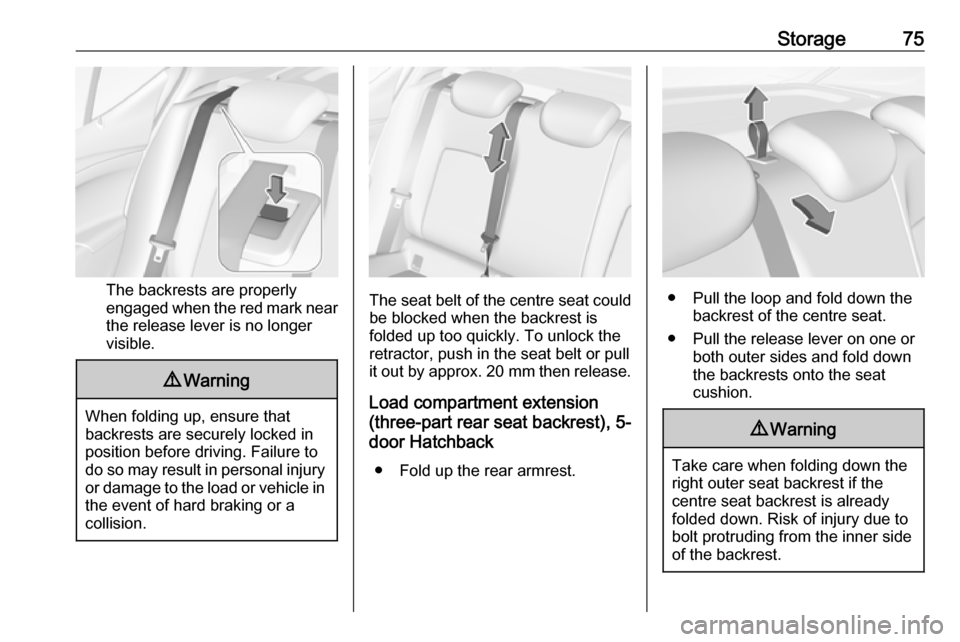
The backrests are properly
engaged when the red mark near the release lever is no longer
visible.
9 Warning
When folding up, ensure that
backrests are securely locked in
position before driving. Failure to
do so may result in personal injury or damage to the load or vehicle in the event of hard braking or a
collision.
The seat belt of the centre seat could
be blocked when the backrest is
folded up too quickly. To unlock the
retractor, push in the seat belt or pull
it out by approx. 20 mm then release.
Load compartment extension
(three-part rear seat backrest), 5-
door Hatchback
● Fold up the rear armrest.● Pull the loop and fold down the backrest of the centre seat.
● Pull the release lever on one or both outer sides and fold down
the backrests onto the seat
cushion.
9 Warning
Take care when folding down the
right outer seat backrest if the
centre seat backrest is already
folded down. Risk of injury due to
bolt protruding from the inner sideof the backrest.
Page 93 of 317

Instruments and controls91Instruments and
controlsControls ....................................... 92
Steering wheel adjustment ........92
Steering wheel controls .............92
Heated steering wheel ...............93
Horn ........................................... 93
Windscreen wiper and washer ..93
Rear window wiper and washer ...................................... 95
Outside temperature ..................96
Clock ......................................... 96
Power outlets ............................. 98
Ashtrays .................................... 99
Warning lights, gauges and indi‐ cators ......................................... 100
Instrument cluster ....................100
Speedometer ........................... 103
Odometer ................................ 104
Trip odometer .......................... 104
Tachometer ............................. 105
Fuel gauge .............................. 105
Fuel selector ............................ 105
Engine coolant temperature gauge ..................................... 106
Service display ........................ 107Control indicators ....................108
Turn lights ................................ 108
Seat belt reminder ...................108
Airbag and belt tensioners .......109
Airbag deactivation ..................109
Charging system .....................110
Malfunction indicator light ........110
Brake and clutch system .........110
Electric parking brake ..............110
Electric parking brake fault ......110
Antilock brake system (ABS) ...111
Gear shifting ............................ 111
Following distance ...................111
Lane keep assist .....................111
Electronic Stability Control off . 111
Electronic Stability Control and Traction Control system .........111
Traction Control system off .....112
Preheating ............................... 112
Exhaust filter ............................ 112
AdBlue ..................................... 112
Tyre pressure monitoring system .................................... 112
Engine oil pressure ..................112
Low fuel ................................... 113
Immobiliser .............................. 113
Exterior light ............................ 113
High beam ............................... 113
High beam assist .....................113
LED headlights ........................ 113Front fog lights......................... 114
Rear fog light ........................... 114
Cruise control .......................... 114
Adaptive cruise control ............114
Vehicle detected ahead ...........114
Speed limiter ........................... 114
Traffic sign assistant ................114
Door open ................................ 115
Displays ..................................... 115
Driver Information Centre ........115
Info Display .............................. 121
Vehicle messages ......................123
Warning chimes .......................124
Battery voltage ........................ 124
Vehicle personalisation ..............125
Telematics service .....................131
OnStar ..................................... 131
Page 105 of 317

Instruments and controls103OverviewOTurn signal 3 108XSeat belt reminder 3 108vAirbag and belt tensioners
3 109VAirbag deactivation 3 109pCharging system 3 110ZMalfunction indicator light
3 110RBrake and clutch system 3 110mElectric parking brake 3 110jElectric parking brake fault
3 110uAntilock brake system (ABS)
3 111RGear shifting 3 111EFollowing distance 3 111aLane keep assist 3 111aElectronic Stability Control off
3 111bElectronic Stability Control and
Traction Control system 3 111kTraction Control system off
3 112!Preheating 3 112ùAdBlue 3 112wTyre pressure monitoring
system 3 112IEngine oil pressure 3 112YLow fuel 3 113dImmobiliser 3 1138Exterior light 3 113CHigh beam 3 113fHigh beam assist 3 113fLED headlights 3 113>Fog light 3 114øRear fog light 3 114mCruise control 3 114 / Adaptive
cruise control 3 114CAdaptive cruise control 3 114AVehicle detected ahead 3 114LSpeed limiter 3 114LTraffic sign assistant 3 114hDoor open 3 115
Speedometer
Indicates vehicle speed.
Page 128 of 317

126Instruments and controls●Comfort Settings
Auto Memory Recall : Changes
the settings to the recall of
memorised settings for power
seat adjustment.
Easy Exit Driver Seat : Activates
or deactivates easy exit function of the power seat.
Chime Volume : Changes the
volume of warning chimes.
Personalisation by Driver :
Activates or deactivates the
personalisation function.
Rain Sense Wipers : Activates or
deactivates automatic wiping
with rain sensor.
Rear Auto Wipe in Reverse :
Activates or deactivates
automatic switching on of the
rear window wiper when reverse gear is engaged.
● Exterior Ambient Lighting
Exterior lighting by unlocking :
Activates or deactivates the entry
lighting.
Duration upon exit of vehicle :
Activates or deactivates andchanges the duration of exit
lighting.
Left or Right Hand Traffic :
Changes between lighting for left or right-hand traffic.
Adaptive Forward Lighting :
Changes the settings of the
functions of the LED headlights.
● Power Door Locks
Stop door lock if door open :
Activates or deactivates the door
locking function while a door is open.
Auto Door Lock : Activates or
deactivates the automatic door
locking function after switching on ignition.
Delayed Door Lock : Activates or
deactivates the delayed door
locking function. This feature
delays the actual locking of the
doors until all doors are closed.
● Remote Lock, Unlock, and Start
Remote Unlock Feedback :
Activates or deactivates the
hazard warning flasher feedback whilst unlocking.Remote Lock Feedback :
Changes what kind of feedback
is given when locking the vehicle.
Remote Door Unlock : Changes
the configuration to unlock only
the driver's door or the whole
vehicle whilst unlocking.
Auto Relock Doors : Activates or
deactivates the automatic relock
function after unlocking without
opening the vehicle.
Remote Window Operation :
Activates or deactivates the
operation of power windows with
remote control.
Passive Door Unlock : Changes
the configuration to unlock only
the driver's door or the whole
vehicle whilst unlocking.
Passive Door Lock : Activates or
deactivates the passive locking
function. This feature locks the
vehicle automatically after
several seconds if all doors have been closed and an electronic
key has been removed from the
vehicle.
Page 130 of 317

128Instruments and controlsmemorised settings for power
seat adjustment.
Easy Exit Driver Seat : Activates
or deactivates easy exit function of the power seat.
Chime Volume : Changes the
volume of warning chimes.
Personalization By Driver :
Activates or deactivates the
personalisation function.
Rain Sense Wipers : Activates or
deactivates automatic wiping
with rain sensor.
Auto Wipe in Reverse Gear :
Activates or deactivates
automatic switching on of the
rear window wiper when reverse gear is engaged.
● Lighting
Vehicle Locator Lights : Activates
or deactivates the entry lighting.
Exit Lighting : Activates or
deactivates and changes the
duration of exit lighting.
Left or Right Hand Traffic :
Changes between lighting for left
or right-hand traffic.Adaptive Forward Lighting :
Changes the settings of the
functions of the LED headlights.
● Power Door Locks
Unlocked Door Anti Lock Out :
Activates or deactivates the door locking function while a door is
open.
Auto Door Lock : Activates or
deactivates the automatic door
locking function after switching on ignition.
Delayed Door Lock : Activates or
deactivates the delayed door
locking function. This feature
delays the actual locking of the
doors until all doors are closed.
● Remote Lock, Unlock, Start
Remote Unlock Light Feedback :
Activates or deactivates the
hazard warning flasher feedback
whilst unlocking.
Remote Lock Feedback :
Changes what kind of feedback
is given when locking the vehicle.
Remote Door Unlock : Changes
the configuration to unlock onlythe driver's door or the whole
vehicle whilst unlocking.
Relock Remotely Unlocked
Doors : Activates or deactivates
the automatic relock function
after unlocking without opening
the vehicle.
Remote Window Operation :
Activates or deactivates the
operation of power windows with
remote control.
Passive Door Unlock : Changes
the configuration to unlock only
the driver's door or the whole
vehicle whilst unlocking.
Passive Door Lock : Activates or
deactivates the passive locking
function. This feature locks the
vehicle automatically after
several seconds if all doors have been closed and an electronickey has been removed from the
vehicle.
Remote Left in Vehicle Alert :
Activates or deactivates the
warning chime when the
electronic key remains in the
vehicle.
Page 132 of 317

130Instruments and controls●Lighting
Vehicle Locator Lights : Activates
or deactivates the entry lighting.
Exit Lighting : Activates or
deactivates and changes the
duration of exit lighting.
Left or Right Hand Traffic :
Changes between lighting for left
or right-hand traffic.
Adaptive Forward Lighting :
Changes the settings of the
functions of the LED headlights.
● Power Door Locks
Unlocked Door Anti-Lockout :
Activates or deactivates the door locking function while a door is
open.
Auto Door Lock : Activates or
deactivates the automatic door
locking function after switching on ignition.
Delayed Door Lock : Activates or
deactivates the delayed door
locking function. This featuredelays the actual locking of the
doors until all doors are closed.
● Remote Lock, Unlock, Start
Remote Unlock Light Feedback :
Activates or deactivates the
hazard warning flasher feedback
whilst unlocking.
Remote Lock Feedback :
Changes what kind of feedback
is given when locking the vehicle.
Remote Door Unlock : Changes
the configuration to unlock only
the driver's door or the whole
vehicle whilst unlocking.
Relock Remote Unlocked Doors :
Activates or deactivates the
automatic relock function after
unlocking without opening the
vehicle.
Remote Window Operation :
Activates or deactivates the
operation of power windows with
remote control.
Passive Door Unlock : Changes
the configuration to unlock only
the driver's door or the whole
vehicle whilst unlocking.Passive Door Lock : Activates or
deactivates the passive locking
function. This feature locks the
vehicle automatically after
several seconds if all doors have
been closed and an electronic
key has been removed from the
vehicle.
Remote Left in Vehicle Alert :
Activates or deactivates the
warning chime when the
electronic key remains in the
vehicle.
Page 146 of 317
144Lighting
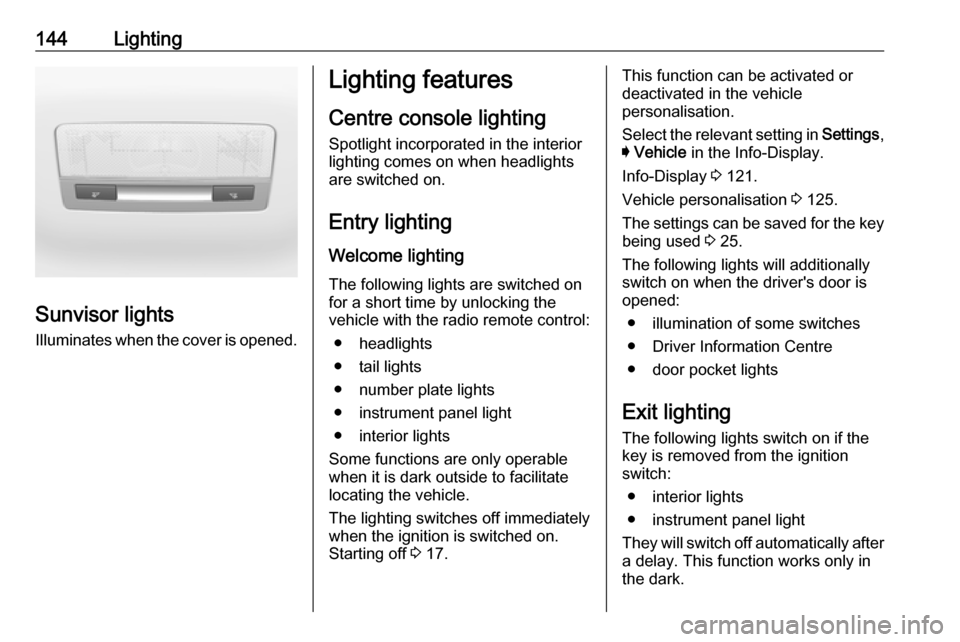
Sunvisor lightsIlluminates when the cover is opened.
Lighting features
Centre console lighting Spotlight incorporated in the interior
lighting comes on when headlights
are switched on.
Entry lighting
Welcome lighting
The following lights are switched on
for a short time by unlocking the
vehicle with the radio remote control:
● headlights
● tail lights
● number plate lights
● instrument panel light
● interior lights
Some functions are only operable
when it is dark outside to facilitate
locating the vehicle.
The lighting switches off immediately
when the ignition is switched on.
Starting off 3 17.This function can be activated or
deactivated in the vehicle
personalisation.
Select the relevant setting in Settings,
I Vehicle in the Info-Display.
Info-Display 3 121.
Vehicle personalisation 3 125.
The settings can be saved for the key being used 3 25.
The following lights will additionally
switch on when the driver's door is
opened:
● illumination of some switches
● Driver Information Centre
● door pocket lights
Exit lighting
The following lights switch on if the
key is removed from the ignition
switch:
● interior lights
● instrument panel light
They will switch off automatically after
a delay. This function works only in
the dark.
Page 160 of 317

158Driving and operating0:ignition off: Some functions
remain active until key is
removed or driver's door is
opened, provided the ignition was
on previously1:accessory power mode: Steering wheel lock released, some
electrical functions are operable,
ignition is off2:ignition on power mode: Ignition
is on, diesel engine is preheating.
Control indicators illuminate and
most electrical functions are
operable. To turn the key from
position 2 to 1 or 0, first push the
key all the way in towards the steering column.3:engine start: Release key after
starting procedure begins
Steering wheel lock
Remove key from ignition switch and
turn steering wheel until it engages.
9 Danger
Never remove the key from
ignition switch during driving as
this will cause steering wheel lock.
Power button
Electronic key must be inside the
vehicle.
Accessory power mode
Press Engine Start/Stop once without
operating clutch or brake pedal. The yellow LED in the button illuminates.
Steering wheel lock is released and
some electrical functions are
operable, ignition is off.Ignition on power mode
Press and hold Engine Start/Stop for
six seconds without operating clutch
or brake pedal. The green LED in the button illuminates, diesel engine is
Page 161 of 317

Driving and operating159preheating. Control indicators
illuminate and most electrical
functions are operable.Engine start
Operate clutch pedal (manual
transmission) or brake pedal
(automatic transmission or manual
transmission automated) and press
Engine Start/Stop once more.
Release button after starting
procedure begins. Release the button
after starting procedure begins.Ignition off
Press Engine Start/Stop briefly in
each mode or when engine is running and vehicle is stationary. Some
functions remain active until driver's
door is opened, provided the ignition
was on previously.Emergency shut off during driving
Press Engine Start/Stop for longer
than two seconds or press twice
briefly within five seconds 3 160.Steering wheel lock
The steering wheel lock activates
automatically when:
● The vehicle is stationary.
● The ignition has been switched off.
● The driver's door is opened.
To release steering wheel lock, open
and close driver's door and switch on accessory mode or start the engine
directly.9 Warning
If the vehicle battery is discharged,
the vehicle must not be towed,
tow-started or jump-started as the
steering wheel lock cannot be
disengaged.
Operation on vehicles with
electronic key system in case of
failure
If either the electronic key fails or the
battery of the electronic key is weak,
the Driver Information Centre may
display No Remote Detected or
Replace Battery in Remote Key when
you try to start the vehicle.
Place the electronic key solely
centred in the transmitter area in
longitudinal direction flat with buttons
upside as shown in the illustration.
Other objects, e.g. other keys,
transponder, tags, coins etc. must be removed from the centre console.
Depress the clutch pedal (manual
transmission) or the brake pedal
(automatic transmission or manual
transmission automated) and press
Engine Start/Stop .
Page 162 of 317

160Driving and operatingTo switch off the engine, press
Engine Start/Stop again. Remove the
electronic key from the centre
console.
This option is intended for
emergencies only. Replace the
electronic key battery as soon as
possible 3 23.
For unlocking or locking the doors,
see fault in radio remote control unit
or electronic key system 3 25.
Retained power off The following electronic systems can
work until the driver's door is opened
or for ten minutes after the ignition is
switched off:
● power windows
● sunroof
● power outletsStarting the engine
Vehicles with ignition switch
Turn key to position 1 to release the
steering wheel lock.
Manual transmission: operate clutch
and brake pedal.
Automatic transmission: operate
brake pedal and move selector lever
to P or N.
Manual transmission automated:
operate brake pedal.
Do not operate accelerator pedal.
Diesel engines: turn the key to
position 2 for preheating and wait until
control indicator ! extinguishes.
Turn key briefly to position 3 and
release: an automatic procedure operates the starter with a short delay
until the engine is running, see
Automatic Starter Control.
Manual transmission: during an
Autostop, the engine can be started
by depressing the clutch pedal
3 162.
Automatic transmission or manual
transmission automated: during an
Autostop, the engine can be started
by releasing the brake pedal 3 162.