tow OPEL ASTRA K 2019 Manual user
[x] Cancel search | Manufacturer: OPEL, Model Year: 2019, Model line: ASTRA K, Model: OPEL ASTRA K 2019Pages: 317, PDF Size: 9.56 MB
Page 158 of 317

156Driving and operatingDriving and
operatingDriving hints ............................... 157
Control of the vehicle ...............157
Steering ................................... 157
Starting and operating ...............157
New vehicle running-in ............157
Ignition switch positions ...........157
Power button ........................... 158
Retained power off ..................160
Starting the engine ..................160
Overrun cut-off ........................ 162
Stop-start system ....................162
Parking .................................... 165
Engine exhaust .......................... 167
Exhaust filter ............................ 167
Catalytic converter ...................168
AdBlue ..................................... 169
Automatic transmission ..............171
Transmission display ...............171
Selector lever .......................... 172
Manual mode ........................... 173
Electronic driving programmes 173
Fault ........................................ 173
Interruption of power supply ....174Manual transmission ..................174
Manual transmission automa‐ ted .............................................. 175
Transmission display ...............175
Selector lever .......................... 176
Manual mode ........................... 177
Electronic driving programmes 177
Fault ........................................ 177
Brakes ........................................ 178
Antilock brake system .............178
Parking brake .......................... 179
Brake assist ............................. 181
Hill start assist ......................... 181
Ride control systems .................181
Traction Control system ..........181
Electronic Stability Control ......182
Sport mode .............................. 183
Driver assistance systems .........184
Cruise control .......................... 184
Speed limiter ........................... 186
Adaptive cruise control ............187
Forward collision alert .............195
Following distance indication ...197
Active emergency braking .......198
Parking assist .......................... 201
Side blind spot alert .................209
Rear view camera ...................210
Traffic sign assistant ................212
Lane keep assist .....................216Fuel............................................ 219
Fuel for petrol engines .............219
Fuel for diesel engines ............220
Fuel for natural gas operation . 221
Refuelling ................................ 221
Trailer hitch ................................ 224
General information .................224
Driving characteristics and towing tips .............................. 224
Trailer towing ........................... 224
Towing equipment ...................225
Trailer stability assist ...............228
Page 160 of 317

158Driving and operating0:ignition off: Some functions
remain active until key is
removed or driver's door is
opened, provided the ignition was
on previously1:accessory power mode: Steering wheel lock released, some
electrical functions are operable,
ignition is off2:ignition on power mode: Ignition
is on, diesel engine is preheating.
Control indicators illuminate and
most electrical functions are
operable. To turn the key from
position 2 to 1 or 0, first push the
key all the way in towards the steering column.3:engine start: Release key after
starting procedure begins
Steering wheel lock
Remove key from ignition switch and
turn steering wheel until it engages.
9 Danger
Never remove the key from
ignition switch during driving as
this will cause steering wheel lock.
Power button
Electronic key must be inside the
vehicle.
Accessory power mode
Press Engine Start/Stop once without
operating clutch or brake pedal. The yellow LED in the button illuminates.
Steering wheel lock is released and
some electrical functions are
operable, ignition is off.Ignition on power mode
Press and hold Engine Start/Stop for
six seconds without operating clutch
or brake pedal. The green LED in the button illuminates, diesel engine is
Page 161 of 317

Driving and operating159preheating. Control indicators
illuminate and most electrical
functions are operable.Engine start
Operate clutch pedal (manual
transmission) or brake pedal
(automatic transmission or manual
transmission automated) and press
Engine Start/Stop once more.
Release button after starting
procedure begins. Release the button
after starting procedure begins.Ignition off
Press Engine Start/Stop briefly in
each mode or when engine is running and vehicle is stationary. Some
functions remain active until driver's
door is opened, provided the ignition
was on previously.Emergency shut off during driving
Press Engine Start/Stop for longer
than two seconds or press twice
briefly within five seconds 3 160.Steering wheel lock
The steering wheel lock activates
automatically when:
● The vehicle is stationary.
● The ignition has been switched off.
● The driver's door is opened.
To release steering wheel lock, open
and close driver's door and switch on accessory mode or start the engine
directly.9 Warning
If the vehicle battery is discharged,
the vehicle must not be towed,
tow-started or jump-started as the
steering wheel lock cannot be
disengaged.
Operation on vehicles with
electronic key system in case of
failure
If either the electronic key fails or the
battery of the electronic key is weak,
the Driver Information Centre may
display No Remote Detected or
Replace Battery in Remote Key when
you try to start the vehicle.
Place the electronic key solely
centred in the transmitter area in
longitudinal direction flat with buttons
upside as shown in the illustration.
Other objects, e.g. other keys,
transponder, tags, coins etc. must be removed from the centre console.
Depress the clutch pedal (manual
transmission) or the brake pedal
(automatic transmission or manual
transmission automated) and press
Engine Start/Stop .
Page 167 of 317

Driving and operating165● The stop-start system ismanually deactivated.
● The bonnet is opened.
● The driver's seat belt is unfastened and / or the driver's
door is opened.
● The engine temperature is too low.
● The charging level of the vehicle battery is below a defined level.
● The brake vacuum is not sufficient.
● The vehicle is driven at least at walking speed.
● The climate control system requests an engine start.
● The desired compartment temperature does not match the
actual temperature.
● The air conditioning is manually switched on.
If the bonnet is not fully closed, a warning message is displayed in the
Driver Information Centre.If an electrical accessory, e.g. a
portable CD player, is connected to
the power outlet, a brief power drop
during the restart might be noticeable.
Note
If a trailer or a bike carrier is
attached, early Autostop and late
restart is deactivated.
Parking9 Warning
● Do not park the vehicle on an
easily ignitable surface. The
high temperature of the
exhaust system could ignite the
surface.
● Always apply the parking brake. Activate the manual
parking brake without pressing the release button. Apply as
firmly as possible on a downhill slope or uphill slope. Depress
brake pedal at the same time to
reduce operating force.
For vehicles with electric
parking brake, pull switch m for
a minimum of one second until
control indicator m illuminates
constantly and electric parking
brake is applied 3 110.
● Switch off the engine. ● If the vehicle is on a level surface or uphill slope, engage
first gear or set the selector
lever to position P before
removing the ignition key or
switching off ignition on
vehicles with power button. On
an uphill slope, turn the front
wheels away from the kerb.
If the vehicle is on a downhill
slope, engage reverse gear or
set the selector lever to position
P before removing the ignition
key or switching off ignition on
vehicles with power button.
Turn the front wheels towards
the kerb.
● Close the windows and the sunroof.
● Remove the ignition key from the ignition switch or switch off
ignition on vehicles with power
Page 170 of 317
168Driving and operatingA warning message appears when
exhaust filter is full. Start cleaning
process as soon as possible.
A warning message also appears
when exhaust filter has reached the
maximum filling level. Start cleaning
process immediately to avoid
damage to the engine.
Activate self-cleaning process
To activate cleaning process,
continue driving, keep engine speed
above 2000 rpm. Shift down if
necessary. Exhaust filter cleaning is
then started.
Cleaning process is completed more
quickly at high engine speeds and
loads.
Keep on driving until self-cleaning
operation is complete and the display message disappears.Caution
If possible, do not interrupt
cleaning process. Drive until
cleaning is completed to avoid the need for service or repair by a
workshop.
Cleaning process not possible
If cleaning is not possible for anyreason, control indicator Z
illuminates and a warning message
appears in the Driver Information
Centre. Engine power may be
reduced. Seek the assistance of a
workshop immediately.
Catalytic converter
The catalytic converter reduces the
amount of harmful substances in the
exhaust gases.
Caution
Fuel grades other than those listed on pages 3 219, 3 287 could
damage the catalytic converter or
electronic components.
Unburnt petrol will overheat and
damage the catalytic converter.
Therefore avoid excessive use of the starter, running the fuel tank
dry and starting the engine by
pushing or towing.
In the event of misfiring, uneven
engine running, a reduction in engine performance or other unusual
problems, have the cause of the fault
rectified by a workshop as soon as
possible. In an emergency, driving
can be continued for a short period,
keeping vehicle speed and engine
speed low.
Page 171 of 317
Driving and operating169AdBlue
General information
The selective catalytic reduction
(BlueInjection) is a method to
substantially reduce the nitrogen
oxides in the exhaust emission. This
is achieved by injecting a Diesel
Exhaust Fluid (DEF) into the exhaust
system. The ammonia released by
the fluid reacts with nitrous gases
(NO x) from the exhaust and turns it
into nitrogen and water.
The designation of this fluid is AdBlue
® . It is a non-toxic, non-flammable,
colourless and odourless fluid which
consists of 32% urea and 68% water.9Warning
Avoid contact of your eyes or skin
with AdBlue.
In case of eye or skin contact,
rinse off with water.
Caution
Avoid contact of the paintwork with AdBlue.
In case of contact, rinse off with water.
AdBlue freezes at a temperature of
approx. -11 °C. As the vehicle is
equipped with an AdBlue pre-heater,
the emissions reduction at low
temperatures is ensured. The AdBlue
pre-heater works automatically.
The typical AdBlue consumption is
approx. two litres per 1000 km, but
can also be higher depending on
driving behaviour (e.g. high load or
towing).
AdBlue tank
The AdBlue tank level can be found in the display menu.
Level warnings
Depending on the calculated range of
AdBlue, different messages are
displayed in the Driver Information
Centre. The messages and the
restrictions are a legal requirement.
The first possible warning is AdBlue
Range: 2400 km .
This warning will show up once briefly with the calculated range. Driving is
possible without any restrictions.
The next warning level is entered with
a range below 1750 km. The
message with the current range will
always be displayed when ignition is
switched on and needs to be
confirmed 3 115 . Refill AdBlue before
entering the next warning level.
At an AdBlue range below 900 km,
the following warning messages are
alternately displayed and cannot be
dismissed:
● AdBlue Low Refill Now
● Engine Restart Prevented in 900
km .
Additionally, control indicator Y
flashes continuously.
Page 175 of 317
Driving and operating173ParkingApply the parking brake and engage
P .
The ignition key can only be removed
when the selector lever is in position
P .
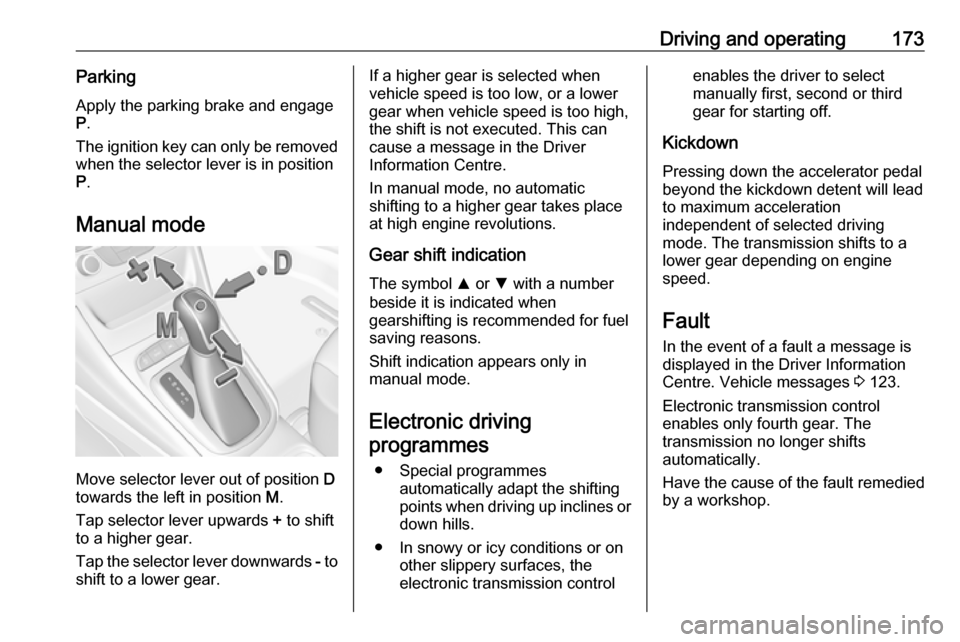
Manual mode
Move selector lever out of position D
towards the left in position M.
Tap selector lever upwards + to shift
to a higher gear.
Tap the selector lever downwards - to
shift to a lower gear.
If a higher gear is selected when
vehicle speed is too low, or a lower
gear when vehicle speed is too high,
the shift is not executed. This can
cause a message in the Driver
Information Centre.
In manual mode, no automatic
shifting to a higher gear takes place
at high engine revolutions.
Gear shift indication
The symbol R or S with a number
beside it is indicated when
gearshifting is recommended for fuel
saving reasons.
Shift indication appears only in
manual mode.
Electronic driving programmes
● Special programmes automatically adapt the shifting
points when driving up inclines or
down hills.
● In snowy or icy conditions or on other slippery surfaces, the
electronic transmission controlenables the driver to select
manually first, second or third
gear for starting off.
Kickdown Pressing down the accelerator pedal
beyond the kickdown detent will lead
to maximum acceleration
independent of selected driving
mode. The transmission shifts to a
lower gear depending on engine
speed.
Fault
In the event of a fault a message is
displayed in the Driver Information
Centre. Vehicle messages 3 123.
Electronic transmission control
enables only fourth gear. The
transmission no longer shifts
automatically.
Have the cause of the fault remedied
by a workshop.
Page 180 of 317

178Driving and operatingIn the event of a fault, a warning
message is displayed in the Driver
Information Centre. Vehicle
messages 3 123.
Continued driving is restricted or not
possible, depending on the fault.
Have the cause of the fault remedied
by a workshop.Brakes
The brake system comprises two
independent brake circuits.
If a brake circuit fails, the vehicle can
still be braked using the other brake
circuit. However, braking effect is
achieved only when the brake pedal
is depressed firmly. Considerably
more force is needed for this. The
braking distance is extended. Seek the assistance of a workshop before
continuing the journey.
When the engine is not running, the
support of the brake servo unit
disappears once the brake pedal has
been depressed once or twice.
Braking effect is not reduced, but
braking requires significantly greater
force. It is especially important to bear this in mind when being towed.
Control indicator R 3 110.
Antilock brake system
Antilock brake system (ABS)
prevents the wheels from locking.ABS starts to regulate brake pressure as soon as a wheel shows a tendency to lock. The vehicle remains
steerable, even during hard braking.
ABS control is made apparent
through a pulse in the brake pedal
and the noise of the regulation
process.
For optimum braking, keep the brake
pedal fully depressed throughout the
braking process, despite the fact that
the pedal is pulsating. Do not reduce
the pressure on the pedal.
After starting off, the system performs
a self-test which may be audible.
Control indicator u 3 111.
Adaptive brake light During full braking, all three brake
lights flash for the duration of ABS
control.
Page 195 of 317
Driving and operating193● Adaptive cruise control doesignore the oncoming traffic.
● Adaptive cruise control does not consider pedestrians and
animals for braking and driving off.
● Adaptive cruise control considers
stopped vehicles only at low
speed.
● Do not use adaptive cruise control when towing a trailer.
● Do not use adaptive cruise control on roads with an incline ofmore than 10%.
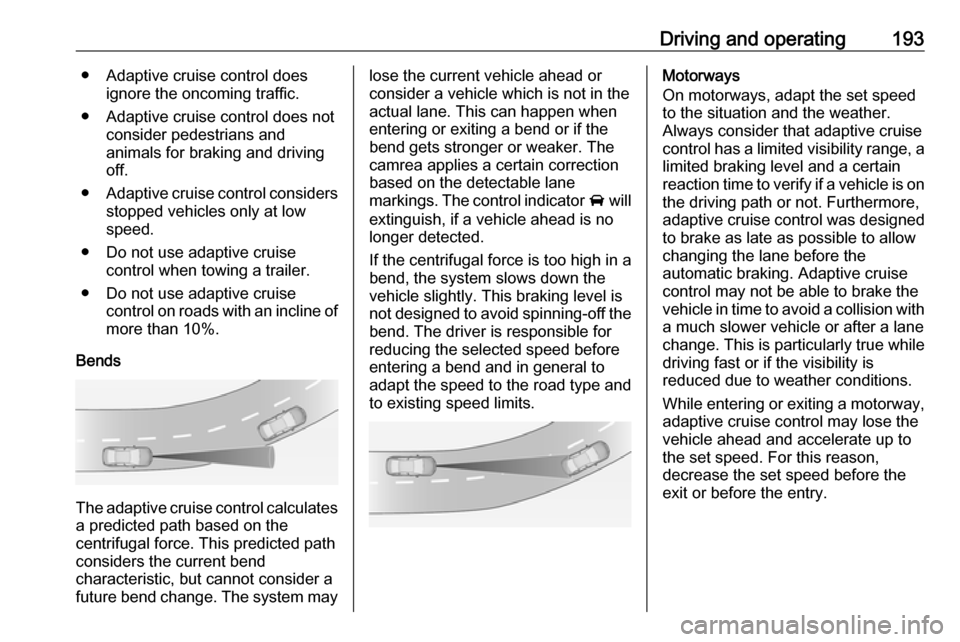
Bends
The adaptive cruise control calculates
a predicted path based on the
centrifugal force. This predicted path
considers the current bend
characteristic, but cannot consider a
future bend change. The system may
lose the current vehicle ahead or
consider a vehicle which is not in the
actual lane. This can happen when
entering or exiting a bend or if the
bend gets stronger or weaker. The
camrea applies a certain correction
based on the detectable lane
markings. The control indicator A will
extinguish, if a vehicle ahead is no longer detected.
If the centrifugal force is too high in a
bend, the system slows down the
vehicle slightly. This braking level is
not designed to avoid spinning-off the
bend. The driver is responsible for
reducing the selected speed before
entering a bend and in general to
adapt the speed to the road type and
to existing speed limits.Motorways
On motorways, adapt the set speed
to the situation and the weather.
Always consider that adaptive cruise
control has a limited visibility range, a
limited braking level and a certain
reaction time to verify if a vehicle is on
the driving path or not. Furthermore,
adaptive cruise control was designed to brake as late as possible to allow
changing the lane before the
automatic braking. Adaptive cruise
control may not be able to brake the
vehicle in time to avoid a collision with
a much slower vehicle or after a lane
change. This is particularly true while
driving fast or if the visibility is
reduced due to weather conditions.
While entering or exiting a motorway, adaptive cruise control may lose thevehicle ahead and accelerate up to
the set speed. For this reason,
decrease the set speed before the
exit or before the entry.
Page 202 of 317
200Driving and operatingAfter a sudden lane change, the
system needs a certain time to
detect the next preceding vehicle.
The complete attention of the
driver is always required while
driving. The driver shall always be ready to take action and apply the brakes and steer to avoid
collisions. The system is designed
to work with all occupants wearing their seat belts.
Intelligent Brake Assist
If the vehicle is equipped with radar
sensor Intelligent brake assist may
activate when the brake pedal is
applied quickly by providing a boost
to braking based on the speed of
approach and distance to a vehicle
ahead.
Minor brake pedal pulsations or pedal
movement during this time is normal
and the brake pedal should continue
to be applied as needed. Intelligent
brake assist will automatically
disengage only when the brake pedal is released.
9 Warning
Intelligent brake assist may
increase vehicle braking in
situations when it may not be
necessary. You could block the
flow of traffic. If this occurs, take
your foot off the brake pedal and
then apply the brakes as needed.
Deactivation
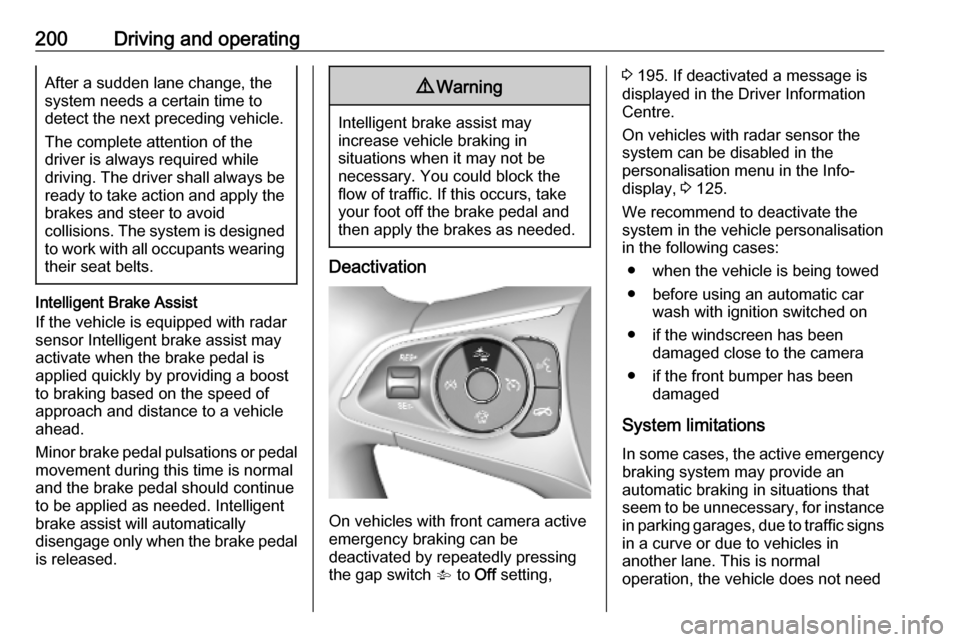
On vehicles with front camera active
emergency braking can be
deactivated by repeatedly pressing
the gap switch V to Off setting,
3 195. If deactivated a message is
displayed in the Driver Information
Centre.
On vehicles with radar sensor the
system can be disabled in the
personalisation menu in the Info-
display, 3 125.
We recommend to deactivate the system in the vehicle personalisation
in the following cases:
● when the vehicle is being towed
● before using an automatic car wash with ignition switched on
● if the windscreen has been damaged close to the camera
● if the front bumper has been damaged
System limitations In some cases, the active emergencybraking system may provide an
automatic braking in situations that
seem to be unnecessary, for instance
in parking garages, due to traffic signs
in a curve or due to vehicles in
another lane. This is normal
operation, the vehicle does not need