instrument panel OPEL ASTRA K 2019 Manual user
[x] Cancel search | Manufacturer: OPEL, Model Year: 2019, Model line: ASTRA K, Model: OPEL ASTRA K 2019Pages: 317, PDF Size: 9.56 MB
Page 12 of 317

10In briefInstrument panel overview
Page 40 of 317
38Keys, doors and windows
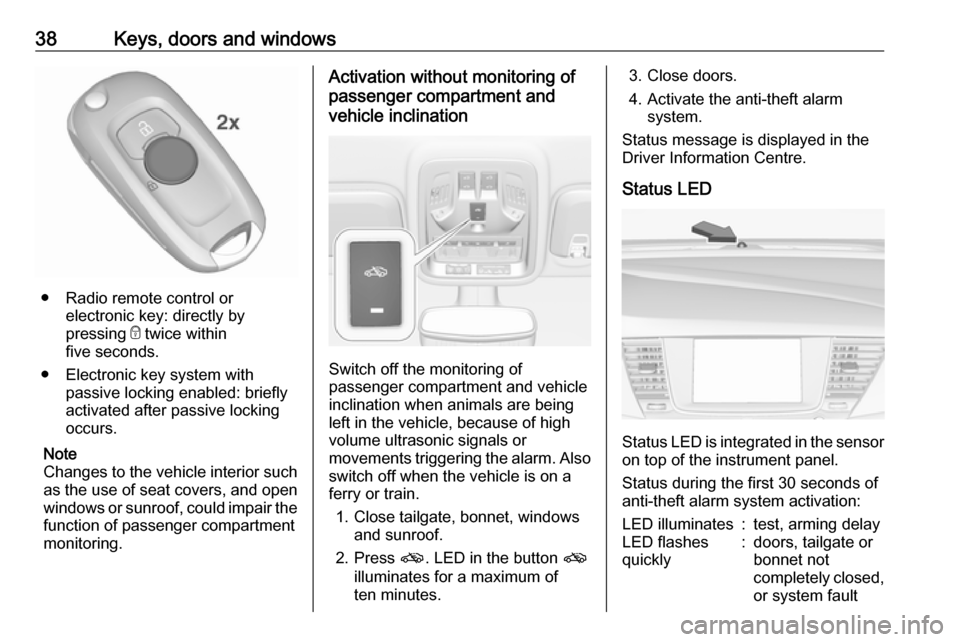
● Radio remote control orelectronic key: directly by
pressing e twice within
five seconds.
● Electronic key system with passive locking enabled: briefly
activated after passive locking
occurs.
Note
Changes to the vehicle interior such
as the use of seat covers, and open windows or sunroof, could impair the
function of passenger compartment
monitoring.
Activation without monitoring of
passenger compartment and
vehicle inclination
Switch off the monitoring of
passenger compartment and vehicle
inclination when animals are being
left in the vehicle, because of high
volume ultrasonic signals or
movements triggering the alarm. Also switch off when the vehicle is on a
ferry or train.
1. Close tailgate, bonnet, windows and sunroof.
2. Press o. LED in the button o
illuminates for a maximum of
ten minutes.
3. Close doors.
4. Activate the anti-theft alarm system.
Status message is displayed in the
Driver Information Centre.
Status LED
Status LED is integrated in the sensor
on top of the instrument panel.
Status during the first 30 seconds of
anti-theft alarm system activation:
LED illuminates:test, arming delayLED flashes
quickly:doors, tailgate or
bonnet not
completely closed,
or system fault
Page 62 of 317
60Seats, restraintsairbag sensing and diagnostic
module, steering wheel,
instrument panel, inner door seals including the speakers, any of the
airbag modules, ceiling or pillar
trim, front sensors, side impact
sensors or airbag wiring.
Note
The airbag systems and belt
pretensioner control electronics are
located in the centre console area.
Do not put any magnetic objects in
this area.
Do not affix any objects onto the
airbag covers and do not cover them with other materials. Have damagedcovers replaced by a workshop.
Each airbag is triggered only once.
Have deployed airbags replaced by
a workshop. Furthermore, it may be
necessary to have the steering
wheel, the instrument panel, parts of
the panelling, the door seals,
handles and the seats replaced.
Do not make any modifications to
the airbag system as this will
invalidate the vehicle operating
permit.
Control indicator v for airbag systems
3 109.
Child restraint systems on front
passenger seat with airbag
systems
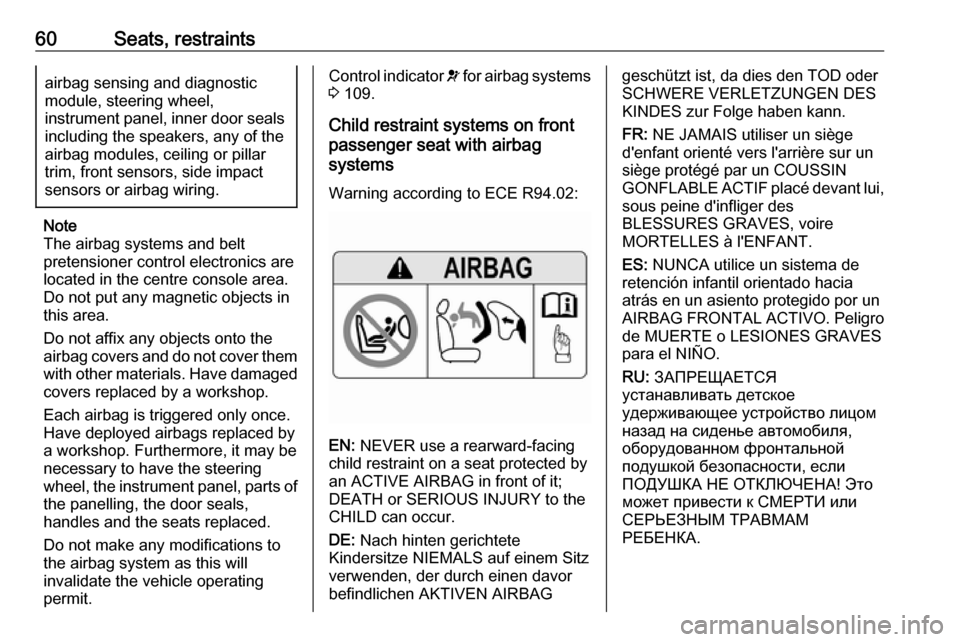
Warning according to ECE R94.02:
EN: NEVER use a rearward-facing
child restraint on a seat protected by
an ACTIVE AIRBAG in front of it;
DEATH or SERIOUS INJURY to the
CHILD can occur.
DE: Nach hinten gerichtete
Kindersitze NIEMALS auf einem Sitz
verwenden, der durch einen davor
befindlichen AKTIVEN AIRBAG
geschützt ist, da dies den TOD oder
SCHWERE VERLETZUNGEN DES
KINDES zur Folge haben kann.
FR: NE JAMAIS utiliser un siège
d'enfant orienté vers l'arrière sur un
siège protégé par un COUSSIN
GONFLABLE ACTIF placé devant lui,
sous peine d'infliger des
BLESSURES GRAVES, voire
MORTELLES à l'ENFANT.
ES: NUNCA utilice un sistema de
retención infantil orientado hacia
atrás en un asiento protegido por un
AIRBAG FRONTAL ACTIVO. Peligro de MUERTE o LESIONES GRAVES
para el NIÑO.
RU: ЗАПРЕЩАЕТСЯ
устанавливать детское
удерживающее устройство лицом
назад на сиденье автомобиля,
оборудованном фронтальной
подушкой безопасности, если
ПОДУШКА НЕ ОТКЛЮЧЕНА! Это
может привести к СМЕРТИ или
СЕРЬЕЗНЫМ ТРАВМАМ
РЕБЕНКА.
Page 65 of 317
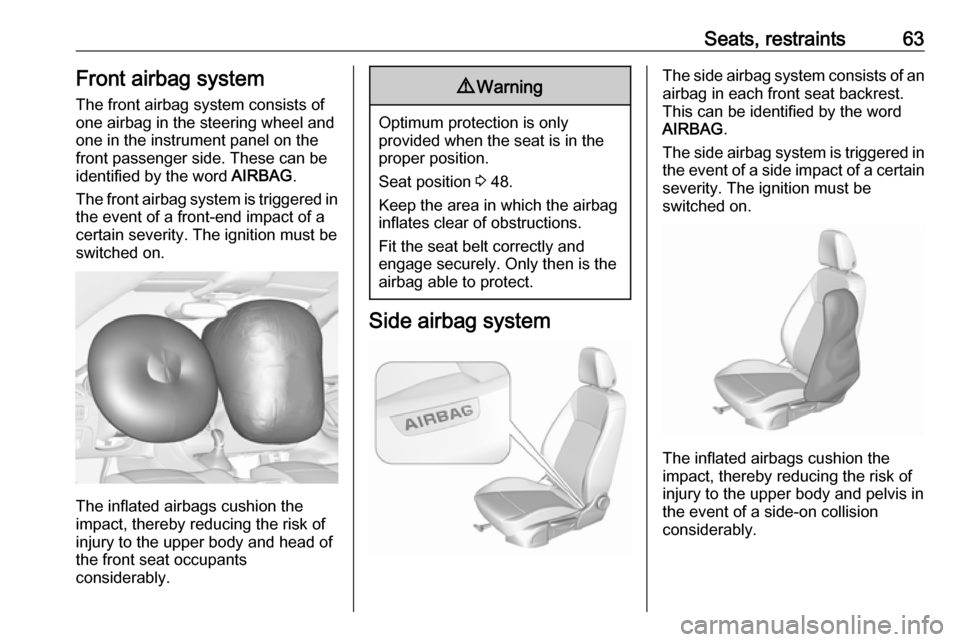
Seats, restraints63Front airbag systemThe front airbag system consists of
one airbag in the steering wheel and
one in the instrument panel on the
front passenger side. These can be
identified by the word AIRBAG.
The front airbag system is triggered in
the event of a front-end impact of a
certain severity. The ignition must be
switched on.
The inflated airbags cushion the
impact, thereby reducing the risk of
injury to the upper body and head of
the front seat occupants
considerably.
9 Warning
Optimum protection is only
provided when the seat is in the
proper position.
Seat position 3 48.
Keep the area in which the airbag
inflates clear of obstructions.
Fit the seat belt correctly and
engage securely. Only then is the
airbag able to protect.
Side airbag system
The side airbag system consists of an
airbag in each front seat backrest.
This can be identified by the word
AIRBAG .
The side airbag system is triggered in the event of a side impact of a certain
severity. The ignition must be
switched on.
The inflated airbags cushion the
impact, thereby reducing the risk of
injury to the upper body and pelvis in
the event of a side-on collision
considerably.
Page 66 of 317

64Seats, restraints9Warning
Keep the area in which the airbag
inflates clear of obstructions.
Note
Only use protective seat covers that have been approved for the vehicle.Be careful not to cover the airbags.
Curtain airbag system
The curtain airbag system consists of an airbag in the roof frame on each
side. This can be identified by the
word AIRBAG on the roof pillars.
The curtain airbag system is triggered
in the event of a side-on impact of a
certain severity. The ignition must be
switched on.
The inflated airbags cushion the
impact, thereby reducing the risk of
injury to the head in the event of a
side-on impact considerably.
9 Warning
Keep the area in which the airbag
inflates clear of obstructions.
The hooks on the handles in the
roof frame are only suitable for
hanging up light articles of
clothing, without coat hangers. Do not keep any items in these
clothes.
Airbag deactivation
The front passenger airbag system must be deactivated for child restraint
system on the passenger seat
according to the instructions in the
table 3 68. The side airbag and
curtain airbag systems, the belt
pretensioners and all driver airbag
systems will remain active.
The front passenger airbag system
can be deactivated via a key-
operated switch on the passenger side of the instrument panel.
Page 75 of 317
Storage73
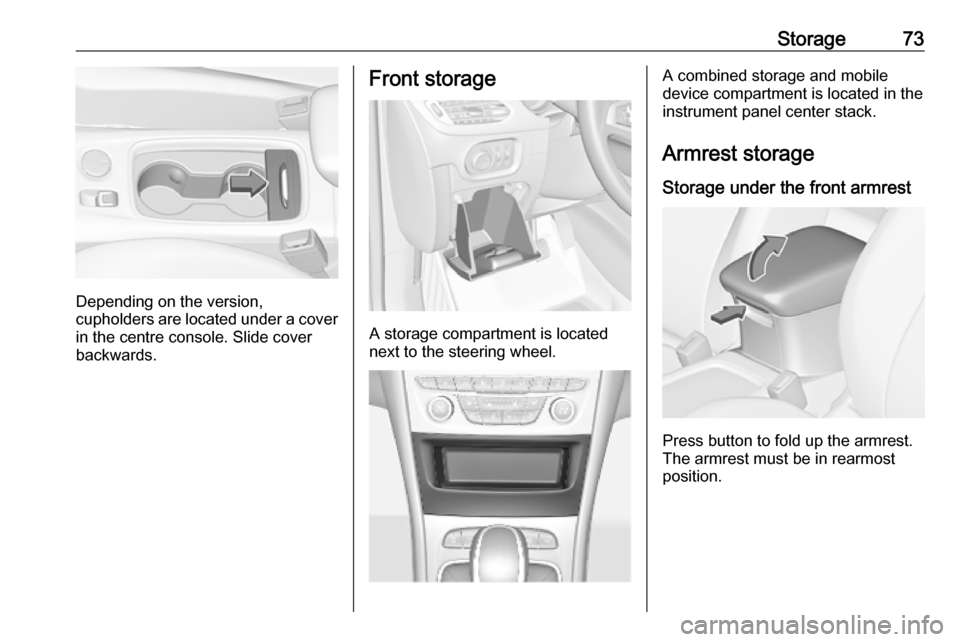
Depending on the version,
cupholders are located under a cover
in the centre console. Slide cover
backwards.
Front storage
A storage compartment is located
next to the steering wheel.
A combined storage and mobile
device compartment is located in the
instrument panel center stack.
Armrest storage
Storage under the front armrest
Press button to fold up the armrest.
The armrest must be in rearmost
position.
Page 92 of 317

90Storage● Do not allow the load to protrudeabove the upper edge of the
backrests.
● Sports Tourer: install safety net when transporting objects in the
load compartment.
● Do not place any objects on the load compartment cover or theinstrument panel, and do not
cover the sensor on top of the instrument panel.
● The load must not obstruct the operation of the pedals, parking
brake and gear selector lever, or
hinder the freedom of movement of the driver. Do not place any
unsecured objects in the interior.
● Do not drive with an open load compartment.9Warning
Always make sure that the load in
the vehicle is securely stowed.
Otherwise objects can be thrown
around inside the vehicle and
cause personal injury or damage
to the load or car.
● The payload is the difference between the permitted gross
vehicle weight (see identification
plate 3 282) and the EC kerb
weight.
To calculate the payload, enter
the data for your vehicle in the
weights table at the front of this
manual.
The EC kerb weight includes
weights for the driver (68 kg),
luggage (7 kg) and all fluids (fuel
tank 90% full).
Optional equipment and
accessories increase the kerb
weight.
● Driving with a roof load increases
the sensitivity of the vehicle to
cross-winds and has a
detrimental effect on vehicle
handling due to the vehicle's
higher centre of gravity.
Distribute the load evenly and secure it properly with retaining
straps. Adjust the tyre pressure
and vehicle speed according to
the load conditions. Check and
retighten the straps frequently.Do not drive faster than
120 km/h.
The permissible roof load is
75 kg. The roof load is the
combined weight of the roof rack and the load.
Page 123 of 317

Instruments and controls121page. If the selected speed limit is
exceeded, a pop-up warning is
displayed with a chime.
Tyre Load
The tyre pressure category according
to the actual tyre inflation pressure
can be selected 3 257.
Software information
Displays the open source software
information.
Info Display The Info-Display is located in the
instrument panel near the instrument
cluster.
Depending on the vehicle
configuration the vehicle has a
● Graphic-Info-Display
or
● 7'' Colour-Info-Display with
touchscreen functionality
or
● 8'' Colour-Info-Display with
touchscreen functionalityThe vehicle has a 7'' Colour-Info-
Display with touchscreen
functionality.
The vehicle has a 8'' Colour-Info-
Display with touchscreen
functionality.
The Info displays can indicate: ● time 3 96
● outside temperature 3 96
● date 3 96
● Infotainment system, see description in the Infotainment
manual
● indication of rear view camera 3 210
● indication of parking assist instructions 3 201
● navigation, see description in the
Infotainment manual
● system messages
● settings for vehicle personalisation 3 125Graphic-Info-Display
Press X to switch on the display.
Press MENU to select main menu
page.
Turn MENU to select a menu page.
Press MENU to confirm a selection.
Press BACK to exit a menu without
changing a setting.
7'' Colour-Info-Display
Selecting menus and settings
Menus and settings are accessed via
the display.
Page 137 of 317

Lighting135LightingExterior lighting.......................... 135
Light switch .............................. 135
Automatic light control .............136
High beam ............................... 136
Headlight flash ......................... 136
Headlight range adjustment ....136
Headlights when driving abroad .................................... 137
Daytime running lights .............137
LED headlights ........................ 137
Hazard warning flashers ..........140
Turn lights ................................ 141
Front fog lights ......................... 141
Rear fog light ........................... 142
Parking lights ........................... 142
Reversing lights .......................142
Misted light covers ...................142
Interior lighting ........................... 143
Instrument panel illumination control ..................................... 143
Interior lights ............................ 143
Reading lights .......................... 143
Sunvisor lights ......................... 144
Lighting features ........................144
Centre console lighting ............144Entry lighting ............................ 144
Exit lighting .............................. 144
Battery discharge protection ....145Exterior lighting
Light switch
Turn light switch:
AUTO:automatic light control
switches automatically
between daytime running
light and headlight8:sidelights9:headlights
When switching on the ignition,
automatic light control is active.
Control indicator 8 3 113.
Page 145 of 317
Lighting143Interior lighting
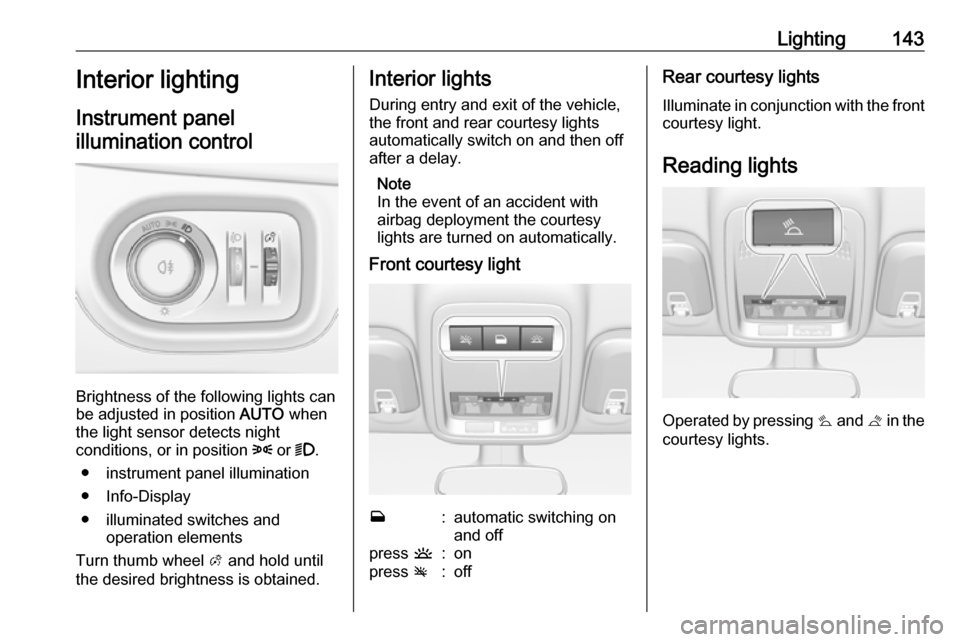
Instrument panel
illumination control
Brightness of the following lights can
be adjusted in position AUTO when
the light sensor detects night
conditions, or in position 8 or 9.
● instrument panel illumination
● Info-Display
● illuminated switches and operation elements
Turn thumb wheel A and hold until
the desired brightness is obtained.
Interior lights
During entry and exit of the vehicle,
the front and rear courtesy lights
automatically switch on and then off
after a delay.
Note
In the event of an accident with
airbag deployment the courtesy
lights are turned on automatically.
Front courtesy lightw:automatic switching on
and offpress u:onpress v:offRear courtesy lights
Illuminate in conjunction with the front courtesy light.
Reading lights
Operated by pressing s and t in the
courtesy lights.