Driver information OPEL ASTRA K 2020 Owner's Manual
[x] Cancel search | Manufacturer: OPEL, Model Year: 2020, Model line: ASTRA K, Model: OPEL ASTRA K 2020Pages: 305, PDF Size: 27.84 MB
Page 13 of 305

In brief111Power windows .....................43
2 Exterior mirrors .....................40
3 Central locking system ..........25
4 Side air vents ...................... 149
5 Cruise control .....................176
Speed limiter ....................... 177
Adaptive cruise control .......179
Forward collision alert .........187
6 Turn lights, headlight
flash, low / high beam,
high beam assist .................136
Exit lighting ......................... 139
Parking lights ...................... 137
Buttons for Driver
Information Centre ..............115
7 Instruments ........................ 104
Driver Information Centre .... 115
8 Buttons for Driver
Information Centre ..............115
9 Windscreen wiper and
washer, rear wiper and
washer ................................. 94
10 Centre air vents ................... 14911Info Display ......................... 121
12 Anti-theft alarm system
status LED ........................... 37
13 Hazard warning flashers ....135
14 Glovebox .............................. 73
15 Controls for Info Display
operation ............................. 121
16 Climate control system ........ 141
17 Fuse box ............................ 244
18 Traction Control system .....173
Electronic Stability Control . 174
Parking assist / Advanced
parking assist .....................195
Lane keep assist ................210
Eco button for stop-start
system ................................. 157
19 Manual transmission ..........169
Automatic transmission ......166
20 Power outlet .......................... 99
21 Parking brake ......................171
22 Power button ....................... 153
23 Ignition switch .....................152
24 Steering wheel adjustment ..93
25 Horn ..................................... 9426Bonnet release lever ..........224
27 Storage compartment ...........74
28 Light switch ........................ 130
Headlight range
adjustment ......................... 133
Front / rear fog lights ..........136
Instrument illumination .......137
Page 26 of 305
24Keys, doors and windowsNote
Do not put the electronic key into the
load compartment or in front of the
Info Display.
Activation and Deactivation
keyless unlocking
If equipped, keyless unlocking of the
exterior door handles and the boot
can be activated or deactivated.
To deactivate the keyless unlocking,
press and hold b a at the same time
on the electronic key for approx. 3
seconds. The turn lights will indicate
the deactivation by flashing four
times. Using any exterior door handle
to unlock the doors or the boot will
indicated the deactivation by the turn
lights flashing fourt times quickly. If
keyless unlocking is deactivated,
deactive the alarm system before
starting the vehicle.
To activate the keyless unlocking,
press and hold b a at the same time
on the electronic key for approx. 3
seconds. The turn lights will indicates the activation by flashing quickly
twice.Replacing battery in electronic
key
Replace the battery as soon as the
system no longer operates properly or the range is reduced. The need for
battery replacement is indicated by a
message in the Driver Information
Centre 3 122.
Batteries do not belong in household
waste. They must be disposed of at
an appropriate recycling collection
point.
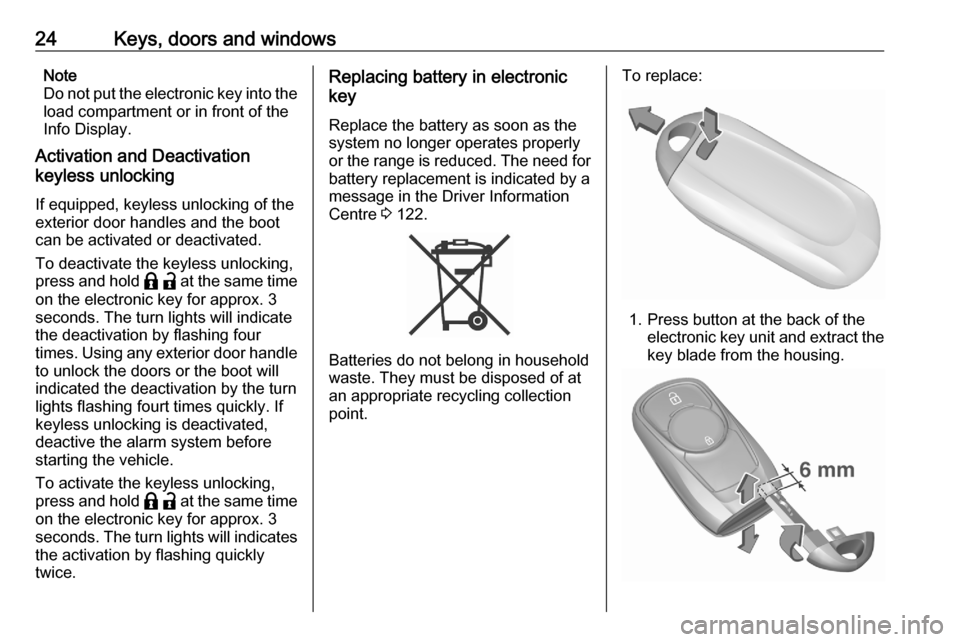
To replace:
1. Press button at the back of the electronic key unit and extract thekey blade from the housing.
Page 41 of 305
Keys, doors and windows393. Close doors.
4. Activate the anti-theft alarm system.
Status message is displayed in the
Driver Information Centre.
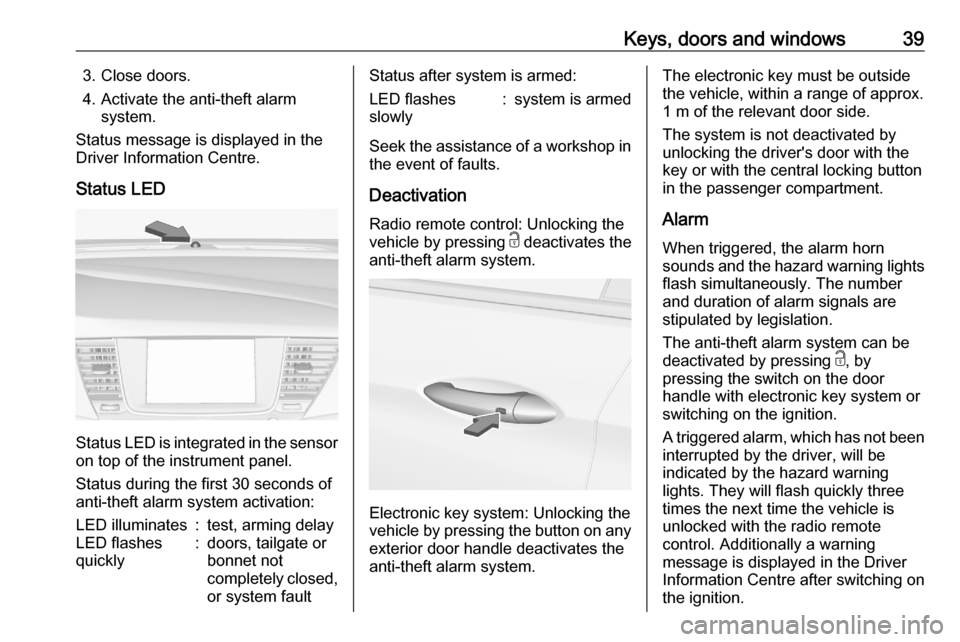
Status LED
Status LED is integrated in the sensor
on top of the instrument panel.
Status during the first 30 seconds of
anti-theft alarm system activation:
LED illuminates:test, arming delayLED flashes
quickly:doors, tailgate or
bonnet not
completely closed,
or system faultStatus after system is armed:LED flashes
slowly:system is armed
Seek the assistance of a workshop in
the event of faults.
Deactivation
Radio remote control: Unlocking the
vehicle by pressing c deactivates the
anti-theft alarm system.
Electronic key system: Unlocking the
vehicle by pressing the button on any
exterior door handle deactivates the
anti-theft alarm system.
The electronic key must be outside
the vehicle, within a range of approx. 1 m of the relevant door side.
The system is not deactivated by
unlocking the driver's door with the
key or with the central locking button
in the passenger compartment.
Alarm When triggered, the alarm horn
sounds and the hazard warning lights flash simultaneously. The number
and duration of alarm signals are
stipulated by legislation.
The anti-theft alarm system can be
deactivated by pressing c, by
pressing the switch on the door
handle with electronic key system or
switching on the ignition.
A triggered alarm, which has not been
interrupted by the driver, will be
indicated by the hazard warning
lights. They will flash quickly three
times the next time the vehicle is
unlocked with the radio remote
control. Additionally a warning
message is displayed in the Driver
Information Centre after switching on
the ignition.
Page 46 of 305
44Keys, doors and windowsChild safety system for rear
windows
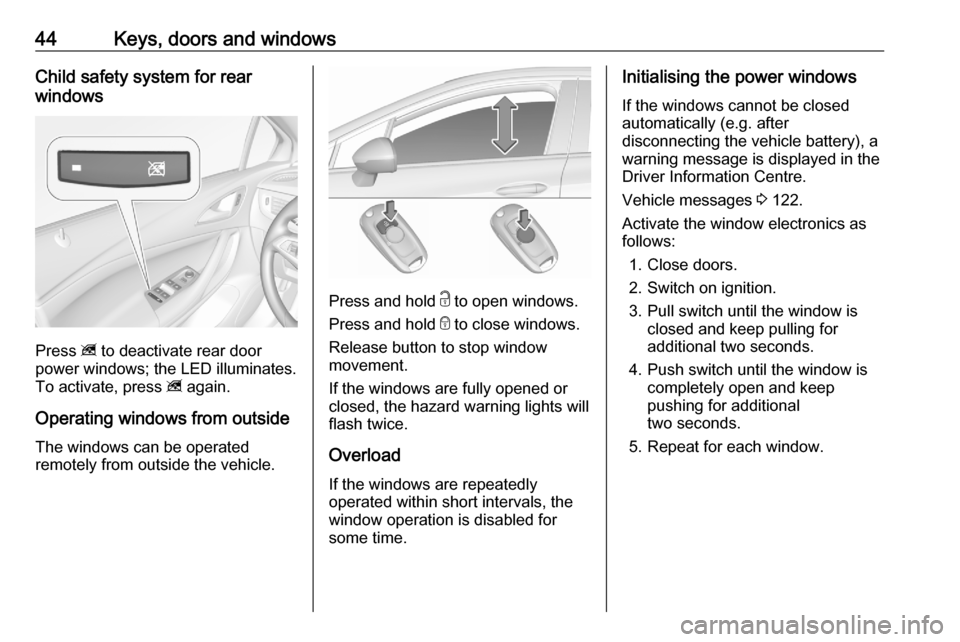
Press z to deactivate rear door
power windows; the LED illuminates.
To activate, press z again.
Operating windows from outside
The windows can be operated
remotely from outside the vehicle.
Press and hold c to open windows.
Press and hold e to close windows.
Release button to stop window
movement.
If the windows are fully opened or
closed, the hazard warning lights will
flash twice.
Overload
If the windows are repeatedly
operated within short intervals, the
window operation is disabled for
some time.
Initialising the power windows
If the windows cannot be closed
automatically (e.g. after
disconnecting the vehicle battery), a
warning message is displayed in the
Driver Information Centre.
Vehicle messages 3 122.
Activate the window electronics as
follows:
1. Close doors.
2. Switch on ignition.
3. Pull switch until the window is closed and keep pulling for
additional two seconds.
4. Push switch until the window is completely open and keep
pushing for additional
two seconds.
5. Repeat for each window.
Page 57 of 305

Seats, restraints55the ignition is switched on. In addition,
a message in the Driver Information
Centre indicates the driver number,
identified by the used key. If the
ignition is switched on more than
three subsequent times with the
same key, the message will not be
displayed again until another key is
being used.
To stop recall movement, press one
of the memory or power seat controls.
Precondition is that Personalisation
by Driver and Auto Memory Recall is
activated in the personal settings of
the Info Display.
This function can be activated or
deactivated in the vehicle
personalisation.
Select the relevant setting in the Vehicle menu in the Info Display.
Info Display 3 121.
Vehicle personalisation 3 124.
Easy exit function
For a convenient exit out of the
vehicle, the power driver seat moves rearwards when vehicle is stationary.To activate the easy exit function:
● set selector lever to position P
(automatic transmission)
● apply parking brake (manual transmission)
● switch off ignition
● remove key from the ignition switch
● open the driver's door
If the door is already open, switch off
ignition to activate easy exit.
To stop movement, press one of the
memory or power seat controls.
This function can be activated or
deactivated in the vehicle
personalisation.
Select the relevant setting in the
Vehicle menu in the Info Display.
Info Display 3 121.
Vehicle personalisation 3 124.
Safety function
If the driver's seat encounters
resistance during movement, the
recall may stop. After removing the
obstruction, press and hold the
appropriate memory position buttonfor two seconds. Try recalling the
memory position again. If the recall
does not operate, consult a
workshop.
Overload
If the seat setting is electrically
overloaded, the power supply is
automatically cut-off for a short time.
Note
After an accident in which airbags
have been deployed, the memory
function for each position button will
be deactivated.
Armrest
Page 60 of 305
58Seats, restraintsHeating
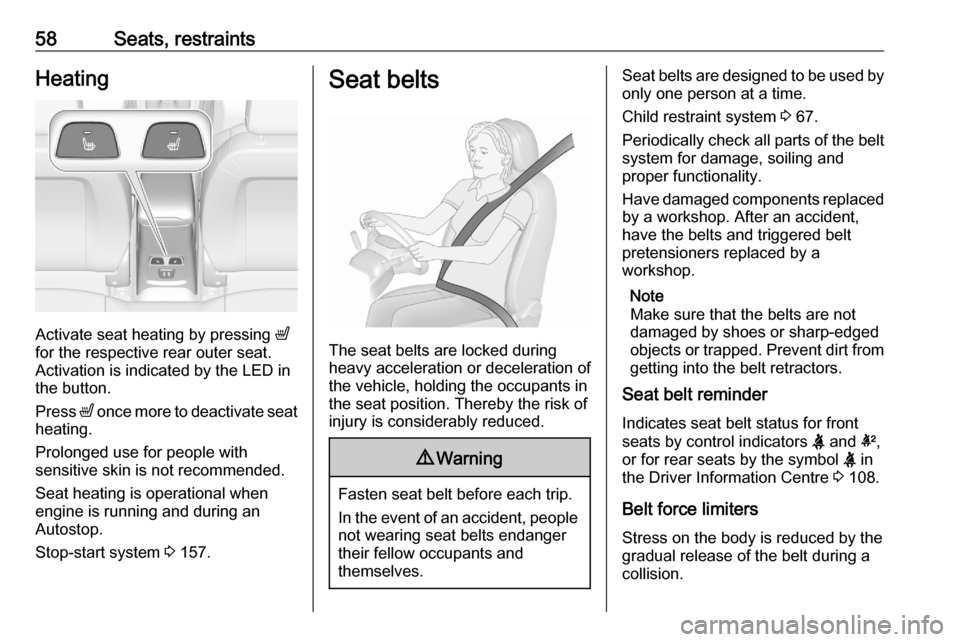
Activate seat heating by pressing ß
for the respective rear outer seat.
Activation is indicated by the LED in
the button.
Press ß once more to deactivate seat
heating.
Prolonged use for people with
sensitive skin is not recommended.
Seat heating is operational when engine is running and during an
Autostop.
Stop-start system 3 157.
Seat belts
The seat belts are locked during
heavy acceleration or deceleration of
the vehicle, holding the occupants in
the seat position. Thereby the risk of
injury is considerably reduced.
9 Warning
Fasten seat belt before each trip.
In the event of an accident, people
not wearing seat belts endanger their fellow occupants and
themselves.
Seat belts are designed to be used by only one person at a time.
Child restraint system 3 67.
Periodically check all parts of the belt
system for damage, soiling and
proper functionality.
Have damaged components replaced by a workshop. After an accident,
have the belts and triggered belt
pretensioners replaced by a
workshop.
Note
Make sure that the belts are not
damaged by shoes or sharp-edged objects or trapped. Prevent dirt from getting into the belt retractors.
Seat belt reminder
Indicates seat belt status for front seats by control indicators X and k,
or for rear seats by the symbol X in
the Driver Information Centre 3 108.
Belt force limiters
Stress on the body is reduced by the
gradual release of the belt during a
collision.
Page 92 of 305
90StorageLoading information
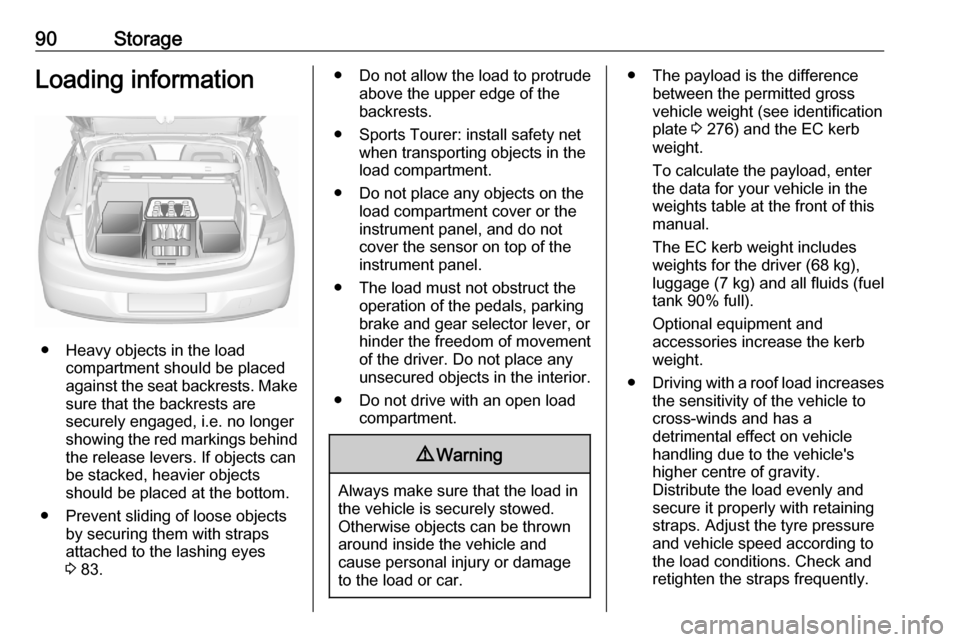
● Heavy objects in the loadcompartment should be placed
against the seat backrests. Make
sure that the backrests are
securely engaged, i.e. no longer
showing the red markings behind
the release levers. If objects can
be stacked, heavier objects
should be placed at the bottom.
● Prevent sliding of loose objects by securing them with straps
attached to the lashing eyes
3 83.
● Do not allow the load to protrude
above the upper edge of the
backrests.
● Sports Tourer: install safety net when transporting objects in the
load compartment.
● Do not place any objects on the load compartment cover or theinstrument panel, and do not
cover the sensor on top of the instrument panel.
● The load must not obstruct the operation of the pedals, parking
brake and gear selector lever, or
hinder the freedom of movement of the driver. Do not place any
unsecured objects in the interior.
● Do not drive with an open load compartment.9Warning
Always make sure that the load in
the vehicle is securely stowed.
Otherwise objects can be thrown
around inside the vehicle and
cause personal injury or damage
to the load or car.
● The payload is the difference between the permitted gross
vehicle weight (see identification
plate 3 276) and the EC kerb
weight.
To calculate the payload, enter
the data for your vehicle in the
weights table at the front of this
manual.
The EC kerb weight includes
weights for the driver (68 kg),
luggage (7 kg) and all fluids (fuel
tank 90% full).
Optional equipment and
accessories increase the kerb
weight.
● Driving with a roof load increases
the sensitivity of the vehicle to
cross-winds and has a
detrimental effect on vehicle
handling due to the vehicle's
higher centre of gravity.
Distribute the load evenly and secure it properly with retaining
straps. Adjust the tyre pressure
and vehicle speed according to
the load conditions. Check and
retighten the straps frequently.
Page 94 of 305

92Instruments and controlsInstruments and
controlsControls ....................................... 93
Steering wheel adjustment ........93
Steering wheel controls .............93
Heated steering wheel ...............93
Horn ........................................... 94
Windscreen wiper and washer ..94
Rear window wiper and washer ...................................... 96
Outside temperature ..................97
Clock ......................................... 97
Power outlets ............................. 99
Inductive charging ...................100
Ashtrays .................................. 101
Warning lights, gauges and indi‐ cators ......................................... 101
Instrument cluster ....................101
Speedometer ........................... 104
Odometer ................................ 105
Trip odometer .......................... 105
Tachometer ............................. 106
Fuel gauge .............................. 106
Engine coolant temperature gauge ..................................... 106
Service display ........................ 107Control indicators ....................108
Turn lights ................................ 108
Seat belt reminder ...................108
Airbag and belt tensioners .......109
Airbag deactivation ..................109
Charging system .....................110
Malfunction indicator light ........110
Brake and clutch system .........110
Electric parking brake ..............110
Electric parking brake fault ......110
Antilock brake system (ABS) ...111
Gear shifting ............................ 111
Following distance ...................111
Lane keep assist .....................111
Electronic Stability Control off . 111
Electronic Stability Control and Traction Control system .........111
Traction Control system off .....112
Engine coolant temperature ....112
Preheating ............................... 112
AdBlue ..................................... 112
Tyre pressure monitoring system .................................... 112
Engine oil pressure ..................112
Low fuel ................................... 113
Immobiliser .............................. 113
Exterior light ............................ 113
High beam ............................... 113
High beam assist .....................113
LED headlights ........................ 113Front fog lights......................... 114
Rear fog light ........................... 114
Cruise control .......................... 114
Adaptive cruise control ............114
Vehicle detected ahead ...........114
Pedestrian detection ................114
Speed limiter ........................... 114
Traffic sign assistant ................115
Door open ................................ 115
Displays ..................................... 115
Driver Information Centre ........115
Info Display .............................. 121
Vehicle messages ......................122
Warning chimes .......................123
Battery voltage ........................ 123
Vehicle personalisation ..............124
Telematics service .....................129
Emergency call ........................129
Page 95 of 305
Instruments and controls93Controls
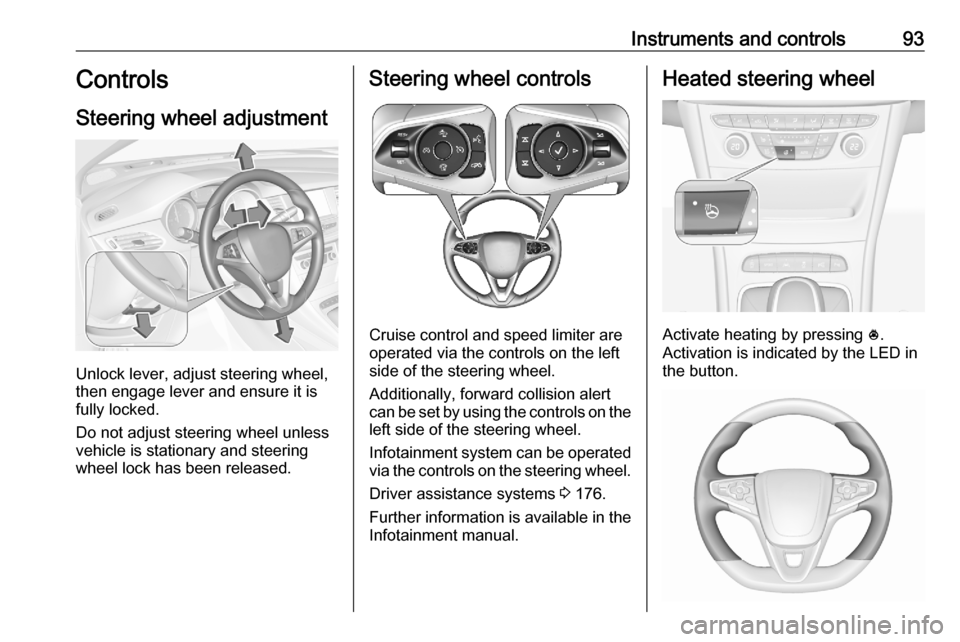
Steering wheel adjustment
Unlock lever, adjust steering wheel,
then engage lever and ensure it is
fully locked.
Do not adjust steering wheel unless
vehicle is stationary and steering
wheel lock has been released.
Steering wheel controls
Cruise control and speed limiter are
operated via the controls on the left
side of the steering wheel.
Additionally, forward collision alert
can be set by using the controls on the
left side of the steering wheel.
Infotainment system can be operated
via the controls on the steering wheel.
Driver assistance systems 3 176.
Further information is available in the
Infotainment manual.
Heated steering wheel
Activate heating by pressing *.
Activation is indicated by the LED in
the button.
Page 99 of 305

Instruments and controls97Outside temperatureA drop in temperature is indicated
immediately and a rise in temperature
after a time delay.
Illustration shows an example.
If outside temperature drops to 3 °C,
a warning message is displayed in the Driver Information Centre.
9 Warning
The road surface may already be
icy even though the display
indicates a few degrees above
0 °C.
Clock
Date and time are shown in the
Info Display.
Info Display 3 121.
Graphic Info Display
Press MENU to open the respective
audio menu.
Select Time and Date .
Set Time
Select Set Time to enter the
respective submenu.
Select Auto Set at the bottom of the
screen. Activate either On - RDS or
Off (Manual) .
If Off (Manual) is selected, adjust
hours and minutes.
Repeatedly select 12-24 HR at the
bottom of the screen to choose a time mode.
If the 12-hour mode is selected, a
third column for AM and PM selection
is displayed. Select the desired
option.