ECU OPEL ASTRA SALOON 2014 User Guide
[x] Cancel search | Manufacturer: OPEL, Model Year: 2014, Model line: ASTRA SALOON, Model: OPEL ASTRA SALOON 2014Pages: 245, PDF Size: 7.12 MB
Page 86 of 245
84StorageLoading information
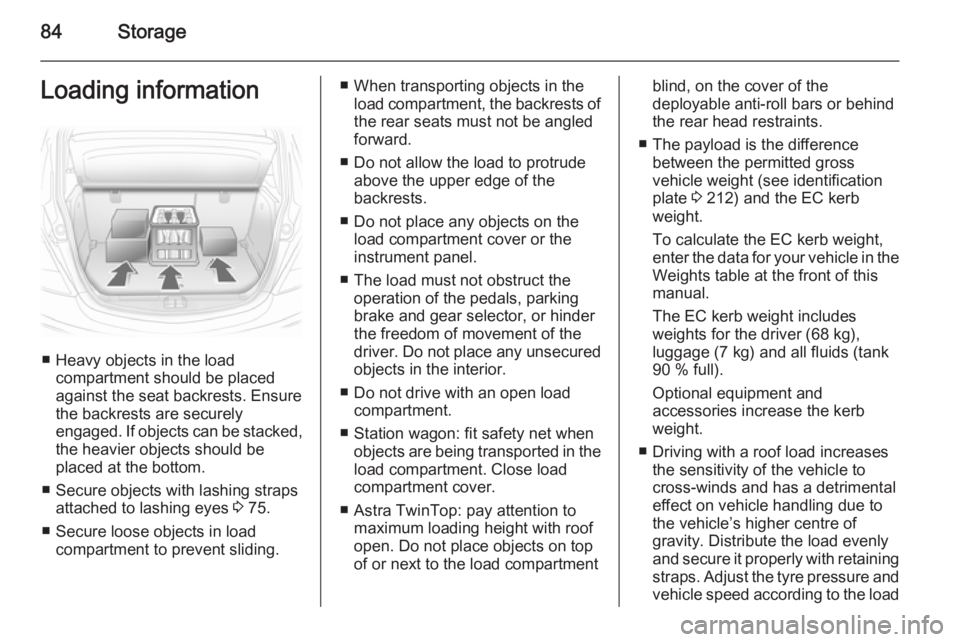
■ Heavy objects in the loadcompartment should be placedagainst the seat backrests. Ensure
the backrests are securely
engaged. If objects can be stacked, the heavier objects should be
placed at the bottom.
■ Secure objects with lashing straps attached to lashing eyes 3 75.
■ Secure loose objects in load compartment to prevent sliding.
■ When transporting objects in theload compartment, the backrests of
the rear seats must not be angled
forward.
■ Do not allow the load to protrude above the upper edge of the
backrests.
■ Do not place any objects on the load compartment cover or theinstrument panel.
■ The load must not obstruct the operation of the pedals, parking
brake and gear selector, or hinder
the freedom of movement of the
driver. Do not place any unsecured objects in the interior.
■ Do not drive with an open load compartment.
■ Station wagon: fit safety net when objects are being transported in theload compartment. Close load
compartment cover.
■ Astra TwinTop: pay attention to maximum loading height with roof
open. Do not place objects on top
of or next to the load compartmentblind, on the cover of the
deployable anti-roll bars or behind
the rear head restraints.
■ The payload is the difference between the permitted gross
vehicle weight (see identification
plate 3 212) and the EC kerb
weight.
To calculate the EC kerb weight,
enter the data for your vehicle in the
Weights table at the front of this
manual.
The EC kerb weight includes
weights for the driver (68 kg),
luggage (7 kg) and all fluids (tank
90 % full).
Optional equipment and
accessories increase the kerb
weight.
■ Driving with a roof load increases the sensitivity of the vehicle to
cross-winds and has a detrimental
effect on vehicle handling due to
the vehicle’s higher centre of
gravity. Distribute the load evenly
and secure it properly with retaining
straps. Adjust the tyre pressure and vehicle speed according to the load
Page 140 of 245
138Driving and operating
Do not accelerate while engaging a
gear. Never depress the accelerator
pedal and brake pedal at the same
time.
When a gear is engaged, the vehicle
slowly begins to creep when the
brake is released.
Gears 3, 2, 13, 2, 1=Transmission does not
shift above the selected
gear.
Press button on selector lever to
engage 3 or 1.
Only select 3, 2 or 1 to prevent
automatic upshifting or as an aid in
engine braking.
Engine braking
To utilise the engine braking effect,
select a lower gear in good time when
driving downhill.
Rocking the vehicle
Rocking the vehicle is only
permissible if the vehicle is stuck in
sand, mud or snow. Move the selector
lever between D and R in a repeat
pattern. Do not race the engine and
avoid sudden acceleration.
Parking
Apply the parking brake and engage P .
The ignition key can only be removed
when the selector lever is in position
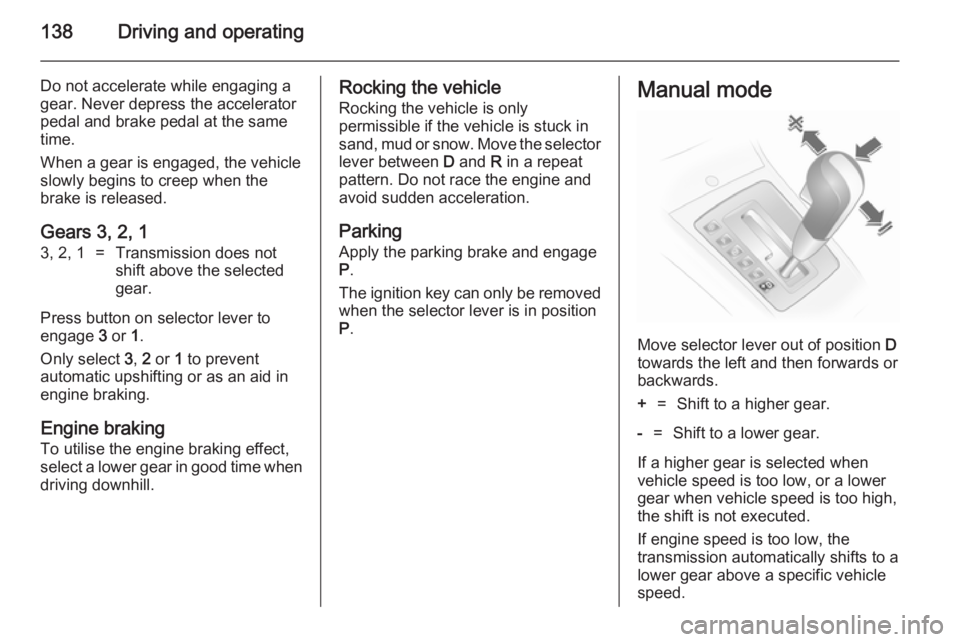
P .Manual mode
Move selector lever out of position D
towards the left and then forwards or backwards.
+=Shift to a higher gear.-=Shift to a lower gear.
If a higher gear is selected when
vehicle speed is too low, or a lower
gear when vehicle speed is too high,
the shift is not executed.
If engine speed is too low, the
transmission automatically shifts to a
lower gear above a specific vehicle
speed.
Page 145 of 245
Driving and operating143
Starting off
Depress the foot brake and move the selector lever to A, + or -. The
transmission is in automatic mode
and first gear is engaged. If R is
selected, reverse gear is engaged.
The vehicle starts to move when the
brake is released.
To start off without depressing the
foot brake, accelerate immediately
after engaging a gear.
If neither the accelerator nor the
brake pedal are depressed, no gear
is engaged and A or R flashes for a
brief time in the display.
Stopping the vehicle
In A, first gear is engaged and the
clutch is released when the vehicle is stopped. In R, reverse gear remains
engaged.
Engine braking Automatic mode
When driving downhill, the manual
transmission automated does not
shift into higher gears until a fairlyhigh engine speed has been reached. It shifts down in good time when
braking.
Manual mode
To utilise the engine braking effect,
select a lower gear in good time when
driving downhill.
Rocking the vehicle
Rocking the vehicle is only
permissible if the vehicle is stuck in
sand, mud or snow. Move the selector
lever between R and A in a repeat
pattern. Do not race the engine and
avoid sudden acceleration.
Parking
Apply the parking brake. The most recently engaged gear (see
transmission display) remains
engaged. With N, no gear is engaged.
When the ignition is switched off the
transmission no longer responds to
movement of the selector lever.Manual mode
If a higher gear is selected when the
engine speed is too low, or a lower
gear when the speed is too high, the
shift is not executed. This prevents
the engine from running at too low or
too high an engine speed.
If engine speed is too low, the
transmission automatically shifts to a
lower gear.
If engine speed is too high, the
transmission only switches to a higher gear via kickdown.
When + or - is selected in automatic
mode, the transmission switches to
manual mode and shifts accordingly.
Electronic driving
programmes ■ Following a cold start, the operating
temperature programme increases engine speed to quickly bring the
catalytic converter to the required
temperature.
Page 163 of 245
Vehicle care1619Danger
The ignition system and Xenon
headlights use extremely high
voltage. Do not touch.
The caps for topping up the engine oil, the coolant, the washing fluid and theoil dipstick handle are yellow for ease
of identification.
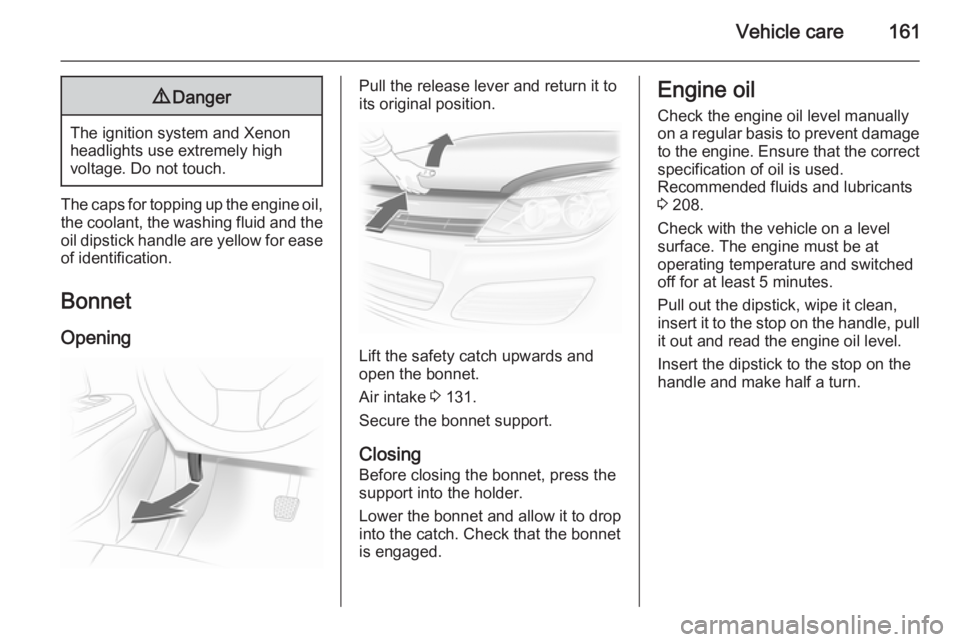
Bonnet
Opening
Pull the release lever and return it to
its original position.
Lift the safety catch upwards and
open the bonnet.
Air intake 3 131.
Secure the bonnet support.
Closing Before closing the bonnet, press the
support into the holder.
Lower the bonnet and allow it to drop into the catch. Check that the bonnet
is engaged.
Engine oil
Check the engine oil level manuallyon a regular basis to prevent damage
to the engine. Ensure that the correct specification of oil is used.
Recommended fluids and lubricants
3 208.
Check with the vehicle on a level
surface. The engine must be at
operating temperature and switched
off for at least 5 minutes.
Pull out the dipstick, wipe it clean, insert it to the stop on the handle, pull
it out and read the engine oil level.
Insert the dipstick to the stop on the
handle and make half a turn.
Page 169 of 245
Vehicle care167
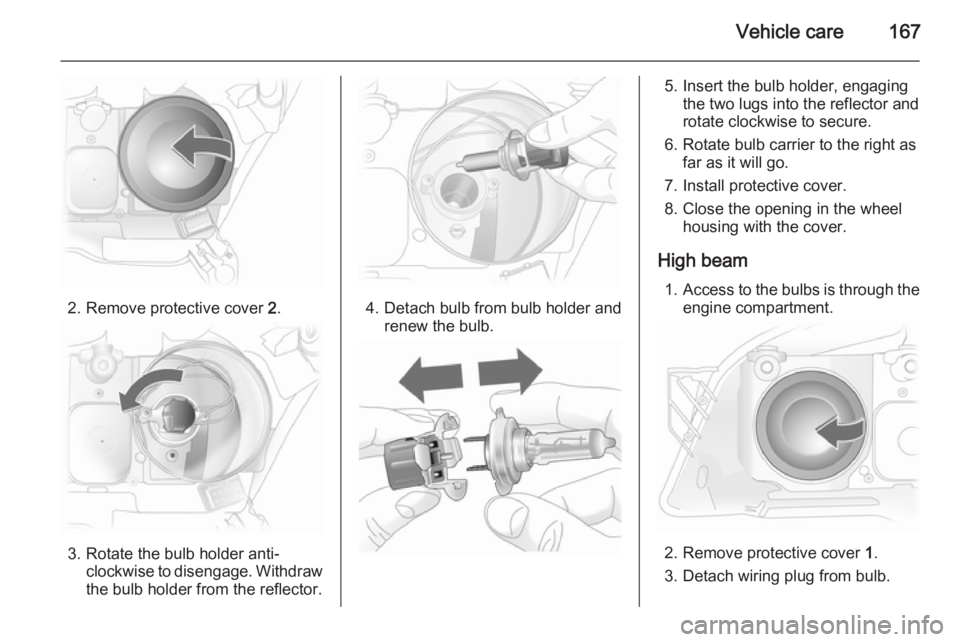
2. Remove protective cover 2.
3. Rotate the bulb holder anti-
clockwise to disengage. Withdrawthe bulb holder from the reflector.
4. Detach bulb from bulb holder and renew the bulb.
5. Insert the bulb holder, engagingthe two lugs into the reflector androtate clockwise to secure.
6. Rotate bulb carrier to the right as far as it will go.
7. Install protective cover.
8. Close the opening in the wheel housing with the cover.
High beam 1. Access to the bulbs is through the
engine compartment.
2. Remove protective cover 1.
3. Detach wiring plug from bulb.
Page 199 of 245
Vehicle care197
■Never change more than one wheel
at once.
■ Use the jack only to change wheels
in case of puncture, not for
seasonal winter or summer tyre
change.
■ If the ground on which the vehicle is standing is soft, a solid board
(max. 1 cm thick) should be placed
under the jack.
■ No people or animals may be in the
vehicle when it is jacked-up.
■ Never crawl under a jacked-up vehicle.
■ Do not start the vehicle when it is raised on the jack.
■ Before screwing in the wheel bolts,
clean them and lightly coat the
taper of each wheel bolt with
commercially available grease.
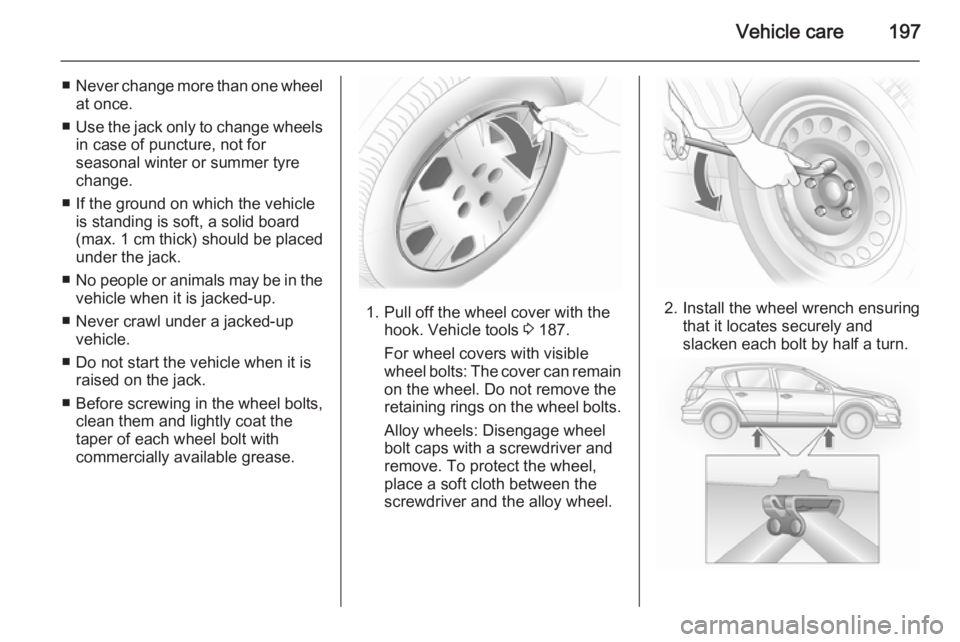
1. Pull off the wheel cover with the hook. Vehicle tools 3 187.
For wheel covers with visible
wheel bolts: The cover can remain
on the wheel. Do not remove the
retaining rings on the wheel bolts.
Alloy wheels: Disengage wheel
bolt caps with a screwdriver and
remove. To protect the wheel,
place a soft cloth between the
screwdriver and the alloy wheel.2. Install the wheel wrench ensuring that it locates securely and
slacken each bolt by half a turn.
Page 200 of 245
198Vehicle care
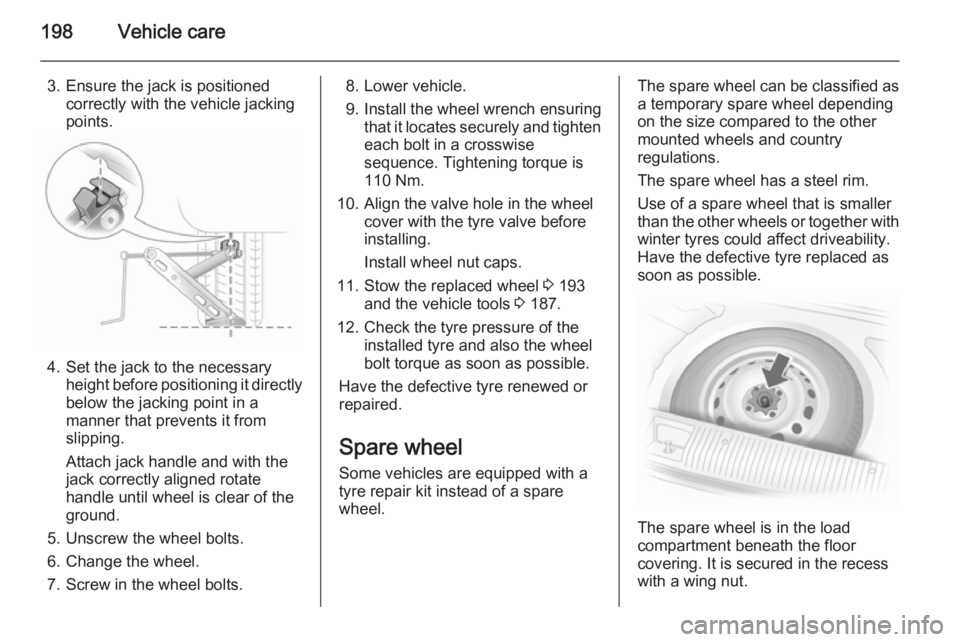
3. Ensure the jack is positionedcorrectly with the vehicle jacking
points.
4. Set the jack to the necessary height before positioning it directly
below the jacking point in a
manner that prevents it from
slipping.
Attach jack handle and with the
jack correctly aligned rotate
handle until wheel is clear of the
ground.
5. Unscrew the wheel bolts.
6. Change the wheel.
7. Screw in the wheel bolts.
8. Lower vehicle.
9. Install the wheel wrench ensuring that it locates securely and tighten
each bolt in a crosswise
sequence. Tightening torque is
110 Nm.
10. Align the valve hole in the wheel cover with the tyre valve before
installing.
Install wheel nut caps.
11. Stow the replaced wheel 3 193
and the vehicle tools 3 187.
12. Check the tyre pressure of the installed tyre and also the wheelbolt torque as soon as possible.
Have the defective tyre renewed or repaired.
Spare wheel
Some vehicles are equipped with a
tyre repair kit instead of a spare
wheel.The spare wheel can be classified as
a temporary spare wheel depending
on the size compared to the other
mounted wheels and country
regulations.
The spare wheel has a steel rim.
Use of a spare wheel that is smaller
than the other wheels or together with winter tyres could affect driveability.
Have the defective tyre replaced as
soon as possible.
The spare wheel is in the load
compartment beneath the floor
covering. It is secured in the recess
with a wing nut.
Page 238 of 245
236Customer information
■ Vehicle reactions in particulardriving situations (e.g. inflation of
an airbag, activation of the stability
regulation system)
■ Environmental conditions (e.g. temperature)
These data are exclusively technical
and help identifying and correcting
errors as well as optimizing vehicle
functions.
Motion profiles indicating travelled
routes cannot be created with these
data.
If services are used (e.g. repair
works, service processes, warranty
cases, quality assurance),
employees of the service network
(manufacturer included) are able to
read out this technical information
from the event and error data storage
modules applying special diagnostic
devices. If required, you will receive
further information at these
workshops. After an error has been
corrected, the data are deleted from
the error storage module or they are
constantly overwritten.When using the vehicle, situations
may occur in which these technical
data related to other information
(accident report, damages on the
vehicle, witness statements etc.) may be associated with a specific person -
possibly, with the assistance of an
expert.
Additional functions contractually
agreed upon with the client (e.g.
vehicle location in emergency cases)
allow the transmission of particular vehicle data from the vehicle.Radio Frequency
Identification (RFID) RFID technology is used in somevehicles for functions such as tyre
pressure monitoring and ignition
system security. It is also used in
connection with conveniences such
as radio remote controls for door
locking/unlocking and starting, and in-
vehicle transmitters for garage door
openers. RFID technology in Opel
vehicles does not use or record
personal information or link with any
other Opel system containing
personal information.
Page 244 of 245
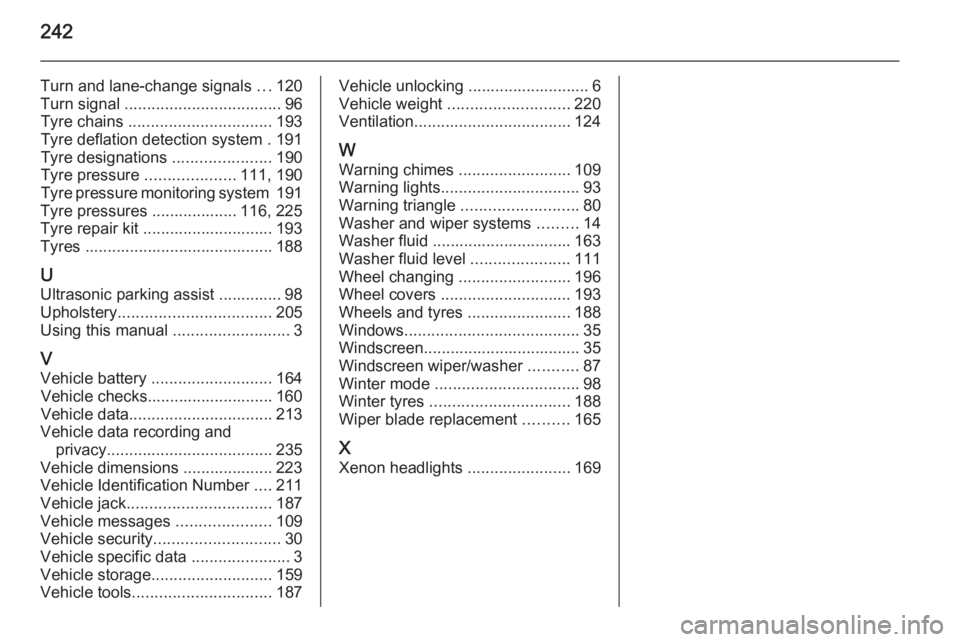
242
Turn and lane-change signals ...120
Turn signal ................................... 96
Tyre chains ................................ 193
Tyre deflation detection system . 191
Tyre designations ......................190
Tyre pressure ....................111, 190
Tyre pressure monitoring system 191
Tyre pressures ................... 116, 225
Tyre repair kit ............................. 193
Tyres .......................................... 188
U Ultrasonic parking assist .............. 98
Upholstery .................................. 205
Using this manual ..........................3
V Vehicle battery ........................... 164
Vehicle checks............................ 160
Vehicle data ................................ 213
Vehicle data recording and privacy ..................................... 235
Vehicle dimensions .................... 223
Vehicle Identification Number ....211
Vehicle jack ................................ 187
Vehicle messages .....................109
Vehicle security ............................ 30
Vehicle specific data ......................3
Vehicle storage ........................... 159
Vehicle tools ............................... 187Vehicle unlocking ........................... 6
Vehicle weight ........................... 220
Ventilation ................................... 124
W
Warning chimes .........................109
Warning lights ............................... 93
Warning triangle .......................... 80
Washer and wiper systems .........14
Washer fluid ............................... 163
Washer fluid level ......................111
Wheel changing .........................196
Wheel covers ............................. 193
Wheels and tyres .......................188
Windows ....................................... 35
Windscreen................................... 35
Windscreen wiper/washer ...........87
Winter mode ................................ 98
Winter tyres ............................... 188
Wiper blade replacement ..........165
X Xenon headlights .......................169