ignition OPEL CASCADA 2017 Owner's Guide
[x] Cancel search | Manufacturer: OPEL, Model Year: 2017, Model line: CASCADA, Model: OPEL CASCADA 2017Pages: 263, PDF Size: 7.76 MB
Page 93 of 263

Instruments and controls91Flashes when the engine is
running
Fault that could lead to catalytic
converter damage. Ease up on the accelerator until the flashing stops.
Seek the assistance of a workshop
immediately.
Brake and clutch system
R illuminates red.
The brake and clutch fluid level is too
low 3 194.9 Warning
Stop. Do not continue your
journey. Consult a workshop.
Illuminates after the ignition is
switched on if the manual parking
brake is applied 3 152.
Operate pedal - illuminates or flashes yellow.
Illuminates
Brake pedal must be depressed to release the electric parking brake
3 152.
Clutch pedal must be depressed to
start the engine in Autostop mode.
Stop-start system 3 139.
Flashes
Clutch pedal must be depressed for a main start of the engine 3 18, 3 138.
On some versions, the operate pedal
message is indicated in the Driver
Information Centre 3 102.
Electric parking brake m illuminates or flashes red.
Illuminates
Electric parking brake is applied
3 152.Flashes
Electric parking brake is not fully applied or released. Switch on
ignition, depress brake pedal and
attempt to reset the system by first
releasing and then applying the
electric parking brake. If m remains
flashing, do not drive and seek the
assistance of a workshop.
Electric parking brake fault j illuminates or flashes yellow.
Illuminates Electric parking brake is operating
with degraded performance 3 152.
Flashes
Electric parking brake is in service
mode. Stop vehicle, apply and
release the electric parking brake to
reset.
Page 94 of 263

92Instruments and controls9Warning
Have the cause of the fault
remedied immediately by a
workshop.
Antilock brake system
(ABS)
u illuminates yellow.
Illuminates for a few seconds after the ignition is switched on. The system is
ready for operation when the control
indicator extinguishes.
If the control indicator does not
extinguish after a few seconds, or if it illuminates while driving, there is a
fault in the ABS. The brake system
remains operational but without ABS
regulation.
Antilock brake system 3 151.
Upshift R with the number of a higher gear is
indicated or pops up as a full page in
the Driver Information Centre when
upshifting is recommended for fuel
saving reasons.
EcoFlex drive assistant 3 95.
Power steering
c illuminates yellow.
Illuminates with power steering
reduced
Power steering is reduced due to
overheating of the system. Control
indicator extinguishes when the
system has cooled down.
Stop-start system 3 139.
Illuminates with power steering disabled
Failure in the power steering system.
Consult a workshop.
Lane departure warning) illuminates green or flashes yellow.
Illuminates green
System is switched on and ready to
operate.Flashes yellow
System recognises an unintended
lane change.
Electronic Stability Control off
n illuminates yellow.
The system is deactivated.
Electronic Stability Control and Traction Control system
b illuminates or flashes yellow.
Flashes
The system is actively engaged.
Engine output may be reduced and
the vehicle may be braked
automatically to a small degree.
Illuminates
A fault in the system is present. A
warning message appears in the
Driver Information Centre. Continued
driving is possible. The system is not
Page 95 of 263

Instruments and controls93operational. Driving stability,
however, may deteriorate depending on road surface conditions.
Have the cause of the fault remedied
by a workshop.
Electronic Stability Control (ESC) 3 155, Traction Control system (TC)
3 154.
Traction Control system off
k illuminates yellow.
The system is deactivated.
Preheating
! illuminates yellow.
Preheating is activated. Only
activates when outside temperature
is low.
Diesel particle filter % illuminates or flashes yellow.
The diesel particle filter requires
cleaning.Continue driving until %
extinguishes. If possible, do not allow engine speed to drop below
2000 rpm.
Illuminates
The diesel particle filter is full. Start cleaning process as soon as
possible.
Flashes
The maximum filling level of the filter
is reached. Start cleaning process
immediately to avoid damage to the
engine.
Diesel particle filter 3 143, Stop-start
system 3 139.
AdBlue
Y flashes yellow.
AdBlue level is low. Refill AdBlue soon to avoid prevention of the
engine start.
AdBlue 3 144.Tyre pressure monitoring
system
w illuminates or flashes yellow.
Illuminates
Tyre pressure loss. Stop immediately
and check tyre pressure.
Flashes
Fault in system or tyre without
pressure sensor mounted (e.g. spare
wheel). After 60-90 seconds the
control indicator illuminates
continuously. Consult a workshop.
Tyre pressure monitoring system3 211.
Engine oil pressure
I illuminates red.
Illuminates when the ignition is
switched on and extinguishes shortly
after the engine starts.
Page 96 of 263
94Instruments and controlsIlluminates when the engine is
runningCaution
Engine lubrication may be
interrupted. This may result in
damage to the engine and/or
locking of the drive wheels.
1. Depress clutch.
2. Select neutral gear, set selector lever to N.
3. Move out of the flow of traffic as quickly as possible without
impeding other vehicles.
4. Switch off ignition.
9 Warning
When the engine is off,
considerably more force is needed
to brake and steer. During an
Autostop the brake servo unit will still be operational.
Do not remove key until vehicle is
stationary, otherwise the steeringwheel lock could engage
unexpectedly.
Check oil level before seeking the
assistance of a workshop 3 191.
Low fuel
i illuminates or flashes yellow.
Illuminates
Level in fuel tank is too low.
Flashes
Fuel used up. Refuel immediately.
Never run the tank dry.
Catalytic converter 3 144.
Bleeding the diesel fuel system
3 195.
Immobiliser d flashes yellow.
Fault in the immobiliser system. The
engine cannot be started.
Exterior light
8 illuminates green.
The exterior lights are on 3 113.
High beam
C illuminates blue.
Illuminates when high beam is on or
during headlight flash 3 115 , or when
high beam is on with high beam assist
or intelligent light range 3 117.
High beam assist
l illuminates green.
The high beam assist or intelligent light range is activated 3 115,
3 117.
Adaptive forward lighting f illuminates or flashes yellow.
Illuminates
Fault in system.
Seek the assistance of a workshop.
Page 97 of 263
Instruments and controls95Flashes
System switched to symmetrical low
beam.
Control indicator f flashes for approx.
4 seconds after the ignition is switched on as a reminder that the
system has been activated 3 116.
Automatic light control 3 114.
Fog light > illuminates green.
The front fog lights are on 3 121.
Rear fog light r illuminates yellow.
The rear fog light is on 3 121.
Cruise control
m illuminates white or green.
Illuminates white The system is on.
Illuminates green Cruise control is active.Cruise control 3 158.
Vehicle detected ahead
A illuminates green.
A vehicle ahead is detected in the
same lane.
Forward collision alert 3 161.
Door open h is indicated as symbol in the Driver
Information Centre when a door or the
boot lid is open.Information displays
Driver Information Centre
The Driver Information Centre is
located in the instrument cluster
between speedometer and
tachometer.
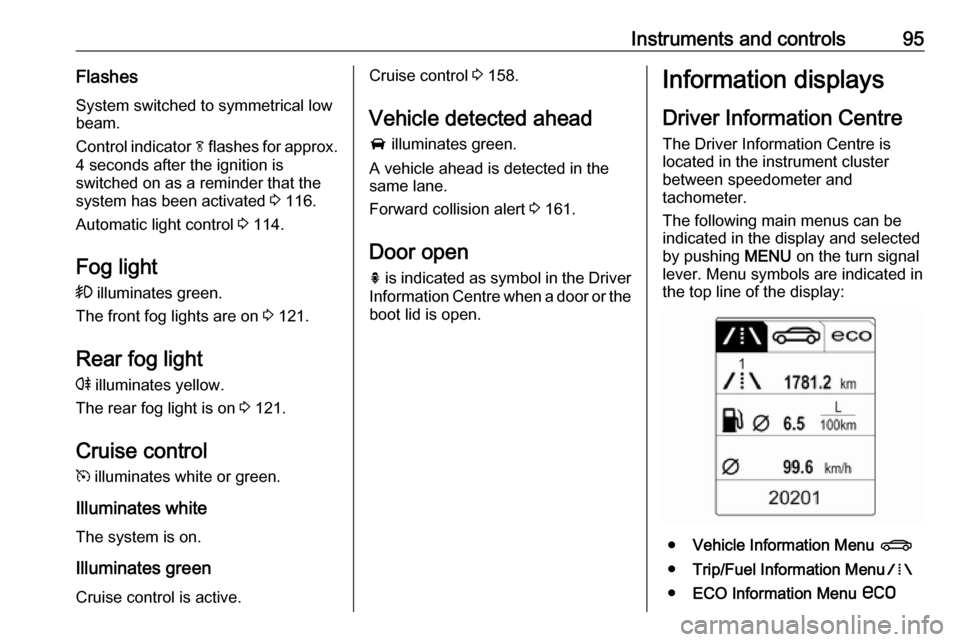
The following main menus can be
indicated in the display and selected
by pushing MENU on the turn signal
lever. Menu symbols are indicated in
the top line of the display:
● Vehicle Information Menu X
● Trip/Fuel Information Menu W
● ECO Information Menu s
Page 107 of 263
Instruments and controls105Vehicle settings
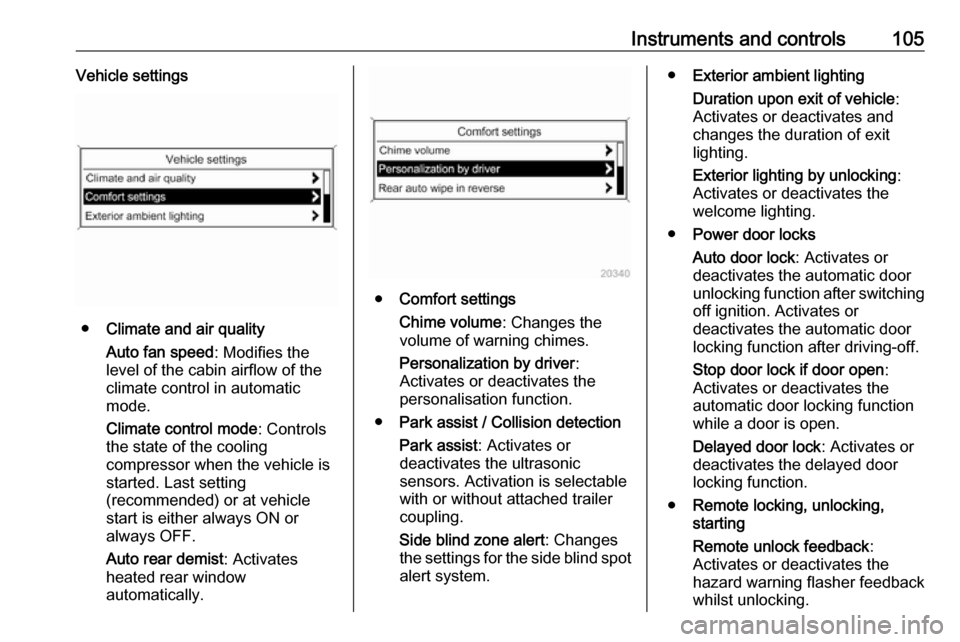
●Climate and air quality
Auto fan speed : Modifies the
level of the cabin airflow of the
climate control in automatic
mode.
Climate control mode : Controls
the state of the cooling
compressor when the vehicle is
started. Last setting
(recommended) or at vehicle
start is either always ON or
always OFF.
Auto rear demist : Activates
heated rear window
automatically.
● Comfort settings
Chime volume : Changes the
volume of warning chimes.
Personalization by driver :
Activates or deactivates the
personalisation function.
● Park assist / Collision detection
Park assist : Activates or
deactivates the ultrasonic
sensors. Activation is selectable
with or without attached trailer
coupling.
Side blind zone alert : Changes
the settings for the side blind spot alert system.
● Exterior ambient lighting
Duration upon exit of vehicle :
Activates or deactivates and
changes the duration of exit
lighting.
Exterior lighting by unlocking :
Activates or deactivates the
welcome lighting.
● Power door locks
Auto door lock : Activates or
deactivates the automatic door
unlocking function after switching
off ignition. Activates or
deactivates the automatic door
locking function after driving-off.
Stop door lock if door open :
Activates or deactivates the
automatic door locking function
while a door is open.
Delayed door lock : Activates or
deactivates the delayed door locking function.
● Remote locking, unlocking,
starting
Remote unlock feedback :
Activates or deactivates the
hazard warning flasher feedback
whilst unlocking.
Page 109 of 263

Instruments and controls107Navigation Settings
See Infotainment manual for further information.
Display Settings ● Home Page Menu :
See Infotainment manual for
further information.
● Rear Camera Options :
Press to adjust the rear camera options 3 173.
● Display Off :
See Infotainment manual for
further information.
● Map Settings :
See Infotainment manual for
further information.
Vehicle Settings ● Climate and Air Quality
Auto Fan Speed : Modifies the
level of the cabin airflow of the
climate control in automatic
mode.
Air Conditioning Mode : Controls
the state of the cooling
compressor when the vehicle is
started. Last setting(recommended) or at vehicle
start is either always ON or
always OFF.
Auto Rear Demist : Activates
heated rear window
automatically.
● Comfort and Convenience
Chime Volume : Changes the
volume of warning chimes.
Personalisation by Driver :
Activates or deactivates the
personalisation function.
● Collision Detection Systems
Park Assist : Activates or
deactivates the ultrasonic
sensors. Activation is selectable
with or without attached trailer
coupling.
Side Blind Zone Alert : Activates
or deactivates the side blind spot alert system.
● Lighting
Vehicle Locator Lights : Activates
or deactivates the entry lighting.
Exit Lighting : Activates or
deactivates and changes the
duration of exit lighting.● Power Door Locks
Open Door Anti Lock Out :
Activates or deactivates the
automatic door locking function
while a door is open.
Auto Door Lock : Activates or
deactivates the automatic door
unlocking function after switching
off ignition. Activates or
deactivates the automatic door
locking function after driving-off.
Delay Door Lock : Activates or
deactivates the delayed door
locking function.
● Remote Lock/Unlock/Start
Remote Lock Feedback :
Activates or deactivates the
hazard warning flasher feedback whilst locking.
Remote Unlock Feedback :
Activates or deactivates the
hazard warning flasher feedback whilst unlocking.
Remote Door Unlock : Changes
the configuration to unlock only
the driver's door or the whole
vehicle whilst unlocking.
Page 110 of 263

108Instruments and controlsRelock Remotely Unlocked
Doors : Activates or deactivates
the automatic relock function
after unlocking without opening
the vehicle.
● Return to Factory Settings? :
Resets all settings to the default settings.Telematics service
OnStar
OnStar is a personal connectivity and service assistant with integrated
Wi-Fi hotspot. The OnStar service is
available 24 hours a day, seven days
a week.
Note
OnStar is not available for all
markets. For further information,
contact your workshop.
Note
In order to be available and
operational, OnStar needs a valid
OnStar subscription, functioning
vehicle electrics, mobile service and
GPS satellite link.
To activate the OnStar services and
set up an account, press Z and speak
with an advisor.Depending on the equipment of the
vehicle, the following services are available:
● Emergency services and support
in the case of a vehicle
breakdown
● Wi-Fi hotspot
● Smartphone application
● Remote control, e.g. location of the vehicle, activation of horn and
lights, control of central locking system
● Stolen vehicle assistance
● Vehicle diagnostics
● Destination download
Note
The OnStar module of the vehicle is
deactivated after ten days without an
ignition cycle. Functions requiring a
data connection will be available
again after switching on the ignition.
Page 116 of 263
114LightingLight switch with Automatic light
control
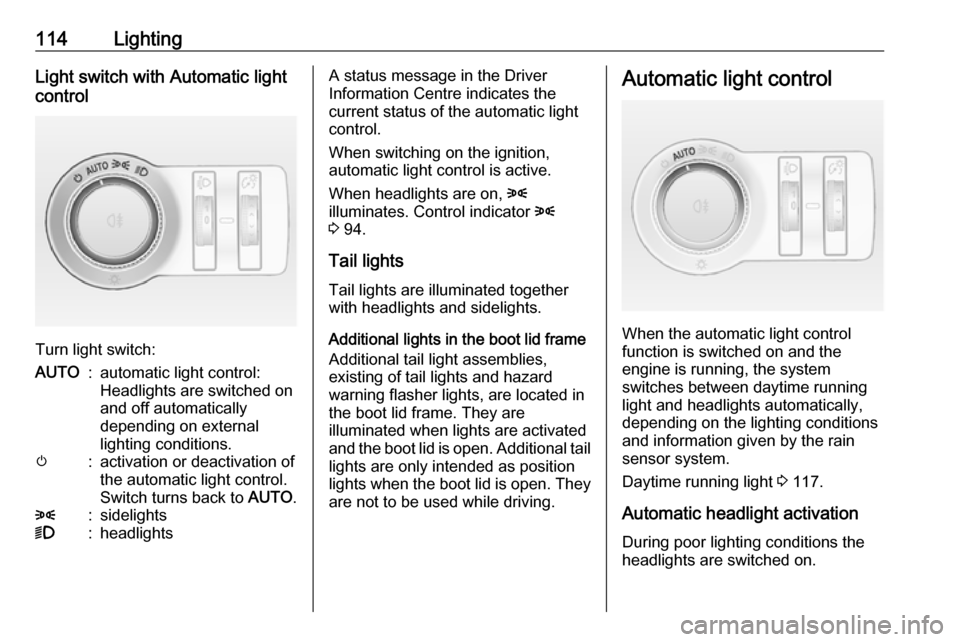
Turn light switch:
AUTO:automatic light control:
Headlights are switched on
and off automatically
depending on external
lighting conditions.m:activation or deactivation of
the automatic light control.
Switch turns back to AUTO.8:sidelights9:headlightsA status message in the Driver
Information Centre indicates the
current status of the automatic light
control.
When switching on the ignition,
automatic light control is active.
When headlights are on, 8
illuminates. Control indicator 8
3 94.
Tail lights
Tail lights are illuminated together
with headlights and sidelights.
Additional lights in the boot lid frame
Additional tail light assemblies,
existing of tail lights and hazard
warning flasher lights, are located in
the boot lid frame. They are
illuminated when lights are activated
and the boot lid is open. Additional tail lights are only intended as position
lights when the boot lid is open. They
are not to be used while driving.Automatic light control
When the automatic light control
function is switched on and the
engine is running, the system
switches between daytime running
light and headlights automatically,
depending on the lighting conditions
and information given by the rain
sensor system.
Daytime running light 3 117.
Automatic headlight activation During poor lighting conditions the
headlights are switched on.
Page 118 of 263

116LightingIf a headlight flash is activated when
the high beam is on, the high beam
assist will be deactivated.
If a headlight flash is activated when
the high beam is off, the high beam
assist will remain activated.
The latest setting of the high beam
assist will remain after the ignition is
switched on again.
Headlight flash To activate the headlight flash, pull
lever.Headlight range adjustment
Manual headlight range
adjustment
To adapt headlight range to the
vehicle load to prevent dazzling: turn
thumb wheel ? to required position.
0:front seats occupied1:all seats occupied2:all seats occupied and load
compartment laden3:driver's seat occupied and load
compartment laden.
Dynamic automatic headlight
levelling 3 117.
Headlights when driving
abroad
The asymmetrical headlight beam
extends visibility at the edge of the
road at the passenger side.
However, when driving in countries
where traffic drives on the opposite
side of the road, adjust the headlights to prevent dazzling of oncoming
traffic.
Vehicles with halogen headlight
system
The headlights do not have to be adjusted.