ECU OPEL CASCADA 2019 Manual user
[x] Cancel search | Manufacturer: OPEL, Model Year: 2019, Model line: CASCADA, Model: OPEL CASCADA 2019Pages: 261, PDF Size: 7.94 MB
Page 186 of 261
184Driving and operatingAttach breakaway stopping cable to
eye.
Check that the coupling ball bar is correctly installed
● Green marking on rotary knob must point towards green
marking on coupling ball bar.
● There must be no gap between the rotary handle and the
coupling ball bar.
● The coupling ball bar must be firmly engaged in the opening.
● The coupling ball bar must be locked and the key removed.9Warning
Towing a trailer is permitted only
when a coupling ball bar is fitted correctly. If the coupling ball bardoes not engage correctly, seekthe assistance of a workshop.
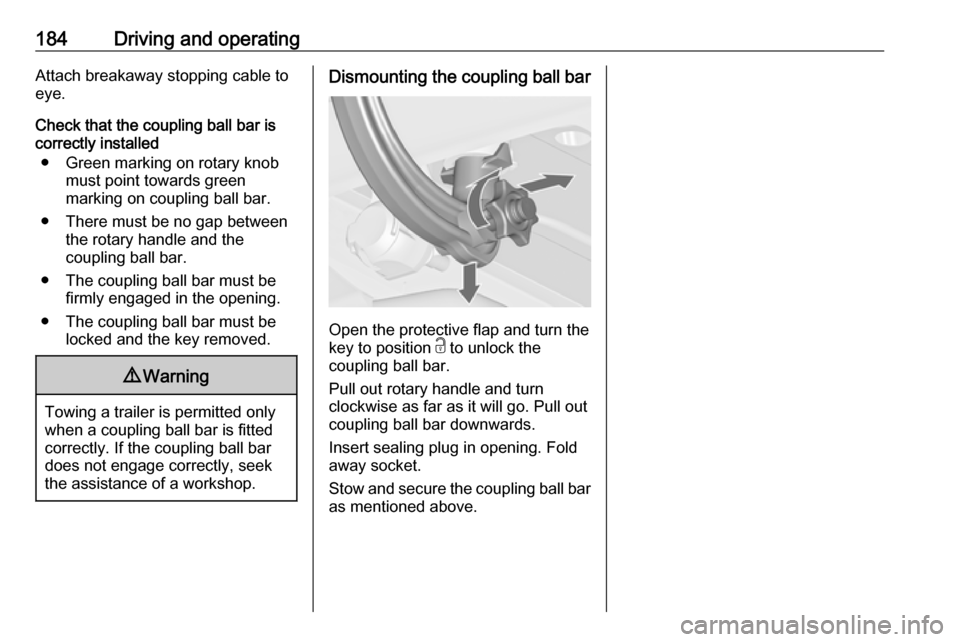
Dismounting the coupling ball bar
Open the protective flap and turn the
key to position c to unlock the
coupling ball bar.
Pull out rotary handle and turn
clockwise as far as it will go. Pull out coupling ball bar downwards.
Insert sealing plug in opening. Fold away socket.
Stow and secure the coupling ball bar
as mentioned above.
Page 189 of 261
Vehicle care187Vehicle checks
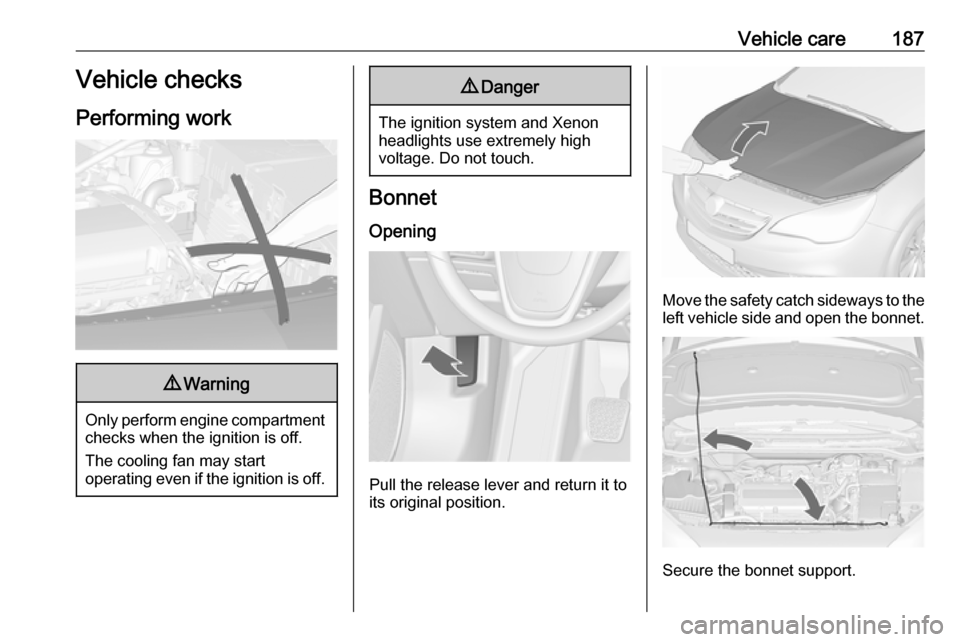
Performing work9 Warning
Only perform engine compartment
checks when the ignition is off.
The cooling fan may start
operating even if the ignition is off.
9 Danger
The ignition system and Xenon
headlights use extremely high
voltage. Do not touch.
Bonnet
Opening
Pull the release lever and return it to
its original position.
Move the safety catch sideways to the left vehicle side and open the bonnet.
Secure the bonnet support.
Page 195 of 261
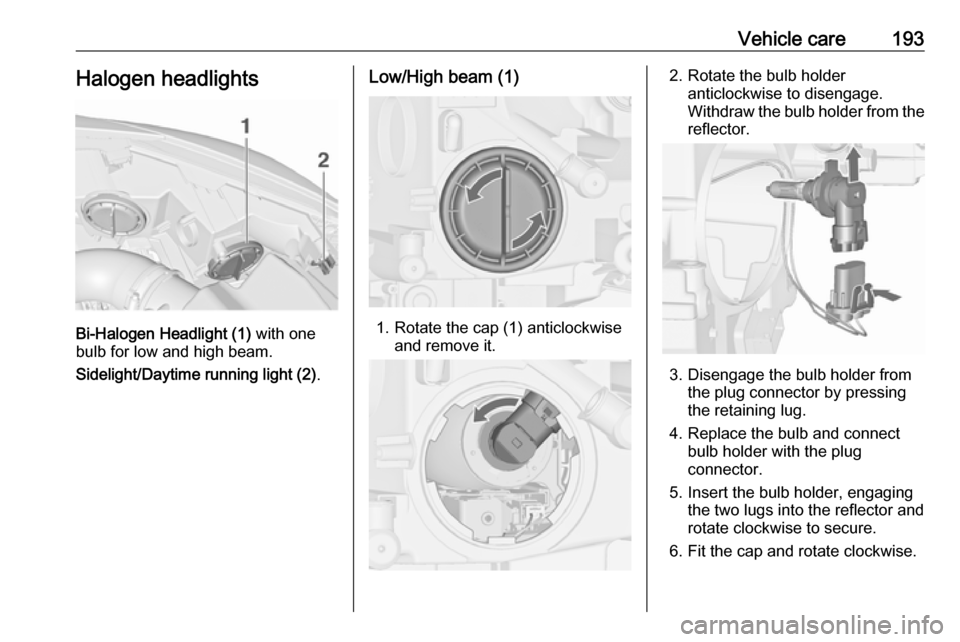
Vehicle care193Halogen headlights
Bi-Halogen Headlight (1) with one
bulb for low and high beam.
Sidelight/Daytime running light (2) .
Low/High beam (1)
1. Rotate the cap (1) anticlockwise
and remove it.
2. Rotate the bulb holderanticlockwise to disengage.
Withdraw the bulb holder from the
reflector.
3. Disengage the bulb holder from the plug connector by pressing
the retaining lug.
4. Replace the bulb and connect bulb holder with the plug
connector.
5. Insert the bulb holder, engaging the two lugs into the reflector and
rotate clockwise to secure.
6. Fit the cap and rotate clockwise.
Page 197 of 261
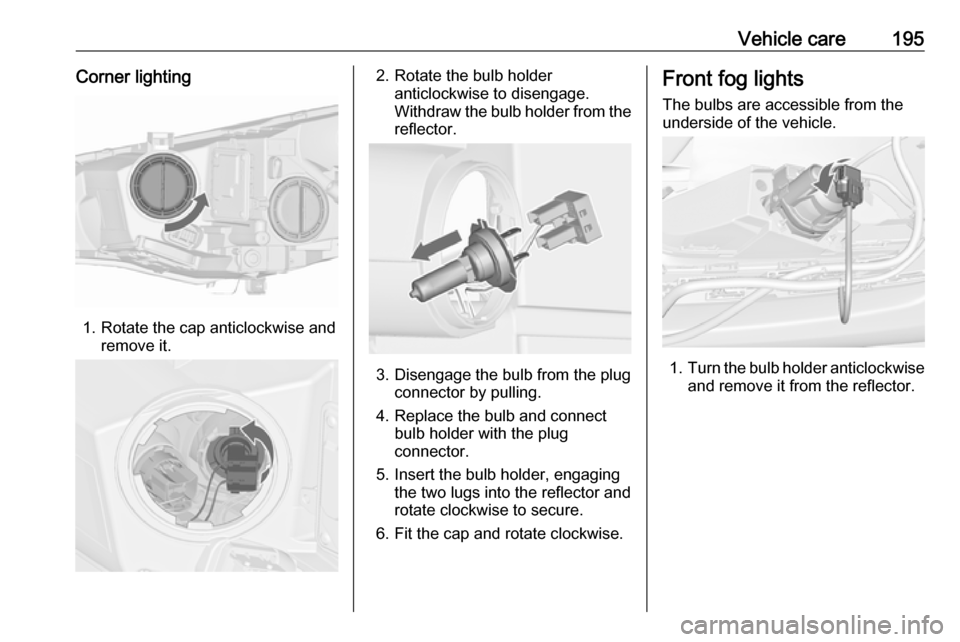
Vehicle care195Corner lighting
1. Rotate the cap anticlockwise andremove it.
2. Rotate the bulb holderanticlockwise to disengage.
Withdraw the bulb holder from the
reflector.
3. Disengage the bulb from the plug connector by pulling.
4. Replace the bulb and connect bulb holder with the plug
connector.
5. Insert the bulb holder, engaging the two lugs into the reflector and
rotate clockwise to secure.
6. Fit the cap and rotate clockwise.
Front fog lights
The bulbs are accessible from the
underside of the vehicle.
1. Turn the bulb holder anticlockwise
and remove it from the reflector.
Page 208 of 261
206Vehicle careNo.Circuit29Hydraulic unit30–31–32Flex RideVehicle tools
Tools
Vehicles with spare wheel
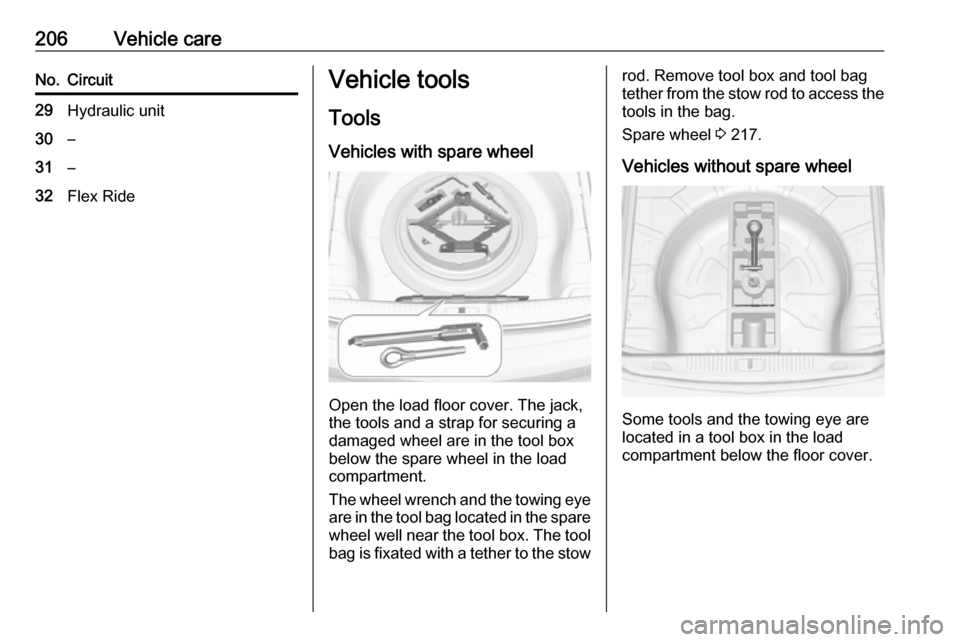
Open the load floor cover. The jack,
the tools and a strap for securing a
damaged wheel are in the tool box
below the spare wheel in the load
compartment.
The wheel wrench and the towing eye
are in the tool bag located in the spare wheel well near the tool box. The toolbag is fixated with a tether to the stow
rod. Remove tool box and tool bag
tether from the stow rod to access the
tools in the bag.
Spare wheel 3 217.
Vehicles without spare wheel
Some tools and the towing eye are
located in a tool box in the load
compartment below the floor cover.
Page 220 of 261

218Vehicle careOnly mount one temporary spare
wheel. Do not drive faster than
80 km/h. Take curves slowly. Do not
use for a long period of time.Caution
The use of a spare wheel that is smaller than the other wheels or
used in combination with winter
tyres could affect driveability.
Have the defective tyre replaced
as soon as possible.
The temporary spare wheel is located in the spare wheel well beneath the
floor cover.
To remove: 1. Close the soft top and fold in the load compartment partition by
pushing upwards at the loop area
towards the inside 3 73.
2. Remove the floor cover.
3. The spare wheel is secured with a
wing nut in the well. Loosen nut, remove conus and remove the
spare wheel.
Under the spare wheel there is a box and a bag with vehicle tools.
The tool bag is secured with a
tether to the stow rod. Remove
tool box and tool bag tether from
the stow rod to access the tools in the bag. Vehicle tools 3 206.
4. Change the damaged wheel 3 217 and stow the tools back in
the tool box and the bag. Remove
the strap from the box and put
aside.
5. Attach the tool bag tether to the stow rod and place the bag in the
well. Secure the tool box by
installing the conical adapter and
tightening wing nut.
Page 222 of 261

220Vehicle care
2. Install the wheel wrench ensuringthat it locates securely and loosen
each wheel nut by half a turn.
The wheels may be protected by
locking wheel nuts. To loosen
these specific nuts, first attach the adapter onto the head of the nut
before installing the wheel
wrench. The adapter is located in
the glovebox.3. Ensure the jack is correctly positioned under the relevant
vehicle jacking point.
4. Set the jack to the necessary height. Position it directly below
the jacking point in a manner that
prevents it from slipping.
Attach wheel wrench and with the
jack correctly aligned rotate
wrench until wheel is clear of the
ground.
5. Unscrew the wheel nuts. 6. Change the wheel. Spare wheel 3 217.
7. Screw on the wheel nuts.
8. Lower the vehicle and remove jack.
Page 223 of 261
Vehicle care2219. Install the wheel wrench ensuringthat it is located securely and
tighten each nut in a crosswise
sequence. Tightening torque is
140 Nm.
10. Align the valve hole in the wheel cover with the tyre valve before
installing.
Install wheel nut caps.
Install centre cap on alloy wheels.
11. Stow the replaced wheel 3 217,
the vehicle tools 3 206 and the
adapter for the locking wheel nuts
3 70.
12. Check the tyre pressure of the installed tyre and the wheel nut
torque as soon as possible.
Stowing a damaged full size
wheel in the load compartment
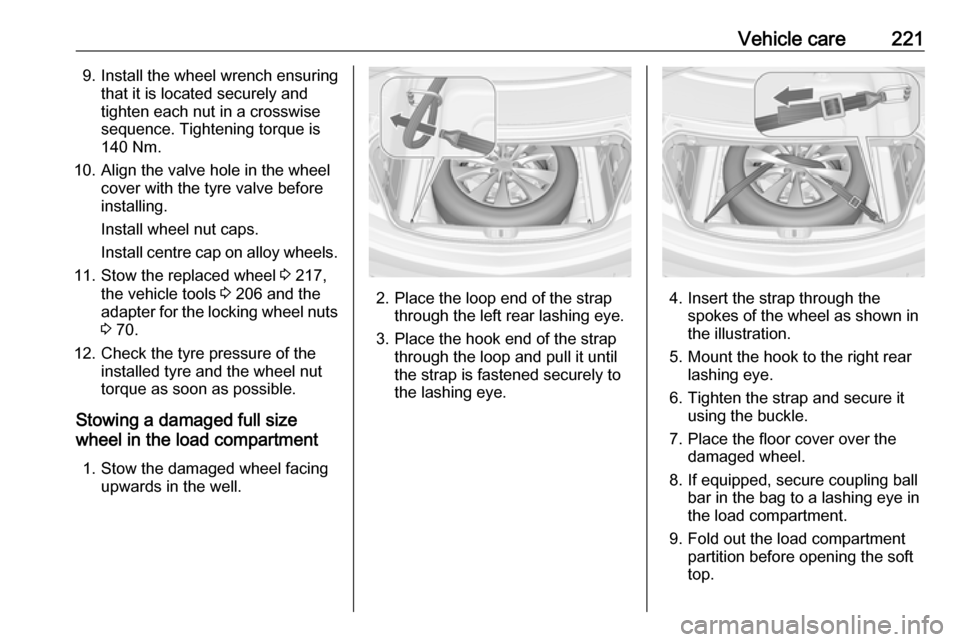
1. Stow the damaged wheel facing upwards in the well.
2. Place the loop end of the strapthrough the left rear lashing eye.
3. Place the hook end of the strap through the loop and pull it until
the strap is fastened securely to
the lashing eye.4. Insert the strap through the spokes of the wheel as shown in
the illustration.
5. Mount the hook to the right rear lashing eye.
6. Tighten the strap and secure it using the buckle.
7. Place the floor cover over the damaged wheel.
8. If equipped, secure coupling ball bar in the bag to a lashing eye in
the load compartment.
9. Fold out the load compartment partition before opening the soft
top.
Page 224 of 261

222Vehicle careStowing the spare wheel back in
the well after replacing the
damaged wheel
1. Close the soft top and fold in the load compartment partition.
2. Remove floor cover, loosen and remove wing nut and conus.
3. Stow the tools in the tool box and the bag.
4. Place spare wheel facing upwards in the well.
5. Insert and turn the excentricconus in the recess of the spare
wheel so that the wheel is
positioned as far as possible
towards the front. Secure the
wheel by turning the wing nut
clockwise.
6. Insert and close floor cover.9 Warning
Storing a jack, a wheel or other
equipment in the load
compartment could cause injury if they are not secured properly.
During a sudden stop or a
collision, loose equipment could cause personal injury or damage
to the load or vehicle.
Always store jack and tools in the
respective storage compartments
and secure them by fixing.
Damaged wheel placed in the load compartment must always be
secured with the strap.
Spare wheel with directional tyre
Fit directional tyres such that they rollin the direction of travel. The rolling
direction is indicated by a symbol
(e.g. an arrow) on the sidewall.
The following applies to tyres fitted
opposing the rolling direction:
● Driveability may be affected. Have the defective tyre renewed
or repaired as soon as possible
and fit it instead of the spare
wheel.
● Drive particularly carefully on wet
and snow-covered road
surfaces.
Page 250 of 261

248Customer informationcopyright holders be liable for any
claim, damages or other liability,
whether in an action of contract, tort
or otherwise, arising from, out of or in connection with the software or the
use or other dealings in the software.
Except as contained in this notice, the name of a copyright holder shall not
be used in advertising or otherwise to
promote the sale, use or other
dealings in this Software without prior
written authorization of the copyright
holder.
unzip This is version 2005-Feb-10 of theInfo-ZIP copyright and license. The
definitive version of this document
should be available at ftp://ftp.info-
zip.org/pub/infozip/license.html
indefinitely.
Copyright (c) 1990-2005 Info-ZIP. All
rights reserved.
For the purposes of this copyright and
license, “Info-ZIP” is defined as the
following set of individuals:
Mark Adler, John Bush, Karl Davis,
Harald Denker, Jean-Michel Dubois,
Jean-loup Gailly, Hunter Goatley, EdGordon, Ian Gorman, Chris Herborth, Dirk Haase, Greg Hartwig, Robert
Heath, Jonathan Hudson, Paul
Kienitz, David Kirschbaum, Johnny
Lee, Onno van der Linden, Igor
Mandrichenko, Steve P. Miller, Sergio Monesi, Keith Owens, George
Petrov, Greg Roelofs, Kai Uwe
Rommel, Steve Salisbury, Dave
Smith, Steven M. Schweda, Christian
Spieler, Cosmin Truta, Antoine
Verheijen, Paul von Behren, Rich Wales, Mike White.
This software is provided “as is,” without warranty of any kind, express or implied. In no event shall Info-ZIP
or its contributors be held liable for
any direct, indirect, incidental, special
or consequential damages arising out
of the use of or inability to use this
software.
Permission is granted to anyone to
use this software for any purpose,
including commercial applications,
and to alter it and redistribute it freely,
subject to the following restrictions:1. Redistributions of source code must retain the above copyright
notice, definition, disclaimer, and
this list of conditions.
2. Redistributions in binary form (compiled executables) must
reproduce the above copyright
notice, definition, disclaimer, and
this list of conditions in
documentation and/or other
materials provided with the
distribution. The sole exception to this condition is redistribution of a
standard UnZipSFX binary
(including SFXWiz) as part of a
self-extracting archive; that is
permitted without inclusion of this
license, as long as the normal
SFX banner has not been
removed from the binary or
disabled.
3. Altered versions--including, but not limited to, ports to new
operating systems, existing ports
with new graphical interfaces, and
dynamic, shared, or static library
versions--must be plainly marked
as such and must not be
misrepresented as being the