camera OPEL CASCADA 2019 User Guide
[x] Cancel search | Manufacturer: OPEL, Model Year: 2019, Model line: CASCADA, Model: OPEL CASCADA 2019Pages: 261, PDF Size: 7.94 MB
Page 174 of 261
172Driving and operatingWarning symbols
Warning symbols are indicated as
triangles 9 on the picture, which show
obstacles detected by the rear
sensors of the advanced parking
assist.
Additionally 9 appears on the top line
of the Info-Display with a warning to
check the vehicle surrounding.
The top line of the display can be
cleared by pressing the multifunction
knob.
Display settingsNavi 650 /Navi 950 : Brightness can be
set by first pressing and then turning
the outer ring of the multifunction
knob.
CD 600 : Brightness can be set by first
pressing and then turning the
multifunction knob.
Deactivation The camera is deactivated when acertain forward speed is exceeded or
if reverse gear is not engaged for
approx. 10 seconds.
Activation or deactivation of the rear
view camera can be changed in the Settings menu in the Info-Display.
Vehicle personalisation 3 104.
Fault
Fault messages are displayed with a 9 on the top line of the Info-Display.
The rear view camera may not
operate properly when:
● The surrounding area is dark.● The sun or the beam of headlights is shining directly into
the camera lens.● Ice, snow, mud, or anything else covers the camera lens. Clean
the lens, rinse it with water, and
wipe it with a soft cloth.
● The vehicle had a rear-end accident.
● There are extreme temperature changes.
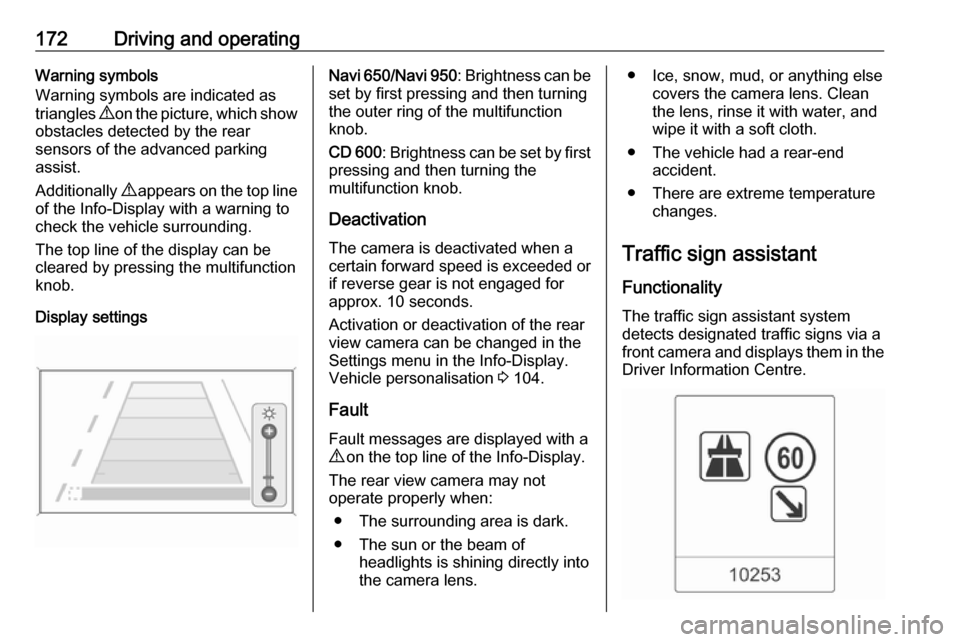
Traffic sign assistant
Functionality
The traffic sign assistant system detects designated traffic signs via a
front camera and displays them in the Driver Information Centre.
Page 177 of 261

Driving and operating175When the setting page is displayed,
select Off to deactivate alert function.
Reactivate by selecting On.
When switching on the ignition, alert function is deactivated.
Pop-up indication is displayed for approx. 8 seconds in the Driver
Information Centre.
System reset The content of the traffic sign memory
can be cleared in the setting menu of
the traffic sign assistant page by
pressing and holding SET/CLR on the
turn signal lever. Upon successful
reset, a chime will sound and the
following symbol is indicated until the
next traffic sign is detected.
In some cases, traffic sign assistant is reset automatically by the system.
Fault
The traffic sign assistant system may
not operate correctly when:
● The area of the windscreen, where the front camera is
located, is not clean.
● Traffic signs are completely or partially covered or difficult to
discern.
● There are adverse environmental
conditions, e.g. heavy rain, snow, direct sunlight or shadows. In this
event, No Traffic Sign Detection
due to Weather is indicated in the
Driver Information Centre.
● Traffic signs are incorrectly mounted or damaged.
● Traffic signs do not comply with the Vienna Convention on Road
Signs and Signals.Caution
The system is intended to help the
driver within a defined speed
range to discern certain traffic
signs. Do not ignore traffic signs
which are not displayed by the
system.
The system does not discern any other than the conventional traffic
signs that might give or end a
speed limit.
Do not let this special feature
tempt you into taking risks when
driving.
Always adapt speed to the road
conditions.
Page 178 of 261

176Driving and operatingThe driver assistance systems donot relieve the driver from full
responsibility for vehicle
operation.
Lane departure warning
The lane departure warning system
observes the lane markings between
which the vehicle is driving via a front camera. The system detects lane
changes and warns the driver in the
event of an unintended lane change
via visual and acoustic signals.
Criteria for the detection of an
unintended lane change are:
● no operation of turn signals
● no brake pedal operation
● no active accelerator operation or
speeding-up
● no active steering
If the driver is performing these
actions, no warning will be issued.
Activation
The lane departure warning system is activated by pressing ). The
illuminated LED in the button
indicates that the system is switched
on. When the control indicator ) in
the instrument cluster illuminates
green, the system is ready to operate.
The system is only operable at
vehicle speeds above 56 km/h and if
lane markings are available.
When the system recognises an
unintended lane change, the control
indicator ) changes to yellow and
flashes. Simultaneously a chime
sound is activated.
Deactivation
The system is deactivated by
pressing ), the LED in the button
extinguishes.
At speeds below 56 km/h the system
is inoperable.
Fault
The lane departure warning system
may not operate properly when:
● the windscreen is not clean
● there are adverse environmental conditions like heavy rain, snow,
direct sunlight or shadows
Page 207 of 261

Vehicle care205
Remove the cover.
Fuse assignments
No.Circuit1Soft top control module, power
rail right2–3Parking assist4Selective catalytic reduction
system5–6–7Power seat8Soft top control module9Selective catalytic reduction
system10Selective catalytic reduction
system11Trailer module, tyre pressure
monitor and rear view camera12Soft top control module, tail
lights13–No.Circuit14Rear seat electrical folding15–16Seat ventilation, rear view
camera, soft top control module17–18–19Steering wheel heating20–21Seat heating22–23Soft top control module, power
rail left24Selective catalytic reduction
system25–26Jumper fuse for non logistic
mode27Passive entry28–
Page 259 of 261

257Rear storage................................. 75
Rear view camera ...................... 170
Recommended fluids and lubricants ........................ 231, 235
Refuelling ................................... 178 Registered trademarks ...............249
Retained power off .....................139
Reversing lights .........................123
Ride control systems ..................152
Rollover protection system ...........45
S Seat adjustment ............................. 7
Seat belt ........................................ 8
Seat belt reminder .......................91
Seat belts ..................................... 56
Seat folding .................................. 52
Seat heating ................................. 55
Seat position ................................ 49
Seat ventilation ............................. 55
Selector lever ............................. 146
Service ............................... 136, 230
Service display ............................ 87
Service information ....................230
Side airbag system ......................63
Side blind spot alert ....................169
Sidelights .................................... 114
Side turn lights ........................... 199
Soft top ........................................ 36
Software acknowledgement .......247Spare wheel ............................... 217
Speed limiter............................... 157
Speedometer ............................... 85
Starting and operating ................138
Starting off ................................... 18
Starting the engine ....................139
Steering ...................................... 138
Steering wheel adjustment ......9, 79
Steering wheel controls ...............79
Stop-start system........................ 140
Storage ......................................... 70
Storage compartments .................70
Sunvisor lights ........................... 124
Sun visors .................................... 35
Symbols ......................................... 4
T
Tachometer ................................. 86
Tail lights ................................... 197
Three-point seat belt .................... 57
Tools .......................................... 206
Tow bar....................................... 180
Towing ................................ 180, 224
Towing another vehicle .............225
Towing equipment .....................181
Towing the vehicle .....................224
Traction Control system ............. 152
Traction Control system off........... 94
Traffic sign assistant ...................172
Trailer coupling ........................... 180Trailer towing ............................. 180
Transmission ............................... 17
Transmission display .................145
Tread depth ............................... 212
Trip odometer .............................. 85
Turn lights ............................ 90, 122
Tyre chains ................................ 213
Tyre designations ......................207
Tyre pressure ............................ 211
Tyre pressure monitoring system ............................... 94, 207
Tyre pressures ........................... 242
Tyre repair kit ............................. 213
U Ultrasonic parking assist............. 162
Upholstery .................................. 228
Upshift .......................................... 93
Using this manual ..........................3
V
Vehicle battery ........................... 191
Vehicle checks............................ 187
Vehicle data ................................ 235
Vehicle data recording and privacy ..................................... 249
Vehicle detected ahead ................96
Vehicle dimensions .................... 240
Vehicle Identification Number ....233
Vehicle jack ................................ 206
Vehicle messages .....................103