interior lights OPEL COMBO E 2019.1 Manual user
[x] Cancel search | Manufacturer: OPEL, Model Year: 2019.1, Model line: COMBO E, Model: OPEL COMBO E 2019.1Pages: 283, PDF Size: 10.57 MB
Page 33 of 283

Keys, doors and windows31Rear doors
Unlock the rear doors with the remote control or by turning the key in the rear
door lock cylinder.
Central locking 3 25.
Always open the left hand door before the right hand door.
To open the left hand rear door, pull
the exterior handle.
The door is opened from inside the
vehicle by pulling the interior handle.
The right hand rear door is released
using the lever.
9 Warning
The rear lights may be obscured if
the rear doors are open and the
vehicle is parked on the roadside.
Make other road users aware of the vehicle, by using a warning
triangle or other equipment
specified in the road traffic
regulations.
The doors are retained in the 90º
position by locking stays. To open the
doors to 180º, push the latch and
swing open to the desired position.
Before closing the doors fix the
locking stays to the 90º position.
Page 125 of 283

Lighting123LightingExterior lighting.......................... 123
Light switch .............................. 123
Automatic light control .............124
High beam ............................... 124
High beam assist .....................124
Headlight flash ......................... 125
Headlight range adjustment ....126
Headlights when driving abroad .................................... 126
Daytime running lights .............126
Cornering lights .......................126
Hazard warning flashers ..........126
Turn lights ................................ 127
Front fog lights ......................... 127
Rear fog light ........................... 128
Parking lights ........................... 128
Reversing lights .......................128
Misted light covers ...................128
Interior lighting ........................... 129
Instrument panel illumination control ..................................... 129
Interior lights ............................ 129
Reading lights .......................... 129
Sunvisor lights ......................... 130Lighting features ........................130
Centre console lighting ............130
Entry lighting ............................ 130
Exit lighting .............................. 130
Vehicle locator lighting ............131
Peripheral lighting ....................131
Battery discharge protection ....131Exterior lighting
Light switch
Turn light switch:
AUTO:automatic light control
switches automatically
between daytime running
light and headlight8:sidelights9:headlights
When switching on the ignition,
automatic light control is active.
Control indicator 8 3 109.
Page 131 of 283
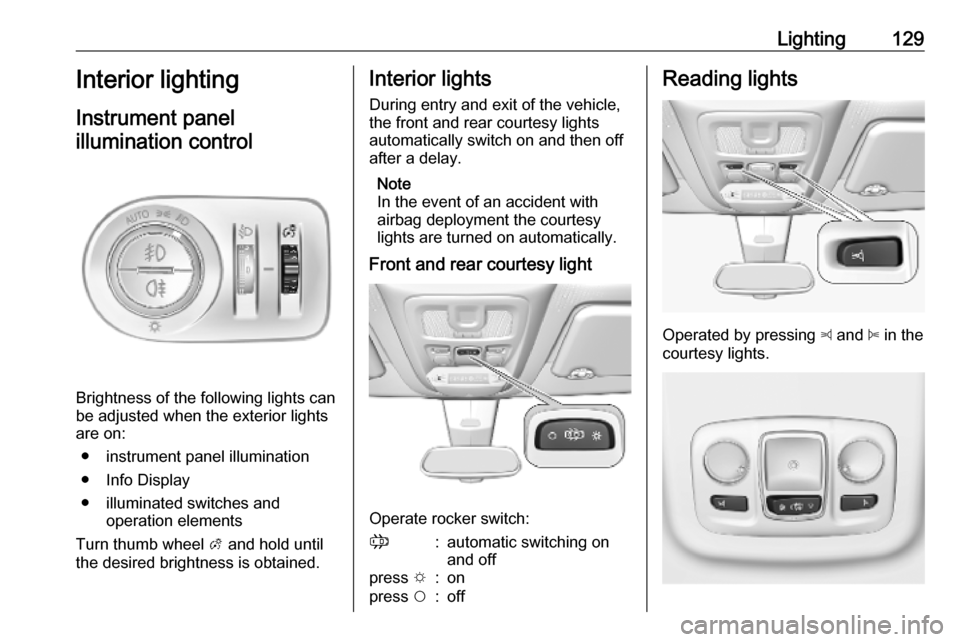
Lighting129Interior lighting
Instrument panel
illumination control
Brightness of the following lights can
be adjusted when the exterior lights
are on:
● instrument panel illumination
● Info Display
● illuminated switches and operation elements
Turn thumb wheel A and hold until
the desired brightness is obtained.
Interior lights
During entry and exit of the vehicle,
the front and rear courtesy lights
automatically switch on and then off
after a delay.
Note
In the event of an accident with
airbag deployment the courtesy
lights are turned on automatically.
Front and rear courtesy light
Operate rocker switch:
;:automatic switching on
and offpress e:onpress $:offReading lights
Operated by pressing z and B in the
courtesy lights.
Page 132 of 283

130LightingIllustration shows rear courtesy lights.
Sunvisor lights Illuminates when the cover is opened.Lighting features
Centre console lighting A spotlight integrated in the overheadconsole illuminates the centre
console when headlights are
switched off.
The intensity can be adjusted in the
vehicle personalisation 3 118.
Entry lighting
Welcome lighting
Some or all of the following lights are
switched on for a short time by
unlocking the vehicle with the radio remote control:
● headlights
● tail lights
● interior lights
The number of activated lights
depends on the surrounding light
conditions.
The lighting switches off immediately
when the ignition is switched on.
Starting off 3 18.This function can be activated or
deactivated in the vehicle
personalisation 3 118.
The following lights will additionally
switch on when the driver's door is
opened:
● illumination of some switches
● Driver Information Centre
Exit lighting
The following lights are switched on if
the key is removed from the ignition
switch:
● interior lights
● instrument panel light
They will switch off automatically after
a delay. This function works only in
the dark.
Path lighting Headlights, tail lights and number
plate lights illuminate the surrounding
area for an adjustable time after
leaving the vehicle.
Page 133 of 283
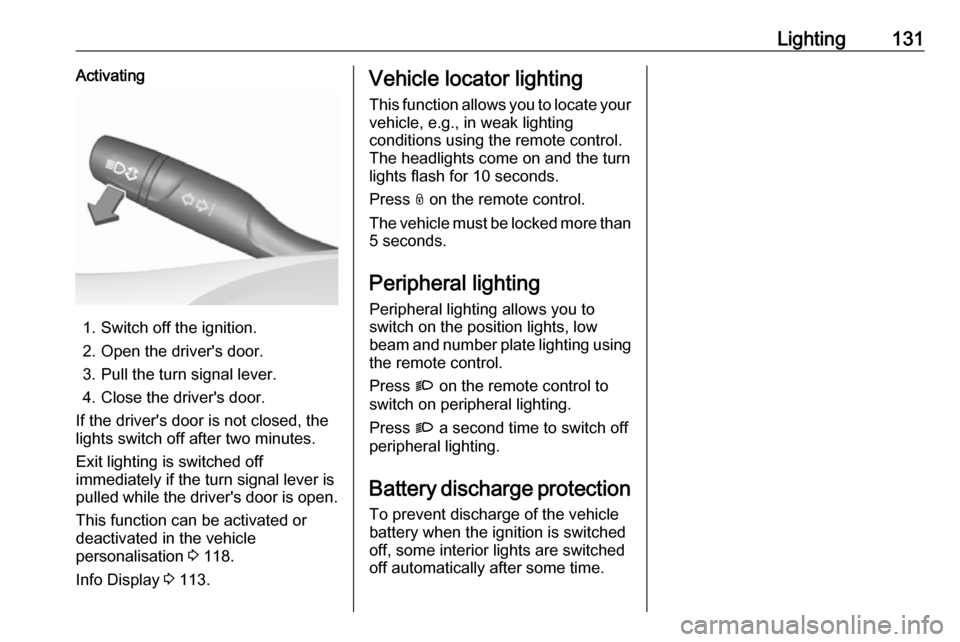
Lighting131Activating
1. Switch off the ignition.
2. Open the driver's door.
3. Pull the turn signal lever.
4. Close the driver's door.
If the driver's door is not closed, the
lights switch off after two minutes.
Exit lighting is switched off
immediately if the turn signal lever is pulled while the driver's door is open.
This function can be activated or
deactivated in the vehicle
personalisation 3 118.
Info Display 3 113.
Vehicle locator lighting
This function allows you to locate your
vehicle, e.g., in weak lighting
conditions using the remote control.
The headlights come on and the turn
lights flash for 10 seconds.
Press N on the remote control.
The vehicle must be locked more than 5 seconds.
Peripheral lighting
Peripheral lighting allows you to
switch on the position lights, low
beam and number plate lighting using the remote control.
Press G on the remote control to
switch on peripheral lighting.
Press G a second time to switch off
peripheral lighting.
Battery discharge protection
To prevent discharge of the vehicle
battery when the ignition is switched
off, some interior lights are switched
off automatically after some time.
Page 214 of 283

212Vehicle careVehicle careGeneral Information...................212
Accessories and vehicle modifications .......................... 212
Vehicle storage ........................213
End-of-life vehicle recovery .....214
Vehicle checks ........................... 214
Performing work ......................214
Bonnet ..................................... 214
Engine oil ................................. 215
Engine coolant ......................... 216
Washer fluid ............................ 217
Brakes ..................................... 217
Brake fluid ............................... 217
Vehicle battery ......................... 217
Diesel fuel system bleeding .....219
Wiper blade replacement ........219
Bulb replacement .......................220
Halogen headlights ..................220
LED headlights ........................ 222
Front fog lights ......................... 222
Front turn lights .......................223
Tail lights ................................. 224
Side turn lights ......................... 226
Number plate light ...................227
Interior lights ............................ 227Electrical system........................227
Fuses ....................................... 227
Engine compartment fuse box . 228
Instrument panel fuse box .......229
Vehicle tools .............................. 230
Tools ........................................ 230
Wheels and tyres .......................231
Winter tyres ............................. 231
Tyre designations ....................232
Tyre pressure .......................... 232
Tyre deflation detection system .................................... 233
Tread depth ............................. 234
Changing tyre and wheel size . 235
Wheel covers ........................... 235
Tyre chains .............................. 235
Tyre repair kit .......................... 236
Wheel changing .......................239
Spare wheel ............................ 240
Jump starting ............................. 244
Towing ....................................... 245
Towing the vehicle ...................245
Towing another vehicle ...........246
Appearance care .......................247
Exterior care ............................ 247
Interior care ............................. 249General Information
Accessories and vehiclemodifications
We recommend the use of genuine
parts and accessories and factory approved parts specific for your
vehicle type. We cannot assess or guarantee reliability of other products
- even if they have a regulatory or
otherwise granted approval.
Any modification, conversion or other changes made to standard vehicle
specifications (including, without
limitation, software modifications,
modifications of the electronic control
units) may invalidate the warranty
offered by Opel. Furthermore, such
changes may affect driver assistance
systems, may impact fuel
consumption, CO 2 emissions and
other emissions of the vehicle and
cause the vehicle to no longer
conform to the operating permit,
impacting the validity of your vehicle
registration.
Page 229 of 283

Vehicle care227Number plate light
1. Insert a screwdriver, for example,in the recess of the cover and
remove it.
2. Pull the bulb from the bulb holder and replace it.
3. Attach the cover.
Interior lights
Have the following bulbs replaced by
a workshop:
● courtesy light, reading lights
● load compartment light
● instrument panel illuminationElectrical system
Fuses
Data on the replacement fuse must
match the data on the defective fuse.
There are two fuse boxes in the
vehicle:
● engine compartment
● instrument panel
Before replacing a fuse, turn off the
respective switch and the ignition.
A blown fuse can be recognised by its melted wire.Caution
Do not replace the fuse until the
cause of the fault has been
remedied.
Some functions are protected by
several fuses.
Fuses may also be inserted without
existence of a function.
Page 231 of 283

Vehicle care229No.Circuit16Front fog lights18Right headlight19Left headlight29Windscreen wiper
After having changed defective fuses,
close the fuse box cover and lock it.
If the fuse box cover is not closed
correctly, malfunction may occur.
Instrument panel fuse box
The fuse box is located behind a
cover in the instrument panel at the
left side.Remove the cover by pulling at the
top left, then at the right side.No.Circuit1Inductive charging, clutch
switch, selective ride control,
power steering, diesel exhaust
system, interior mirror4Horn6Windscreen washer7Power outlet rear10Door lock
Page 232 of 283

230Vehicle careNo.Circuit12Diagnostic connector, power
supply transformer13Head-up display, climate
control, Infotainment system14Anti-theft alarm system, tele‐
matic unit15Automatic transmission, instru‐
ment cluster, climate control16Starter, power supply trans‐
former17Instrument cluster19Trailer socket, steering wheel
controls21Anti-theft system, power button22Rear view camera, rain and light sensor23Seat belt reminder, special
vehicle control module, start-
stop, trailer socketNo.Circuit24Parking assist, Infotainment
system, rear view camera, side
blind spot camera25Airbag26Steering angle sensor27Parking heater29Infotainment system31-32Power outlet34Parking assist, interior mirror35Diagnostic connector, headlight
range adjustment, heated wind‐ screen, climate control36Interior lights, USB portVehicle tools
Tools
Vehicles with spare wheel
Open the cover of the footwell storage
3 75.
Page 275 of 283

Customer information273Depending on technical equipment
level, the data stored is as follows:
● system component operating states (e.g. fill level, tyre
pressure, battery status)
● faults and defects in important system components (e.g. lights,
brakes)
● system reactions in special driving situations (e.g. triggeringof an airbag, actuation of the
stability control systems)
● information on events damaging the vehicle
● for electric vehicles the amount of
charge in the high-voltage
battery, estimated range
In special cases (e.g. if the vehicle
has detected a malfunction), it may be
necessary to save data that would
otherwise just be volatile.
When you use services (e.g. repairs,
maintenance), the operating data
saved can be read together with the
vehicle identification number and
used when necessary. Staff working
for the service network ( e.g. garages,
manufacturers) or third parties (e.g.breakdown services) can read the
data from the vehicle. The same
applies to warranty work and quality
assurance measures.
Data is generally read via the OBD
(On-Board Diagnostics) port
prescribed by law in the vehicle. The operating data which is read out,
documents the technical condition of
the vehicle or individual components
and assists with fault diagnosis,
compliance with warranty obligations
and quality improvement. This data,
in particular information on
component stress, technical events,
operator errors and other faults, is
transmitted to the manufacturer
where appropriate, together with the
vehicle identification number. The
manufacturer is also subject to
product liability. The manufacturer
potentially also uses operating data
from vehicles for product recalls. This
data can also be used to check
customer warranty and guarantee
claims.
Fault memories in the vehicle can be
reset by a service company when
carrying out servicing or repairs or at
your request.Comfort and infotainment
functions
Comfort settings and custom settings can be stored in the vehicle and
changed or reset at any time.
Depending on the equipment level in
question, these include
● seat and steering wheel position settings
● chassis and air conditioning settings
● custom settings such as interior lighting
You can input your own data in the
infotainment functions for your
vehicle as part of the selected
features.
Depending on the equipment level in
question, these include
● multimedia data such as music, videos or photos for playback in
an integrated multimedia system
● address book data for use with an
integrated hands-free system or an integrated navigation system