remote OPEL COMBO E 2019.1 User Guide
[x] Cancel search | Manufacturer: OPEL, Model Year: 2019.1, Model line: COMBO E, Model: OPEL COMBO E 2019.1Pages: 283, PDF Size: 10.57 MB
Page 33 of 283

Keys, doors and windows31Rear doors
Unlock the rear doors with the remote control or by turning the key in the rear
door lock cylinder.
Central locking 3 25.
Always open the left hand door before the right hand door.
To open the left hand rear door, pull
the exterior handle.
The door is opened from inside the
vehicle by pulling the interior handle.
The right hand rear door is released
using the lever.
9 Warning
The rear lights may be obscured if
the rear doors are open and the
vehicle is parked on the roadside.
Make other road users aware of the vehicle, by using a warning
triangle or other equipment
specified in the road traffic
regulations.
The doors are retained in the 90º
position by locking stays. To open the
doors to 180º, push the latch and
swing open to the desired position.
Before closing the doors fix the
locking stays to the 90º position.
Page 37 of 283

Keys, doors and windows35Vehicle security
Anti-theft locking system9 Warning
Do not use the system if there are
people in the vehicle! The doorscannot be unlocked from the
inside.
The system deadlocks all the doors. All doors must be closed otherwise
the system cannot be activated.
Unlocking the vehicle disables the
mechanical anti-theft locking system.
This is not possible with the central
locking button.
Activating
Simple key: Insert the key and turn it
clockwise twice within 5 seconds.
Remote control: Press N on the radio
remote control twice within five
seconds.
Electronic key: Press twice with a
finger or thumb on one of the door
handles (at the markings) within five seconds
Anti-theft alarm system The anti-theft alarm system is
combined with the anti-theft locking
system.
It monitors: ● doors, tailgate, bonnet
● passenger compartment including adjoining load
compartment
Activation
Ignition must be switched off. All
doors must be closed and the
electronic key must not remain in the
vehicle. Otherwise the system cannot
be activated.
● Radio remote control: Monitoring
of doors, tailgate and bonnet is
self-activated 5 seconds after
locking the vehicle by pressing e.
Monitoring of passenger
compartment including adjoiningload compartment is self-
activated 45 seconds after
locking the vehicle by pressing e.
● Electronic key system: Monitoring of doors, tailgate and
bonnet is self-activated
5 seconds after locking the
vehicle by pressing with a finger
or thumb on one of the front door handles at the markings.
Monitoring of passenger
compartment including adjoining
load compartment is self-
activated 45 seconds after
locking the vehicle by pressing with a finger or thumb on one of
the front door handles at the
markings.
Activation is confirmed by the flashing of the status LED and coming on of
the turn lights for a short time.
If a door or the tailgate is not correctly
closed and the vehicle is locked via
remote control or electronic key
system, the vehicle remains
unlocked. However, the anti-theft
alarm system will be activated after
45 seconds.
Page 38 of 283
36Keys, doors and windowsNote
Changes to the vehicle interior such
as the use of seat covers and open
windows, could impair the function
of passenger compartment
monitoring.
Activation without monitoring of
passenger compartment
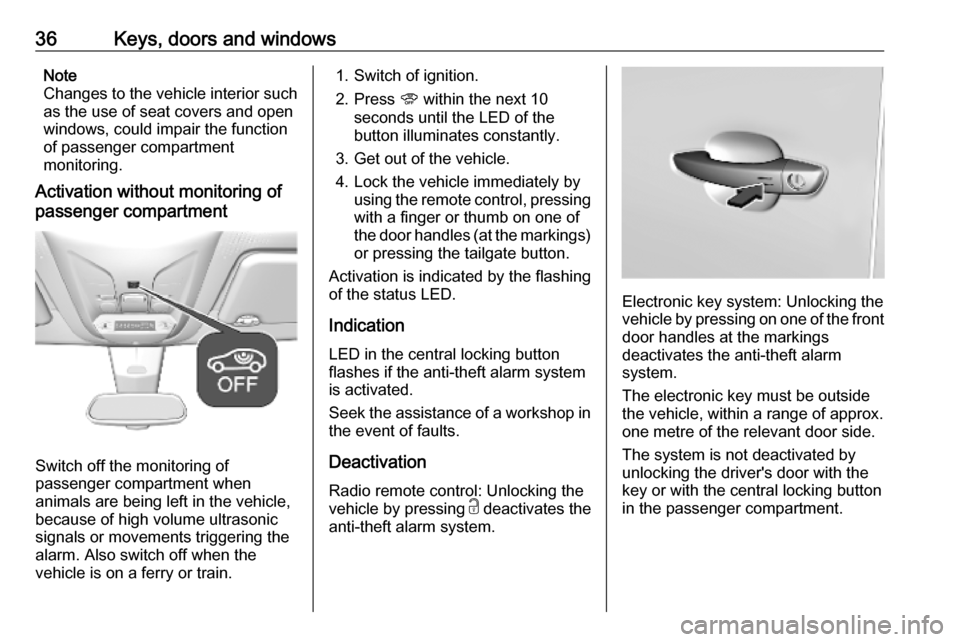
Switch off the monitoring of
passenger compartment when
animals are being left in the vehicle,
because of high volume ultrasonic
signals or movements triggering the
alarm. Also switch off when the
vehicle is on a ferry or train.
1. Switch of ignition.
2. Press U within the next 10
seconds until the LED of the
button illuminates constantly.
3. Get out of the vehicle.
4. Lock the vehicle immediately by using the remote control, pressing
with a finger or thumb on one of
the door handles (at the markings) or pressing the tailgate button.
Activation is indicated by the flashing
of the status LED.
Indication
LED in the central locking button
flashes if the anti-theft alarm system
is activated.
Seek the assistance of a workshop in
the event of faults.
Deactivation
Radio remote control: Unlocking the
vehicle by pressing c deactivates the
anti-theft alarm system.
Electronic key system: Unlocking the
vehicle by pressing on one of the front door handles at the markings
deactivates the anti-theft alarm
system.
The electronic key must be outside
the vehicle, within a range of approx. one metre of the relevant door side.
The system is not deactivated by
unlocking the driver's door with the
key or with the central locking button
in the passenger compartment.
Page 39 of 283

Keys, doors and windows37Note
If the vehicle is unlocked and no door
is opened, the vehicle is
automatically relocked after 30
seconds. In this case, the anti-theft
alarm will be reactivated, too.
Alarm
When triggered, the alarm horn
sounds and the hazard warning lights flash simultaneously. The number
and duration of alarm signals are
stipulated by legislation.
The anti-theft alarm system can be
deactivated by pressing c, by
pressing on one of the front door
handles at the markings with
electronic key system. The LED of the
U button will extinguish and the turn
lights flash for a short time.
A triggered alarm, which has not been interrupted by the driver, will be
indicated by the rapid flashing of the
LED of the U button. If the ignition is
switched on, the flashing stops
immediately
If the vehicle's battery is to be
disconnected (e.g. for maintenance
work), the alarm siren must bedeactivated as follows: switch the
ignition on then off, then disconnect
the vehicle's battery within 15 s.
Locking the vehicle without
activation of the anti-theft alarm
Lock the vehicle by inserting andturning the integrated key of the
remote control or the electronic key
system in the lock cylinder of the
driver's door.
Malfunction of the remote control
Unlock the vehicle by inserting and
turning the integrated key of the
remote control or the electronic key
system in the lock cylinder of the
driver's door.
Open the driver's door.
The horn of the anti-theft alarm will
sound.
Switch on ignition.
The horn will stop sounding and the
status LED extinguishes.Immobiliser
The system is part of the ignition
switch and checks whether the
vehicle is allowed to be started with the key being used.
The immobiliser is activated
automatically after the key has been
removed from the ignition switch.
Note
Radio Frequency Identification
(RFID) tags may cause interference
with the key. Do not have it placed
near the key when starting the
vehicle.
Note
The immobiliser does not lock the
doors. Always lock the vehicle after
leaving it 3 25 and switch on the anti-
theft alarm system 3 35.
Page 44 of 283
42Keys, doors and windows
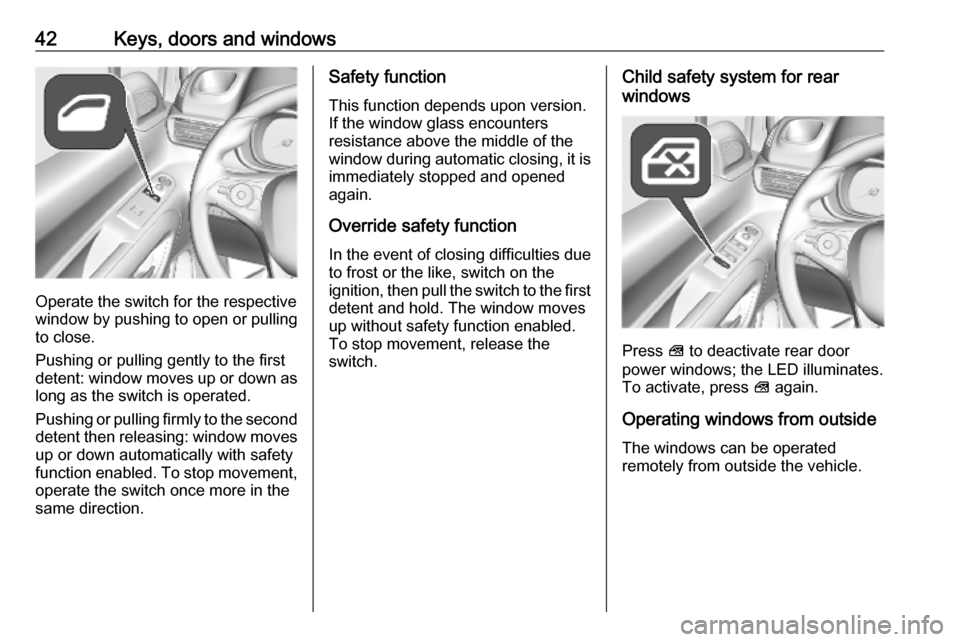
Operate the switch for the respective
window by pushing to open or pulling to close.
Pushing or pulling gently to the first
detent: window moves up or down as long as the switch is operated.
Pushing or pulling firmly to the second
detent then releasing: window moves
up or down automatically with safety
function enabled. To stop movement,
operate the switch once more in the
same direction.
Safety function
This function depends upon version.
If the window glass encounters
resistance above the middle of the
window during automatic closing, it is
immediately stopped and opened
again.
Override safety function
In the event of closing difficulties due
to frost or the like, switch on the
ignition, then pull the switch to the first
detent and hold. The window moves
up without safety function enabled.
To stop movement, release the
switch.Child safety system for rear
windows
Press V to deactivate rear door
power windows; the LED illuminates.
To activate, press V again.
Operating windows from outside
The windows can be operated
remotely from outside the vehicle.
Page 132 of 283

130LightingIllustration shows rear courtesy lights.
Sunvisor lights Illuminates when the cover is opened.Lighting features
Centre console lighting A spotlight integrated in the overheadconsole illuminates the centre
console when headlights are
switched off.
The intensity can be adjusted in the
vehicle personalisation 3 118.
Entry lighting
Welcome lighting
Some or all of the following lights are
switched on for a short time by
unlocking the vehicle with the radio remote control:
● headlights
● tail lights
● interior lights
The number of activated lights
depends on the surrounding light
conditions.
The lighting switches off immediately
when the ignition is switched on.
Starting off 3 18.This function can be activated or
deactivated in the vehicle
personalisation 3 118.
The following lights will additionally
switch on when the driver's door is
opened:
● illumination of some switches
● Driver Information Centre
Exit lighting
The following lights are switched on if
the key is removed from the ignition
switch:
● interior lights
● instrument panel light
They will switch off automatically after
a delay. This function works only in
the dark.
Path lighting Headlights, tail lights and number
plate lights illuminate the surrounding
area for an adjustable time after
leaving the vehicle.
Page 133 of 283
Lighting131Activating
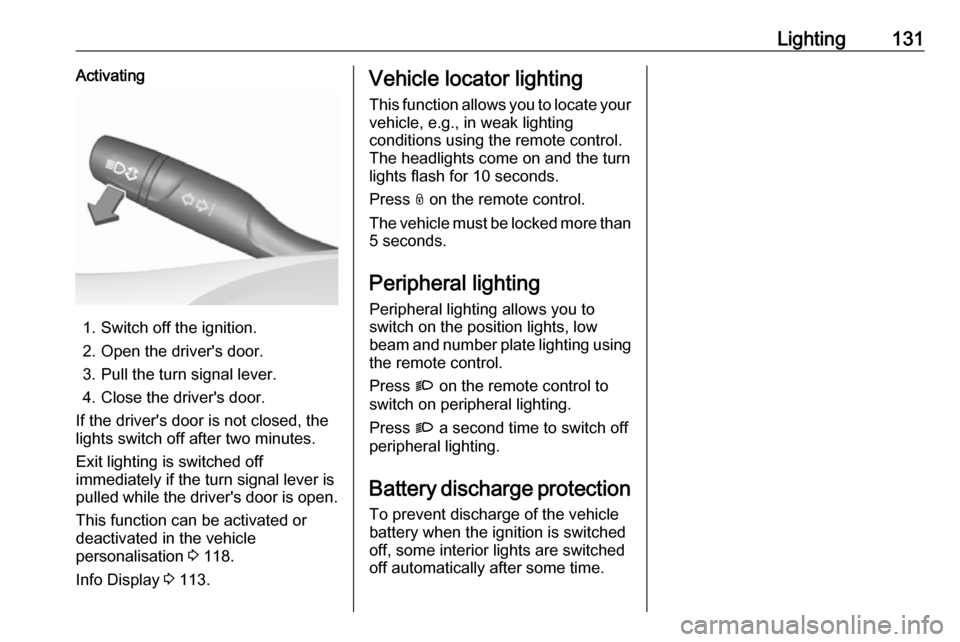
1. Switch off the ignition.
2. Open the driver's door.
3. Pull the turn signal lever.
4. Close the driver's door.
If the driver's door is not closed, the
lights switch off after two minutes.
Exit lighting is switched off
immediately if the turn signal lever is pulled while the driver's door is open.
This function can be activated or
deactivated in the vehicle
personalisation 3 118.
Info Display 3 113.
Vehicle locator lighting
This function allows you to locate your
vehicle, e.g., in weak lighting
conditions using the remote control.
The headlights come on and the turn
lights flash for 10 seconds.
Press N on the remote control.
The vehicle must be locked more than 5 seconds.
Peripheral lighting
Peripheral lighting allows you to
switch on the position lights, low
beam and number plate lighting using the remote control.
Press G on the remote control to
switch on peripheral lighting.
Press G a second time to switch off
peripheral lighting.
Battery discharge protection
To prevent discharge of the vehicle
battery when the ignition is switched
off, some interior lights are switched
off automatically after some time.
Page 142 of 283
140Climate controlDeactivation of electronic climatecontrol system
Press s subsequently until the
electronic climate control system is
deactivated.
Parking heater
The parking heater allows to heat the vehicle's interior and to ventilate the
vehicle's interior with ambient air.
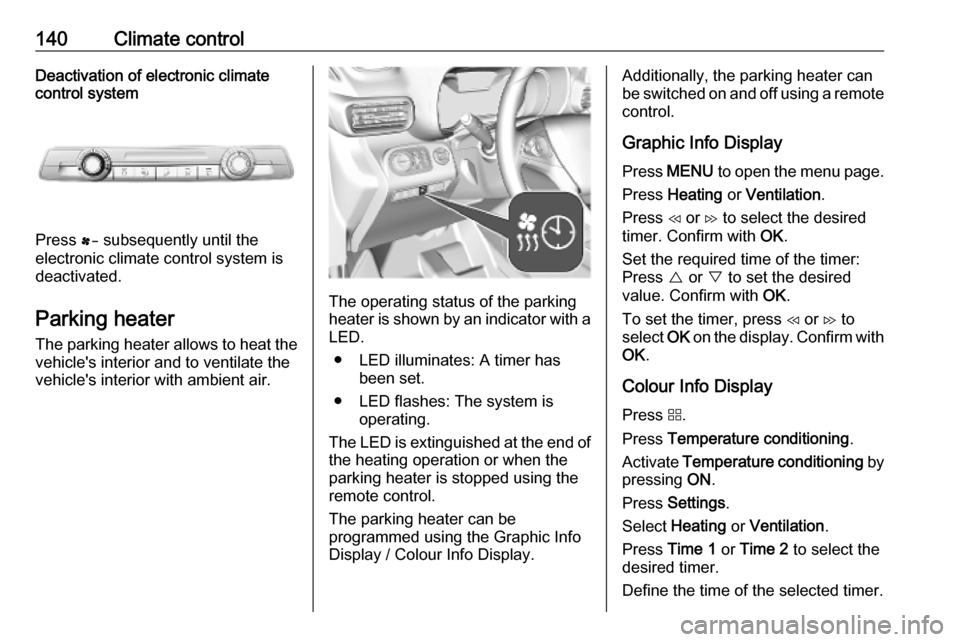
The operating status of the parking
heater is shown by an indicator with a LED.
● LED illuminates: A timer has been set.
● LED flashes: The system is operating.
The LED is extinguished at the end of
the heating operation or when the
parking heater is stopped using the
remote control.
The parking heater can be
programmed using the Graphic Info
Display / Colour Info Display.
Additionally, the parking heater can
be switched on and off using a remote control.
Graphic Info Display
Press MENU to open the menu page.
Press Heating or Ventilation .
Press H or I to select the desired
timer. Confirm with OK.
Set the required time of the timer:
Press { or } to set the desired
value. Confirm with OK.
To set the timer, press H or I to
select OK on the display. Confirm with
OK .
Colour Info Display
Press d.
Press Temperature conditioning .
Activate Temperature conditioning by
pressing ON.
Press Settings .
Select Heating or Ventilation .
Press Time 1 or Time 2 to select the
desired timer.
Define the time of the selected timer.
Page 143 of 283

Climate control141Press ü to save the settings and set
the timer.
Parking heater via remote control The parking heater can be switched
on using a remote control.
Press ì.
Replacing the battery in the remote
control
If the indicator light of the remote
control turns yellow, the charging
status of the battery is weak. If the
indicator light does not illuminated
anymore, the battery is discharged
and has to be replaced.
1. Remove the cap of the remote control by unscrewing it with a
coin and remove the battery
2. Replace battery with a battery of the same type. Pay attention to
the installation position.
3. Screw the cap in its place .
Air vents
Adjustable air ventsCentre air vents in the instrument
panel
Direct the flow of air by tilting and
swivelling the slats.
To close the vent, swivel the slats
inwards.
Page 149 of 283
Driving and operating1479Warning
If the vehicle battery is discharged,
the vehicle must not be towed,
tow-started or jump-started as the
steering wheel lock cannot be
disengaged.
Operation on vehicles with
electronic key system in case of
failure
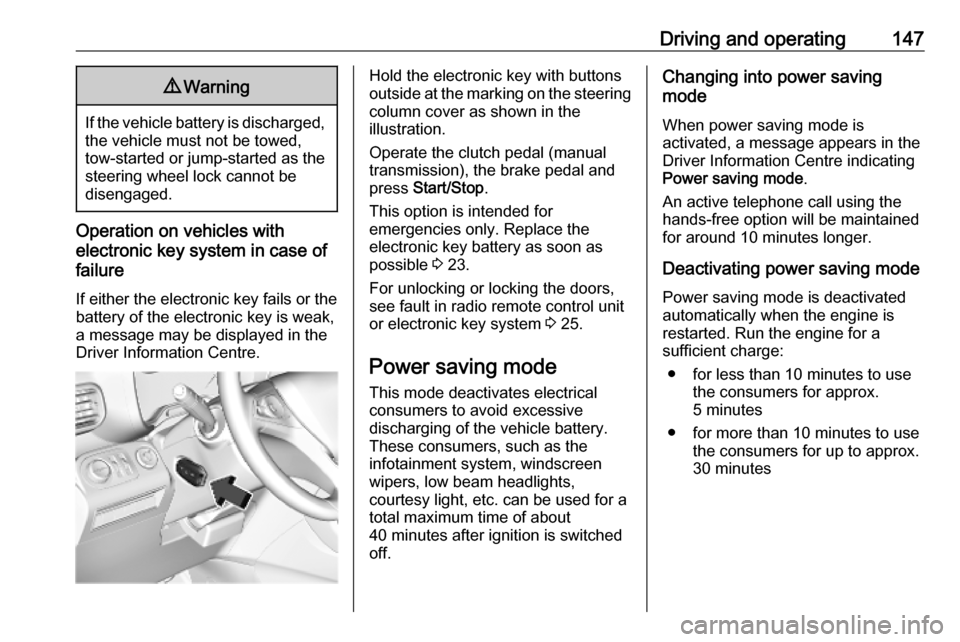
If either the electronic key fails or the
battery of the electronic key is weak,
a message may be displayed in the
Driver Information Centre.
Hold the electronic key with buttons
outside at the marking on the steering column cover as shown in the
illustration.
Operate the clutch pedal (manual
transmission), the brake pedal and
press Start/Stop .
This option is intended for
emergencies only. Replace the
electronic key battery as soon as
possible 3 23.
For unlocking or locking the doors,
see fault in radio remote control unit
or electronic key system 3 25.
Power saving mode
This mode deactivates electrical
consumers to avoid excessive
discharging of the vehicle battery.
These consumers, such as the
infotainment system, windscreen
wipers, low beam headlights,
courtesy light, etc. can be used for a
total maximum time of about
40 minutes after ignition is switched
off.Changing into power saving
mode
When power saving mode is
activated, a message appears in the
Driver Information Centre indicating
Power saving mode .
An active telephone call using the
hands-free option will be maintained
for around 10 minutes longer.
Deactivating power saving mode
Power saving mode is deactivated
automatically when the engine is
restarted. Run the engine for a
sufficient charge:
● for less than 10 minutes to use the consumers for approx.
5 minutes
● for more than 10 minutes to use the consumers for up to approx.
30 minutes