door lock OPEL COMBO E 2019.75 Manual user
[x] Cancel search | Manufacturer: OPEL, Model Year: 2019.75, Model line: COMBO E, Model: OPEL COMBO E 2019.75Pages: 285, PDF Size: 10.68 MB
Page 80 of 285

78Storage
3. Move past the point of resistanceto lock the ladder flap with the
props.
Support bar Rest long loads on the support bar.1. Push the lever to the top.
2. Push the support bar a bit to the front and then guide it down to thedoor pillar.
3. Hold the long load in the angled position.
4. Move the support bar below the load to its original position. Fix it
by pressing the lever downwards
past the point of resistance.
The rear doors will only lock when the support bar is installed.
5. Secure the loads firmly. The side supports can be used as hooking
points.
Closing the ladder flap
1. Check that the support bar is properly locked.
2. Lower the ladder flap.
3. Fix the spring clip in its retainer.
Load compartment cover
Rear luggage cover Do not place any objects on the cover.
Closing the cover
Pull the load compartment cover
towards the rear and engage it in the
side brackets.
Page 93 of 285

Instruments and controls91Instruments and
controlsControls ....................................... 92
Steering wheel adjustment ........92
Steering wheel controls .............92
Heated steering wheel ...............92
Horn ........................................... 93
Windscreen wiper and washer ..93
Rear window wiper and washer ...................................... 95
Outside temperature ..................95
Clock ......................................... 96
Power outlets ............................. 96
Inductive charging .....................97
Cigarette lighter ......................... 98
Ashtrays .................................... 98
Warning lights, gauges and indi‐ cators ........................................... 99
Instrument cluster ......................99
Speedometer ........................... 100
Odometer ................................ 100
Trip odometer .......................... 100
Tachometer ............................. 101
Fuel gauge .............................. 101
Engine coolant temperature gauge ..................................... 101Engine oil level monitor...........102
Service display ........................ 102
Control indicators ....................103
Turn lights ................................ 103
Seat belt reminder ...................103
Airbag and belt tensioners .......104
Airbag deactivation ..................104
Charging system .....................104
Malfunction indicator light ........105
Service vehicle soon ...............105
Stop engine ............................. 105
System check .......................... 105
Brake and clutch system .........105
Parking brake .......................... 106
Electric parking brake ..............106
Electric parking brake fault ......106
Antilock brake system (ABS) ...106
Gear shifting ............................ 106
Overload indicator ...................106
Descent control system ...........107
Lane keep assist .....................107
Electronic Stability Control and Traction Control system .........107
Engine coolant temperature ....107
Preheating ............................... 107
Exhaust filter ............................ 107
AdBlue ..................................... 108
Deflation detection system ......108
Engine oil pressure ..................108
Low fuel ................................... 109Autostop.................................. 109
Exterior light ............................ 109
High beam ............................... 109
Low beam ................................ 109
High beam assist .....................109
LED headlights ........................ 109
Front fog lights ......................... 109
Rear fog light ........................... 109
Rain sensor ............................. 109
Cruise control .......................... 109
Adaptive cruise control ............110
Vehicle detected ahead ...........110
Side blind spot alert .................110
Active emergency braking .......110
Speed limiter ........................... 110
Door open ................................ 110
Displays ..................................... 111
Driver Information Centre ........111
Info Display .............................. 113
Head-up display ......................115
Rear view display ....................116
Vehicle messages ......................117
Warning chimes .......................117
Vehicle personalisation ..............118
Telematics services ...................122
Opel Connect .......................... 122
Page 121 of 285

Instruments and controls119●Comfort
Ambient lighting : Adjusts the
brightness of the ambient
lighting.
Rear wiper in reverse gear :
Activates or deactivates
automatic switching on of the
rear window wiper when reverse
gear is engaged.
● Vehicle
Unlocking boot only : Activation /
deactivation.
Plip action : Driver / all doors.
● Security
Fatigue Detection system :
Activates or deactivates the
driver drowsiness system.
● Driving assistance
Speed recommendation :
Activates or deactivates the
function.Colour Info Display Multimedia
Press : to open settings menu.
Use touch buttons to operate the
display.
Unit settings
Select System configuration .
Change units for Distance and fuel
consumption and Temperature .
Language settings
Select Language .
Change language by touching the
respective entry.
Driving function
Press Í.
Select Driving function .
In the corresponding submenus the
following settings can be changed:
● Park Assist : Activates advanced
park assist, a parking maneuver
can be selected.
● Parking sensors : Activates or
deactivates the parking sensors.
● Blind spot sensors : Activates or
deactivates side blind spot alert.
● Under-inflation initialization :
Initialises the tyre under-inflation
detection system.
● Diagnostic : Shows alert
messages of the diagnostic
system.
Page 123 of 285

Instruments and controls121Language settings
Select Languages .
Change language by touching the
respective entry.
Confirm with G.
Driving functions
Press Í.
Select Driving functions .
In the corresponding submenus the
following settings can be changed:
● Park Assist : Activates advanced
park assist, a parking maneuver can be selected.
● Parking sensors : Activates or
deactivates the parking sensors.
● Blind spot sensors : Activates or
deactivates side blind spot alert.
● Under-inflation initialization :
Initialises the tyre under-inflation
detection system.
● Diagnostic : Shows alert
messages of the diagnostic
system.Vehicle settings
Press Í.
Select Vehicle settings .
In the corresponding submenus the
following settings can be changed:
● Parking
Rear wiper in reverse : Activates
or deactivates automatic
switching on of the rear window
wiper when reverse gear is
engaged.
Blocking of door mirror folding :
Activates or deactivates the
automatic folding of the exterior
mirrors.
● Headlights
Guide-me-home lighting :
Activates or deactivates the
function and adjusts its duration.
Welcome lighting : Activates or
deactivates the function and
adjusts its duration.
Directional headlamps : Activates
or deactivates the cornering
lights.
● Comfort
Mood lighting : Adjusts the
brightness of the ambient
lighting.
● Safety
Traffic Signs Recognition :
Activates or deactivates the
speed limit information by traffic sign recognition.
Active safety brake : Activates or
deactivates active emergency braking, the alert distance for risk of collision can be selected.
Mirror adaptation in reverse :
Adjusts the exterior mirrors if
reverse gear is engaged to
facilitate sidewalks visibility.
Page 133 of 285

Lighting131Illustration shows rear courtesy lights.
Sunvisor lights Illuminates when the cover is opened.Lighting features
Centre console lighting A spotlight integrated in the overheadconsole illuminates the centre
console when headlights are
switched off.
The intensity can be adjusted in the
vehicle personalisation 3 118.
Entry lighting
Welcome lighting
Some or all of the following lights are
switched on for a short time by
unlocking the vehicle with the radio remote control:
● headlights
● tail lights
● interior lights
The number of activated lights
depends on the surrounding light
conditions.
The lighting switches off immediately
when the ignition is switched on.
Starting off 3 19.This function can be activated or
deactivated in the vehicle
personalisation 3 118.
The following lights will additionally
switch on when the driver's door is
opened:
● illumination of some switches
● Driver Information Centre
Exit lighting The following lights are switched on if
the key is removed from the ignition
switch:
● interior lights
● instrument panel light
They will switch off automatically after
a delay. This function works only in
the dark.
Path lighting Headlights, tail lights and number
plate lights illuminate the surrounding
area for an adjustable time after
leaving the vehicle.
Page 134 of 285
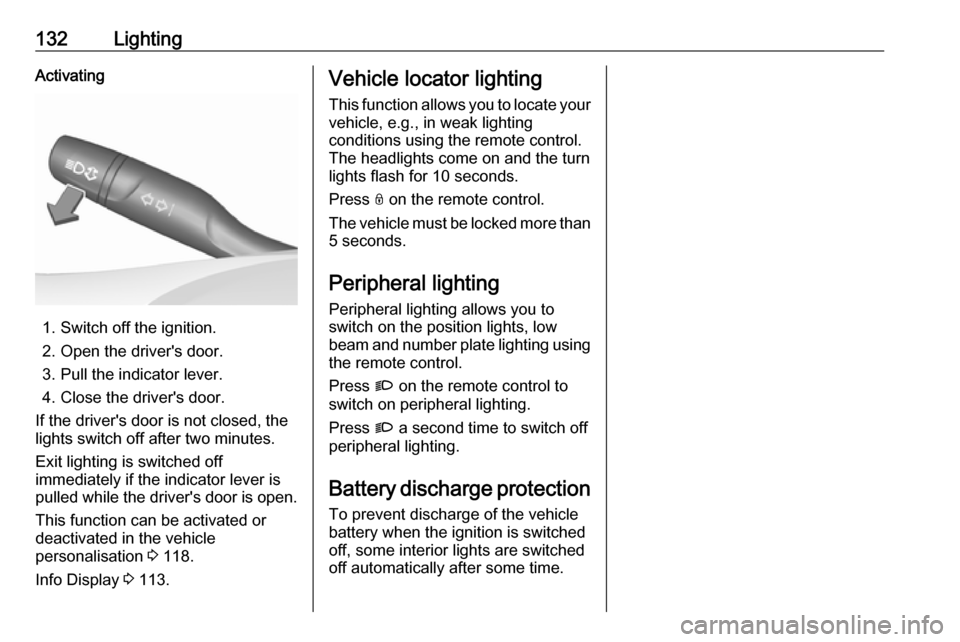
132LightingActivating
1. Switch off the ignition.
2. Open the driver's door.
3. Pull the indicator lever.
4. Close the driver's door.
If the driver's door is not closed, the
lights switch off after two minutes.
Exit lighting is switched off
immediately if the indicator lever is
pulled while the driver's door is open.
This function can be activated or
deactivated in the vehicle
personalisation 3 118.
Info Display 3 113.
Vehicle locator lighting
This function allows you to locate your
vehicle, e.g., in weak lighting
conditions using the remote control.
The headlights come on and the turn
lights flash for 10 seconds.
Press N on the remote control.
The vehicle must be locked more than 5 seconds.
Peripheral lighting
Peripheral lighting allows you to
switch on the position lights, low
beam and number plate lighting using the remote control.
Press G on the remote control to
switch on peripheral lighting.
Press G a second time to switch off
peripheral lighting.
Battery discharge protection
To prevent discharge of the vehicle
battery when the ignition is switched
off, some interior lights are switched
off automatically after some time.
Page 136 of 285
134Climate controlclockwise:increaseanticklockwise:decrease
Air recirculation system u
Press u to activate air recirculation
mode. The LED in the button
illuminates to indicate activation.
Press u again to deactivate air
recirculation mode.
9 Warning
The exchange of fresh air is
reduced in air recirculation mode.
In operation without cooling the air humidity increases, so the
windows may mist up from inside.
The quality of the passenger
compartment air deteriorates,
which may cause the vehicle
occupants to feel drowsy.
In warm and very humid ambient air conditions, the windscreen may mist
up from outside when cold air is
directed towards it. If windscreen
mists up from outside, activate
windscreen wiper and deactivate l.
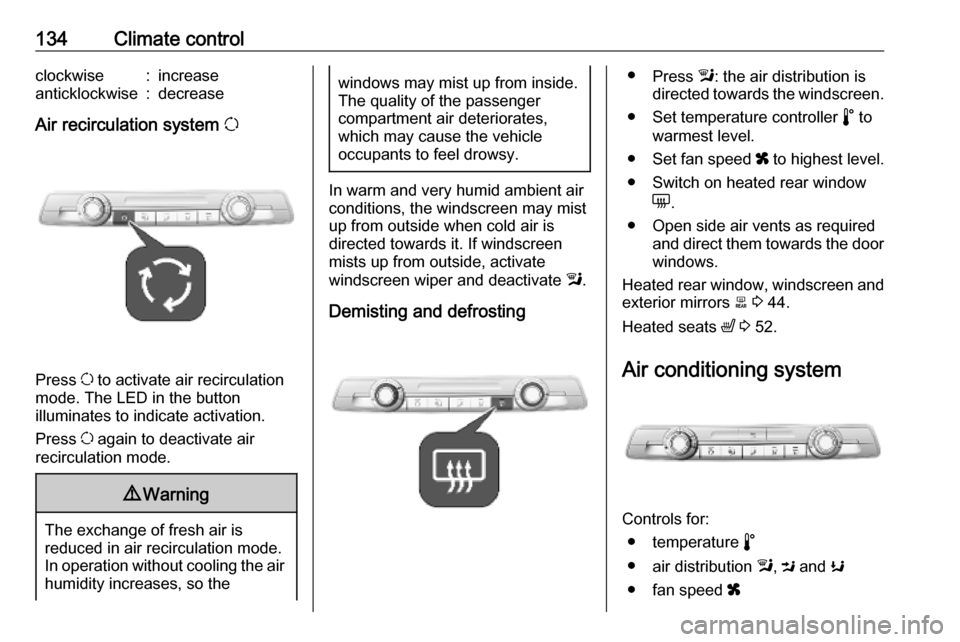
Demisting and defrosting
● Press l: the air distribution is
directed towards the windscreen.
● Set temperature controller n to
warmest level.
● Set fan speed x to highest level.
● Switch on heated rear window e.
● Open side air vents as required and direct them towards the doorwindows.
Heated rear window, windscreen and exterior mirrors b 3 44.
Heated seats ß 3 52.
Air conditioning system
Controls for: ● temperature n
● air distribution l, M and K
● fan speed x
Page 137 of 285
Climate control135● cooling A/C
● air recirculation q
● heated rear window and exterior mirrors e
Heated rear window e 3 44.
Heated exterior mirrors e 3 40.
Temperature n
Adjust the temperature by turning n
to the desired temperature.HI:warmLO:cold
Heating will not be fully effective until
the engine has reached normal
operating temperature.
Air distribution l, M , K
l:to windscreen and front door
windowsM:to head area via adjustable air
ventsK:to foot well
All combinations are possible.
Fan speed x
Adjust the air flow by turning x to the
desired speed.clockwise:increaseanticlockwise:decrease
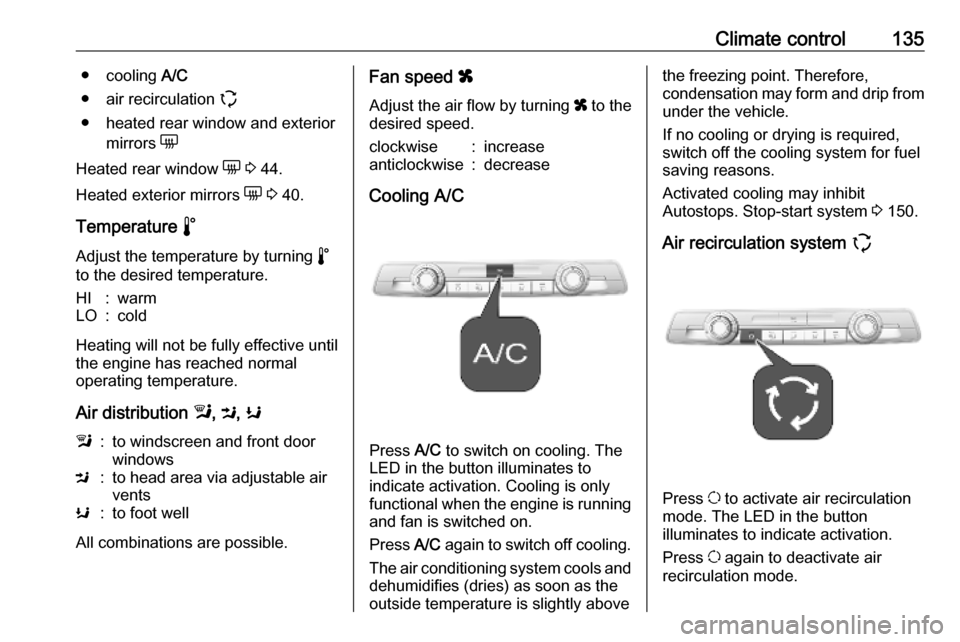
Cooling A/C
Press A/C to switch on cooling. The
LED in the button illuminates to
indicate activation. Cooling is only
functional when the engine is running and fan is switched on.
Press A/C again to switch off cooling.
The air conditioning system cools and
dehumidifies (dries) as soon as the
outside temperature is slightly above
the freezing point. Therefore,
condensation may form and drip from
under the vehicle.
If no cooling or drying is required,
switch off the cooling system for fuel
saving reasons.
Activated cooling may inhibit
Autostops. Stop-start system 3 150.
Air recirculation system q
Press u to activate air recirculation
mode. The LED in the button
illuminates to indicate activation.
Press u again to deactivate air
recirculation mode.
Page 149 of 285
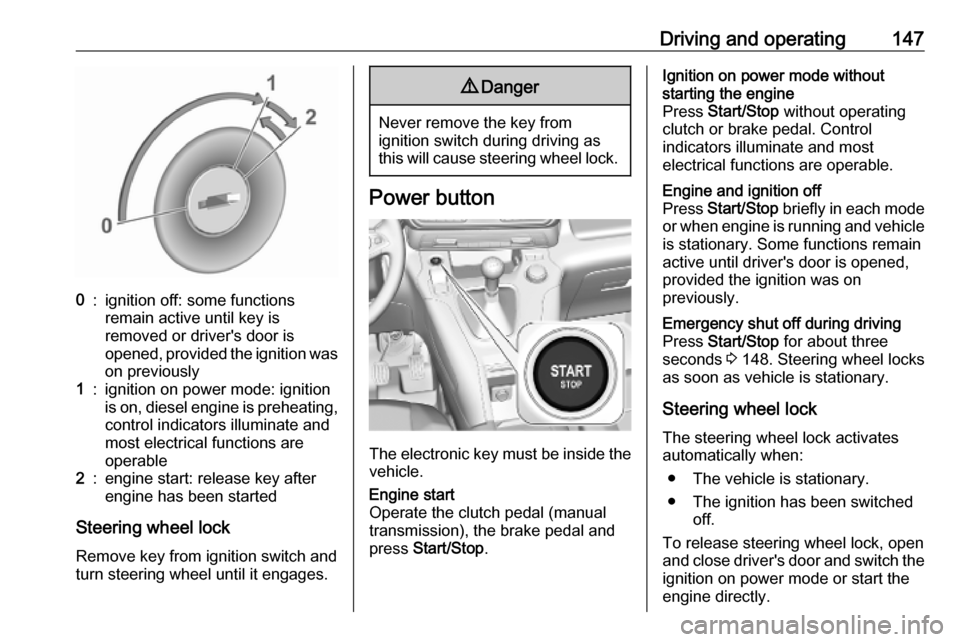
Driving and operating1470:ignition off: some functions
remain active until key is
removed or driver's door is
opened, provided the ignition was
on previously1:ignition on power mode: ignition
is on, diesel engine is preheating, control indicators illuminate and
most electrical functions are
operable2:engine start: release key after
engine has been started
Steering wheel lock
Remove key from ignition switch and
turn steering wheel until it engages.
9 Danger
Never remove the key from
ignition switch during driving as
this will cause steering wheel lock.
Power button
The electronic key must be inside the
vehicle.
Engine start
Operate the clutch pedal (manual
transmission), the brake pedal and
press Start/Stop .Ignition on power mode without
starting the engine
Press Start/Stop without operating
clutch or brake pedal. Control
indicators illuminate and most
electrical functions are operable.Engine and ignition off
Press Start/Stop briefly in each mode
or when engine is running and vehicle
is stationary. Some functions remain
active until driver's door is opened,
provided the ignition was on
previously.Emergency shut off during driving
Press Start/Stop for about three
seconds 3 148. Steering wheel locks
as soon as vehicle is stationary.
Steering wheel lock
The steering wheel lock activates
automatically when:
● The vehicle is stationary.
● The ignition has been switched off.
To release steering wheel lock, open
and close driver's door and switch the ignition on power mode or start the
engine directly.
Page 150 of 285
148Driving and operating9Warning
If the vehicle battery is discharged,
the vehicle must not be towed,
tow-started or jump-started as the
steering wheel lock cannot be
disengaged.
Operation on vehicles with
electronic key system in case of
failure
If either the electronic key fails or the
battery of the electronic key is weak,
a message may be displayed in the
Driver Information Centre.
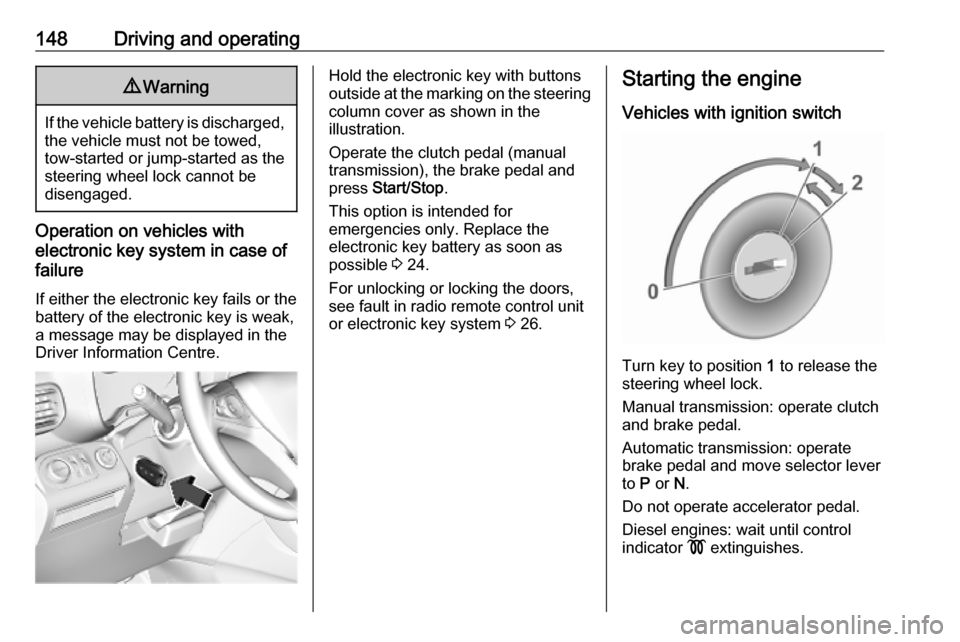
Hold the electronic key with buttons
outside at the marking on the steering column cover as shown in the
illustration.
Operate the clutch pedal (manual
transmission), the brake pedal and
press Start/Stop .
This option is intended for
emergencies only. Replace the
electronic key battery as soon as
possible 3 24.
For unlocking or locking the doors,
see fault in radio remote control unit
or electronic key system 3 26.Starting the engine
Vehicles with ignition switch
Turn key to position 1 to release the
steering wheel lock.
Manual transmission: operate clutch
and brake pedal.
Automatic transmission: operate
brake pedal and move selector lever
to P or N.
Do not operate accelerator pedal.
Diesel engines: wait until control
indicator ! extinguishes.