ignition OPEL COMBO E 2019.75 Manual user
[x] Cancel search | Manufacturer: OPEL, Model Year: 2019.75, Model line: COMBO E, Model: OPEL COMBO E 2019.75Pages: 285, PDF Size: 10.68 MB
Page 180 of 285

178Driving and operatingIf the stopped vehicle ahead was
stopped for a longer time and then
begins to move forward, the green
illuminated vehicle ahead control
indicator . will flash and a warning
chime will sound as a reminder to check traffic before resuming.
When the vehicle ahead drives away,
press the accelerator pedal until
30 km/h and then move the thumb
wheel to SET- or RES+ to resume
adaptive cruise control. If the vehicle
stays stopped for more than five
minutes or if the driver's door is
opened and the driver's seat belt is
unfastened, then the electric parking
brake is applied automatically to hold the vehicle. Control indicator m will
illuminate. To release electric parking
brake, press the accelerator pedal.
Electric parking brake 3 163.9 Warning
When the system is deactivated or
cancelled, the vehicle will no
longer be held at a stop and can
start moving. Be always prepared
to manually apply the brake to hold the vehicle stationary.
Do not leave the vehicle while it is
being held at a stop by adaptive
cruise control. Always move
selector lever to park position P
and switch off the ignition before
leaving the vehicle.
Setting the following distance
When adaptive cruise control detects
a slower moving vehicle in the driving path, it will adjust the vehicle speed tomaintain the following distance
selected by the driver.
The following distance can be set to
close (1 bar), normal (2 bars) or far
(3 bars).
If the engine is running and the
adaptive cruise control is enabled
(grey), you can modify the following
distance setting:
Press Ö, the current setting is shown
in the Driver Information Centre.
Press Ö again to change the following
distance: The new setting is
displayed in the Driver Information
Centre.
The selected following distance is
indicated by full bars in the adaptive
cruise control page.9 Warning
The driver accepts full
responsibility for the appropriate
following distance based on traffic, weather and visibility conditions.
Following distance must be
adjusted or the system switched
off when required by the prevailing
conditions.
Detecting the vehicle ahead
If the system detects a vehicle in the
driving path, the adaptive cruise
control symbol displayed in the Driver
Information Centre changes: - is
changed to w.
Page 181 of 285
Driving and operating179Deactivation of the functionality
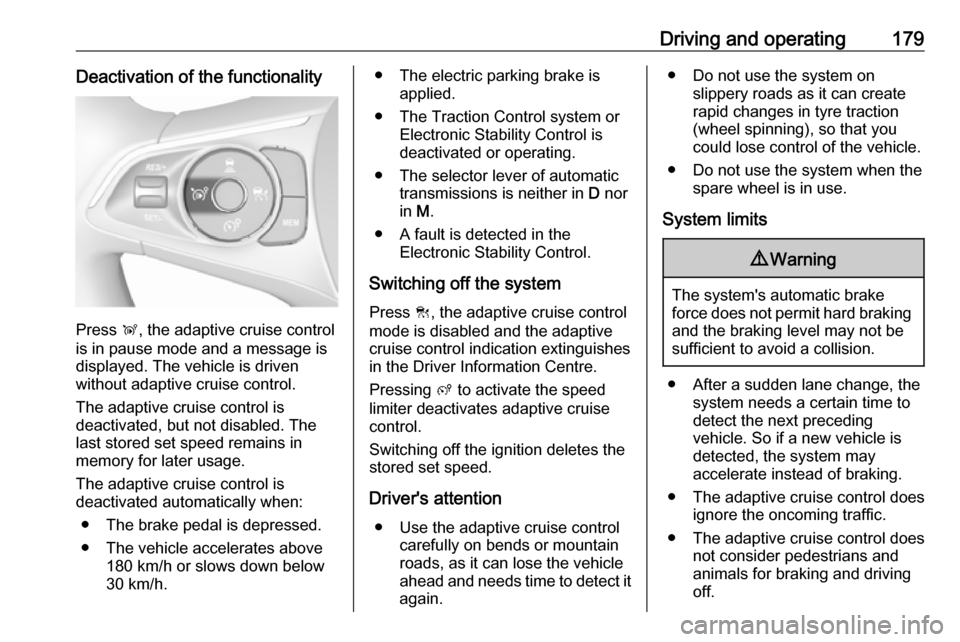
Press Ñ, the adaptive cruise control
is in pause mode and a message is
displayed. The vehicle is driven
without adaptive cruise control.
The adaptive cruise control is
deactivated, but not disabled. The
last stored set speed remains in
memory for later usage.
The adaptive cruise control is
deactivated automatically when:
● The brake pedal is depressed.
● The vehicle accelerates above 180 km/h or slows down below
30 km/h.
● The electric parking brake is applied.
● The Traction Control system or Electronic Stability Control is
deactivated or operating.
● The selector lever of automatic transmissions is neither in D nor
in M.
● A fault is detected in the Electronic Stability Control.
Switching off the system
Press C, the adaptive cruise control
mode is disabled and the adaptive
cruise control indication extinguishes
in the Driver Information Centre.
Pressing ß to activate the speed
limiter deactivates adaptive cruise
control.
Switching off the ignition deletes the
stored set speed.
Driver's attention ● Use the adaptive cruise control carefully on bends or mountainroads, as it can lose the vehicle
ahead and needs time to detect it
again.● Do not use the system on slippery roads as it can create
rapid changes in tyre traction
(wheel spinning), so that you
could lose control of the vehicle.
● Do not use the system when the spare wheel is in use.
System limits9 Warning
The system's automatic brake
force does not permit hard braking and the braking level may not be
sufficient to avoid a collision.
● After a sudden lane change, the system needs a certain time to
detect the next preceding
vehicle. So if a new vehicle is
detected, the system may
accelerate instead of braking.
● The adaptive cruise control does ignore the oncoming traffic.
● The adaptive cruise control does not consider pedestrians and
animals for braking and driving
off.
Page 185 of 285

Driving and operating183In the following cases, forward
collision alert may not detect a vehicle
ahead or sensor performance is
limited:
● driving on winding or hilly roads
● driving during nighttime
● weather limits visibility, such as fog, rain, or snow
● the sensor in the windscreen is blocked by snow, ice, slush, mud,dirt etc.
● the windscreen is damaged or affected by foreign objects, e.g.
stickers
Active emergency braking
Active emergency braking can help to reduce the damage and injury from
crashes with vehicles, pedestrians and obstacles directly ahead, when a
collision can no longer be avoided
either by manual braking or by
steering. Before the active
emergency braking applies, the driver is warned by the forward collision
alert or the front pedestrian protection
alert.Forward collision alert 3 181
Front pedestrian protection 3 185
The feature uses various inputs (e.g.
camera sensor, brake pressure,
vehicle speed) to calculate the
probability of a frontal collision.9 Warning
This system is not intended to
replace the driver responsibility for driving the vehicle and looking
ahead. Its function is limited to
supplemental use only to reduce
the vehicle speed before a
collision.
The system may not react to
animals. After a sudden lane
change, the system needs a
certain time to detect the next
preceding vehicle.
The driver must always be ready
to take action and apply the brakes and steer to avoid collisions.
Functionality
Active emergency braking is
equipped with a front camera and
operates in forward gear above
walking speed up to 85 km/h. The
system detects stationary vehicles
only if the speed does not exceed
80 km/h.
A precondition is that active
emergency braking is not deactivated
in the vehicle personalisation menu
3 118.
If deactivated, m illuminates in the
instrument cluster and a warning
message is displayed in the Driver
Information Centre
If the system has been deactivated
manually, it is reactivated
automatically the next time the
ignition is switched on.
The system includes: ● emergency automatic braking● forward collision alert
● front pedestrian protection
Page 188 of 285

186Driving and operatingFront pedestrian alert
When approaching a detected
pedestrian too quickly, a warning
message is displayed in the Driver
Information Centre. A warning chime
is provided.
Cruise control or Adaptive cruise
control may be disengaged when the
front pedestrian alert occurs.
System limitations In the following cases, front
pedestrian protection may not detect
a pedestrian ahead or sensor
performance is limited:
● vehicle speed is out of range from
5 km/h to 60 km/h in forward gear
● the distance to an pedestrian ahead is more than 40 m
● driving on winding or hilly roads
● driving during nighttime
● weather limits visibility, such as fog, rain, or snow● the sensor in the windscreen is blocked by snow, ice, slush, mud,dirt etc.
● the windscreen is damaged or affected by foreign objects, e.g.
stickers
Parking assist
General information
When attaching a trailer or bicycle
carrier to the trailer hitch, the parking
assist is deactivated.9 Warning
The driver bears full responsibility
for the parking manoeuvre.
Always check the surrounding
area when driving backwards or
forwards while using parking
assist system.
Rear parking assist
The system warns the driver with
acoustic signals against potentially
hazardous obstacles behind the
vehicle in a distance range up to
50 cm while reverse gear is engaged.
The system operates with ultrasonic
parking sensors in the rear bumper.
Activation
Rear parking assist is activated when
reverse gear is engaged and ignition
is switched on. This is confirmed by
an accoustic chime.
Page 189 of 285

Driving and operating187Graphic Info Display: The system is
ready to operate when the LED in the
parking assist button ¼ is not
illuminated.
Colour Info Display: Activate the
parking assist in the vehicle
personalisation 3 118.
Indication
Depending on which side of the
vehicle is closer to an obstacle, you will hear acoustic warning signals inthe vehicle on the respective side.
The interval between the sounds
becomes shorter as the vehicle gets
closer to that obstacle. When the
distance is less than approx. 30 cm,
the sound is continuous.
Additionally, the distance to rear
obstacles is displayed by changing
distance lines in the Info Display
3 113. When the obstacle is very
close, 9 for danger is displayed.
Deactivation
The system is switched off when reverse gear is disengaged. Press ¼
to deactivate the system manually.
The LED in the button illuminates
when the system is deactivated. If the
system has been deactivated
manually, it is not reactivated
automatically the next time the
ignition is switched on.
Graphic Info Display: The system is
switched off when the LED in the
parking assist button ¼ is illuminated.
Colour Info Display: Deactivate the
parking assist in the vehicle
personalisation 3 118. The state of
the system
Front-rear parking assist
The front-rear parking assist
measures the distance between the
vehicle and obstacles in front and
behind the vehicle. It informs and
warns the driver by giving acoustic
signals and display indication.
It uses two different acoustic warning signals for the front and rear
monitoring areas, each with a
different tone frequency.
The system operates with ultrasonic
parking sensors in the rear and front
bumper.
Activation
In addition to the rear parking assist, the front parking assist is triggered
when an obstacle is detected in front
and the speed of the vehicle is below 10 km/h.
Page 195 of 285

Driving and operating193DeactivationThe current park assist manoeuvre is
cancelled via the button to return to
the previous screen in the Info
Display. To deactivate the system
completely, press ¼ in the centre
console.
The system is deactivated
automatically:
● if the ignition is switched off
● if stalling the engine
● if no manoeuvre is started within 5 minutes of selection of the type
of manoeuvre
● after a prolonged stop of the vehicle during a manoeuvre
● if the Electronic Stability Control is triggered
● if the speed of the vehicle exceeds the stated limit
● when the driver interrupts movement of the steering wheel
● after seven manoeuvres for entering a perpendicular parking
slot (a manoeuvre consists of
one rear move or one forward
move)● after ten manoeuvres for entering
or exiting a parallel parking slot
● on opening a door or the load compartment
● if one of the front wheels encounters an obstacle
● parking manoeuvre successfully ended
Deactivation by the driver or by the
system during manoeuvring will be
indicated on the display. Additionally,
an acoustic signal sounds.
The system is switched off
automatically when towing an
electrically connected trailer, bicycle
carrier, etc.
Contact your dealer to switch off the
system for a prolonged period.
Fault
In the event of a fault, a message is
displayed in the Colour Info Display, accompanied by an acoustic signal.
In the event of a fault in the power
steering, C illuminates and a
message is displayed in the Driver
Information Centre.9 Warning
Under certain circumstances,
various reflective surfaces on
objects or clothing as well as
external noise sources may cause the system to fail to detect
obstacles.
Special attention must be paid to
low obstacles which can damage
the lower part of the bumper.
Caution
Performance of the system can be reduced when sensors are
covered, e.g. by ice or snow.
Performance of the parking assist
system can be reduced due to
heavy loading.
Special conditions apply if there
are taller vehicles in the vicinity
(e.g. off-road vehicles, mini vans,
vans). Object identification and correct distance indication in the
upper part of these vehicles
cannot be guaranteed.
Page 198 of 285

196Driving and operatingThe state of the system is stored
when switching off the ignition.
The system is automatically
deactivated when towing an
electrically connected trailer.
Due to adverse weather conditions
such as heavy rain, false detections
may occur.
Fault
In the event of a fault, B flashes for a
few moments in the instrument panel,
accompanied by C and a display
message. Have the cause of the fault remedied by a workshop.
Passenger side camera
The passenger side camera monitors the side of the vehicle.
The camera is mounted at the bottom of the exterior mirror on the
passenger side.
The passenger side view is displayed
in the rear view display 3 116.
The area displayed by the camera is
limited. The distance of the image that
appears on the display differs from
the actual distance.
Switching on
The camera is switched on when the vehicle is running in forward gear and
the passenger side view is selectedfrom the rear view display.
Guidelines
The line represents a distance of
about 4 m beyond the edge of
vehicle's rear bumper.
Switching off The camera is deactivated when
another view type is selected.
Panoramic view system
This system allows views of the
vehicle's surroundings to be
displayed as a nearly 180° picture in
the Info display, like a bird's eye view.
Page 199 of 285
Driving and operating197The system uses:● rear camera, installed in the tailgate
● ultrasonic parking sensors in the rear bumper
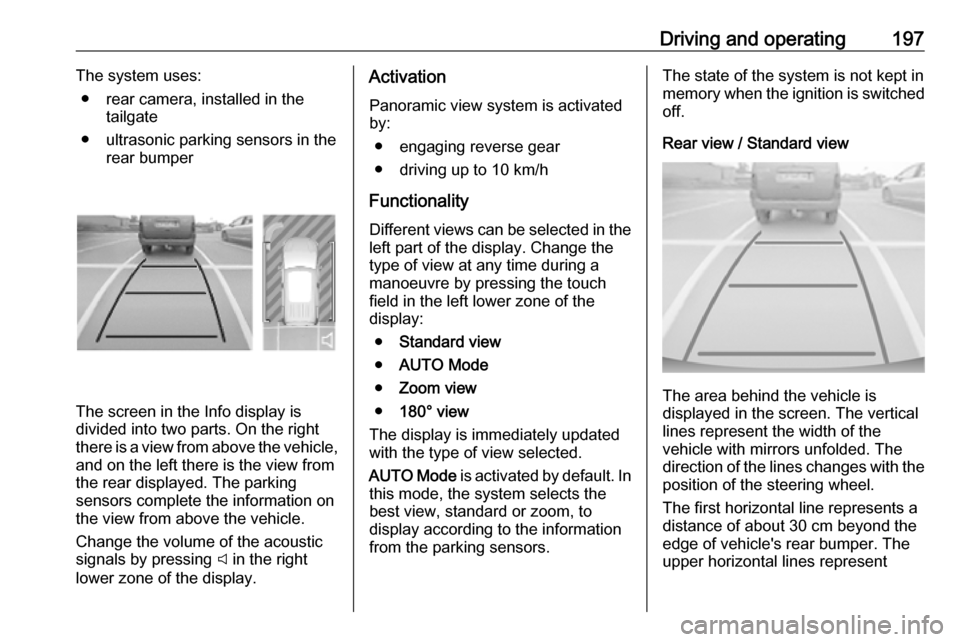
The screen in the Info display is
divided into two parts. On the right
there is a view from above the vehicle,
and on the left there is the view from
the rear displayed. The parking
sensors complete the information on
the view from above the vehicle.
Change the volume of the acoustic
signals by pressing C in the right
lower zone of the display.
Activation
Panoramic view system is activated
by:
● engaging reverse gear
● driving up to 10 km/h
Functionality
Different views can be selected in the left part of the display. Change the
type of view at any time during a
manoeuvre by pressing the touch
field in the left lower zone of the
display:
● Standard view
● AUTO Mode
● Zoom view
● 180° view
The display is immediately updated
with the type of view selected.
AUTO Mode is activated by default. In
this mode, the system selects the
best view, standard or zoom, to
display according to the information
from the parking sensors.The state of the system is not kept in memory when the ignition is switched
off.
Rear view / Standard view
The area behind the vehicle is
displayed in the screen. The vertical
lines represent the width of the
vehicle with mirrors unfolded. The
direction of the lines changes with the position of the steering wheel.
The first horizontal line represents a
distance of about 30 cm beyond the
edge of vehicle's rear bumper. The
upper horizontal lines represent
Page 206 of 285

204Driving and operatingSwitch off the system if the system is
disturbed by tar marks, shadows,
road cracks, temporary or
construction lane markings, or other
road imperfections.9 Warning
Always keep your attention on the
road and maintain proper vehicle
position within the lane, otherwise
vehicle damage, injury or death
could occur.
Lane keep assist does not
continuously steer the vehicle.
The system may not keep the
vehicle in the lane or give an alert,
even if a lane marking is detected.
The steering of the lane keep
assist may not be sufficient to
avoid a lane departure.
The system may not detect hands-
off driving due to external
influences like road condition and
surface and weather. The driver has full responsibility to control the
vehicle and is always required to
keep the hands on the steering
wheel while driving.
Using the system while towing a
trailer or on slippery roads could
cause loss of control of the vehicle
and a crash. Switch the system off.
Driver alert
The driver alert system monitores the driving time and the vigilance of the
driver. Monitoring the vigilance of the
driver is based on the trajectory
variations of the vehicle compared to
the lane markings.
The system includes a driving time
alert combined with driver drowsiness detection.
9 Warning
The system cannot replace the
need for vigilance on the part of
the driver. Taking a break is
recommended as soon as feeling tired or at least every two hours.
Do not take the steering wheel
when feeling tired.
Activation or Deactivation
The system can be activated or
deactivated in the vehicle
personalisation 3 118.
The state of the system stays in
memory when the ignition is switched
off.
Driving time alert The driver gets notified by a pop-up
reminder symbol € in the Driver
Information Centre simultaneously with an acoustic alert if the driver has
not taken a break after 2 hours of
driving at a speed above 65 km/h. The
alert is repeated hourly until the
vehicle is stopped, no matter how
vehicle speed evolves.
Page 207 of 285

Driving and operating205The counting of driving time alert is
reset if one of the following conditions
is met:
● The vehicle has been stationary for more than 15 minutes with theengine running.
● The ignition has been switched off for a few minutes.
● The driver's seat belt has been unfastened and the driver's door
is open.
Note
If the vehicle speed drops below
65 km/h, the system is paused. The driving time is counted again once
the speed is above 65 km/h.
Driver drowsiness detection
The system monitors the driver's level
of vigilance. A camera at the top of the windscreen detects variations in
trajectory compared to the lane
markings. This system is particularly
suited to fast roads (speed higher
than 65 km/h).
If the trajectory of the vehicle
suggests a certain level of
drowsiness or inattention by thedriver, the system triggers the first
level of alert. The driver is notified by
a message and an audible signal is
given.
After three first level alerts, the
system triggers a new alert with a
message, accompanied by a more
pronounced audible signal.
In certain driving conditions (poor
road surface or strong winds), the
system may give alerts independent of the driver's level of vigilance.
The driver drowsiness detection is reinitialised when the ignition has
been switched off for a few minutes or the speed remains below 65 km/h for
a few minutes.
System limitationsIn the following situations, the system
may not operate properly or even not
operate at all:
● poor visibility caused by inadequate lighting of the
roadway, falling snow, heavy
rain, dense fog etc.● dazzle caused by headlamps of oncoming vehicles, low sun,
reflections on damp roads,
leaving a tunnel, alternating
shade and light etc.
● windscreen area in front of the camera covered by dirt, snow,
stickers etc.
● no lane markings detected or multiple lane markings due to
roadworks
● close vehicles ahead
● winding roads or narrow roads