Fog OPEL COMBO E 2019 User Guide
[x] Cancel search | Manufacturer: OPEL, Model Year: 2019, Model line: COMBO E, Model: OPEL COMBO E 2019Pages: 279, PDF Size: 10.43 MB
Page 183 of 279

Driving and operating1819Warning
Forward collision alert is just a
warning system and does not
apply the brakes. When
approaching a vehicle ahead too
rapidly, it may not provide you
enough time to avoid a collision.
The driver accepts full
responsibility for the appropriate
following distance based on traffic, weather and visibility conditions.
The complete attention of the
driver is always required while
driving. The driver must always be
ready to take action and apply the
brakes.
Caution
The colour lighting of this control
indicator does not correspond to
local traffic laws on following
distance. The driver bears full
responsibility for maintaining safe
following distance according to
applicable traffic rules, weather
and road conditions etc. at all
times.
Selecting the alert sensitivity
The alert sensitivity has to be set to
close, normal or distant in the vehicle personalisation menu 3 119.
The chosen setting will remain until it
is changed. The alert timing will vary
based on vehicle speed. The faster
the vehicle speed, the farther away
the alert will occur. Consider traffic
and weather conditions when
selecting the alert timing.
Deactivation The system can only be deactivated
by deactivating the active emergency
braking in the vehicle personalisation
3 119.
System limitations
Forward collision alert is designed to
warn on vehicles only, but may react
also to other objects.
In the following cases, forward
collision alert may not detect a vehicle ahead or sensor performance is
limited:
● driving on winding or hilly roads
● driving during nighttime
● weather limits visibility, such as fog, rain, or snow
● the sensor in the windscreen is blocked by snow, ice, slush, mud,dirt etc.
● the windscreen is damaged or affected by foreign objects, e.g.
stickers
Active emergency braking
Active emergency braking can help to reduce the damage and injury from
crashes with vehicles, pedestrians
and obstacles directly ahead, when a
collision can no longer be avoided
either by manual braking or by
steering. Before the active
emergency braking applies, the driver is warned by the forward collision
alert 3 180 or the front pedestrian
protection alert 3 184.
Page 186 of 279

184Driving and operatingSystem limitations
In some cases, the active emergency braking system may provide an
automatic braking in situations that
seem to be unnecessary, for instance
in parking garages, due to traffic signs in a curve or due to vehicles in
another lane. This is normal
operation, the vehicle does not need service. Firmly apply the accelerator
pedal to override the automatic
braking if the situation and the
surroundings permit.
In the following cases, active
emergency braking performance is limited:
● Driving on winding or hilly roads.
● Detecting all vehicles, especially vehicles with a trailer, tractors,
muddy vehicles, etc.
● Detecting a vehicle when weather limits visibility, such as in
fog, rain, or snow.
● Driving during nighttime.● Weather limits visibility, such as fog, rain, or snow.
● The windscreen is damaged or affected by foreign items, e.g.
stickers.
Complete attention is always required while driving, and you should be
ready to take action and apply the
brakes and / or steer the vehicle to
avoid crashes.
Fault
In case the system requires a service, m is illuminated in the instrument
cluster, a message is displayed in the Driver Information Centre and an
audible signal is given.
If the system does not work as it
should do, vehicle messages are
displayed in the Driver Information
Centre.
Vehicle messages 3 118.
Front pedestrian protection Front pedestrian protection may helpto avoid or reduce the harm causedby front-end crashes with pedestrians when driving forward.The system uses the front camera in
the windscreen to detect a pedestrian directly ahead in your path.
Front pedestrian protection can
detect and alert to pedestrians in a
forward gear at speeds between
5 km/h and 60 km/h.
During nighttime driving, system
performance is limited.9 Danger
Front pedestrian braking does not
provide an alert or automatically
brake the vehicle, unless it detects
a pedestrian.
The system may not detect
pedestrians, including children,
when the pedestrian is not directly ahead, not fully visible, not
standing upright, or when part of a
group.
Front pedestrian protection includes:
● detecting front pedestrian ahead● front pedestrian alert
Page 187 of 279

Driving and operating185Front pedestrian protection is
activated together with forward
collision alert.
Forward collision alert 3 180.
Detecting front pedestrian ahead
A pedestrian ahead up to a distance
of approximately 40 m is indicated by
a symbol in the instrument cluster.
Front pedestrian alert When approaching a detected
pedestrian too quickly, a warning
message is displayed in the Driver
Information Centre. A warning chime
is provided.
Cruise control or Adaptive cruise
control may be disengaged when the
front pedestrian alert occurs.
System limitations In the following cases, front
pedestrian protection may not detect
a pedestrian ahead or sensor
performance is limited:● vehicle speed is out of range from
5 km/h to 60 km/h in forward gear
● the distance to an pedestrian ahead is more than 40 m
● driving on winding or hilly roads
● driving during nighttime
● weather limits visibility, such as fog, rain, or snow
● the sensor in the windscreen is blocked by snow, ice, slush, mud,dirt etc.
● the windscreen is damaged or affected by foreign objects, e.g.
stickers
Parking assist
General information
When attaching a trailer or bicycle
carrier to the trailer hitch, the parking
assist is deactivated.9 Warning
The driver bears full responsibility
for the parking manoeuvre.
Always check the surrounding
area when driving backwards or
forwards while using parking
assist system.
Rear parking assist
The rear parking assist makes
parking easier by measuring the
distance between the vehicle and
rear obstacles. It informs and warns
the driver by giving acoustic signals
and display indication.
The system operates with ultrasonic
parking sensors in the rear bumper.
Activation
Rear parking assist is activated when reverse gear is engaged and ignition
is switched on. This is confirmed by
an accoustic chime.
Page 199 of 279

Driving and operating197Always check the surrounding of
the vehicle before driving.
Displayed images may be further
or closer than they appear. The
area displayed is limited and
objects that are close to either
edge of the bumper or under the
bumper are not displayed on the
screen.
System limitations
Caution
For optimal operation of the
system, it is important to keep the
lense of the camera in the tailgate between the number plate lightsalways clean. Rinse the lense with water and wipe with a soft cloth.
Do not clean the lense with a
steam-jet or high-pressure jet
cleaner.
The panoramic view system may not
operate properly when:
● The surrounding is dark.
● The sun or the beam of headlights is shining directly into
the camera lenses.
● During nighttime driving.
● Weather limits visibility, such as fog, rain, or snow.
● The camera lenses are blocked by snow, ice, slush, mud, dirt.
● The vehicle is towing a trailer.
● The vehicle had an accident.
● There are extreme temperature changes.
Rear view camera The view of the camera is displayed
in the Info Display.9 Warning
The rear view camera does not
replace driver vision. Note that
objects that are outside the
camera's field of view and the
parking assist sensors, e.g. below
the bumper or underneath the
vehicle, are not displayed.
Do not reverse or park the vehicle
using only the rear view camera.
Always check the surrounding of
the vehicle before driving.
Switching on
Rear view camera is automatically
activated when reverse gear is
engaged.
Functionality
Page 200 of 279

198Driving and operatingThe camera is mounted in the tailgateor the left rear door.
The area displayed by the camera is
limited. The distance of the image that
appears on the display differs from
the actual distance.
Guidelines
Dynamic guidelines are horizontal
lines at one metre intervals projected
onto the picture to define the distance
to displayed objects.
Trajectory lane of the vehicle is
shown in accordance with the
steering angle.
Deactivation of guidelines
Info Display 3 114.
Vehicle personalisation 3 119.
Switching off The camera is switched off when a
forward gear is engaged.
System limitations The rear view camera may not
operate properly when:
● the surrounding is dark
● the beam of headlights is shining
directly into the camera lenses
● weather limits visibility, such as fog, rain, or snow
● the camera lenses are blocked by snow, ice, slush, mud, dirt.
Clean the lense, rinse with water,
and wipe with a soft cloth
● the tailgate will be opened
● the vehicle is towing an electrically connected trailer,bicycle carrier, etc.● the vehicle had a rear end accident
● there are extreme temperature changes
Lane keep assist Lane keep assist helps to avoid
crashes due to unintentional lane
departures. A front camera located at the top of the windscreen observes
the lane markings between which the
vehicle is driving. If the vehicle
approaches a lane marking, the
steering wheel is gently turned to
position the vehicle back into the lane. The driver will then notice a turning
movement of the steering wheel. Turn
steering wheel in same direction, if
system steers not sufficient. Turn
steering wheel gently into opposite
direction, if lane change is intended.
When the system steers to correct the trajectory of the vehicle, a flashes
yellow in the instrument cluster.
A warning message in the Driver
Information Centre accompanied by a warning chime alerts the driver when
immediate driver´s action is required.
Page 204 of 279

202Driving and operatingdriver, the system triggers the first
level of alert. The driver is notified by
a message and an audible signal is
given.
After three first level alerts, the
system triggers a new alert with a message, accompanied by a more
pronounced audible signal.
In certain driving conditions (poor
road surface or strong winds), the
system may give alerts independent of the driver's level of vigilance.
The driver drowsiness detection is
reinitialised when the ignition has
been switched off for a few minutes or the speed remains below 65 km/h for
a few minutes.
System limitationsIn the following situations, the system
may not operate properly or even not
operate at all:
● poor visibility caused by inadequate lighting of the
roadway, falling snow, heavy
rain, dense fog etc.● dazzle caused by headlamps of oncoming vehicles, low sun,
reflections on damp roads,
leaving a tunnel, alternating
shade and light etc.
● windscreen area in front of the camera covered by dirt, snow,
stickers etc.
● no lane markings detected or multiple lane markings due to
roadworks
● close vehicles ahead
● winding roads or narrow roadsFuel
Fuel for petrol engines The petrol engines are compatible
with bio-fuels that conform to current
and future European standards and
and can be obtained from filling
stations:
Petrol that meets the EN228
standard, mixed with a biofuel
meeting the EN15376 standard.
Fuel for diesel engines The Diesel engines are compatible
with bio-fuels that conform to current and future European standards and
and can be obtained from filling
stations:
Page 212 of 279

210Vehicle careVehicle careGeneral Information...................210
Accessories and vehicle modifications .......................... 210
Vehicle storage ........................211
End-of-life vehicle recovery .....212
Vehicle checks ........................... 212
Performing work ......................212
Bonnet ..................................... 212
Engine oil ................................. 213
Engine coolant ......................... 214
Washer fluid ............................ 215
Brakes ..................................... 215
Brake fluid ............................... 215
Vehicle battery ......................... 215
Diesel fuel system bleeding .....217
Wiper blade replacement ........217
Bulb replacement .......................218
Halogen headlights ..................218
LED headlights ........................ 220
Front fog lights ......................... 220
Front turn lights .......................221
Tail lights ................................. 222
Side turn lights ......................... 224
Number plate light ...................225
Interior lights ............................ 225Electrical system........................225
Fuses ....................................... 225
Engine compartment fuse box . 226
Instrument panel fuse box .......227
Vehicle tools .............................. 228
Tools ........................................ 228
Wheels and tyres .......................229
Winter tyres ............................. 229
Tyre designations ....................230
Tyre pressure .......................... 230
Tyre deflation detection system .................................... 231
Tread depth ............................. 232
Changing tyre and wheel size . 233
Wheel covers ........................... 233
Tyre chains .............................. 233
Tyre repair kit .......................... 234
Wheel changing .......................237
Spare wheel ............................ 238
Jump starting ............................. 242
Towing ....................................... 243
Towing the vehicle ...................243
Towing another vehicle ...........244
Appearance care .......................245
Exterior care ............................ 245
Interior care ............................. 247General Information
Accessories and vehiclemodifications
We recommend the use of genuine
parts and accessories and factory approved parts specific for your
vehicle type. We cannot assess or guarantee reliability of other products
- even if they have a regulatory or
otherwise granted approval.
Any modification, conversion or other changes made to standard vehicle
specifications (including, without
limitation, software modifications,
modifications of the electronic control
units) may invalidate the warranty
offered by Opel. Furthermore, such
changes may affect driver assistance
systems, may impact fuel
consumption, CO 2 emissions and
other emissions of the vehicle and
cause the vehicle to no longer
conform to the operating permit,
impacting the validity of your vehicle
registration.
Page 222 of 279
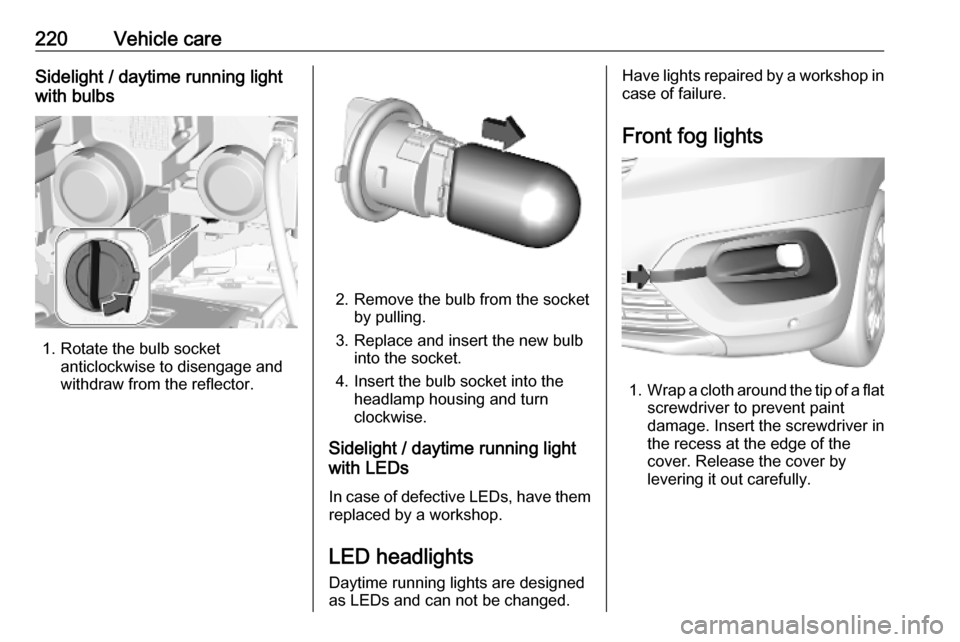
220Vehicle careSidelight / daytime running light
with bulbs
1. Rotate the bulb socket anticlockwise to disengage and
withdraw from the reflector.
2. Remove the bulb from the socket by pulling.
3. Replace and insert the new bulb into the socket.
4. Insert the bulb socket into the headlamp housing and turn
clockwise.
Sidelight / daytime running light
with LEDs
In case of defective LEDs, have them replaced by a workshop.
LED headlights Daytime running lights are designedas LEDs and can not be changed.
Have lights repaired by a workshop in
case of failure.
Front fog lights
1. Wrap a cloth around the tip of a flat
screwdriver to prevent paint
damage. Insert the screwdriver in
the recess at the edge of the
cover. Release the cover by
levering it out carefully.
Page 225 of 279
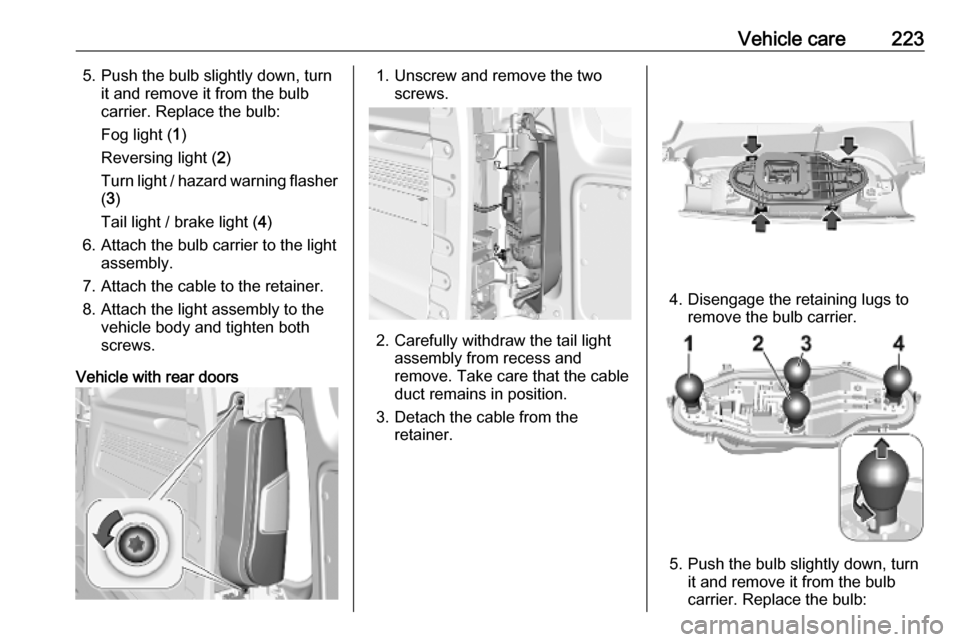
Vehicle care2235. Push the bulb slightly down, turnit and remove it from the bulb
carrier. Replace the bulb:
Fog light ( 1)
Reversing light ( 2)
Turn light / hazard warning flasher ( 3 )
Tail light / brake light ( 4)
6. Attach the bulb carrier to the light assembly.
7. Attach the cable to the retainer.
8. Attach the light assembly to the vehicle body and tighten both
screws.
Vehicle with rear doors1. Unscrew and remove the two screws.
2. Carefully withdraw the tail lightassembly from recess and
remove. Take care that the cable
duct remains in position.
3. Detach the cable from the retainer.
4. Disengage the retaining lugs toremove the bulb carrier.
5. Push the bulb slightly down, turnit and remove it from the bulb
carrier. Replace the bulb:
Page 226 of 279
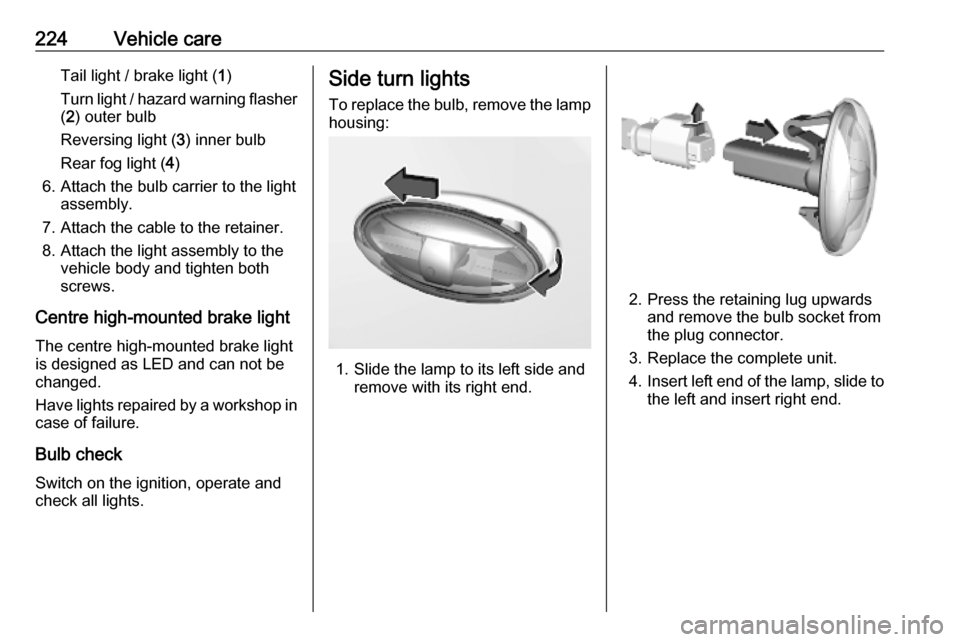
224Vehicle careTail light / brake light (1)
Turn light / hazard warning flasher ( 2 ) outer bulb
Reversing light ( 3) inner bulb
Rear fog light ( 4)
6. Attach the bulb carrier to the light assembly.
7. Attach the cable to the retainer. 8. Attach the light assembly to the vehicle body and tighten both
screws.
Centre high-mounted brake light The centre high-mounted brake light
is designed as LED and can not be
changed.
Have lights repaired by a workshop in case of failure.
Bulb check
Switch on the ignition, operate and
check all lights.Side turn lights
To replace the bulb, remove the lamp
housing:
1. Slide the lamp to its left side and remove with its right end.
2. Press the retaining lug upwards and remove the bulb socket from
the plug connector.
3. Replace the complete unit.
4. Insert left end of the lamp, slide to
the left and insert right end.