park assist OPEL CORSA E 2017.5 Manual user
[x] Cancel search | Manufacturer: OPEL, Model Year: 2017.5, Model line: CORSA E, Model: OPEL CORSA E 2017.5Pages: 269, PDF Size: 7.97 MB
Page 110 of 269

108Instruments and controlsAuto Rear Defog: Automatically
activates heated rear window.
● Collision / Detection Systems
Park Assist : Activates or
deactivates the ultrasonic
parking assist. Activation is
selectable with or without
attached trailer coupling.
Side Blind Zone Alert : Activates
or deactivates side blind zone alert.
● Comfort and Convenience
Chime Volume : Changes the
volume of warning chimes.
Personalization By Driver :
Activates or deactivates the
personalisation function.
Auto Wipe in Reverse Gear :
Activates or deactivates
automatic switching on of the
rear window wiper when reverse gear is engaged.
● Lighting
Vehicle Locator Lights : Activates
or deactivates the entry lighting.Exit Lighting : Activates or
deactivates and changes the
duration of exit lighting.
● Power Door Locks
Unlocked Door Anti Lock Out :
Activates or deactivates the door
locking function while a door is open.
Auto Door Lock : Activates or
deactivates the automatic door locking function after switching
on ignition.
Auto Door Unlock : Changes the
configuration to unlock only the
driver's door or the whole vehicle after switching off ignition.
Delayed Door Lock : Activates or
deactivates the delayed door
locking function. This feature
delays the actual locking of the
doors until all doors are closed.
● Remote Lock, Unlock, Start
Remote Unlock Light Feedback :
Activates or deactivates the
hazard warning flasher feedback whilst unlocking.
Remote Door Unlock : Changes
the configuration to unlock onlythe driver's door or the whole
vehicle whilst unlocking.
Relock Remotely Unlocked
Doors : Activates or deactivates
the automatic relock function
after unlocking without opening
the vehicle.
Page 119 of 269

Lighting117The high beam assist is activated by
pushing the indicator lever twice at a
speed above 40 km/h.
The green control indicator f
illuminates continuously when the
assist is activated, the blue one 7
illuminates when high beam is on.
Control indicator f 3 96.
Deactivation
Push indicator lever once. It is also
deactivated when front fog lights are switched on.
If a headlight flash is activated when
the high beam is on, the high beam
assist will be deactivated.
If a headlight flash is activated when
the high beam is off, the high beam assist will remain activated.
The latest setting of the high beam
assist will remain after the ignition is
switched on again.Corner lighting
On tight bends or when turning off,
depending on the steering angle or
the indicator light signal, an additional left or right reflector is switched on
which illuminates the road in the
direction of travel. It is activated up to
a speed of 40 km/h.
Reversing function
To assist driver's orientation when
parking, both corner lights and
reversing light illuminate when
headlights are on and reverse gear is engaged. They remain illuminated for
a short time after disengaging reverse gear or until driving faster than
7 km/h in a forward gear.
Hazard warning flashers
Operated by pressing ¨.
In the event of an accident with airbag
deployment, the hazard warning
flashers are activated automatically.
Page 135 of 269
Driving and operating133Driving and
operatingDriving hints ............................... 134
Control of the vehicle ...............134
Starting and operating ...............134
New vehicle running-in ............134
Ignition switch positions ...........134
Retained power off ..................135
Starting the engine ..................135
Overrun cut-off ........................ 136
Stop-start system ....................136
Parking .................................... 139
Engine exhaust .......................... 140
Diesel particle filter ..................140
Catalytic converter ...................141
Automatic transmission ..............141
Transmission display ...............141
Selector lever .......................... 141
Manual mode ........................... 142
Electronic driving programmes 143
Fault ........................................ 143
Interruption of power supply ....143
Manual transmission ..................144Manual transmission automa‐
ted .............................................. 145
Transmission display ...............145
Starting the engine ..................145
Selector lever .......................... 146
Manual mode ........................... 148
Electronic driving programmes 148
Fault ........................................ 148
Brakes ........................................ 149
Antilock brake system .............149
Parking brake .......................... 150
Brake assist ............................. 150
Hill start assist ......................... 150
Ride control systems .................151
Traction Control system ..........151
Electronic Stability Control ......152
City mode ................................ 153
Driver assistance systems .........154
Cruise control .......................... 154
Speed limiter ........................... 156
Forward collision alert .............157
Following distance indication ...160
Parking assist .......................... 160
Side blind spot alert .................170
Rear view camera ...................172
Traffic sign assistant ................173
Lane departure warning ..........176
Fuel ............................................ 177
Fuel for petrol engines .............177Fuel for diesel engines ............178
Fuel for liquid gas operation ....179
Refuelling ................................ 181
Fuel consumption - CO 2-
Emissions ............................... 184
Trailer hitch ................................ 185
General information .................185
Driving characteristics and towing tips .............................. 185
Trailer towing ........................... 185
Towing equipment ...................186
Trailer stability assist ...............189
Page 152 of 269

150Driving and operatingParking brake
Manual parking brake9 Warning
Always apply parking brake firmly
without operating the release
button, and apply as firmly as
possible on a downhill or uphill
slope.
To release the parking brake, pull
the lever up slightly, press the
release button and fully lower the
lever.
To reduce the operating forces of
the parking brake, depress the
brake pedal at the same time.
Control indicator R 3 93.
Brake assist
If the brake pedal is depressed
quickly and forcefully, maximum
brake force is automatically applied
(full braking).
Maintain steady pressure on the
brake pedal for as long as full braking is required. Maximum brake force is
automatically reduced when the
brake pedal is released.
Hill start assist
The system helps prevent unintended movement when driving away on
inclines.
When releasing the brake pedal after
stopping on an incline, the brakes
remain on for a further two seconds.
The brakes release automatically as
soon as the vehicle begins to
accelerate or the two seconds holding
time is over.
The hill start assist is not active during
an Autostop.
Page 155 of 269
Driving and operating153Fault
If there is a fault in the system, the control indicator b illuminates
continuously and a message or a
warning code appears in the Driver
Information Centre. The system is not operational.
Have the cause of the fault remedied
by a workshop.
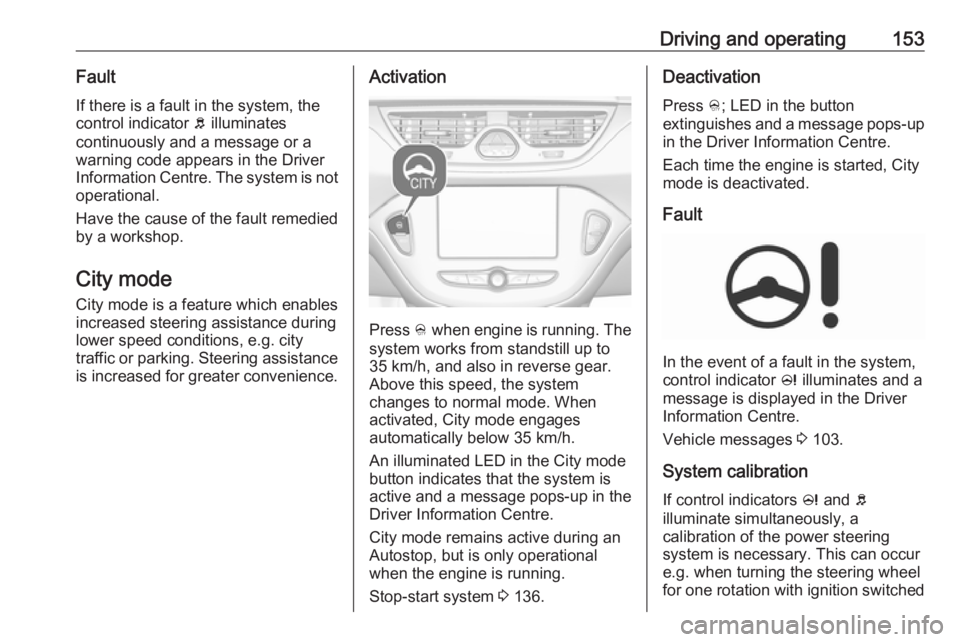
City mode City mode is a feature which enables
increased steering assistance during
lower speed conditions, e.g. city
traffic or parking. Steering assistance
is increased for greater convenience.Activation
Press B when engine is running. The
system works from standstill up to
35 km/h, and also in reverse gear. Above this speed, the system
changes to normal mode. When
activated, City mode engages
automatically below 35 km/h.
An illuminated LED in the City mode
button indicates that the system is
active and a message pops-up in the
Driver Information Centre.
City mode remains active during an
Autostop, but is only operational when the engine is running.
Stop-start system 3 136.
Deactivation
Press B; LED in the button
extinguishes and a message pops-up in the Driver Information Centre.
Each time the engine is started, City
mode is deactivated.
Fault
In the event of a fault in the system,
control indicator c illuminates and a
message is displayed in the Driver
Information Centre.
Vehicle messages 3 103.
System calibration
If control indicators c and b
illuminate simultaneously, a
calibration of the power steering
system is necessary. This can occur
e.g. when turning the steering wheel
for one rotation with ignition switched
Page 162 of 269

160Driving and operatingFollowing distanceindication
The following distance indication
displays the distance to a preceding
moving vehicle. The front camera in
the windscreen is used to detect the
distance of a vehicle directly ahead in
the vehicle's path. It is active at
speeds above 40 km/h.
When a preceding vehicle is detected
ahead, the distance is indicated in
seconds, displayed on a page in the
Driver Information Centre 3 97 . Press
MENU on the turn signal lever to
select ? and turn the adjuster
wheel to choose following distance
indication page.
The minimum indicated distance is
0.5 seconds.
If there is no vehicle ahead or the
vehicle ahead is out of range, two
dashes will be displayed: -.- sec.
Parking assist
General information
When the trailer hitch is attached,
change the configuration settings in
the vehicle personalisation menu in
the Info-Display. Vehicle
personalisation 3 106.
When attaching a trailer or bike
carrier to the trailer hitch, the parking
assist is deactivated.
Rear parking assist9 Warning
It is the driver who bears full
responsibility for the parking
manoeuvre.
Always check the surrounding
area while reversing and using the rear parking assist system.
The rear parking assist makes
parking easier by measuring the
distance between the vehicle and
rear obstacles. It informs and warns
the driver via acoustic signals and
display indication.
Page 163 of 269

Driving and operating161
The system has four ultrasonic
parking sensors in the rear bumper.
Activation
When reverse gear is engaged, the
system is ready to operate
automatically.
An illuminated LED in the parking
assist button r indicates that the
system is ready to operate.
Indication
The system warns the driver with
acoustic signals against potentially
hazardous obstacles behind the
vehicle in a distance range up to
1.5 metres. The interval between the
sounds becomes shorter as the
vehicle gets closer to that obstacle.
When the distance is less than
approx. 30 cm, the sound is
continuous.
Additionally, the distance to rear obstacles is displayed by changing
distance lines in the Driver
Information Centre with Uplevel
display 3 97 or, depending on the
version, on the Colour-Info-Display
3 101.
The distance indication can be
inhibited by vehicle messages with a
higher priority. After approving the
message by pressing SET/CLR on
the turn signal lever, distance
indication appears again.Deactivation
The system automatically switches
off when reverse gear is disengaged.
Manual deactivation is also possible
by pressing the parking assist button
r .
In both cases, the LED in the button
extinguishes.
Fault
In the event of a fault or if the system does not work temporarily, e.g.
because of high external noise level
or other interference factors, the LED
in the button flashes for
three seconds then extinguishes.
Page 164 of 269

162Driving and operatingControl indicator r illuminates in
the instrument cluster 3 94 or a
message is indicated in the Driver
Information Centre.
Front-rear parking assist9 Warning
The driver bears full responsibility
for the parking manoeuvre.
Always check the surrounding
area when driving backwards or
forwards while using parking
assist system.
The front-rear parking assist
measures the distance between the vehicle and obstacles in front and
behind the vehicle. It informs and
warns the driver via acoustic signals
and display indication.
It uses two different acoustic warning
signals for the front and rear
monitoring areas, each with a
different tone frequency.
The system has four ultrasonic
parking sensors each in the rear and front bumper.
Activation
When reverse gear is engaged, the
front and rear parking assist is ready
to operate.
The system is also activated
automatically at a speed up to
11 km/h.An illuminated LED in the parking
assist button r indicates that the
system is ready to operate.
If r is switched off within an ignition
cycle, the front parking assist is
deactivated. If vehicle speed has
exceeded 25 km/h beforehand,
parking assist will be reactivated when speed drops below 11 km/h.
Indication
The system warns the driver with
acoustic signals against potentially
hazardous obstacles in front of the
vehicle in a distance range up to
80 cm and against potentially
Page 165 of 269

Driving and operating163hazardous obstacles behind the
vehicle in a distance range up to 1.5
metres.
Depending on which side of the
vehicle is closer to an obstacle, you
will hear acoustic warning signals in
the vehicle on the respective side.
The interval between the sounds
becomes shorter as the vehicle gets closer to that obstacle. When the
distance is less than approx. 30 cm, the sound is continuous.
Additionally, the distance to rear and
front obstacles is displayed by
changing distance lines in the Driver
Information Centre with Uplevel
display 3 97 or, depending on the
version, on the Colour-Info-Display
3 101.
The distance indication can be
inhibited by vehicle messages with a
higher priority. After dismissing the message, distance indication
appears again.
The distance to obstacles is shown on the Colour-Info-Display by coloured
zones in front of or behind the vehicle
3 101.
Deactivation
The rear parking assist automatically
switches off when reverse gear is
disengaged.
The front parking assist is deactivated
automatically at a speed above
11 km/h.
Manual deactivation is also possible
by pressing the parking assist button
r .
Page 166 of 269

164Driving and operatingWhen the system is deactivated, the
LED in the button extinguishes and, if
manually deactivated, Park Assist
Off pops-up in the Driver Information
Centre.
After a manual deactivation, the front- rear parking assist is activated again
if r is pressed or if reverse gear is
engaged.
The complete system can be
manually deactivated in the vehicle personalisation menu in the
Info-Display. It remains deactivated
during the ignition cycle or until
activation in personalisation menu
again. Vehicle personalisation 3 106.
Fault
In the event of a fault or if the system
does not work temporarily, e.g.
because of high external noise level
or other interference factors, a
message pops-up in the Driver
Information Centre.
Vehicle messages 3 103.Advanced parking assist9 Warning
The driver bears full responsibility
for accepting the parking slot
suggested by the system and the
parking manoeuvre.
Always check the surrounding
area in all directions when using
the advanced parking assist.
The advanced parking assist
measures a suitable parking slot
while passing, calculates the
trajectory and automatically steers
the vehicle into a parallel or
perpendicular parking slot.
Instructions are given in the Driver
Information Centre 3 97 or,
depending on the version, on the
Colour-Info-Display 3 101 , supported
by acoustic signals.
The driver must control acceleration,
braking and gear shifting, while
steering is done automatically.Advanced parking assist is always
combined with front-rear parking
assist. Both systems use the same
sensors in the front and rear bumper.
Parking assist button D and
operation logic
Advanced parking assist and front-
rear parking assist both use the same button for activation and deactivation:
A brief press of D activates or
deactivates the parking assist.
A long press of D (approx.
one second) activates or deactivates the advanced parking assist, see
separate description below.