lights OPEL CORSA E 2017.5 Manual user
[x] Cancel search | Manufacturer: OPEL, Model Year: 2017.5, Model line: CORSA E, Model: OPEL CORSA E 2017.5Pages: 269, PDF Size: 7.97 MB
Page 121 of 269

Lighting119Parking lights
When the vehicle is parked, the
parking lights on one side can be
activated:
1. Switch off the ignition.
2. Move the turn signal lever all the way up (right parking lights) or
down (left parking lights).
Confirmed by an acoustic signal and
the corresponding turn signal control
indicator.
Reversing lights
The reversing light comes on when
the ignition is on and reverse gear is
selected.
Misted light covers
The inside of the light housing may
mist up briefly in poor, wet and cold weather conditions, in heavy rain or
after washing. The mist disappears
quickly by itself; to help switch on the
headlights.Interior lighting
Instrument panel illumination control
Brightness of the following lights can
be adjusted when the exterior lights
are on:
● instrument panel illumination
● dome light
● Info-Display
● illuminated switches and operation elements
Turn thumb wheel A and hold until
the desired brightness is obtained.
Page 122 of 269

120LightingOn vehicles with automatic light
control, the brightness can only be
adjusted when the exterior lights are
on and the light sensor detects night
conditions.
Interior lights
Front courtesy light
Operate rocker switch:
centre
position
w:automatic switching on
when opening a door.
Turns off after a delaypress I:permanently onpress 0:permanently offFront courtesy light with reading
lights
When opening a door, the courtesylight automatically switches on and
then off after a delay.
Pressing c switches courtesy light
on or off manually.
Switching on ignition will turn off
courtesy light.
When exterior lighting has been on
previously, courtesy light will turn on
when ignition is switched off.
Note
In the event of an accident with
airbag deployment, the courtesy lights are turned on automatically.
Rear courtesy lights
Left and right lamps are operated
separately.
Operate rocker switches:
centre
position:automatic switching on
when opening a door.
Turns off after a delaypress I:permanently onpress 0:permanently off
Page 123 of 269

Lighting121Dome light
Spotlight incorporated in the inside
mirror housing comes on when
headlights are switched on.
Dome light illuminates gear shifting
console indirectly.
Reading lights
Operated by pressing 2 for the left
and right side.
Lighting features
Entry lighting
Welcome lighting
The following lights are switched on
for a short time by unlocking the
vehicle with the radio remote control:
● headlights
● tail lights
● number plate lights
● instrument panel light
● interior lights
Some functions are only operable
when it is dark outside, to facilitate locating the vehicle.
Lighting switches off immediately
when the ignition key is turned to
position 1 3 134.
Activation or deactivation of this
function can be changed in the
Info-Display.
Vehicle personalisation 3 106.
The settings can be saved for the key being used 3 24.The following lights will additionally
switch on when the driver's door is
opened:
● illumination of all switches
● Driver Information Centre
Exit lighting
The following lights switch on if the
key is removed from the ignition
switch:
● interior lights
● instrument panel light (only when
it is dark)
They will switch off automatically after
a delay and will be activated again if
the driver's door is opened.
Path lighting Headlights, tail lights and number
plate lights illuminate the surrounding area for an adjustable time after
leaving the vehicle.
Page 124 of 269
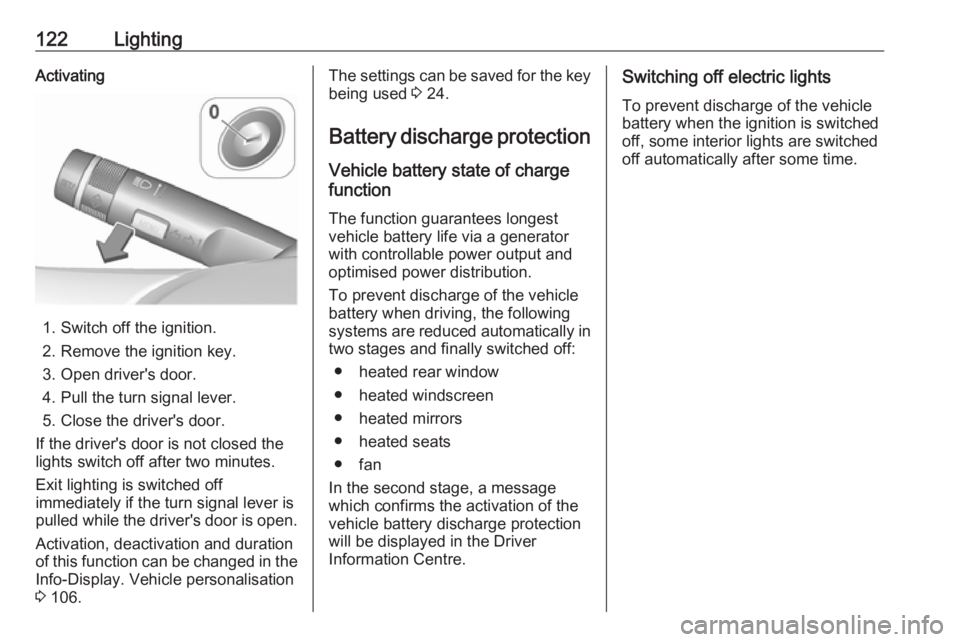
122LightingActivating
1. Switch off the ignition.
2. Remove the ignition key.
3. Open driver's door.
4. Pull the turn signal lever.
5. Close the driver's door.
If the driver's door is not closed the
lights switch off after two minutes.
Exit lighting is switched off
immediately if the turn signal lever is
pulled while the driver's door is open.
Activation, deactivation and duration
of this function can be changed in the Info-Display. Vehicle personalisation
3 106.
The settings can be saved for the key
being used 3 24.
Battery discharge protection
Vehicle battery state of charge
function
The function guarantees longestvehicle battery life via a generator
with controllable power output and
optimised power distribution.
To prevent discharge of the vehicle
battery when driving, the following
systems are reduced automatically in two stages and finally switched off:
● heated rear window
● heated windscreen
● heated mirrors
● heated seats
● fan
In the second stage, a message
which confirms the activation of the
vehicle battery discharge protection
will be displayed in the Driver
Information Centre.Switching off electric lights
To prevent discharge of the vehicle
battery when the ignition is switched off, some interior lights are switched
off automatically after some time.
Page 148 of 269

146Driving and operatingTransmission automatically shifts to
N upon starting. There may be a slight
delay.
Starting is not possible if all brake
lights fail.
Stop-start-system
Autostop
If the vehicle is at a standstill and
brake pedal is operated, Autostop is
activated automatically.
The engine will be switched off while
the ignition stays on.
An Autostop is indicated by control
indicator D.
Autostart
Release the brake pedal or move selector lever out of D to restart the
engine.
When the engine is restarted, control
indicator D extinguishes in the Driver
Information Centre.
The stop-start system will be disabled
on inclines of 15% or more.
Stop-start-system 3 136.
Selector lever
Always move the selector lever in the
appropriate direction as far as it will
go. Upon release, it automatically
returns to the centre position.
Note
Do not hold the selector lever in an
intermediate position. Not fully
engaging a gear may lead to
malfunction and the error code 81
may be displayed in the Driver
Information Centre.
Return the selector lever to the
centre position. After a short while N
will be displayed in the Driver
Information Centre and the system
will operate normally again.
Vehicle messages 3 103.N:neutral positionD/M:switch between automatic (D)
and manual (M) shift mode.
The transmission display
shows either D or M with the
selected gear<:upshifting in manual mode]:downshifting in manual modeR:reverse gear. Engage only
when vehicle is stationary
If selector lever is moved from R to the
left, D is directly engaged.
If selector lever is moved from D to
< or ], manual mode M is selected
and the transmission shifts.
Page 151 of 269
Driving and operating149Brakes
The brake system comprises two
independent brake circuits.
If a brake circuit fails, the vehicle can
still be braked using the other brake
circuit. However, braking effect is
achieved only when the brake pedal
is depressed firmly. Considerably
more force is needed for this. The
braking distance is extended. Seek the assistance of a workshop before
continuing the journey.
When the engine is not running, the
support of the brake servo unit
disappears once the brake pedal has
been depressed once or twice.
Braking effect is not reduced, but
braking requires significantly greater
force. It is especially important to bear this in mind when being towed.
Control indicator R 3 93.
Antilock brake system
Antilock brake system (ABS)
prevents the wheels from locking.ABS starts to regulate brake pressure as soon as a wheel shows a tendency to lock. The vehicle remains
steerable, even during hard braking.
ABS control is made apparent
through a pulse in the brake pedal
and the noise of the regulation
process.
For optimum braking, keep the brake
pedal fully depressed throughout the
braking process, despite the fact that
the pedal is pulsating. Do not reduce
the pressure on the pedal.
After starting-off the system performs
a self-test which may be audible.
Control indicator u 3 93.
Adaptive brake light
During full braking, all three brake
lights flash for the duration of ABS
control.Fault9 Warning
If there is a fault in the ABS, the
wheels may be liable to lock due
to braking that is heavier than
normal. The advantages of ABS are no longer available. During
hard braking, the vehicle can no longer be steered and may
swerve.
Have the cause of the fault remedied
by a workshop.
Page 174 of 269

172Driving and operatingFault
Occasional missed alerts can occur
under normal circumstances and will
increase in wet conditions.
Side blind spot alert does not operate when the left or right corners of the
rear bumper are covered with mud,
dirt, snow, ice, slush, or in heavy
rainstorms. Cleaning instructions
3 233.
In the event of a fault in the system or
if the system does not work due to
temporary conditions, a message is
displayed in the Driver Information
Centre. Seek the assistance of a
workshop.
Rear view camera
The rear view camera assists the
driver when reversing by displaying a
view of the area behind the vehicle.
The view of the camera is displayed
in the Colour-Info-Display.9 Warning
The rear view camera does not
replace driver vision. Note that
objects that are outside the
camera's field of view and the
advanced parking assist sensors,
e.g. below the bumper or
underneath the vehicle, are not
displayed.
Do not reverse the vehicle by only looking at the Info-Display and
check the surrounding area
behind and around the vehicle
before reversing.
Activation
Rear view camera is automatically
activated when reverse gear is
engaged.
Functionality
The camera is mounted between the
number plate lights and has a viewing angle of 130°.
Page 175 of 269

Driving and operating173The area displayed by the camera is
limited. The distance of the image that
appears on the display differs from
the actual distance.
Warning symbols
Warning symbols are indicated as
triangles 9 on the picture, which show
obstacles detected by the rear
sensors of the advanced parking
assist.
Additionally 9 appears on the top line
of the Info-Display with the warning to
check the vehicle surrounding.
Deactivation
The camera is deactivated when a certain forward speed is exceeded or
if reverse gear is not engaged for
approx. ten seconds.
Rear view camera can be manually deactivated in the vehicle
personalisation menu in the
Info-Display. Vehicle personalisation
3 106.Deactivation of guiding lines and
warning symbols
Activation or deactivation of the visual guiding lines and the warning
symbols can be changed by touch
buttons in the lower zone of the
display.
Fault
Fault messages are displayed with a
9 on the top line of the Info-Display.
The rear view camera may not
operate properly when:
● The surrounding is dark.
● The sun or the beam of headlights is shining directly into
the camera lens.
● Ice, snow, mud, or anything else covers the camera lens. Clean
the lens, rinse it with water, and
wipe it with a soft cloth.
● The vehicle is towing a trailer.
● The vehicle had a rear end accident.
● There are extreme temperature changes.Traffic sign assistant
Functionality
The traffic sign assistant system
detects designated traffic signs via a
front camera and displays them in the Driver Information Centre.
Traffic signs, which will be detected,
are:
Limit and no passing signs ● speed limit
● no passing
● end of speed limit
● end of no passing
Page 183 of 269

Driving and operating181Note
In the event of an accident, switch off
the ignition and lights.
Refuelling9 Danger
Before refuelling, switch off
ignition and any external heaters
with combustion chambers.
Follow the operating and safety
instructions of the filling station
when refuelling.
9 Danger
Fuel is flammable and explosive.
No smoking. No naked flames or
sparks.
If you can smell fuel in your
vehicle, have the cause of this
remedied immediately by a
workshop.
Caution
In case of misfuelling, do not
switch on ignition.
Fuel filler flap is located at right rear
side of the vehicle.
The fuel filler flap can only be opened
if the vehicle is unlocked. Release the
fuel filler flap by pushing the flap.
To open, turn the cap slowly
anticlockwise.
Page 192 of 269
190Vehicle careVehicle careGeneral Information...................191
Accessories and vehicle modifications .......................... 191
Vehicle storage ........................191
End-of-life vehicle recovery .....192
Vehicle checks ........................... 192
Performing work ......................192
Bonnet ..................................... 192
Engine oil ................................. 193
Engine coolant ......................... 194
Washer fluid ............................ 195
Brakes ..................................... 196
Brake fluid ............................... 196
Vehicle battery ......................... 196
Diesel fuel system bleeding .....198
Wiper blade replacement ........198
Bulb replacement .......................199
Halogen headlights ..................199
Xenon headlights .....................201
Fog lights ................................. 202
Front turn signal lights .............203
Tail lights ................................. 203
Side turn signal lights ..............205
Centre high-mounted brake light ......................................... 206Number plate light...................206
Interior lights ............................ 206
Instrument panel illumination ...206
Electrical system ........................207
Fuses ....................................... 207
Engine compartment fuse box . 208
Instrument panel fuse box .......210
Vehicle tools .............................. 212
Tools ........................................ 212
Wheels and tyres .......................213
Winter tyres ............................. 213
Tyre designations ....................213
Tyre pressure .......................... 213
Tyre pressure monitoring system .................................... 215
Tread depth ............................. 219
Changing tyre and wheel size . 219
Wheel covers ........................... 219
Tyre chains .............................. 220
Tyre repair kit .......................... 220
Wheel changing .......................225
Spare wheel ............................ 228
Jump starting ............................. 230
Towing ....................................... 231
Towing the vehicle ...................231
Towing another vehicle ...........232Appearance care .......................233
Exterior care ............................ 233
Interior care ............................. 236