wheel OPEL CORSA E 2017.5 Workshop Manual
[x] Cancel search | Manufacturer: OPEL, Model Year: 2017.5, Model line: CORSA E, Model: OPEL CORSA E 2017.5Pages: 269, PDF Size: 7.97 MB
Page 159 of 269

Driving and operating157DeactivationPress y: speed limiter is deactivated
and the vehicle can be driven without
speed limit.
The stored limited speed is indicated
in brackets in the Driver Information
Centre. Additionally, a corresponding message appears.
Resume limit speed Turn thumb wheel to RES/+. The
stored speed limit will be obtained
and is indicated without brackets in
the Driver Information Centre.
Switching off
Press L, the speed limit indication
extinguishes in the Driver Information Centre. The stored speed is deleted.
By pressing m to activate cruise
control, speed limiter is also
deactivated and the stored speed is
deleted.
By switching off the ignition, speed
limiter is also deactivated, but the
speed limit will be stored for next
speed limiter activation.
Forward collision alert
The forward collision alert can help to
avoid or reduce the harm caused by
front-end crashes.
Forward collision alert uses the front
camera system in the windscreen to
detect a vehicle directly ahead, in
your path, within a distance of approx. 60 metres.
A vehicle ahead is indicated by
control indicator A.
If a vehicle directly ahead is
approached too quickly, a warning
chime and alert in the Driver
Information Centre is provided.
Additionally the driver gets notified by
a flashing red LED stripe which is
projected on the windscreen in the
driver's field of view.
A precondition is that forward collision
alert is not deactivated by pressing
V .
Activation Forward collision alert operates
automatically above 40 km/h, if it is
not deactivated by pressing V, see
below.
Selecting the alert sensitivity
The alert sensitivity can be set to
near, medium or far.
Page 162 of 269

160Driving and operatingFollowing distanceindication
The following distance indication
displays the distance to a preceding
moving vehicle. The front camera in
the windscreen is used to detect the
distance of a vehicle directly ahead in
the vehicle's path. It is active at
speeds above 40 km/h.
When a preceding vehicle is detected
ahead, the distance is indicated in
seconds, displayed on a page in the
Driver Information Centre 3 97 . Press
MENU on the turn signal lever to
select ? and turn the adjuster
wheel to choose following distance
indication page.
The minimum indicated distance is
0.5 seconds.
If there is no vehicle ahead or the
vehicle ahead is out of range, two
dashes will be displayed: -.- sec.
Parking assist
General information
When the trailer hitch is attached,
change the configuration settings in
the vehicle personalisation menu in
the Info-Display. Vehicle
personalisation 3 106.
When attaching a trailer or bike
carrier to the trailer hitch, the parking
assist is deactivated.
Rear parking assist9 Warning
It is the driver who bears full
responsibility for the parking
manoeuvre.
Always check the surrounding
area while reversing and using the rear parking assist system.
The rear parking assist makes
parking easier by measuring the
distance between the vehicle and
rear obstacles. It informs and warns
the driver via acoustic signals and
display indication.
Page 170 of 269

168Driving and operating
Select parallel or perpendicular
parking slot by tapping the respective icon on the display.
Select parking side by tapping the
respective icon on the display.
When a slot is detected, a visual
feedback on the Colour-Info-Display
and an acoustic signal is given.
If the driver does not stop the vehicle after a parking slot is proposed, the
system starts to search for another
suitable parking slot.Park guiding mode
The parking slot suggestion of the system is accepted when the vehicle
is stopped by the driver within
10 metres for parallel parking slots or
six metres for perpendicular parking
slots after the Stop message is given.
The system calculates the optimal
path into the parking slot.
A brief vibration in the steering wheel
after engaging reverse gear indicates
that the steering is controlled by the
system. Then the vehicle is steered into the slot automatically by giving
the driver detailed instructions for
braking, accelerating and gear
shifting. The driver must keep hands
away from the steering wheel.Always pay attention to the sound of
the front-rear parking assist.
Continuous sound indicates that the
distance to an obstacle is less than
approx. 30 cm.
If, for any reason, the driver must take over control of the steering, hold the
steering wheel only at the outer edge. Automatic steering is cancelled in thisevent.Display indication
The instructions on the display show:
● General hints and warning messages.
● A hint when driving faster than 30 km/h during parking slot
searching mode, or 8 km/h in
guiding mode.
● The demand to stop the vehicle, when a parking slot is detected.
● The direction of driving during the
parking manoeuvre.
● The demand to shift into reverse or first gear.
Page 171 of 269

Driving and operating169● The demand to accelerate orbrake.
● For some of the instructions a progress bar is shown in the
Driver Information Centre.
● The successful completion of the
parking manoeuvre indicated by
a pop-up symbol and a chime.
● The cancelling of a parking manoeuvre.
Display priorities
Advanced parking assist indication in the Driver Information Centre can beinhibited by vehicle messages with a
higher priority. After approving the
message by pressing SET/CLR on
the turn signal lever, advanced
parking assist instructions appear
again and the parking manoeuvre can be continued.
Deactivation of advanced parking
assist
The system is deactivated by:
● a long press of D
● parking manoeuvre successfully ended●driving faster than 30 km/h during
parking slot search
● driving faster than 8 km/h during parking guidance
● driver interference on steering wheel detected
● exceeding number of maximum gear changes: eight cycles when
parallel parking or five cycles
when perpendicular parking
● switching off the ignition
Deactivation by the driver or by the
system during manoeuvring will be indicated by Parking Deactivated on
the display. Additionally, an acoustic
signal sounds.
Fault
A message appears when:
● There is a fault in the system.
● The driver did not successfully complete the parking
manoeuvre.
● The system is not operational.
● Any of the deactivation reasons described above apply.If an object is detected during parking
instructions, Stop is indicated on the
display. Removing the object will
resume the parking manoeuvre. If the object is not removed, the system will
be deactivated. A long press of D
will activate the system and search for
a new parking slot.
Basic notes on parking assist
systems9 Warning
Under certain circumstances,
various reflective surfaces on
objects or clothing as well as
external noise sources may cause the system to fail to detect
obstacles.
Special attention must be paid to
low obstacles which can damage
the lower part of the bumper.
Page 176 of 269

174Driving and operatingRoad signs
Beginning and end of:
● city regions (country-specific)● motorways
● A-roads
● play streetsAdd-on signs ● additional hints to traffic signs
● restriction of trailer towing
● tractor constraints
● wet warning
● ice warning
● direction arrows
Speed limit signs and no passing
signs are displayed in the Driver
Information Centre until the next
speed limit sign or end of speed limit is detected or up to a defined sign
timeout.Indication of multiple signs on the
display is possible.
An exclamation mark in a frame
indicates that there is an additional
sign detected which cannot be clearly
identified by the system.
The system operates without loss of
performance up to a speed of
200 km/h depending on the lighting
conditions. At night the system is
active up to a speed of 160 km/h.
As soon as vehicle speed becomes
slower than 55 km/h, the display will
be reset and the content of the traffic
sign page will be cleared, e.g. when
entering a city zone. The next
recognized speed indication will be
displayed.
Display indication
Information about the currently valid
traffic signs is available on the
designated traffic sign assistant page in the Driver Information Centre.
Additionally, the currently valid speed
limit is displayed permanently in the
lower line of the Driver Information
Centre. In case a speed limit with add-
on is available, a + symbol is
displayed in this area.
Choose ? via MENU and select
traffic sign assistant page with the adjuster wheel on the turn signal lever
3 97.
Page 177 of 269

Driving and operating175When another page on the Driver
Information Centre menu was
selected and then traffic sign
assistant page is chosen again, the
last recognised traffic sign will be
displayed.
Alert function
The alert function can be activated or deactivated in the setting menu of the
traffic sign assistant page.
Once activated and when the traffic
sign detection page is currently not
displayed, newly detected speed limit
and no passing signs are displayed
as pop-up alerts in the Driver
Information Centre.
When traffic sign assistant page is
displayed, press SET/CLR on the turn
signal lever.
Select Alerts ON or Alerts OFF by
turning the adjuster wheel and press
SET/CLR .
Pop-up alert is displayed for approx.
eight seconds in the Driver
Information Centre.
System reset The content of the traffic sign memory
can be cleared in the setting menu of
the traffic sign assistant page by
selecting Reset and confirm by
pressing SET/CLR on the turn signal
lever.
Alternatively, SET/CLR can be
pressed for three seconds to clear the
content of the page.
Upon successful reset, a chime will
sound and the following “Default
Sign” is indicated until the next traffic
sign is detected.
Page 188 of 269

186Driving and operatingThe permissible gross train weight
must not be exceeded. This weight is
specified on the identification plate
3 241.
Vertical coupling load The vertical coupling load is the load
exerted by the trailer on the coupling
ball. It can be varied by changing the
weight distribution when loading the
trailer.Petrol and diesel engines
The maximum permissible vertical
coupling load (55 kg) is specified on
the towing equipment identification
plate and in the vehicle documents.
Always aim for the maximum load,
especially in the case of heavy
trailers. The vertical coupling load
should never fall below 25 kg.Engine B14XEL LPG
The maximum permissible vertical
coupling load (45 kg) is specified on
the towing equipment identification
plate and in the vehicle documents.
Always aim for the maximum load,
especially in the case of heavy
trailers. The vertical coupling load
should never fall below 25 kg.Rear axle loadPetrol and diesel engines
When the trailer is coupled and the
towing vehicle fully loaded, the
permissible rear axle load (see
identification plate or vehicle
documents) for passenger vehicles
may be exceeded by 70 kg for the 5-
door vehicle and 60 kg for the 3-door
vehicle, the gross vehicle weight
rating by 55 kg.Engine B14XEL LPG
When the trailer is coupled and the
towing vehicle fully loaded, the
permissible rear axle load (see
identification plate or vehicle
documents) for passenger vehicles
may be exceeded by 70 kg for the 5-
door vehicle and 70 kg for the 3-door
vehicle and the gross vehicle weight
rating by 45 kg.Delivery van
When the trailer is coupled and the
towing vehicle fully loaded, the
permissible rear axle load (see
identification plate or vehicle
documents) for passenger vehicles
may be exceeded by 60 kg and the
gross vehicle weight rating by 55 kg.General
If the permitted rear axle load is
exceeded a maximum speed of
100 km/h applies. If lower national
maximum speeds are specified for
trailer operation, they must be
complied with.
Towing equipmentCaution
When operating without a trailer,
remove the coupling ball bar.
Stowage of coupling ball bar
The coupling ball bar is stowed in a
bag in the spare wheel well and
secured to the lashing eyes in the
load compartment.
Page 191 of 269

Driving and operating1899Warning
Towing a trailer is permitted only
when a coupling ball bar is fitted correctly. If the coupling ball bardoes not engage correctly, seekthe assistance of a workshop.
Dismounting the coupling ball bar
Insert the key in the lock and unlock
the coupling ball bar.
Push the rotary knob onto the
coupling ball bar and rotate right while pressed down until it engages. Pull
out the ball bar downwards.
Insert sealing plug in opening for
coupling ball bar. Fold away socket.
Trailer stability assist
If the system detects snaking
movements, engine power is reduced
and the vehicle/trailer combination is
selectively braked until the snaking ceases. While system is working keep
steering wheel as still as possible.
Trailer stability assist is a function of
the Electronic Stability Control 3 152.
Page 192 of 269
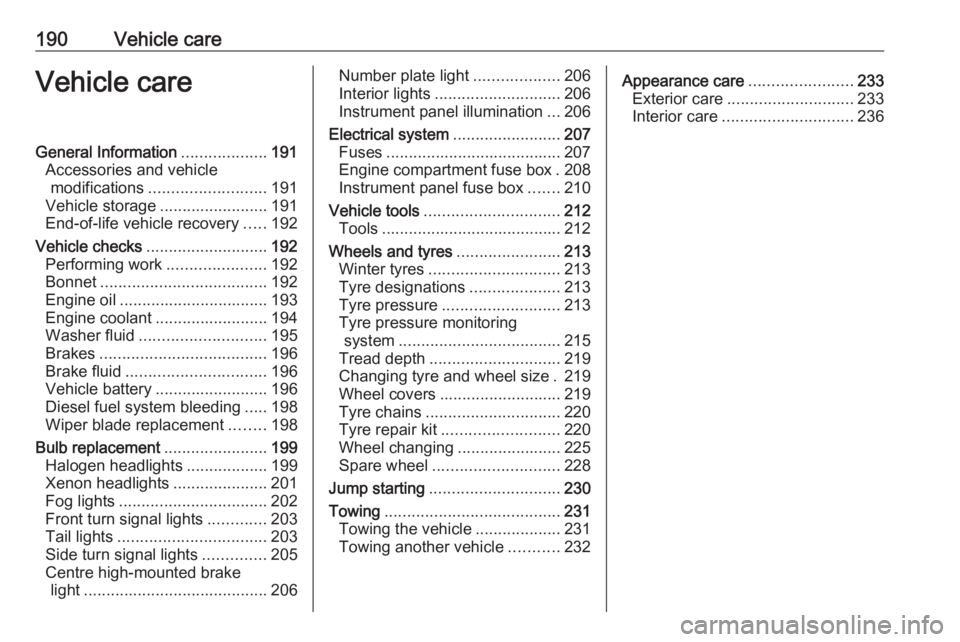
190Vehicle careVehicle careGeneral Information...................191
Accessories and vehicle modifications .......................... 191
Vehicle storage ........................191
End-of-life vehicle recovery .....192
Vehicle checks ........................... 192
Performing work ......................192
Bonnet ..................................... 192
Engine oil ................................. 193
Engine coolant ......................... 194
Washer fluid ............................ 195
Brakes ..................................... 196
Brake fluid ............................... 196
Vehicle battery ......................... 196
Diesel fuel system bleeding .....198
Wiper blade replacement ........198
Bulb replacement .......................199
Halogen headlights ..................199
Xenon headlights .....................201
Fog lights ................................. 202
Front turn signal lights .............203
Tail lights ................................. 203
Side turn signal lights ..............205
Centre high-mounted brake light ......................................... 206Number plate light...................206
Interior lights ............................ 206
Instrument panel illumination ...206
Electrical system ........................207
Fuses ....................................... 207
Engine compartment fuse box . 208
Instrument panel fuse box .......210
Vehicle tools .............................. 212
Tools ........................................ 212
Wheels and tyres .......................213
Winter tyres ............................. 213
Tyre designations ....................213
Tyre pressure .......................... 213
Tyre pressure monitoring system .................................... 215
Tread depth ............................. 219
Changing tyre and wheel size . 219
Wheel covers ........................... 219
Tyre chains .............................. 220
Tyre repair kit .......................... 220
Wheel changing .......................225
Spare wheel ............................ 228
Jump starting ............................. 230
Towing ....................................... 231
Towing the vehicle ...................231
Towing another vehicle ...........232Appearance care .......................233
Exterior care ............................ 233
Interior care ............................. 236
Page 213 of 269
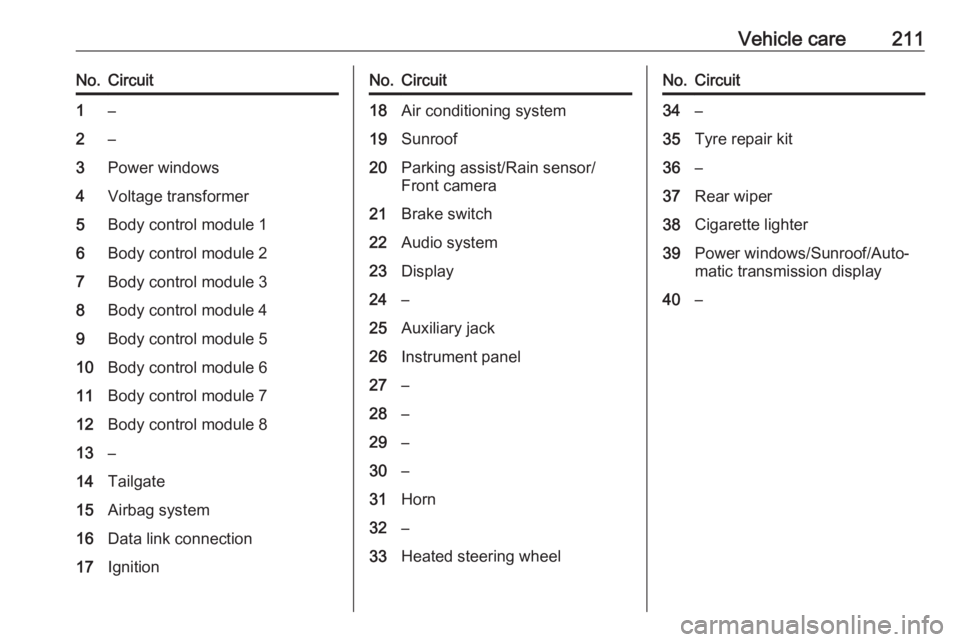
Vehicle care211No.Circuit1–2–3Power windows4Voltage transformer5Body control module 16Body control module 27Body control module 38Body control module 49Body control module 510Body control module 611Body control module 712Body control module 813–14Tailgate15Airbag system16Data link connection17IgnitionNo.Circuit18Air conditioning system19Sunroof20Parking assist/Rain sensor/
Front camera21Brake switch22Audio system23Display24–25Auxiliary jack26Instrument panel27–28–29–30–31Horn32–33Heated steering wheelNo.Circuit34–35Tyre repair kit36–37Rear wiper38Cigarette lighter39Power windows/Sunroof/Auto‐
matic transmission display40–