direction OPEL CORSA E 2017.5 Owner's Manual
[x] Cancel search | Manufacturer: OPEL, Model Year: 2017.5, Model line: CORSA E, Model: OPEL CORSA E 2017.5Pages: 269, PDF Size: 7.97 MB
Page 5 of 269
Introduction3Vehicle specific dataPlease enter your vehicle's data on
the previous page to keep it easily
accessible. This information is
available in the sections "Service and
maintenance" and "Technical data"
as well as on the identification plate.
Introduction
Your vehicle is a designed
combination of advanced technology, safety, environmental friendliness
and economy.
This Owner's Manual provides you
with all the necessary information to
enable you to drive your vehicle
safely and efficiently.
Make sure your passengers are
aware of the possible risk of accident
and injury which may result from
improper use of the vehicle.
You must always comply with the
specific laws and regulations of the
country that you are in. These laws
may differ from the information in this Owner's Manual.
Disregarding the description given in
this manual may affect your warranty.When this Owner's Manual refers to a
workshop visit, we recommend your
Opel Service Partner.
For gas vehicles we recommend an
Opel Repairer authorised for
servicing gas vehicles.
All Opel Service Partners provide
first-class service at reasonable
prices. Experienced mechanics
trained by Opel work according to
specific Opel instructions.
The customer literature pack should
always be kept ready to hand in the
vehicle.
Using this manual ● This manual describes all options
and features available for this
model. Certain descriptions,
including those for display and
menu functions, may not apply to
your vehicle due to model
variant, country specifications,
special equipment or
accessories.
● The "In brief" section will give you
an initial overview.● The table of contents at the beginning of this manual and
within each section shows where the information is located.
● The index will enable you to search for specific information.
● This Owner's Manual depicts left-
hand drive vehicles. Operation is similar for right-hand drive
vehicles.
● The Owner's Manual uses the engine identifier code. The
corresponding sales designation
and engineering code can be
found in the section "Technical
data".
● Directional data, e.g. left or right, or front or back, always relate to
the direction of travel.
● Displays may not support your specific language.
● Display messages and interior labelling are written in bold
letters.
Page 10 of 269
8In briefHead restraint adjustment
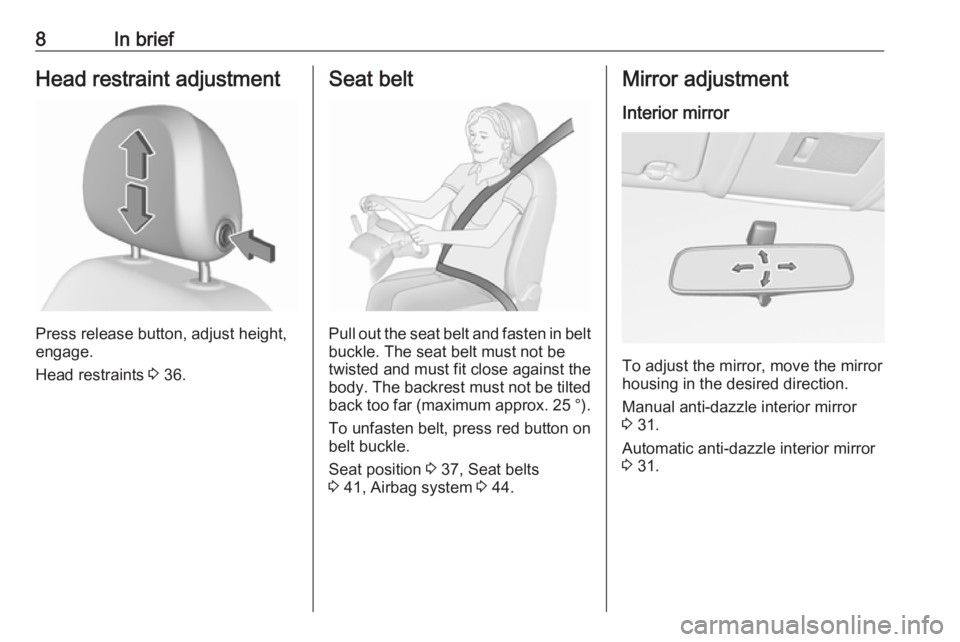
Press release button, adjust height,
engage.
Head restraints 3 36.
Seat belt
Pull out the seat belt and fasten in belt
buckle. The seat belt must not be
twisted and must fit close against the
body. The backrest must not be tilted back too far (maximum approx. 25 ° ).
To unfasten belt, press red button on belt buckle.
Seat position 3 37, Seat belts
3 41, Airbag system 3 44.
Mirror adjustment
Interior mirror
To adjust the mirror, move the mirror
housing in the desired direction.
Manual anti-dazzle interior mirror
3 31.
Automatic anti-dazzle interior mirror 3 31.
Page 59 of 269

Storage57StorageStorage compartments................57
Glovebox ................................... 57
Cupholders ................................ 57
Front storage ............................. 58
Underseat storage .....................59
Rear carrier system ...................59
Load compartment .......................67
Load compartment cover ...........69
Rear floor storage cover ............70
Lashing eyes ............................. 71
Warning triangle ........................72
First aid kit ................................. 72
Roof rack system .........................72
Roof rack ................................... 72
Loading information .....................73Storage compartments9Warning
Do not store heavy or sharp
objects in the storage
compartments. Otherwise, the
storage compartment lid could
open and vehicle occupants could be injured by objects being thrown
around in the event of hard
braking, a sudden change in
direction or an accident.
Glovebox
Pull lever to open the glovebox cover.
The glovebox features a coin holder
and an adapter for the locking wheel
bolts.
The glovebox should be closed whilst
driving.
Cupholders
Cupholders are located in the centre
console.
Page 66 of 269

64Storage
Attach the pedal crank by rotating the
attachment screw on the pedal crank
mount.
Place the wheel recesses so that the
bicycle is roughly horizontal. Here,
the distance between the pedals and
the tailgate should be at least 5 cm.
Both bicycle tyres must be in the
wheel recesses.Caution
Ensure that the wheel recesses
are pulled out as far as necessary
to have both bicycle tyres placed
in the recesses. Otherwise a
horizontal mounting of the bicycle
is not guaranteed. Disregard could
lead to damage of the bicycle
wheels caused by hot exhaust
fumes.
Align the bicycle in the longitudinal direction of the vehicle: Slightly
loosen the pedal mount.
Place the bicycle upright using the
rotary lever on the pedal crank
recess.
If the two bicycles obstruct one
another, the relative positions of the bicycles can be adapted by adjusting
the wheel recesses and the rotary
lever on the pedal crank recess until
the bicycles no longer touch one
another. Ensure there is sufficient
clearance from the vehicle.
Page 75 of 269

Storage73Fitting on model with sunroof
Disengage covers concealing roof
rack mounts by pushing sliders in
direction of arrow and remove
upwards. To close roof rack mounts,
first insert covers at front and engage sliders at rear.
Attach roof rack at appropriate points, see enclosed roof rack system
instructions.
Loading information
● Heavy objects in the load compartment should be placed
against the seat backrests.
Ensure that the backrests are
securely engaged. If objects can
be stacked, heavier objects
should be placed at the bottom.
● Secure objects with lashing straps attached to the lashing
eyes 3 71.
● Use the hook at the right sidewall
of the load compartment for
hanging up carrier bags.
Maximum load: 5 kg.
● Secure loose objects in the load compartment to prevent themfrom sliding.
● When transporting objects in the load compartment, the backrestsof the rear seats must not be
angled forward.
● Do not allow the load to protrude above the upper edge of the
backrests.
● Do not place any objects on the load compartment cover or theinstrument panel, and do not
cover the sensor on top of the instrument panel.
● The load must not obstruct the operation of the pedals, parking
brake and gear selector lever, or
hinder the freedom of movement of the driver. Do not place any
unsecured objects in the interior.
● Do not drive with an open load compartment.
Page 119 of 269

Lighting117The high beam assist is activated by
pushing the indicator lever twice at a
speed above 40 km/h.
The green control indicator f
illuminates continuously when the
assist is activated, the blue one 7
illuminates when high beam is on.
Control indicator f 3 96.
Deactivation
Push indicator lever once. It is also
deactivated when front fog lights are switched on.
If a headlight flash is activated when
the high beam is on, the high beam
assist will be deactivated.
If a headlight flash is activated when
the high beam is off, the high beam assist will remain activated.
The latest setting of the high beam
assist will remain after the ignition is
switched on again.Corner lighting
On tight bends or when turning off,
depending on the steering angle or
the indicator light signal, an additional left or right reflector is switched on
which illuminates the road in the
direction of travel. It is activated up to
a speed of 40 km/h.
Reversing function
To assist driver's orientation when
parking, both corner lights and
reversing light illuminate when
headlights are on and reverse gear is engaged. They remain illuminated for
a short time after disengaging reverse gear or until driving faster than
7 km/h in a forward gear.
Hazard warning flashers
Operated by pressing ¨.
In the event of an accident with airbag
deployment, the hazard warning
flashers are activated automatically.
Page 148 of 269

146Driving and operatingTransmission automatically shifts to
N upon starting. There may be a slight
delay.
Starting is not possible if all brake
lights fail.
Stop-start-system
Autostop
If the vehicle is at a standstill and
brake pedal is operated, Autostop is
activated automatically.
The engine will be switched off while
the ignition stays on.
An Autostop is indicated by control
indicator D.
Autostart
Release the brake pedal or move selector lever out of D to restart the
engine.
When the engine is restarted, control
indicator D extinguishes in the Driver
Information Centre.
The stop-start system will be disabled
on inclines of 15% or more.
Stop-start-system 3 136.
Selector lever
Always move the selector lever in the
appropriate direction as far as it will
go. Upon release, it automatically
returns to the centre position.
Note
Do not hold the selector lever in an
intermediate position. Not fully
engaging a gear may lead to
malfunction and the error code 81
may be displayed in the Driver
Information Centre.
Return the selector lever to the
centre position. After a short while N
will be displayed in the Driver
Information Centre and the system
will operate normally again.
Vehicle messages 3 103.N:neutral positionD/M:switch between automatic (D)
and manual (M) shift mode.
The transmission display
shows either D or M with the
selected gear<:upshifting in manual mode]:downshifting in manual modeR:reverse gear. Engage only
when vehicle is stationary
If selector lever is moved from R to the
left, D is directly engaged.
If selector lever is moved from D to
< or ], manual mode M is selected
and the transmission shifts.
Page 166 of 269

164Driving and operatingWhen the system is deactivated, the
LED in the button extinguishes and, if
manually deactivated, Park Assist
Off pops-up in the Driver Information
Centre.
After a manual deactivation, the front- rear parking assist is activated again
if r is pressed or if reverse gear is
engaged.
The complete system can be
manually deactivated in the vehicle personalisation menu in the
Info-Display. It remains deactivated
during the ignition cycle or until
activation in personalisation menu
again. Vehicle personalisation 3 106.
Fault
In the event of a fault or if the system
does not work temporarily, e.g.
because of high external noise level
or other interference factors, a
message pops-up in the Driver
Information Centre.
Vehicle messages 3 103.Advanced parking assist9 Warning
The driver bears full responsibility
for accepting the parking slot
suggested by the system and the
parking manoeuvre.
Always check the surrounding
area in all directions when using
the advanced parking assist.
The advanced parking assist
measures a suitable parking slot
while passing, calculates the
trajectory and automatically steers
the vehicle into a parallel or
perpendicular parking slot.
Instructions are given in the Driver
Information Centre 3 97 or,
depending on the version, on the
Colour-Info-Display 3 101 , supported
by acoustic signals.
The driver must control acceleration,
braking and gear shifting, while
steering is done automatically.Advanced parking assist is always
combined with front-rear parking
assist. Both systems use the same
sensors in the front and rear bumper.
Parking assist button D and
operation logic
Advanced parking assist and front-
rear parking assist both use the same button for activation and deactivation:
A brief press of D activates or
deactivates the parking assist.
A long press of D (approx.
one second) activates or deactivates the advanced parking assist, see
separate description below.
Page 170 of 269

168Driving and operating
Select parallel or perpendicular
parking slot by tapping the respective icon on the display.
Select parking side by tapping the
respective icon on the display.
When a slot is detected, a visual
feedback on the Colour-Info-Display
and an acoustic signal is given.
If the driver does not stop the vehicle after a parking slot is proposed, the
system starts to search for another
suitable parking slot.Park guiding mode
The parking slot suggestion of the system is accepted when the vehicle
is stopped by the driver within
10 metres for parallel parking slots or
six metres for perpendicular parking
slots after the Stop message is given.
The system calculates the optimal
path into the parking slot.
A brief vibration in the steering wheel
after engaging reverse gear indicates
that the steering is controlled by the
system. Then the vehicle is steered into the slot automatically by giving
the driver detailed instructions for
braking, accelerating and gear
shifting. The driver must keep hands
away from the steering wheel.Always pay attention to the sound of
the front-rear parking assist.
Continuous sound indicates that the
distance to an obstacle is less than
approx. 30 cm.
If, for any reason, the driver must take over control of the steering, hold the
steering wheel only at the outer edge. Automatic steering is cancelled in thisevent.Display indication
The instructions on the display show:
● General hints and warning messages.
● A hint when driving faster than 30 km/h during parking slot
searching mode, or 8 km/h in
guiding mode.
● The demand to stop the vehicle, when a parking slot is detected.
● The direction of driving during the
parking manoeuvre.
● The demand to shift into reverse or first gear.
Page 176 of 269

174Driving and operatingRoad signs
Beginning and end of:
● city regions (country-specific)● motorways
● A-roads
● play streetsAdd-on signs ● additional hints to traffic signs
● restriction of trailer towing
● tractor constraints
● wet warning
● ice warning
● direction arrows
Speed limit signs and no passing
signs are displayed in the Driver
Information Centre until the next
speed limit sign or end of speed limit is detected or up to a defined sign
timeout.Indication of multiple signs on the
display is possible.
An exclamation mark in a frame
indicates that there is an additional
sign detected which cannot be clearly
identified by the system.
The system operates without loss of
performance up to a speed of
200 km/h depending on the lighting
conditions. At night the system is
active up to a speed of 160 km/h.
As soon as vehicle speed becomes
slower than 55 km/h, the display will
be reset and the content of the traffic
sign page will be cleared, e.g. when
entering a city zone. The next
recognized speed indication will be
displayed.
Display indication
Information about the currently valid
traffic signs is available on the
designated traffic sign assistant page in the Driver Information Centre.
Additionally, the currently valid speed
limit is displayed permanently in the
lower line of the Driver Information
Centre. In case a speed limit with add-
on is available, a + symbol is
displayed in this area.
Choose ? via MENU and select
traffic sign assistant page with the adjuster wheel on the turn signal lever
3 97.