belt OPEL CORSA E 2018.5 Manual user
[x] Cancel search | Manufacturer: OPEL, Model Year: 2018.5, Model line: CORSA E, Model: OPEL CORSA E 2018.5Pages: 271, PDF Size: 7.99 MB
Page 77 of 271
Instruments and controls75Instruments and
controlsControls ....................................... 76
Steering wheel adjustment ........76
Steering wheel controls .............76
Heated steering wheel ...............76
Horn ........................................... 77
Windscreen wiper and washer ..77
Rear window wiper and washer ...................................... 78
Outside temperature ..................79
Clock ......................................... 80
Power outlets ............................. 81
Inductive charging .....................82
Cigarette lighter ......................... 83
Ashtrays .................................... 83
Warning lights, gauges and indi‐ cators ........................................... 84
Instrument cluster ......................84
Speedometer ............................. 84
Odometer .................................. 84
Trip odometer ............................ 84
Tachometer ............................... 85
Fuel gauge ................................ 85
Fuel selector .............................. 86Engine coolant temperature
gauge ....................................... 87
Service display .......................... 87
Control indicators ......................88
Turn lights .................................. 90
Seat belt reminder .....................91
Airbag and belt tensioners .........91
Airbag deactivation ....................92
Charging system .......................92
Malfunction indicator light ..........92
Service vehicle soon .................92
Brake and clutch system ...........93
Operate pedal ............................ 93
Antilock brake system (ABS) .....93
Gear shifting .............................. 93
Power steering .......................... 93
Lane departure warning ............93
Parking assist ............................ 94
Electronic Stability Control off ...94
Electronic Stability Control and Traction Control system ...........94
Traction Control system off .......94
Preheating ................................. 94
Exhaust filter .............................. 94
Tyre pressure monitoring system ...................................... 95
Engine oil pressure ....................95
Low fuel ..................................... 95
Immobiliser ................................ 95
Reduced engine power .............95Autostop .................................... 96
Exterior light .............................. 96
High beam ................................. 96
High beam assist .......................96
Fog light ..................................... 96
Rear fog light ............................. 96
Cruise control ............................ 96
Vehicle detected ahead .............96
Speed limiter ............................. 96
Traffic sign assistant ..................96
Door open .................................. 96
Displays ....................................... 97
Driver Information Centre ..........97
Info Display .............................. 101
Vehicle messages ......................103
Warning chimes .......................105
Battery voltage ........................ 105
Vehicle personalisation ..............106
Telematics service .....................108
OnStar ..................................... 108
Page 92 of 271
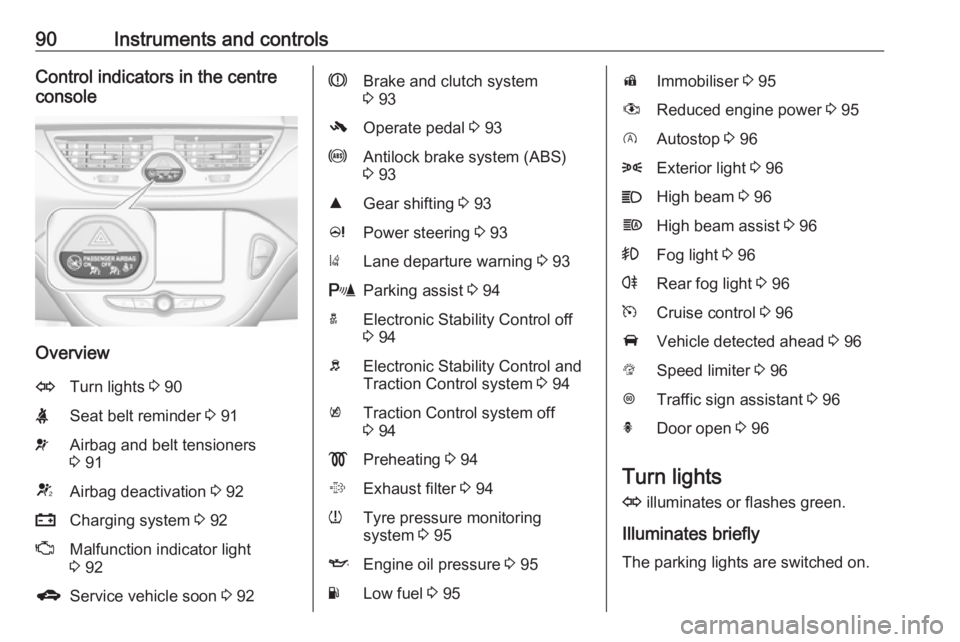
90Instruments and controlsControl indicators in the centre
console
Overview
OTurn lights 3 90XSeat belt reminder 3 91vAirbag and belt tensioners
3 91VAirbag deactivation 3 92pCharging system 3 92ZMalfunction indicator light
3 92gService vehicle soon 3 92RBrake and clutch system
3 93-Operate pedal 3 93uAntilock brake system (ABS)
3 93RGear shifting 3 93cPower steering 3 93)Lane departure warning 3 93rParking assist 3 94aElectronic Stability Control off
3 94bElectronic Stability Control and
Traction Control system 3 94kTraction Control system off
3 94!Preheating 3 94%Exhaust filter 3 94wTyre pressure monitoring
system 3 95IEngine oil pressure 3 95YLow fuel 3 95dImmobiliser 3 95#Reduced engine power 3 95DAutostop 3 968Exterior light 3 96CHigh beam 3 96fHigh beam assist 3 96>Fog light 3 96rRear fog light 3 96mCruise control 3 96AVehicle detected ahead 3 96LSpeed limiter 3 96LTraffic sign assistant 3 96hDoor open 3 96
Turn lights
O illuminates or flashes green.
Illuminates briefly The parking lights are switched on.
Page 93 of 271
Instruments and controls91Flashes
A turn light or the hazard warning
flashers are activated.
Rapid flashing: failure of a turn light or associated fuse.
Bulb replacement 3 196.
Fuses 3 204.
Turn lights 3 118.
Seat belt reminder
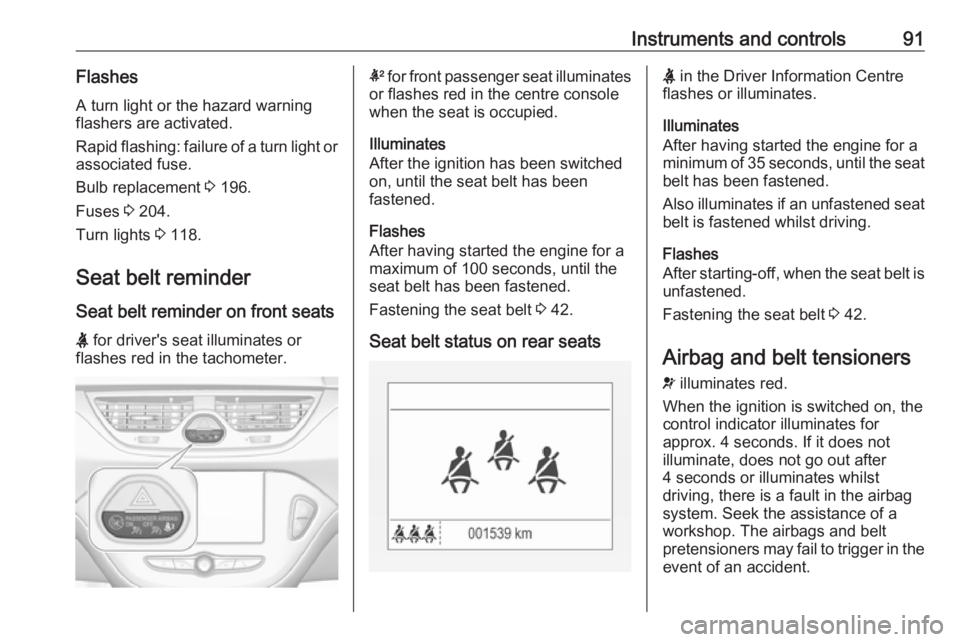
Seat belt reminder on front seats
X for driver's seat illuminates or
flashes red in the tachometer.k for front passenger seat illuminates
or flashes red in the centre console
when the seat is occupied.
Illuminates
After the ignition has been switched on, until the seat belt has been
fastened.
Flashes
After having started the engine for a
maximum of 100 seconds, until the
seat belt has been fastened.
Fastening the seat belt 3 42.
Seat belt status on rear seatsX in the Driver Information Centre
flashes or illuminates.
Illuminates
After having started the engine for a
minimum of 35 seconds, until the seat
belt has been fastened.
Also illuminates if an unfastened seat belt is fastened whilst driving.
Flashes
After starting-off, when the seat belt is
unfastened.
Fastening the seat belt 3 42.
Airbag and belt tensioners v illuminates red.
When the ignition is switched on, the control indicator illuminates for
approx. 4 seconds. If it does not
illuminate, does not go out after
4 seconds or illuminates whilst
driving, there is a fault in the airbag
system. Seek the assistance of a
workshop. The airbags and belt
pretensioners may fail to trigger in the event of an accident.
Page 94 of 271

92Instruments and controlsDeployment of the belt pretensioners
or airbags is indicated by continuous
illumination of v.9 Warning
Have the cause of the fault
remedied immediately by a
workshop.
Belt pretensioners 3 41.
Airbag system 3 44.
Airbag deactivation V illuminates yellow.
Illuminates for approx. 60 seconds
after the ignition is switched on. The
front passenger airbag is activated.
* illuminates yellow.
The front passenger airbag is
deactivated 3 49.
9 Danger
Risk of fatal injury for a child using
a child restraint system together
with activated front passenger
airbag.
Risk of fatal injury for an adult
person with deactivated front
passenger airbag.
Charging system
p illuminates red.
Illuminates when the ignition is
switched on and extinguishes shortly
after the engine starts.
Illuminates when the engine is
running
Stop, switch off engine. Vehicle
battery is not charging. Engine
cooling may be interrupted. The
brake servo unit may cease to be
effective. Seek the assistance of a
workshop.
Malfunction indicator light Z illuminates or flashes yellow.
Illuminates when the ignition is
switched on and extinguishes shortly
after the engine starts.
Illuminates when the engine is
running
Fault in the emission control system. The permitted emission limits may be exceeded. Seek the assistance of a
workshop immediately.
Flashes when the engine is
running
Fault that could lead to catalytic converter damage. Ease up on the
accelerator until the flashing stops.
Seek the assistance of a workshop
immediately.
Service vehicle soon
g illuminates yellow.
Additionally, a warning message is
displayed in the Driver Information
Centre.
The vehicle requires a service.
Seek the assistance of a workshop.
Vehicle messages 3 103.
Page 99 of 271

Instruments and controls97Displays
Driver Information Centre
The Driver Information Centre is
located in the instrument cluster.
Depending on the version and
equipment, the Driver Information
Centre is available as Midlevel
display or Uplevel display.
The following menus are selectable in the Driver Information Centre using
the buttons on the stalk:
● vehicle information and settings
● trip/fuel information
● economic information
The following indications appear if
required:
● warning messages 3 103
● gear shift indication 3 93
● drive mode indication 3 141,
3 146
● tyre pressure warning 3 212
● seat belt reminder indication 3 91● Autostop indication 3 136
● service information 3 92
Midlevel display
Main menus are: ● trip/fuel information, see description below
● vehicle information, see description below
Some of the displayed functions differ
when the vehicle is being driven or at a standstill. Some functions are only
available when the vehicle is being
driven.
Uplevel display
Main menus are:
● trip/fuel information menu, displayed by ;, see
description below
● vehicle information menu, displayed by ?, see
description below
● eco information menu, displayed by @ , see description below
Note
Some systems override the main
menu tabs. The currently active tab
is indicated by a small arrow head.
Page 107 of 271

Instruments and controls105Vehicle messages on
Colour Info Display
Some important messages appear
additionally in the
Colour Info Display. Some messages only pop-up for a few seconds.
Warning chimes If several warnings appear at the
same time, only one warning chime
will sound.
When starting the engine or whilst
driving
The warning chime regarding
unfastened seat belts has priority
over any other warning chime.
● If seat belt is not fastened.
● If a door or the tailgate is not fully
closed when starting off.
● If a certain speed is exceeded with parking brake applied.
● If a programmed speed is exceeded.
● If a warning message appears in the Driver Information Centre orInfo Display.● If the parking assist detects an object.
● If unintended lane change occurs.
● If the reverse gear is engaged and the rear end carrier
extended.
● If the exhaust filter has reached the maximum filling level.
When the vehicle is parked and /
or the driver's door is opened
● With exterior lights on.
During an Autostop ● If the driver's door is opened.
Battery voltage Uplevel display
When the vehicle battery voltage is
running low, a warning message will
appear in the Driver Information
Centre.
Midlevel displayWhen the vehicle battery voltage is running low, a warning code 174 will appear in the Driver Information
Centre.
1. Switch off immediately any electrical consumers which are
not required for a safe drive, e.g.
seat heating, heated windscreen
and heated rear window or other
main consumers.
2. Charge the vehicle battery by driving continuously for a while or
by using a charging device.
The warning message or warning
code will disappear after the engine
has been started twice consecutively
without a voltage drop.
If the vehicle battery cannot be
recharged, have the cause of the fault
remedied by a workshop.
Page 112 of 271
110Instruments and controlsbreakdown, a flat tyre and empty fuel
tank, press Z to establish a
connection to an advisor.
Emergency services
In the case of an emergency situation,
press [ and talk to an advisor. The
advisor then contacts emergency or
assistance service providers and
directs them to your vehicle.
In the case of an accident with
activation of airbags or belt
tensioners, an automatic emergency
call is established. The advisor is
immediately connected to your
vehicle to see whether help is
needed.
Wi-Fi hotspot
The Wi-Fi hotspot of the vehicle
provides internet connectivity with a
maximum speed of 4G/LTE.
Note
The Wi-Fi hotspot functionality is not available for all markets.
Note
Some mobile devices connect to Wi-
Fi hotspots automatically and use
mobile data capacity in thebackground, even if they are not in
use. This includes automatic
updates, downloads, as well as
programme or app synchronisation
traffic. The data volume purchased
via OnStar might be consumed
rapidly. Turn off automatic
synchronisations in the settings of
your device.
Up to seven devices may be
connected.
To connect a mobile device with the
Wi-Fi hotspot:
1. Press j and then select Wi-Fi
settings on the Info Display. The
settings displayed include the Wi- Fi hotspot name (SSID),
password and connection type.
2. Start a Wi-Fi network search on your mobile device.
3. Select your vehicle hotspot (SSID) when listed.
4. When prompted, enter the password on your mobile device.
Note
To change the SSID or password,
press Z and talk to an advisor or log
in to your account.To switch off the Wi-Fi hotspot
functionality, press Z to call an
advisor.
Smartphone app
With the myOpel smartphone app,
some vehicle functions can be
operated remotely.
The following functions are available: ● Lock or unlock vehicle.
● Honk horn or flash lights.
● Check fuel level, engine oil life and tyre pressure (only with tyre
pressure monitoring system).
● Send navigation destination to the vehicle, if equipped with a
built-in navigation system.
● Locate vehicle on a map.
● Manage Wi-Fi settings.
To operate these functions, download the app from App Store ®
or
Google Play™ Store.
Page 134 of 271

132Climate controlAir conditioning regularoperation
In order to ensure continuously
efficient performance, cooling must
be operated for a few minutes once a
month, irrespective of the weather
and time of year. Operation with
cooling is not possible when the
outside temperature is too low.
Service For optimal cooling performance, it is recommended to annually check the
climate control system, starting
three years after initial vehicle
registration, including:
● functionality and pressure test
● heating functionality
● leakage check
● check of drive belts
● cleaning of condenser and evaporator drainage
● performance check
Note
Refrigerant R-134a contains
fluorinated greenhouse gases.
Page 139 of 271

Driving and operating137Deactivation
Deactivate the stop-start system
manually by pressing eco. The
deactivation is indicated when the
LED in the button extinguishes.
Autostop
Vehicles with manual transmission
If the vehicle is at a low speed or at a
standstill, activate an Autostop as
follows:
● Depress the clutch pedal.
● Set the lever in neutral.
● Release the clutch pedal.The engine will be switched off while
the ignition stays on.Vehicles with manual transmission
automated
If the vehicle is at a standstill with the brake pedal depressed, Autostop is
activated automatically.
The engine will be switched off while
the ignition stays on.
The stop-start system will be disabled
on inclines of 12% or more.
Indication
An Autostop is indicated by control
indicator D.
During an Autostop, the heating and
brake performance will be
maintained.
Conditions for an Autostop
The stop-start system checks if each
of the following conditions is fulfilled:
● The stop-start system is not manually deactivated.
● The bonnet is fully closed.
● The driver's door is closed or the driver's seat belt is fastened.
● The vehicle battery is sufficiently charged and in good condition.
● The engine is warmed-up.
● The engine coolant temperature is not too high.
● The engine exhaust temperature is not too high, e.g. after driving
with high engine load.
● The ambient temperature is above -5 °C.
● The climate control system allows an Autostop.
● The brake vacuum is sufficient.
● The self-cleaning function of the exhaust filter is not active.
● The vehicle was driven at least at
walking speed since the last
Autostop.
Page 140 of 271

138Driving and operatingOtherwise an Autostop will be
inhibited.
Certain settings of the climate control
system may inhibit an Autostop. See
'Climate control' chapter for further
information 3 126.
Immediately after motorway driving
an Autostop may be inhibited.
New vehicle running-in 3 134.
Vehicle battery discharge protection To ensure reliable engine restarts,
several vehicle battery discharge
protection features are implemented
as part of the stop-start system.
Power saving measures
During an Autostop, several electrical
features, e.g. the rear window
heating, are disabled or switched into a power saving mode. The fan speed
of the climate control system is
reduced to save power.
Restart of the engine by the driverVehicles with manual transmission
Depress the clutch pedal to restart the
engine.When the engine is restarted, control
indicator D in the Driver Information
Centre extinguishes.
If the selector lever is shifted out of
neutral before depressing the clutch
pedal first, control indicator -
illuminates or is shown as a symbol in
the Driver Information Centre.
Control indicator - 3 93.Vehicles with manual transmission
automated
Release the brake pedal or move
selector lever out of D to restart the
engine.
When the engine is restarted, control
indicator D in the Driver Information
Centre extinguishes.
Restart of the engine by the stop-
start system
The selector lever must be in neutral
to enable an automatic restart.
If one of the following conditions occurs during an Autostop, the
engine will be restarted automatically
by the stop-start system:
● The stop-start system is manually deactivated.
● The bonnet is opened.
● The driver's seat belt is unfastened and the driver's door
is opened.
● The engine temperature is too low.
● The charging level of the vehicle battery is below a defined level.
● The brake vacuum is not sufficient.
● The vehicle is driven at least at walking speed.
● The climate control system requests an engine start.
● The air conditioning is manually switched on.
If the bonnet is not fully closed, a
warning message is displayed in the
Driver Information Centre.
If an electrical accessory, e.g. a
portable CD player, is connected to
the power outlet, a brief power drop
during restart might be noticeable.