steering wheel OPEL CORSA E 2018.5 Manual user
[x] Cancel search | Manufacturer: OPEL, Model Year: 2018.5, Model line: CORSA E, Model: OPEL CORSA E 2018.5Pages: 271, PDF Size: 7.99 MB
Page 141 of 271

Driving and operating139Parking9Warning
● Do not park the vehicle on an
easily ignitable surface. The
high temperature of the
exhaust system could ignite the
surface.
● Always apply the parking brake. Activate the manual
parking brake without pressing the release button. Apply as
firmly as possible on a downhill slope or uphill slope. Depress
brake pedal at the same time to
reduce operating force.
● Switch off the engine.
● If the vehicle is on a level surface or uphill slope, engage
first gear or set the selector
lever to position P before
removing the ignition key. On
an uphill slope, turn the front
wheels away from the kerb.
If the vehicle is on a downhill
slope, engage reverse gear or
set the selector lever to position
P before removing the ignition
key. Turn the front wheels
towards the kerb.
● Close the windows and the sunroof.
● Remove the ignition key from the ignition switch. Turn the
steering wheel until the
steering wheel lock is felt to
engage.
For vehicles with automatic
transmission, the key can only
be removed when the selector
lever is in position P.
For vehicles with manual
transmission automated, the
key can only be removed from
the ignition switch when the
parking brake is applied.
● Lock the vehicle.
● Activate the anti-theft alarm system.
● The engine cooling fans may run
after the engine has been
switched off 3 190.
Caution
After running at high engine
speeds or with high engine loads,
operate the engine briefly at a low load or run in neutral for
approx. 30 seconds before
switching off, in order to protect
the turbocharger.
Note
In the event of an accident with
airbag deployment, the engine is
switched off automatically if the
vehicle comes to a standstill within a
certain time.
Page 156 of 271

154Driving and operatingStop-start system 3 136.
Deactivation Press B. The LED in the button
extinguishes.
Additionally, a message pops-up in
the Driver Information Centre.
Each time the engine is started, City
mode is deactivated.
Fault
In the event of a fault in the system,
control indicator c illuminates.
Additionally, a message pops-up in the Driver Information Centre.
Vehicle messages 3 103.
System calibration
If control indicators c and b
illuminate simultaneously, a
calibration of the power steering
system is necessary. This can occur
e.g. when turning the steering wheel
for one rotation with ignition switched
off. In this case, switch on ignition and turn steering wheel once from lock to
lock.
If control indicators c and b do not
extinguish after calibration, seek the
assistance of a workshop.Driver assistance
systems9 Warning
Driver assistance systems are
developed to support the driver
and not to replace the driver's
attention.
The driver accepts full
responsibility when driving the
vehicle.
When using driver assistance
systems, always take care
regarding the current traffic
situation.
Cruise control
The cruise control can store and
maintain speeds of approx. 30 km/h
to maximum vehicle speed.
Deviations from the stored speeds
may occur when driving uphill or
downhill.
Page 170 of 271

168Driving and operating
Select parallel or perpendicular
parking slot by tapping the respective icon on the Info Display.
Select parking side by tapping the
respective icon on the Info Display.
When a slot is detected, a visual
feedback on the Colour Info Display
and an acoustic signal is given.
If the driver does not stop the vehicle after a parking slot is proposed, the
system starts to search for another
suitable parking slot.Park guiding mode
The parking slot suggestion of the system is accepted when the vehicle
is stopped by the driver within 10 m
for parallel parking slots or 6 m for
perpendicular parking slots after the
Stop message is given. The system
calculates the optimal path into the
parking slot.
A brief vibration in the steering wheel
after engaging reverse gear indicates
that the steering is controlled by the
system. Then the vehicle is steered into the slot automatically by givingthe driver detailed instructions for
braking, accelerating and gear
shifting. The driver must keep hands
away from the steering wheel.Always pay attention to the sound of
the front-rear parking assist.
Continuous sound indicates that the
distance to an obstacle is less than
approx. 30 cm.
If, for any reason, the driver must take over control of the steering, hold the
steering wheel only at the outer edge. Automatic steering is cancelled in thisevent.Display indication
The instructions on the display show:
● General hints and warning messages.
● A hint when driving faster than 30 km/h during parking slot
searching mode, or 8 km/h in
guiding mode.
● The demand to stop the vehicle, when a parking slot is detected.
● The direction of driving during the
parking manoeuvre.
● The demand to shift into reverse or first gear.
Page 171 of 271

Driving and operating169● The demand to accelerate orbrake.
● For some of the instructions a progress bar is shown in the
Driver Information Centre.
● The successful completion of the
parking manoeuvre indicated by
a pop-up symbol and a chime.
● The cancelling of a parking manoeuvre.
Display priorities
Advanced parking assist indication in the Driver Information Centre can beinhibited by vehicle messages with a
higher priority. After approving the
message by pressing SET/CLR on
the stalk, advanced parking assist instructions appear again and the
parking manoeuvre can be continued.
Deactivation of advanced parking
assist
The system is deactivated by:
● a long press of D
● parking manoeuvre successfully ended●driving faster than 30 km/h during
parking slot search
● driving faster than 8 km/h during parking guidance
● driver interference on steering wheel detected
● exceeding number of maximum gear changes: eight cycles when
parallel parking or five cycles
when perpendicular parking
● switching off the ignition
Deactivation by the driver or by the
system during manoeuvring will be indicated by Parking Deactivated on
the display. Additionally, an acoustic
signal sounds.
Fault
A message appears when:
● There is a fault in the system.
● The driver did not successfully complete the parking
manoeuvre.
● The system is not operational.
● Any of the deactivation reasons described above apply.If an object is detected during parking
instructions, Stop is indicated on the
display. Removing the object will
resume the parking manoeuvre. If the
object is not removed, the system will
be deactivated. A long press of D
will activate the system and search for a new parking slot.
Basic notes on parking assist
systems9 Warning
Under certain circumstances,
various reflective surfaces on
objects or clothing as well as
external noise sources may cause the system to fail to detect
obstacles.
Special attention must be paid to
low obstacles which can damage
the lower part of the bumper.
Page 189 of 271

Driving and operating187Eye for break-away stopping cable
Attach breakaway stopping cable to
eye.
Check that the coupling ball bar is correctly installed
● Green marking on rotary knob is visible.
● There must be no gap between the rotary knob and the coupling
ball bar.
● The coupling ball bar must be firmly engaged in the opening.
● The coupling ball bar must be locked and the key removed.
9Warning
Towing a trailer is permitted only
when a coupling ball bar is fitted correctly. If the coupling ball bardoes not engage correctly, seekthe assistance of a workshop.
Dismounting the coupling ball bar
Insert the key in the lock and unlock
the coupling ball bar.
Push the rotary knob onto the
coupling ball bar and rotate right while pressed down until it engages. Pull
out the ball bar downwards.
Insert sealing plug in opening for
coupling ball bar. Fold away socket.
Trailer stability assist
If the system detects snaking
movements, engine power is reduced
and the vehicle/trailer combination is
selectively braked until the snaking ceases. While system is working keep
steering wheel as still as possible.
Trailer stability assist is a function of
the Electronic Stability Control 3 152.
Page 210 of 271

208Vehicle careThe fuse box is located behind a
cover in the glovebox. Open the
glovebox, then open the cover and
fold it down.No.Circuit1–2–3Power windows4Voltage transformer5Body control module 16Body control module 27Body control module 38Body control module 49Body control module 510Body control module 611Body control module 712Body control module 813–14Tailgate15Airbag system16Data link connection17IgnitionNo.Circuit18Air conditioning system19Sunroof20Parking assist / Rain sensor /
Front camera21Brake switch22Audio system23Display24–25Auxiliary jack26Instrument panel27–28–29–30–31Horn32–33Heated steering wheel
Page 220 of 271
218Vehicle careTyre chains are permitted on tyres of
size 195/55 R16 with rims of size
16 x 6 and 16 x 6.5, the latter only in combination with limited steering
angle. Seek the assistance of a
workshop.
Tyre chains are not permitted on tyres of size 215/45 R17 and 215/40 R18.
The use of tyre chains is not permitted on the temporary spare wheel.
Tyre repair kit Minor damage to the tyre tread can be
repaired with the tyre repair kit.
Do not remove foreign bodies from
the tyres.
Tyre damage exceeding 4 mm or that is at the tyre's side wall near the rim
cannot be repaired with the tyre repair kit.9 Warning
Do not drive faster than 80 km/h.
Do not use for a lengthy period.
Steering and handling may be
affected.
If you have a flat tyre:
Apply the parking brake and engage
first gear, reverse gear or P.
The tyre repair kit is stowed in the load
compartment.
Depending on the equipment, the tyre repair kit is in a compartment in the
right sidewall or in a compartment
under the floor cover.
Vehicles with tyre repair kit under
the floor cover
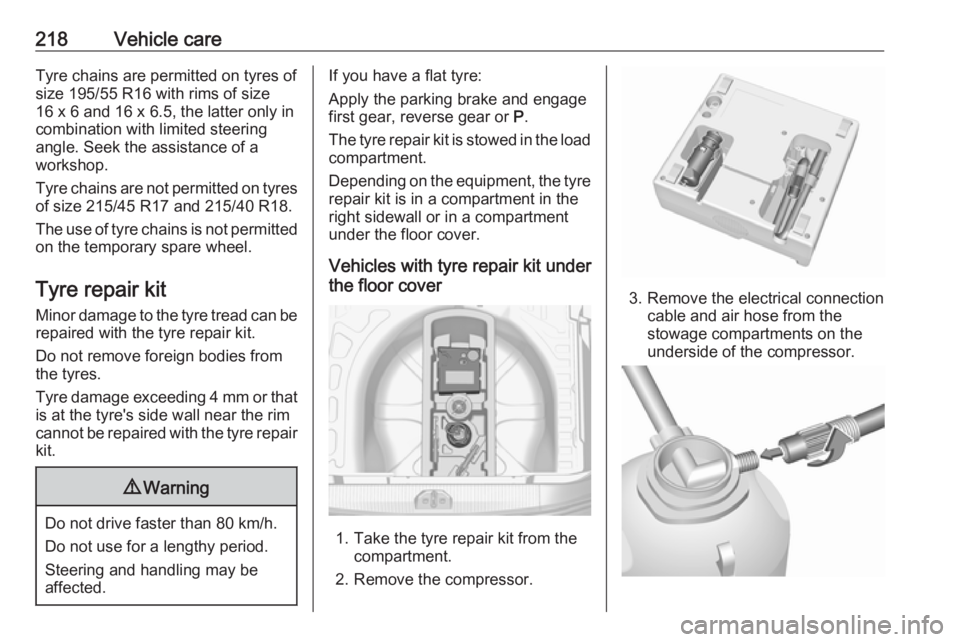
1. Take the tyre repair kit from the compartment.
2. Remove the compressor.
3. Remove the electrical connection cable and air hose from the
stowage compartments on the
underside of the compressor.
Page 231 of 271

Vehicle care229Towing
Towing the vehicle
Wrap a cloth around the tip of a flat
screwdriver to prevent paint damage.
Insert the screwdriver in the slot at the
lower part of the cap. Release the cap by carefully moving the screwdriver
downwards.
The towing eye is stowed with the
vehicle tools 3 209.
Screw in the towing eye as far as it will
go until it stops in a horizontal
position.
Attach a tow rope – or better still a tow
rod – to the towing eye.
The towing eye must only be used for
towing and not for recovering the
vehicle.
Switch on ignition to release steering wheel lock and to permit operation of
brake lights, horn and windscreen
wiper.
Switch the selector lever to neutral.
Release the parking brake.
Caution
Drive slowly. Do not drive jerkily.
Excessive tractive force can
damage the vehicle.
When the engine is not running,
considerably more force is needed to
brake and steer.
To prevent the entry of exhaust gases from the towing vehicle, switch on the
air recirculation and close the
windows.
Vehicles with automatic transmission: the vehicle must be towed facing
forwards, not faster than 80 km/h nor further than 100 km. In all other cases
and when the transmission is
defective, the front axle must be
raised off the ground.
Vehicles with manual transmission
automated: the vehicle must only be
towed facing forwards with the front axle raised off the ground.
Seek the assistance of a workshop. After towing, unscrew the towing eye.
Insert cap at the top and engage
downwards.
Page 264 of 271
262Customer informationDepending on the equipment level in
question, these include
● Seat and steering wheel position settings,
● Chassis and air conditioning settings,
● Custom settings such as interior lighting.
You can input your own data in the
infotainment functions for your
vehicle as part of the selected
features.
Depending on the equipment level in
question, these include
● Multimedia data such as music, videos or photos for playback in
an integrated multimedia system,
● Address book data for use with an integrated hands-free system
or an integrated navigation
system,
● Input destinations,
● Data on the use of online services.
This data for comfort and
infotainment functions can be stored
locally in the vehicle or be kept on adevice that you have connected to the
vehicle ( e.g. a smartphone, USB stick
or MP3 player). Data that you have
input yourself can be deleted at any
time.
This data can only be transmitted out
of the vehicle at your request,
particularly when using online
services in accordance with the
settings selected by you.
Smartphone integration, e.g.
Android Auto or Apple CarPlay
If your vehicle is equipped
accordingly, you can connect your
smartphone or another mobile device to the vehicle so that you can control
it via the controls integrated in the
vehicle. The smartphone image and
sound can be output via the
multimedia system in this case. At the
same time, specific information is
transmitted to your smartphone.
Depending on the type of integration,
this includes data such as position
data, day / night mode and other
general vehicle information. For moreinformation, please see the operating instructions for the vehicle /
infotainment system.
Integration allows selected
smartphone apps to be used, such as
navigation or music playback. No
further integration is possible
between smartphone and vehicle, in
particular active access to vehicle
data. The nature of further data
processing is determined by the
provider of the app used. Whether
you can define settings, and if so
which ones, is dependent on the app
in question and your smartphone's
operating system.
Page 268 of 271

266Heated rear window ..................... 33
Heated steering wheel .................76
Heated windscreen .......................34
Heating ........................................ 40
Heating and ventilation system . 123
High beam ........................... 96, 115
High beam assist ..................96, 116
Hill start assist ........................... 150
Horn ....................................... 15, 77
I
Identification plate .....................238
Ignition switch positions .............134
Immobiliser ............................ 29, 95
Indicators ...................................... 84
Inductive charging ........................82
Info Display ................................. 101
Information displays...................... 97
Instrument cluster ........................84
Instrument panel fuse box .........207
Instrument panel illumination control .................................... 119
Instrument panel overview ........... 10
Interior care ............................... 233
Interior lighting ............................ 119
Interior lights ...................... 120, 204
Interior mirrors .............................. 31
Interruption of power supply ......144
Introduction .................................... 3J
Jump starting ............................. 227
K Key, memorised settings ..............24
Keys ............................................. 22
Keys, locks ................................... 22
L Lane departure warning .......93, 176
Lashing eyes ............................... 71
Light switch ................................ 113
Load compartment ................27, 67
Load compartment cover .............69
Loading information .....................73
Low fuel ....................................... 95
LPG .............................. 86, 179, 239
M
Malfunction indicator light ............92
Manual anti-dazzle ......................31
Manual mode .....................143, 148
Manual transmission .................. 145
Manual transmission automated 145
Manual windows ..........................32
Memorised settings ......................24
Mirror adjustment ........................... 8 Misted light covers .....................119N
New vehicle running-in ..............134
Number plate light .....................203
O Object detection systems ...........160
Odometer ..................................... 84
Oil, engine .......................... 235, 239
OnStar ........................................ 108
Operate pedal ............................... 93
Outside temperature ....................79
Overrun cut-off ........................... 136
P Parking ................................ 20, 139
Parking assist ...................... 94, 160
Parking brake ............................ 150
Parking lights ............................. 119
Particulate filter ........................... 140
Performance .............................. 244
Performing work ........................190
Power outlets ............................... 81
Power steering.............................. 93
Power windows ............................ 32
Preheating ................................... 94
Puncture ..................................... 223
R
Radio Frequency Identification (RFID) ..................................... 263
Radio remote control ...................23