airbag OPEL CORSA E 2018 Manual user
[x] Cancel search | Manufacturer: OPEL, Model Year: 2018, Model line: CORSA E, Model: OPEL CORSA E 2018Pages: 271, PDF Size: 7.99 MB
Page 107 of 271
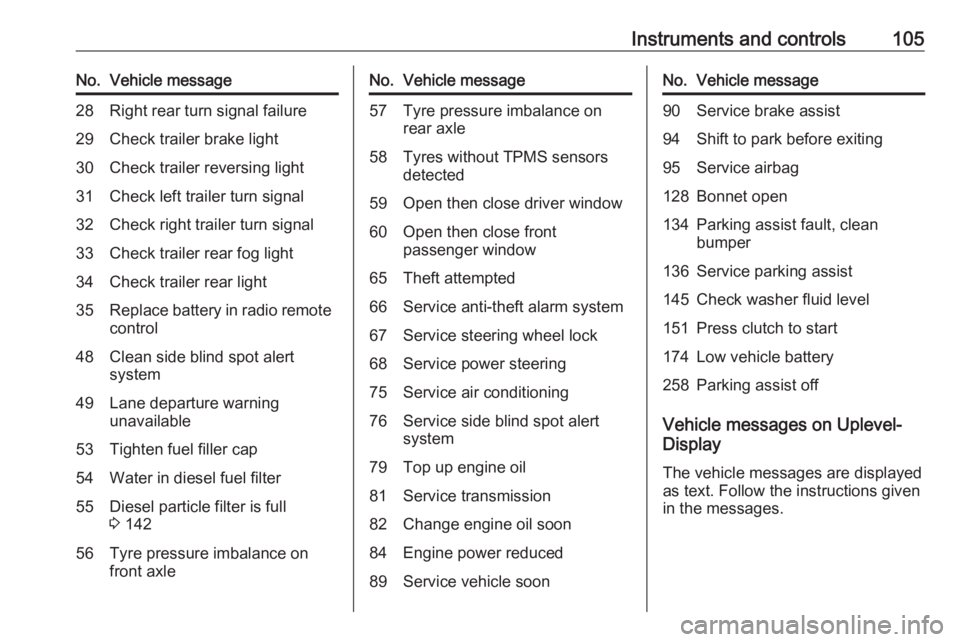
Instruments and controls105No.Vehicle message28Right rear turn signal failure29Check trailer brake light30Check trailer reversing light31Check left trailer turn signal32Check right trailer turn signal33Check trailer rear fog light34Check trailer rear light35Replace battery in radio remote
control48Clean side blind spot alert
system49Lane departure warning
unavailable53Tighten fuel filler cap54Water in diesel fuel filter55Diesel particle filter is full
3 14256Tyre pressure imbalance on
front axleNo.Vehicle message57Tyre pressure imbalance on rear axle58Tyres without TPMS sensors
detected59Open then close driver window60Open then close front
passenger window65Theft attempted66Service anti-theft alarm system67Service steering wheel lock68Service power steering75Service air conditioning76Service side blind spot alert
system79Top up engine oil81Service transmission82Change engine oil soon84Engine power reduced89Service vehicle soonNo.Vehicle message90Service brake assist94Shift to park before exiting95Service airbag128Bonnet open134Parking assist fault, clean
bumper136Service parking assist145Check washer fluid level151Press clutch to start174Low vehicle battery258Parking assist off
Vehicle messages on Uplevel-
Display
The vehicle messages are displayedas text. Follow the instructions given
in the messages.
Page 113 of 271

Instruments and controls111OnStar buttons
Privacy button
Press and hold j until a message is
heard to activate or deactivate the
transmission of the vehicle location.
Press j to answer a call or to end a
call to an advisor.
Press j to access the Wi-Fi settings.
Service button
Press Z to establish a connection to
an advisor.
SOS button
Press [ to establish a priority
emergency connection to a specially
trained emergency advisor.
Status LED
Green: The system is ready with
activated transmission of the vehicle
location.
Green flashing: The system is on a
call.
Red: A problem arose.
Off: The system is ready with
deactivated transmission of the
vehicle location or the system is in
standby mode.
Red / green flashing for a short period of time: The transmission of the
vehicle location has been
deactivated.
OnStar services
General services
If you need any information e.g.
opening hours, points of interest and
destinations or if you need any
support e.g. in the case of a vehiclebreakdown, a flat tyre and empty fuel
tank, press Z to establish a
connection to an advisor.
Emergency services
In the case of an emergency situation,
press [ and talk to an advisor. The
advisor then contacts emergency or
assistance service providers and
directs them to your vehicle.
In the case of an accident with
activation of airbags or belt
tensioners, an automatic emergency
call is established. The advisor is
immediately connected to your
vehicle to see whether help is
needed.
Wi-Fi hotspot
The Wi-Fi hotspot of the vehicle
provides internet connectivity with a
maximum speed of 4G/LTE.
Note
The Wi-Fi hotspot functionality is not
available for all markets.
Up to seven devices may be
connected.
Page 115 of 271

Instruments and controls113Diagnostic report
The vehicle automatically transmits
diagnostic data to OnStar which
sends a monthly email report to you
and your preferred workshop.
Note
The workshop notification function
can be disabled in your account.
The report contains the status of key
operating systems of the vehicle like
engine, transmission, airbags, ABS,
and other major systems. It also
provides information on possible
maintenance items and tyre pressure
(only with tyre pressure monitoring
system).
To look at the information in greater
detail, select the link within the email and log in to your account.
Destination download
A desired destination can be directly
downloaded to the navigation system.
Press Z to call an advisor and
describe the destination or point of
interest.The advisor can look up any address
or point of interest and directly send
the destination to the built-in
navigation system.
OnStar settings
OnStar PIN
To have full access to all OnStar
services, a four-digit PIN is required.
The PIN has to be personalised when
first talking to an advisor.
To change the PIN, press Z to call an
advisor.
Account data
An OnStar subscriber has an account
where all the data is stored. To
request a change of the account
information, press Z and talk to an
advisor or log in to your account.
If the OnStar service is used on
another vehicle, press Z and request
that the account be transferred to the
new vehicle.Note
In any case, if the vehicle is disposed of, sold or otherwise transferred,
immediately inform OnStar about
the changes and terminate the
OnStar service on this vehicle.
Vehicle location
The vehicle location is transmitted to OnStar when service is requested ortriggered. A message on the Info-
Display informs about this
transmission.
To activate or deactivate the
transmission of the vehicle location,
press and hold j until an audio
message is heard.
The deactivation is indicated by the
status light flashing red and green for
a short period of time and each time
the vehicle is started.
Note
If the transmission of the vehicle
location is deactivated, some
services are no longer available.
Page 121 of 271

Lighting119The high beam assist is activated by
pushing the indicator lever twice at a
speed above 40 km/h.
The green control indicator f
illuminates continuously when the
assist is activated, the blue one 7
illuminates when high beam is on.
Control indicator f 3 97.
Deactivation
Push indicator lever once. It is also
deactivated when front fog lights are switched on.
If a headlight flash is activated when
the high beam is on, the high beam
assist will be deactivated.
If a headlight flash is activated when
the high beam is off, the high beam assist will remain activated.
The latest setting of the high beam
assist will remain after the ignition is
switched on again.Corner lighting
On tight bends or when turning off,
depending on the steering angle or
the indicator light signal, an additional left or right reflector is switched on
which illuminates the road in the
direction of travel. It is activated up to
a speed of 40 km/h.
Reversing function
To assist driver's orientation when
parking, both corner lights and
reversing light illuminate when
headlights are on and reverse gear is engaged. They remain illuminated for
a short time after disengaging reverse gear or until driving faster than
7 km/h in a forward gear.
Hazard warning flashers
Operated by pressing ¨.
In the event of an accident with airbag
deployment, the hazard warning
flashers are activated automatically.
Page 124 of 271

122LightingOn vehicles with automatic light
control, the brightness can only be
adjusted when the exterior lights are
on and the light sensor detects night
conditions.
Interior lights
Front courtesy light
Operate rocker switch:
centre
position
w:automatic switching on
when opening a door.
Turns off after a delaypress I:permanently onpress 0:permanently offFront courtesy light with reading
lights
When opening a door, the courtesylight automatically switches on and
then off after a delay.
Pressing c switches courtesy light
on or off manually.
Switching on ignition will turn off
courtesy light.
When exterior lighting has been on
previously, courtesy light will turn on
when ignition is switched off.
Note
In the event of an accident with
airbag deployment, the courtesy lights are turned on automatically.
Rear courtesy lights
Left and right lamps are operated
separately.
Operate rocker switches:
centre
position:automatic switching on
when opening a door.
Turns off after a delaypress I:permanently onpress 0:permanently off
Page 143 of 271

Driving and operating141Parking9Warning
● Do not park the vehicle on an
easily ignitable surface. The
high temperature of the
exhaust system could ignite the
surface.
● Always apply the parking brake. Activate the manual
parking brake without pressing the release button. Apply as
firmly as possible on a downhill slope or uphill slope. Depress
brake pedal at the same time to
reduce operating force.
● Switch off the engine.
● If the vehicle is on a level surface or uphill slope, engage
first gear or set the selector
lever to position P before
removing the ignition key. On
an uphill slope, turn the front
wheels away from the kerb.
If the vehicle is on a downhill
slope, engage reverse gear or
set the selector lever to position
P before removing the ignition
key. Turn the front wheels
towards the kerb.
● Close the windows and the sunroof.
● Remove the ignition key from the ignition switch. Turn the
steering wheel until the
steering wheel lock is felt to
engage.
For vehicles with automatic
transmission, the key can only
be removed when the selector
lever is in position P.
For vehicles with manual
transmission automated, the
key can only be removed from
the ignition switch when the
parking brake is applied.
● Lock the vehicle.
● Activate the anti-theft alarm system.
● The engine cooling fans may run
after the engine has been
switched off 3 193.
Caution
After running at high engine
speeds or with high engine loads,
operate the engine briefly at a low load or run in neutral for
approx. 30 seconds before
switching off, in order to protect
the turbocharger.
Note
In the event of an accident with
airbag deployment, the engine is
switched off automatically if the
vehicle comes to a standstill within a
certain time.
Page 213 of 271
Vehicle care211
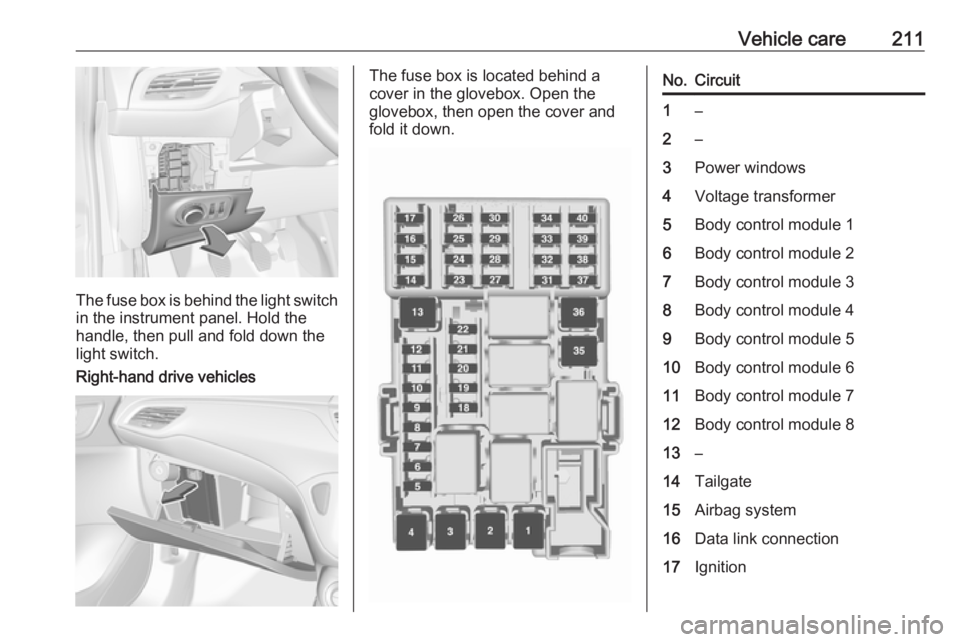
The fuse box is behind the light switchin the instrument panel. Hold the
handle, then pull and fold down the
light switch.
Right-hand drive vehicles
The fuse box is located behind a
cover in the glovebox. Open the
glovebox, then open the cover and
fold it down.No.Circuit1–2–3Power windows4Voltage transformer5Body control module 16Body control module 27Body control module 38Body control module 49Body control module 510Body control module 611Body control module 712Body control module 813–14Tailgate15Airbag system16Data link connection17Ignition
Page 265 of 271

Customer information263Vehicle data recording
and privacy
Event data recorders Data storage modules in the
vehicle
A large number of electronic
components of your vehicle contain
data storage modules temporarily or
permanently storing technical data
about the condition of the vehicle,
events and errors. In general, this
technical information documents the
condition of parts, modules, systems
or the environment:
● Operating conditions of system components (e.g. filling levels).
● Status messages of the vehicle and its single components (e.g.
number of wheel revolutions /
rotational speed, deceleration,
lateral acceleration).
● Dysfunctions and defects in important system components.● Vehicle reactions in particular driving situations ( e.g. inflation of
an airbag, activation of the
stability regulation system).
● Environmental conditions (e.g. temperature).
These data are exclusively technical
and help identifying and correcting
errors as well as optimizing vehicle
functions.
Motion profiles indicating travelled
routes cannot be created with these
data.
If services are used (e.g. repair
works, service processes, warranty
cases, quality assurance),
employees of the service network
(manufacturer included) are able to
read out this technical information
from the event and error data storage
modules applying special diagnostic
devices. If required, you will receive
further information at these
workshops. After an error has been
corrected, the data are deleted from
the error storage module or they are
constantly overwritten.When using the vehicle, situations
may occur in which these technical
data related to other information
(accident report, damages on the
vehicle, witness statements etc.) may
be associated with a specific person - possibly, with the assistance of an
expert.
Additional functions contractually
agreed upon with the client (e.g.
vehicle location in emergency cases)
allow the transmission of particular
vehicle data from the vehicle.
Radio Frequency
Identification (RFID)
RFID technology is used in some
vehicles for functions such as tyre
pressure monitoring and ignition
system security. It is also used in
connection with conveniences such
as radio remote controls for door
locking/unlocking and starting, and in-
vehicle transmitters for garage door
openers. RFID technology in Opel
vehicles does not use or record
personal information or link with any
other Opel system containing
personal information.
Page 266 of 271
264IndexAAccessories and vehicle modifications .......................... 192
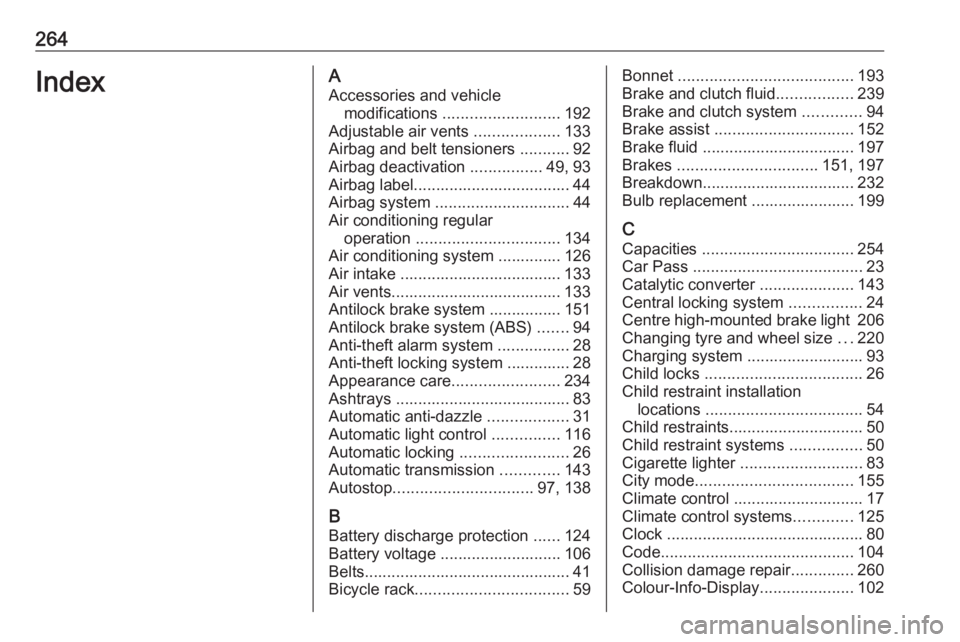
Adjustable air vents ...................133
Airbag and belt tensioners ...........92
Airbag deactivation ................49, 93
Airbag label................................... 44 Airbag system .............................. 44
Air conditioning regular operation ................................ 134
Air conditioning system .............. 126
Air intake .................................... 133
Air vents...................................... 133
Antilock brake system ................ 151
Antilock brake system (ABS) .......94
Anti-theft alarm system ................28
Anti-theft locking system .............. 28
Appearance care ........................234
Ashtrays ....................................... 83
Automatic anti-dazzle ..................31
Automatic light control ...............116
Automatic locking ........................26
Automatic transmission .............143
Autostop ............................... 97, 138
B Battery discharge protection ......124
Battery voltage ........................... 106
Belts.............................................. 41
Bicycle rack .................................. 59Bonnet ....................................... 193
Brake and clutch fluid .................239
Brake and clutch system .............94
Brake assist ............................... 152
Brake fluid .................................. 197
Brakes ............................... 151, 197
Breakdown.................................. 232
Bulb replacement ....................... 199
C Capacities .................................. 254
Car Pass ...................................... 23
Catalytic converter .....................143
Central locking system ................24
Centre high-mounted brake light 206
Changing tyre and wheel size ...220
Charging system .......................... 93
Child locks ................................... 26
Child restraint installation locations ................................... 54
Child restraints.............................. 50
Child restraint systems ................50
Cigarette lighter ........................... 83
City mode ................................... 155
Climate control ............................. 17
Climate control systems .............125
Clock ............................................ 80
Code ........................................... 104
Collision damage repair ..............260
Colour-Info-Display .....................102
Page 267 of 271
265Control indicators.......................... 89
Control of the vehicle .................136
Controls ........................................ 76
Convex shape .............................. 30
Coolant and antifreeze ...............239
Corner lighting ............................ 118
Cruise control ...................... 97, 156
Cupholders .................................. 57
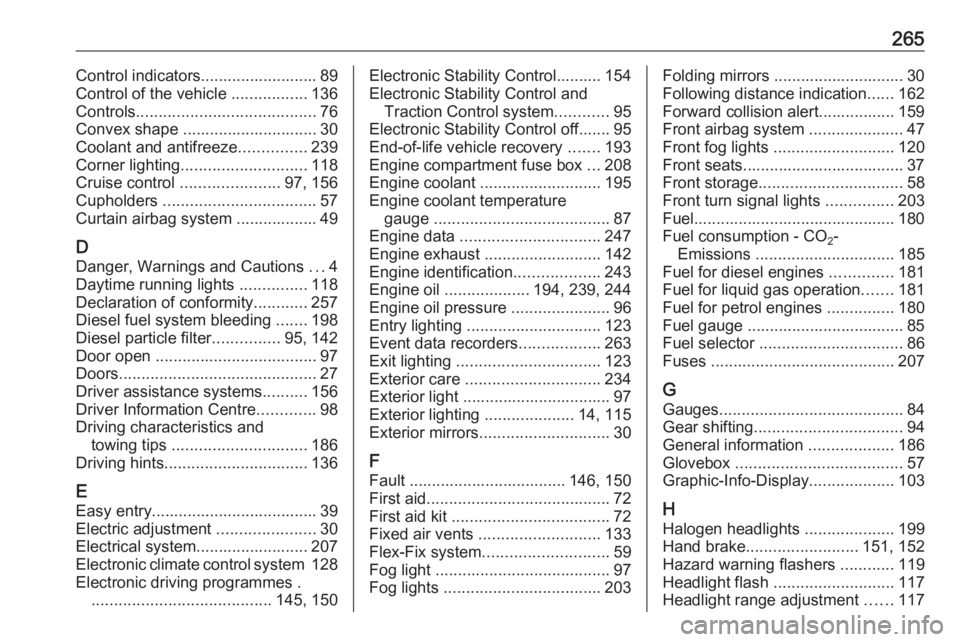
Curtain airbag system .................. 49
D Danger, Warnings and Cautions ...4
Daytime running lights ...............118
Declaration of conformity ............257
Diesel fuel system bleeding .......198
Diesel particle filter ...............95, 142
Door open .................................... 97
Doors ............................................ 27
Driver assistance systems ..........156
Driver Information Centre .............98
Driving characteristics and towing tips .............................. 186
Driving hints ................................ 136
E Easy entry..................................... 39
Electric adjustment ......................30
Electrical system......................... 207
Electronic climate control system 128
Electronic driving programmes . ........................................ 145, 150Electronic Stability Control.......... 154
Electronic Stability Control and Traction Control system ............95
Electronic Stability Control off....... 95
End-of-life vehicle recovery .......193
Engine compartment fuse box ...208
Engine coolant ........................... 195
Engine coolant temperature gauge ....................................... 87
Engine data ............................... 247
Engine exhaust .......................... 142
Engine identification ...................243
Engine oil ................... 194, 239, 244
Engine oil pressure ......................96
Entry lighting .............................. 123
Event data recorders ..................263
Exit lighting ................................ 123
Exterior care .............................. 234
Exterior light ................................. 97
Exterior lighting ....................14, 115
Exterior mirrors ............................. 30
F
Fault ................................... 146, 150
First aid ......................................... 72
First aid kit ................................... 72
Fixed air vents ........................... 133
Flex-Fix system ............................ 59
Fog light ....................................... 97
Fog lights ................................... 203Folding mirrors ............................. 30
Following distance indication ......162
Forward collision alert................. 159
Front airbag system .....................47
Front fog lights ........................... 120
Front seats.................................... 37
Front storage ................................ 58
Front turn signal lights ...............203
Fuel............................................. 180
Fuel consumption - CO 2-
Emissions ............................... 185
Fuel for diesel engines ..............181
Fuel for liquid gas operation .......181
Fuel for petrol engines ...............180
Fuel gauge ................................... 85 Fuel selector ................................ 86
Fuses ......................................... 207
G Gauges ......................................... 84
Gear shifting ................................. 94
General information ...................186
Glovebox ..................................... 57
Graphic-Info-Display ...................103
H Halogen headlights ....................199
Hand brake ......................... 151, 152
Hazard warning flashers ............119
Headlight flash ........................... 117
Headlight range adjustment ......117