belt OPEL CORSA E 2019 Manual user
[x] Cancel search | Manufacturer: OPEL, Model Year: 2019, Model line: CORSA E, Model: OPEL CORSA E 2019Pages: 231, PDF Size: 6.87 MB
Page 79 of 231
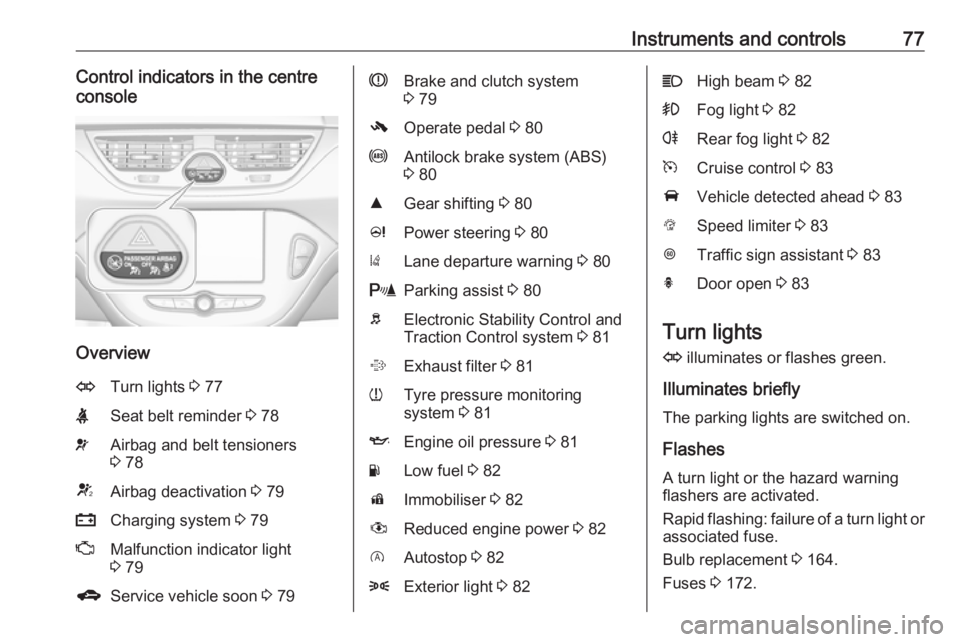
Instruments and controls77Control indicators in the centre
console
Overview
OTurn lights 3 77XSeat belt reminder 3 78vAirbag and belt tensioners
3 78VAirbag deactivation 3 79pCharging system 3 79ZMalfunction indicator light
3 79gService vehicle soon 3 79RBrake and clutch system
3 79-Operate pedal 3 80uAntilock brake system (ABS)
3 80RGear shifting 3 80cPower steering 3 80)Lane departure warning 3 80rParking assist 3 80bElectronic Stability Control and
Traction Control system 3 81%Exhaust filter 3 81wTyre pressure monitoring
system 3 81IEngine oil pressure 3 81YLow fuel 3 82dImmobiliser 3 82#Reduced engine power 3 82DAutostop 3 828Exterior light 3 82CHigh beam 3 82>Fog light 3 82rRear fog light 3 82mCruise control 3 83AVehicle detected ahead 3 83LSpeed limiter 3 83LTraffic sign assistant 3 83hDoor open 3 83
Turn lights
O illuminates or flashes green.
Illuminates briefly The parking lights are switched on.
Flashes
A turn light or the hazard warning
flashers are activated.
Rapid flashing: failure of a turn light or associated fuse.
Bulb replacement 3 164.
Fuses 3 172.
Page 80 of 231

78Instruments and controlsTurn lights 3 104.
Seat belt reminder
Seat belt reminder on front seats
X for driver's seat illuminates or
flashes red in the tachometer.
k for front passenger seat illuminates
or flashes red in the centre console
when the seat is occupied.
Illuminates
After the ignition has been switched on, until the seat belt has been
fastened.
Flashes
After having started the engine for a
maximum of 100 seconds, until the
seat belt has been fastened.
Fastening the seat belt 3 40.
Seat belt status on rear seats
X in the Driver Information Centre
flashes or illuminates.
Illuminates
After having started the engine for a
minimum of 35 seconds, until the seat
belt has been fastened.
Also illuminates if an unfastened seat belt is fastened whilst driving.
Flashes
After starting-off, when the seat belt is
unfastened.
Fastening the seat belt 3 40.
Airbag and belt tensioners v illuminates red.
When the ignition is switched on, the control indicator illuminates for
approx. 4 seconds. If it does not
illuminate, does not go out after
4 seconds or illuminates whilst
driving, there is a fault in the airbag
system. Seek the assistance of a
workshop. The airbags and belt
pretensioners may fail to trigger in the event of an accident.
Deployment of the belt pretensioners
or airbags is indicated by continuous
illumination of v.9 Warning
Have the cause of the fault
remedied immediately by a
workshop.
Belt pretensioners 3 39.
Page 85 of 231
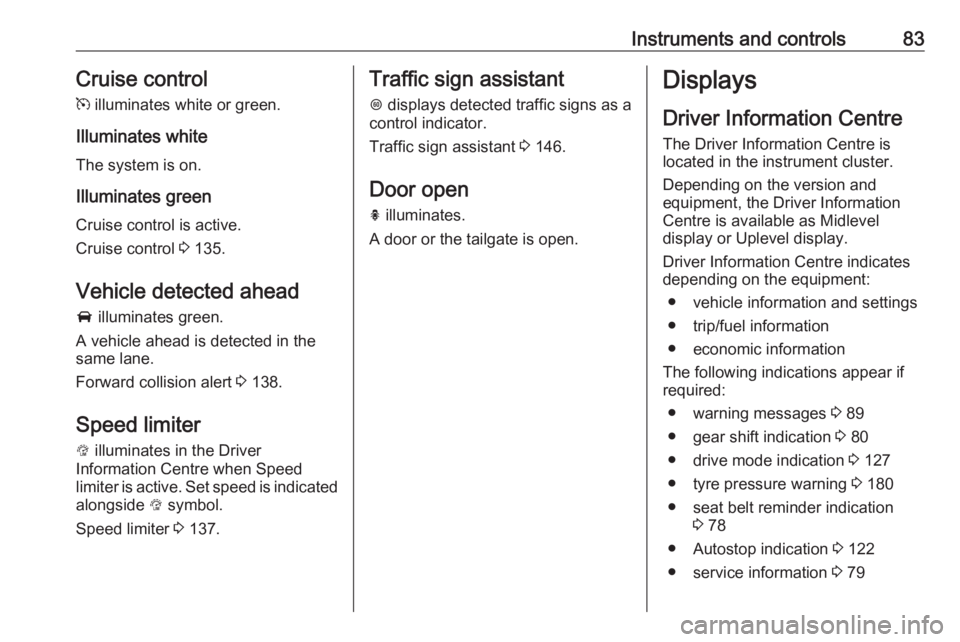
Instruments and controls83Cruise control
m illuminates white or green.
Illuminates white
The system is on.
Illuminates green
Cruise control is active.
Cruise control 3 135.
Vehicle detected ahead
A illuminates green.
A vehicle ahead is detected in the
same lane.
Forward collision alert 3 138.
Speed limiter L illuminates in the Driver
Information Centre when Speed
limiter is active. Set speed is indicated
alongside L symbol.
Speed limiter 3 137.Traffic sign assistant
L displays detected traffic signs as a
control indicator.
Traffic sign assistant 3 146.
Door open h illuminates.
A door or the tailgate is open.Displays
Driver Information Centre The Driver Information Centre is
located in the instrument cluster.
Depending on the version and
equipment, the Driver Information
Centre is available as Midlevel
display or Uplevel display.
Driver Information Centre indicates
depending on the equipment:
● vehicle information and settings
● trip/fuel information
● economic information
The following indications appear if
required:
● warning messages 3 89
● gear shift indication 3 80
● drive mode indication 3 127
● tyre pressure warning 3 180
● seat belt reminder indication 3 78
● Autostop indication 3 122
● service information 3 79
Page 93 of 231
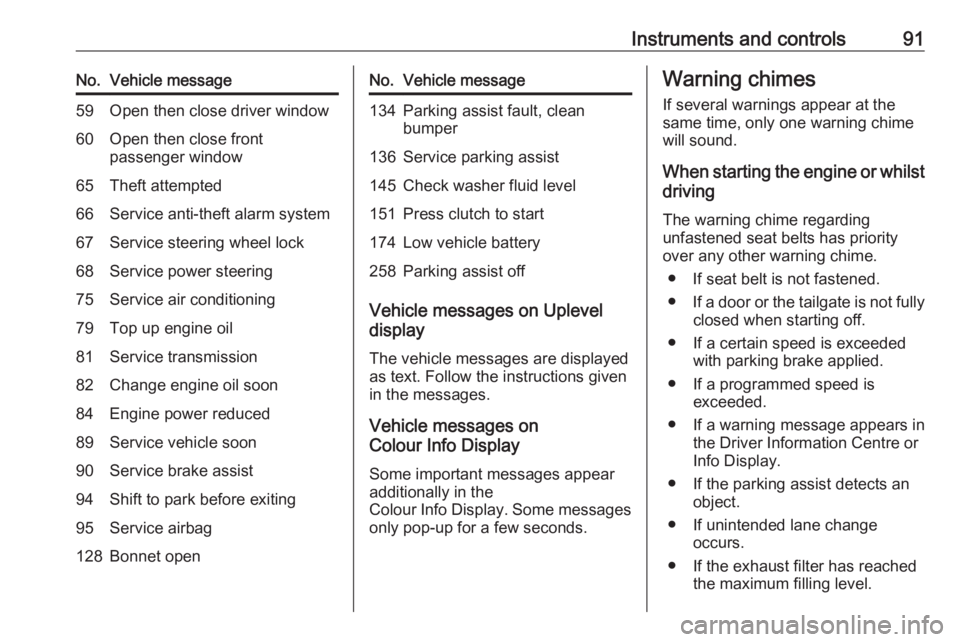
Instruments and controls91No.Vehicle message59Open then close driver window60Open then close front
passenger window65Theft attempted66Service anti-theft alarm system67Service steering wheel lock68Service power steering75Service air conditioning79Top up engine oil81Service transmission82Change engine oil soon84Engine power reduced89Service vehicle soon90Service brake assist94Shift to park before exiting95Service airbag128Bonnet openNo.Vehicle message134Parking assist fault, clean
bumper136Service parking assist145Check washer fluid level151Press clutch to start174Low vehicle battery258Parking assist off
Vehicle messages on Uplevel
display
The vehicle messages are displayed as text. Follow the instructions given
in the messages.
Vehicle messages on
Colour Info Display
Some important messages appear
additionally in the
Colour Info Display. Some messages
only pop-up for a few seconds.
Warning chimes
If several warnings appear at the same time, only one warning chime
will sound.
When starting the engine or whilst driving
The warning chime regarding
unfastened seat belts has priority
over any other warning chime.
● If seat belt is not fastened.
● If a door or the tailgate is not fully
closed when starting off.
● If a certain speed is exceeded with parking brake applied.
● If a programmed speed is exceeded.
● If a warning message appears in the Driver Information Centre orInfo Display.
● If the parking assist detects an object.
● If unintended lane change occurs.
● If the exhaust filter has reached the maximum filling level.
Page 98 of 231
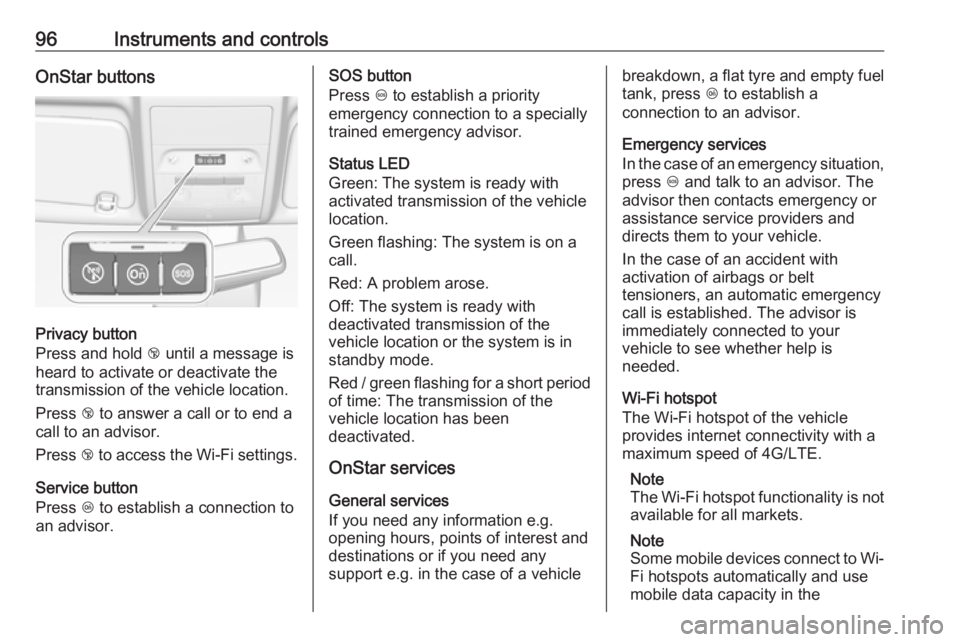
96Instruments and controlsOnStar buttons
Privacy button
Press and hold j until a message is
heard to activate or deactivate the
transmission of the vehicle location.
Press j to answer a call or to end a
call to an advisor.
Press j to access the Wi-Fi settings.
Service button
Press Z to establish a connection to
an advisor.
SOS button
Press [ to establish a priority
emergency connection to a specially
trained emergency advisor.
Status LED
Green: The system is ready with
activated transmission of the vehicle
location.
Green flashing: The system is on a
call.
Red: A problem arose.
Off: The system is ready with
deactivated transmission of the
vehicle location or the system is in
standby mode.
Red / green flashing for a short period of time: The transmission of the
vehicle location has been
deactivated.
OnStar services
General services
If you need any information e.g.
opening hours, points of interest and
destinations or if you need any
support e.g. in the case of a vehiclebreakdown, a flat tyre and empty fuel
tank, press Z to establish a
connection to an advisor.
Emergency services
In the case of an emergency situation,
press [ and talk to an advisor. The
advisor then contacts emergency or
assistance service providers and
directs them to your vehicle.
In the case of an accident with
activation of airbags or belt
tensioners, an automatic emergency
call is established. The advisor is
immediately connected to your
vehicle to see whether help is
needed.
Wi-Fi hotspot
The Wi-Fi hotspot of the vehicle
provides internet connectivity with a
maximum speed of 4G/LTE.
Note
The Wi-Fi hotspot functionality is not
available for all markets.
Note
Some mobile devices connect to Wi- Fi hotspots automatically and use
mobile data capacity in the
Page 120 of 231
118Climate control
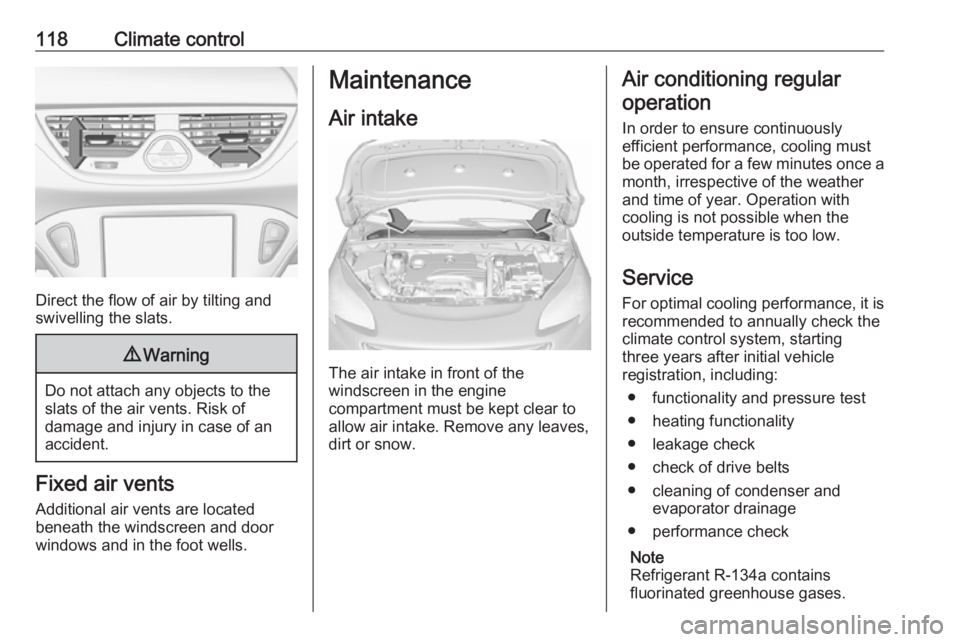
Direct the flow of air by tilting and
swivelling the slats.
9 Warning
Do not attach any objects to the
slats of the air vents. Risk of
damage and injury in case of an
accident.
Fixed air vents
Additional air vents are located
beneath the windscreen and door windows and in the foot wells.
Maintenance
Air intake
The air intake in front of the
windscreen in the engine
compartment must be kept clear to
allow air intake. Remove any leaves,
dirt or snow.
Air conditioning regular
operation
In order to ensure continuously
efficient performance, cooling must
be operated for a few minutes once a
month, irrespective of the weather
and time of year. Operation with
cooling is not possible when the
outside temperature is too low.
Service For optimal cooling performance, it is recommended to annually check the
climate control system, starting
three years after initial vehicle
registration, including:
● functionality and pressure test
● heating functionality
● leakage check
● check of drive belts
● cleaning of condenser and evaporator drainage
● performance check
Note
Refrigerant R-134a contains
fluorinated greenhouse gases.
Page 125 of 231
Driving and operating123Conditions for an Autostop
The stop-start system checks if each
of the following conditions is fulfilled:
● The stop-start system is not manually deactivated.
● The bonnet is fully closed.
● The driver's door is closed or the driver's seat belt is fastened.
● The vehicle battery is sufficiently charged and in good condition.
● The engine is warmed-up.
● The engine coolant temperature is not too high.
● The engine exhaust temperature is not too high, e.g. after driving
with high engine load.
● The ambient temperature is above -5 °C.
● The climate control system allows an Autostop.
● The brake vacuum is sufficient.
● The self-cleaning function of the exhaust filter is not active.
● The vehicle was driven at least at
walking speed since the last
Autostop.Otherwise an Autostop will be
inhibited.
Certain settings of the climate control
system may inhibit an Autostop. See
'Climate control' chapter for further
information 3 110.
Immediately after motorway driving
an Autostop may be inhibited.
New vehicle running-in 3 120.
Vehicle battery discharge protection
To ensure reliable engine restarts,
several vehicle battery discharge
protection features are implemented
as part of the stop-start system.
Power saving measures
During an Autostop, several electrical
features, e.g. the rear window
heating, are disabled or switched into
a power saving mode. The fan speed of the climate control system is
reduced to save power.
Restart of the engine by the driverVehicles with manual transmission
Depress the clutch pedal to restart the
engine.When the engine is restarted, control
indicator D in the Driver Information
Centre extinguishes.
If the selector lever is shifted out of
neutral before depressing the clutch
pedal first, control indicator -
illuminates or is shown as a symbol in
the Driver Information Centre.
Control indicator - 3 79.
Restart of the engine by the stop- start system
The selector lever must be in neutral to enable an automatic restart.
If one of the following conditions occurs during an Autostop, the
engine will be restarted automatically
by the stop-start system:
● The stop-start system is manually deactivated.
● The bonnet is opened.
● The driver's seat belt is unfastened and the driver's door
is opened.
● The engine temperature is too low.
Page 180 of 231
178Vehicle careVehicles with spare wheel
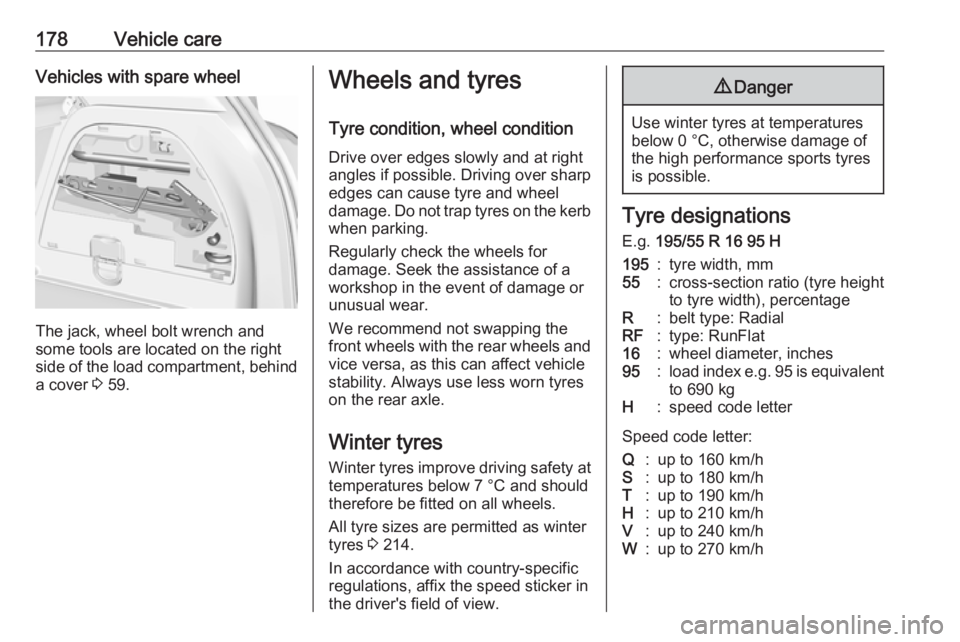
The jack, wheel bolt wrench and
some tools are located on the right
side of the load compartment, behind a cover 3 59.
Wheels and tyres
Tyre condition, wheel condition
Drive over edges slowly and at right
angles if possible. Driving over sharp
edges can cause tyre and wheel
damage. Do not trap tyres on the kerb when parking.
Regularly check the wheels for
damage. Seek the assistance of a
workshop in the event of damage or
unusual wear.
We recommend not swapping the
front wheels with the rear wheels and vice versa, as this can affect vehicle
stability. Always use less worn tyres
on the rear axle.
Winter tyres
Winter tyres improve driving safety at temperatures below 7 °C and should
therefore be fitted on all wheels.
All tyre sizes are permitted as winter
tyres 3 214.
In accordance with country-specific
regulations, affix the speed sticker in
the driver's field of view.9 Danger
Use winter tyres at temperatures
below 0 °C, otherwise damage of
the high performance sports tyres
is possible.
Tyre designations
E.g. 195/55 R 16 95 H
195:tyre width, mm55:cross-section ratio (tyre height
to tyre width), percentageR:belt type: RadialRF:type: RunFlat16:wheel diameter, inches95:load index e.g. 95 is equivalent
to 690 kgH:speed code letter
Speed code letter:
Q:up to 160 km/hS:up to 180 km/hT:up to 190 km/hH:up to 210 km/hV:up to 240 km/hW:up to 270 km/h
Page 203 of 231

Vehicle care201Clean the leather upholstery with
clear water and a soft cloth. In case of
heavy soiling, use leather care.
The instrument cluster and the
displays should only be cleaned using
a soft damp cloth. If necessary use a
weak soap solution.
Clean fabric upholstery with a
vacuum cleaner and brush. Remove
stains with an upholstery cleaner.
Clothing fabrics may not be
colourfast. This could cause visible
discolourations, especially on light- coloured upholstery. Removable
stains and discolourations should be
cleaned as soon as possible.
Clean seat belts with lukewarm water or interior cleaner.Caution
Close Velcro fasteners as open
Velcro fasteners on clothing could damage seat upholstery.
The same applies to clothing with
sharp-edged objects, like zips or
belts or studded jeans.
Plastic and rubber parts
Plastic and rubber parts can be
cleaned with the same cleaner as
used to clean the body. Use interior cleaner if necessary. Do not use any
other agent. Avoid solvents and petrol in particular. Do not use high-
pressure jet cleaners.
Page 223 of 231
Customer information221Operating data in the vehicleControl units process data for
operation of the vehicle.
This data includes, e.g.: ● vehicle status information (e.g. speed, movement delay, lateral
acceleration, wheel rotation rate,
"seat belts fastened" display)
● ambient conditions (e.g. temperature, rain sensor,
distance sensor)
As a rule such data is transient, not
stored for longer than an operational
cycle, and only processed on board
the vehicle itself. Control units often
include data storage (including the
vehicle key). This is used to allow
information to be documented
temporarily or permanently on vehicle
condition, component stress,
maintenance requirements and
technical events and errors.Depending on technical equipment
levels, the data stored is as follows:
● system component operating states (e.g. fill level, tyre
pressure, battery status)
● faults and defects in important system components (e.g. lights,brakes)
● system reactions in special driving situations (e.g. triggering
of an airbag, actuation of the
stability control systems)
● information on events damaging the vehicle
● for electric vehicles the amount of
charge in the high-voltage
battery, estimated range
In special cases (e.g. if the vehicle
has detected a malfunction), it may be
necessary to save data that would
otherwise just be volatile.
When you use services (e.g. repairs,
maintenance), the operating data
saved can be read together with the
vehicle identification number and
used where necessary. Staff working
for the service network ( e.g. garages,
manufacturers) or third parties (e.g.breakdown services) can read the
data from the vehicle. The same
applies to warranty work and quality
assurance measures.
Data is generally read via the OBD
(On-Board Diagnostics) port
prescribed by law in the vehicle. The operating datawhich is read out,
documents the technical condition of
the vehicle or individual components
and assists with fault diagnosis,
compliance with warranty obligations
and quality improvement. This data,
in particular information on
component stress, technical events,
operator errors and other faults, is
transmitted to the manufacturer
where appropriate, together with the
vehicle identification number. The
manufacturer is also subject to
product liability. The manufacturer
potentially also uses operating data
from vehicles for product recalls. This
data can also be used to check
customer warranty and guarantee
claims.
Fault memories in the vehicle can be
reset by a service company when
carrying out servicing or repairs or at
your request.