camera OPEL CORSA F 2020 User Guide
[x] Cancel search | Manufacturer: OPEL, Model Year: 2020, Model line: CORSA F, Model: OPEL CORSA F 2020Pages: 229, PDF Size: 21.14 MB
Page 136 of 229
134Driving and operating9Warning
Smart brake assist may increase
vehicle braking in situations when
it may not be necessary. You
could block the flow of traffic. If this occurs, take your foot off the brakepedal and then apply the brakes
as needed.
Forward collision alert 3 135.
Front pedestrian protection 3 137.
System limitations In some cases, the active emergencybraking system may provide an
automatic braking in situations that
seem to be unnecessary, for instance
in parking garages, due to various
types of objects, i.e., traffic signs or
vehicles in another lane. This is
normal operation, the vehicle does
not need service. Firmly apply the
accelerator pedal to override the
automatic braking if the situation and
the surroundings permit.
In the following cases, active
emergency braking performance
might be limited:
● driving on winding or hilly roads
● detecting vehicles with a trailer, tractors, muddy vehicles, etc.
● detecting a vehicle when weather
limits visibility, such as in fog,
rain, or snow
● driving during nighttime
● the sensor in the windscreen or the radar unit behind the front
bumper are blocked by snow, ice,
slush, mud, dirt etc.
● the windscreen is damaged or affected by foreign objects, e.g.
stickers
the bumper is damaged or
affected by foreign objects, e.g.
license plate support
Complete attention is always required
while driving, and you should be
ready to take action and apply the
brakes and / or steer the vehicle to
avoid crashes.We recommend to deactivate the
system in the vehicle personalisation
in the following cases:
● when towing a trailer or caravan
● when carrying long objects on roof bars or a roof rack
● when the vehicle is being towed with the engine running
● when the vehicle is fitted with snow chains
● when a spare wheel is fitted that is smaller than the other wheels
● before using an automatic car wash with the engine running
● before placing the vehicle on a rolling road in a workshop
● if the windscreen has been damaged close to the camera
● if the front bumper has been damaged
● if the brake lights are not working
Fault
In case the system requires a service,
a message is displayed in the Driver
Information Centre.
Page 137 of 229
Driving and operating135If the system does not work properly,
vehicle messages are displayed in
the Driver Information Centre.
Vehicle messages 3 76.
Forward collision alert The forward collision alert may help toavoid or reduce the harm caused by
front-end crashes.
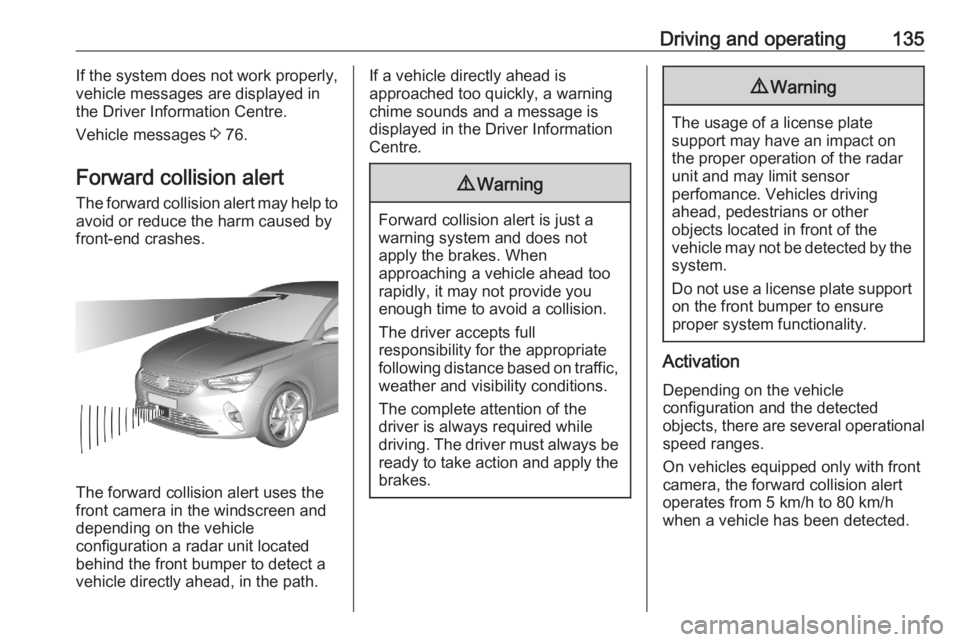
The forward collision alert uses the
front camera in the windscreen and
depending on the vehicle
configuration a radar unit located
behind the front bumper to detect a
vehicle directly ahead, in the path.
If a vehicle directly ahead is
approached too quickly, a warning
chime sounds and a message is
displayed in the Driver Information
Centre.9 Warning
Forward collision alert is just a
warning system and does not
apply the brakes. When
approaching a vehicle ahead too
rapidly, it may not provide you
enough time to avoid a collision.
The driver accepts full
responsibility for the appropriate
following distance based on traffic, weather and visibility conditions.
The complete attention of the
driver is always required while
driving. The driver must always be
ready to take action and apply the
brakes.
9 Warning
The usage of a license plate
support may have an impact on
the proper operation of the radar
unit and may limit sensor
perfomance. Vehicles driving
ahead, pedestrians or other
objects located in front of the
vehicle may not be detected by the
system.
Do not use a license plate support on the front bumper to ensure
proper system functionality.
Activation
Depending on the vehicle
configuration and the detected
objects, there are several operational speed ranges.
On vehicles equipped only with front
camera, the forward collision alert
operates from 5 km/h to 80 km/h
when a vehicle has been detected.
Page 138 of 229
136Driving and operatingOn vehicles equipped with radar
sensor and front camera, the forward
collision alert operates from 5 km/h to
140 km/h when a vehicle has been
detected.
Alerting the driver
The driver is warned by following
alerts:
● Symbol , and a warning
message are displayed in the
Driver Information Center, when
the distance to the vehicle ahead
gets to small.
● Symbol , and a warning
message are displayed in the
Driver Information Center and a
warning chime sounds, when a
collision is imminent and
immediate driver's action is
required.9 Warning
Forward collision alert is just a
warning system and does not
apply the brakes. When
approaching a vehicle ahead too
rapidly, it may not provide you
enough time to avoid a collision.
The driver accepts full
responsibility for the appropriate
following distance based on traffic, weather and visibility conditions.
The complete attention of the
driver is always required while
driving. The driver must always be
ready to take action and apply the
brakes.9 Warning
The usage of a license plate
support may have an impact on
the proper operation of the radar
unit and may limit sensor
perfomance. Vehicles or
pedestrians driving or walking
ahead may not be detected by the
system.
Do not use a a license plate
support to ensure proper system
functionality.
Selecting the alert sensitivity
Three alert sensivities can be
selected in the settings of the active
emergency braking within the vehicle personalisation 3 77.
The chosen setting will be memorised
when the ignition has been switched
off. The alert timing will vary based on
selected alert setting and vehicle
speed. Consider traffic and weather conditions when selecting the alert
timing.
Deactivation
The system can only be deactivated
by deactivating the active emergency braking in the vehicle personalisation
3 77. When ignition is switched on
next time, system is activated.
System limitations Forward collision alert is designed to
warn on vehicles, but may react also
to other objects.
Page 139 of 229

Driving and operating137In the following cases, forward
collision alert may not detect a vehicle
ahead or sensor performance is
limited:
● driving on winding or hilly roads
● driving during nighttime
● weather limits visibility, such as fog, rain, or snow
● the sensor in the windscreen or the radar unit behind the front
bumper are blocked by snow, ice, slush, mud, dirt etc.
● the windscreen is damaged or affected by foreign objects, e.g.
stickers
Front pedestrian protection
Front pedestrian protection may help
to avoid or reduce the harm caused
by front-end crashes with pedestrians when driving forward.
The system uses the front camera in
the windscreen and depending on the vehicle configuration a radar unit in
the front bumper to detect a
pedestrian directly ahead in the path.
9 Warning
The usage of a license plate
support may have an impact on
the proper operation of the radar
unit and may limit sensor
perfomance. Vehicles or
pedestrians driving or walking
ahead may not be detected by the
system.
Do not use a a license plate
support to ensure proper system
functionality.
Front pedestrian protection can
detect and alert to pedestrians in a
forward gear at speeds between
5 km/h and 60 km/h. Additionally,
front pedestrian protection can
provide a boost to braking or
automatically brake the vehicle.
During nighttime driving, system
performance is limited.
9 Danger
Front pedestrian braking does not
provide an alert or automatically
brake the vehicle, unless it detects
a pedestrian.
The system may not detect
pedestrians, including children,
when the pedestrian is not directly ahead, not fully visible, not
standing upright, or when part of a
group.
Page 150 of 229
148Driving and operatingActive side blind spot detection
operates when the vehicle speed is
between 65 and 140 km/h.
Functionality
When steering towards the detected
vehicle is attemped, the driver will
then notice a turning movement of the
steering wheel towards the opposite
side. Turn steering wheel in the same direction if the system does not steer
sufficiently.
The system also intervenes even if
the turn lights have been activated.
Panoramic view system
This system allows views of the
vehicle's surroundings to be
displayed as a nearly 180° picture in
the Info Display, like a bird's eye view.
The system uses: ● rear camera, installed in the rear bumper
● ultrasonic parking sensors in the rear bumper
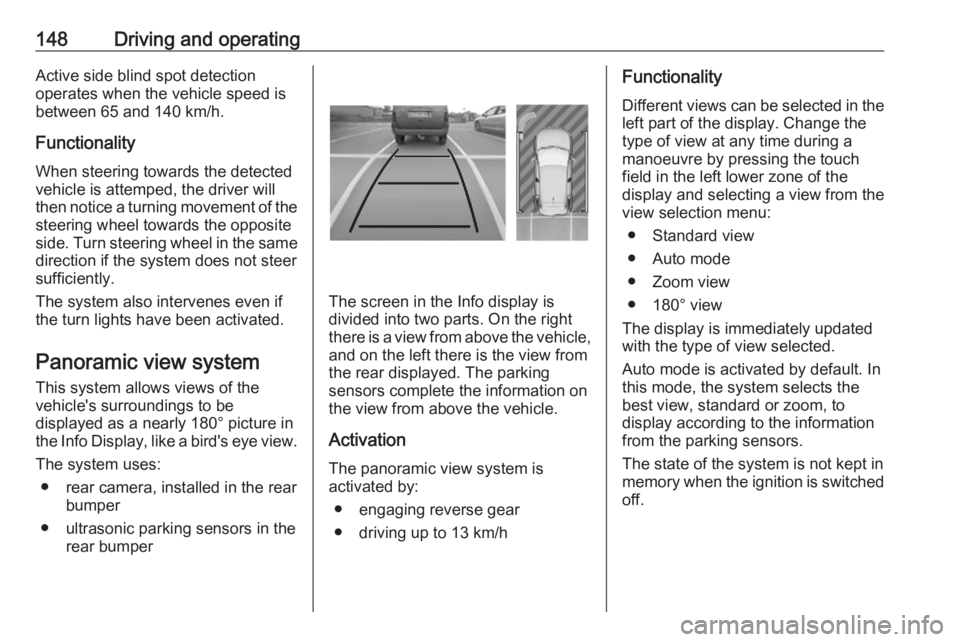
The screen in the Info display is
divided into two parts. On the right
there is a view from above the vehicle,
and on the left there is the view from
the rear displayed. The parking
sensors complete the information on
the view from above the vehicle.
Activation
The panoramic view system is
activated by:
● engaging reverse gear
● driving up to 13 km/h
Functionality
Different views can be selected in the left part of the display. Change the
type of view at any time during a
manoeuvre by pressing the touch
field in the left lower zone of the
display and selecting a view from the
view selection menu:
● Standard view
● Auto mode
● Zoom view
● 180° view
The display is immediately updated
with the type of view selected.
Auto mode is activated by default. In
this mode, the system selects the
best view, standard or zoom, to
display according to the information
from the parking sensors.
The state of the system is not kept in
memory when the ignition is switched
off.
Page 151 of 229
Driving and operating149Standard view
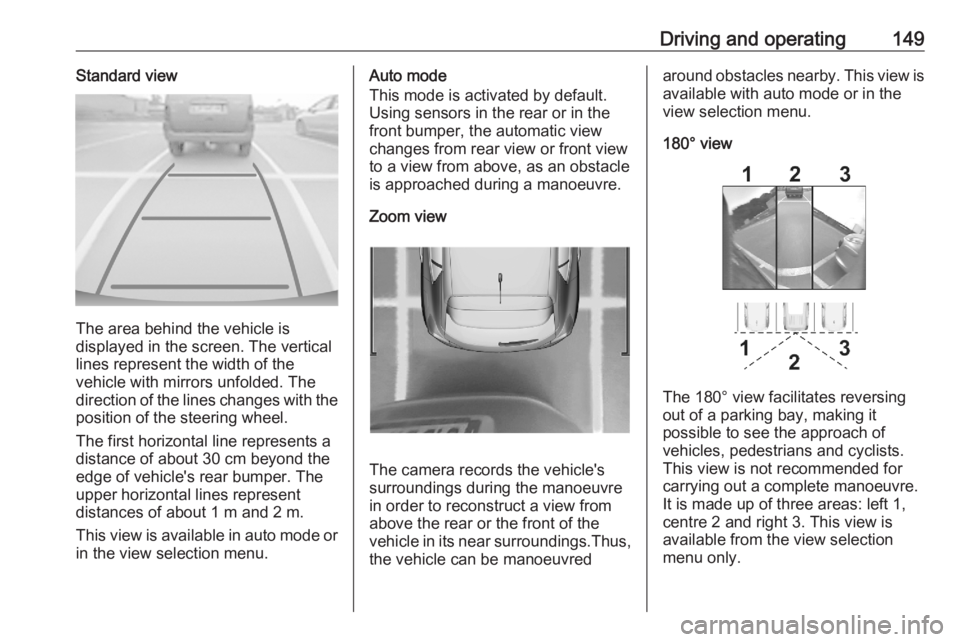
The area behind the vehicle is
displayed in the screen. The vertical
lines represent the width of the
vehicle with mirrors unfolded. The
direction of the lines changes with the position of the steering wheel.
The first horizontal line represents a
distance of about 30 cm beyond the
edge of vehicle's rear bumper. The
upper horizontal lines represent
distances of about 1 m and 2 m.
This view is available in auto mode or
in the view selection menu.
Auto mode
This mode is activated by default.
Using sensors in the rear or in the
front bumper, the automatic view
changes from rear view or front view
to a view from above, as an obstacle is approached during a manoeuvre.
Zoom view
The camera records the vehicle's
surroundings during the manoeuvre
in order to reconstruct a view fromabove the rear or the front of the
vehicle in its near surroundings.Thus,
the vehicle can be manoeuvred
around obstacles nearby. This view is available with auto mode or in the
view selection menu.
180° view
The 180° view facilitates reversing
out of a parking bay, making it
possible to see the approach of
vehicles, pedestrians and cyclists.
This view is not recommended for
carrying out a complete manoeuvre.
It is made up of three areas: left 1,
centre 2 and right 3. This view is
available from the view selection menu only.
Page 152 of 229
150Driving and operatingDeactivation
Panoramic view system is
deactivated when:
● towing an electrically connected trailer, bicycle carrier, etc.
● a certain forward speed is exceeded or if reverse gear is not
engaged for 7 seconds
● by pressing the icon q in the left
upper corner of the touch screen
General information9 Warning
The panoramic view system does
not replace driver vision. It will not display children, pedestrians,
cyclists, crossing traffic, animals,
or any other objects outside of the camera view area, e. g. below the
bumper, or underneath the
vehicle.
Do not drive or park the vehicle
using only the panoramic view
system.
Always check the surrounding of
the vehicle before driving.
Displayed images may be further
or closer than they appear. The
area displayed is limited and
objects that are close to either
edge of the bumper or under the
bumper are not displayed on the
screen.
System limitations
Caution
For optimal operation of the
system, it is important to keep the
lense of the camera in the tailgate between the number plate lightsand the lense in the front grill
below the emblem always clean.
Rinse the lenses with water and
wipe with a soft cloth.
Do not clean the lenses with a
steam-jet or high-pressure jet
cleaner.
The panoramic view system may not
operate properly when:
● The surrounding is dark.
● The sun or the beam of headlights is shining directly into
the camera lenses.
● Weather limits visibility, such as fog, rain, or snow.
● The camera lenses are blocked by snow, ice, slush, mud, dirt.
● The vehicle had an accident. ● There are extreme temperature changes.
Rear view camera The rear view camera assists the
driver when reversing by displaying a
view of the area behind the vehicle.
The view of the camera is displayed
in the Info Display.9 Warning
The rear view camera does not
replace driver vision. Note that
objects that are outside the
Page 153 of 229
Driving and operating151camera's field of view and the
parking assist sensors, e.g. below
the bumper or underneath the
vehicle, are not displayed.
Do not reverse or park the vehicle using only the rear view camera.
Always check the surrounding of
the vehicle before driving.
Switching on
Rear view camera is automatically
activated when reverse gear is
engaged.
Functionality
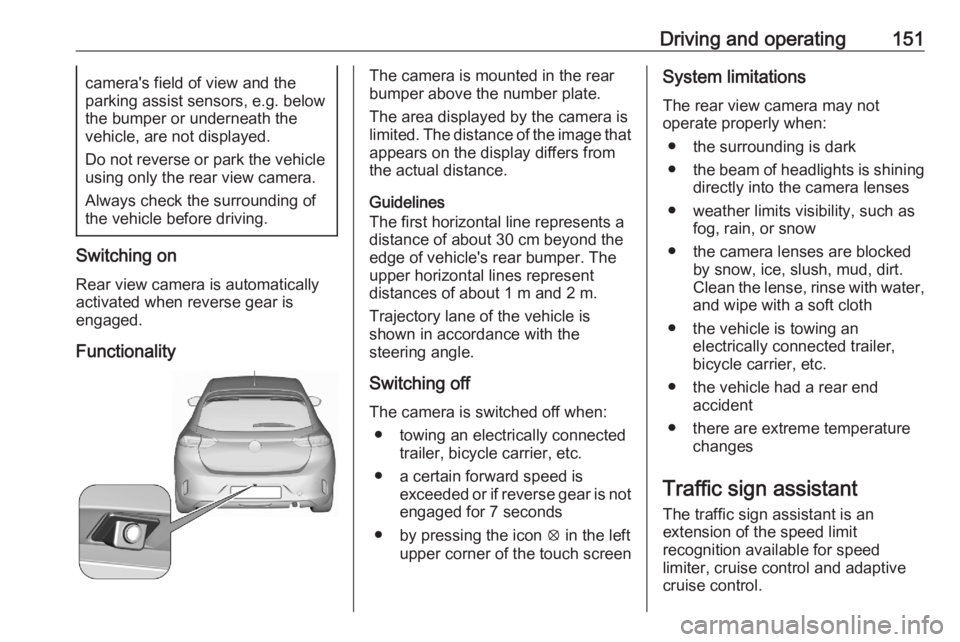
The camera is mounted in the rear
bumper above the number plate.
The area displayed by the camera is
limited. The distance of the image that
appears on the display differs from
the actual distance.
Guidelines
The first horizontal line represents a
distance of about 30 cm beyond the
edge of vehicle's rear bumper. The
upper horizontal lines represent
distances of about 1 m and 2 m.
Trajectory lane of the vehicle is
shown in accordance with the
steering angle.
Switching off
The camera is switched off when: ● towing an electrically connected trailer, bicycle carrier, etc.
● a certain forward speed is exceeded or if reverse gear is not
engaged for 7 seconds
● by pressing the icon q in the left
upper corner of the touch screenSystem limitations
The rear view camera may not
operate properly when:
● the surrounding is dark
● the beam of headlights is shining
directly into the camera lenses
● weather limits visibility, such as fog, rain, or snow
● the camera lenses are blocked by snow, ice, slush, mud, dirt.Clean the lense, rinse with water,
and wipe with a soft cloth
● the vehicle is towing an electrically connected trailer,
bicycle carrier, etc.
● the vehicle had a rear end accident
● there are extreme temperature changes
Traffic sign assistant
The traffic sign assistant is an
extension of the speed limit
recognition available for speed
limiter, cruise control and adaptive
cruise control.
Page 154 of 229

152Driving and operating
The system recognises the traffic
signs above and displays them in the
Driver Information Centre.
9 Warning
The actual traffic sign always
takes priority over the traffic sign displayed in the Driver Information Centre.
If the vehicle enters a road of whichthe entry is prohibited, the no entry
traffic symbol and a warning message are displayed in the Driver
Information Centre. If the system
detects one of the other traffic signs,
the respective traffic sign is displayed
in the Driver Information Centre.
Speed limiter 3 122
Cruise control 3 120
Adaptive cruise control 3 124
Lane keep assist
Lane keep assist supports the driver
to avoid unintended leaving of the
lane. The front camera observes road
edges, as well as the lane markings
between which the vehicle is driving.
If the vehicle approaches a road edge or a lane marking, the steering wheel
is gently turned to position so that the
vehicle turns back into the lane. The
driver will then notice a turning
movement of the steering wheel. Turn steering wheel in same direction, if
the system does not steer sufficiently.
Turn steering wheel gently into
opposite direction, if lane change is
intended.
When the system steers to correct the trajectory of the vehicle, L flashes
yellow in the instrument cluster.
Unintended lane departure is not
assumed by the system when the turn lights are operated and during few
seconds after turn lights have been
switched off.Note
The system may be switched off if it
detects lanes which are too narrow,
too wide or too curved.
Following preconditions have to be
fulfilled:
● vehicle speed must be between 65 km/h and 180 km/h
● the driver must hold the steering wheel
● the turn lights are not activated
● the electronic stability control is activated and not in operation
● the vehicle is not connected to a trailer or an electric bicycle carrier
● normal driving behaviour (system
detects dynamic driving style, i.e. pressure on the brake or
accelerator pedal)
● roads with good lane markings ● no spare wheel is used
● the driver is not taking the hands off the steering wheel for a longer
time period
● the vehicle is not driven in a tight
corner
Page 157 of 229
Driving and operating155The counting of driving time alert is
reset when the ignition has been
switched off for a few minutes.
Driver drowsiness detection
The system monitors the driver's level
of vigilance at speeds above
65 km/h. A camera at the top of the
windscreen detects variations in
trajectory compared to the lane
markings.
If the trajectory of the vehicle
suggests a certain level of
drowsiness or inattention by the
driver, the system triggers the first
level of alert. The driver is notified by
a message and an audible signal is
given.
After three first level alerts, the
system triggers a new alert with a message, accompanied by a more
pronounced audible signal.
In certain driving conditions (poor
road surface or strong winds), the
system may give alerts independent of the driver's level of vigilance.The driver drowsiness detection is
reinitialised when the ignition has
been switched off for a few minutes or the speed remains below 65 km/h for
a few minutes.
System limitationsIn the following situations, the system
may not operate properly or even not
operate at all:
● poor visibility caused by inadequate lighting of the
roadway, falling snow, heavy
rain, dense fog etc.
● dazzle caused by headlamps of an oncoming vehicles, low sun,
reflections on damp roads,
leaving a tunnel, alternating
shade and light etc.
● windscreen area in front of the camera covered by dirt, snow,
stickers etc.
● no lane markings detected or multiple lane markings due to
roadworks
● close vehicles ahead
● winding roads or narrow roadsFuel
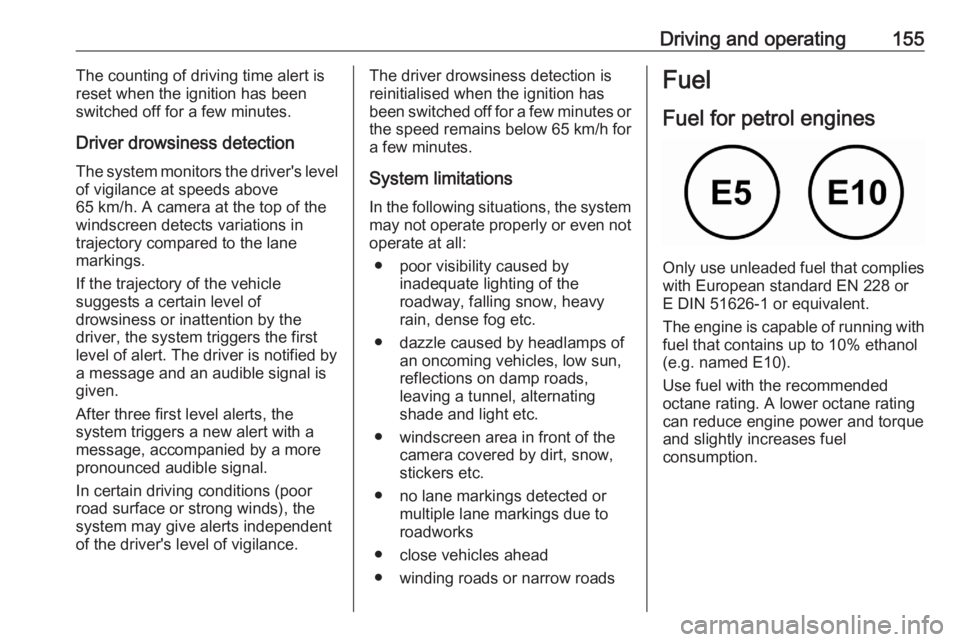
Fuel for petrol engines
Only use unleaded fuel that complies
with European standard EN 228 or
E DIN 51626-1 or equivalent.
The engine is capable of running with
fuel that contains up to 10% ethanol
(e.g. named E10).
Use fuel with the recommended octane rating. A lower octane rating can reduce engine power and torque
and slightly increases fuel
consumption.