warning light OPEL CROSSLAND X 2017.75 Manual user
[x] Cancel search | Manufacturer: OPEL, Model Year: 2017.75, Model line: CROSSLAND X, Model: OPEL CROSSLAND X 2017.75Pages: 245, PDF Size: 7.6 MB
Page 93 of 245

Instruments and controls91Flashes yellowThe remaining driving range is
between 0 and 600 km.
Top-up the AdBlue® as soon as
possible to avoid a breakdown by a
qualified workshop. You can add up
to 10 litres of AdBlue® to its tank.
Deflation detection system
w illuminates or flashes yellow.
Illuminates
Tyre pressure loss in one or more
wheels. Stop immediately and check
tyre pressure.
Flashes
Fault in system. Consult a workshop.
Engine oil pressure
I illuminates red.
Illuminates when the ignition is
switched on and extinguishes shortly after the engine starts.Illuminates when the engine is
runningCaution
Engine lubrication may be
interrupted. This may result in
damage to the engine and/or
locking of the drive wheels.
1. Depress clutch.
2. Select neutral gear.
3. Move out of the flow of traffic as quickly as possible without
impeding other vehicles.
4. Switch off ignition.
9 Warning
When the engine is off,
considerably more force is needed
to brake and steer.
During an Autostop, the brake
servo unit will still be operational.
Do not remove key until vehicle is stationary, otherwise the steeringwheel lock could engage
unexpectedly.
Check oil level before seeking
assistance of a workshop 3 178.
Low fuel
o illuminates yellow.
Level in fuel tank is too low.
Refuelling 3 168.
Bleeding the diesel fuel system
3 182.
Autostop
D illuminates or flashes green.
Illuminates green
Engine is in an Autostop.
Flashes green
Autostop is temporarily unavailable,
or Autostop mode is invoked
automatically.
Stop-start system 3 132.
Exterior light
8 illuminates green.
The exterior lights are on 3 107.
Page 99 of 245
Instruments and controls97Speech recognition
Description see Infotainment manual.
Vehicle personalisation 3 100.
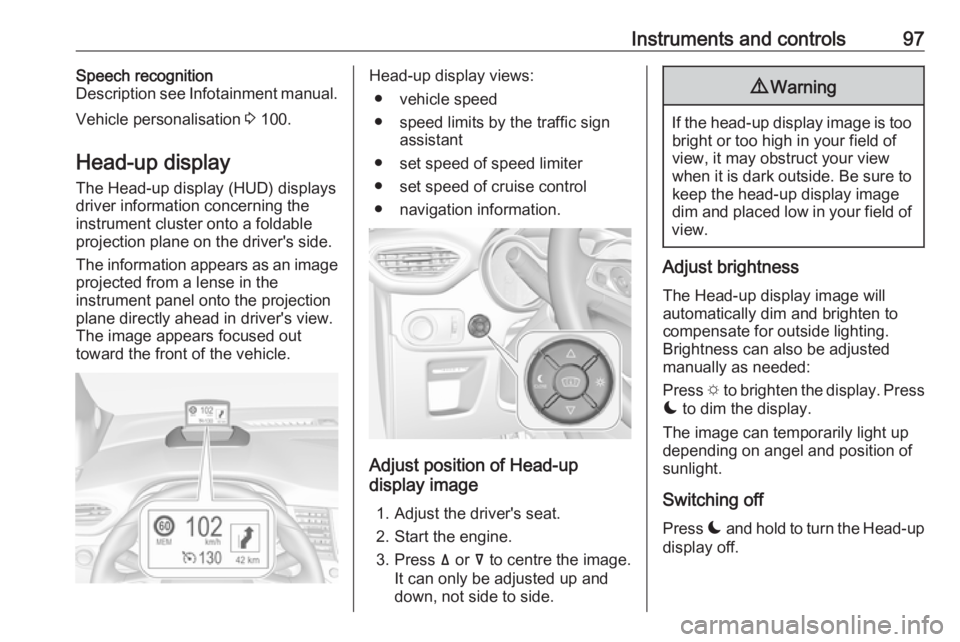
Head-up display The Head-up display (HUD) displays
driver information concerning the
instrument cluster onto a foldable
projection plane on the driver's side.
The information appears as an image
projected from a lense in the
instrument panel onto the projection
plane directly ahead in driver's view.
The image appears focused out
toward the front of the vehicle.Head-up display views:
● vehicle speed
● speed limits by the traffic sign assistant
● set speed of speed limiter
● set speed of cruise control
● navigation information.
Adjust position of Head-up
display image
1. Adjust the driver's seat.
2. Start the engine.
3. Press ä or å to centre the image.
It can only be adjusted up and
down, not side to side.
9 Warning
If the head-up display image is too
bright or too high in your field of
view, it may obstruct your view
when it is dark outside. Be sure to keep the head-up display imagedim and placed low in your field of
view.
Adjust brightness
The Head-up display image will
automatically dim and brighten to
compensate for outside lighting.
Brightness can also be adjusted
manually as needed:
Press e to brighten the display. Press
æ to dim the display.
The image can temporarily light up
depending on angel and position of
sunlight.
Switching off
Press æ and hold to turn the Head-up
display off.
Page 101 of 245
Instruments and controls99Messages in the
Colour-Info-Display
Some important messages may
appear additionally in the
Info-Display. Some messages only
pop-up for a few seconds.
Warning chimes When starting the engine or whilst
driving
Only one warning chime will sound at
a time.
The warning chime regarding not
fastened seat belts has priority over
any other warning chime.
● If a seat belt is not fastened.
● If a door or the tailgate is not fully
closed when starting off.
● If a certain speed is exceeded with parking brake applied.
● If cruise control deactivates automatically.
● If a programmed speed or speed
limit is exceeded.● If a warning message appears in the Driver Information Centre.
● If the electronic key is not in the passenger compartment.
● If the parking assist detects an object.
● If an unintended lane change occurs.
● If the diesel particle filter has reached the maximum filling
level.
When the vehicle is parked and/or the driver's door is opened
● With exterior lights on.
During an Autostop ● If the driver's door is opened.
● If any condition for an autostart is
not fulfilled.
Battery voltage When the vehicle battery voltage is
running low, a warning message will
appear in the Driver Information
Centre.When the vehicle is being driven, the
load reduction function temporarily
deactivates certain functions, such as the air conditioning, the heated rear
screen, heated steering wheel, etc.
The deactivated functions are
reactivated automatically as soon as
conditions permit.
Page 104 of 245
102Instruments and controls8" Colour-Info-Display
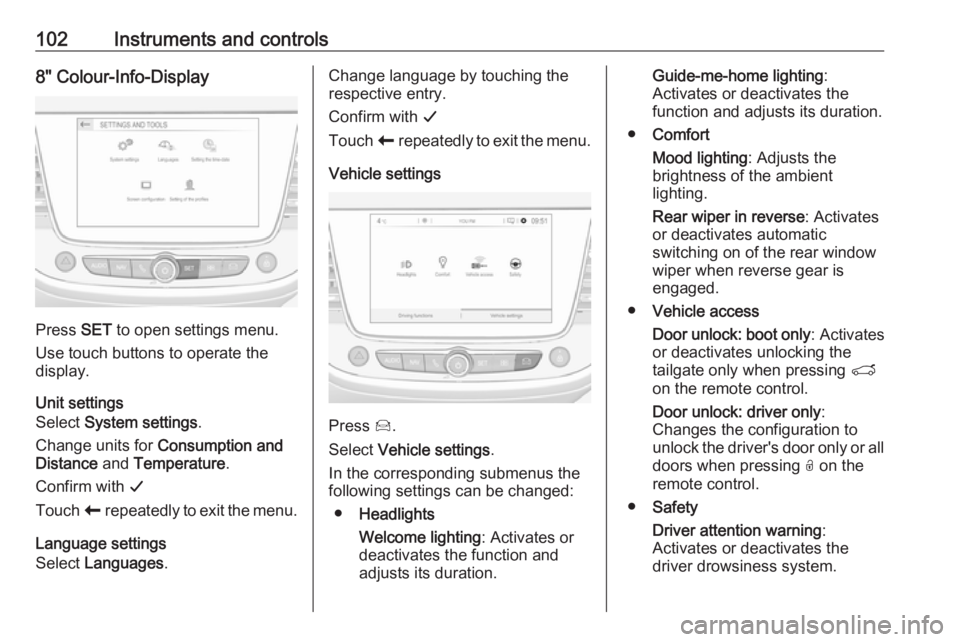
Press SET to open settings menu.
Use touch buttons to operate the
display.
Unit settings
Select System settings .
Change units for Consumption and
Distance and Temperature .
Confirm with G
Touch r repeatedly to exit the menu.
Language settings
Select Languages .
Change language by touching the
respective entry.
Confirm with G
Touch r repeatedly to exit the menu.
Vehicle settings
Press Í.
Select Vehicle settings .
In the corresponding submenus the
following settings can be changed:
● Headlights
Welcome lighting : Activates or
deactivates the function and
adjusts its duration.
Guide-me-home lighting :
Activates or deactivates the
function and adjusts its duration.
● Comfort
Mood lighting : Adjusts the
brightness of the ambient
lighting.
Rear wiper in reverse : Activates
or deactivates automatic
switching on of the rear window
wiper when reverse gear is
engaged.
● Vehicle access
Door unlock: boot only : Activates
or deactivates unlocking the
tailgate only when pressing T
on the remote control.
Door unlock: driver only :
Changes the configuration to
unlock the driver's door only or all
doors when pressing O on the
remote control.
● Safety
Driver attention warning :
Activates or deactivates the
driver drowsiness system.
Page 109 of 245
Lighting107LightingExterior lighting.......................... 107
Light switch .............................. 107
Automatic light control .............108
High beam ............................... 108
Headlight flash ......................... 108
Headlight range adjustment ....109
Daytime running lights .............109
Adaptive forward lighting .........109
Hazard warning flashers ..........110
Turn and lane-change signals . 111
Front fog lights ......................... 111
Rear fog light ........................... 111
Parking lights ........................... 112
Reversing lights .......................112
Misted light covers ...................112
Interior lighting ........................... 112
Instrument panel illumination control ..................................... 112
Interior lights ............................ 113
Reading lights .......................... 113
Sunvisor lights ......................... 113
Lighting features ........................114
Centre console lighting ............114
Entry lighting ............................ 114Exit lighting.............................. 114
Battery discharge protection ....114Exterior lighting
Light switch
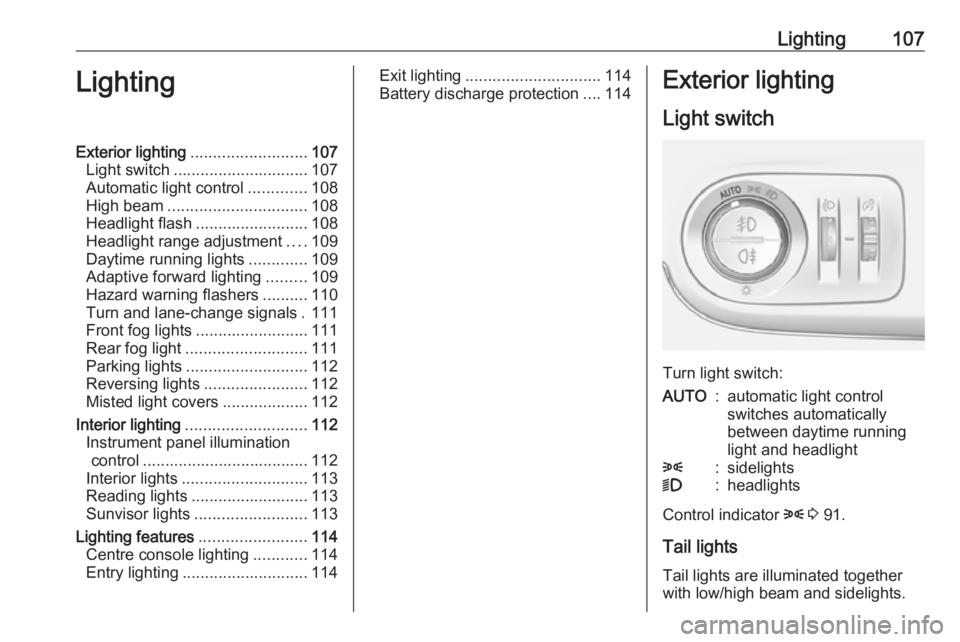
Turn light switch:
AUTO:automatic light control
switches automatically
between daytime running
light and headlight8:sidelights9:headlights
Control indicator 8 3 91.
Tail lights Tail lights are illuminated together
with low/high beam and sidelights.
Page 112 of 245
110LightingIt switches automatically to low beam
when:
● The camera or a sensor in the windscreen detects the lights of
oncoming or preceding vehicles.
● The vehicle speed drops below 15 km/h.
● It is foggy or snowy.
● Driving in urban areas.
If there are no restrictions detected,
the system switches back to high
beam.
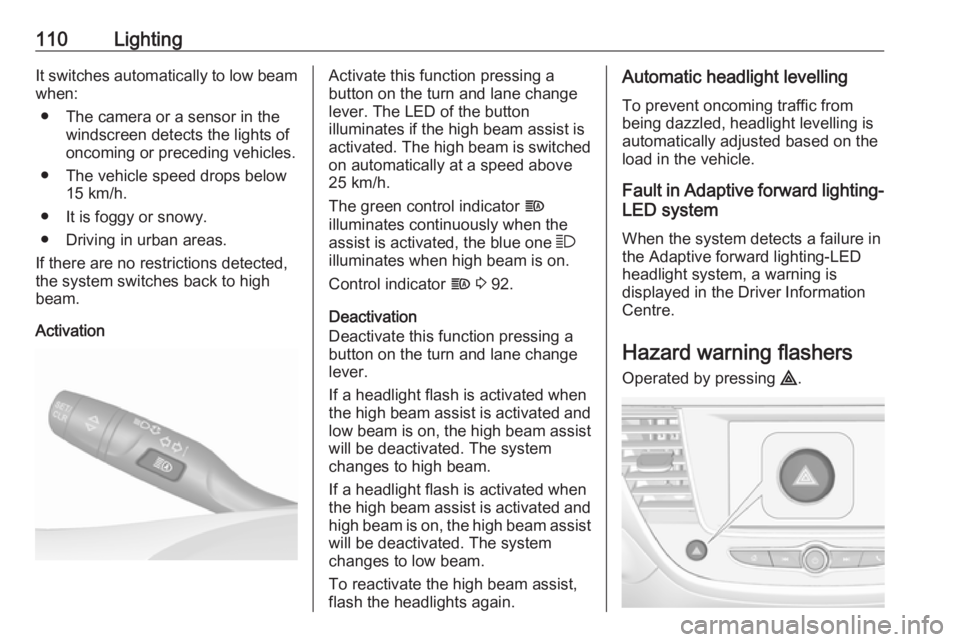
ActivationActivate this function pressing a
button on the turn and lane change
lever. The LED of the button
illuminates if the high beam assist is activated. The high beam is switched on automatically at a speed above
25 km/h.
The green control indicator f
illuminates continuously when the
assist is activated, the blue one 7
illuminates when high beam is on.
Control indicator f 3 92.
Deactivation
Deactivate this function pressing a button on the turn and lane change
lever.
If a headlight flash is activated when
the high beam assist is activated and
low beam is on, the high beam assist will be deactivated. The system
changes to high beam.
If a headlight flash is activated when
the high beam assist is activated and
high beam is on, the high beam assist will be deactivated. The system
changes to low beam.
To reactivate the high beam assist,
flash the headlights again.Automatic headlight levelling
To prevent oncoming traffic from
being dazzled, headlight levelling is
automatically adjusted based on the
load in the vehicle.
Fault in Adaptive forward lighting- LED system
When the system detects a failure in
the Adaptive forward lighting-LED
headlight system, a warning is
displayed in the Driver Information Centre.
Hazard warning flashers
Operated by pressing ¨.
Page 113 of 245
Lighting111When braking in an emergency, the
hazard warning flashers are switched
on automatically depending on the
force of deceleration. They are
switched off automatically the first
time you accelerate.
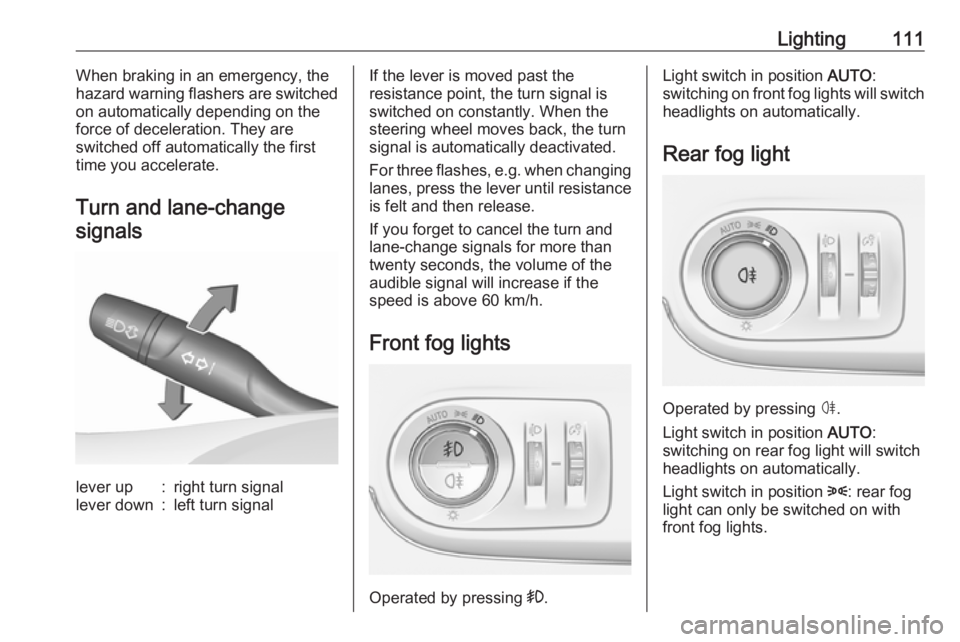
Turn and lane-change signalslever up:right turn signallever down:left turn signalIf the lever is moved past the
resistance point, the turn signal is
switched on constantly. When the
steering wheel moves back, the turn
signal is automatically deactivated.
For three flashes, e.g. when changing
lanes, press the lever until resistance
is felt and then release.
If you forget to cancel the turn and
lane-change signals for more than
twenty seconds, the volume of the
audible signal will increase if the
speed is above 60 km/h.
Front fog lights
Operated by pressing >.
Light switch in position AUTO:
switching on front fog lights will switch headlights on automatically.
Rear fog light
Operated by pressing ø
.
Light switch in position AUTO:
switching on rear fog light will switch
headlights on automatically.
Light switch in position 8: rear fog
light can only be switched on with
front fog lights.
Page 146 of 245
144Driving and operatingWhen clutch slip is detected for a
specific time, the engine power will be
reduced. A warning is displayed in the Driver Information Centre. Release
the clutch.Caution
It is not advisable to drive with the hand resting on the selector lever.
Gear shift indication 3 89.
Stop-start system 3 132.
Brakes
The brake system comprises two
independent brake circuits.
If a brake circuit fails, the vehicle can
still be braked using the other brake
circuit. However, braking effect is
achieved only when the brake pedal
is depressed firmly. Considerably
more force is needed for this. The
braking distance is extended. Seek
the assistance of a workshop before
continuing the journey.
When the engine is not running, the
support of the brake servo unit
disappears once the brake pedal has been depressed once or twice.
Braking effect is not reduced, but
braking requires significantly greater
force. It is especially important to bear this in mind when being towed.
Control indicator R 3 89.
Antilock brake system
Antilock brake system (ABS)
prevents the wheels from locking.ABS starts to regulate brake pressure as soon as a wheel shows a tendency to lock. The vehicle remains
steerable, even during hard braking.
ABS control is made apparent
through a pulse in the brake pedal
and the noise of the regulation
process.
For optimum braking, keep the brake
pedal fully depressed throughout the
braking process, despite the fact that
the pedal is pulsating. Do not reduce
the pressure on the pedal.
After starting off, the system performs
a self-test which may be audible.
Control indicator u 3 89.
Adaptive brake light
During full braking, all three brake
lights flash for the duration of ABS
control.
Page 147 of 245
Driving and operating145Fault9Warning
If there is a fault in the ABS, the
wheels may be liable to lock due
to braking that is heavier than
normal. The advantages of ABS are no longer available. During
hard braking, the vehicle can no longer be steered and may
swerve.
Have the cause of the fault remedied
by a workshop.
Parking brake
9 Warning
Before leaving the vehicle, check
parking brake status. Control
indicator R must illuminate
constantly.
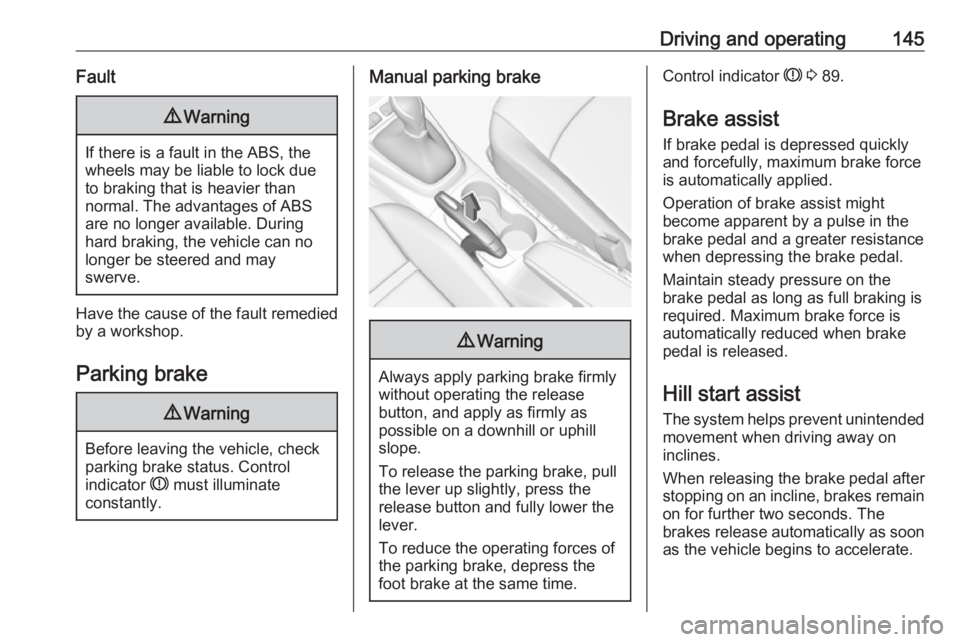
Manual parking brake9 Warning
Always apply parking brake firmly
without operating the release
button, and apply as firmly as
possible on a downhill or uphill
slope.
To release the parking brake, pull
the lever up slightly, press the
release button and fully lower the
lever.
To reduce the operating forces of
the parking brake, depress the
foot brake at the same time.
Control indicator R 3 89.
Brake assist
If brake pedal is depressed quickly
and forcefully, maximum brake force
is automatically applied.
Operation of brake assist might
become apparent by a pulse in the
brake pedal and a greater resistance when depressing the brake pedal.
Maintain steady pressure on the
brake pedal as long as full braking is
required. Maximum brake force is
automatically reduced when brake
pedal is released.
Hill start assist The system helps prevent unintendedmovement when driving away on
inclines.
When releasing the brake pedal after
stopping on an incline, brakes remain on for further two seconds. The
brakes release automatically as soon
as the vehicle begins to accelerate.
Page 165 of 245
Driving and operating163DeactivationPanoramic view system is
deactivated when:
● driving faster than 10 km/h
● seven seconds after disengaging
reverse gear
● by pressing the icon q in the left
upper corner of the touch screen
● opening the tailgate
General information9 Warning
The panoramic view system does
not replace driver vision. It will not display children, pedestrians,
cyclists, crossing traffic, animals,
or any other objects outside of the camera view area, e. g. below the
bumper, or underneath the
vehicle.
Do not drive or park the vehicle
using only the panoramic view
system.
Always check the surrounding of
the vehicle before driving.
Displayed images may be further
or closer than they appear. The
area displayed is limited and
objects that are close to either
edge of the bumper or under the
bumper are not displayed on the
screen.
System limitations
Caution
For optimal operation of the
system, it is important to keep the
lense of the camera in the tailgate between the number plate lightsalways clean. Rinse the lense with water and wipe with a soft cloth.
Do not clean the lense with a
steam-jet or high-pressure jet
cleaner.
The panoramic view system may not
operate properly when:
● The surrounding is dark.
● The sun or the beam of headlights is shining directly into
the camera lenses.
● During nighttime driving.
● Weather limits visibility, such as fog, rain, or snow.
● The camera lenses are blocked by snow, ice, slush, mud, dirt.
● The vehicle is towing a trailer.
● The vehicle had an accident.
● There are extreme temperature changes.
Rear view camera The rear view camera assists the
driver when reversing by displaying a
view of the area behind the vehicle.
The view of the camera is displayed
in the Info-Display.9 Warning
The rear view camera does not
replace driver vision. Note that
objects that are outside the
camera's field of view and the