steering OPEL CROSSLAND X 2017.75 Manual user
[x] Cancel search | Manufacturer: OPEL, Model Year: 2017.75, Model line: CROSSLAND X, Model: OPEL CROSSLAND X 2017.75Pages: 245, PDF Size: 7.6 MB
Page 134 of 245
132Driving and operatingAutomatic transmission: operate
brake pedal and move selector lever
to P or N.
Do not operate accelerator pedal.
Press and release Start/Stop: an
automatic procedure operates the
starter with a short delay until the
engine is running.
Before restarting or to switch off the engine when vehicle is stationary, press Start/Stop once more briefly.
Manual transmission: during an
Autostop, the engine can be started
by depressing the clutch pedal
3 132.
Automatic transmission: during an
Autostop, the engine can be started
by releasing the brake pedal 3 132.
Emergency shut off during driving If the engine needs to be switched offduring driving in case of emergency,
press Start/Stop for five seconds.9Danger
Switching off the engine during
driving may cause loss of power
support for brake and steering
systems. Assistance systems and
airbag systems are disabled.
Lighting and brake lights will
extinguish. Therefore power down the engine and ignition while
driving only when required in case of emergency.
Starting the vehicle at low
temperatures
Starting the engine without additional
heaters is possible down to -25 °С for diesel engines and -30 °C for petrol
engines. Required is an engine oil
with the correct viscosity, the correct fuel, performed services and a
sufficiently charged vehicle battery.
With temperatures below -30 °C the
automatic transmission requires a
warming phase of approx.
five minutes. The selector lever must
be in position P.
Turbo engine warm-up
Upon start-up, engine available
torque may be limited for a short time, especially when the engine
temperature is cold. The limitation is
to allow the lubrication system to fully
protect the engine.
Overrun cut-off
The fuel supply is automatically cut off
during overrun, i.e. when the vehicle
is driven with a gear engaged but accelerator pedal is released.
Depending on driving conditions, the
overrun cut-off may be deactivated.
Stop-start system The stop-start system helps to save
fuel and to reduce the exhaust
emissions. When conditions allow, it
switches off the engine as soon as the
vehicle is at a low speed or at a
standstill, e.g. at a traffic light or in a traffic jam.
Page 137 of 245
Driving and operating135● The driver's seat belt isunfastened and the driver's door
is opened.
● The engine temperature is too low.
● The charging level of the vehicle battery is below a defined level.
● The brake vacuum is not sufficient.
● The vehicle is driven at least at walking speed.
● The climate control system requests an engine start.
● The air conditioning is manually switched on.
If the bonnet is not fully closed, a warning message is displayed in the
Driver Information Centre.
If an electrical accessory, e.g. a
portable CD player, is connected to
the power outlet, a brief power drop during the restart might be noticeable.Parking9 Warning
● Do not park the vehicle on an
easily ignitable surface. The
high temperature of the
exhaust system could ignite the
surface.
● Always apply the parking brake. Activate the manual
parking brake without pressing the release button. Apply as
firmly as possible on a downhill slope or uphill slope. Depress
brake pedal at the same time to
reduce operating force.
● Switch off the engine.
● If the vehicle is on a level surface or uphill slope, engage
first gear or set the selector
lever to position P before
removing the ignition key or
switching off ignition on
vehicles with power button. On an uphill slope, turn the front
wheels away from the kerb.
If the vehicle is on a downhill
slope, engage reverse gear or
set the selector lever to position
P before removing the ignition
key or switching off ignition on
vehicles with power button.
Turn the front wheels towards
the kerb.
● Close the windows.
● Remove the ignition key from the ignition switch or switch off
ignition on vehicles with power
button. Turn the steering wheel until the steering wheel lock is
felt to engage.
● Lock the vehicle.
● Activate the anti-theft alarm system.
● The engine cooling fans may run
after the engine has been
switched off 3 177.
Caution
After running at high engine
speeds or with high engine loads,
operate the engine briefly at a low
Page 150 of 245
148Driving and operatingSwitching on
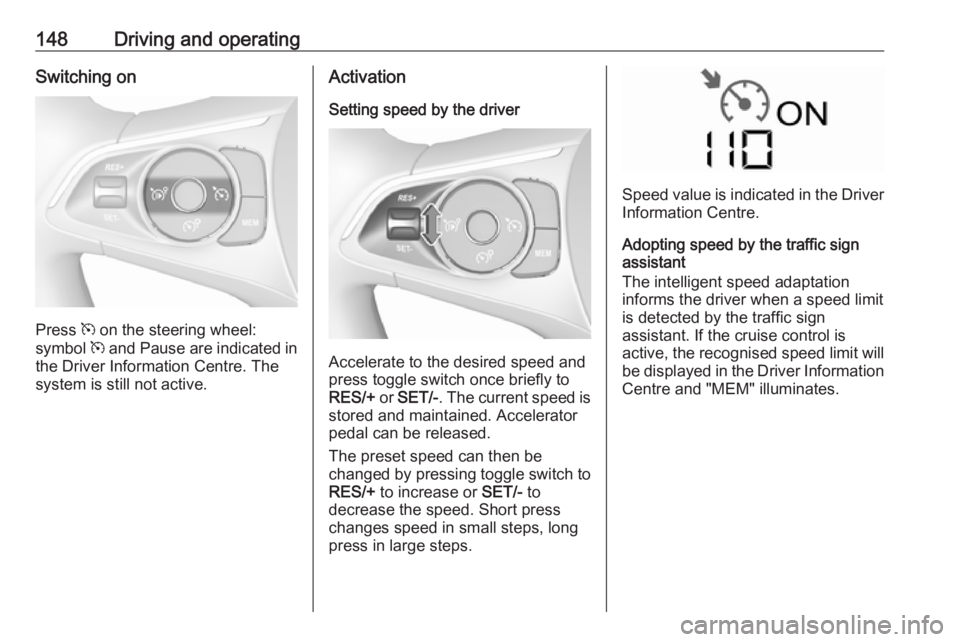
Press m on the steering wheel:
symbol m and Pause are indicated in
the Driver Information Centre. The
system is still not active.
Activation
Setting speed by the driver
Accelerate to the desired speed and
press toggle switch once briefly to
RES/+ or SET/- . The current speed is
stored and maintained. Accelerator
pedal can be released.
The preset speed can then be
changed by pressing toggle switch to
RES/+ to increase or SET/- to
decrease the speed. Short press
changes speed in small steps, long
press in large steps.
Speed value is indicated in the Driver
Information Centre.
Adopting speed by the traffic sign
assistant
The intelligent speed adaptation
informs the driver when a speed limit
is detected by the traffic sign
assistant. If the cruise control is
active, the recognised speed limit will be displayed in the Driver Information
Centre and "MEM" illuminates.
Page 151 of 245
Driving and operating149
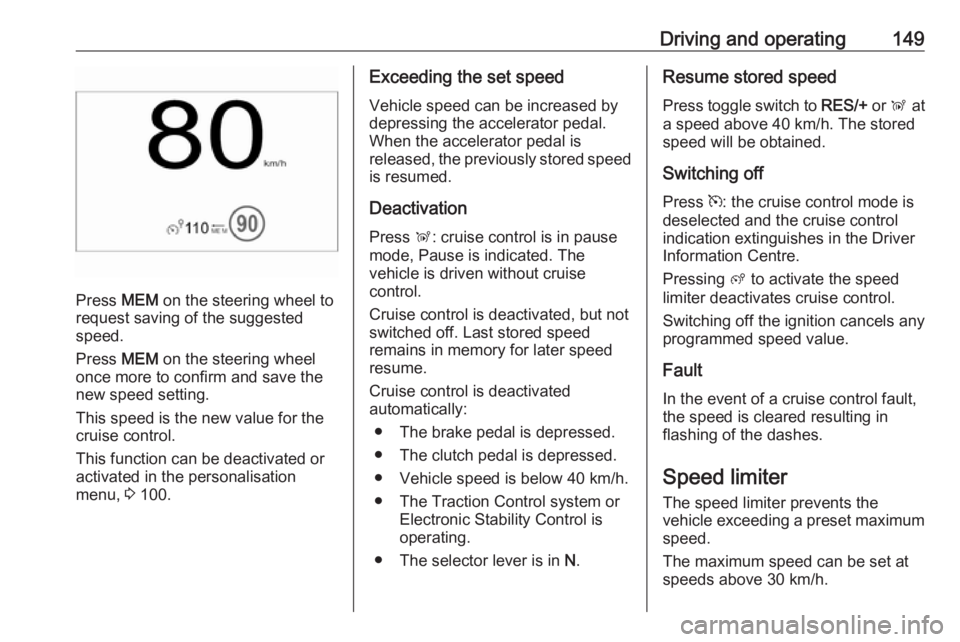
Press MEM on the steering wheel to
request saving of the suggested
speed.
Press MEM on the steering wheel
once more to confirm and save the
new speed setting.
This speed is the new value for the
cruise control.
This function can be deactivated or activated in the personalisation
menu, 3 100.
Exceeding the set speed
Vehicle speed can be increased by
depressing the accelerator pedal. When the accelerator pedal is
released, the previously stored speed
is resumed.
Deactivation Press Ñ: cruise control is in pause
mode, Pause is indicated. The
vehicle is driven without cruise
control.
Cruise control is deactivated, but not
switched off. Last stored speed
remains in memory for later speed
resume.
Cruise control is deactivated
automatically:
● The brake pedal is depressed.
● The clutch pedal is depressed.
● Vehicle speed is below 40 km/h.
● The Traction Control system or Electronic Stability Control is
operating.
● The selector lever is in N.Resume stored speed
Press toggle switch to RES/+ or Ñ at
a speed above 40 km/h. The stored
speed will be obtained.
Switching off
Press m: the cruise control mode is
deselected and the cruise control
indication extinguishes in the Driver
Information Centre.
Pressing ß to activate the speed
limiter deactivates cruise control.
Switching off the ignition cancels any
programmed speed value.
Fault
In the event of a cruise control fault,
the speed is cleared resulting in
flashing of the dashes.
Speed limiter
The speed limiter prevents the
vehicle exceeding a preset maximum
speed.
The maximum speed can be set at
speeds above 30 km/h.
Page 153 of 245
Driving and operating151Press MEM on the steering wheel to
request saving of the suggested
speed.
Press MEM on the steering wheel
once more to confirm and save the
new speed setting.
This speed is the new value for the
speed limiter.
This function can be deactivated or activated in the personalisation
menu, 3 100.
Exceeding the speed limit
In the event of an emergency, it is possible to exceed the speed limit by
a "kickdown". In this case the preset speed value flashes.
Release the accelerator pedal and the speed limiter function is
reactivated once a speed lower than
the limit speed is obtained.
Deactivation Press Ñ: speed limiter is in pause
mode, Pause is indicated. The
vehicle is driven without speed limit.Speed limiter is deactivated, but not
switched off. Last stored speed
remains in memory for later speed
resume.
Resume limit speed Press Ñ. The stored speed limit will
be obtained.
Switching off
Press ß, the speed limiter mode is
deselected and the speed limit
indication extinguishes in the Driver
Information Centre.
Pressing m to activate cruise control
deactivates speed limiter.
The preset speed remains in the
memory when the ignition is switched
off.
Fault
In the event of a speed limiter fault,
the speed is cleared resulting in
flashing of the dashes.
The speed limiter may not operate correctly if traffic signs do not comply with the Vienna Convention on RoadSigns and Signals (Wiener
Übereinkommen über
Straßenverkehrszeichen).
Parking assist
General information When attaching a trailer or bike
carrier to the trailer hitch, the parking
assist is deactivated.9 Warning
The driver bears full responsibility
for the parking manoeuvre.
Always check the surrounding
area when driving backwards or
forwards while using parking
assist system.
Rear parking assist
The rear parking assist makes
parking easier by measuring the
distance between the vehicle and
rear obstacles. It informs and warns
the driver by giving acoustic signals
and display indication.
Page 157 of 245
Driving and operating155The driver must control acceleration,
braking and gear shifting, while
steering is done automatically. The
driver can take control at any time by
gripping the steering wheel.
It may be necessary to move forwards
and backwards more than once.
Instructions are given in the Info-
Display 3 95.
Advanced parking assist can only be
activated when driving forwards.
Advanced parking assist is always
combined with front-rear parking assist.
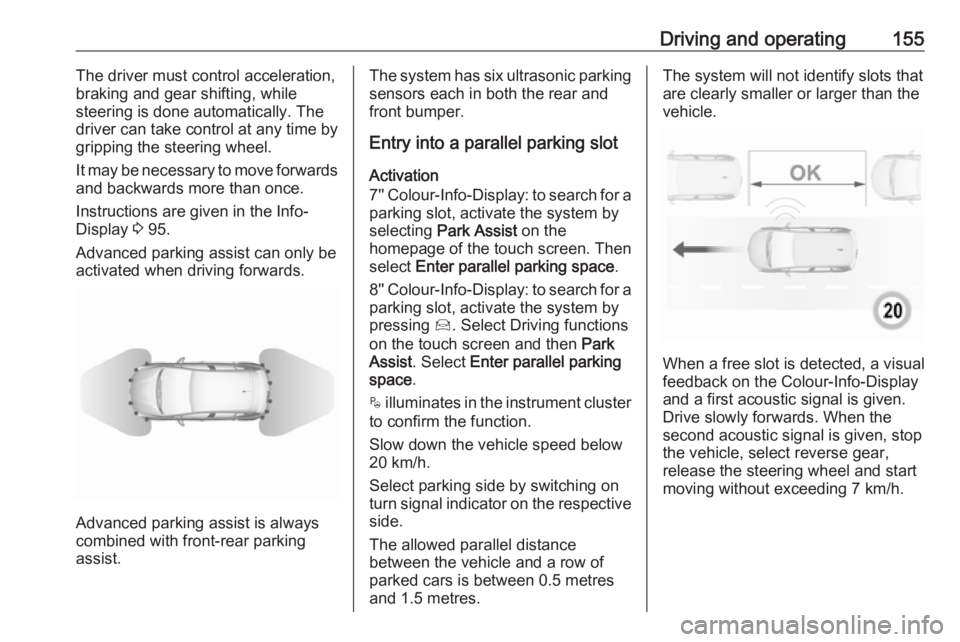
The system has six ultrasonic parking
sensors each in both the rear and
front bumper.
Entry into a parallel parking slot
Activation
7'' Colour-Info-Display: to search for a
parking slot, activate the system by
selecting Park Assist on the
homepage of the touch screen. Then
select Enter parallel parking space .
8'' Colour-Info-Display: to search for a parking slot, activate the system by
pressing Í. Select Driving functions
on the touch screen and then Park
Assist . Select Enter parallel parking
space .
$ illuminates in the instrument cluster
to confirm the function.
Slow down the vehicle speed below
20 km/h.
Select parking side by switching on
turn signal indicator on the respective
side.
The allowed parallel distance
between the vehicle and a row of
parked cars is between 0.5 metres
and 1.5 metres.The system will not identify slots that are clearly smaller or larger than the
vehicle.
When a free slot is detected, a visual
feedback on the Colour-Info-Display and a first acoustic signal is given.Drive slowly forwards. When the
second acoustic signal is given, stop
the vehicle, select reverse gear,
release the steering wheel and start
moving without exceeding 7 km/h.
Page 158 of 245
156Driving and operating
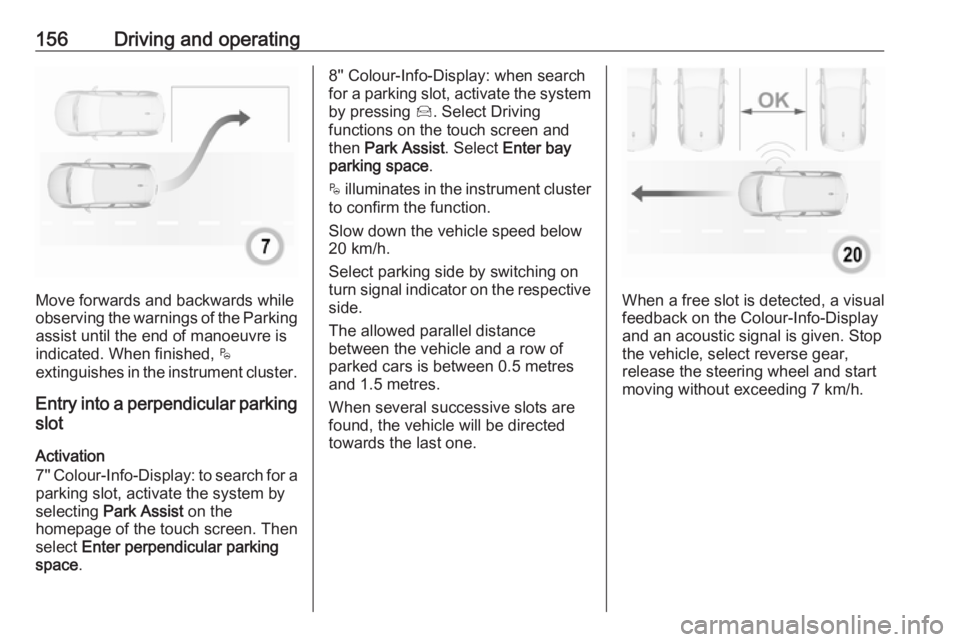
Move forwards and backwards while
observing the warnings of the Parking
assist until the end of manoeuvre is
indicated. When finished, $
extinguishes in the instrument cluster.
Entry into a perpendicular parking
slot
Activation
7'' Colour-Info-Display: to search for a
parking slot, activate the system by
selecting Park Assist on the
homepage of the touch screen. Then
select Enter perpendicular parking
space .
8'' Colour-Info-Display: when search
for a parking slot, activate the system by pressing Í. Select Driving
functions on the touch screen and
then Park Assist . Select Enter bay
parking space .
$ illuminates in the instrument cluster
to confirm the function.
Slow down the vehicle speed below
20 km/h.
Select parking side by switching on
turn signal indicator on the respective
side.
The allowed parallel distance
between the vehicle and a row of
parked cars is between 0.5 metres
and 1.5 metres.
When several successive slots are found, the vehicle will be directed towards the last one.
When a free slot is detected, a visual
feedback on the Colour-Info-Display
and an acoustic signal is given. Stop
the vehicle, select reverse gear,
release the steering wheel and start
moving without exceeding 7 km/h.
Page 159 of 245
Driving and operating157
Move forwards and backwards as
instructed by observing the warnings of the Parking assist and paying
attention to the acoustic signals until
the end of manoeuvre is indicated.
When finished, $ extinguishes in the
instrument cluster.
During the parking manoeuvre, the
system is automatically deactivated
once the rear of the vehicle is within
50 cm of an obstacle.
Exiting a parallel parking slot
Activation
7'' Colour-Info-Display: when exiting a parallel parking slot, activate the
system by selecting Park Assist on
the homepage of the touch screen.
Then select Exit parallel parking
space .
8'' Colour-Info-Display: when exiting a
parallel parking slot, activate the
system by pressing Í. Select Driving
functions on the touch screen and
then Park Assist . Select Exit parallel
parking space .
Select exit side by switching on the
respective turn signal indicator.
Engage reverse or forward gear,
release the steering wheel and start
moving without exceeding 5 km/h.
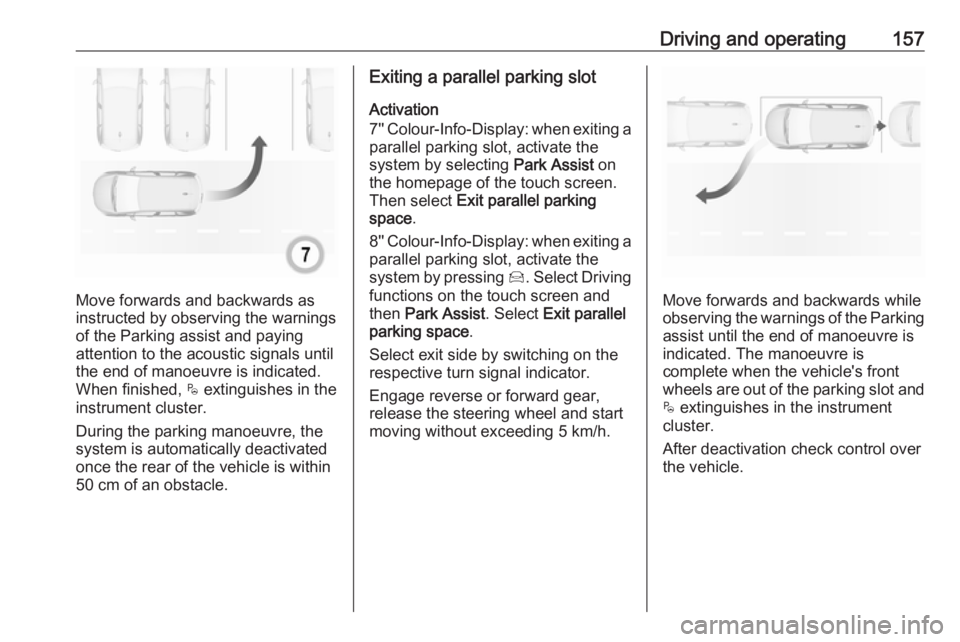
Move forwards and backwards while
observing the warnings of the Parking
assist until the end of manoeuvre is
indicated. The manoeuvre is
complete when the vehicle's front
wheels are out of the parking slot and
$ extinguishes in the instrument
cluster.
After deactivation check control over
the vehicle.
Page 160 of 245
158Driving and operatingDisplay indication
The instructions on the display show: ● General hints and warning messages.
● The demand to stop the vehicle, when a parking slot is detected.
● The direction of driving during the
parking manoeuvre.
● The demand to shift into reverse or first gear.
● The demand to stop or to drive slowly.
● The successful completion of the
parking manoeuvre indicated by
a pop-up symbol and a chime.
● The cancelling of a parking manoeuvre.
Deactivation The current park assist manoeuvre is
cancelled via the button to return to
the previous screen in the Colour-
Info-Display. To deactivate the
system completely, press r Off in
the centre console.The system is deactivated
automatically:
● if the ignition is switched off
● if stalling the engine
● if no manoeuvre is started within 5 minutes of selection of the type
of manoeuvre
● after a prolonged stop of the vehicle during a manoeuvre
● if the electronic stability control (ESC) is triggered
● if the speed of the vehicle exceeds the stated limit
● when the driver interrupts movement of the steering wheel
● after 4 manoeuvre cycles
● on opening the driver's door
● if one of the front wheels encounters an obstacle
● parking manoeuvre successfully ended
Deactivation by the driver or by the system during manoeuvring will be indicated on the display. Additionally,
an acoustic signal sounds.The system is switched off
automatically when towing a
electrically connected trailer.
Contact your dealer to switch off the
system for a prolonged period.
Fault
In the event of a fault, $ flashes for a
few seconds, accompanied by an
acoustic signal. If the fault occurs during the use of the system, $
extinguishes.
In the event of a fault in the power
steering, c flashes in the instrument
panel, accompanied by a message.9 Warning
Under certain circumstances,
various reflective surfaces on
objects or clothing as well as
external noise sources may cause the system to fail to detect
obstacles.
Special attention must be paid to
low obstacles which can damage
the lower part of the bumper.
Page 164 of 245
162Driving and operatingRear view
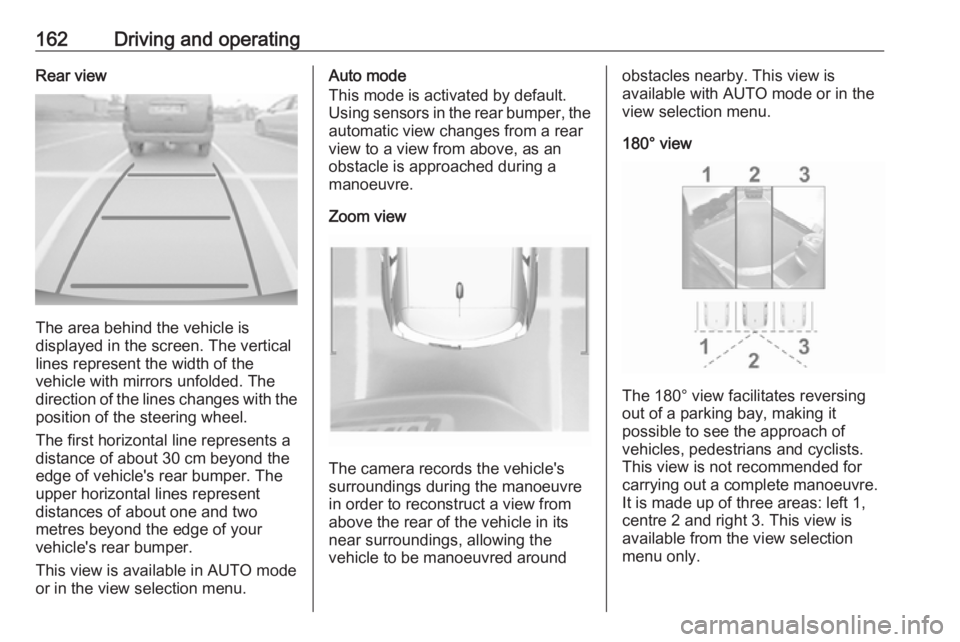
The area behind the vehicle is
displayed in the screen. The vertical
lines represent the width of the
vehicle with mirrors unfolded. The
direction of the lines changes with the position of the steering wheel.
The first horizontal line represents a
distance of about 30 cm beyond the
edge of vehicle's rear bumper. The
upper horizontal lines represent
distances of about one and two
metres beyond the edge of your
vehicle's rear bumper.
This view is available in AUTO mode
or in the view selection menu.
Auto mode
This mode is activated by default.
Using sensors in the rear bumper, the
automatic view changes from a rear
view to a view from above, as an
obstacle is approached during a
manoeuvre.
Zoom view
The camera records the vehicle's
surroundings during the manoeuvre in order to reconstruct a view fromabove the rear of the vehicle in its
near surroundings, allowing the
vehicle to be manoeuvred around
obstacles nearby. This view is
available with AUTO mode or in the
view selection menu.
180° view
The 180° view facilitates reversing
out of a parking bay, making it
possible to see the approach of
vehicles, pedestrians and cyclists.
This view is not recommended for
carrying out a complete manoeuvre.
It is made up of three areas: left 1,
centre 2 and right 3. This view is
available from the view selection menu only.