phone OPEL CROSSLAND X 2018.5 Infotainment system
[x] Cancel search | Manufacturer: OPEL, Model Year: 2018.5, Model line: CROSSLAND X, Model: OPEL CROSSLAND X 2018.5Pages: 127, PDF Size: 2.69 MB
Page 95 of 127

95HHome menu .................................. 64
I Infotainment control panel ............58
Intellitext ....................................... 74
M
Maximum startup volume .............67
Menu operation............................. 64
Mobile phones and CB radio equipment ................................ 92
Movie files..................................... 76
Mute.............................................. 61
O
Operation ...................................... 88
External devices ........................76
Menu ......................................... 64
Phone ........................................ 88
Radio ......................................... 70
P Pairing .......................................... 85
Phone Bluetooth ................................... 84
Bluetooth connection ................85
Call history ................................ 88
Emergency calls ........................87
Entering a number ....................88
Functions during a call ..............88General information................... 84
Incoming call ............................. 88
Phone book ............................... 88
Phone main menu .....................88
Selecting the ring tone ..............88
Speed dial number ....................88
Phone book .................................. 88
Phone projection .......................... 81
Picture files ................................... 76
Playing audio ................................ 78
Playing movies ............................. 80
R Radio Activating................................... 70Configuring DAB .......................74
Configuring RDS .......................72
DAB announcements ................74
Digital audio broadcasting
(DAB) ........................................ 74
Favourite lists ............................ 72
Intellitext .................................... 74
Radio data system (RDS) .........72
Regional .................................... 72
Regionalisation ......................... 72
Retrieving stations..................... 72
Selecting the waveband ............70
Station search ........................... 70
Station tuning ............................ 70Storing stations......................... 72
Usage ........................................ 70
Radio data system .......................72
RDS .............................................. 72
Regional ....................................... 72
Regionalisation ............................. 72
Retrieving stations ........................72
Ring tone Changing the ring tone ..............88
Ring tone volume ......................67
S Smartphone .................................. 76
Phone projection .......................81
Speech recognition .......................83
Speed dial numbers .....................88
Station search............................... 70
Steering wheel audio controls ......58
Storing stations ............................. 72
Switching the Infotainment system on .................................. 61
System settings ............................ 67
T
Theft-deterrent feature ................. 57
Tone settings ................................ 66
Touch beep volume ......................67
TP volume .................................... 67
Page 96 of 127

96UUsage ............................... 61, 70, 83
Bluetooth ................................... 76
Menu ......................................... 64
Phone ........................................ 88
Radio ......................................... 70
USB ........................................... 76
USB Connecting device ....................76
General information................... 76
USB audio menu .......................78
USB movie menu ......................80
USB picture menu .....................79
Using smartphone applications ....81
V Voice recognition ..........................83
Volume Auto volume .............................. 67
Maximum startup volume ..........67
Mute function............................. 61
Ring tone volume ......................67
Setting the volume ....................61
Speed compensated volume ....67
Touch beep volume ..................67
TP volume ................................. 67
Volume limitation at high
temperatures ............................. 61
Volume settings ............................ 67W
Waveband selection .....................70
Page 97 of 127

Introduction.................................. 98
Basic operation .......................... 105
Radio ......................................... 109
USB port .................................... 113
Bluetooth music ......................... 115
Speech recognition ....................117
Phone ........................................ 118
Index .......................................... 124R 4.0
Page 98 of 127

98IntroductionIntroductionGeneral information.....................98
Theft-deterrent feature .................99
Control elements overview ........100
Usage ........................................ 103General information
The Infotainment system provides
you with state-of-the-art in-car
infotainment.
Using the FM, AM or DAB radio
functions, you can play a great
number of different radio stations. If desired, you can register stations on
radio preset buttons.
You can connect external data
storage devices to the Infotainment
system as further audio sources,
either via a cable or via Bluetooth ®
.
In addition, the Infotainment system is equipped with a Phone function that
allows comfortable and safe use of
your mobile phone in the vehicle.
The Infotainment system can be
operated using the control panel or
the controls on the steering wheel.
Note
This manual describes all options
and features available for the
various Infotainment systems.
Certain descriptions, including those
for display and menu functions, may
not apply to your vehicle due tomodel variant, country
specifications, special equipment or
accessories.
Important information on
operation and traffic safety9 Warning
Drive safely at all times when
using the Infotainment system.
If in doubt, stop the vehicle before operating the Infotainment
system.
Radio reception
Radio reception may be disrupted by static, noise, distortion or loss of
reception due to:
● changes in distance from the transmitter
● multi-path reception due to reflection
● shadowing
Page 102 of 127
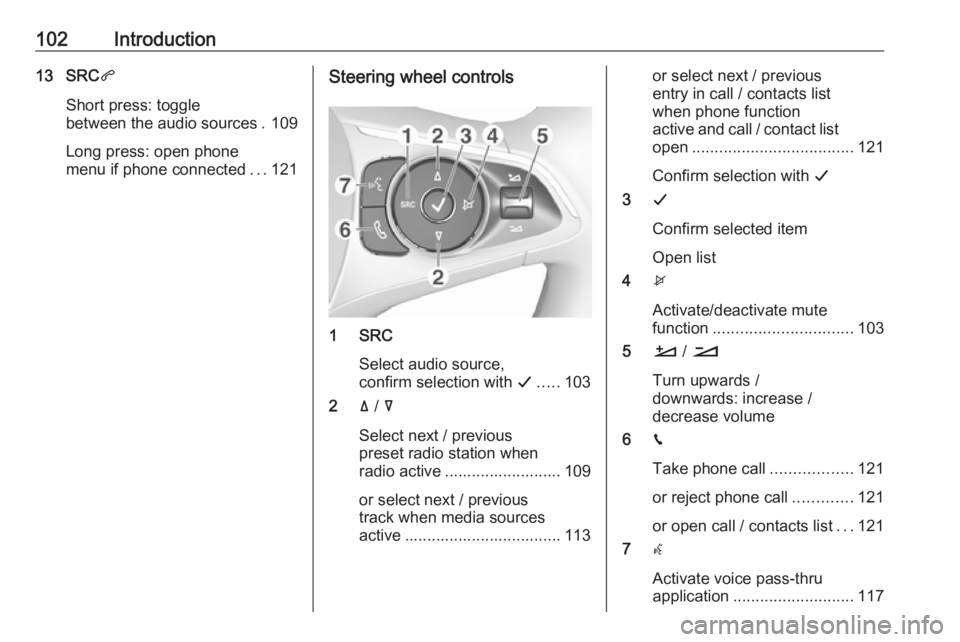
102Introduction13 SRCq
Short press: toggle
between the audio sources . 109
Long press: open phone
menu if phone connected ...121Steering wheel controls
1 SRC
Select audio source,
confirm selection with G..... 103
2 ä / å
Select next / previous
preset radio station when
radio active .......................... 109
or select next / previous
track when media sources
active ................................... 113
or select next / previous
entry in call / contacts list
when phone function
active and call / contact list
open .................................... 121
Confirm selection with G
3 G
Confirm selected item
Open list
4 x
Activate/deactivate mute
function ............................... 103
5 À / Á
Turn upwards /
downwards: increase /
decrease volume
6 v
Take phone call ..................121
or reject phone call .............121
or open call / contacts list ...121
7 w
Activate voice pass-thru
application ........................... 117
Page 104 of 127
104IntroductionModes of operationRadio
Repeatedly press BAND to toggle
between the different wavebands and select the desired waveband.
For a detailed description of the radio
functions 3 109.
USB port
Repeatedly press SRCq to toggle
between the different audio sources
and select USB mode.
For a detailed description on
connecting and operating external
devices 3 113.
Bluetooth music
Repeatedly press SRCq to toggle
between the different audio sources
and select Bluetooth music mode.
For a detailed description on
connecting and operating external
devices 3 115.Phone
Before the phone function can be
used, a connection to a Bluetooth
device has to be established. For a detailed description 3 119.
Press MENU to display the home
page. Select Telephone by pressing
N and O and then press OK to confirm.
The phone menu is displayed.
For a detailed description of mobile
phone operation via the Infotainment
system 3 121.
Page 106 of 127
106Basic operationPress N or O to adjust the desired
value.
Press OK to confirm the set value.
The cursor then switches to the value
of the next setting. To switch to the
value of another setting, press Q, P ,
N or O. If the values of all settings are
set, select OK on the display and
press OK.
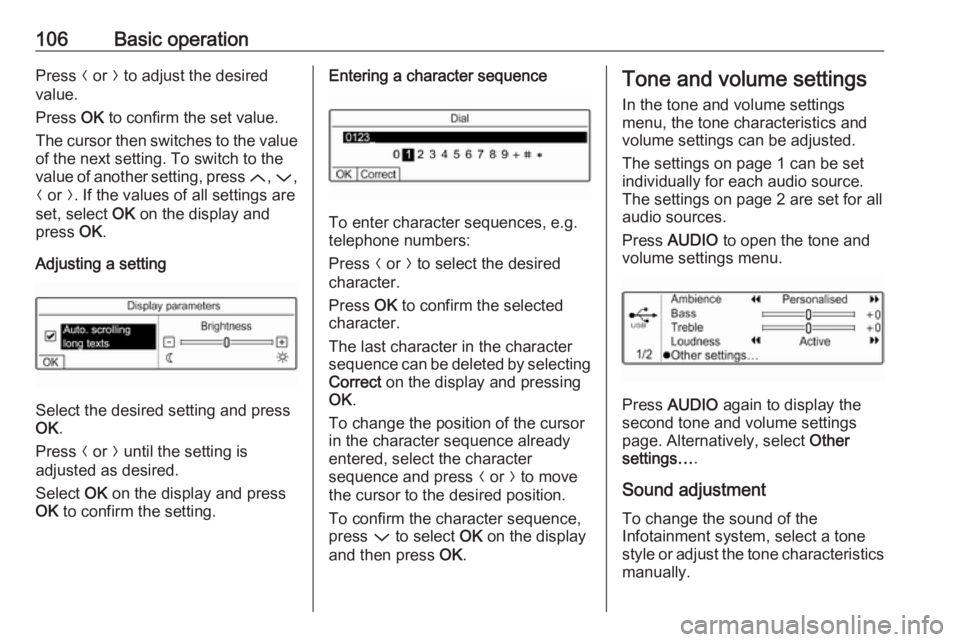
Adjusting a setting
Select the desired setting and press
OK .
Press N or O until the setting is
adjusted as desired.
Select OK on the display and press
OK to confirm the setting.
Entering a character sequence
To enter character sequences, e.g.
telephone numbers:
Press N or O to select the desired
character.
Press OK to confirm the selected
character.
The last character in the character sequence can be deleted by selecting
Correct on the display and pressing
OK .
To change the position of the cursor
in the character sequence already
entered, select the character
sequence and press N or O to move
the cursor to the desired position.
To confirm the character sequence, press P to select OK on the display
and then press OK.
Tone and volume settings
In the tone and volume settings
menu, the tone characteristics and
volume settings can be adjusted.
The settings on page 1 can be set
individually for each audio source.
The settings on page 2 are set for all
audio sources.
Press AUDIO to open the tone and
volume settings menu.
Press AUDIO again to display the
second tone and volume settings
page. Alternatively, select Other
settings… .
Sound adjustment To change the sound of the
Infotainment system, select a tone
style or adjust the tone characteristics
manually.
Page 115 of 127
Bluetooth music115Bluetooth musicGeneral information...................115
Operation ................................... 115General information
Connecting a Bluetooth device
Bluetooth enabled audio sources
(e.g. music mobile phones, MP3
players featuring Bluetooth, etc.) can
be connected wirelessly to the
Infotainment system.
The external Bluetooth device must
be paired to the Infotainment system
3 119.
If the device is paired but not
connected to the Infotainment
system, establish the connection via
the Connections management menu:
Press MENU and then select
Connections . Select Connections
management and then choose the
desired Bluetooth device to enter a
submenu.
To serve as audio source, the device
must be connected as media player.
Select Connect media player or
Connect telephone + media player as
desired. The device is connected.Disconnecting a Bluetooth device
Press MENU and then select
Connections . Select Connections
management and then choose the
desired Bluetooth device to enter a
submenu.
Select Disconnect media player to
disconnect the device only as
Bluetooth audio source. In this case,
the connection for the telephone
function remains active.
To completely disconnect the device, select Disconnect telephone + media
player .
Select Yes in the message and press
OK .
Operation
Activating the USB music function
If the device is not yet connected to
the Infotainment system, connect the
device 3 119.
The Infotainment system
automatically switches to Bluetooth
music mode.
Page 117 of 127
Speech recognition117Speech recognitionGeneral information...................117
Usage ........................................ 117General information
The voice pass-thru application of the Infotainment system allows access toSiri. See your smartphone
manufacturer's operating instructions
to find out whether your smartphone
supports this feature.
In order to use the voice pass-thru
application, the smartphone must be
connected via Bluetooth 3 119.
Usage
Activating speech recognition Press and hold s on the steering
wheel until a speech recognition
session is started.
Adjusting the volume of voice
prompts
Turn m on the control panel or press
the volume button on the steering
wheel upwards (increase volume)
À or downwards (decrease volume)
Á .Deactivating speech recognition
Press v on the steering wheel. The
speech recognition session is ended.
Page 118 of 127
118PhonePhoneGeneral information...................118
Bluetooth connection .................119
Emergency call .......................... 120
Operation ................................... 121
Mobile phones and CB radio
equipment .................................. 123General information
The Phone function provides you with the possibility of having mobile phone conversations via a vehicle
microphone and the vehicle
loudspeakers as well as operating the
most important mobile phone
functions via the Infotainment system in the vehicle. To be able to use the
Phone function, the mobile phone
must be connected to the
Infotainment system via Bluetooth.
Not all functionalities of the Phone
function are supported by every
mobile phone. The possible
functionalities depend on the relevant
mobile phone and network provider.
You will find further information on
this in the operating instructions for
your mobile phone or you can enquire about them with your network
provider.Important information for
operation and traffic safety9 Warning
Mobile phones have effects on
your environment. For this reason safety regulations and directions
have been prepared. You should
be familiar with the related
directions before you use the
telephone function.
9 Warning
Use of the hands-free facility while
driving can be dangerous because
your concentration is reduced
when telephoning. Park your
vehicle before you use the hands- free facility. Follow the stipulations
of the country in which you find
yourself at present.
Do not forget to follow the special
regulations that apply in specific
areas and always switch off the
mobile phone if the use of mobile
phones is prohibited, if