ECO mode OPEL CROSSLAND X 2018.5 Manual user
[x] Cancel search | Manufacturer: OPEL, Model Year: 2018.5, Model line: CROSSLAND X, Model: OPEL CROSSLAND X 2018.5Pages: 261, PDF Size: 8.04 MB
Page 157 of 261
Driving and operating155Deactivation of the functionalityPress Ñ, speed limiter is in pause
mode and a message is displayed.
The vehicle is driven without speed
limiter.
Speed limiter is deactivated, but not
switched off. Last stored speed
remains in memory for later speed
resume.
Resume limit speed
Press Ñ. The stored speed limit will
be obtained.
Switching off the system
Press ß, the speed limiter mode is
deselected and the speed limit
indication extinguishes in the Driver
Information Centre.
Pressing m to activate cruise control
deactivates speed limiter.
The preset speed remains in the
memory when the ignition is switched
off.Fault
In the event of a speed limiter fault,
the speed is cleared resulting in
flashing of the dashes.
The speed limit recognition may not
operate correctly if traffic signs do not
comply with the Vienna Convention
on Road Signs and Signals.
Forward collision alert The forward collision alert may help toavoid or reduce the harm caused by
front-end crashes.
The forward collision alert uses the
front camera in the windscreen to
detect a preceding vehicle directly
ahead, in your path.
If a vehicle directly ahead is
approached too quickly, a warning
chime and alert in the Driver
Information Centre is provided.9 Warning
Forward collision alert is just a
warning system and does not
apply the brakes. When
approaching a vehicle ahead too
rapidly, it may not provide you
enough time to avoid a collision.
The driver accepts full
responsibility for the appropriate
following distance based on traffic, weather and visibility conditions.
The complete attention of the
driver is always required while
driving. The driver must always be
ready to take action and apply the
brakes.
Activation
Forward collision alert detects
vehicles and operates automatically
at all speeds between 5 km/h and 85 km/h. The system detects
stationary vehicles if the speed does
not exceed 80 km/h.
Page 159 of 261
Driving and operating157● the sensor in the windscreen isblocked by snow, ice, slush, mud,dirt etc.
● the windscreen is damaged or affected by foreign objects, e.g.
stickers
Active emergency braking
Active emergency braking can help to reduce the damage and injury from
crashes with vehicles, pedestrians and obstacles directly ahead, when a
collision can no longer be avoided
either by manual braking or by
steering. Before the active
emergency braking applies, the driver is warned by the forward collision
alert 3 155 or the front pedestrian
protection alert 3 159.
The feature uses various inputs (e.g.
camera sensor, brake pressure,
vehicle speed) to calculate the
probability of a frontal collision.9 Warning
This system is not intended to
replace the driver responsibility for driving the vehicle and looking
ahead. Its function is limited to
supplemental use only to reduce
the vehicle speed before a
collision.
The system may not react to
animals. After a sudden lane
change, the system needs a
certain time to detect the next
preceding vehicle.
The driver must always be ready
to take action and apply the brakes and steer to avoid collisions.
Operation conditions
Active emergency braking is
equipped with a front camera and
operates in forward gear above
walking speed up to 85 km/h. The
system detects stationary vehicles
only if the speed does not exceed
80 km/h.
Activation
A precondition is that forward collision
alert with front camera system is not
deactivated in the vehicle
personalisation menu 3 101.
Functionality The system includes: ● emergency automatic braking
● forward looking brake assist ● forward collision alert
● front pedestrian protection
Emergency automatic braking
After activation of brake preparation
system and just before the imminent
collision, this function automatically
applies limited braking to reduce the
impact speed of the collision or
prohibit a crash. If active emergency
braking is applied, m flashes in the
instrument cluster. Depending on the
situation, the vehicle may
automatically brake moderately or
hard. This front automatic braking can
only occur if a vehicle 3 155 or a
pedestrian 3 159 ahead is detected.
Page 173 of 261
Driving and operating171Rear view
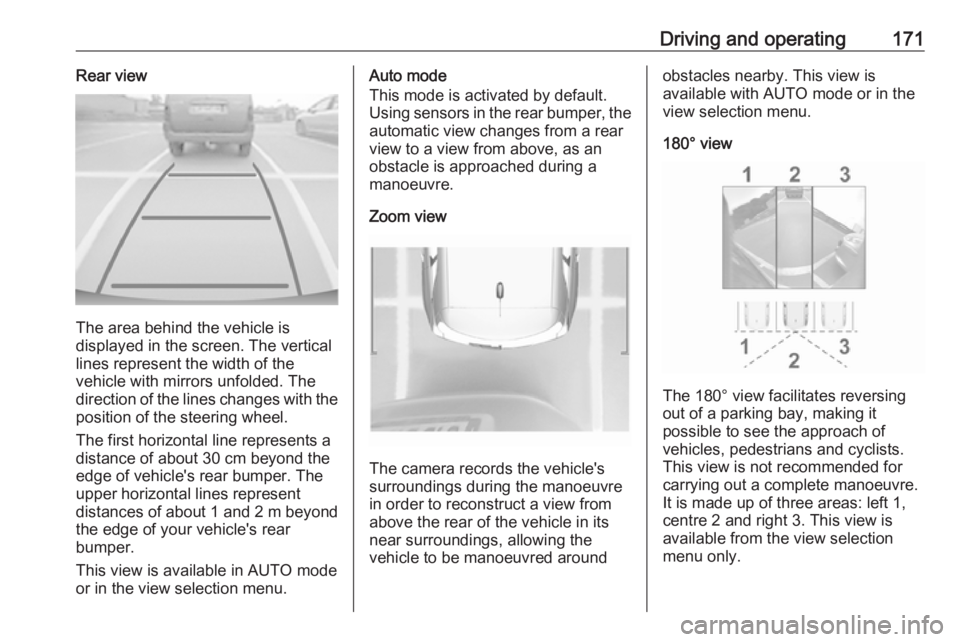
The area behind the vehicle is
displayed in the screen. The vertical
lines represent the width of the
vehicle with mirrors unfolded. The
direction of the lines changes with the position of the steering wheel.
The first horizontal line represents a
distance of about 30 cm beyond the
edge of vehicle's rear bumper. The
upper horizontal lines represent
distances of about 1 and 2 m beyond
the edge of your vehicle's rear
bumper.
This view is available in AUTO mode
or in the view selection menu.
Auto mode
This mode is activated by default.
Using sensors in the rear bumper, the automatic view changes from a rear
view to a view from above, as an
obstacle is approached during a
manoeuvre.
Zoom view
The camera records the vehicle's
surroundings during the manoeuvre in order to reconstruct a view fromabove the rear of the vehicle in its
near surroundings, allowing the
vehicle to be manoeuvred around
obstacles nearby. This view is
available with AUTO mode or in the
view selection menu.
180° view
The 180° view facilitates reversing
out of a parking bay, making it
possible to see the approach of
vehicles, pedestrians and cyclists.
This view is not recommended for
carrying out a complete manoeuvre.
It is made up of three areas: left 1,
centre 2 and right 3. This view is
available from the view selection menu only.
Page 240 of 261
![OPEL CROSSLAND X 2018.5 Manual user 238Technical dataVehicle weight
Kerb weight, basic model without any optional equipmentEngineManual
transmissionAutomatic
transmissionwithout / with
air conditioning
[kg]B12xE1163/1174–B12xE
LPG1234](/img/37/18839/w960_18839-239.png "OPEL CROSSLAND X 2018.5 Manual user 238Technical dataVehicle weight
Kerb weight, basic model without any optional equipmentEngineManual
transmissionAutomatic
transmissionwithout / with
air conditioning
[kg]B12xE1163/1174–B12xE
LPG1234")
238Technical dataVehicle weight
Kerb weight, basic model without any optional equipmentEngineManual
transmissionAutomatic
transmissionwithout / with
air conditioning
[kg]B12xE1163/1174–B12xE
LPG1234/1245–B12xHT1234/1245 6)1278/1289B12xHT1263/1274 7)–B16DT1278/1289–B16DTH1306/1319–B16DTH1308/13198)–6)
5-gear transmission
7) 6-gear transmission
8) ECO
Optional equipment and accessories increase the kerb weight.
Loading information 3 70.
Page 260 of 261
258VValet mode ................................... 97
Vehicle battery ........................... 191
Vehicle checks............................ 188
Vehicle data ................................ 232
Vehicle data recording and privacy ..................................... 249
Vehicle dimensions .................... 239
Vehicle Identification Number ....230
Vehicle jack ................................ 206
Vehicle messages .....................100
Vehicle personalisation .............101
Vehicle security ............................ 31
Vehicle specific data ......................3
Vehicle storage ........................... 187
Vehicle tools ............................... 206
Vehicle unlocking ........................... 6
Vehicle weight ........................... 238
Ventilation ................................... 118
W Warning chimes .........................100
Warning lights ............................... 84
Warning triangle .......................... 69
Washer and wiper systems .........14
Washer fluid ............................... 190
Wheel changing .........................214
Wheel covers ............................. 210
Wheels and tyres .......................207
Windows ....................................... 36Windscreen................................... 36
Windscreen wiper and washer ....74
Winter tyres ............................... 207
Wiper blade replacement ..........193