service OPEL CROSSLAND X 2018.5 Manual user
[x] Cancel search | Manufacturer: OPEL, Model Year: 2018.5, Model line: CROSSLAND X, Model: OPEL CROSSLAND X 2018.5Pages: 261, PDF Size: 8.04 MB
Page 107 of 261
Instruments and controls105Telematics service
OnStar
OnStar is a personal connectivity and
service assistant with integrated
Wi-Fi hotspot. The OnStar service is
available 24 hours a day, seven days
a week.
Note
OnStar is not available for all
markets. For further information,
contact your workshop.
Note
In order to be available and
operational, OnStar needs a valid
OnStar subscription, functioning
vehicle electrics, ignition on, mobile
service and GPS satellite link.
To activate the OnStar services and
set up an account, press Z and speak
with an advisor.Depending on the equipment of the
vehicle, the following services are
available:
● Emergency services and support
in the case of a vehicle
breakdown
● Wi-Fi hotspot
● Smartphone application
● Remote control, e.g. location of the vehicle, activation of horn andlights, control of central locking
system
● Stolen vehicle assistance
● Vehicle diagnostics
Note
The OnStar module of the vehicle is
deactivated after ten days without an
ignition cycle. Functions requiring a
data connection will be available
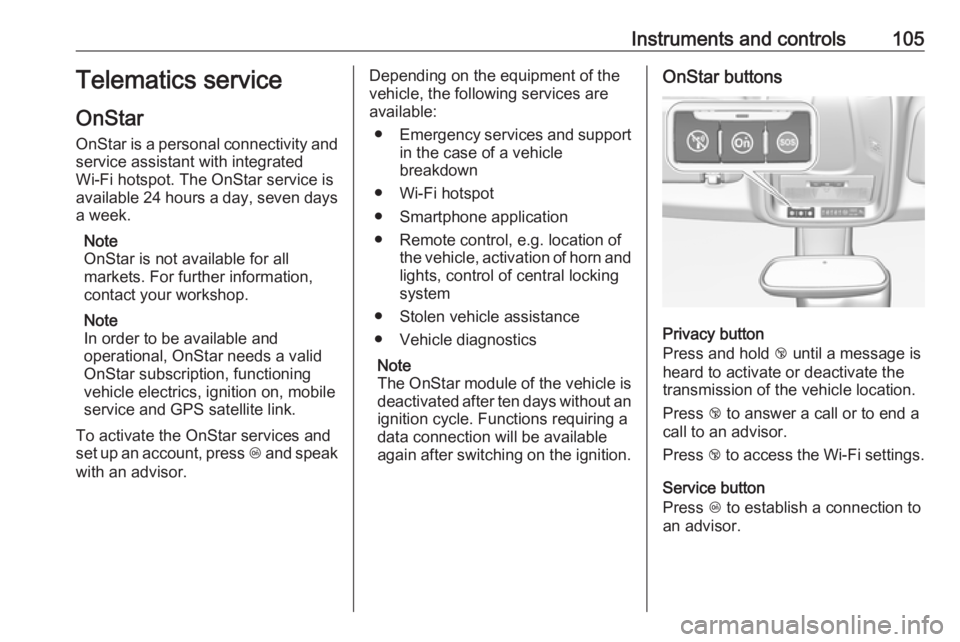
again after switching on the ignition.OnStar buttons
Privacy button
Press and hold j until a message is
heard to activate or deactivate the
transmission of the vehicle location.
Press j to answer a call or to end a
call to an advisor.
Press j to access the Wi-Fi settings.
Service button
Press Z to establish a connection to
an advisor.
Page 108 of 261
106Instruments and controlsSOS button
Press [ to establish a priority
emergency connection to a specially
trained emergency advisor.
Status LED
Green: The system is ready with activated transmission of the vehicle
location.
Green flashing: The system is on a call.
Red: A problem arose.
Off: The system is ready with
deactivated transmission of the
vehicle location or the system is in
standby mode.
Red / green flashing for a short period of time: The transmission of the
vehicle location has been
deactivated.
OnStar services
General services
If you need any information e.g.
opening hours, points of interest and
destinations or if you need any
support e.g. in the case of a vehiclebreakdown, a flat tyre and empty fuel
tank, press Z to establish a
connection to an advisor.
Emergency services
In the case of an emergency situation,
press [ and talk to an advisor. The
advisor then contacts emergency or
assistance service providers and
directs them to your vehicle.
In the case of an accident with
activation of airbags or belt
tensioners, an automatic emergency
call is established. The advisor is
immediately connected to your
vehicle to see whether help is
needed.
Note
Establishing an emergency call may not be possible in areas without
sufficient network availability or due
to hardware damage during an
accident.
Wi-Fi hotspot
The Wi-Fi hotspot of the vehicle provides internet connectivity with a
maximum speed of 4G/LTE.Note
The Wi-Fi hotspot functionality is not
available for all markets.
Note
Some mobile devices connect to Wi- Fi hotspots automatically and use
mobile data capacity in the
background, even if they are not in
use. This includes automatic
updates, downloads, as well as
programme or app synchronisation
traffic. The data volume purchased
via OnStar might be consumed
rapidly. Turn off automatic
synchronisations in the settings of
your device.
Up to seven devices may be
connected.
To connect a mobile device with the
Wi-Fi hotspot:
1. Press j and then select Wi-Fi
settings on the Info Display. The settings displayed include the Wi-
Fi hotspot name (SSID),
password and connection type.
2. Start a Wi-Fi network search on your mobile device.
Page 110 of 261
108Instruments and controlsmaintenance items and tyre pressure(only with tyre pressure monitoring
system).
To look at the information in greater
detail, select the link within the email and log in to your account.
OnStar settings
OnStar PIN
To have full access to all OnStar
services, a four-digit PIN is required. The PIN has to be personalised when first talking to an advisor.
To change the PIN, press Z to call an
advisor.
Account data
An OnStar subscriber has an account
where all the data is stored. To
request a change of the account
information, press Z and talk to an
advisor or log in to your account.
If the OnStar service is used on
another vehicle, press Z and request
that the account be transferred to the
new vehicle.Note
In any case, if the vehicle is disposed of, sold or otherwise transferred,
immediately inform OnStar about
the changes and terminate the
OnStar service on this vehicle.
Vehicle location
The vehicle location is transmitted to OnStar when service is requested ortriggered. A message on the Info
Display informs about this
transmission.
To activate or deactivate the
transmission of the vehicle location,
press and hold j until an audio
message is heard.
The deactivation is indicated by the
status light flashing red and green for
a short period of time and each time
the vehicle is started.
Note
If the transmission of the vehicle
location is deactivated, some
services are no longer available.
Note
The vehicle location always remains accessible to OnStar in the case of
an emergency.Find the privacy policy in your
account.
Software updates
OnStar may remotely carry out software updates without further notice or consent. These updates are
to enhance or maintain safety and
security or the operation of the
vehicle.
These updates may concern privacy
issues. Find the privacy policy in your account.
Page 120 of 261

118Climate controlClimate controlClimate control systems.............118
Heating and ventilation system 118
Air conditioning system ...........119
Electronic climate control system .................................... 122
Auxiliary heater ........................126
Air vents ..................................... 127
Adjustable air vents .................127
Fixed air vents ......................... 128
Maintenance .............................. 128
Air intake ................................. 128
Air conditioning regular operation ................................ 129
Service .................................... 129Climate control systems
Heating and ventilation system
Controls for: ● temperature £
● air distribution l, M and K
● fan speed Z
● demisting and defrosting à
● heated rear window and exterior mirrors b
● heated seats ß
Temperature £
Adjust the temperature by turning
£ to the desired temperature.red area:warmerblue area:colder
Heating will not be fully effective until
the engine has reached normal
operating temperature.
Air distribution l M K
Press:
l:to windscreen and front door
windowsM:to head area and rear seats via
adjustable front air ventsK:to front and rear foot well and
windscreen
Combinations are possible.
Fan speed Z
Adjust the air flow by turning Z to the
desired speed.
to the right:increaseto the left:decrease
Page 131 of 261
Climate control129areas with high dust levels or which
are sensitive to environmental
allergens.
Passenger compartment air filter
replacement may also be needed if
there is reduced air flow, windows
fogging up, or odors.
Your dealer can help to determine
when it is the right time to replace the
filter.
Air conditioning regular operation
In order to ensure continuously
efficient performance, cooling must
be operated for a few minutes once a
month, irrespective of the weather
and time of year. Operation with
cooling is not possible when the
outside temperature is too low.
Service For optimal cooling performance, it is recommended to annually check the
climate control system, starting
three years after initial vehicle
registration, including:● functionality and pressure test
● heating functionality
● leakage check
● check of drive belts
● cleaning of condenser and evaporator drainage
● performance check
● cabin air filter check
Page 137 of 261
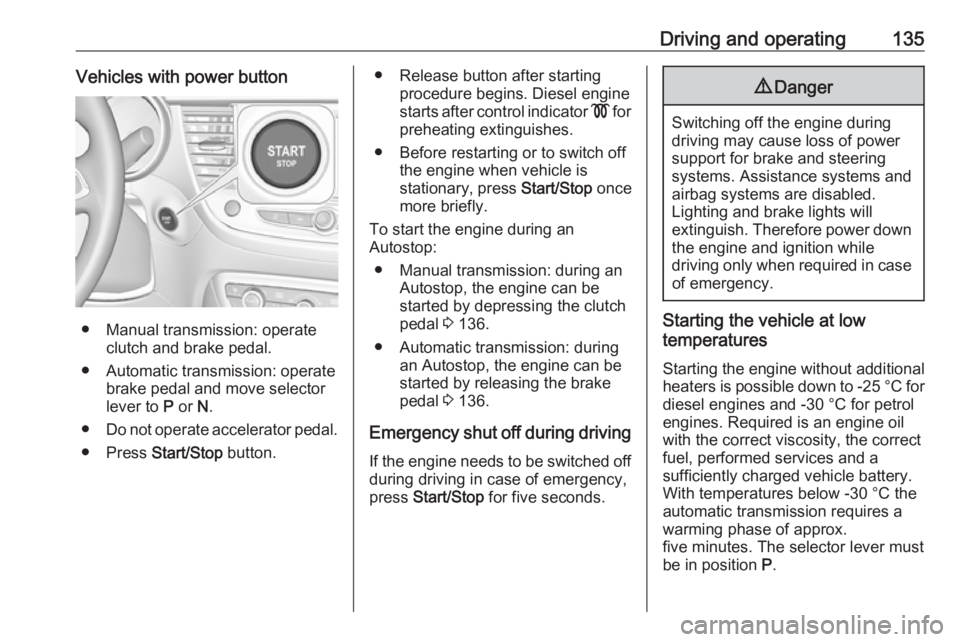
Driving and operating135Vehicles with power button
● Manual transmission: operateclutch and brake pedal.
● Automatic transmission: operate brake pedal and move selector
lever to P or N.
● Do not operate accelerator pedal.
● Press Start/Stop button.
● Release button after starting
procedure begins. Diesel engine
starts after control indicator ! for
preheating extinguishes.
● Before restarting or to switch off the engine when vehicle is
stationary, press Start/Stop once
more briefly.
To start the engine during an
Autostop:
● Manual transmission: during an Autostop, the engine can be
started by depressing the clutch
pedal 3 136.
● Automatic transmission: during an Autostop, the engine can be
started by releasing the brake
pedal 3 136.
Emergency shut off during driving If the engine needs to be switched offduring driving in case of emergency,
press Start/Stop for five seconds.9Danger
Switching off the engine during
driving may cause loss of power
support for brake and steering
systems. Assistance systems and
airbag systems are disabled.
Lighting and brake lights will
extinguish. Therefore power down the engine and ignition while
driving only when required in case of emergency.
Starting the vehicle at low
temperatures
Starting the engine without additional
heaters is possible down to -25 °С for diesel engines and -30 °C for petrol
engines. Required is an engine oil
with the correct viscosity, the correct fuel, performed services and a
sufficiently charged vehicle battery.
With temperatures below -30 °C the
automatic transmission requires a
warming phase of approx.
five minutes. The selector lever must
be in position P.
Page 161 of 261
Driving and operating159System limitationsIn some cases, the active emergencybraking system may provide an
automatic braking in situations that
seem to be unnecessary, for instance
in parking garages, due to traffic signs in a curve or due to vehicles in
another lane. This is normal
operation, the vehicle does not need
service. Firmly apply the accelerator
pedal to override the automatic
braking if the situation and the
surroundings permit.
In the following cases, active
emergency braking performance is limited:
● Driving on winding or hilly roads.
● Detecting all vehicles, especially vehicles with a trailer, tractors,
muddy vehicles, etc.
● Detecting a vehicle when weather limits visibility, such as infog, rain, or snow.
● Driving during nighttime.● Weather limits visibility, such as fog, rain, or snow.
● The windscreen is damaged or affected by foreign items, e.g.
stickers.
Complete attention is always required
while driving, and you should be
ready to take action and apply the
brakes and / or steer the vehicle to
avoid crashes.
Fault
In case the system requires a service, a message is displayed in the Driver
Information Centre.
If the system does not work as it
should do, vehicle messages are
displayed in the Driver Information
Centre.
Vehicle messages 3 100.
Front pedestrian protection Front pedestrian protection may help
to avoid or reduce the harm caused
by front-end crashes with pedestrians when driving forward.The system uses the front camera in
the windscreen to detect a pedestrian directly ahead in your path.
Front pedestrian protection can
detect and alert to pedestrians in a
forward gear at speeds between
5 km/h and 60 km/h.
During nighttime driving, system
performance is limited.9 Danger
Front pedestrian braking does not
provide an alert or automatically
brake the vehicle, unless it detects
a pedestrian.
The system may not detect
pedestrians, including children,
when the pedestrian is not directly ahead, not fully visible, not
standing upright, or when part of a
group.
Front pedestrian protection includes:
● detecting front pedestrian ahead● front pedestrian alert
Page 165 of 261
Driving and operating163When the system is deactivated
manually, the LED in the button
illuminates.
If the system has been deactivated
manually, it is not reactivated
automatically the next time the
ignition is switched on.
System limitations In the event of a fault or if the system
does not work temporarily, e.g.
because of high external noise level
or other interference factors, Service
in the cluster instrument illuminates. A message is indicated in the Driver
Information Centre.9 Warning
Under certain circumstances,
various reflective surfaces on
objects or clothing as well as
external noise sources may cause the system to fail to detect
obstacles.
Special attention must be paid to
low obstacles which can damage
the lower part of the bumper.
Caution
Performance of the system can be reduced when sensors are
covered, e.g. by ice or snow.
Performance of the parking assist
system can be reduced due to
heavy loading.
Special conditions apply if there
are taller vehicles in the vicinity
(e.g. off-road vehicles, mini vans,
vans). Object identification and correct distance indication in the
upper part of these vehicles
cannot be guaranteed.
Objects with a very small reflection
cross-section, e.g. objects of
narrow size or soft materials, may
not be detected by the system.
Parking assist systems do not
detect objects outside the
detection range.
Advanced parking assist9 Warning
The driver bears full responsibility
for accepting the parking slot
suggested by the system and the
parking manoeuvre.
Always check the surrounding
area in all directions when using
the advanced parking assist.
The advanced parking assist
measures a suitable parking slot
while passing, calculates the
trajectory and automatically steers
the vehicle while parking.
Advanced parking assist provides
assistance for the following
manoeuvres:
● Entry into a parallel parking slot.
● Entry into a perpendicular parking slot.
● Exit from a parallel parking slot.
Page 228 of 261
226Service and maintenanceService and
maintenanceGeneral information ...................226
Service information ..................226
Recommended fluids, lubricants
and parts .................................... 228
Recommended fluids and lubricants ................................ 228General information
Service information In order to ensure economical and
safe vehicle operation and to
maintain the value of your vehicle, it
is of vital importance that all
maintenance work is carried out at the proper intervals as specified.
The detailed, up-to-date service
schedule for your vehicle is available
at the workshop.
Severe operating conditions exist if one or more of the following
circumstances occur frequently: Cold
starting, stop and go operation, e.g.
for taxis and police vehicles, trailer
operation, mountain driving, driving
on poor and sandy road surfaces,
increased air pollution, presence of
airborne sand and high dust content,
driving at high altitude and large
variations of temperature.
Under these severe operating
conditions, certain service work may
be required more frequently than the
regular service interval indicated inthe service display. Contact a
workshop for customised service
schedules.
Service display 3 87.
Service intervals - country group 1 Maintenance of your vehicle is
required every 25,000 km or after one
year, whichever occurs first, unless
otherwise indicated in the service
display.
These service intervals are valid for
the following countries:
Andorra, Austria, Belgium, Cyprus,
Denmark, Finland, France, Germany, Greece, Greenland, Iceland, Ireland,
Italy, Liechtenstein, Luxembourg,
Malta, Monaco, Netherlands,
Norway, Portugal, San Marino, Spain, Sweden, Switzerland, United
Kingdom.
Service intervals - country group 2 Maintenance of your vehicle
equipped with engine EB2F, EB2DT or EB2DTS is required every
15,000 km or after one year,
whichever occurs first, unless
Page 229 of 261
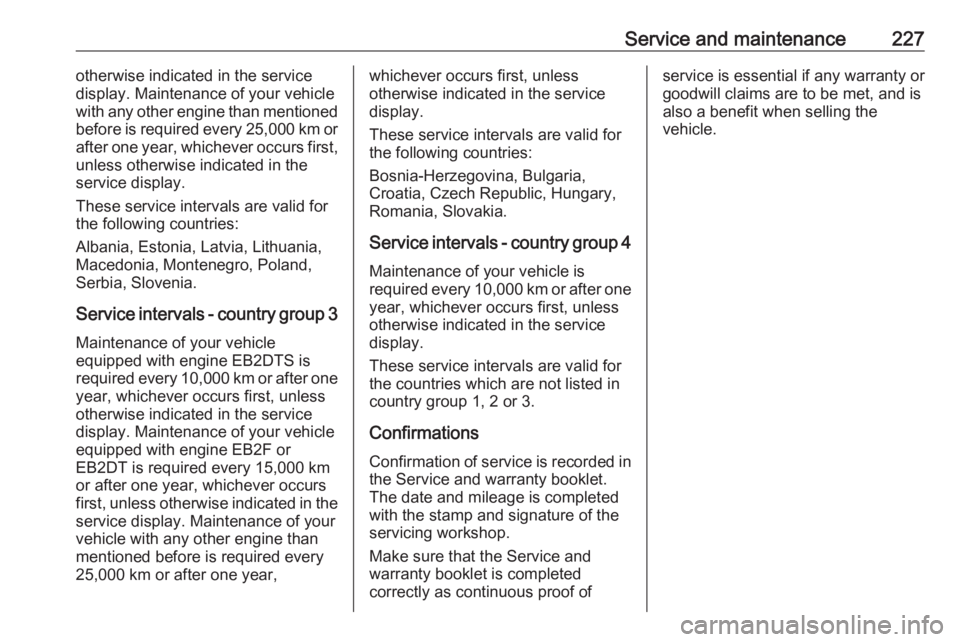
Service and maintenance227otherwise indicated in the service
display. Maintenance of your vehicle
with any other engine than mentioned
before is required every 25,000 km or after one year, whichever occurs first,
unless otherwise indicated in the
service display.
These service intervals are valid for
the following countries:
Albania, Estonia, Latvia, Lithuania,
Macedonia, Montenegro, Poland,
Serbia, Slovenia.
Service intervals - country group 3 Maintenance of your vehicle
equipped with engine EB2DTS is
required every 10,000 km or after one
year, whichever occurs first, unless
otherwise indicated in the service
display. Maintenance of your vehicle
equipped with engine EB2F or
EB2DT is required every 15,000 km
or after one year, whichever occurs
first, unless otherwise indicated in the
service display. Maintenance of yourvehicle with any other engine than
mentioned before is required every
25,000 km or after one year,whichever occurs first, unless
otherwise indicated in the service
display.
These service intervals are valid for
the following countries:
Bosnia-Herzegovina, Bulgaria,
Croatia, Czech Republic, Hungary,
Romania, Slovakia.
Service intervals - country group 4 Maintenance of your vehicle is
required every 10,000 km or after one
year, whichever occurs first, unless
otherwise indicated in the service
display.
These service intervals are valid for
the countries which are not listed in
country group 1, 2 or 3.
Confirmations Confirmation of service is recorded inthe Service and warranty booklet.
The date and mileage is completed
with the stamp and signature of the
servicing workshop.
Make sure that the Service and
warranty booklet is completed
correctly as continuous proof ofservice is essential if any warranty or goodwill claims are to be met, and is
also a benefit when selling the
vehicle.