lock OPEL CROSSLAND X 2018.5 Manual user
[x] Cancel search | Manufacturer: OPEL, Model Year: 2018.5, Model line: CROSSLAND X, Model: OPEL CROSSLAND X 2018.5Pages: 261, PDF Size: 8.04 MB
Page 159 of 261
Driving and operating157● the sensor in the windscreen isblocked by snow, ice, slush, mud,dirt etc.
● the windscreen is damaged or affected by foreign objects, e.g.
stickers
Active emergency braking
Active emergency braking can help to reduce the damage and injury from
crashes with vehicles, pedestrians and obstacles directly ahead, when a
collision can no longer be avoided
either by manual braking or by
steering. Before the active
emergency braking applies, the driver is warned by the forward collision
alert 3 155 or the front pedestrian
protection alert 3 159.
The feature uses various inputs (e.g.
camera sensor, brake pressure,
vehicle speed) to calculate the
probability of a frontal collision.9 Warning
This system is not intended to
replace the driver responsibility for driving the vehicle and looking
ahead. Its function is limited to
supplemental use only to reduce
the vehicle speed before a
collision.
The system may not react to
animals. After a sudden lane
change, the system needs a
certain time to detect the next
preceding vehicle.
The driver must always be ready
to take action and apply the brakes and steer to avoid collisions.
Operation conditions
Active emergency braking is
equipped with a front camera and
operates in forward gear above
walking speed up to 85 km/h. The
system detects stationary vehicles
only if the speed does not exceed
80 km/h.
Activation
A precondition is that forward collision
alert with front camera system is not
deactivated in the vehicle
personalisation menu 3 101.
Functionality The system includes: ● emergency automatic braking
● forward looking brake assist ● forward collision alert
● front pedestrian protection
Emergency automatic braking
After activation of brake preparation
system and just before the imminent
collision, this function automatically
applies limited braking to reduce the
impact speed of the collision or
prohibit a crash. If active emergency
braking is applied, m flashes in the
instrument cluster. Depending on the
situation, the vehicle may
automatically brake moderately or
hard. This front automatic braking can
only occur if a vehicle 3 155 or a
pedestrian 3 159 ahead is detected.
Page 162 of 261
160Driving and operatingFront pedestrian protection is
activated together with forward
collision alert.
Forward collision alert 3 155.
Detecting front pedestrian ahead
A pedestrian ahead up to a distance
of approximately 40 m is indicated by
a symbol in the instrument cluster.
Front pedestrian alert
When approaching a detected
pedestrian too quickly, a warning
message is displayed in the Driver
Information Centre. A warning chime
is provided.
Cruise control or Adaptive cruise
control may be disengaged when the
front pedestrian alert occurs.
System limitations In the following cases, front
pedestrian protection may not detect
a pedestrian ahead or sensor
performance is limited:● vehicle speed is out of range from
5 km/h to 60 km/h in forward gear
● the distance to an pedestrian ahead is more than 40 m
● driving on winding or hilly roads
● driving during nighttime
● weather limits visibility, such as fog, rain, or snow
● the sensor in the windscreen is blocked by snow, ice, slush, mud,dirt etc.
● the windscreen is damaged or affected by foreign objects, e.g.
stickers
Parking assist
General information When attaching a trailer or bike
carrier to the trailer hitch, the parking
assist is deactivated.9 Warning
The driver bears full responsibility
for the parking manoeuvre.
Always check the surrounding
area when driving backwards or
forwards while using parking
assist system.
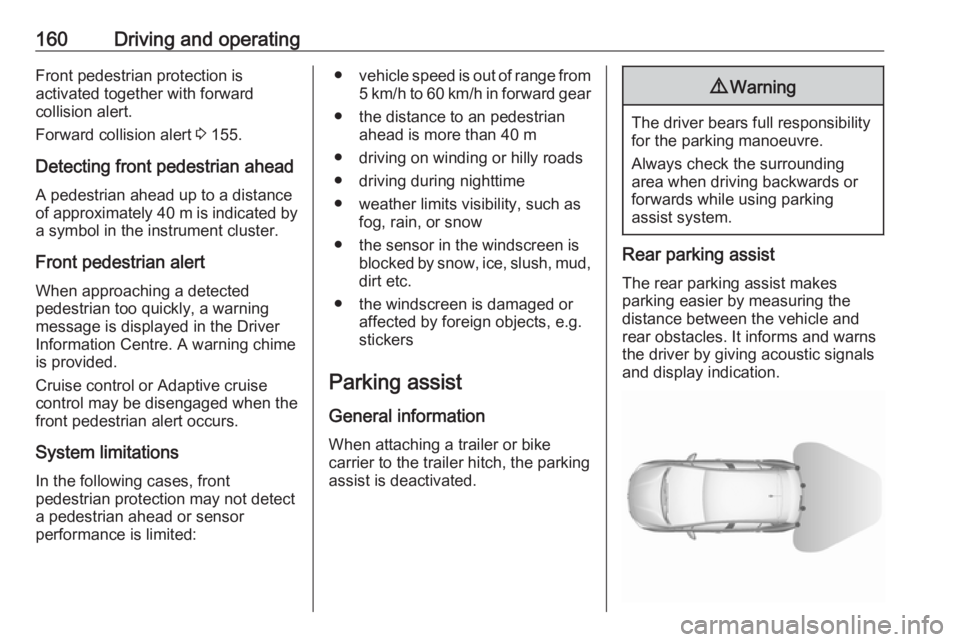
Rear parking assist
The rear parking assist makes
parking easier by measuring the
distance between the vehicle and
rear obstacles. It informs and warns
the driver by giving acoustic signals
and display indication.
Page 174 of 261
172Driving and operatingDeactivation
Panoramic view system is
deactivated when:
● driving faster than 10 km/h
● seven seconds after disengaging
reverse gear
● by pressing the icon q in the left
upper corner of the touch screen
● opening the tailgate
General information9 Warning
The panoramic view system does
not replace driver vision. It will not display children, pedestrians,
cyclists, crossing traffic, animals,
or any other objects outside of the camera view area, e. g. below the
bumper, or underneath the
vehicle.
Do not drive or park the vehicle
using only the panoramic view
system.
Always check the surrounding of
the vehicle before driving.
Displayed images may be further
or closer than they appear. The
area displayed is limited and
objects that are close to either
edge of the bumper or under the
bumper are not displayed on the
screen.
System limitations
Caution
For optimal operation of the
system, it is important to keep the
lense of the camera in the tailgate between the number plate lightsalways clean. Rinse the lense with water and wipe with a soft cloth.
Do not clean the lense with a
steam-jet or high-pressure jet
cleaner.
The panoramic view system may not
operate properly when:
● The surrounding is dark.
● The sun or the beam of headlights is shining directly into
the camera lenses.
● During nighttime driving.
● Weather limits visibility, such as fog, rain, or snow.
● The camera lenses are blocked by snow, ice, slush, mud, dirt.
● The vehicle is towing a trailer.
● The vehicle had an accident.
● There are extreme temperature changes.
Rear view camera The rear view camera assists the
driver when reversing by displaying a
view of the area behind the vehicle.
The view of the camera is displayed
in the Info Display.9 Warning
The rear view camera does not
replace driver vision. Note that
objects that are outside the
camera's field of view and the
Page 176 of 261
174Driving and operating● The camera lenses are blockedby snow, ice, slush, mud, dirt.Clean the lense, rinse with water,
and wipe with a soft cloth.
● The tailgate will be opened.
● The vehicle is towing an electrically connected trailer.
● The vehicle had a rear end accident.
● There are extreme temperature changes.
Lane departure warning The lane departure warning system
observes the lane markings between
which the vehicle is driving via a front camera. The system detects lane
changes and warns the driver in the
event of an unintended lane change
via visual and acoustic signals.
Criteria for the detection of an
unintended lane change are:
● No operation of turn lights.
● No brake pedal operation.
● No active accelerator operation or speeding-up.If the driver is active, no warning will
be issued.
Activation
The lane departure warning system isactivated by pressing ½. The system
is switched on when the LED in the
button is not illuminated.
The system is only operable at
vehicle speeds above 60 km/h and if
lane markings are available.
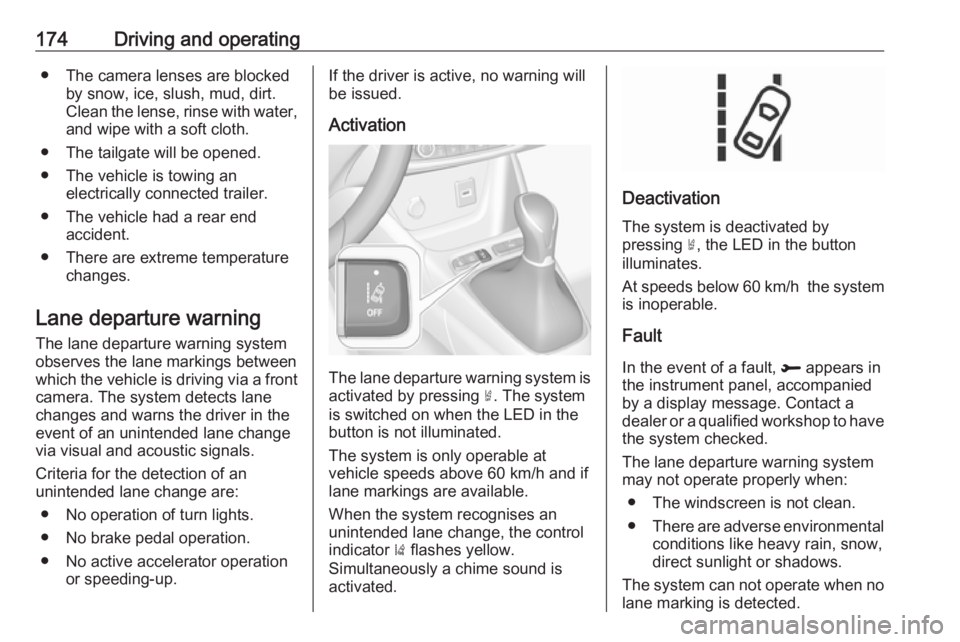
When the system recognises an
unintended lane change, the control
indicator ) flashes yellow.
Simultaneously a chime sound is
activated.
Deactivation
The system is deactivated by
pressing ½, the LED in the button
illuminates.
At speeds below 60 km/h the system
is inoperable.
Fault
In the event of a fault, R appears in
the instrument panel, accompanied
by a display message. Contact a dealer or a qualified workshop to have
the system checked.
The lane departure warning system
may not operate properly when:
● The windscreen is not clean.● There are adverse environmental
conditions like heavy rain, snow,
direct sunlight or shadows.
The system can not operate when no
lane marking is detected.
Page 177 of 261
Driving and operating175System limitationsThe system performance may not
operate properly when:
● Vehicle speed is below 60 km/h.● Driving on winding or hilly roads.
● During nighttime driving.
● Weather limits visibility, such as fog, rain, or snow.
● The sensor in the windscreen is blocked by snow, ice, slush, mud,dirt, windscreen damage or
affected by foreign items, e.g.
stickers.
● The sun is shining directly into the camera lens.
● Close vehicles ahead.
● Banked roads.
● Road edges.
● Roads with poor lane markings.
● Sudden lighting changes.
Driver alert
The driver alert system monitores the driving time and the vigilance of the
driver. Monitoring the vigilance of thedriver is based on the trajectory
variations of the vehicle compared to
the lane markings.
The system includes a driving time alert combined with driver drowsiness
detection.9 Warning
The system cannot replace the
need for vigilance on the part of
the driver. It is recommended that
you take a break as soon as you
feel tired or at least every two
hours. Do not take the wheel if you are tired.
Activation or Deactivation
The system can be activated or
deactivated in the vehicle
personalisation 3 101
The state of the system stays in
memory when the ignition is switched
off.
Driving time alert
The driver gets notified by a pop-upreminder symbol € in the Driver
Information Centre simultaneously with a acoustic alert if the driver has
not taken a break after two hours of
driving at a speed above 65 km/h. The
alert is repeated hourly until the
vehicle is stopped, no matter how
vehicle speed evolves.
The counting of driving time alert is
reset when the ignition has been
switched off for a few minutes.
Driver drowsiness detection The system monitors the driver's level
of vigilance. A camera at the top of the
windscreen detects variations in
trajectory compared to the lane
markings. This system is particularly
suited to fast roads (speed higher
than 65 km/h).
If the trajectory of the vehicle
suggests a certain level of
drowsiness or inattention by the
driver, the system triggers the first
Page 181 of 261
Driving and operating179
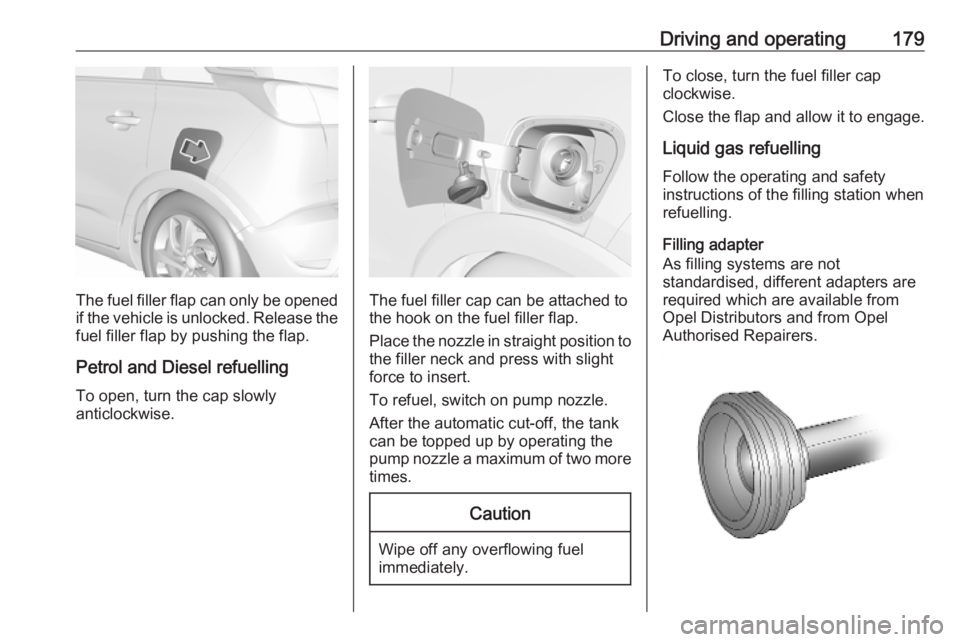
The fuel filler flap can only be opened
if the vehicle is unlocked. Release the
fuel filler flap by pushing the flap.
Petrol and Diesel refuelling To open, turn the cap slowly
anticlockwise.The fuel filler cap can be attached to the hook on the fuel filler flap.
Place the nozzle in straight position to the filler neck and press with slight
force to insert.
To refuel, switch on pump nozzle.
After the automatic cut-off, the tank can be topped up by operating the
pump nozzle a maximum of two more
times.
Caution
Wipe off any overflowing fuel
immediately.
To close, turn the fuel filler cap
clockwise.
Close the flap and allow it to engage.
Liquid gas refuellingFollow the operating and safety
instructions of the filling station when
refuelling.
Filling adapter
As filling systems are not
standardised, different adapters are
required which are available from
Opel Distributors and from Opel
Authorised Repairers.
Page 182 of 261
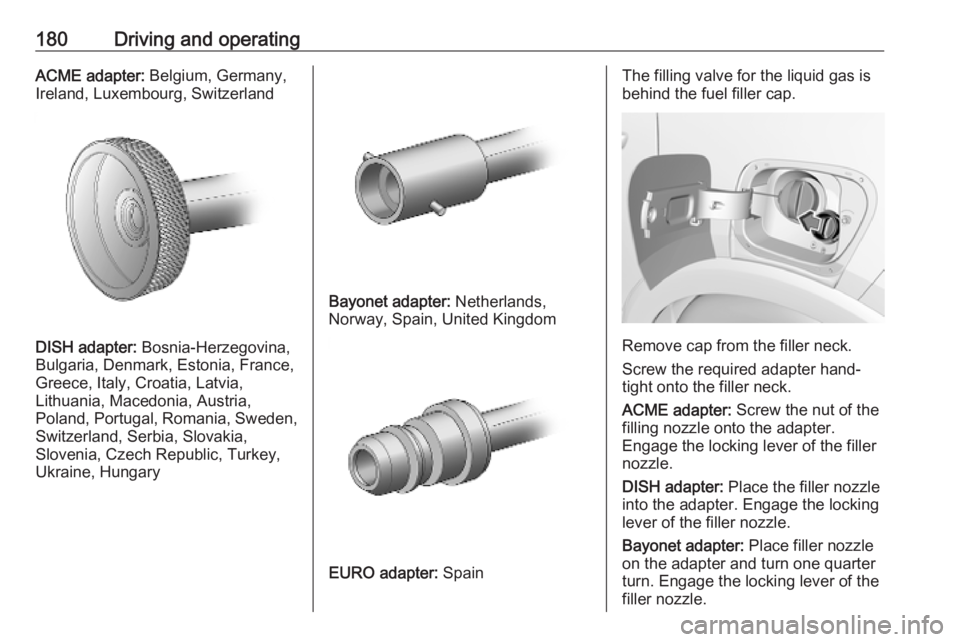
180Driving and operatingACME adapter: Belgium, Germany,
Ireland, Luxembourg, Switzerland
DISH adapter: Bosnia-Herzegovina,
Bulgaria, Denmark, Estonia, France,
Greece, Italy, Croatia, Latvia,
Lithuania, Macedonia, Austria,
Poland, Portugal, Romania, Sweden,
Switzerland, Serbia, Slovakia,
Slovenia, Czech Republic, Turkey,
Ukraine, Hungary
Bayonet adapter: Netherlands,
Norway, Spain, United Kingdom
EURO adapter: Spain
The filling valve for the liquid gas is
behind the fuel filler cap.
Remove cap from the filler neck.
Screw the required adapter hand-
tight onto the filler neck.
ACME adapter: Screw the nut of the
filling nozzle onto the adapter.
Engage the locking lever of the filler
nozzle.
DISH adapter: Place the filler nozzle
into the adapter. Engage the locking
lever of the filler nozzle.
Bayonet adapter: Place filler nozzle
on the adapter and turn one quarter
turn. Engage the locking lever of the
filler nozzle.
Page 183 of 261
Driving and operating181EURO adapter: Press the filler nozzle
onto the adapter. Engage the locking
lever of the filler nozzle.
Press the button of the liquid gas supply point. The filling system stops
or begins to run slowly when 80% of
the tank volume is reached
(maximum fill level).
Release button on filling system to stop the filling process. Release the
locking lever and remove the filler
nozzle. A small quantity of liquid gas
can escape.
Remove adapter and stow in vehicle.
Fit protective cap to prevent the
penetration of foreign bodies into the
filler opening and the system.9 Warning
Due to the system design, an
escape of liquid gas after
releasing the locking lever is
unavoidable. Avoid inhaling.
9 Warning
The liquid gas tank may only be
filled to 80% for safety reasons.
The multivalve on the liquid gas tank
automatically limits the fill quantity. If
a larger quantity is added, we
recommend not exposing the vehicle
to the sun until the excess amount
has been used up.
Twelve minutes after switching off the ignition the system of the fuel-filling
turns off. To restart it turn the ignition
on and then off again.
Fuel filler cap Only use genuine fuel filler caps.Diesel-engined vehicles have special
fuel filler caps.
Trailer hitch
General information
The factory-fitted towing equipment is
folded up under the rear bumper
fascia.
Entrust retrofitting of towing
equipment to a workshop. It may be
necessary to make changes that
affect the cooling system, heat
shields or other equipment. Only use
towing equipment that has been
approved for your vehicle.
To avoid vehicle damage, the power
tailgate cannot be operated with the
radio remote control when a trailer is
electrically connected.
The bulb outage detection function for trailer brake light cannot detect a
partial bulb outage. E.g. in case of
four bulbs with a power of 5 W each,
the function only detects lamp outage
when only a single 5 W lamp remains
or none remain.
Fitting of towing equipment could
cover the opening of the towing eye.
If this is the case use the coupling ball
bar for towing.
Page 186 of 261
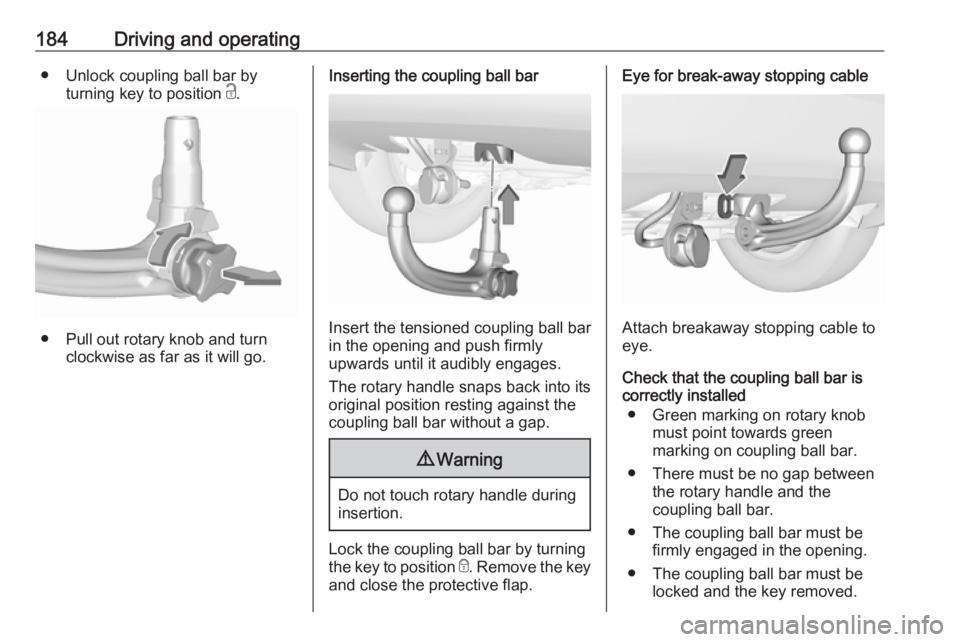
184Driving and operating● Unlock coupling ball bar byturning key to position c.
● Pull out rotary knob and turn
clockwise as far as it will go.
Inserting the coupling ball bar
Insert the tensioned coupling ball bar
in the opening and push firmly
upwards until it audibly engages.
The rotary handle snaps back into its
original position resting against the
coupling ball bar without a gap.
9 Warning
Do not touch rotary handle during
insertion.
Lock the coupling ball bar by turning
the key to position e. Remove the key
and close the protective flap.
Eye for break-away stopping cable
Attach breakaway stopping cable to
eye.
Check that the coupling ball bar is correctly installed
● Green marking on rotary knob must point towards green
marking on coupling ball bar.
● There must be no gap between the rotary handle and the
coupling ball bar.
● The coupling ball bar must be firmly engaged in the opening.
● The coupling ball bar must be locked and the key removed.
Page 187 of 261
Driving and operating1859Warning
Towing a trailer is permitted only
when a coupling ball bar is fitted correctly. If the coupling ball bardoes not engage correctly, seekthe assistance of a workshop.
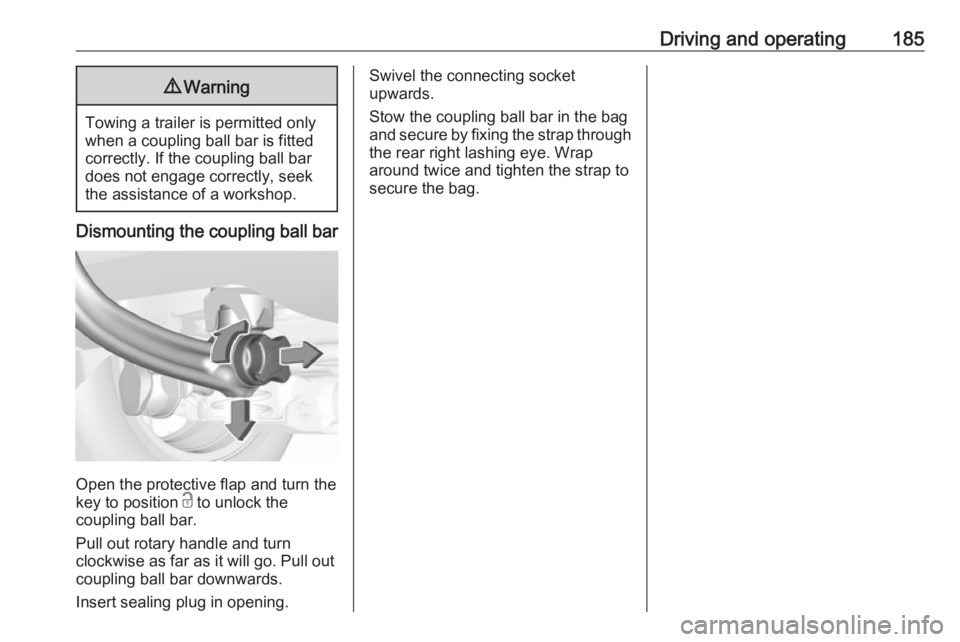
Dismounting the coupling ball bar
Open the protective flap and turn the
key to position c to unlock the
coupling ball bar.
Pull out rotary handle and turn
clockwise as far as it will go. Pull out coupling ball bar downwards.
Insert sealing plug in opening.
Swivel the connecting socket
upwards.
Stow the coupling ball bar in the bag
and secure by fixing the strap through the rear right lashing eye. Wrap
around twice and tighten the strap to
secure the bag.