buttons OPEL CROSSLAND X 2018.5 Owner's Manual
[x] Cancel search | Manufacturer: OPEL, Model Year: 2018.5, Model line: CROSSLAND X, Model: OPEL CROSSLAND X 2018.5Pages: 261, PDF Size: 8.04 MB
Page 13 of 261

In brief111Power windows .....................37
2 Exterior mirrors .....................34
3 Cruise control .....................150
Speed limiter ....................... 153
4 Turn lights ........................... 113
Headlight flash ....................110
High beam ........................... 110
High beam assist ...............111
Exit lighting ......................... 116
Parking lights ...................... 114
Buttons for Driver
Information Centre ................94
5 Side air vents ...................... 127
6 Instruments .......................... 84
Driver Information Centre ...... 94
7 Buttons for Driver
Information Centre ................94
8 Windscreen wiper and
washer, rear wiper and
washer ................................. 74
9 Head-up display ....................98
10 Centre air vents .................. 12711Hazard warning flashers ....112
12 Info Display .......................... 97
13 Centre air vent ......................97
14 Anti-theft alarm system
status LED ........................... 32
15 Central locking system ..........24
16 Glovebox .............................. 63
Fuse box ............................ 203
17 Controls for Info Display
operation ............................... 97
18 Climate control system ........ 119
19 USB charging port ................ 77
20 Parking assist / Advanced
parking assist .....................160
Lane departure warning .....174
Eco button for stop-start
system ................................. 136
Electronic Stability Control
and Traction Control ...........149
21 Power outlet .......................... 77
22 Manual transmission ..........146
Automatic transmission ......143
23 Manual parking brake .........14824Power button ....................... 132
25 Ignition switch .....................131
26 Steering wheel adjustment ..73
27 Horn ..................................... 74
28 Bonnet release lever ..........188
29 Storage ................................. 63
Fuse box ............................ 203
30 Head-up display ....................98
31 Light switch ........................ 109
Headlight range
adjustment ......................... 111
Front / rear fog lights ..........113
Instrument illumination .......115
Page 24 of 261
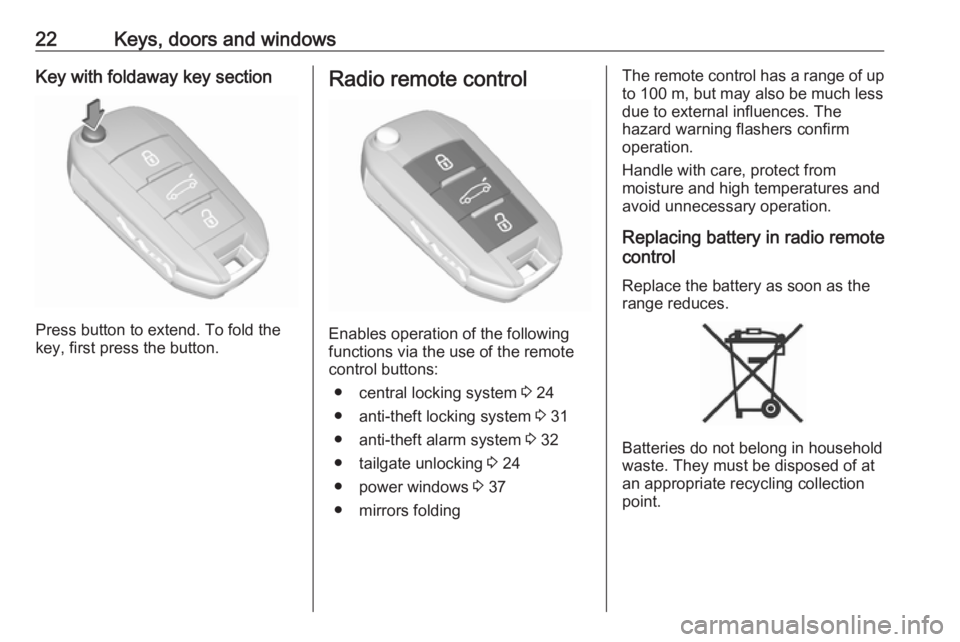
22Keys, doors and windowsKey with foldaway key section
Press button to extend. To fold the
key, first press the button.
Radio remote control
Enables operation of the following
functions via the use of the remote control buttons:
● central locking system 3 24
● anti-theft locking system 3 31
● anti-theft alarm system 3 32
● tailgate unlocking 3 24
● power windows 3 37
● mirrors folding
The remote control has a range of up
to 100 m, but may also be much less
due to external influences. The
hazard warning flashers confirm
operation.
Handle with care, protect from
moisture and high temperatures and
avoid unnecessary operation.
Replacing battery in radio remote
control
Replace the battery as soon as the
range reduces.
Batteries do not belong in household
waste. They must be disposed of at
an appropriate recycling collection
point.
Page 29 of 261
Keys, doors and windows27The system locks if any door has
been opened and all doors are now
closed.
If the driver's door is not closed
properly, the electronic key remains in
the vehicle or the ignition is not off,
locking will not be permitted and a
warning chime sounds.
If there have been two or more
electronic keys in the vehicle and the
ignition was on once, the doors will be locked even if just one electronic key
is taken out of the vehicle.
Unlocking and opening the tailgate
The tailgate can be unlocked and
opened by pushing the touchpad
under the tailgate moulding when the
electronic key is in range. The doors
remain locked depending on the
configuration in the vehicle
personalisation.
Load compartment 3 30
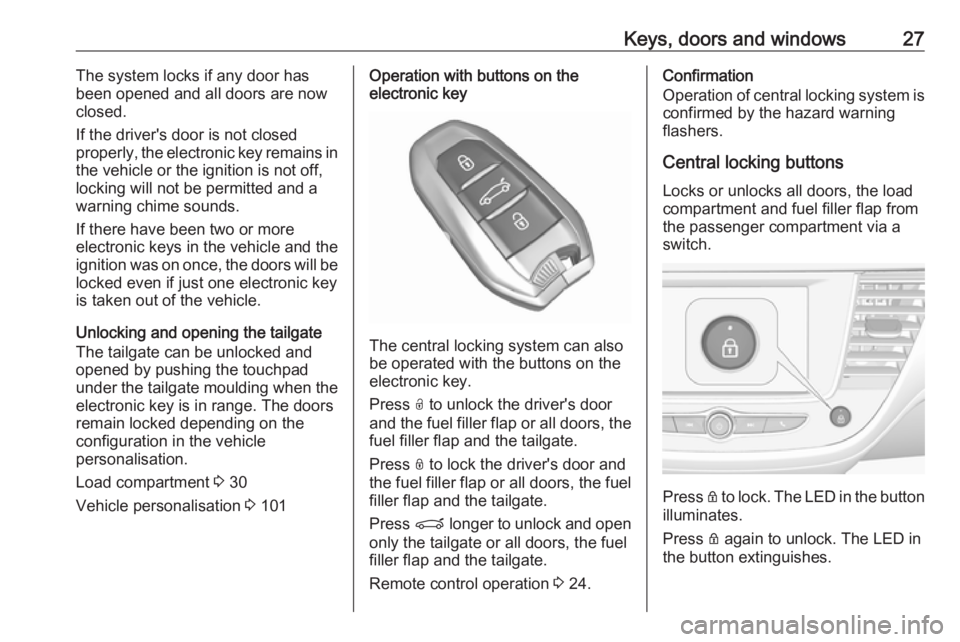
Vehicle personalisation 3 101Operation with buttons on the
electronic key
The central locking system can also
be operated with the buttons on the
electronic key.
Press O to unlock the driver's door
and the fuel filler flap or all doors, the fuel filler flap and the tailgate.
Press N to lock the driver's door and
the fuel filler flap or all doors, the fuel
filler flap and the tailgate.
Press P longer to unlock and open
only the tailgate or all doors, the fuel
filler flap and the tailgate.
Remote control operation 3 24.
Confirmation
Operation of central locking system is
confirmed by the hazard warning
flashers.
Central locking buttonsLocks or unlocks all doors, the load
compartment and fuel filler flap from
the passenger compartment via a
switch.
Press Q to lock. The LED in the button
illuminates.
Press Q again to unlock. The LED in
the button extinguishes.
Page 96 of 261
94Instruments and controlsIlluminated when rain sensor positionon wiper stalk is selected.
Side blind spot alert
B illuminates green.
The system is active.
Cruise control
m illuminates in the Driver
Information Centre.
Cruise control 3 150.
Side blind spot alert B illuminates continously green in the
instrument cluster.
The system is active 3 168.
Active emergency braking m illuminates or flashes yellow.
Illuminates
The system has been deactivated or a fault has been detected.Additionally, a warning message is
displayed in the Driver Information
Centre.
Check the reason of the deactivation
3 157 and in case of a system fault,
seek the assistance of a workshop.
Flashes
The system is actively engaged.
Depending on the situation, the
vehicle may automatically brake
moderately or hard.
Forward collision alert 3 155.
Front pedestrian protection 3 159.
Speed limiter
ß illuminates in the Driver
Information Centre.
Speed limiter 3 153.
Door open h illuminates red.
A door or the tailgate is open.Displays
Driver Information Centre The Driver Information Centre is
located in the instrument cluster.
Depending on the version and the
instrument cluster, the Driver
Information Centre is available as
Baselevel or Midlevel display.
Driver Information Centre indicates: ● overall and trip odometer
● digital speed indication
● trip / fuel information menu
● gear shift indication
● service information
● vehicle and warning messages ● driver assistance messages
● pop-up messages
Selecting menus and functions The menus and functions can be
selected via the buttons on the left
steering wheel stalk.
Page 100 of 261
98Instruments and controlsTouch 9 to return to the next higher
menu level.
Press ; to return to the homepage.
For further information, see
Infotainment manual.
Vehicle personalisation 3 101.
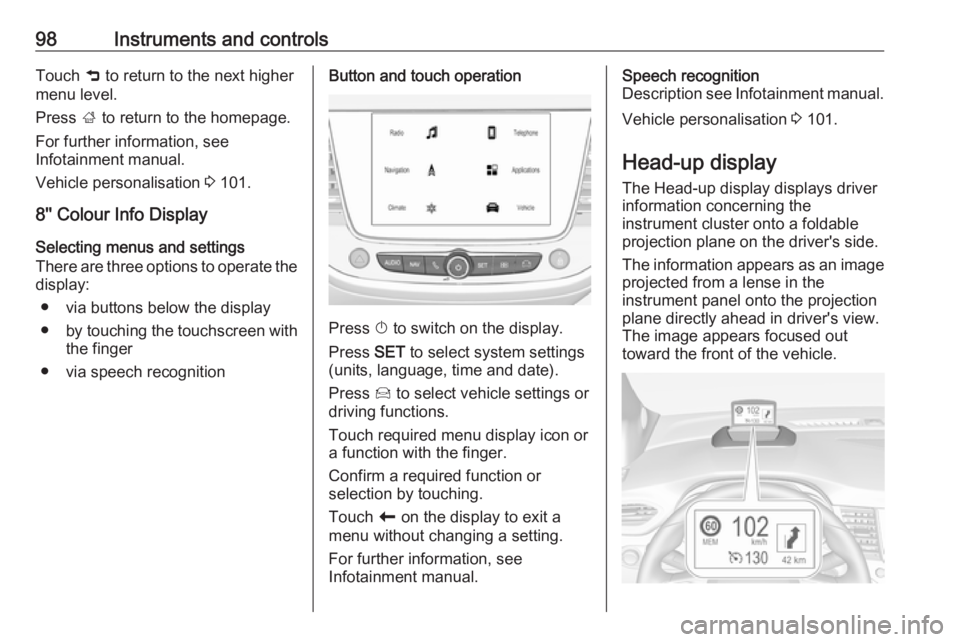
8'' Colour Info Display Selecting menus and settings
There are three options to operate the
display:
● via buttons below the display
● by touching the touchscreen with
the finger
● via speech recognitionButton and touch operation
Press X to switch on the display.
Press SET to select system settings
(units, language, time and date).
Press Í to select vehicle settings or
driving functions.
Touch required menu display icon or a function with the finger.
Confirm a required function or
selection by touching.
Touch r on the display to exit a
menu without changing a setting.
For further information, see
Infotainment manual.
Speech recognition
Description see Infotainment manual.
Vehicle personalisation 3 101.
Head-up display
The Head-up display displays driver
information concerning the
instrument cluster onto a foldable projection plane on the driver's side.
The information appears as an image
projected from a lense in the
instrument panel onto the projection
plane directly ahead in driver's view.
The image appears focused out
toward the front of the vehicle.
Page 104 of 261
102Instruments and controlsSelect ˆ Personalisation-
configuration I OK .
Unit settings
Select Display configuration I OK .
Select Choise of units I OK .
Select desired settings I OK .
Language settings
Select Display configuration I OK .
Select Choise of language I OK .
Select desired language I OK .
Vehicle settings
Select Define vehicle parameters I
OK .
In the corresponding submenus the
following settings can be changed:
● Lighting .
Follow me home headlamps :
Activation and setting duration
time.
Welcome lighting : Activation and
setting duration time.
● Comfort
Ambient lighting : Activation/
Deactivation.Rear wiper in reverse gear :
Activation/Deactivation.
● Vehicle
Unlocking boot only : Activation/
Deactivation.
Plip action : Driver/all doors.
● Driving assistance
Fatigue Detection system :
Activation/Deactivation.
Speed recommendation :
Activation/Deactivation.
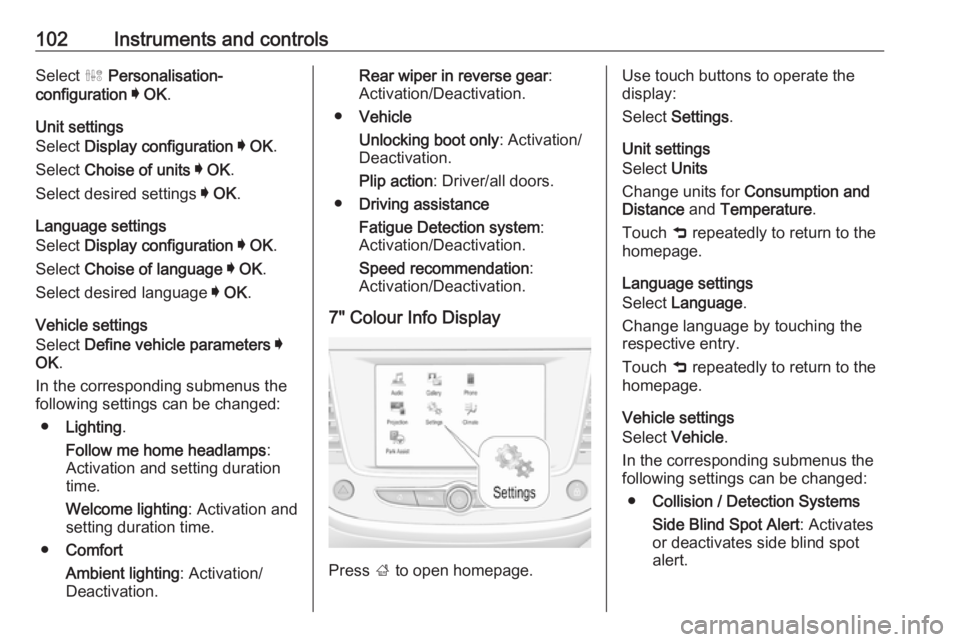
7" Colour Info Display
Press ; to open homepage.
Use touch buttons to operate the
display:
Select Settings .
Unit settings
Select Units
Change units for Consumption and
Distance and Temperature .
Touch 9 repeatedly to return to the
homepage.
Language settings
Select Language .
Change language by touching the respective entry.
Touch 9 repeatedly to return to the
homepage.
Vehicle settings
Select Vehicle .
In the corresponding submenus the
following settings can be changed:
● Collision / Detection Systems
Side Blind Spot Alert : Activates
or deactivates side blind spot
alert.
Page 105 of 261
Instruments and controls103Drowsy Driver Alert : Activates or
deactivates the driver
drowsiness system.
Speed Limit Information :
Activates or deactivates the
speed limit information by traffic
sign recognition.
Rear View Camera Guidelines :
Activates or deactivates the rear
view camera guidelines on the
Info display.
● Comfort and Convenience
Auto Wipe in Reverse Gear :
Activates or deactivates
automatic switching on of the
rear window wiper when reverse gear is engaged.
● Lighting
Ambient Lighting : Activates or
deactivates the ambient lighting and adjusts its brightness.
Welcome Lighting : Activates or
deactivates and changes the
duration of welcome lighting.Exit Lighting : Activates or
deactivates and changes the
duration of exit lighting.
● Remote Lock, Unlock, Start
Remote Door Unlock : Changes
the configuration to unlock the
driver's door only or all doors
when pressing O on the remote
control.
Unlock boot only : Activates or
deactivates unlocking the tailgate
only when pressing T on the
remote control.
Touch 9 repeatedly to return to the
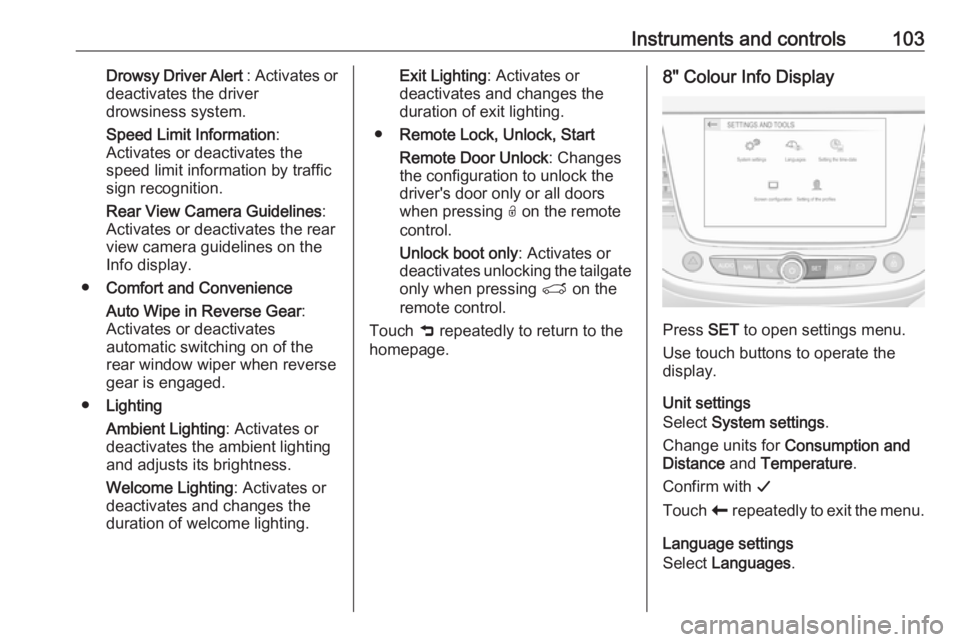
homepage.8" Colour Info Display
Press SET to open settings menu.
Use touch buttons to operate the
display.
Unit settings
Select System settings .
Change units for Consumption and
Distance and Temperature .
Confirm with G
Touch r repeatedly to exit the menu.
Language settings
Select Languages .
Page 107 of 261
Instruments and controls105Telematics service
OnStar
OnStar is a personal connectivity and
service assistant with integrated
Wi-Fi hotspot. The OnStar service is
available 24 hours a day, seven days
a week.
Note
OnStar is not available for all
markets. For further information,
contact your workshop.
Note
In order to be available and
operational, OnStar needs a valid
OnStar subscription, functioning
vehicle electrics, ignition on, mobile
service and GPS satellite link.
To activate the OnStar services and
set up an account, press Z and speak
with an advisor.Depending on the equipment of the
vehicle, the following services are
available:
● Emergency services and support
in the case of a vehicle
breakdown
● Wi-Fi hotspot
● Smartphone application
● Remote control, e.g. location of the vehicle, activation of horn andlights, control of central locking
system
● Stolen vehicle assistance
● Vehicle diagnostics
Note
The OnStar module of the vehicle is
deactivated after ten days without an
ignition cycle. Functions requiring a
data connection will be available
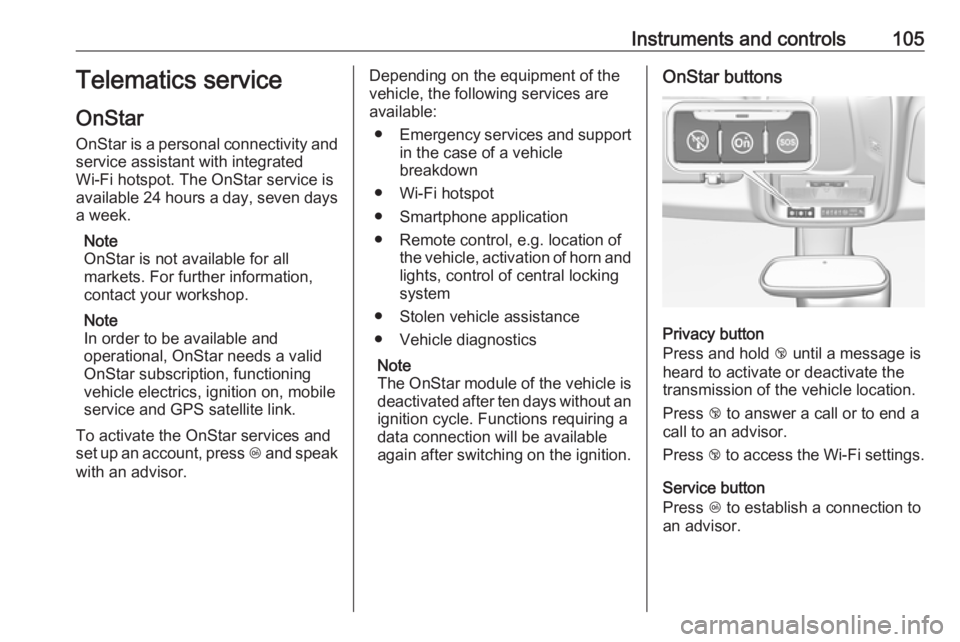
again after switching on the ignition.OnStar buttons
Privacy button
Press and hold j until a message is
heard to activate or deactivate the
transmission of the vehicle location.
Press j to answer a call or to end a
call to an advisor.
Press j to access the Wi-Fi settings.
Service button
Press Z to establish a connection to
an advisor.
Page 124 of 261
122Climate controlHeated rear window, windscreen
and exterior mirrors b
3 38.
Heated seats ß
3 46.
Electronic climate control
system
The dual zone climate control allows
different temperatures for driver side
and front passenger side.
In automatic mode, temperature, fan
speed and air distribution are
regulated automatically.Illustration shows functions which
may not be available for your
particular vehicle.
Controls for: ● temperature on driver side £
● MENU enters the Climate setting
menu in the Info Display
● fan speed Z
● automatic mode AUTO
● temperature on front passenger side £
● cooling A/C
● manual air recirculation 4
● demisting and defrosting à
● heated rear window and exterior mirrors b
● heated windscreen ,
● heated seats ß
Activated functions are indicated by the LED in the respective control.
The electronic climate control system
is only fully operational when the
engine is running.Climate settings menu (MENU
button)
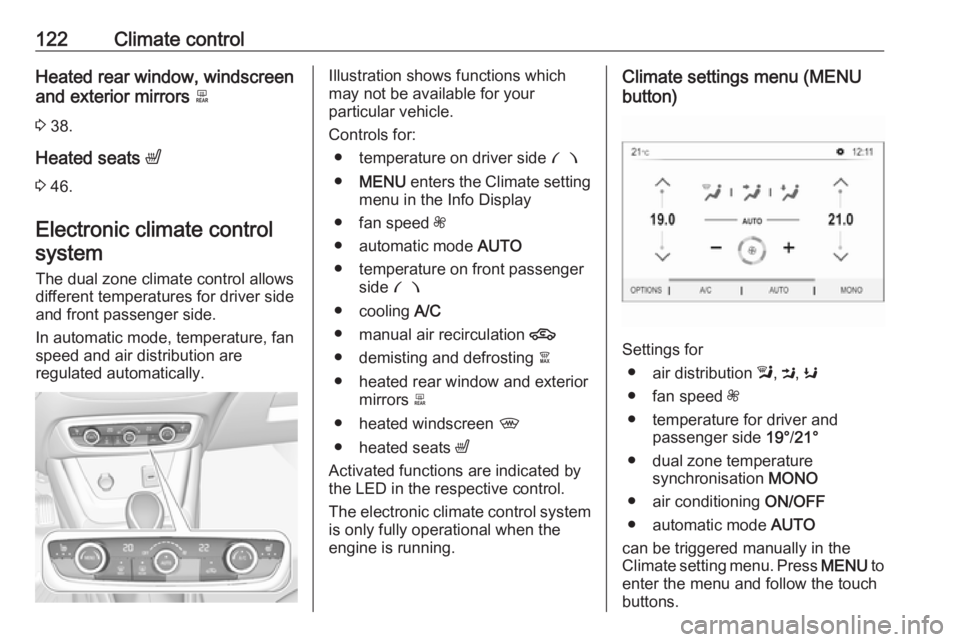
Settings for
● air distribution l, M , K
● fan speed Z
● temperature for driver and passenger side 19°/21°
● dual zone temperature synchronisation MONO
● air conditioning ON/OFF
● automatic mode AUTO
can be triggered manually in the
Climate setting menu. Press MENU to
enter the menu and follow the touch
buttons.
Page 125 of 261
Climate control123Climate setting menu can also be
displayed
● by selecting Climate on the 7''
Colour Info Display or
● by pressing Í and then selecting
Climate from the menu on the 8''
Colour Info Display.
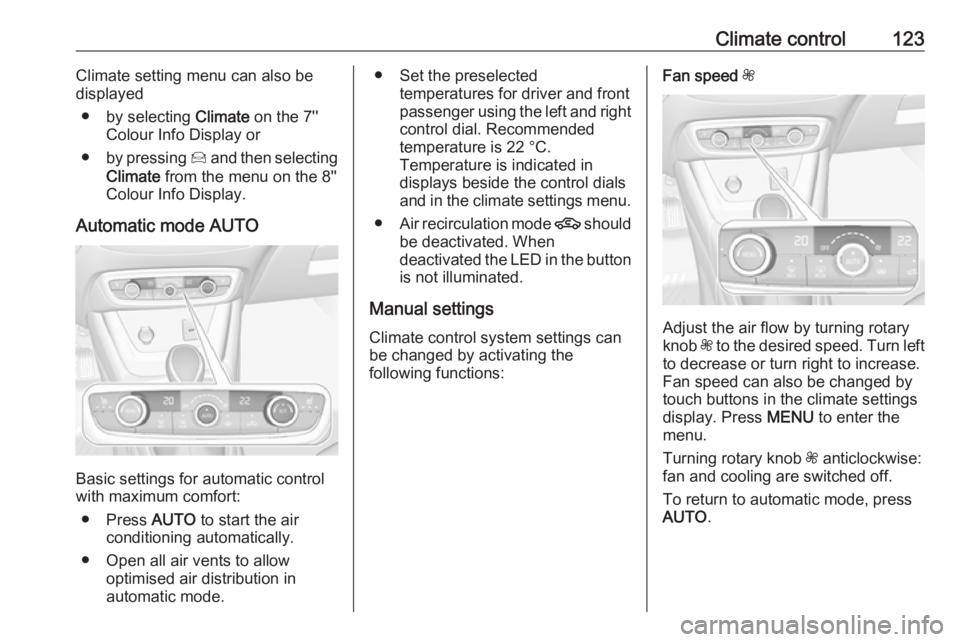
Automatic mode AUTO
Basic settings for automatic control
with maximum comfort:
● Press AUTO to start the air
conditioning automatically.
● Open all air vents to allow optimised air distribution in
automatic mode.
● Set the preselected temperatures for driver and front
passenger using the left and right
control dial. Recommended
temperature is 22 °C.
Temperature is indicated in
displays beside the control dials
and in the climate settings menu.
● Air recirculation mode 4 should
be deactivated. When
deactivated the LED in the button is not illuminated.
Manual settings
Climate control system settings can
be changed by activating the
following functions:Fan speed Z
Adjust the air flow by turning rotary
knob Z to the desired speed. Turn left
to decrease or turn right to increase.
Fan speed can also be changed by
touch buttons in the climate settings
display. Press MENU to enter the
menu.
Turning rotary knob Z anticlockwise:
fan and cooling are switched off.
To return to automatic mode, press
AUTO .