airbag OPEL CROSSLAND X 2018 Manual user
[x] Cancel search | Manufacturer: OPEL, Model Year: 2018, Model line: CROSSLAND X, Model: OPEL CROSSLAND X 2018Pages: 257, PDF Size: 7.81 MB
Page 60 of 257
58Seats, restraintsConsult a workshop immediately if
neither of the two control indicators
are illuminated.
Change status only when the vehicle is stopped with the ignition off.
Status remains until the next change. Control indicator for airbag
deactivation 3 91.Child restraints
Child restraint systems9 Danger
If using a rear-facing child restraint
system on the front passenger
seat, the airbag system for the
front passenger seat must be
deactivated. This also applies to certain forward-facing child
restraint systems as indicated in
the tables 3 61.
Airbag deactivation 3 57.
Airbag label 3 52.
We recommend a child restraint system which is tailored specifically to the vehicle. For further information,
contact your workshop.
When a child restraint system is being
used, pay attention to the following
usage and installation instructions
and also those supplied with the child
restraint system.
Always comply with local or national
regulations. In some countries, the
use of child restraint systems is
forbidden on certain seats.
Child restraint systems can be
fastened with:
● Three-point seat belt
● ISOFIX brackets
● Top-tether anchor
Three-point seat belt
Child restraint systems can be
fastened by using a three-point seat
belt.
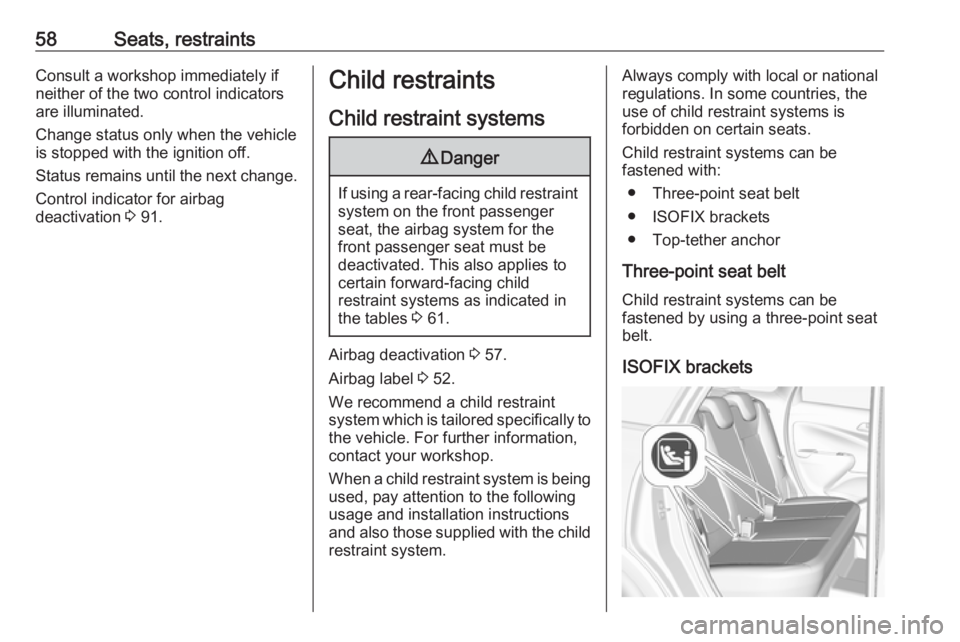
ISOFIX brackets
Page 63 of 257

Seats, restraints61Child restraint installation locations
Permissible options for fastening a child restraint system with a three-point seat belt
Weight class
On front passenger seat
On rear outboard seatsOn rear centre seat
activated airbagdeactivated airbagGroup 0: up to 10 kgXU 1,2U/L 3XGroup 0+: up to 13 kgXU1,2U/L 3XGroup I: 9 to 18 kgXU1,2U/L 3,4XGroup II: 15 to 25 kgU1,2XU/L 3,4XGroup III: 22 to 36 kgU1,2XU/L 3,4XU:universal suitability in conjunction with three-point seat beltL:suitable for particular child restraint systems of the 'specific-vehicle', 'restricted' or 'semi-universal' categories. The
child restraint system must be approved for the specific vehicle type (refer to the vehicle type list of the child restraint
system)X:no child restraint system permitted in this weight class1:move seat forwards as far as necessary and adjust seat backrest inclination as far as necessary to a vertical position to ensure that the belt runs forwards from the upper anchorage point2:move seat height adjustment upwards as far as necessary and adjust seat backrest inclination as far as necessaryto a vertical position to ensure that the belt is tight on the buckle side3:move the respective front seat ahead of the child restraint system forwards and the sliding rear seat backwards as far as necessary4:adjust the respective headrest as necessary or remove if required
Page 64 of 257
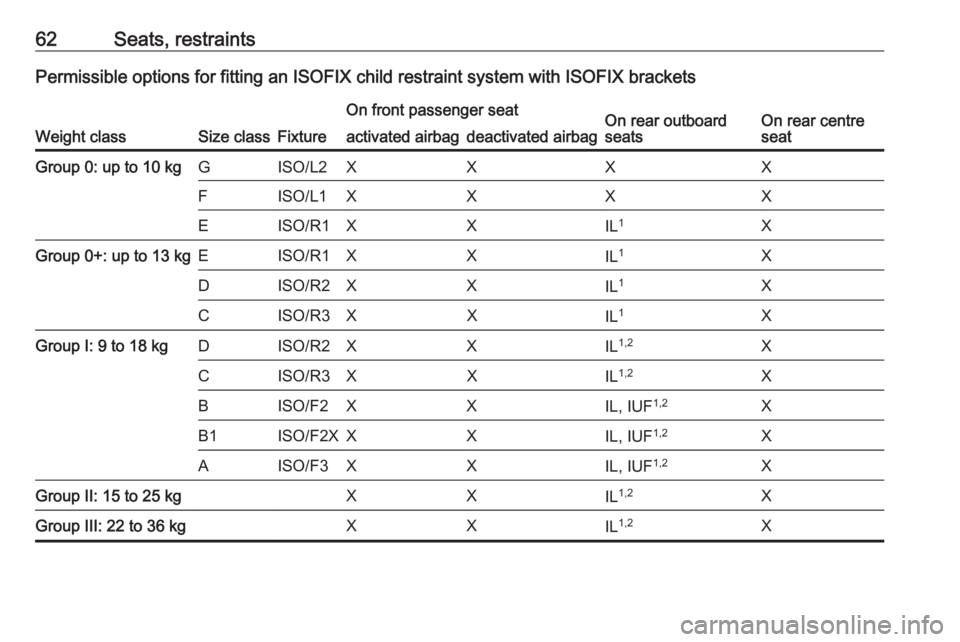
62Seats, restraintsPermissible options for fitting an ISOFIX child restraint system with ISOFIX brackets
Weight classSize classFixture
On front passenger seatOn rear outboard
seatsOn rear centre
seatactivated airbagdeactivated airbagGroup 0: up to 10 kgGISO/L2XXXXFISO/L1XXXXEISO/R1XXIL 1XGroup 0+: up to 13 kgEISO/R1XXIL 1XDISO/R2XXIL1XCISO/R3XXIL1XGroup I: 9 to 18 kgDISO/R2XXIL 1,2XCISO/R3XXIL1,2XBISO/F2XXIL, IUF 1,2XB1ISO/F2XXXIL, IUF 1,2XAISO/F3XXIL, IUF1,2XGroup II: 15 to 25 kgXXIL1,2XGroup III: 22 to 36 kgXXIL1,2X
Page 66 of 257
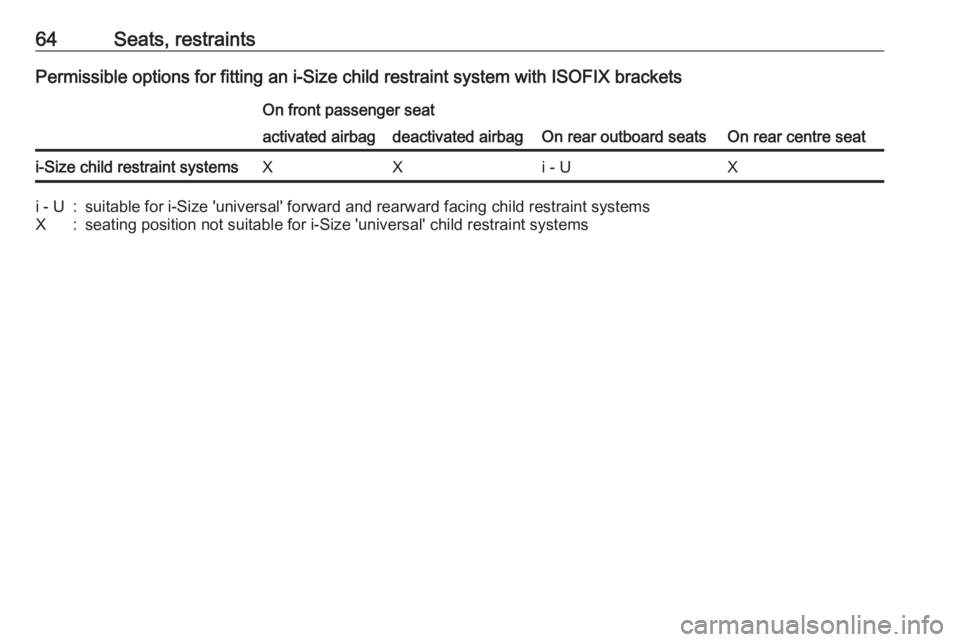
64Seats, restraintsPermissible options for fitting an i-Size child restraint system with ISOFIX bracketsOn front passenger seat
On rear outboard seatsOn rear centre seat
activated airbagdeactivated airbagi-Size child restraint systemsXXi - UXi - U:suitable for i-Size 'universal' forward and rearward facing child restraint systemsX:seating position not suitable for i-Size 'universal' child restraint systems
Page 76 of 257
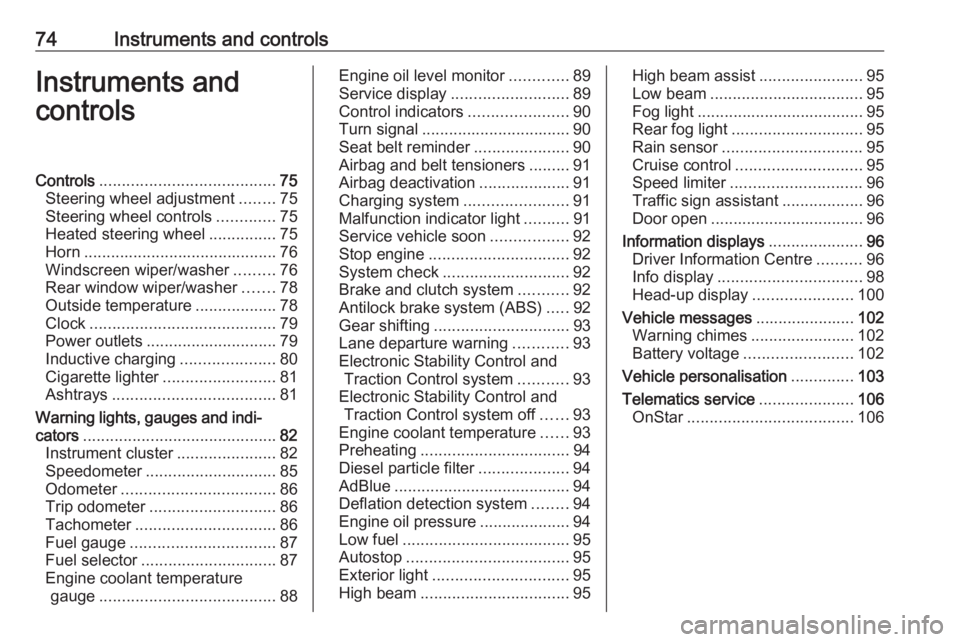
74Instruments and controlsInstruments and
controlsControls ....................................... 75
Steering wheel adjustment ........75
Steering wheel controls .............75
Heated steering wheel ...............75
Horn ........................................... 76
Windscreen wiper/washer .........76
Rear window wiper/washer .......78
Outside temperature ..................78
Clock ......................................... 79
Power outlets ............................. 79
Inductive charging .....................80
Cigarette lighter ......................... 81
Ashtrays .................................... 81
Warning lights, gauges and indi‐ cators ........................................... 82
Instrument cluster ......................82
Speedometer ............................. 85
Odometer .................................. 86
Trip odometer ............................ 86
Tachometer ............................... 86
Fuel gauge ................................ 87
Fuel selector .............................. 87
Engine coolant temperature gauge ....................................... 88Engine oil level monitor.............89
Service display .......................... 89
Control indicators ......................90
Turn signal ................................. 90
Seat belt reminder .....................90
Airbag and belt tensioners .........91
Airbag deactivation ....................91
Charging system .......................91
Malfunction indicator light ..........91
Service vehicle soon .................92
Stop engine ............................... 92
System check ............................ 92
Brake and clutch system ...........92
Antilock brake system (ABS) .....92
Gear shifting .............................. 93
Lane departure warning ............93
Electronic Stability Control and Traction Control system ...........93
Electronic Stability Control and Traction Control system off ......93
Engine coolant temperature ......93
Preheating ................................. 94
Diesel particle filter ....................94
AdBlue ....................................... 94
Deflation detection system ........94
Engine oil pressure ....................94
Low fuel ..................................... 95
Autostop .................................... 95
Exterior light .............................. 95
High beam ................................. 95High beam assist.......................95
Low beam .................................. 95
Fog light ..................................... 95
Rear fog light ............................. 95
Rain sensor ............................... 95
Cruise control ............................ 95
Speed limiter ............................. 96
Traffic sign assistant ..................96
Door open .................................. 96
Information displays .....................96
Driver Information Centre ..........96
Info display ................................ 98
Head-up display ......................100
Vehicle messages ......................102
Warning chimes .......................102
Battery voltage ........................ 102
Vehicle personalisation ..............103
Telematics service .....................106
OnStar ..................................... 106
Page 87 of 257
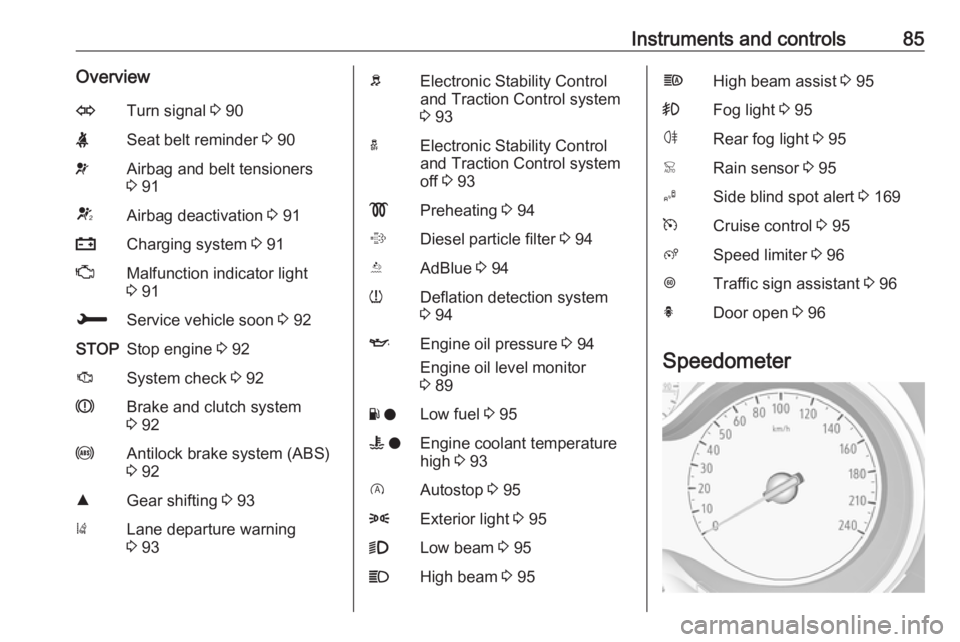
Instruments and controls85OverviewOTurn signal 3 90XSeat belt reminder 3 90vAirbag and belt tensioners
3 91VAirbag deactivation 3 91pCharging system 3 91ZMalfunction indicator light
3 91HService vehicle soon 3 92STOPStop engine 3 92JSystem check 3 92RBrake and clutch system
3 92uAntilock brake system (ABS)
3 92RGear shifting 3 93)Lane departure warning
3 93bElectronic Stability Control
and Traction Control system
3 93aElectronic Stability Control
and Traction Control system
off 3 93!Preheating 3 94%Diesel particle filter 3 94YAdBlue 3 94wDeflation detection system
3 94IEngine oil pressure 3 94
Engine oil level monitor
3 89Y oLow fuel 3 95W oEngine coolant temperature
high 3 93DAutostop 3 958Exterior light 3 959Low beam 3 95CHigh beam 3 95fHigh beam assist 3 95>Fog light 3 95øRear fog light 3 95
Page 93 of 257

Instruments and controls91on, if the seat belt of any
occupied seat has not been
fastened.
● After running up, X in the
instrument cluster and the
symbol for the respective seat in
the roof console flashes for a
certain time together with a
chime. After a certain time of
driving X illuminates constantly
until the seat belt of the
respective seat has been
fastened or if any passenger has
unfastened the seat belt.
Airbag and belt tensioners v illuminates red.
When the ignition is switched on, the control indicator illuminates for
approx. four seconds. If it does not
illuminate, does not go out after
four seconds or illuminates whilst
driving, there is a fault in the airbag
system. Seek the assistance of a
workshop. The airbags and belt
pretensioners may fail to trigger in the
event of an accident.Deployment of the belt pretensioners
or airbags is indicated by continuous
illumination of v.9 Warning
Have the cause of the fault
remedied immediately by a
workshop.
Belt pretensioners, airbag system
3 49, 3 52.
Airbag deactivation
Ó ON illuminates yellow.
The front passenger airbag is
activated.
* OFF illuminates yellow.
The front passenger airbag is
deactivated.
Airbag deactivation 3 57.
Charging system
p illuminates red.
Illuminates when the ignition is
switched on and extinguishes shortly
after the engine starts.
Illuminates when the engine is
running
Stop, switch off engine. Vehicle
battery is not charging. Engine
cooling may be interrupted. The
brake servo unit may cease to be
effective. Seek the assistance of a
workshop.
Malfunction indicator light
Z illuminates or flashes yellow.
Page 110 of 257

108Instruments and controlsbreakdown, a flat tyre and empty fuel
tank, press Z to establish a
connection to an advisor.
Emergency services
In the case of an emergency situation,
press [ and talk to an advisor. The
advisor then contacts emergency or
assistance service providers and
directs them to your vehicle.
In the case of an accident with
activation of airbags or belt
tensioners, an automatic emergency
call is established. The advisor is
immediately connected to your
vehicle to see whether help is
needed.
Note
Establishing an emergency call may
not be possible in areas without
sufficient network availability or due
to hardware damage during an
accident.
Wi-Fi hotspot
The Wi-Fi hotspot of the vehicle
provides internet connectivity with a
maximum speed of 4G/LTE.Note
The Wi-Fi hotspot functionality is not available for all markets.
Up to seven devices may be
connected.
To connect a mobile device with the
Wi-Fi hotspot:
1. Press j and then select Wi-Fi
settings on the Info-Display. The
settings displayed include the Wi-
Fi hotspot name (SSID),
password and connection type.
2. Start a Wi-Fi network search on your mobile device.
3. Select your vehicle hotspot (SSID) when listed.
4. When prompted, enter the password on your mobile device.
Note
To change the SSID or password,
press Z and talk to an advisor or log
in to your account.
To switch off the Wi-Fi hotspot
functionality, press Z to call an
advisor.Smartphone app
With the myOpel smartphone app, some vehicle functions can be
operated remotely.
The following functions are available: ● Lock or unlock vehicle.
● Honk horn or flash lights.
● Check fuel level.
● Locate vehicle on a map.
● Manage Wi-Fi settings.
To operate these functions, download the app from App Store ®
or
Google Play™ Store.
Remote control
If desired, use any phone to call an
advisor, who can remotely operate
specific vehicle functions. Find the
respective OnStar phone number on
our country-specific website.
The following functions are available: ● Lock or unlock vehicle.
● Provide information on the vehicle location.
● Honk horn or flash lights.
Page 111 of 257

Instruments and controls109Stolen vehicle assistance
If the vehicle is stolen, report the theft
to the authorities and request OnStar
stolen vehicle assistance. Use any
phone to call an advisor. Find the
respective OnStar phone number on
our country-specific website.
OnStar can provide support in
locating and recovering the vehicle.Theft alert
When the anti-theft alarm system is
triggered, a notification is sent to
OnStar. You are then informed about
this event by text message or email.Restart prevention
By sending remote signals, OnStar can prevent the vehicle from
restarting once it has been turned off.
On-demand diagnostics
At any time e.g. if the vehicle displays a vehicle message, press Z to
contact an advisor and ask to
complete a real-time diagnostic check
to directly determine the issue.
Depending on the results, the advisor
will provide further support.
Diagnostic report
The vehicle automatically transmits
diagnostic data to OnStar which
sends a monthly email report to you
and your preferred workshop.
Note
The workshop notification function
can be disabled in your account.
The report contains the status of key
operating systems of the vehicle like
engine, transmission, airbags, ABS,
and other major systems. It also
provides information on possible
maintenance items and tyre pressure
(only with tyre pressure monitoring
system).
To look at the information in greater
detail, select the link within the email and log in to your account.
OnStar settings
OnStar PIN
To have full access to all OnStar
services, a four-digit PIN is required.
The PIN has to be personalised when
first talking to an advisor.
To change the PIN, press Z to call an
advisor.Account data
An OnStar subscriber has an account
where all the data is stored. To
request a change of the account
information, press Z and talk to an
advisor or log in to your account.
If the OnStar service is used on
another vehicle, press Z and request
that the account be transferred to the
new vehicle.
Note
In any case, if the vehicle is disposed
of, sold or otherwise transferred,
immediately inform OnStar about
the changes and terminate the
OnStar service on this vehicle.
Vehicle location
The vehicle location is transmitted to OnStar when service is requested or triggered. A message on the Info-
Display informs about this
transmission.
To activate or deactivate the
transmission of the vehicle location,
press and hold j until an audio
message is heard.
Page 119 of 257

Lighting117Interior lighting
Instrument panel
illumination control
Brightness of the following lights can
be adjusted in position AUTO when
the light sensor detects night
conditions, or in position 8 or 9:
● instrument panel illumination
● Info-Display
● illuminated switches and operation elements
Turn thumb wheel A and hold until
the desired brightness is obtained.
Interior lights
During entry and exit of the vehicle,
the front and rear courtesy lights
automatically switch on and then off
after a delay.
Note
In the event of an accident with
airbag deployment the courtesy
lights are turned on automatically.
Front courtesy light
Operate rocker switch:
w:automatic switching on
and offpress u:onpress v:offRear courtesy lights
Illuminate in conjunction with the front courtesy light depending on rocker
switch position.
Reading lights
Operated by pressing s and t in the
courtesy lights.