brake light OPEL CROSSLAND X 2018 Manual user
[x] Cancel search | Manufacturer: OPEL, Model Year: 2018, Model line: CROSSLAND X, Model: OPEL CROSSLAND X 2018Pages: 257, PDF Size: 7.81 MB
Page 152 of 257

150Driving and operatingManual parking brake9Warning
Always apply parking brake firmly
without operating the release
button, and apply as firmly as
possible on a downhill or uphill
slope.
To release the parking brake, pull
the lever up slightly, press the
release button and fully lower the
lever.
To reduce the operating forces of
the parking brake, depress the
foot brake at the same time.
Control indicator R 3 92.
Brake assist
If brake pedal is depressed quickly
and forcefully, maximum brake force
is automatically applied.
Operation of brake assist might
become apparent by a pulse in the
brake pedal and a greater resistance when depressing the brake pedal.
Maintain steady pressure on the
brake pedal as long as full braking is
required. Maximum brake force is
automatically reduced when brake
pedal is released.
Hill start assist The system helps prevent unintendedmovement when driving away on
inclines.
When releasing the brake pedal after
stopping on an incline, brakes remain on for further two seconds. The
brakes release automatically as soon
as the vehicle begins to accelerate.Ride control systems
Electronic Stability Control and Traction Control system
Electronic Stability Control improves
driving stability when necessary,
regardless of the type of road surface
or tyre grip.
As soon as the vehicle starts to
swerve (understeer/oversteer),
engine output is reduced and the
wheels are braked individually.
Electronic Stability Control operates
in combination with the Traction
Control system. It prevents the driven wheels from spinning.
The Traction Control system is a
component of the Electronic Stability
Control.
Traction Control improves driving
stability when necessary, regardless
of the type of road surface or tyre grip,
by preventing the driven wheels from
spinning.
As soon as the driven wheels starts to spin, engine output is reduced and
the wheel spinning the most is braked
Page 158 of 257
156Driving and operatingSpeed limiter is deactivated, but not
switched off. Last stored speed
remains in memory for later speed
resume.
Resume limit speed Press Ñ. The stored speed limit will
be obtained.
Switching off
Press ß, the speed limiter mode is
deselected and the speed limit
indication extinguishes in the Driver
Information Centre.
Pressing m to activate cruise control
deactivates speed limiter.
The preset speed remains in the
memory when the ignition is switched
off.
Fault
In the event of a speed limiter fault,
the speed is cleared resulting in
flashing of the dashes.
The speed limiter may not operate
correctly if traffic signs do not comply with the Vienna Convention on RoadSigns and Signals (Wiener
Übereinkommen über
Straßenverkehrszeichen).
Forward collision alert The forward collision alert may help to
avoid or reduce the harm caused by
front-end crashes.
The forward collision alert uses the
front camera in the windscreen to
detect a vehicle directly ahead, in
your path.
The system triggers different level of
alerts depending on the risk of
collision detected. The alerts are
displayed in the Driver Information
Centre.
Level 1: A visual alert is displayed.
Level 2: A visual alert is displayed and an audible alert sounds.Caution
The colour lighting of this control
indicator does not correspond to
local traffic laws on following
distance. The driver bears full
responsibility for maintaining safe
following distance according to
applicable traffic rules, weather
and road conditions etc. at all
times.9 Warning
Forward collision alert is just a
warning system and does not
apply the brakes. When
approaching a vehicle ahead too
rapidly, it may not provide you
enough time to avoid a collision.
The driver accepts full
responsibility for the appropriate
following distance based on traffic, weather and visibility conditions.
The complete attention of the
driver is always required while
driving. The driver must always be
ready to take action and apply the
brakes.
Page 160 of 257
158Driving and operatingOperation conditions
Active emergency braking is
equipped with a front camera and
operates in forward gear above
walking speed up to 85 km/h.
Activation
Active emergency braking can be
activated in the vehicle
personalisation menu 3 103.
Functionality
The system includes: ● brake preparation system
● emergency automatic braking ● forward looking brake assist
● forward collision alert
● front pedestrian protection
Brake preparation system
When approaching a vehicle ahead
or a pedestrian so quickly that a
collision is likely, the brake
preparation system slightly
pressurizes the brakes. This reduces
the response time, when a manual or automatic braking is requested.The brake system is prepared so that
braking can occur more rapidly.
Emergency automatic braking After activation of brake preparation
system and just before the imminent
collision, this function automatically
applies limited braking to reduce the
impact speed of the collision or
prohibit a crash. Depending on the
situation, the vehicle may
automatically brake moderately or
hard. This front automatic braking can
only occur if a vehicle 3 156 or a
pedestrian 3 159 ahead is detected .
Emergency automatic braking may slow the vehicle to a complete stop to
try to avoid a potential crash.9 Warning
Emergency automatic braking is
an emergency crash preparation
feature and is not designed to
avoid crashes. Do not rely on the
system to brake the vehicle.
Emergency automatic braking will
not brake outside of its operating
speed range and only responds to
detected vehicles and
pedestrians.
Forward looking brake assist
In addition to the brake preparation
system and emergency automatic
braking, the forward looking brake
assist function makes the brake assist more sensitive. Therefore, pressing
the brake pedal less strongly results
in immediate hard braking. This
function helps the driver brake
quicker and harder before the
imminent collision.
9 Warning
Active emergency braking is not
designed to apply hard
autonomous braking or to
automatically avoid a collision. It is designed to reduce the vehicle
speed before a collision. It may not
react to animals. After a sudden
Page 162 of 257

160Driving and operatingFront pedestrian protection uses the
front camera in the windscreen to
detect a pedestrian directly ahead, in
your path.
The system triggers different level of
alerts depending on the risk of
collision detected. The alerts are
displayed in the Driver Information
Centre.
Level 1: A visual alert is displayed.
Level 2: A visual alert is displayed and
an audible alert sounds.9 Danger
Front pedestrian braking does not
provide an alert or automatically
brake the vehicle, unless it detects
a pedestrian.
The system may not detect
pedestrians, including children,
when the pedestrian is not directly ahead, not fully visible, not
standing upright, or when part of a
group.
Caution
The colour lighting of this control
indicator does not correspond to
local traffic laws on following
distance. The driver bears full
responsibility for maintaining safe
following distance according to
applicable traffic rules, weather
and road conditions etc. at all
times.
When the time to a potential collision
with a pedestrian in front gets too small and a collision is imminent, a
warning is displayed in the Driver
Information Centre.
Simultaneously a warning chime
sounds. Depress the brake pedal and
steer the vehicle, if it is required by the
situation.
Operation conditions
The following condition must be
fullfilled for proper operation:
The speed must be between 5km/h
and 60 km/h.
Activation
To use the system, active safety braking has to be activated in the
vehicle personalisation 3 103.
Selecting the alert sensitivity
The alert sensitivity has to be set to
close, normal or distant in the vehicle personalisation menu 3 103.
Deactivation The system can only be deactivated
by deactivating the active emergency braking in the vehicle personalisation,3 103.
System limitations Front pedestrian protection is
designed to warn on pedestrians
only, but may react also to other
objects.
In the following cases, the system
may not detect a pedestrian ahead or
sensor performance is limited:
● Driving on winding or hilly roads.
● During nighttime driving.
Page 176 of 257

174Driving and operatingThe area displayed by the camera is
limited. The distance of the image that
appears on the display differs from
the actual distance.
Guide lines
The vertical lines represent the
general direction of the vehicle and
the distance between the vertical
lines corresponds to the width of your vehicle without mirrors. The first
horizontal line represents a distance
of about 30 cm beyond the edge of
vehicle's rear bumper. The upper
horizontal lines represent distances
of about 1 and 2 metres beyond the
edge of your vehicle's rear bumper.
The crossing curves represent the
maximum turning circle.
Deactivation of guide lines
Guide lines can be deactivated in the Info-Display. Select Settings, I
Vehicle , I Collision detection , I Rear
view camera guide lines , I § .
Info-Display 3 98.
Vehicle personalisation 3 103.
Switching off
The camera is switched off when a
certain forward speed is exceeded or
if reverse gear is disengaged for
approx. 10 seconds.
System limitationsThe rear view camera may not
operate properly when:
● The surrounding is dark.
● The beam of headlights is shining
directly into the camera lenses.
● During nighttime driving.
● Weather limits visibility, such as fog, rain, or snow.● The camera lenses are blockedby snow, ice, slush, mud, dirt.Clean the lense, rinse with water,
and wipe with a soft cloth.
● The tailgate will be opened.
● The vehicle is towing an electrically connected trailer.
● The vehicle had a rear end accident.
● There are extreme temperature changes.
Lane departure warning
The lane departure warning system
observes the lane markings between
which the vehicle is driving via a front camera. The system detects lane
changes and warns the driver in the
event of an unintended lane change
via visual and acoustic signals.
Criteria for the detection of an
unintended lane change are:
● No operation of turn signals.
● No brake pedal operation.
● No active accelerator operation or speeding-up.
Page 183 of 257

Driving and operating181Trailer hitch
General information
The factory-fitted towing equipment is
folded up under the rear bumper
fascia.
Entrust retrofitting of towing
equipment to a workshop. It may be
necessary to make changes that
affect the cooling system, heat
shields or other equipment. Only use
towing equipment that has been
approved for your vehicle.
To avoid vehicle damage, the power
tailgate cannot be operated with the
radio remote control when a trailer is
electrically connected.
The bulb outage detection function for trailer brake light cannot detect a
partial bulb outage, e.g. in case of four
times five watt bulbs, the function only detects lamp outage when only a
single five Watt lamp remains or none remain.
Fitting of towing equipment could
cover the opening of the towing eye.
If this is the case use the coupling ball
bar for towing.Driving characteristics and
towing tips
Before attaching a trailer, lubricate the coupling ball. However, do not do so if a stabiliser, which acts on thecoupling ball, is being used to reduce
snaking movements.
During trailer towing do not exceed a
speed of 80 km/h. A maximum speed
of 100 km/h is only appropriate if an
oscillation damper is used and the
permissible gross trailer weight does
not exceed the vehicle’s curb weight.
For trailers with low driving stability
and caravan trailers, the use of an
oscillation damper is strongly
recommended.
If the trailer starts snaking, drive more slowly, do not attempt to correct the
steering and brake sharply if
necessary.
When driving downhill, drive in the
same gear as if driving uphill and
drive at a similar speed.
Adjust tyre pressure to the value
specified for full load 3 239.Trailer towing
Trailer loads The permissible trailer loads are
vehicle and engine-dependent
maximum values which must not be
exceeded. The actual trailer load is the difference between the actual
gross weight of the trailer and the
actual coupling socket load with the
trailer coupled.
The permissible trailer loads are
specified in the vehicle documents. In general, they are valid for gradients
up to 12%.
The permissible trailer load applies
up to the specified incline and at sea
level. Since engine power decreases
as altitude increases due to the air
becoming thinner, therefore reducing
climbing ability, the permissible gross
train weight also decreases by 10%
for every 1000 metres of altitude. The gross train weight does not have to be reduced when driving on roads with
slight inclines (less than 8%, e.g.
motorways).
Page 187 of 257
Vehicle care185Vehicle careGeneral Information...................185
Accessories and vehicle modifications .......................... 185
Vehicle storage ........................186
End-of-life vehicle recovery .....186
Vehicle checks ........................... 187
Performing work ......................187
Bonnet ..................................... 187
Engine oil ................................. 188
Engine coolant ......................... 189
Washer fluid ............................ 189
Brakes ..................................... 190
Brake fluid ............................... 190
Vehicle battery ......................... 190
Diesel fuel system bleeding .....191
Wiper blade replacement ........192
Bulb replacement .......................192
Halogen headlights ..................192
LED headlights ........................ 195
Fog lights ................................. 195
Tail lights ................................. 195
Side turn signal lights ..............199
Number plate light ...................200
Interior lights ............................ 200
Instrument panel illumination ...200Electrical system ........................200
Fuses ....................................... 200
Engine compartment fuse box . 201
Instrument panel fuse box .......202
Vehicle tools .............................. 205
Tools ........................................ 205
Wheels and tyres .......................206
Winter tyres ............................. 206
Tyre designations ....................206
Tyre pressure .......................... 206
Tyre deflation detection system .................................... 207
Tread depth ............................. 208
Changing tyre and wheel size . 209
Wheel covers ........................... 209
Tyre chains .............................. 210
Tyre repair kit .......................... 210
Wheel changing .......................213
Spare wheel ............................ 216
Jump starting ............................. 217
Towing ....................................... 219
Towing the vehicle ...................219
Towing another vehicle ...........220
Appearance care .......................221
Exterior care ............................ 221
Interior care ............................. 223General Information
Accessories and vehiclemodifications
We recommend the use of genuine
parts and accessories and factory approved parts specific for your
vehicle type. We cannot assess or guarantee reliability of other products
- even if they have a regulatory or
otherwise granted approval.
Any modification, conversion or other changes made to standard vehicle
specifications (including, without
limitation, software modifications,
modifications of the electronic control
units) may invalidate the warranty
offered by Opel. Furthermore, such
changes may affect driver assistance
systems, may impact fuel
consumption, CO 2 emissions and
other emissions of the vehicle and
cause the vehicle to no longer
conform to the operating permit,
impacting the validity of your vehicle
registration.
Page 197 of 257
Vehicle care1954. Replace the bulb and push it intothe reflector housing by setting
the lug into position.
5. Fold up the retainer and hold in position.
6. Attach the plug connector to the bulb and fix it with the retainer.
7. Fit the cap and rotate clockwise.
Sidelight/Daytime running light In case of defective LEDs, have them
replaced by a workshop.
LED headlights
Headlights for low and high beam,
sidelights, daytime running lights and turn signal lights are designed as
LEDs and can not be changed.
Have lights repaired by a workshop in
case of failure.
Fog lights
The bulbs are accessible from the
underside of the vehicle.
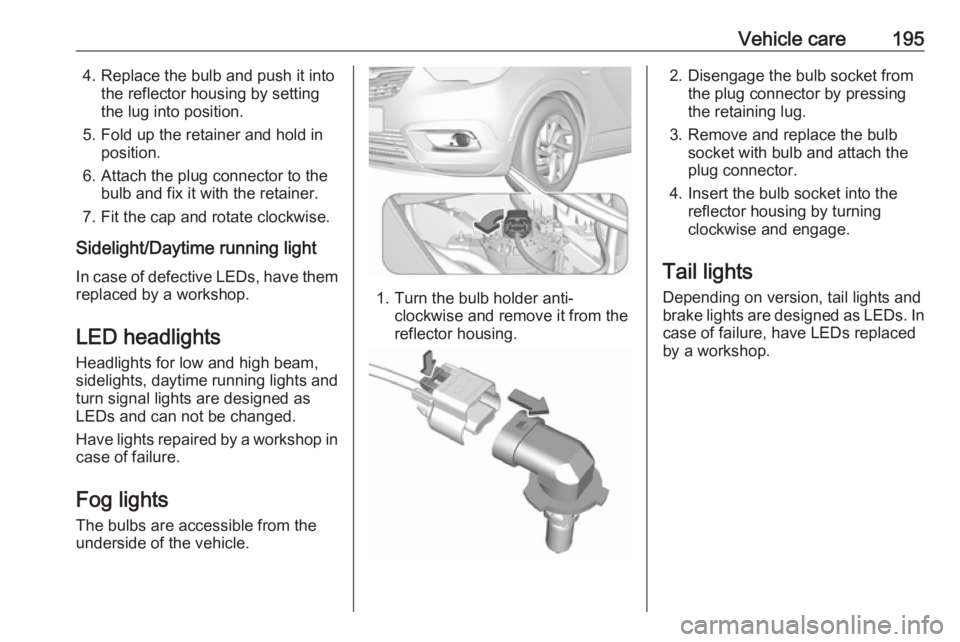
1. Turn the bulb holder anti- clockwise and remove it from the
reflector housing.
2. Disengage the bulb socket from the plug connector by pressing
the retaining lug.
3. Remove and replace the bulb socket with bulb and attach the
plug connector.
4. Insert the bulb socket into the reflector housing by turning
clockwise and engage.
Tail lights
Depending on version, tail lights and
brake lights are designed as LEDs. In case of failure, have LEDs replaced
by a workshop.
Page 198 of 257

196Vehicle careLight assembly in the body
Detaching the light assembly
1. Unscrew the two screws that secure the light assembly.
2. Remove the light assembly bypulling it straight back.
3. Remove the three screws thatsecure the bulb carrier.
4. Version without LED
Remove the bulb by pulling and
replace.
Tail light/Brake light 1
Turn-signal light 2
Version with LED
Only turn signal light bulb can be
replaced.
Remove the bulb socket from the light assembly by turning it
anticlockwise.
Page 220 of 257
218Vehicle care● A discharged vehicle battery canalready freeze at a temperature
of 0 °C. Defrost the frozen battery before connecting jump leads.
● Wear eye protection and protective clothing when
handling a battery.
● Use a booster battery with the same voltage (12 Volts). Its
capacity (Ah) must not be much less than that of the discharged
vehicle battery.
● Use jump leads with insulated terminals and a cross section of
at least 16 mm 2
(25 mm 2
for
diesel engines).
● Do not disconnect the discharged
vehicle battery from the vehicle.
● Switch off all unnecessary electrical consumers.
● Do not lean over the vehicle battery during jump starting.
● Do not allow the terminals of one
lead to touch those of the other
lead.● The vehicles must not come into contact with each other during
the jump starting process.
● Apply the parking brake, transmission in neutral,
automatic transmission in P.
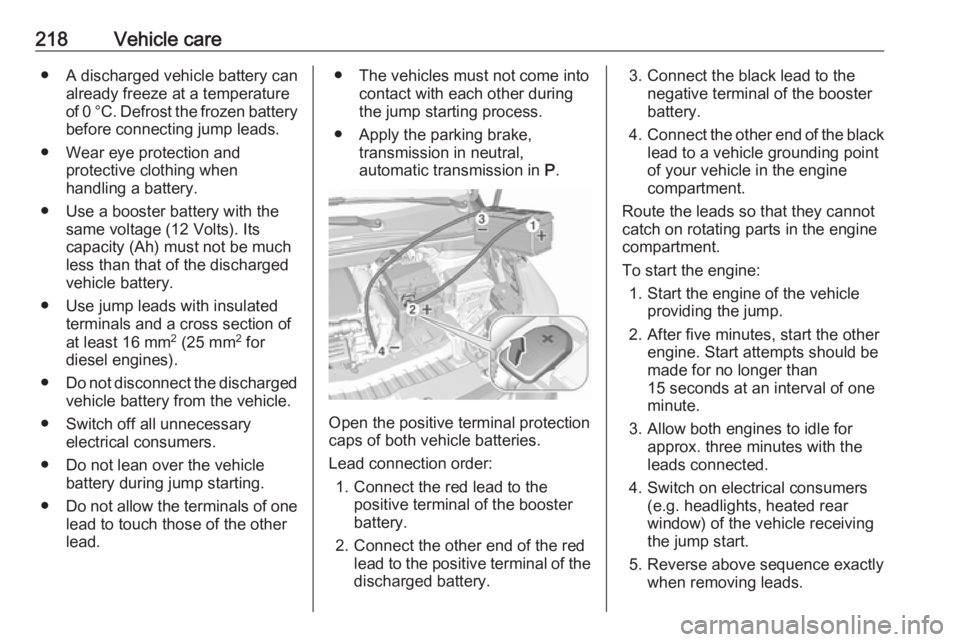
Open the positive terminal protection
caps of both vehicle batteries.
Lead connection order: 1. Connect the red lead to the positive terminal of the booster
battery.
2. Connect the other end of the red lead to the positive terminal of the
discharged battery.
3. Connect the black lead to the negative terminal of the boosterbattery.
4. Connect the other end of the black
lead to a vehicle grounding point
of your vehicle in the engine
compartment.
Route the leads so that they cannot
catch on rotating parts in the engine
compartment.
To start the engine: 1. Start the engine of the vehicle providing the jump.
2. After five minutes, start the other engine. Start attempts should be
made for no longer than
15 seconds at an interval of one
minute.
3. Allow both engines to idle for approx. three minutes with the
leads connected.
4. Switch on electrical consumers (e.g. headlights, heated rear
window) of the vehicle receiving
the jump start.
5. Reverse above sequence exactly when removing leads.